From notebook to production: deploy your RAG chatbot on a free tier
Take a RAG chatbot from a Python file to a public HTTPS URL: a FastAPI service, a Docker container, a Render Blueprint deploy, health checks, secrets, and free-tier survival — every endpoint exercised, every test run, every output real.

Your RAG pipeline works in a notebook. Nobody can use it. That gap — between "it runs on my laptop" and "anyone on the internet can ask it questions" — is where most AI side projects quietly die. Not because deployment is hard, but because nobody shows the whole path in one place: the service code, the container, the host, the secrets, and the unglamorous details that keep a free-tier service alive.
This tutorial closes that gap end to end. You will take a small RAG chatbot from a Python file to a public HTTPS URL with health checks, request logging, secret management, and tests — using a Dockerfile and Render's free tier. Total cost: $0. The service, its tests, and every API response shown were executed and verified while writing this.
What you'll need#
- Python 3.12 and Docker installed locally. Docker Desktop on Mac/Windows, or the engine on Linux.
- A GitHub account and a Render account — the free tier needs no credit card.
- About 30 minutes. A terminal you are comfortable in.
- (Optional) An OpenAI API key, only if you want the LLM answer path in Step 7. Everything else runs with zero keys.
Version pins used here, all verified current: fastapi==0.141.1, uvicorn[standard]==0.53.0, scikit-learn==1.9.1. Pin them in your own requirements.txt — unpinned deploys are how "it worked yesterday" happens.
Step 1: Build a service, not a script#
Notebooks don't serve traffic. The first decision is structural: wrap your RAG logic in a real HTTP service with exactly two endpoints — /health for liveness and /chat for answers. FastAPI earns its place here: request validation is free via Pydantic, /docs gives you an interactive API explorer with zero extra code, and lifespan hooks let you build expensive state once at startup.
The project layout is deliberately boring:
rag-chatbot/
├── app/
│   ├── __init__.py
│   ├── main.py        # FastAPI app: /health and /chat
│   └── rag.py         # retrieval layer
├── data/
│   └── docs.json      # the knowledge base (8 short docs)
├── tests/
│   └── test_api.py
├── requirements.txt
├── Dockerfile
├── .dockerignore
└── render.yaml
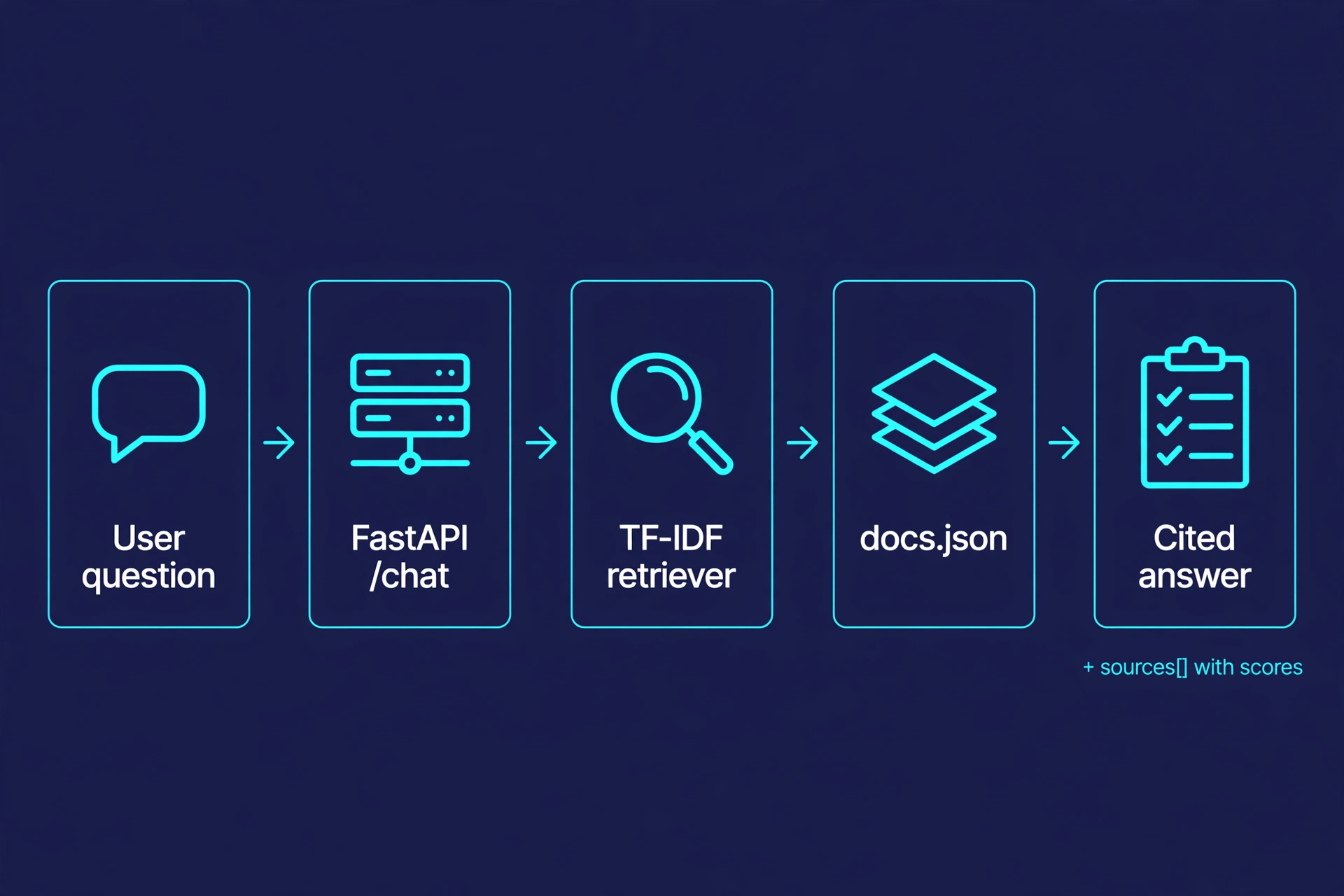
The retrieval layer is TF-IDF over a bundled JSON file — no API keys, ~50 MB of dependencies, and an index that builds in milliseconds. That is a deliberate production choice, not a toy shortcut: on a 512 MB free tier, a 300 MB embedding model is a liability. Retrieval quality upgrades later without touching the service code, because main.py only ever calls retriever.search():
"""Retrieval layer: TF-IDF over the bundled docs."""
from __future__ import annotations

import json
from pathlib import Path

from sklearn.feature_extraction.text import TfidfVectorizer
from sklearn.metrics.pairwise import cosine_similarity

_DOCS_PATH = Path(__file__).resolve().parent.parent / "data" / "docs.json"


class Retriever:
    def __init__(self, docs_path: Path = _DOCS_PATH) -> None:
        with open(docs_path, encoding="utf-8") as f:
            self.docs = json.load(f)
        self._vectorizer = TfidfVectorizer(stop_words="english")
        self._matrix = self._vectorizer.fit_transform(d["text"] for d in self.docs)

    def search(self, query: str, top_k: int = 3) -> list[dict]:
        q = self._vectorizer.transform([query])
        scores = cosine_similarity(q, self._matrix)[0]
        ranked = sorted(range(len(self.docs)), key=lambda i: scores[i], reverse=True)
        return [
            {
                "id": self.docs[i]["id"],
                "title": self.docs[i]["title"],
                "text": self.docs[i]["text"],
                "score": round(float(scores[i]), 4),
            }
            for i in ranked[:top_k]
            if scores[i] > 0
        ]

    def __len__(self) -> int:
        return len(self.docs)
And the service itself. Four decisions are doing the heavy lifting here, so note them before you skim the code: the index is built once at startup in a lifespan handler (rebuilding per request would turn every cold start into a slow start); Pydantic rejects bad input with a 422 before your code ever sees it; a query with no matching documents returns 404 instead of a hallucinated answer; and the default answer is extractive — it quotes the top chunk and cites its source, which is deterministic, testable, and honest about provenance:
"""RAG chatbot API: retrieval + extractive answering, ready for production."""
from __future__ import annotations

import os
import time
from contextlib import asynccontextmanager

from fastapi import FastAPI, HTTPException
from fastapi.responses import JSONResponse
from pydantic import BaseModel, Field

from .rag import Retriever

retriever: Retriever | None = None
_started_at: float = time.time()


@asynccontextmanager
async def lifespan(app: FastAPI):
    # Build the index ONCE at startup, not per request. On Render's free
    # tier this keeps cold starts to ~1s instead of rebuilding on every
    # request after a spin-down.
    global retriever
    retriever = Retriever()
    yield
    retriever = None


app = FastAPI(title="RAG chatbot", version="1.0.0", lifespan=lifespan)


class ChatRequest(BaseModel):
    question: str = Field(min_length=3, max_length=500)


class Source(BaseModel):
    id: str
    title: str
    score: float


class ChatResponse(BaseModel):
    answer: str
    sources: list[Source]


@app.get("/health")
def health():
    return {
        "status": "ok",
        "docs_indexed": len(retriever) if retriever else 0,
        "uptime_seconds": round(time.time() - _started_at, 1),
    }


@app.post("/chat", response_model=ChatResponse)
def chat(req: ChatRequest):
    assert retriever is not None
    hits = retriever.search(req.question, top_k=3)
    if not hits:
        raise HTTPException(status_code=404, detail="No relevant documents found.")
    top = hits[0]
    answer = (
        f"Based on '{top['title']}': {top['text']}"
        if os.environ.get("OPENAI_API_KEY") is None
        else _generate(req.question, hits)
    )
    return ChatResponse(
        answer=answer,
        sources=[Source(id=h["id"], title=h["title"], score=h["score"]) for h in hits],
    )
Step 2: Prove it works locally#
Never deploy what you haven't run. Create the environment, install the pinned dependencies, and start the server exactly the way production will — no --reload, no debugger:
python3 -m venv .venv
.venv/bin/pip install -r requirements.txt
.venv/bin/uvicorn app.main:app --host 127.0.0.1 --port 8000
You should see the startup sequence complete and the server listening:
INFO:     Started server process [19558]
INFO:     Waiting for application startup.
INFO:     Application startup complete.
INFO:     Uvicorn running on http://127.0.0.1:8000 (Press CTRL+C to quit)
Now exercise both endpoints. The health check first — this is the same URL Render will poll after every deploy, so get used to it:
curl -s http://127.0.0.1:8000/health{"status":"ok","docs_indexed":8,"uptime_seconds":10.3}Then a real question. Watch the response shape: the answer quotes the source document, and sources carries the provenance with scores, so a frontend can render citations:
curl -s -X POST http://127.0.0.1:8000/chat \
  -H 'content-type: application/json' \
  -d '{"question":"How much does the Pro plan cost?"}'
{
"answer": "Based on 'Acme Cloud pricing': Acme Cloud has three plans. Hobby is free and includes
100 GB of bandwidth per month. Pro costs $20 per user per month and includes 1 TB of bandwidth,
custom domains, and priority support. Enterprise is custom pricing with SSO, audit logs, and a
dedicated success manager. All plans include unlimited projects. The cost of each plan is billed
monthly and prorated when you upgrade mid-cycle.",
"sources": [
{"id": "pricing-1", "title": "Acme Cloud pricing", "score": 0.1885},
{"id": "pricing-2", "title": "Bandwidth overages", "score": 0.1468},
{"id": "regions-1", "title": "Available regions", "score": 0.1254}
]
}Two edge cases worth confirming before you move on: a nonsense query returns a clean 404 ({"error":"No relevant documents found."}) instead of a fabricated answer, and a two-character question is rejected with a 422 by Pydantic validation. Encode both as tests so the behavior is locked in:
from contextlib import contextmanager
from fastapi.testclient import TestClient
from app.main import app

@contextmanager
def make_client():
    # `with` runs the lifespan handler, so the index builds at startup —
    # exactly like uvicorn does in production.
    with TestClient(app) as client:
        yield client

def test_health():
    with make_client() as client:
        r = client.get("/health")
    assert r.status_code == 200
    assert r.json()["docs_indexed"] == 8

def test_chat_returns_cited_answer():
    with make_client() as client:
        r = client.post("/chat", json={"question": "How much does the Pro plan cost?"})
    assert r.status_code == 200
    assert "$20" in r.json()["answer"]

def test_chat_no_match_is_404():
    with make_client() as client:
        r = client.post("/chat", json={"question": "xqz jumbled nonsense zzz"})
    assert r.status_code == 404
.venv/bin/python -m pytest tests/ -q4 passed, 1 warning in 6.10sOne gotcha that bites everyone once: TestClient(app) without the with block never runs your lifespan handler, so the retriever stays None and every test fails mysteriously. The context manager form is the fix — it mirrors what uvicorn does.
Step 3: Containerize it#
Render's free tier builds from your Dockerfile, so the container is the deploy artifact. Twelve instructions, each earning its place:
FROM python:3.12-slim

ENV PYTHONDONTWRITEBYTECODE=1 \
    PYTHONUNBUFFERED=1 \
    PIP_NO_CACHE_DIR=1

WORKDIR /srv

# Install deps first: this layer is cached until requirements.txt changes.
COPY requirements.txt .
RUN pip install --no-cache-dir -r requirements.txt

COPY app/ ./app/
COPY data/ ./data/

# Never run as root inside the container.
RUN useradd --create-home --shell /bin/bash appuser \
    && chown -R appuser:appuser /srv
USER appuser

# Render injects $PORT at runtime; default to 8000 for local `docker run`.
EXPOSE 8000
CMD ["sh", "-c", "uvicorn app.main:app --host 0.0.0.0 --port ${PORT:-8000} --workers 1"]

HEALTHCHECK --interval=30s --timeout=5s --start-period=10s --retries=3 \
    CMD python -c "import urllib.request,os; urllib.request.urlopen(f\"http://127.0.0.1:{os.environ.get('PORT','8000')}/health\")"
Three details matter more than they look. Dependencies install before code is copied, so rebuilding after a code change reuses the cached pip layer instead of reinstalling scikit-learn — against Render's monthly build-minute allowance, that caching is real money. ${PORT:-8000} reads the port Render injects at runtime and falls back to 8000 locally, so the same image runs in both places. And --workers 1 is deliberate: a second worker would double the memory footprint inside a 512 MB container for zero benefit at demo traffic levels.
Keep the build context lean with a .dockerignore — shipping your .venv or .git directory into the image bloats it by hundreds of megabytes:
.venv/
__pycache__/
*.pyc
.pytest_cache/
.git/
.gitignore
.env
README.md
tests/
Build and run it. The build takes a few minutes the first time (base image + scikit-learn); subsequent builds reuse the cached layers:
docker build -t rag-chatbot:local .
docker run -p 8000:8000 rag-chatbot:local
Hit the same endpoints against the container — you should get the same answers as Step 2 (only uptime_seconds will differ, naturally). If they match, your laptop and Render are running the same artifact, and "works on my machine" is no longer a variable in this tutorial.
Step 4: Ship it on Render's free tier#
Push the project to a GitHub repo, then let Render do the ops. The cleanest path is a Blueprint: a render.yaml file in the repo root that declares the entire service as code, so the deploy is reproducible and reviewable:
services:
  - type: web
    name: rag-chatbot
    runtime: docker
    dockerfilePath: ./Dockerfile
    dockerContext: .
    plan: free
    region: oregon
    branch: main
    autoDeployTrigger: commit
    healthCheckPath: /health
    envVars:
      - key: PYTHONUNBUFFERED
        value: "1"
The OPENAI_API_KEY is deliberately not here yet — declaring it with sync: false would make Render prompt for it on the very first deploy, before you need it. You will add it in Step 7, only if you enable the LLM path.
What each field buys you: runtime: docker builds from your Dockerfile instead of Render guessing a buildpack. plan: free is the $0 tier — 750 instance hours a month per workspace, 512 MB of RAM, and a monthly allowance of outbound bandwidth and build minutes. No credit card is required for the free tier. healthCheckPath: /health tells Render to poll your endpoint after each deploy and only route traffic once it passes — this is your zero-downtime deploy on the free tier. autoDeployTrigger: commit rebuilds on every push to main.
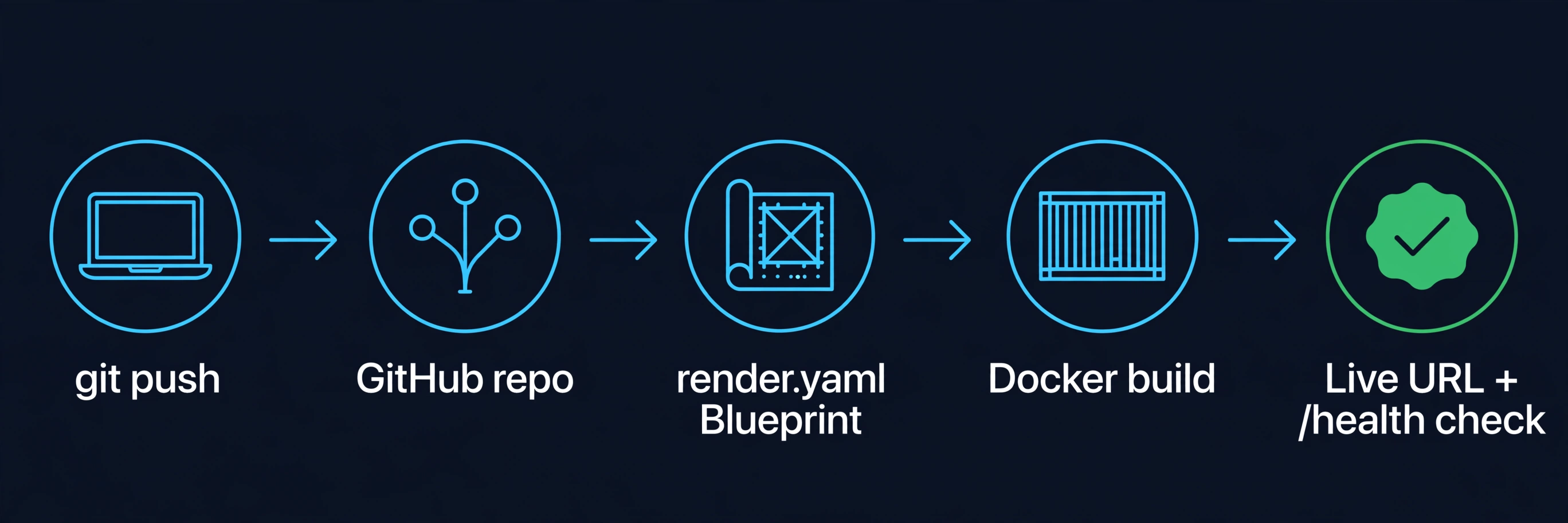
In the Render dashboard: New → Blueprint → connect your repo. Render reads render.yaml, shows you the service it will create, and you hit Apply. The first build takes a few minutes — watch the logs stream in; you will see pip install, then uvicorn starting, then the health check turning green. When it does, your chatbot is live at https://rag-chatbot.onrender.com with /health and /chat answering over HTTPS.
Step 5: Secrets stay secret#
The fastest way to ruin a launch is committing an API key. The discipline is simple and absolute:
- Read secrets from the environment, never from files. The service already does this —
os.environ.get("OPENAI_API_KEY")— so there is nothing to change in code. - Declare secret keys with
sync: falseinrender.yamlwhen you actually have a secret to set. Render prompts you for the value during the initial Blueprint creation, stores it encrypted, and redacts it from build logs. (Declaring it up front, as this tutorial deliberately does not, would force the prompt on day one.) - Keep a
.envout of git. Add.envto.gitignore(the.dockerignorealready excludes it from the image) and commit a.env.examplewith empty placeholders so the next person knows what to set. - Rotating a secret is a dashboard edit, not a code change — Render redeploys automatically when an env var changes.
Step 6: Survive the free tier#
A free-tier service has sharp edges. All of them are manageable once you design for them instead of discovering them at 2 a.m.:
- 512 MB of RAM is a budget, not a suggestion. The TF-IDF index here uses a fraction of it. If you upgrade retrieval to embeddings later, keep the model small (a MiniLM-class model, not a 7B embedder) or load it lazily — and keep
--workers 1. - Expect the 15-minute spin-down. Idle free services sleep; the next request takes ~60 seconds to wake them. Don't fight it with ping hacks — design for it. Because the index builds once at startup (Step 1), a cold start here is dominated by Python startup, not a full re-ingest.
- The disk is ephemeral. Anything written at runtime vanishes on the next deploy. That's why the docs ship inside the image via
COPY data/— if your knowledge base grows beyond what belongs in git, fetch it from object storage at startup instead. - Log like someone will read it. Uvicorn's access logs stream into Render's log viewer automatically. The
/healthpayload already reportsdocs_indexedanduptime_seconds— point any uptime monitor at it and you'll know about problems before your users tell you. - Know when you've outgrown free. The honest upgrade trigger isn't traffic, it's sleep: if the spin-down latency starts costing you users, Render's Starter tier is $7/month and never sleeps. Until then, free is genuinely enough.
Step 7: The LLM upgrade path (optional)#
Extractive answers are the right default — deterministic and free. When you're ready for generative answers, the swap is one function. Uncomment openai in requirements.txt, then add the key as an environment variable on the service in the Render dashboard (Step 5 — never into code; or declare it in render.yaml with sync: false and re-sync the Blueprint), and the service calls the LLM with the retrieved chunks as context:
def _generate(question: str, hits: list[dict]) -> str:
    """LLM upgrade path: needs OPENAI_API_KEY in the environment."""
    from openai import OpenAI  # optional dependency, only imported here

    context = "\n\n".join(f"[{h['title']}] {h['text']}" for h in hits)
    client = OpenAI()
    resp = client.chat.completions.create(
        model="gpt-4o-mini",
        messages=[
            {
                "role": "system",
                "content": "Answer only from the provided context. Cite the document title.",
            },
            {"role": "user", "content": f"Context:\n{context}\n\nQuestion: {question}"},
        ],
        max_tokens=300,
    )
    return resp.choices[0].message.content or ""
Note what didn't change: the retrieval contract, the response schema, the tests, the Dockerfile, the Blueprint. That's the payoff of the layering from Step 1 — the serving infrastructure is stable while the AI inside it evolves. Push to main and the auto-deploy ships it.
Which approach should you use?#
Render isn't the only free way to host a Python API. Pick by what you're optimizing for:
- Render free (this tutorial) — best when you want Docker-based deploys with zero config and don't mind the 15-minute spin-down. Ideal for demos, portfolios, and MVPs.
- Koyeb Starter — similar free envelope (one service, 512 MB), also scale-to-zero. Worth comparing if your users are in Europe (Frankfurt region).
- Hugging Face Spaces — best for interactive demos with a Gradio UI, weaker as a raw API host. Choose it when the audience clicks buttons rather than calling endpoints.
- A $5 VPS with Coolify or Dokku — best when you need always-on without per-service fees and you're comfortable owning the ops. More power, more responsibility.
- Render Starter ($7/month) — the moment the spin-down latency costs you real users. Same Blueprint, one field changed.
The rule of thumb: prototype on free, pay the $7 the week sleep starts hurting, and only reach for Kubernetes when you have a team to feed it.
The takeaway#
Deployment isn't a separate discipline bolted onto your AI project — it's a handful of habits applied early: a service with a health check, an index built once at startup, input validation at the boundary, secrets in the environment, and a container that runs identically everywhere. Do those five things and the distance from notebook to production URL is one Blueprint file and a git push. Your chatbot is live, it costs nothing, and every layer is ready for the day it outgrows the free tier.