Vector search on your Redis code: hands-on with KiviDB 1.2
Every small RAG project hits the same fork in the road: keep your cache in Redis and bolt on a second service for vector search, or move everything into a dedicated vector database and rewrite the caching layer. KiviDB 1.2.0, released November 3, 2026, refuses the fork. It is a Redis-protocol-compatible store, written in Rust, with full-text and HNSW vector search built into the same binary — no module to load, no second service to operate.
- What: KiviDB 1.2.0: a Redis-compatible in-memory store (RESP2/RESP3) with
FT.*full-text and vector search built in — no module, no second service. - Trending: 993 stars as of November 9, 2026; +254 stars November 4–9 (26 to 51 a day, whatstrending.ai); v1.2.0 released November 3, 2026.
- Verified: November 8–9, 2026 in a sandbox: binary download + SHA256, server start, core Redis operations, FT.CREATE / KNN / hybrid / VSIM, BGSAVE + restart reload. Versions: KiviDB 1.2.0, redis-py 8.1.0, scikit-learn 1.9.1, numpy 2.5.3, Python 3.12.3.
- Requirement: Linux x86_64 (macOS binaries too), Python 3.10+, about 30 minutes. No account, no API key, no GPU, no Docker.

Why KiviDB, why now#
Every small RAG project hits the same fork in the road: keep your cache in Redis and bolt on a second service for vector search, or move everything into a dedicated vector database and rewrite the caching layer. KiviDB 1.2.0, released November 3, 2026, refuses the fork. It is a Redis-protocol-compatible store, written in Rust, with full-text and HNSW vector search built into the same binary — no module to load, no second service to operate.
The numbers explain why it is on this desk. KiviDB was created on October 16, 2026. By November 9 it had 993 stars, and its pace nearly doubled in a week: from 26 stars a day to 51 a day, gaining 254 stars between November 4 and 9, enough to land in the top ten fastest-accelerating AI repositories that week. Version 1.2.0 is a durability and compatibility release — append-only-file writes are now acknowledged only once they reach disk, search scores match Redis 8.10, and every release file carries a signed build attestation.
This guide does the thing the README cannot: it installs KiviDB, proves the Redis compatibility with plain client code, and builds a working semantic search over real documents — then proves the index survives a restart. Every command below ran in a sandbox on November 8–9, 2026, and every output quoted is the output that came back.
What you'll need#
- A Linux x86_64 machine (macOS Apple silicon and Intel binaries exist too; there is no Windows binary — use WSL). The sandbox used here is a small VM with 7 GB of RAM.
- Python 3.10 or later with pip. The sandbox ran Python 3.12.3.
- About 30 minutes. The download is 6 MB; nothing here compiles, needs a GPU, or downloads model weights.
- No account, no API key, no Docker. KiviDB is a single static binary and the client is plain
redis-py.
Pinned versions, exactly as verified: KiviDB 1.2.0, redis 8.1.0, scikit-learn 1.9.1, numpy 2.5.3.
Step 1 — Install the release binary#
KiviDB ships prebuilt binaries on GitHub Releases. Download the Linux x86_64 tarball for 1.2.0, verify its checksum against the release's SHA256SUMS.txt, and extract it:
curl -LO https://github.com/kividbio/kividb/releases/download/v1.2.0/kividb-linux-x86_64.tar.gz
curl -LO https://github.com/kividbio/kividb/releases/download/v1.2.0/SHA256SUMS.txt
sha256sum -c <(grep 'kividb-linux-x86_64.tar.gz' SHA256SUMS.txt)
tar xzf kividb-linux-x86_64.tar.gz
Expected output:
kividb-linux-x86_64.tar.gz: OKThe tarball is 6,051,503 bytes and extracts to a kividb/ directory holding one 16 MB binary plus the license files. Four variants exist per platform — default, -lua (Lua scripting), -tls (TLS termination), and -full (both). The default is what this guide uses; the .deb and .rpm packages install it as a systemd service instead, if you prefer that.
Start it, pointing at a data directory of your choice:
KIVIDB_NO_UPDATE_CHECK=1 ./kividb/kividb --dir ./data --port 6380 --loglevel noticeExpected output (banner trimmed):
KiviDB v1.2.0 - A fast Redis®-compatible store written in Rust
  * Version        : 1.2.0
  * Mode           : standalone
  * OS             : linux x86_64
  * Listening on   : 0.0.0.0:6380
  * Worker threads : 2
  * AOF            : disabled
  * Persistence    : KDB snapshot (SAVE / BGSAVE)
  * Databases      : 16
Ready to accept connections on 0.0.0.0:6380
Three details matter. First, the port is 6380, not Redis's 6379 — deliberate, so KiviDB and Redis can run side by side. Second, protected mode is on by default: with no password set, only loopback clients may connect, exactly as in Redis. Third, a release build makes one HTTPS request at startup to check for a newer release; KIVIDB_NO_UPDATE_CHECK=1 (or --update-check no) turns it off, which is what the command above does.
Step 2 — Prove it's Redis#
Install the client libraries, then run the plain redis-py code you would run against Redis. Nothing in this script is KiviDB-specific — that is the point.
python3 -m venv kvvenv
source kvvenv/bin/activate
pip install redis==8.1.0 scikit-learn==1.9.1 numpy==2.5.3
import redis
r = redis.Redis(host="127.0.0.1", port=6380, decode_responses=True)
print("PING:", r.ping())
info = r.info("server")
print("redis_version:", info.get("redis_version"))
print("kividb_version:", info.get("kividb_version"))
r.flushdb()
r.set("hello", "world")
r.incr("counter")
r.lpush("queue", "a", "b", "c")
r.hset("user:1", mapping={"name": "Ada", "role": "editor"})
r.sadd("tags", "rag", "cache", "vectors")
r.set("temp", "x", ex=60)
print("GET hello:", r.get("hello"))
print("LRANGE queue:", r.lrange("queue", 0, -1))
print("HGETALL user:1:", r.hgetall("user:1"))
print("DBSIZE:", r.dbsize())Expected output:
PING: True
redis_version: 8.10.0
kividb_version: 1.2.0
GET hello: world
LRANGE queue: ['c', 'b', 'a']
HGETALL user:1: {'name': 'Ada', 'role': 'editor'}
DBSIZE: 6
The two version lines are the whole compatibility story. KiviDB reports itself as Redis 8.10.0, and its own version rides along in INFO as kividb_version. The project runs Redis 8.10.2's own test suite against every change and reports 2,697 tests passing with 6 documented differences. Strings, lists, hashes, sets, expiry — the code above is unmodified redis-py, and it works because KiviDB speaks RESP2 and RESP3, the Redis wire protocols.
Step 3 — Create the vector index#
KiviDB implements the Redis Stack search commands, so the index definition reads like Redis documentation. Create an index over hashes with the doc: prefix, with two text fields and one vector field:
r.execute_command(
    "FT.CREATE", "idx", "ON", "HASH", "PREFIX", "1", "doc:",
    "SCHEMA", "title", "TEXT", "WEIGHT", "1.0",
    "body", "TEXT",
    "vec", "VECTOR", "HNSW", "6", "TYPE", "FLOAT32",
    "DIM", 87, "DISTANCE_METRIC", "COSINE",
)
What each piece does:
ON HASH PREFIX 1 doc:— index every hash whose key starts withdoc:.title TEXT WEIGHT 1.0andbody TEXT— full-text fields; title matches count the same as body matches.vec VECTOR HNSW 6 ...— an HNSW approximate-nearest-neighbour index. The6is the count of the parameters that follow:TYPE FLOAT32(32-bit floats),DIM 87(vector width),DISTANCE_METRIC COSINE.
DIM 87 is not a magic number — it is the width of the vectors this guide produces, and Step 4 explains where it comes from. HNSW's graph parameters default to M 16 and EF_CONSTRUCTION 200, which FT.INFO confirms after the index is built:
info = r.execute_command("FT.INFO", "idx")
print(info["num_docs"], info["fields"])
0 ['title (TEXT)', 'body (TEXT)', 'vec (VECTOR HNSW(M=16,ef=200) DIM=87 COSINE)']Zero documents, as expected — nothing is indexed yet.
Step 4 — Embed eight documents#
A vector index needs vectors. Production systems use an embedding model; this guide uses TF-IDF vectors instead, for a deliberate reason: they need no model download, no API key, and no GPU, and they make the mechanics visible — one dimension per vocabulary term, so you can see exactly what the search is ranking. The honest trade-off is that TF-IDF ranks by word overlap, not meaning; the retrieval below is a real retrieval demo, not a semantic miracle. Swapping in a real embedder later changes only the vector production and the DIM — the index, the storage, and every query stay identical.
import numpy as np
from sklearn.feature_extraction.text import TfidfVectorizer

DOCS = [
    ("doc:1", "KiviDB persistence",
     "KiviDB saves snapshots to dump.kdb and can append every write to an append-only file for durability after a crash."),
    ("doc:2", "Redis compatibility",
     "KiviDB speaks the Redis protocol RESP2 and RESP3, so existing Redis clients and libraries work unchanged."),
    ("doc:3", "Vector search",
     "KiviDB has full-text and vector search built in with HNSW indexes, so a retrieval index needs no separate service."),
    ("doc:4", "In-memory speed",
     "KiviDB runs every core on a sharded in-memory key-value design and serves millions of pipelined GET operations per second."),
    ("doc:5", "Full-text search",
     "Text fields are stemmed like Redis, so searching for preferences also finds documents containing prefer."),
    ("doc:6", "Hybrid search",
     "Combine a text filter with a KNN vector query to search only matching documents by meaning and by keyword."),
    ("doc:7", "Eviction policies",
     "Set maxmemory and a maxmemory-policy such as allkeys-lru so the cache evicts the least recently used keys when full."),
    ("doc:8", "Replication",
     "A replica copies the dataset from its primary and stays in step, so reads can scale out and failover keeps serving."),
]

texts = [title + ". " + body for _, title, body in DOCS]
vec = TfidfVectorizer(stop_words="english")
X = vec.fit_transform(texts).toarray().astype(np.float32)
X = X / np.linalg.norm(X, axis=1, keepdims=True)  # L2-normalise: cosine ranking
print("vocab size / DIM:", X.shape[1])
Expected output:
vocab size / DIM: 87That 87 is the vocabulary size after English stop-word removal — and it is the DIM from Step 3. A real embedding model would give you a fixed width instead (384 for a small sentence-transformer, 1,536 for OpenAI's text-embedding-3-small); you would put that number in FT.CREATE and nothing else would change. Store the documents with their vectors as raw little-endian float32 blobs — the same convention Redis Stack uses:
for (key, title, body), row in zip(DOCS, X):
    r.hset(key, mapping={"title": title, "body": body, "vec": row.tobytes()})

info = r.execute_command("FT.INFO", "idx")
print("num_docs:", info["num_docs"])
num_docs: 8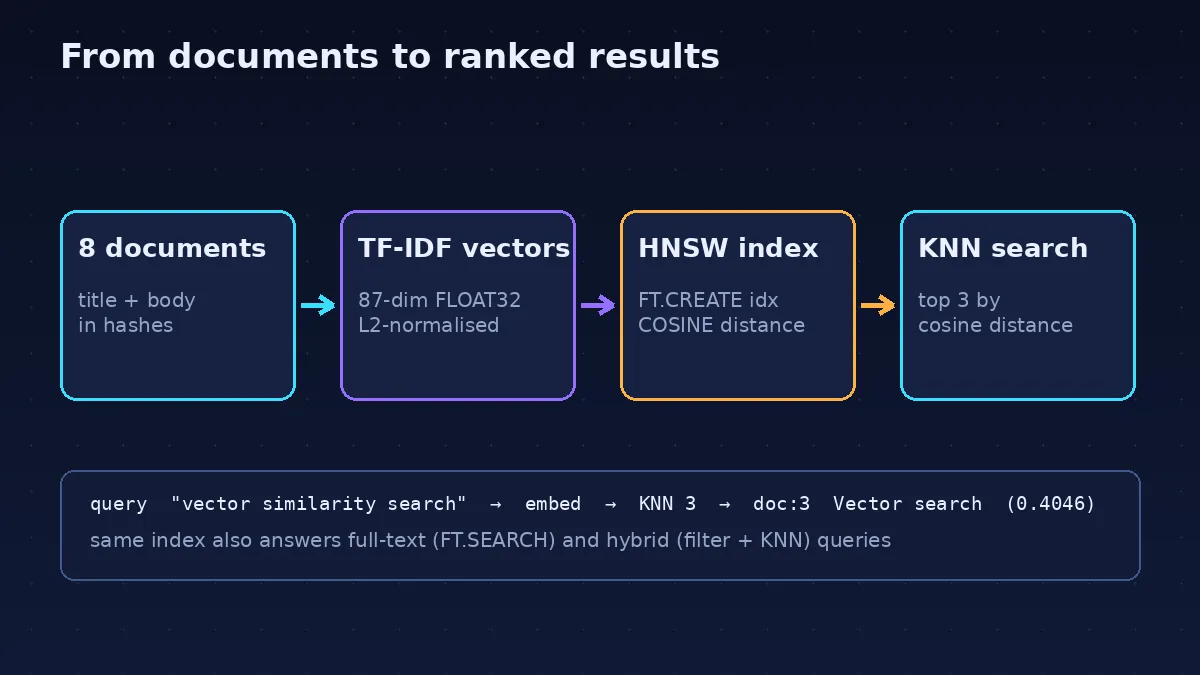
Step 5 — Ask it questions#
Embed the query with the same vectorizer, then run a KNN search. The query syntax is Redis Stack's: *=>[KNN 3 @vec $q] means "the three nearest neighbours of the query vector", passed as a binary parameter:
def knn(query_text, k=3):
    q = vec.transform([query_text]).toarray().astype(np.float32)
    q = q / np.linalg.norm(q)
    res = r.execute_command(
        "FT.SEARCH", "idx", f"*=>[KNN {k} @vec $q]",
        "PARAMS", "2", "q", q.tobytes(), "DIALECT", "2",
        "RETURN", "2", "title", "__vec_score",
    )
    return [(hit["id"], hit["extra_attributes"]["title"],
             hit["extra_attributes"]["__vec_score"])
            for hit in res["results"]]

for query in ["vector similarity search",
              "crash durability snapshots",
              "Redis protocol clients",
              "millions of operations per second"]:
    print(query, "->", knn(query))
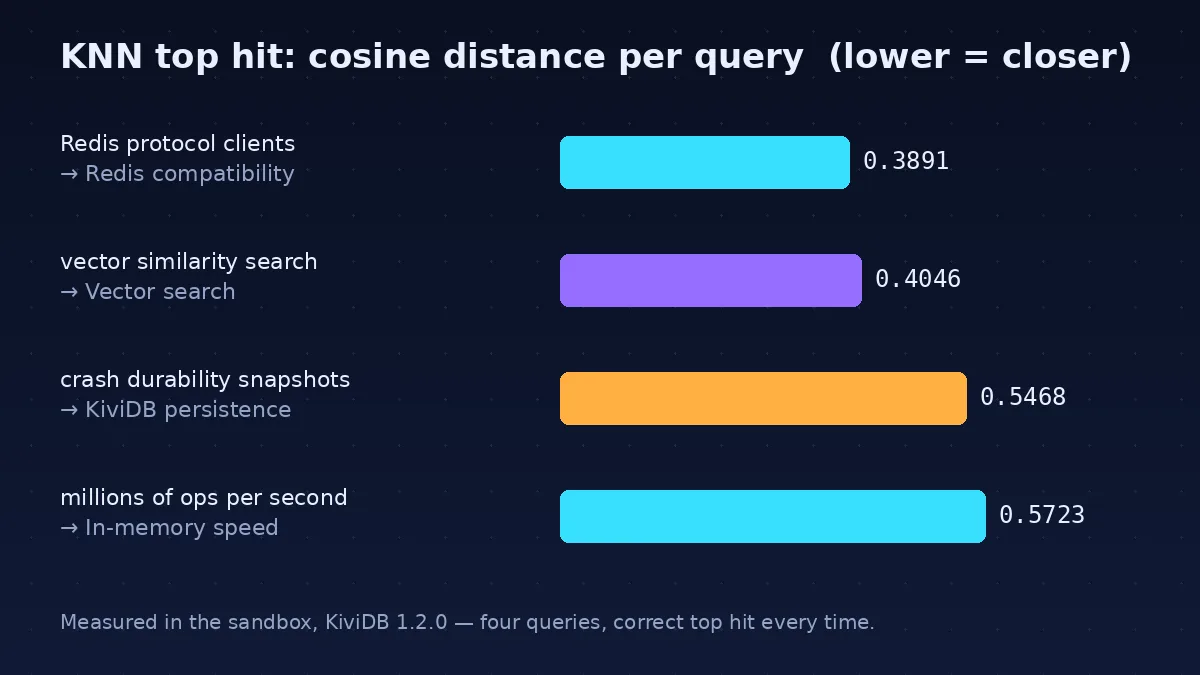
Expected output — the exact scores from the verified run:
vector similarity search -> [('doc:3', 'Vector search', '0.40460086'),
  ('doc:6', 'Hybrid search', ...), ('doc:5', 'Full-text search', ...)]
crash durability snapshots -> [('doc:1', 'KiviDB persistence', '0.54682934'), ...]
Redis protocol clients -> [('doc:2', 'Redis compatibility', '0.3890546'), ...]
millions of operations per second -> [('doc:4', 'In-memory speed', '0.5723274'), ...]
All four queries return the right document first. The score is a cosine distance: 0 means identical direction, 2 means opposite. So 0.39 for the Redis-protocol query is a close match and 0.57 for the throughput query is a weaker one — the numbers are honest about how confident the match is. Two redis-py details worth knowing: version 8.x parses FT.SEARCH into a dict with total_results and results (each hit carrying id and extra_attributes), and the vector blob must be passed as bytes — with decode_responses=True, reading the vec field back through HGETALL fails, because the raw float32 bytes are not valid UTF-8. Read text fields individually instead.
Step 6 — Full-text and hybrid search#
The same index answers keyword queries, because the title and body are real text fields. Text is stemmed as in Redis, so a query for one word form finds the others:
res = r.execute_command("FT.SEARCH", "idx", "preferences", "RETURN", "1", "title")
print(res["total_results"], res["results"][0]["extra_attributes"]["title"])
1 Full-text searchpreferences matched the document containing prefer — stemming works. The more useful pattern is hybrid: filter by keyword first, then rank the survivors by vector similarity. Only three documents contain the word "search" in their body, and the hybrid query finds exactly those three:
q = vec.transform(["vector similarity"]).toarray().astype(np.float32)
q = q / np.linalg.norm(q)
res = r.execute_command(
    "FT.SEARCH", "idx", "(@body:search)=>[KNN 3 @vec $q]",
    "PARAMS", "2", "q", q.tobytes(), "DIALECT", "2",
    "RETURN", "1", "title",
)
print(res["total_results"],
      [hit["extra_attributes"]["title"] for hit in res["results"]])
3 ['Vector search', 'Hybrid search', 'Full-text search']This is the query shape real RAG pipelines use most: a cheap keyword filter to cut the candidate set, then vector ranking on what remains.
Step 7 — Vector sets, the shortcut#
If the full-text fields are more than you need, Redis 8.10's vector sets give you a lighter path: one key holds named vectors, no index definition at all. Add the same eight documents, then ask for the three most similar to the "vector similarity search" query from Step 5:
q = vec.transform(["vector similarity search"]).toarray().astype(np.float32)
q = q / np.linalg.norm(q)
for i, row in enumerate(X, start=1):
    r.execute_command("VADD", "vecset", "VALUES", 87, *row.tolist(), f"doc:{i}")

sim = r.execute_command("VSIM", "vecset", "VALUES", 87, *q[0].tolist(),
                        "COUNT", 3, "WITHSCORES")
print(sim)
['doc:3', '0.797700', 'doc:6', '0.727784', 'doc:5', '0.568139']Same winner, different score scale: VSIM reports similarity as (1 + cosine) / 2, so 0.80 means close and 0.5 means unrelated. You can check the arithmetic against Step 5 — the KNN cosine distance for doc:3 was 0.4046, and (1 + (1 - 0.4046)) / 2 = 0.7977. Vector sets are the right tool when you want pure similarity over a named collection; the FT.* index is the right tool when you also need text search, filters, and hybrid queries.
Step 8 — Make it survive a restart#
A cache that forgets its index on restart is a demo, not infrastructure. Save a snapshot, shut down cleanly, restart, and re-query. The snippets below assume the same Python session as Steps 2–7 — if you closed it, re-run the setup code from Steps 2 and 4 first; the index and documents are on disk, only the in-memory vectorizer needs rebuilding.
r.execute_command("BGSAVE")
print(r.info("persistence")["rdb_last_bgsave_status"])
r.execute_command("SHUTDOWN")okA dump.kdb file — about 10.8 KB for these eight documents, their HNSW graph, and the vector set — now sits in the data directory. Restart the server against the same directory:
KIVIDB_NO_UPDATE_CHECK=1 ./kividb/kividb --dir ./data --port 6380 --loglevel noticeAfter the restart, the data and the index are both back — fifteen keys, counting the six demo keys from Step 2, the eight documents, and the vector set:
r = redis.Redis(host="127.0.0.1", port=6380, decode_responses=True)
print("keys:", r.dbsize())
print("num_docs:", r.execute_command("FT.INFO", "idx")["num_docs"])
print("KNN top-1:", knn("vector similarity search")[0][1])
keys: 15
num_docs: 8
KNN top-1: Vector searchTwo persistence notes. First, snapshots save on SAVE/BGSAVE and on a graceful shutdown; a killed process keeps only what was last snapshotted. For write durability, start with --aof: every write is appended to appendonly.aof and replayed on startup, so a crash loses at most about a second of writes. Second, the HNSW graph itself is stored in the snapshot, so search quality after a restart matches the graph you had before shutdown — the KNN result above is the proof.
When to use KiviDB — and when not to#
| Need | Use | Why |
|---|---|---|
| Cache + vector search in one process | KiviDB | One binary, one protocol, no second service; the tutorial above is the whole stack. |
| Drop-in Redis replacement for an existing app | KiviDB or Valkey | KiviDB reports as Redis 8.10 and passes 2,697 of its tests; Valkey is the BSD-licensed fork with the larger ecosystem. |
| Vector search at scale with payload filtering | Qdrant | A dedicated vector database with richer filtering, quantization, and a bigger community; see the blog's Qdrant tutorial. |
| Maximum Redis throughput on many cores | Measure first | KiviDB's own benchmarks claim 21M pipelined GETs/s on 32 cores — but those are the project's numbers on its hardware, not an independent test. Benchmark your workload. |
| A battle-tested store for production data you cannot lose | Not KiviDB yet | It is three weeks old. The 1.2.0 release fixed real ACL and credential-leak vulnerabilities; that is good maintenance and a reminder of its age. |
Three more honest limits. The license is AGPL-3.0: fine for a service you run yourself, but read it before embedding KiviDB in something you distribute. Lua scripting and TLS live in separate builds (-lua, -tls, -full) — the default binary has neither. And cluster mode, replication, and the io_uring fast path exist in the docs but were not exercised here; this guide verifies the standalone server only.
The takeaway#
KiviDB 1.2.0 earns its spike on a simple proposition: the code you already write against Redis now gets vector search for free. One 6 MB download, one binary, one port — and the same redis-py calls you have used for years store documents, build an HNSW index, and answer KNN, full-text, hybrid, and vector-set queries. The project is young and its big performance numbers are its own, so do not move production data onto it this week. But for a local RAG cache, a prototype, or a side project that needs search without a second service, it is already the shortest path from zero to a working answer — and the answer survives a restart.
Verification note#
Verified in a sandbox on November 8–9, 2026: KiviDB 1.2.0 (release binary, SHA256 2d918e71…), redis-py 8.1.0, scikit-learn 1.9.1, numpy 2.5.3, Python 3.12.3. The download, checksum, server start, core Redis operations, index creation, all four KNN queries, the stemming check, the hybrid query, the vector-set query, the snapshot, and the restart reload all ran here, with the outputs quoted above. The first snapshot attempt failed on the sandbox's disk quota, not on KiviDB; moving the data directory outside the quota fixed it, and the retry succeeded. Not verified here: the project's own throughput benchmarks (quoted as theirs), cluster mode and replication, the redis-cli path (the same commands were run through redis-py), and the Lua/TLS builds.
Sources#
- KiviDB repository (kividbio/kividb) — README, star count, install instructions, configuration flags, and benchmark reports, read November 9, 2026.
- KiviDB v1.2.0 release notes — durability, cluster, TLS, and search changes; security fixes GHSA-6rw7-4fcr-r6j3 and GHSA-c4xj-63wm-4jj9; release date November 3, 2026.
- AI Repo Acceleration Report, November 9, 2026 (whatstrending.ai) — KiviDB 26 stars/day to 51/day, +254 stars November 4–9.
- GitHub API release record for v1.2.0 — published date and release asset list, read November 9, 2026.