Every AI-generated video has the same tells: a brand label tucked in a corner, a headline held on the left, a card floating on a flat colour, and a fade between every beat. motionmaxxing (Tejashmakwana/motionmaxxing) is an agent skill that exists to kill those defaults — past 300 GitHub stars, Apache-2.0 — built not from opinions but from frame-by-frame measurement of 53 professional motion moments. It turns Claude Code, or any agent that reads a SKILL.md folder, into a motion designer with opinions, and then it checks its own work with scripts instead of telling you it came out well. This tutorial installs it, renders your first piece, and shows how its quality gates catch the slop.
SKILL.md folder works, with shell access so the scripts can run.ELEVENLABS_API_KEY) — only if you want voice-over, sound effects, and music. Plenty of films are better silent.The README’s own install lines. For Claude Code:
git clone https://github.com/Tejashmakwana/motionmaxxing ~/.claude/skills/motionmaxxing
bash ~/.claude/skills/motionmaxxing/install.sh        # checks the requirements; installs nothing system-wide
Checked out elsewhere: ./install.sh links it into your skills folder. Flags: --dir PATH for another skills folder, --copy to copy instead of symlink, --force to replace an existing install. Other agents: point the agent at the folder — the skill is just a SKILL.md plus scripts — and give it shell access.
Before anything renders, ask the toolbox what you actually have:
bash ~/.claude/skills/motionmaxxing/scripts/providers.sh # JSON: chrome, ffmpeg, key, codex, disk. Never installs anything.The output is JSON: whether Chrome and ffmpeg are reachable, whether an ElevenLabs key is set, whether the Codex CLI can generate images, and how much disk you have. No Chrome, no render — the skill renders frame by frame through headless Chrome and stitches with ffmpeg. This is the step that fails silently later if you skip it now.
In Claude Code, run /motionmaxxing or ask in plain language. The skill triggers on any request to make, plan, storyboard, fix, or critique a motion graphic. Three ways in, straight from the README:
From a URL — the skill captures the site’s brand first (brand.mjs: brand.json, BRAND.md, board.png, logo, fonts, screens):
/motionmaxxing make a 20s launch film for https://example.com. I want to see the idea and the storyboard before you build.A single moment — the cheapest way to see the craft:
/motionmaxxing a 6 second kinetic-type sting for our brand: the one line "Ship it" with real 3D on the mark. Silent is fine.Rate and repair — bring your own slop:
/motionmaxxing here is draft.mp4 and its index.html. Rate it slop, mid or maxxed, run the gates, tell me what fails, and fix it.Every run follows the same 10-step protocol: toolbox and taste → brand → one true thing → the idea → world and time (STORYBOARD.md) → hardest beat first → look honestly → sound to picture → deliver. The agent shows you the idea and the storyboard before it builds. When a gate fails, it fixes in a fixed order — a failing gate is fixed, not argued.
This is the part most “video skills” skip: scripted quality checks with numbers. A gate that fails gets fixed; two gates have no script, and the agent has to say so.
| Gate | Pass condition | Computed by |
|---|---|---|
| G0 render exists | Decodes, is not blank, the picture moves, the length matches the plan, audio present when planned | look.py |
| G1 proof readable | UI text at least 0.04 H; fragment at least 0.55 W or cropped by the frame; lit, in a world | by eye on the contact sheet |
| G2 no empty frame | No run of more than 3 consecutive flat frames | look.py |
| G3 end card short | End hold at most 1.4 s; the final shot at most 25% of the film | look.py |
| G4 one hero per frame | Two panels only if one has twice the area of the other, or the camera moves between them | by eye on the contact sheet |
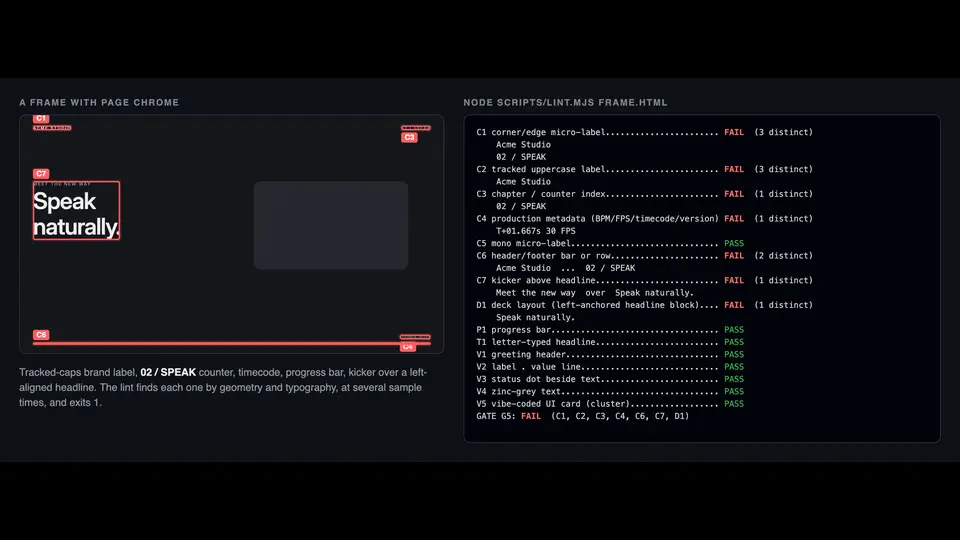
| G5 no page chrome | No corner labels, counters, timecodes, header/footer bars, kicker over a headline, left headline beside right-side media, progress bars, letter-typed headlines, or vibe-coded UI cards | lint.mjs |
G5 is the signature move: page chrome — a brand name in a corner, a “02 / SPEAK” counter, a timecode — was the strongest signal in the skill’s slop autopsy that nobody had decided anything. The lint catches it by geometry and typography. G2 is the mewing rule for your frames: in the measured 3–7 s pro moments, something moves on about 99% of frames, and more than 3 flat frames in a row fails.
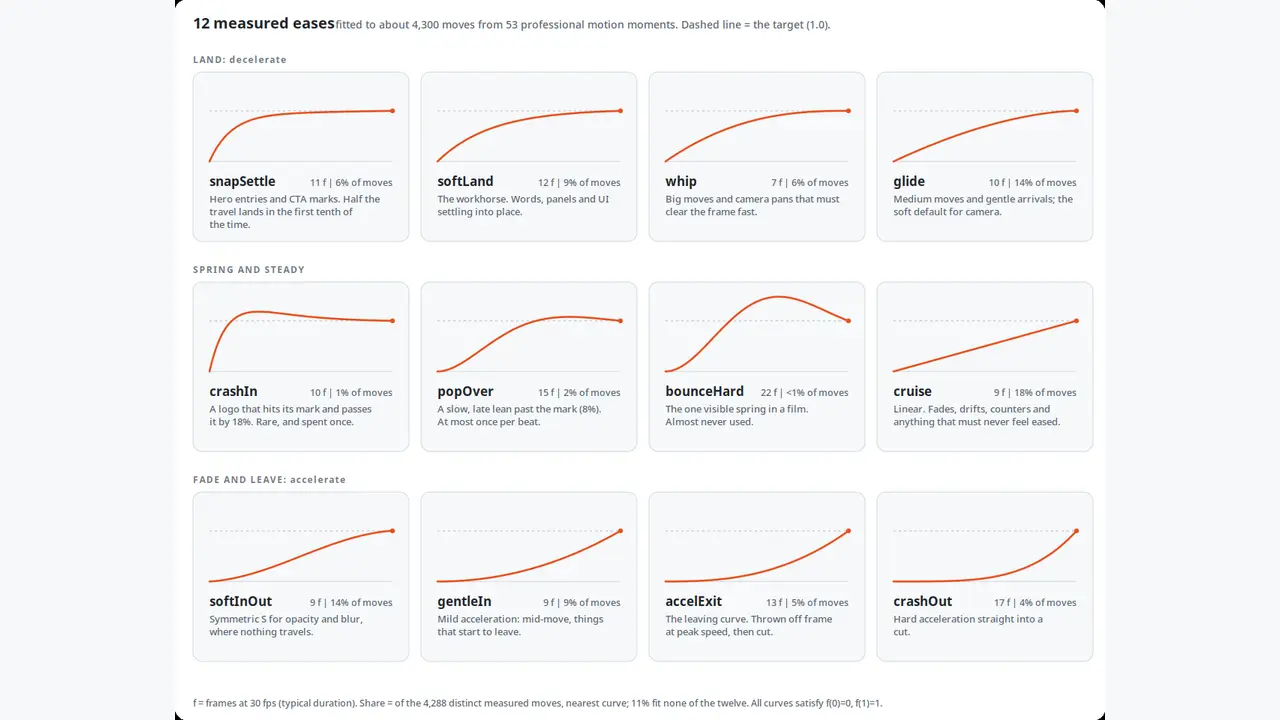
Most “motion design skills” are a list of opinions. This one started with a measurement: 53 frame-accurate pro moments decoded by 6 parallel AI analyst agents (reviewed by a human) into about 150 designer rules, each written as WHEN / DO / BECAUSE with evidence. About 4,300 distinct moves were seeked frame by frame — that gave 12 measured eases, named and reusable in the runtime (M.ease.softLand, snapSettle, accelExit, …):
The numbers worth stealing, even if you never install the skill:
The runtime is honest engineering too: runtime/motion.js is one plain <script> on top of vendored GSAP with no build step, and every frame is a pure function of time — seek-safe, so jumping to any frame equals playing to it (Motion.selfTest proves it, canvas pixels included).
A skill installed in your agent’s skills folder, a machine check you can re-run any time, and a repeatable protocol: brief → brand → idea → storyboard → hardest beat first → scripted gates → sound → deliverables. A finished run leaves you four files: film/final.mp4 (the film), film/index.html (the editable source — plain HTML plus the Motion runtime, reproducible frame by frame), film/STORYBOARD.md (the plan and the beat table), and film/NOTE.md (the honest account: what is real and what is illustrative or generated, the G0–G5 numbers, what you would still improve). The skill’s own rule: the agent never certifies the film as good.
docs/KNOWN-LIMITS.md.look.py treats show and hide events as cuts; fetch_logo.mjs can return a header ribbon instead of the mark.NOTICE before shipping commercially.