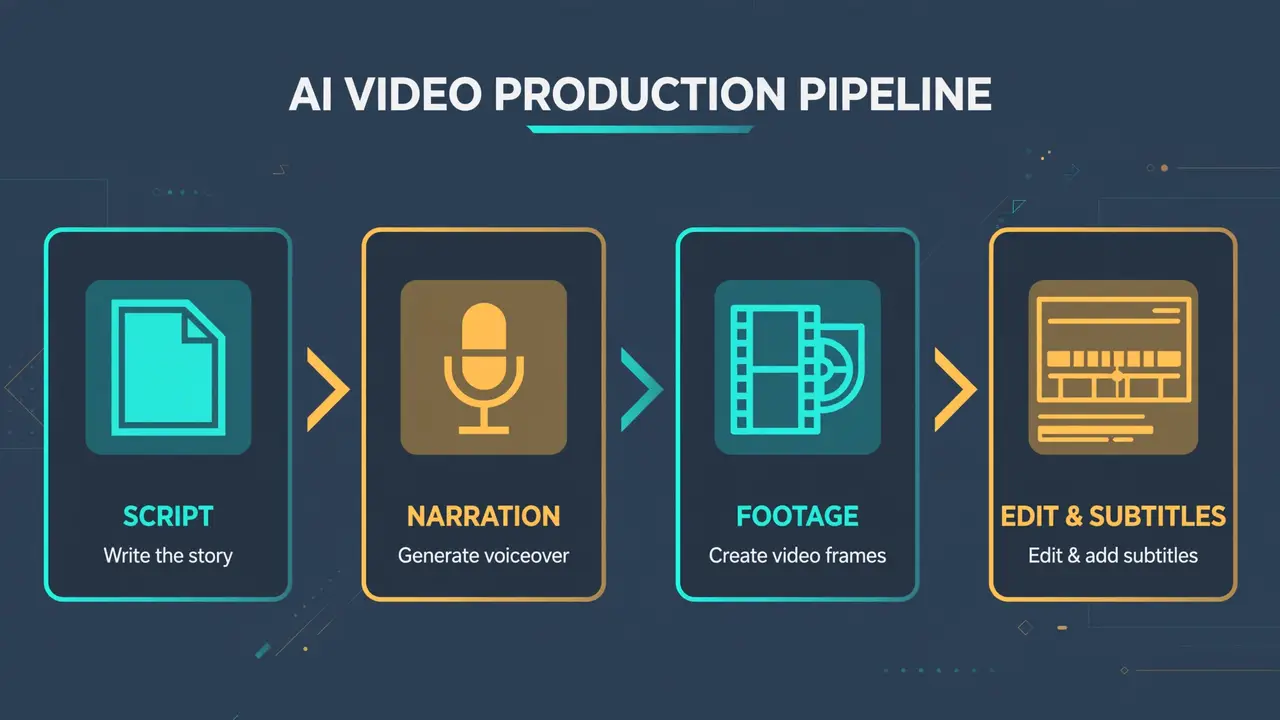
Describing a video in plain language and getting a finished cut back used to be a demo-day fantasy. OpenMontage (calesthio/OpenMontage) makes it a repo you clone: the self-described first open-source, agentic video production system — past 67,000 GitHub stars, AGPL-3.0 — that turns Claude Code, Cursor, Copilot, Windsurf, or Codex into a full studio. It researches your topic, writes and narrates the script, sources footage or generates it, scores a soundtrack, burns in word-level captions, and renders — with a multi-point self-review before you ever see the cut. This tutorial installs it, renders the zero-key demo, and directs your first video.
brew install ffmpeg; on Debian/Ubuntu: sudo apt install ffmpeg..env.make setup installs a Python venv, npm packages for the Remotion composer, and the Piper TTS model. The first video takes a while; that is the agent doing research, scriptwriting, asset generation, and editing.Three commands:
git clone https://github.com/calesthio/OpenMontage.git
cd OpenMontage
make setup
If you don’t have make, the README gives the manual equivalent (venv + pip install -r requirements.txt + npm install in remotion-composer + pip install piper-tts + copy .env.example to .env). Open the project folder in your coding assistant and you are on the set.
Sanity-check the install with the zero-key demo, which renders sample videos instantly without touching any provider:
make demoWhat comes out is a fully rendered video — narrated, captioned, scored — built with nothing but free local tools. If the demo renders, your pipeline is healthy.
With the project open in your assistant, type a plain-language brief. This one is straight from the project’s own quick start:
"Make a 60-second animated explainer about how neural networks learn"Here is what the agent actually does behind that one sentence: it researches the topic with live web search, writes a script with voice direction, generates images, narrates them with Piper TTS, finds royalty-free background music automatically, burns in word-level subtitles, and renders the final cut. Before you see anything, the system runs a multi-point self-review — ffprobe validation, frame sampling, audio level analysis, and subtitle checks.
When it finishes, every creative decision comes with your approval gate, and every provider selection is scored across 7 dimensions with an auditable decision log. You are the producer; the agent is the crew.
OpenMontage’s most interesting trick is that it is not limited to animating stills. Ask for the documentary montage pipeline and it builds a CLIP-searchable corpus from Archive.org, NASA, and Wikimedia Commons, retrieves actual motion footage, and cuts it into a timeline:
"Make a 75-second documentary montage about city life in the rain. Use real footage only, no narration, elegiac tone, with music."That prompt is also from the README, and it exercises a genuinely different pipeline: no narration track, footage retrieved by semantic search rather than generated, music laid under a real edit. If you want this path reliably, prompt for a documentary montage, tone poem, or stock-footage collage and say use real footage only explicitly — the project is clear that otherwise the agent may default to the image-based route.
Copy .env.example to .env if make setup didn’t already, and add only what you need. Every key is optional; more keys mean more tools, not a different product:
# Free stock media (developer keys are free to get)
PEXELS_API_KEY=your-key        # free stock footage and images
PIXABAY_API_KEY=your-key       # free stock footage and images

# Image + video gateway (paid, per-use)
FAL_KEY=your-key               # FLUX images + Veo, Kling, MiniMax video

# Voice & music (paid, per-use)
ELEVENLABS_API_KEY=your-key    # premium TTS, AI music, sound effects
SUNO_API_KEY=your-key          # full songs, instrumentals, any genre
Have a GPU? make install-gpu unlocks free local video generation (Wan 2.2, Hunyuan, LTX, CogVideo models), enabled with VIDEO_GEN_LOCAL_ENABLED=true in .env. To calibrate your expectations on cost, the project’s own showcase — a 60-second animated short, six generated motion clips, AI narration, royalty-free music, TikTok-style captions — cost $1.33 end to end.
A working agentic video studio: 12 production pipelines, 100+ tools, and 700+ agent skill files wired into whatever coding assistant you already use. You can now go from a sentence to a rendered, narrated, captioned video — or from a reference clip you paste in to 2–3 differentiated concepts with cost estimates before production starts. The reference-video path is the sleeper feature: paste a YouTube Short you like, and the agent analyzes its transcript, pacing, scenes, and style, then proposes what it keeps, what it changes, and what it will cost at your target duration.