Give your coding agent a memory that survives the session: hands-on with OpenViking
Every coding agent wakes up with amnesia: close the session and everything it learned about your project is gone. OpenViking attacks that directly — an open-source context database (AGPL-3.0) from VolcEngine, past 39,000 GitHub stars, that gives agents one filesystem for everything they know: knowledge, memory, and skills, all browsable under viking:// URIs. No more text-in, embeddings-out black box; your agent’s context is a directory tree you can ls, tree, grep, and edit by hand. This tutorial installs the server, indexes a real repo, wires it into a coding agent, and shows where it ends.
Every coding agent wakes up with amnesia: close the session and everything it learned about your project is gone. OpenViking attacks that directly — an open-source context database (AGPL-3.0) from VolcEngine, past 39,000 GitHub stars, that gives agents one filesystem for everything they know: knowledge, memory, and skills, all browsable under viking:// URIs. No more text-in, embeddings-out black box; your agent’s context is a directory tree you can ls, tree, grep, and edit by hand. This tutorial installs the server, indexes a real repo, wires it into a coding agent, and shows where it ends.
What you’ll need
- uv and Python 3.10+ — the two hard prerequisites for the server.
- A model provider with an embedding model and a VLM: Volcengine, OpenAI, Kimi, GLM, or Codex OAuth — or local Ollama for the zero-cost path. OpenViking embeds what it indexes and generates a summary per directory.
- A coding agent that takes the memory plugin: Claude Code, Codex, Cursor, TRAE, or OpenCode. The installer detects which ones you have.
- About 30 minutes.
Step 1: Install and start the server
Install the package and run the setup wizard, which configures the models:
uv tool install openviking --upgrade && openviking-server initinit is interactive and writes ~/.openviking/ov.conf — it asks which provider to use and for its API key, so have one ready. The server runs in the foreground, so keep this terminal open. Don’t want to self-host yet? Two shortcuts: Volcengine runs the same service hosted (first 50 files free; create an API key in their console; the server address is https://api.vikingdb.cn-beijing.volces.com/openviking), and there’s a zero-install browser preview at openviking.ai/studio. In a hurry, you can also paste the README’s “Let your agent deploy it” prompt into your coding agent and have it walk you through the provider, key, and workspace questions itself.
Step 2: Index your first repo
With the server running, the ov CLI ships with the package. Check the server, then hand it a repository:
ov status
ov add-resource https://github.com/volcengine/OpenViking
# Replace TASK_ID with the returned task_id; repeat until status is completed
ov task status TASK_ID
What just happened: OpenViking chunked the repo, embedded it, and mounted it at viking://resources/volcengine/OpenViking/ — every directory with a generated summary your agent can scan before deciding what to read.
Step 3: Browse the context filesystem
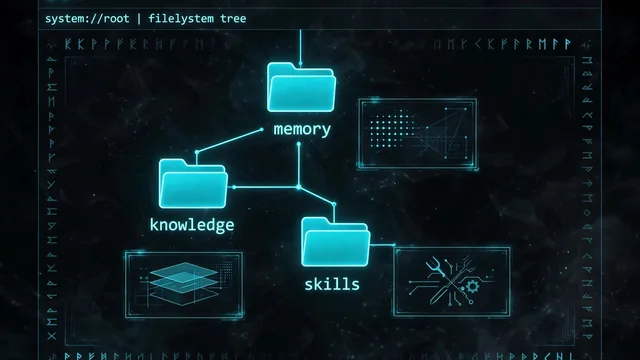
This is the whole point. Most agent memory is a black box — text goes in, embeddings come out, and nobody can see what was actually stored. OpenViking organizes context as a virtual filesystem instead. Agents navigate it like files, and you can open any directory to inspect and edit what your agent knows:
ov ls viking://resources/
ov tree viking://resources/volcengine -L 2
ov find "what is openviking"
ov grep "openviking" --uri viking://resources/volcengine/OpenViking/docs/en
ov find runs a semantic search scoped to a directory instead of scanning a flat vector pool — ask a question about one project’s docs without the rest of the index polluting the answer. ov grep is the exact-match counterpart scoped to a URI.
Step 4: Plug it into your coding agent
Run the memory plugin installer with your server’s address:
curl -fsSL https://openviking.ai/install | bash -s -- --yes --url <SERVER_URL>The installer covers Claude Code, Codex, Cursor, TRAE, OpenCode and more, and detects which ones you have. Two auth details from the docs: if your server has auth turned on, pass --api-key with a user key — a root key can’t read or write memories; if auth is off, pass --api-key '' so an earlier saved key isn’t reused. Restart your agent afterward. Memories now persist across sessions at viking://memories/, and reusable skills live at viking://skills/. Test it: tell your agent “remember that I prefer pytest over unittest”, close the session, open a new one, and ask “what are my testing preferences?” — watch it consult the filesystem instead of guessing.

Step 5: Build on it
The CLI is just the surface. There are Python, Go, and TypeScript SDKs plus an HTTP API for your own integrations, and the docs cover index maintenance, multi-tenant accounts, and resource ACLs. The idea is research-backed, not just product copy: the team’s VikingMem paper on memory-base management was presented at VLDB 2026, and the directory-aware retrieval design (TrieHI) is what lets agents search a project subtree instead of a flat index.
What you built
A working context database for your coding agent: repo knowledge mounted at viking://resources/, cross-session memory at viking://memories/, and skills in one browsable, editable filesystem — scoped semantic search, per-directory summaries, and a plugin keeping it wired into Claude Code, Codex, Cursor, TRAE, or OpenCode. Your agent’s long-term context is now something you can audit with ls, not a black box you have to trust.
Honest limitations
- AGPL-3.0 is copyleft. Self-hosting and internal use are fine; if you modify OpenViking and run it as a service for others, read the license obligations first.
- It needs an embedding model and a VLM from a provider. The free path is local Ollama; everything else is a paid API key (Codex OAuth is also supported). Indexing a large monorepo costs real embedding tokens.
- The server runs in the foreground. For always-on memory, run it as a service (systemd, launchd, or a process manager) instead of a terminal tab you might close.
- Configure authentication before exposing it beyond localhost. A root key can’t read or write memories — create a user key for your agents. The hosted Volcengine endpoint is a cn-beijing address, so weigh data residency before pointing it at private repos.
- A filesystem for memory doesn’t curate itself. Stale memories are like stale docs — they rot. Check in occasionally, read what your agent stored, and delete what’s wrong.