You’ve seen a feature in an app — a search box that reads your mind, a sync that never conflicts, an animation with impossible physics — and wondered how they built it. The source is closed and the docs say nothing. REA (morluto/rea, MIT) flips the power balance: one MCP server that wires your coding agent to the tools professional reverse engineers use — Ghidra, Hopper, JADX, packet captures — and lets you ask plain questions like “understand how search works in the Notes app, show me the evidence, and build a similar feature for my project.” The agent inspects the target, traces the relevant code, and answers with evidence attached. REA is the #1 trending repository on GitHub today, with 41,000+ stars. This walkthrough takes it from a fresh install to your first investigation.
npx rea-agents setupSetup shows a multi-select of supported agents, proposes the exact configuration changes — registering REA’s MCP server plus matching workflow instructions, with backups of your existing config — and waits for your approval before writing anything. Restart the agent afterward. Two knobs worth knowing: rea setup --dry-run previews the plan without applying it, and --skill=false skips installing the workflow instructions if you only want the MCP server. Hopper installation is a separate question with its own explicit approval; the setup can also record verified paths for an existing Ghidra. The npm package is currently at version 6.2.0 and moves fast — rea update keeps it current, and the update prints the setup command to refresh your agent registrations.
Understand how search works in the Notes app, show me the evidence,
and build a similar feature for my project.
That is the project’s own example prompt, and it captures the whole pitch: the agent calls REA through MCP, inspects the target without its source code, traces the relevant code, and comes back with findings plus the evidence and limitations behind each conclusion. Your agent then uses those findings to explain the behavior, or to write and test a version for your project. You are not operating the decompiler yourself — you are asking questions, and the answers arrive with receipts. The project’s showcase page has three worked cases that show the ceiling: a DX-Ball sound-pan calculation reconstructed into C that passes 3,205 original-x86 test cases and reproduces all 63 compiled function bytes, Notion’s Electron clipboard bridge traced from renderer through preload and IPC into the main process, and a DOS bullet-ring calculation recovered from the original PC-98 game’s 16-bit instructions.
You don’t need an agent for a direct inspection — the CLI runs the same workflows. Point it at an extracted application directory or an ASAR archive:
npx -y rea-agents@latest analyze-javascript-application /absolute/path/to/app --jsonThe result includes modules, imports, Electron boundaries, and the evidence. Static analysis reads the supplied files without running the application — safe against targets you don’t fully trust. For regular use, install the command once:
npm install --global rea-agents
rea --help
A generic rea analyze PATH selects the JavaScript workflow automatically for directories and .asar files. Output defaults to the project’s compact TOON format; pass --json when a script consumes it. To keep a structured record of an inspection:
set -o pipefail
rea inspect-artifact ./app.asar --json | jq . > inspection.json
For a native binary, configure an analysis engine first, then query it directly:
rea providers --json
rea analyze /absolute/path/to/program --provider ghidra --json
rea search /absolute/path/to/program "search" --provider ghidra --json
rea function /absolute/path/to/program main --provider ghidra --json
rea decompile /absolute/path/to/program 0x1000 --provider ghidra --json
rea xrefs /absolute/path/to/program 0x1000 --provider ghidra --json
function returns a function dossier, decompile returns pseudocode, xrefs maps cross-references. Substitute your target, search text, function name, or address. rea providers and rea capabilities list what each engine supports; set REA_ANALYSIS_PROVIDER as a standing preference, and diagnose a sick engine with rea doctor --provider ghidra --json. If a binary is large, the docs suggest raising Ghidra’s startup deadline with REA_GHIDRA_STARTUP_TIMEOUT_MS. REA starts Hopper when an operation needs it — on macOS a first-run dialog may ask you to choose demo mode or activate your license.
Each CLI invocation is a separate process, so save results you will reuse. A snapshot retains successful analysis results for later queries, and REA reuses an exact result when the target bytes, operation, parameters, provider, and settings all match:
rea analyze /absolute/path/to/program --provider ghidra --snapshot /absolute/path/to/analysis/program.json
# Repeat the same query to reuse its saved result.
Snapshot files are local with owner-only permissions. Evidence bundles can be validated, exported to canonical form, and compared — useful when you want to diff two versions of the same app:
rea evidence-export /absolute/path/to/evidence/bundle.json /absolute/path/to/evidence/canonical.json
rea compare /absolute/path/to/evidence/left.json /absolute/path/to/evidence/right.json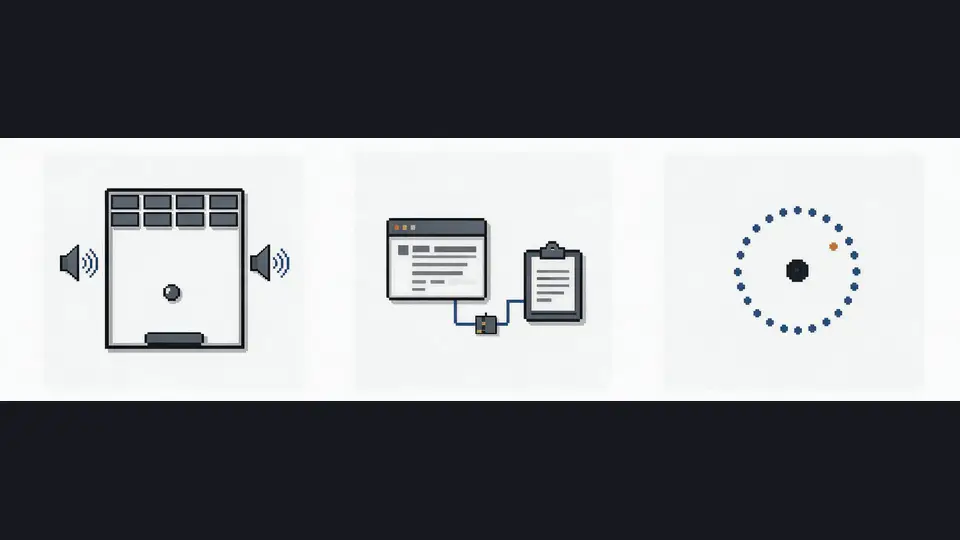
An agent that can investigate any app you point it at — native binaries, JavaScript and Electron apps, websites, .NET assemblies, Android APKs, firmware, even EVM bytecode and saved network captures — and explain how a feature works with evidence attached, then reimplement it for your project. Plus a terminal workflow for direct analysis: rea analyze for the overview, function/decompile/xrefs for the details, snapshots and evidence bundles for repeatable, diffable investigations. The loop is the same whether you drive it through chat or through bash: point at a target, get evidence-backed findings, ask for the reimplementation.
Still: reverse engineering used to mean learning a disassembler before you could ask a single question. REA moves the bottleneck from tooling to curiosity — the hard part is no longer operating Ghidra, it’s knowing what to ask.