sand3d: write 3D models in Python that your LLM can actually generate — hands-on
sand3d turns 3D modeling into short Python programs an LLM can actually write: 721 stars in three days, a 3,600-token API, and a bracket in six lines. This guide installs it, builds a part, articulates a washing machine, and hands the API to a model.
- Who: sand3d by Sandflow (Thibault Neveu and Andréa Loy) — Sandflow-ai/sand3d on GitHub, Apache-2.0.
- What: Version 1.6.3 (per the repo's citation file); a Python library over Blender's bpy; install with
pip install sand3d. - Momentum: 721 stars on November 6, 2026; created November 3, 2026 — about 720 stars in three days.
- Token math: The same part takes 2–6× fewer tokens than in Blender Python, CadQuery or FeatureScript (the project's own measurement; median 4.0× vs Blender Python); the whole API is ~3,600 tokens.
- Requirements: Python 3.13 (recommended) or 3.11; bpy 5.2 LTS / 4.5 LTS bundled; no wheel for Python 3.12 or Intel Macs on 5.2.
- Exports: GLB, URDF, USDA, OBJ and STL from one
s3d.exportcall; millimetres by default, metres on export.
Ask a language model to write you a 3D model in Blender Python and you get the worst of both worlds: hundreds of lines of coordinate math, operators called in the right order or not at all, and a script nobody can read back. The model is guessing at geometry through an API that was designed for humans clicking menus, not for text.
sand3d attacks exactly that gap. It is a Python library, released November 3, 2026 by Sandflow, for writing 3D objects as short programs over Blender's bpy: profiles, solids, edits, frames, joints and assemblies on one flat s3d.<verb> surface. A part takes 2 to 6 times fewer tokens than the same part in Blender Python, CadQuery or FeatureScript, by the project's own measurement — and the whole API fits in about 3,600 tokens, so it can go into a system prompt wholesale. Three days after release it has 721 GitHub stars. This guide installs it, builds a first part, articulates a washing machine, and hands the API to a model.
What you'll need
- Python 3.13 (recommended) or 3.11 — check with
python3 --version. There is nobpywheel for Python 3.12, nor for Intel Macs from bpy 5.2 on; there, use Python 3.11. piporuvfor the install.- A way to look at a GLB file — Blender itself, or any GLB viewer. You do not need Blender installed to run sand3d: it arrives as the
bpymodule (5.2 LTS on Python 3.13, 4.5 LTS on Python 3.11). - A text editor and a terminal. No GPU, no account, no API key anywhere in this guide.
Step 1: Install sand3d
One package, and Blender comes with it:
pip install sand3d # or, in a uv project: uv add sand3dVerify the import works before you write anything:
python3 -c "import sand3d as s3d; print('sand3d ok')"If that prints sand3d ok, the bundled bpy loaded. The library is at version 1.6.3, per the version cited in the repo, and it is Apache-2.0 licensed — free to use commercially.
Step 2: Build your first part — a bracket
This is the project's own first program, from its README. Save it as bracket.py:
import sand3d as s3d

def bracket(w=80, d=40, t=6, hole_d=6.6, pitch=50):
    plate = s3d.extrude("plate", s3d.rect(w, d, r=4), t)
    s3d.hole(plate, hole_d, on=s3d.grid(2, 1, pitch, 0))
    s3d.fillet(plate, 1, edges="top")
    return plate

s3d.export(bracket(), "bracket.glb")
Read it as a sentence: extrude an 80 by 40 mm rounded rectangle 6 mm thick, drill two 6.6 mm holes on a 50 mm pitch, put a 1 mm fillet on the top edges. Everything is in millimetres by default, and every part is reached by name — "plate", "top" — never by hand-computed coordinates. That is the whole design idea: a program says how a shape is made, part by part and in its own words, so a model writes it in a few hundred tokens and a person can read it.
Run it:
python3 bracket.py
ls -la bracket.glb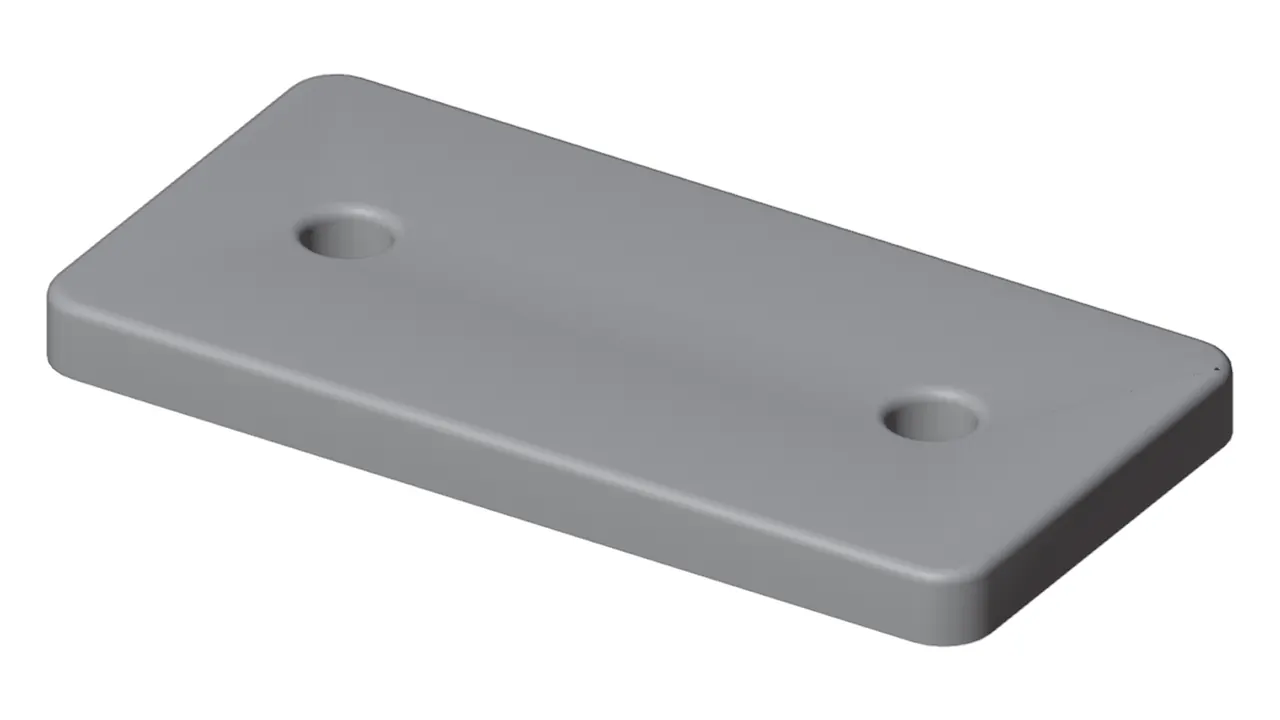
Step 3: Open it and check the mesh
Open bracket.glb in Blender or any GLB viewer and confirm the plate, the two holes and the fillet are all there. If you work with Blender regularly, our hands-on guide to Blender agent skills shows the other side of the same workflow — agents driving the Blender UI instead of writing programs.
Two properties are worth noticing now, because they shape everything else you will do with the library. First, it is deterministic: the same program builds the same mesh, bit for bit. Second, the program is the model — there is no hidden state to sync. Change the pitch to 60, re-run, and the holes move; the file you export is just a snapshot.
Step 4: Build something that moves — a washing machine
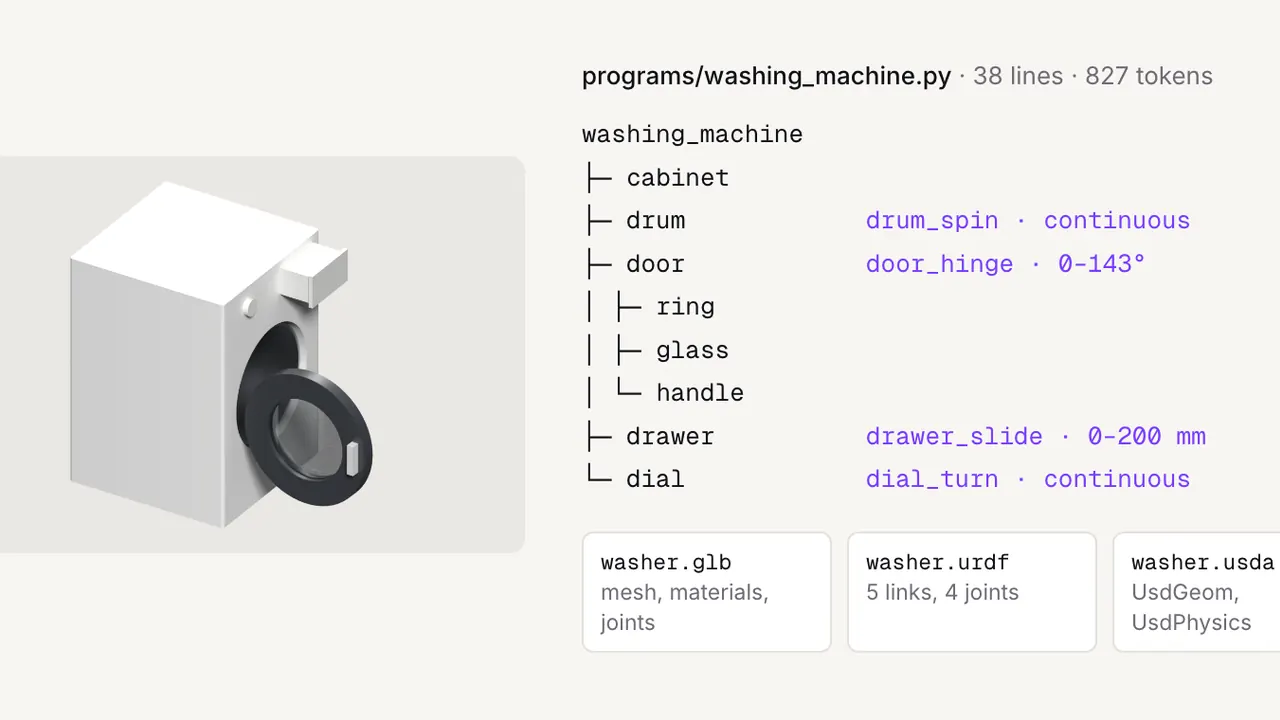
A bracket proves the verbs work. The repo's own programs/washing_machine.py proves the vocabulary scales: a front-loading washing machine in 38 lines, with four joints. Grab the real file rather than retyping it:
curl -fsSL -o washing_machine.py https://raw.githubusercontent.com/Sandflow-ai/sand3d/main/programs/washing_machine.py
python3 -c "import washing_machine as w; print('washer program ok')"
The program builds the cabinet, drum, door (ring, glass and handle grouped so they move together), detergent drawer and dial, then declares how each one moves:
s3d.joint("door_hinge", door, hinge, axis="-Z", range=(0, 143))
s3d.joint("drum_spin", drum, front.move(0, 400), kind="continuous")
s3d.joint("drawer_slide", drawer, top_band.move(150), kind="prismatic", axis="+X", range=(0, 200))
s3d.joint("dial_turn", dial, top_band.move(-150), kind="continuous")
return s3d.assembly("washing_machine", cab, drum, door, drawer, dial, front=front)
Frames are read off the parts themselves — cab.face("+X") gives the front face, and .move() and .offset() walk around on it — so the door hinge sits at the ring's outer edge without you computing a single coordinate. The file also ships a posed variant, washer_open(), which opens the door 92 degrees, slides the drawer out 120 mm and turns the dial 30 degrees with s3d.pose().
Export both poses, in two formats, from one call each:
python3 -c "
import sand3d as s3d
import washing_machine as w
s3d.export(w.washer(), 'washer.glb')
s3d.export(w.washer(), 'washer.urdf')
s3d.export(w.washer_open(), 'washer_open.glb')
"
Step 5: Hand the API to your LLM
This is the step the library is built for. The repo ships docs/api.md — the rules of the vocabulary, every signature, and worked examples in about 3,600 tokens — and an llms.txt that points a model at it. Put the API file in the system prompt:
curl -fsSL -o sand3d-api.md https://raw.githubusercontent.com/Sandflow-ai/sand3d/main/docs/api.md
wc -c sand3d-api.md
Then ask for an object in plain language — "a wall-mounted coat hook, two screws, 90 mm wide" — and paste the program it returns into a file and run it. For assemblies of several parts, the repo's guidelines page gives eight rules for an assembly program: the plan first, then the details, then the parts. Treat the model's output the way you would treat any generated code: run it, open the GLB, and check the mesh. A program that runs is not automatically a program that makes the shape you asked for.
If you want example programs to learn from, the project publishes five datasets of sand3d programs on Hugging Face under CC BY 4.0 — Objaverse everyday objects, public CAD models, articulated Articraft objects, NVIDIA SimReady assets and AutoMate mechanical assemblies — browsable in the sand3d explorer. The same local-first instinct runs through our other hands-on guides, from running Flux.1 image generation on your own machine to local voice cloning — the model does the work, your machine keeps the files.
Step 6: Export for your target
One call; the file's extension names the format, and lengths are in metres on export:
s3d.export(machine, "washer.glb") # or .urdf, .usda, .obj, .stlPick by destination: GLB carries meshes, materials and the joints for the web, viewers and game engines; URDF gives a link per moving part with joints and limits for ROS, PyBullet, MuJoCo and Isaac; USDA is the same tree in OpenUSD for Omniverse and Isaac Sim; OBJ and STL are the meshes alone — OBJ Y up, binary STL Z up — for any 3D tool or slicer. The .usd, .usdc and .usdz forms come from the .usda through USD's own tools, usdcat and usdzip. The scene is also an ordinary Blender scene, so anything else Blender writes is available too.
What you built
A working sand3d setup on Python 3.13, a bracket program you can parametrize, an articulated washing machine exported as GLB and URDF in two poses, and a prompt-ready copy of the API so a language model can generate the next object instead of you. The bracket is genuinely printable: swap the export to bracket.stl and the same one-line call hands a slicer a binary STL.
Honest limitations
First, age. sand3d is three days old at the time of writing — the API is small and documented, but expect it to move, and pin the version in any project that matters. Second, the token-saving numbers (2 to 6 times fewer tokens, median 4.0 times against Blender Python) are the project's own measurements, on its own parts; your mileage will vary with the shape. Third, there is no built-in viewer: every check means exporting and opening the file elsewhere, which is a slower loop than watching a viewport. Fourth, the Blender dependency is real — bpy is heavy, and the Python 3.12 gap plus the Intel Mac caveat will bite someone on your team. And finally, the model still has to be right: a short program is easier to verify than a long one, but "short" and "correct" are different claims, and the mesh is the only verdict. If you need to check the engineering consequences of a shape rather than its looks, pair this with analysis — our hands-on guide to finite element analysis with Claude is the natural next step.
Frequently asked questions
Do I need Blender installed to use sand3d?
No. sand3d ships Blender as the bpy module — 5.2 LTS on Python 3.13, 4.5 LTS on Python 3.11. You only need Blender or another viewer to open the exported GLB and look at the result.
Why can an LLM write sand3d better than Blender Python?
Parts are named, not coordinate-computed, and the whole API is about 3,600 tokens, so it fits in a system prompt; the project measures 2–6× fewer tokens per part than Blender Python, CadQuery or FeatureScript. You still verify the mesh — a program that runs is not automatically the shape you asked for.
Can I 3D-print what I build?
Yes. Export STL — binary STL, Z up — for slicers, or OBJ for other tools; the bracket in this guide exports to bracket.stl with the same one-line s3d.export call used for the GLB.