Signal walls off your chats from OS AI agents — and calls the screen-scanning era an existential threat
Signal is blocking screenshots in its iOS and Android apps by default, stopping Siri, Gemini and other operating-system AI agents from reading your private chats — and warning that the fix only goes so far.
- The change: screenshots are blocked by default in Signal on iOS 27, and on Android whenever Signal detects an AI assistant trying to read the screen.
- The trigger: operating-system agents such as Gemini Intelligence and Siri AI’s Onscreen Awareness scan whatever is on your screen to answer questions and run tasks.
- The warning: Signal president Meredith Whittaker calls OS-level agent integration an “existential threat” to Signal’s ability to guarantee privacy.
- The precedent: Signal blocked Microsoft Recall the same way on Windows 11 last year.
- The gap: the fix does not stop filesystem access or other routes into app data, and there is no equivalent protection on macOS yet.
- The ask: Signal wants a documented app-level opt-out from AI data access, and clearer technical specs, from Apple, Google and Microsoft.
Signal is putting a wall between your chats and the AI built into your phone. On Friday, the encrypted messaging app said it will block screenshots inside its iOS and Android apps by default, so the assistants baked into the operating system — Google’s Gemini, Apple’s Siri, and anything else that reads the screen — can no longer scan your private conversations. Signal’s president, Meredith Whittaker, framed the move in the starkest terms the company has used yet: the screen-scanning era, she said, is an “existential threat” to Signal’s mission.
The logic is straightforward. To answer questions and run errands, operating-system agents look at whatever is on your screen — including your Signal messages, which get captured, stored and processed outside Signal’s control. Encryption still protects messages in transit and at rest, but once the words are pixels on a display, it has nothing left to protect.
What changed#
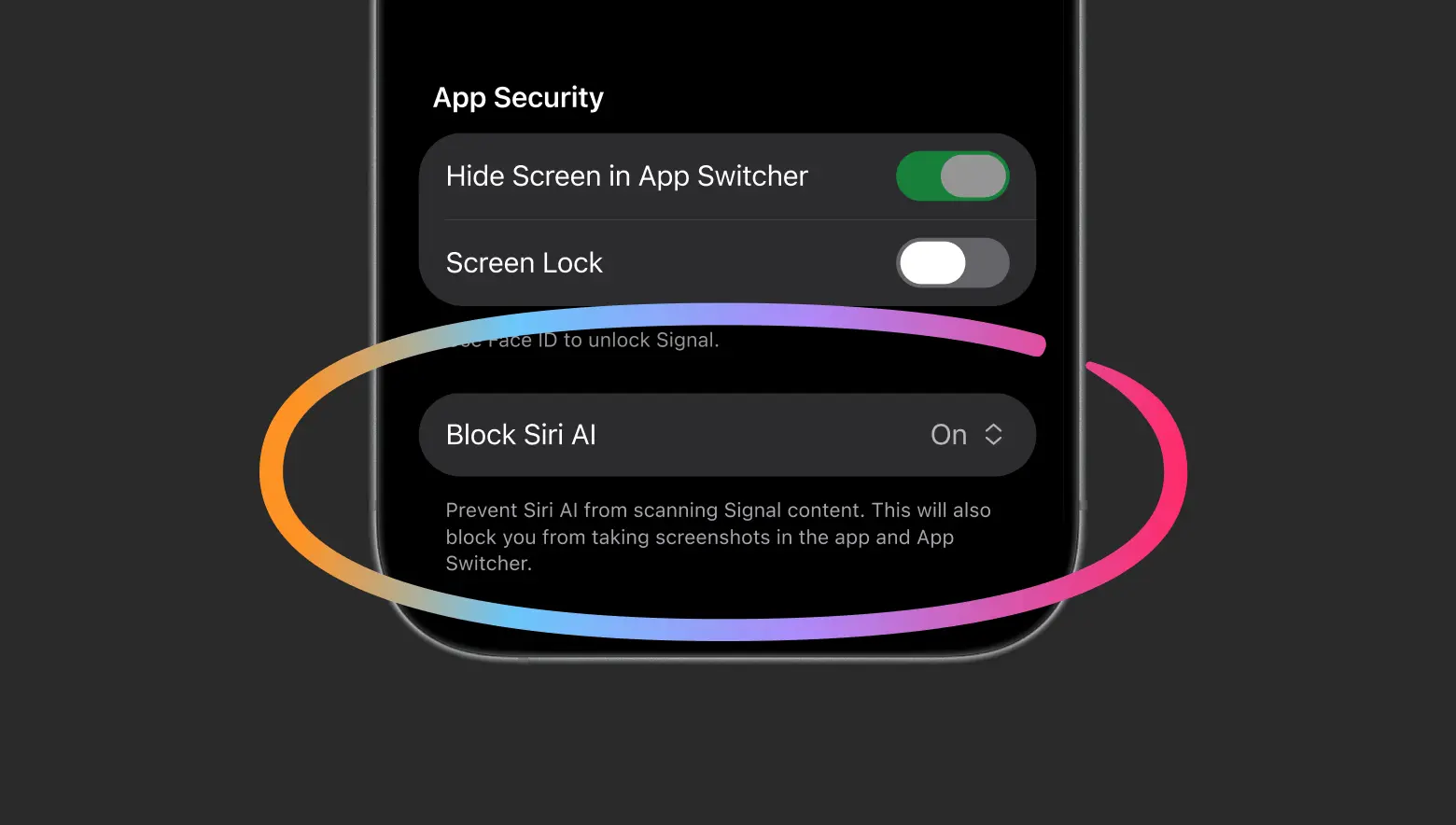
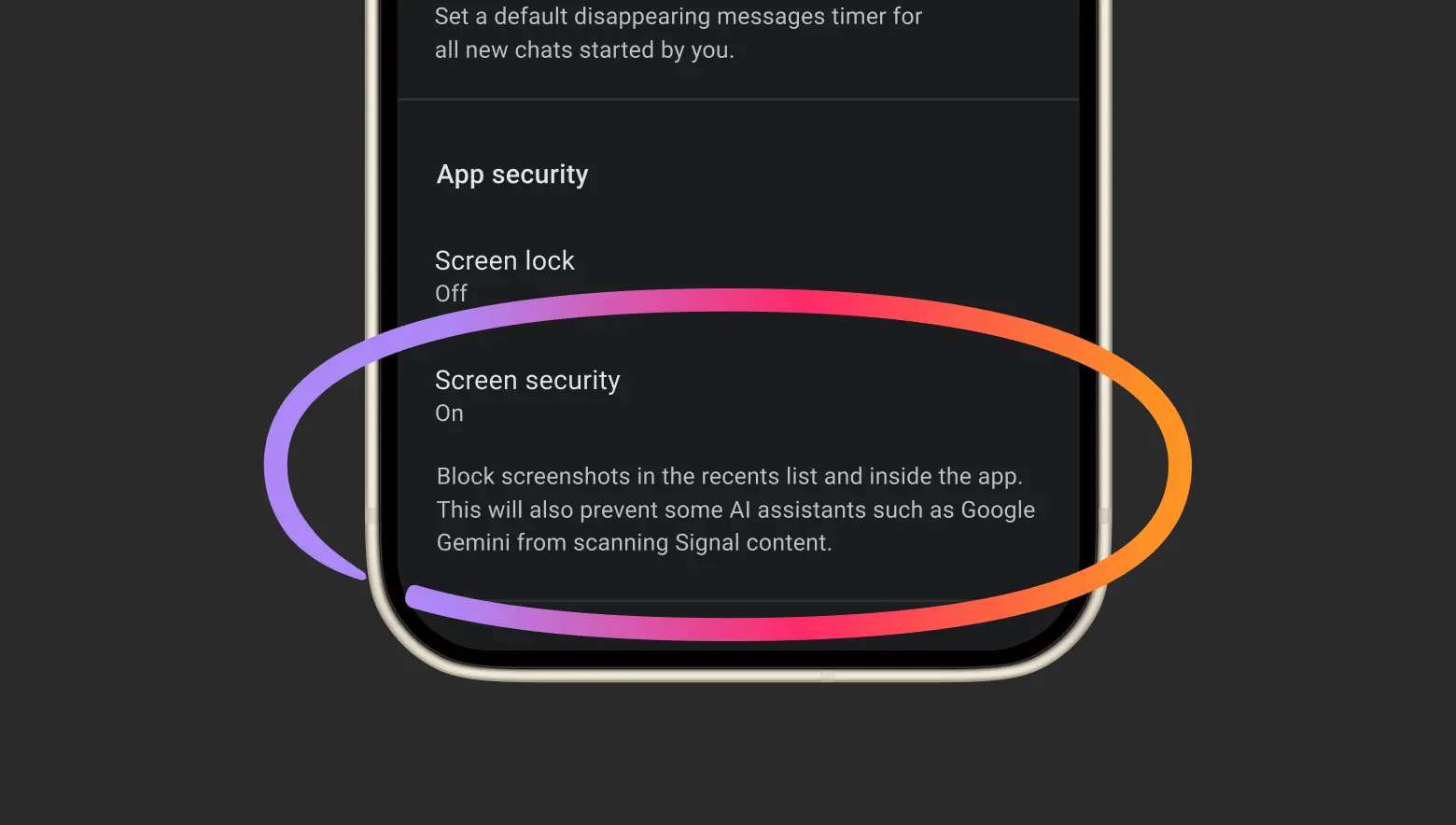
On iPhones running iOS 27, screenshots are now blocked inside Signal by default, with a new “Block Siri AI” switch in the app’s security settings. On Android, Signal turns on its existing Screen Security feature automatically when it detects an AI assistant trying to read the screen, blocking screenshots inside the app and in the recent-apps list. Users who still want screenshots can switch the protection off in settings — but Signal warns that doing so exposes not only their own messages but their contacts’ as well, and breaks the privacy guarantees the app is built on.
Signal has done this before, using the same approach last year to keep Microsoft’s Recall on Windows 11 from capturing images of Signal chats.
Why the screen is the battleground#
For more than a decade, Signal’s privacy promise has rested on two things it controls: open-source code anyone can inspect, and an encryption protocol formally verified and stress-tested by security researchers worldwide. Operating-system agents sidestep both at once. They don’t need to break the encryption or read the code — they just read the screen, the one place a message has to appear in plain text.
The agents in question are the ones Google and Apple have been weaving into their systems: Gemini Intelligence, which pairs with Google Gemini on Android, and Siri AI’s Onscreen Awareness on iOS. Whittaker’s complaint is not only that they capture data, but that the companies give developers no clean way to say no. The operating systems, she wrote, are changing the environment apps live in “in a way that’s making it increasingly hostile to privacy.”
Signal also flagged third-party agents such as Meta’s Muse, which it says use accessibility permissions — built to help people use their devices — as “a skeleton key” into apps.
The fix Signal admits is incomplete#
Whittaker is unusually candid about what screenshot blocking cannot do. It does nothing about other routes into app data: an agent that can read files already on the device doesn’t need a screenshot at all. Coverage is uneven, too: on Android the protection only kicks in where Signal can detect an assistant trying to read the screen, so it won’t work on every device. And on macOS there is no protection yet — Signal says Apple hasn’t provided the documented tools to block screenshots there reliably, though Apple’s macOS 27.3 beta adds more granular controls over app permissions.
What Signal is asking the OS makers to do#
The blog post ends with two concrete asks for Apple, Google and Microsoft. First, a simple, well-documented way for developers to opt an app out of AI data access — screen reading, filesystem access, notifications, APIs and other system frameworks — without gutting the app’s core features. Second, proper documentation and technical specifications for how these agents actually work, so developers can see what is captured and processed. Confidential computing, Signal says, doesn’t answer the question — it leaves the privacy decision in the providers’ hands.
Signal adds that Google and Apple are engaging with it on the question, and that it is “cautiously optimistic” about standardized approaches.
What to watch#
Signal is not the only app drawing this line, and the pattern is widening fast. Amazon has blocked shopping agents such as Meta’s Muse from its storefront; Walmart built a gateway to channel agents through its own rules; Anthropic has blocked third-party harnesses; United Airlines has banned transactions from unauthorized bots. The first wave of the agentic era was about access. The second is about the doors being shut, one app at a time.
Three things will decide how far this goes: whether Apple and Google ship the opt-out tools Signal wants — and whether macOS gets covered at all; whether other privacy-sensitive apps follow; and whether users keep the protection on, since disabling it to share a screenshot strips the guarantee from every contact in the conversation. Signal calls itself “the canary in the coal mine.” The rest of the ecosystem is about to find out whether the warning travels.
Sources: Signal, “Signal is Serious About Protecting Your Privacy”; The Register, “Signal slams door on prying AI agents to protect privacy”; TechCrunch, “Signal restricts mobile screenshots as it confronts ‘existential threat’ of AI surveillance”
Frequently asked questions
Can I still take screenshots of my Signal chats?
Yes — you can switch the protection off in the app’s settings. Signal warns that doing so exposes your messages, and your contacts’ messages, to operating-system AI agents, and breaks the privacy guarantees the app is built on.
Does blocking screenshots keep AI agents out of Signal completely?
No, and Signal says so itself. Screenshot blocking stops agents from reading what is on your screen, but it does not stop other routes into app data, such as content already stored on the device’s filesystem. There is also no equivalent protection on macOS yet.
Why is Signal singling out AI agents instead of screenshots in general?
Because the two are different in scale. A person taking a screenshot is a one-off act; an operating-system agent scans the screen continuously, stores what it captures, and can send it to a server Signal has no control over. Signal’s argument is that this turns a private conversation into training or query data without anyone in the chat agreeing to it.