Claude can now turn your artifacts into standalone Mac and Windows apps
Anthropic’s new “Install as app” beta gives Claude artifacts their own icon, window, and permissions on Mac and Windows — but the apps need an internet connection and a signed-in Claude account to open.
- How it works: describe an app to Claude, try it as an artifact, then choose “Install as app” from the Share menu. No packaging or code signing, and it uses your Claude account, so there is no API key or separate login. The installed app updates automatically when the underlying artifact is edited.
- Three permission levels: Default (browser-only), App permissions (always-on-top windows, global shortcuts, notifications), and Full computer access (run programs and read, change, or delete files without asking each time). A permission covers only the current version — Claude asks again after every update.
- What Anthropic built with it: Linnet, a full layered image editor; Phosphor, a file manager; Sift, which sets up folder rules and uses Claude to keep files organized; Tern, a terminal with Claude by your side; and Vitals, a menu-bar app for peeking at computer performance.
- The limits: you need to be online and signed in to Claude to open an app; Claude Docs, Slides, and Sheets artifacts can’t be installed; HIPAA-ready organizations and hybrid deployments are excluded. On Team it is on by default with full access off; on Enterprise it stays off until an owner turns it on.
- The skepticism: top commenters on the Reddit thread where the news spread call it, in effect, installing a website as a progressive web app — the novelty, in that reading, is not the install but what the app can do once installed.
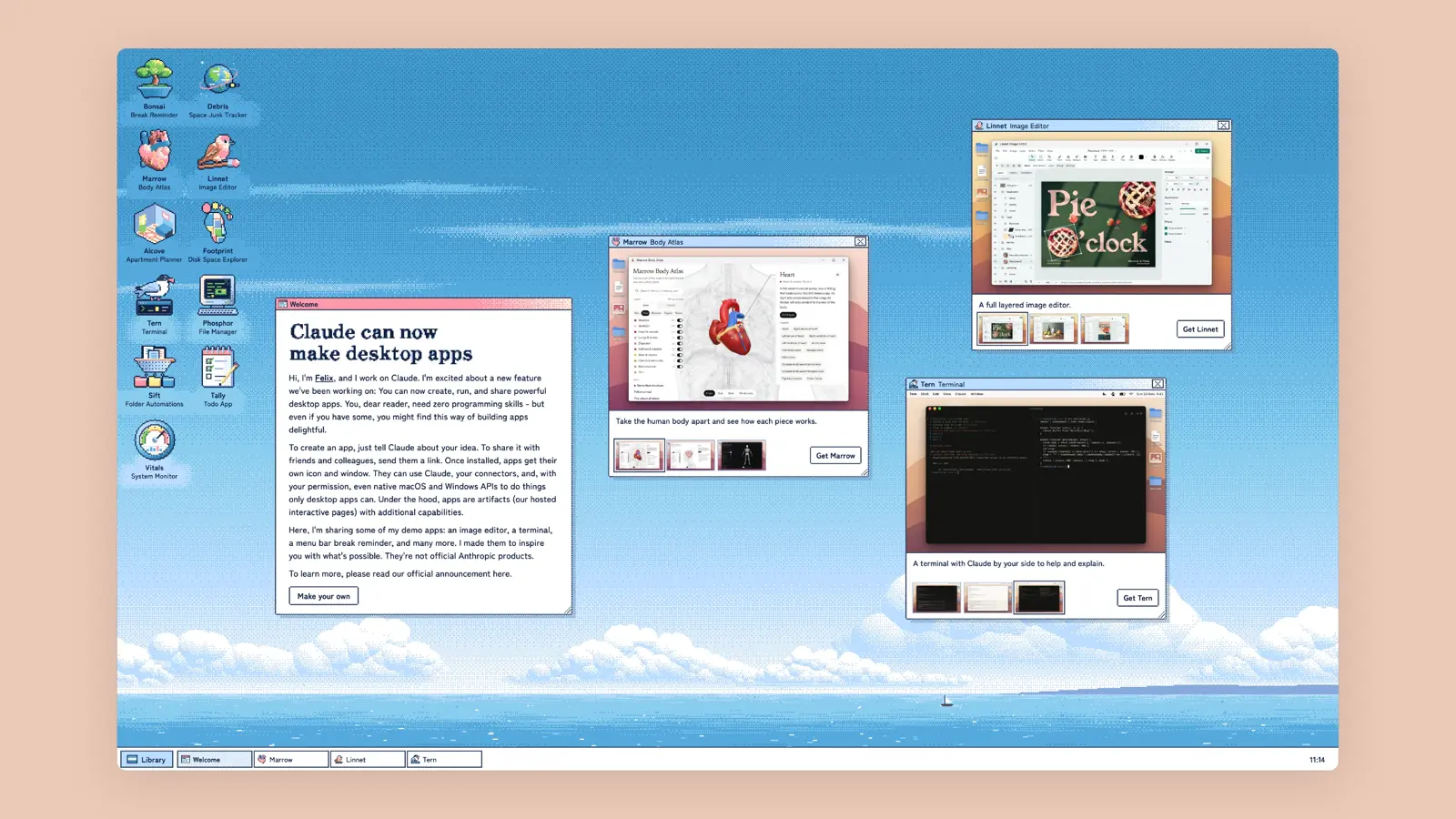
Anthropic gave Claude a new trick on Tuesday: the artifacts you build in a chat can now leave the chat. The company’s “Install as app” feature, rolling out in beta for Claude on Mac and Windows, turns an artifact into a standalone desktop app — its own icon, its own window, shareable with other people. No packaging, no code signing, no app-store review. You describe the app, try it as an artifact, and pick “Install as app” from the Share menu.
It is the most concrete step yet in Anthropic’s push to turn artifacts — the interactive documents, tools, and dashboards Claude generates inside a conversation — into software people actually live in. Artifacts started as shareable outputs, like a chart or a web page. People now use them as working tools, Anthropic says: a meeting-prep page that pulls from a calendar and email, or a tracker for the orders that need to ship that day. The pitch: if you rely on a tool for work, it should open like the rest of your apps.
From artifact to app in one click#
Installed apps stay connected to the artifact they came from: edit the artifact and the app updates automatically. They can also use Claude itself and your connected services, so a tracker that pulls from email keeps working after install. The trade-off is metering: requests the app makes to Claude count toward your plan’s usage limits, so a popular shared app can eat into the allowance of whoever runs it.
An installed app can also behave like a real desktop citizen. It can send notifications, or add an item to the Mac menu bar or the Windows system tray.
Three permission levels — and the one that matters#
The feature ships with a permission ladder, and the top rung is the one to think about before clicking anything. At the Default level, an installed app can only do what it would be able to do in a browser. App permissions unlock the desktop features — always-on-top windows, global shortcuts, notifications. Full computer access lets an app run programs and read, change, or delete your files without asking each time.
| Permission level | What the app can do |
|---|---|
| Default | Only what it could do in a browser |
| App permissions | Always-on-top windows, global shortcuts, notifications |
| Full computer access | Run programs; read, change, or delete files without asking each time |
Two guardrails are worth noting. A permission covers only the current version of the app: Claude asks again after every update, even your own edits. And full access can only be granted to apps you made yourself, or, on Team and Enterprise plans, apps made by people in your organization. Anthropic does not review apps before you install them, and says so plainly: only give full access to apps you trust.
What Anthropic built with it#
Anthropic’s own staff have been using the feature to build tools they apparently wanted for themselves: Linnet, a full layered image editor; Phosphor, a file manager; Sift, which sets up folder rules and uses Claude to keep files organized; Tern, a terminal with Claude by your side to help and explain; and Vitals, a menu-bar app for peeking at your computer’s performance. A demo video on the announcement page shows them running as ordinary desktop apps.
The catches#
First, the apps are not really standalone in the usual sense: you need to be online and signed in to Claude to open one. On the Reddit thread where the news spread, the top commenters were skeptical about novelty rather than existence: installing an artifact as an app is, in effect, installing a website as a progressive web app, something browsers have offered for years. The novelty, in that reading, is not the install but what the app can do once installed: notifications, a menu-bar presence, and the permission ladder.
Second, not everything can be installed. Claude Docs, Slides, and Sheets artifacts are excluded, and HIPAA-ready organizations and hybrid deployments can’t use the feature at all. On Team plans it is on by default with full access switched off; on Enterprise it stays off until an owner turns it on, and admins can switch app permissions and full access on or off for their organization.
What to watch#
The question now is whether the permission model survives contact with real users. The history of app permissions on every platform says the top tier will get clicked through. Watch whether shared apps become a real distribution channel for AI-built tools, and whether the first embarrassing incident — an app deleting something it shouldn’t have — arrives before Anthropic tightens the defaults. For now, the sensible posture is Anthropic’s own: install freely at the browser level, and treat full access like handing someone your house keys.
Sources: Anthropic, “Turn artifacts into Mac and Windows apps” (November 24, 2026); Anthropic support, “Install an artifact as an app” (updated November 24, 2026); 9to5Mac, “Anthropic just gave Claude users a new way to make Mac apps” (November 24, 2026); r/ClaudeAI, “Claude’s new feature lets users turn AI-generated artifacts into standalone desktop apps” (November 24, 2026)