Give your coding agent ears: a hands-on guide to earshot
Coding agents can now write the code that renders a film, a product demo or a game — but they cannot hear what they made. They can't tell a premium key press from a cheap one, notice a hit landing 80 ms after the cut, or hear that the music swells in the wrong place. earshot closes that gap: it turns sound into evidence an agent can reason about, runs locally on CPU, and — two days after its October 15, 2026 launch — is already past 500 GitHub stars under the MIT license.
describe, match, find and critique turn any audio file into words, scores and verdicts, while forge synthesizes sounds as code scored by a listening critic and fit translates a recording into editable code. It runs on CPU only, works offline after a one-time ~1.4 GB model download, and connects to your agent over MCP.- earshot (Leonxlnx/earshot, MIT) — ears for coding agents — passed 500 GitHub stars within two days of its October 15, 2026 launch (as of October 17, 2026).
- Needs Python 3.10+ and ffmpeg/ffprobe on PATH; CPU-only, no GPU is used. First model use downloads ~1.4 GB into
.cache/hf(CLAPlaion/larger_clap_general+ AudioSet taggerMIT/ast-finetuned-audioset-10-10-0.4593); afterwards it works offline (EARSHOT_OFFLINE=1). - Listen:
describe(calibrated tags with z-scores, alternative readings, measurements),match(verdict strong / plausible / weak / no match),find(best moments as start/end trims),critique(VERDICT + FIX FIRST scorecard). Each CLI call loads the models in ~20–40 s — use the MCP server or one Python script (from earshot import api) for loops. - Make:
forgewrites a sound as physical-synthesis code and improves it with a listening critic (v2: 34 motion-design categories, 4–6 variants each);fitturns a recording into an editable recipe module (median CLAP cosine 0.945 on 12 recordings, same top tag in 10 of 12). A fit is a derivative — keep the source recording's licence. - Connect:
claude mcp add earshot --scope user -e EARSHOT_THREADS=3 -- <venv>/bin/python -m earshot mcp, or any client via.mcp.json. Models load on first call and stay warm; the optionalllm_critiquetool readsGEMINI_API_KEYfrom the environment — never a literal key in a file.
earshot's premise is simple: a coding agent that can read images, files and browser state is still deaf. It generates a key-press sound effect for your UI, a whoosh for your logo sting, or a full mix for the launch film it just scripted — and then it has no idea whether any of it is any good. earshot listens instead: what a file sounds like in words, how well it fits a description, the best moment inside a long recording, whether it's a real recording or code-synthesized, a second-by-second listening transcript of a whole film.
With ears, the agent can also make its own sounds in code and improve them by listening (earshot forge), and translate a recording into code it can vary (earshot fit). Every command prints a plain-language summary first; --json gives the full result and --out f.json saves it. Errors are one line on stderr with exit 1. This guide installs the CLI, listens, makes, and wires the whole thing into your coding agent. Every command below comes from the project's README, verified today.
What you'll need
- Python 3.10+ and ffmpeg / ffprobe on your PATH. CPU only — no GPU is used anywhere.
- ~1.4 GB of disk for the first model download (into
.cache/hfinside the repo, orEARSHOT_HOME). After that, everything runs offline. - A terminal, plus any audio file to test with. For the agent step: Claude Code or any MCP-capable client.
Step 1: Install the CLI
git clone https://github.com/Leonxlnx/earshot && cd earshot
python -m venv .venv
.venv/bin/python -m pip install torch --index-url https://download.pytorch.org/whl/cpu   # Windows: .venv/Scripts/python
.venv/bin/python -m pip install -e ".[mcp,llm,dev]"
.venv/bin/python -m earshot doctor --load
The doctor --load call triggers the one-time download: two open models — CLAP laion/larger_clap_general (text-audio embeddings) and the AudioSet tagger MIT/ast-finetuned-audioset-10-10-0.4593 — and reports what's in use. After that, earshot works offline. A few knobs exist as environment variables: EARSHOT_THREADS (torch CPU threads, default min(4, cores/2)), EARSHOT_PRECISION (bf16 on CPUs with native bf16, fp32 everywhere else), and EARSHOT_HOME to move the cache.
Step 2: Listen first — describe a sound
.venv/bin/python -m earshot describe enter.ogg 0.56 s short transient (attack 3 ms, decays in 190 ms). Sounds most like: a single mechanical keyboard key press
(z +5.4), a soft key release click (z +3.6) ... [clear reading]. peak -0.1 dBFS, brightness 1.5 kHz ...describe is the core read: calibrated tags with z-scores, the closest alternative readings, AudioSet labels, and real measurements (peak level, brightness, attack, decay). Two things matter for agents: the tags are calibrated — a z-score of +5.4 means "confident", not just "the closest embedding" — and the alternatives are included, so the agent sees ambiguity instead of hallucinating certainty. One practical note: each CLI call loads the models, taking ~20–40 s. For more than a few calls, use the MCP server from Step 7 or one Python script with from earshot import api.
Step 3: Check the fit and find the moment
.venv/bin/python -m earshot match key.ogg "a deep thocky mechanical keyboard press" \
  --alts "a clicky blue switch keyboard" "a mouse click"
.venv/bin/python -m earshot find keys.ogg "a single mechanical key press" --top 4
-> strong (z +3.7; would rank #2 among 322 vocabulary descriptions) ...
0:03.94-0:04.19 (0.24 s stroke, z +4.1 strong); 0:10.60-0:10.86 ...match answers "does this file sound like what I asked for?" — cosine similarity, the query's z-score among the whole vocabulary, and a verdict of strong / plausible / weak / no match backed by held-out evidence. The --alts give the agent the counterfactuals it would otherwise have to guess. find is the time-series twin: given a long recording, it returns the best moments as sample trims with start/end seconds. The same idea scales up with rank QUERY PATHS... (sort many candidate downloads by a description), compare FILE --refs DIR / ab A B (nearest references, typicality, head-to-head), and sheet — a second-by-second listening transcript of a whole film, with labelled sound events, spectrogram, loudness and sync to the beat.
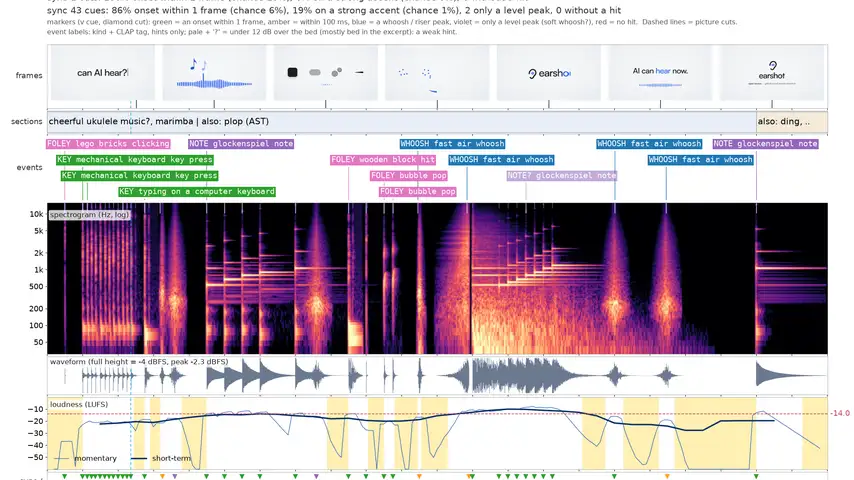
earshot sheet — frames, labelled sound events, spectrogram, loudness and sync-to-beat for a film (Leonxlnx/earshot, MIT). One page shows your agent exactly what it made.Step 4: Critique a render
.venv/bin/python -m earshot critique film.mp4 VERDICT: close - 21 of 23 scored metrics in range ... FIX FIRST: 1. [major] nothing reaches body level until 0:01.01 ...critique is the scorecard step: it rates a render against professional launch films and hands back a prioritized fix list — what fails, where, how badly. This is the loop that makes earshot more than a measurement tool. An agent that renders a film, a game scene, or a product demo can now do what a human editor does: render, listen, fix the worst thing, render again. The verdict is machine-checkable, so the loop closes without you in it.
Step 5: Make sounds in code with forge
.venv/bin/python -m earshot forge --list
.venv/bin/python -m earshot forge keypress --budget 144 --variants 4 --dir made/keypress
.venv/bin/python -m earshot forge whoosh --target "a fast crisp air whoosh" --alts "a wind gust" "a sword swing" \
  --mode real --dir made/whoosh
forge inverts the usual sound-library workflow. Instead of downloading samples, the agent writes a sound as code: a recipe of physical synthesis — modal resonators, contact excitations, filtered noise, a computed room and a microphone — with no recorded audio inside. The forge renders candidates from the recipe's parameters, and a critic built from earshot scores each one: description match against named confusions, realness, closeness to real reference recordings, measured shape — then model-free penalties against the references (tonal balance in 1/3-octave bands, the spectro-temporal envelope, artifacts like clicks, aliasing, DC offset, harsh resonances, comb ring and cut tails) and polish (attack, onset snap, tail smoothness). A cheap pre-screen ranks many renders so the models only hear the best; an evolutionary search keeps the winners and mutates them. Then the agent reads the critic's words ("sounds like: a cork pop, a glass ting", "decay +2.4 outside the refs", "bumpy tail"), looks at spectrograms next to the references, rewrites the recipe, and runs it again.
Each run lands in --dir as the best diverse WAVs plus report.md (what was asked, the search per generation, each pick in the critic's words), compare.png (each pick's spectrogram, envelope and tonal balance next to its nearest reference), audition.wav (made, ref, made, ref — pairs to listen to), and report.json with every candidate's parameters and scores. forge --list shows the recipes (click, impact, keypress, pop, whoosh, ...); v2 ships them as families of named characters across 34 motion-design categories — whooshes, swishes, risers, downlifters, zips, impacts, sub drops, logo stings, clicks, taps, notification dings and more — with 4–6 variants each. Bring your own references with --refs DIR (the repo holds no licensed recordings) or leave them out: without refs the critic runs in "designed" mode, reporting realness without requiring it. The launch film's sounds — all 22 seconds — were made this way in code, with no recordings and no music track. And the honest test: five made sounds (key press, UI click, pop, fast whoosh, impact) were played blind next to real recordings, and the author picked the made one correctly 8 times out of 15 — a coin flip.
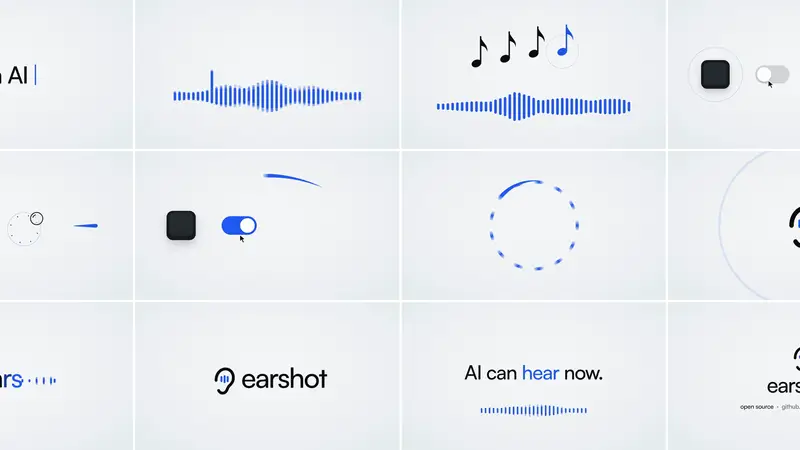
earshot forge, with no recordings and no music track (Leonxlnx/earshot, MIT).Step 6: Turn a recording into code with fit
.venv/bin/python -m earshot fit click.wav -o made/click_fit.py --report
python made/click_fit.py 3 take3.wav
.venv/bin/python -m earshot fit --morph a.wav b.wav --amount 0.5 -o made/ab_morph.py
fit is analysis by synthesis: it fits a small synthesis model — ringing modes, tracked partials, a time-varying noise gesture, or a layered hybrid — until its render matches the recording, then writes the model as a forge recipe module whose render() makes the sound. The module stores the structure of the sound, not its samples, so it can make new takes (python made/click_fit.py 3 take3.wav renders seed 3), variations (size, damping, pitch, brightness, decay) and morphs between two recordings. Measured on 12 real recordings (click, key press, pop, impact, fast whoosh, notification): the median CLAP cosine between each recording and the render of its generated code is 0.945 (minimum 0.881), and earshot describe gives the same top tag in 10 of 12. One licence rule matters: a fit is a derivative of its recording, so keep the source's licence with the recipe.
Step 7: Wire it into your coding agent
claude mcp add earshot --scope user -e EARSHOT_THREADS=3 -- /path/to/earshot/.venv/bin/python -m earshot mcpThe MCP server is how the agent actually hears. Models load on the first call and stay warm — no more 20–40 s per command — and every tool is available from inside the agent's loop: describe a file it just generated, critique the film it just rendered, forge a replacement sound for the thing it flagged. Any MCP-capable client can connect via .mcp.json (command <venv>/bin/python, args ["-m", "earshot", "mcp"]). Pure-Python works too: import earshot; earshot.describe('whoosh.wav'). Two operational notes from the README: on a slow machine, start Claude Code with MCP_TIMEOUT=60000; and the optional llm_critique tool reads GEMINI_API_KEY from the environment — never write a literal key into a file.
What you built
Your coding agent is no longer deaf. It can identify and measure any audio file, verify a description against a sound, pull the best moments out of long recordings, score its own renders against professional launch films — and, with forge and fit, synthesize brand-new sounds as editable code or convert real recordings into variational code. All of it on CPU, all of it local.
Honest limitations
- The critic grades its own homework. The forge search optimizes earshot's own models, and those can be pleased without the sound getting better — the realness model is easy to fool (a modal resonator plus a room and a noise floor reads "real"). The README says it plainly: judge a made sound by the model-free measurements, spectrograms next to the references, robust re-renders, and a human blind test.
- The headline tests are small. One listener, 15 trials for the blind test (8/15 correct); 12 recordings for the fit numbers (risers, zips and long designed sounds are untested).
- It's not fast per call. ~20–40 s of model loading per CLI invocation — fine for a script, painful for a loop. That's exactly what the MCP server and the single-process Python API are for.
- First run is 1.4 GB. The models download once; budget the disk and the patience.
Frequently asked questions
Do I need a GPU or an API key?
Neither. earshot is CPU-only and the base tools need no key — the only network traffic is the one-time ~1.4 GB model download; after that EARSHOT_OFFLINE=1 runs everything locally.
Can code-made sounds really pass for real recordings?
Often, but not always. In the project's own blind test the author picked the made sound correctly 8 times out of 15 — a coin flip — but the realness model is easy to fool, and fit renders are close rather than identical (onsets, tone balance and noise texture still differ measurably). Judge made sounds by the model-free measurements, spectrograms next to references, and a human blind test, not just the critic's score.
What if my assistant isn't Claude Code?
Any MCP-capable client connects through .mcp.json, and you can drive everything from the plain CLI or the Python API (import earshot; earshot.describe('whoosh.wav')). earshot gallery turns forge outputs into a static HTML listening page — players, spectrograms, numbers — with no server and no network.