Query your codebase instead of grepping it: a hands-on guide to Graphify
Every serious coding assistant has the same blind spot: it reads files one at a time. Ask it where authentication meets the database and it greps its way there — slow, token-hungry, and blind to architecture. Graphify takes a different route: it turns your whole project — code, docs, SQL schemas, configs, PDFs — into a knowledge graph your assistant can query instead of reading. It has struck a nerve: as of October 17, 2026 the open-source repo (Apache-2.0) is past 127,000 GitHub stars, and an October 1 trend digest estimated about 1,200 new stars in a single day.
uv tool install graphifyy (the PyPI package has a double-y; the command is graphify), run graphify install, then /graphify . in your assistant. You get graph.html, GRAPH_REPORT.md, and graph.json. Query with /graphify query, /graphify path, and /graphify explain instead of grepping; code parses locally with tree-sitter for zero LLM cost, and graphify hook install keeps the graph current on every commit.- Graphify (Graphify-Labs/graphify, Apache-2.0, by Graphify Labs) has past 127,000 GitHub stars and roughly 12,300 forks as of October 17, 2026; created 2026-04-03 and still actively updated.
- Install: the PyPI package is
graphifyy(double-y; other graphify* packages are unaffiliated), but the CLI command isgraphify. Needs Python 3.10+ and uv (or pipx). - One install, any assistant: Claude Code, Cursor, Codex, Gemini CLI, GitHub Copilot and 20+ more, on macOS, Linux, and Windows — or connect via the MCP server.
- Build with
/graphify .→graphify-out/holdsgraph.html(clickable),GRAPH_REPORT.md(god nodes, communities, key paths),graph.json(queryable). Roughly 40 languages parse locally with tree-sitter; a code-only graph needs no API key and runs fully offline. - Every edge is tagged
EXTRACTED(stated in the source) orINFERRED(resolved by graphify). Ambiguous symbol names are refused with the candidate list rather than guessed; script exit codes are0answered,3ambiguous,4no match. - Keep it fresh:
/graphify ./docs --updatere-extracts only changed files;graphify hook installauto-rebuilds on commit and branch checkout;.graphifyrcholds project settings;.gitignoreis honored. Vendor benchmarks: 0.497 recall@10 on LOCOMO (vs 0.048 mem0, 0.149 supermemory) with 0 LLM credits spent building the graph.
Every serious coding assistant has the same blind spot: it reads files one at a time. Ask it where authentication meets the database and it greps its way there — slow, token-hungry, and blind to architecture. Graphify takes a different route: it turns your whole project — code, docs, SQL schemas, configs, PDFs — into a knowledge graph your assistant can query instead of reading. And it has struck a nerve: as of October 17, 2026 the open-source repo (Apache-2.0) is past 127,000 GitHub stars, after an October 1 trend digest estimated about 1,200 new stars in a single day.
The idea is deliberately unglamorous. No embeddings, no vector store: Graphify parses roughly 40 languages locally with tree-sitter AST — deterministic, no LLM, nothing leaves your machine — and writes three files you can open, read, and query. Every edge is tagged EXTRACTED (it was stated in the source) or INFERRED (Graphify resolved it), so your agent can tell what was read from what was guessed.
This guide installs the CLI, builds your first graph, wires it into your coding assistant, and sets up the habits that keep it current. Everything here comes from the project's README and docs, verified today.
What you'll need
- Python 3.10+ and uv (or pipx). macOS:
brew install [email protected] uv. Windows:winget install astral-sh.uv. - A project to map — any repo in one of the ~40 supported languages, on macOS, Linux, or Windows.
- An AI coding assistant (optional but the point): Claude Code, Cursor, Codex, Gemini CLI, GitHub Copilot, or 20+ others. Headless use works too — a code-only graph needs no API key at all.
- No LLM credits for the code graph:
graphify extracton a code-only corpus runs fully offline.
Step 1: Install the CLI
The PyPI package is graphifyy — with a double-y. The README is explicit that other graphify* packages on PyPI are not affiliated, so type it carefully. The CLI command itself is plain graphify:
uv tool install graphifyy      # recommended, isolated env
# alternatives:
pipx install graphifyy
pip install graphifyy          # may need PATH setup
Verify it:
graphify --help
Step 2: Register the skill with your assistant
Run this once:
graphify install # detects your assistant and registers the skill
It installs a /graphify skill for your platform — Claude Code, Cursor, Codex, Gemini CLI, and the rest — so you can build and query graphs from inside your normal session.
Step 3: Build your first graph
In your assistant, in the project root:
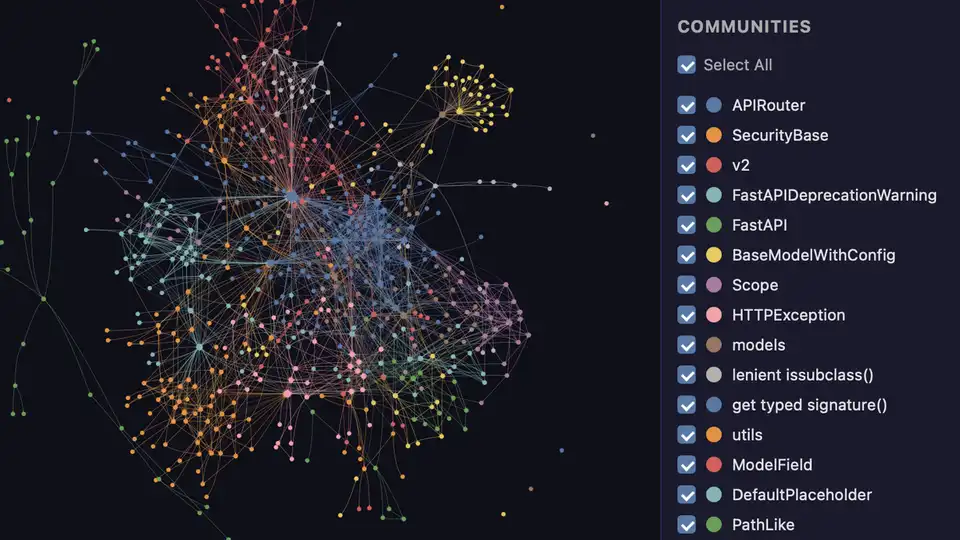
/graphify .On a small repo it takes about thirty seconds. You get three files in graphify-out/:
graphify-out/
├── graph.html       open in any browser: click nodes, filter, search
├── GRAPH_REPORT.md  the highlights: key concepts, surprising connections, suggested questions
└── graph.json       the full graph: query it anytime without re-reading your files
Step 4: Read the report, not the files
GRAPH_REPORT.md summarizes the graph for broad architecture review: the god nodes (the most-connected concepts — what everything flows through), the communities (the graph split into subsystems with Leiden clustering, labeled without an LLM), and the key paths between them. Start here before you let an agent loose on the repo: it is the cheapest architecture review you will ever get.
Step 5: Query, trace, explain
This is the payoff. Instead of grepping, ask the graph:
/graphify query "what connects auth to the database?"
/graphify path "UserService" "DatabasePool"
/graphify explain "RateLimiter"
query answers a question against graph.json; path traces the connection between two things; explain unpacks one concept. Edges carry their provenance — EXTRACTED vs INFERRED — so when your assistant reasons over the answer it can weigh evidence properly. Two behaviors worth knowing: a name that matches several nodes is refused with the candidate list rather than guessed, and scripts can read the outcome from the exit code (0 answered, 3 ambiguous, 4 no matching node).
You can also query the graph straight from the CLI, without the assistant: graphify query, graphify path, and graphify explain work against the local graph.
Step 6: Keep the graph fresh
A stale graph is worse than none. Three habits:
/graphify ./docs --update          # re-extract only changed files
/graphify . --cluster-only         # rerun clustering without re-extracting
graphify hook install              # auto-rebuild on commit + branch checkout
The hook auto-rebuilds on commit and branch checkout (run graphify update . after git pull, per the README's recommended workflow). For settings that belong to the project rather than one run, drop a .graphifyrc in the scan root — one key=value per line, # comments. Graphify honors .gitignore and supports --exclude patterns and a project .graphifyignore, so vendored code and build output never pollute the graph.
Step 7: Make your assistant always use the graph
Run once per project:
graphify claude install        # or: graphify codex install
# or, for any other platform:
graphify install --platform <name>
This writes a small config that tells your assistant to consult the knowledge graph for codebase questions — preferring scoped queries like graphify query "<question>" over reading the full report or grepping raw files. On hook platforms (Claude Code, Gemini CLI) a hook fires before search-style tool calls and nudges the assistant toward the graph path; on instruction-file platforms (Codex, OpenCode, Cursor) persistent files like AGENTS.md or .cursor/rules/ provide the same guidance. To remove it everywhere: graphify uninstall (add --purge to also delete graphify-out/).
What you built
A local, deterministic map of your project that your coding assistant can traverse instead of re-reading files: god nodes showing what everything flows through, communities splitting the system into subsystems, provenance-tagged edges, and a query path your assistant prefers over grepping. On the project's own benchmarks this structure-first approach scores 0.497 recall@10 on LOCOMO (against 0.048 for mem0 and 0.149 for supermemory) with zero LLM credits spent building the graph — measured on the project's own harness with a blind-validated judge.
Honest limitations
- The "no LLM" promise covers code. Docs, PDFs, images, and video go through a semantic pass that needs a configured backend (Gemini, Kimi, Claude, OpenAI, DeepSeek, Ollama, Bedrock, or the
claudeCLI). For a pure code graph use--code-onlyorGRAPHIFY_BACKEND=none. Video and audio at least stay local — transcribed with faster-whisper, nothing leaves your machine. - Ambiguity is refused, not resolved. A symbol matching several nodes fails with the candidate list instead of being guessed. Good for correctness; your scripts need to handle exit code 3.
- Big repos take real time. AST parsing is deterministic but a monorepo build is not instant — which is why the incremental
--updateand commit hooks exist. - The benchmark numbers are the vendor's. The 0.497 recall@10 was measured on their own harness with a blind-validated judge (90.6% agreement, Cohen's kappa 0.81); treat it as directional, not gospel.
- Assistant coverage is wide, not universal. 20+ platforms, with hooks on some and instruction files on others — check the always-on docs for yours rather than assuming the hook fires.
Frequently asked questions
Does Graphify send my code to the cloud?
No. Code files are parsed locally with tree-sitter and nothing leaves your machine; a code-only corpus runs fully offline with no API key (use --code-only or GRAPHIFY_BACKEND=none for mixed repos). Docs, PDFs, and images go through a semantic pass that uses your configured backend, but video and audio stay local, transcribed with faster-whisper. Graphify collects no telemetry, and queries are logged locally to ~/.cache/graphify-queries.log unless you set GRAPHIFY_QUERY_LOG_DISABLE=1.
Do I need a specific AI assistant to use it?
No. graphify install supports 20+ platforms — Claude Code, Cursor, Codex, Gemini CLI, GitHub Copilot and more — and you can also connect through the MCP server. Hook platforms (Claude Code, Gemini CLI) get a hook that fires before search-style tool calls; instruction-file platforms (Codex, OpenCode, Cursor) get persistent guidance in files like AGENTS.md. You can also query the graph directly from the CLI without any assistant at all.
What happens when a symbol matches several nodes?
The query is refused with the candidate list rather than guessed, so the assistant never silently picks the wrong RateLimiter. Scripts can read the outcome from the exit code: 0 means an answer, 3 means an ambiguous name, 4 means no matching node.