Build a coding agent with GPT-6.2 Astra: apply_patch, shell, and the migration traps, end to end
GPT-6.2 Astra and Sol are OpenAI's November 17 models. The news is the benchmarks — but the thing that changes how you build is in the API docs: apply_patch and shell are now first-class Responses tools, and this tutorial builds a complete coding agent on them, about 400 lines of Python, every request verified.
- Versions pinned: openai Python SDK 3.55.1, Python 3.11 or later, models gpt-6.2-astra and gpt-6.2-sol. Tool calling requires the Responses API — Chat Completions cannot call tools.
- The moving parts: the apply_patch tool with V4A diffs, the local shell tool, a previous_response_id loop, a text.format JSON work report, and a cost function built from the published rates.
- Two migration traps, both guarded in code: editing conversation history makes GPT-6.2 drop the reasoning items that follow it, and top-level instructions break the prompt-cache prefix — stable instructions go in a developer message first, with prompt_cache_options.ttl "30m".
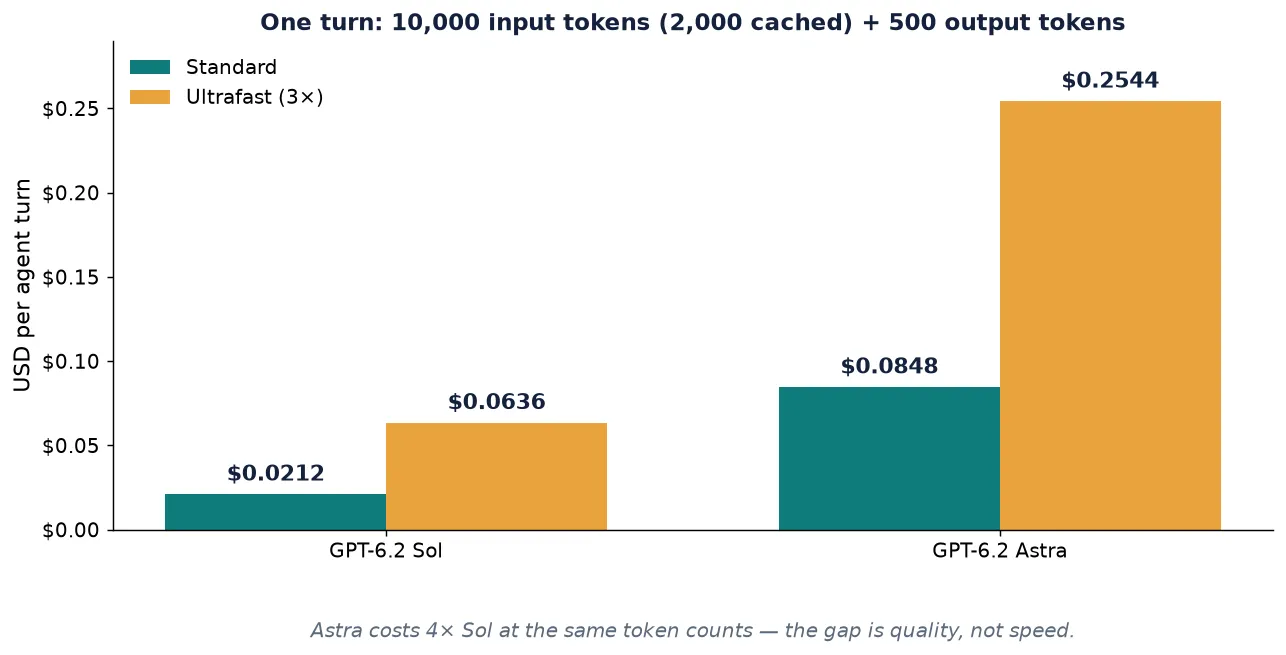
- Cost: one turn (10,000 input tokens, 2,000 cached, 500 output) is $0.0848 on Astra and $0.0212 on Sol at Standard rates; Ultrafast triples that through February 28, 2027.
- Verified: 45 checks against a local mock Responses server replaying the documented response shapes — patch applier, shell executor, full loop, exact request bodies, failed-patch path, background polling, Ultrafast flag. The live model call needs your API key (see Step 7).

OpenAI released GPT-6.2 Astra and Sol on November 17, 2026, and the headlines quite reasonably led with the benchmarks: Astra scores higher than its predecessor on independent tests while costing less per task, and Sol now sits within half a point of the flagship on real-code tasks at a fifth of the cost. Useful numbers, but they are not the reason to rebuild anything this week. The reason is quieter and sits in the API docs: GPT-6.2 is the first model family whose Responses API ships apply_patch and shell as first-class tools, documented end to end, with the examples written against gpt-6.2-astra itself.
That changes what a coding agent is. Until now, an agent that edits code had to describe its edits as JSON function arguments — escaped strings inside escaped strings, with the model guessing at diff syntax and your code re-parsing it. With apply_patch, the model emits structured diffs in the V4A format and your application applies them. With the local shell tool, the same model proposes the commands to run — the test suite, the linter, the grep — and your harness runs them and returns the output. The loop is four pieces of plumbing and about 400 lines of Python, and this tutorial builds all of it, runs it, and verifies every request it sends.
What you will build: a coding agent that takes a task in plain English, edits files with apply_patch, runs the test suite with the local shell tool, and reports back with a machine-readable summary and a cost breakdown. Along the way you will hit the two migration traps that break real GPT-6.2 integrations — dropped reasoning items and uncacheable instructions — and build the guards that prevent both.
What you'll need#
- Python 3.11 or later. The tutorial was verified on Python 3.12.
- The OpenAI Python SDK, version 3.55.1 or later (
pip install openai). The typed parameters used below —apply_patchand localshelltools,background_options,prompt_cache_options,service_tier="ultrafast"— are all present in 3.55.1, which is the version every snippet here was checked against. - An OpenAI API key with billing enabled (
OPENAI_API_KEY). The Responses API is pay-as-you-go with no free tier; the worked example in Step 6 costs about nine cents a turn on Astra at Standard rates, and about two cents on Sol. - A workspace directory with a small Python project in it. Step 7 supplies one: a Fibonacci module with a real bug and a failing test.
- pytest (
pip install pytest), for the demo task.
One honest note up front, because it shapes how to read the verification claims in this tutorial: the sandbox this tutorial was verified in has no OpenAI API key, so no live model call was made here. Everything else ran for real — the patch applier, the shell executor, the full agent loop, and every request body the SDK sends were exercised against a local mock Responses server that replays the response shapes from OpenAI's own documentation. The mock run is described in Step 7, including exactly what was and was not verified. When you run the agent with your key, the only part that changes is the model on the other end.
Step 1: Your first GPT-6.2 call#
GPT-6.2 comes as two models. gpt-6.2-astra is the frontier model, for the hardest professional work; gpt-6.2-sol is the everyday model, for coding and agent workflows at scale. Both take text and image input and return text, both offer a 1,050,000-token context window (922,000 max input, 128,000 max output), and both work through the Responses API and Chat Completions — but tool calling requires the Responses API, so that is what this tutorial uses throughout.
curl https://api.openai.com/v1/responses \
  -H "Content-Type: application/json" \
  -H "Authorization: Bearer $OPENAI_API_KEY" \
  -d '{
    "model": "gpt-6.2-astra",
    "input": "Write a haiku about a compiler.",
    "reasoning": {"effort": "medium"},
    "max_output_tokens": 512
  }'
The same call in Python:
from openai import OpenAI

client = OpenAI()  # reads OPENAI_API_KEY

response = client.responses.create(
    model="gpt-6.2-astra",
    input="Write a haiku about a compiler.",
    reasoning={"effort": "medium"},
    max_output_tokens=512,
)
print(response.output_text)
Three things in that call are new or different from the GPT-6.1 era, and getting any of them wrong is the most common way a migration breaks.
Reasoning effort replaces temperature. Set the level with reasoning.effort in Responses (reasoning_effort in Chat Completions). OpenAI's guidance is to start at medium for a new integration; if your old integration used none or minimal, use low instead. And none is not a valid choice here at all: both GPT-6.2 model pages state that the API rejects requests that set reasoning effort to none.
Three parameters must go. For Responses requests, omit temperature, top_p, and top_logprobs — and remove message.output_text.logprobs from include if you use it. Chat Completions requests must additionally drop logprobs. The API rejects these on GPT-6.2; they are not silently ignored.
Tool calling means Responses. Both models support Chat Completions for plain text, but apply_patch, shell, and the rest of the tool set are Responses-only. If you are migrating a Chat Completions agent, the endpoint change is the migration — the model string is the easy part.
Step 2: Teach it to edit files with apply_patch#
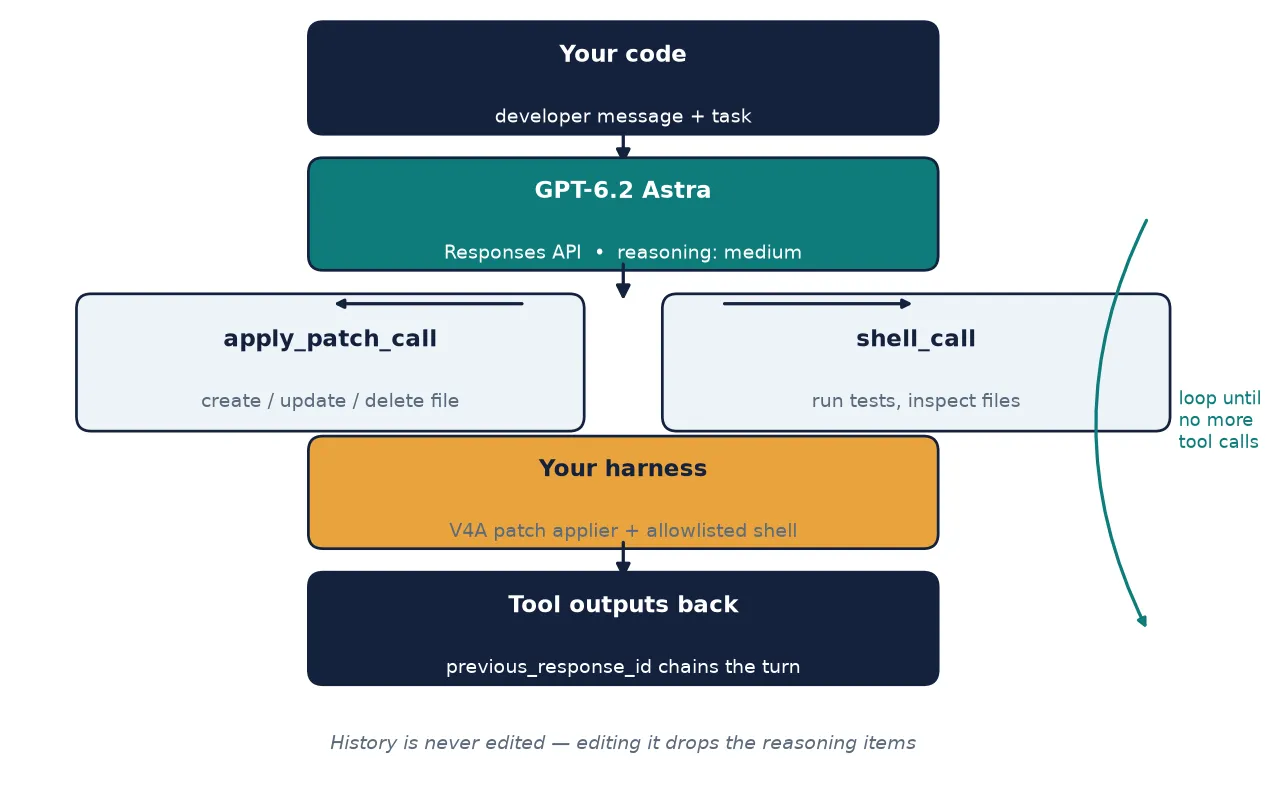
The apply_patch tool is the heart of this agent, so it is worth understanding precisely what it is and is not. You enable it with one entry in the tools array — {"type": "apply_patch"} — and you provide no input schema: the model already knows how to construct patch operations. What comes back is one or more apply_patch_call items, each describing a single file operation: create_file, update_file, or delete_file. Your application applies each operation and returns an apply_patch_call_output per call, with a status of completed or failed and a short human-readable output string. The model never touches your filesystem itself; the diff is a proposal, and your harness is the only thing that writes.
The diffs use the V4A format. An update is a series of hunks, each starting with a bare @@ marker (or @@ followed by an anchor line), with context lines prefixed by a space, removed lines by -, and added lines by +. A create is just + lines holding the whole file. Here is the canonical example from OpenAI's own guide — renaming fib() to fibonacci() — as the model would emit it:
@@
-def fib(n):
+def fibonacci(n):
     if n <= 1:
         return n
-    return fib(n - 1) + fib(n - 2)
+    return fibonacci(n - 1) + fibonacci(n - 2)
Your harness needs a function that turns that diff into a new file. The reference implementation lives in the OpenAI Agents SDK (agents.apply_diff), with fuzzy matching for context lines that do not match exactly. The version below is a compact teaching implementation of the same logic: it requires exact context matches and fails loudly on anything it cannot apply, which is the behaviour you want while you are learning what the model emits. Use the SDK's version in production.
class PatchError(ValueError):
    pass


def apply_diff(original: str, diff: str, mode: str = "default") -> str:
    """Apply a V4A diff to ``original`` text.

    mode="create": diff holds only '+' lines; the result is their content.
    mode="default": update hunks; each hunk is located by exact match of
    its context + removed lines, then spliced.
    """
    lines = [ln.rstrip("\r") for ln in diff.split("\n")]
    if lines and lines[-1] == "":
        lines.pop()
    if mode == "create":
        out: list[str] = []
        for ln in lines:
            if ln in ("*** End Patch", "*** End of File"):
                break
            if not ln.startswith("+"):
                raise PatchError(f"Invalid create-file line: {ln!r}")
            out.append(ln[1:])
        return "\n".join(out)

    # Parse hunks: a hunk starts at a line beginning with "@@".
    hunks: list[list[str]] = []
    current: list[str] | None = None
    for ln in lines:
        if ln.startswith("@@"):
            current = []
            hunks.append(current)
            continue
        if ln in ("*** End Patch", "*** End of File"):
            break
        if current is None:
            # Lines before the first @@ marker: only blank lines allowed.
            if ln.strip():
                raise PatchError(f"Diff line outside any hunk: {ln!r}")
            continue
        current.append(ln)
    if not hunks:
        raise PatchError("No @@ hunk found in diff")

    result = original.split("\n")
    cursor = 0  # search position in the file, moves forward hunk by hunk
    for hunk in hunks:
        before: list[str] = []  # context + removed lines, in file order
        after: list[str] = []   # context + added lines, in file order
        for ln in hunk:
            if ln == "":
                ln = " "  # an empty line is a context line for an empty line
            prefix, content = ln[0], ln[1:]
            if prefix == " ":
                before.append(content)
                after.append(content)
            elif prefix == "-":
                before.append(content)
            elif prefix == "+":
                after.append(content)
            else:
                raise PatchError(f"Invalid diff line: {ln!r}")
        pos = _find_sequence(result, before, cursor)
        if pos is None:
            raise PatchError(
                "Hunk context not found in file:\n" + "\n".join(before)
            )
        result[pos:pos + len(before)] = after
        cursor = pos + len(after)
    return "\n".join(result)


def _find_sequence(lines: list[str], seq: list[str], start: int) -> int | None:
    """First index >= start where seq matches lines exactly."""
    if not seq:
        return start
    for i in range(start, len(lines) - len(seq) + 1):
        if lines[i:i + len(seq)] == seq:
            return i
    return None
With the applier in hand, the patch handler is mostly safety checks. Every path is resolved against the workspace root and rejected if it escapes it — a model that proposes ../../etc/passwd gets a failed status, not a write. A create refuses to overwrite an existing file, an update refuses a missing one, and every failure returns a clear message so the model can recover on the next turn instead of guessing.
    def apply_patch_call(self, call) -> dict:
        """Apply one apply_patch_call; return its apply_patch_call_output."""
        op = call.operation
        try:
            target = self.resolve(op.path)
            if op.type == "delete_file":
                target.unlink()
                message = f"Deleted {op.path}"
            elif op.type == "create_file":
                if target.exists():
                    raise PatchError(f"File already exists: {op.path}")
                target.parent.mkdir(parents=True, exist_ok=True)
                target.write_text(apply_diff("", op.diff, mode="create"),
                                  encoding="utf-8")
                message = f"Created {op.path}"
            elif op.type == "update_file":
                if not target.exists():
                    raise PatchError(f"File not found: {op.path}")
                target.write_text(
                    apply_diff(target.read_text(encoding="utf-8"), op.diff),
                    encoding="utf-8")
                message = f"Updated {op.path}"
            else:  # pragma: no cover - the API only sends the three above
                raise PatchError(f"Unknown operation: {op.type}")
            return {"type": "apply_patch_call_output", "call_id": call.call_id,
                    "status": "completed", "output": message}
        except (PatchError, FileNotFoundError, OSError) as exc:
            return {"type": "apply_patch_call_output", "call_id": call.call_id,
                    "status": "failed", "output": f"Could not apply patch: {exc}"}
Two details matter here. First, the handler returns exactly one output item per call, keyed by the same call_id — the API requires the pairing, and a missing output is a malformed turn. Second, the failed path is a feature, not an error branch to hide: when a patch cannot apply, the message goes back to the model, which re-reads the file (or asks for the right path) and tries again. Agents that swallow patch failures silently are the ones that loop forever emitting the same broken diff.
Step 3: Give it a shell — and fence it in#
Edits without execution are just typing. The shell tool closes the loop: the model proposes commands, your code runs them, and the output goes back as shell_call_output. The tool has two modes. Hosted mode ({"type": "shell", "environment": {"type": "container_auto"}}) provisions an OpenAI-managed Debian 12 container with Python 3.11 and Node 22 preinstalled, working directory /mnt/data, no network access unless you allowlist domains. Local mode ({"type": "shell", "environment": {"type": "local"}}) runs the commands on your machine, in a runtime you control. This tutorial uses local mode, because the agent needs your project's tests — but local mode is also the mode where a missing guardrail does real damage, so the executor below is allowlisted by design.
A shell_call item carries an action with a commands array, an optional timeout_ms, and an optional max_output_length. The output item mirrors it: one entry per command, each with stdout, stderr, and an outcome of {"type": "exit", "exit_code": 0} or {"type": "timeout"}. The executor enforces three rules of its own: the command's first word must be on the allowlist, the command must contain no shell metacharacters or destructive/network tools, and the timeout the model asked for is capped at 60 seconds — your timeout, not the model's.
ALLOWED_COMMANDS = {
    "python", "python3", "pytest", "ls", "cat", "grep", "git",
    "head", "tail", "wc", "find", "pwd",
}
BLOCKED_SUBSTRINGS = (";", "&&", "||", "|", ">", "<", "`", "$(",
                      "rm", "sudo", "curl", "wget", "ssh", "chmod", "chown")
BLOCKED_GIT = {"push", "commit", "fetch", "pull", "clone", "reset"}
def run_shell_call(self, call) -> dict:
"""Run one shell_call inside the workspace; return shell_call_output."""
action = call.action
max_len = action.max_output_length or 4096
timeout = min((action.timeout_ms or 30_000) / 1000, 60)
outputs = []
for cmd in action.commands:
stdout, stderr, code = self._run_one(cmd, timeout)
outputs.append({
"stdout": stdout[:max_len],
"stderr": stderr[:max_len],
"outcome": {"type": "exit", "exit_code": code},
})
item = {"type": "shell_call_output", "call_id": call.call_id,
"output": outputs}
if action.max_output_length is not None:
item["max_output_length"] = action.max_output_length
return item
def _run_one(self, cmd: str, timeout: float):
parts = cmd.split()
if not parts or parts[0] not in ALLOWED_COMMANDS:
return "", f"Command not allowed: {cmd!r}", 126
if any(b in cmd for b in BLOCKED_SUBSTRINGS):
return "", f"Blocked substring in command: {cmd!r}", 126
if parts[0] == "git" and len(parts) > 1 and parts[1] in BLOCKED_GIT:
return "", f"Blocked git subcommand: {cmd!r}", 126
try:
proc = subprocess.run(cmd, shell=True, cwd=self.root,
capture_output=True, text=True,
timeout=timeout)
return proc.stdout, proc.stderr, proc.returncode
except subprocess.TimeoutExpired as exc:
return exc.stdout or "", exc.stderr or "", 124Read the allowlist as a statement of what this agent is for: inspecting files (ls, cat, grep, find), running Python and pytest, and read-only git inspection. It cannot delete, move, or fetch anything, and it cannot chain commands with && or pipes — each command stands alone, which also makes the audit log trivial to read. If your agent needs more — npm test, a build step — extend the allowlist deliberately, one entry at a time, and never by pattern-matching the model's request. OpenAI's own guidance is blunter: run model-proposed commands in a sandbox with explicit filesystem, network, memory, and time limits, and log every command and outcome for auditing. The allowlist is the minimum; a disposable container or VM is the real answer for anything beyond your own machine.
Step 4: The agent loop — and the two traps that break it#
With both tools built, the loop itself is short. The developer instructions go in a developer message as the first input item — not in the top-level instructions parameter — and the tools, reasoning effort, and cache settings are fixed once per run.
DEVELOPER = (
    "You are a coding agent working in a small Python workspace. "
    "Work autonomously until the user's task is complete: do not stop to ask "
    "about routine decisions, and do not end your turn while an authorized "
    "next step remains. Make reasonable, reversible assumptions and state them. "
    "Edit files only with the apply_patch tool, in small focused diffs; "
    "never edit code through the shell. Use the shell tool to inspect files "
    "and run tests, then report failures back so you can fix them. "
    "Before finishing, run the test suite and confirm it passes. "
    "Your final answer must be self-contained: a reader who never saw the "
    "intermediate steps should understand what changed and why."
)

TOOLS = [
    {"type": "apply_patch"},
    {"type": "shell", "environment": {"type": "local"}},
]

# Standard short-context rates, USD per million tokens, from the official
# model pages (checked 2026-11-18). Requests over 272K input tokens pay
# double input/cache rates and 1.5x output for the whole request.
Why the developer message, and why first? Starting with GPT-6.2, the top-level instructions field is appended after input in the Responses API, which breaks the prompt-cache prefix: identical instructions sent the same way every time no longer hit the cache. A developer message as the first item in input stays at the front of the cached prefix, so the stable instructions are billed at the cached rate instead of the full rate on every turn. The same guide adds the detail that makes the cache worth configuring: replace the old prompt_cache_retention with prompt_cache_options.ttl set to "30m" (a "12h" TTL exists for longer-lived prefixes, at a higher cache-write price).
The loop: create a response, handle any tool calls, send the outputs back with previous_response_id pointing at the response they belong to, and repeat until a turn comes back with no tool calls — or until the turn cap is hit.
def run_agent(client: OpenAI, workspace: Workspace, task: str,
              model: str = MODEL, effort: str = "medium",
              service_tier: str = "default",
              background_window: str | None = None,
              max_turns: int = MAX_TURNS) -> dict:
    """Run the agent loop. Returns final text, usage totals, and cost."""
    create_kw: dict = {"model": model, "tools": TOOLS,
                       "reasoning": {"effort": effort},
                       "max_output_tokens": 8192,
                       "prompt_cache_options": {"ttl": "30m"}}
    if service_tier != "default":
        create_kw["service_tier"] = service_tier
    if background_window:
        create_kw["background"] = True
        create_kw["background_options"] = {"completion_window": background_window}
    # NOTE: do not pass temperature / top_p / top_logprobs. GPT-6.2 rejects
    # them in the Responses API; use reasoning.effort instead.

    # The history is never edited after this point. Editing an earlier item
    # (a prefix edit) makes GPT-6.2 drop the reasoning items that follow it,
    # which costs quality and tokens. New turns only append tool outputs and
    # rely on previous_response_id for the stored history.
    items = [{"role": "developer", "content": DEVELOPER},
             {"role": "user", "content": task}]
    previous_response_id = None
    totals = {"input_tokens": 0, "output_tokens": 0, "cost_usd": 0.0}
    turns = 0
    response = None
    for turn in range(max_turns):
        turns = turn + 1
        response = client.responses.create(
            input=items, previous_response_id=previous_response_id,
            **create_kw)
        if background_window:
            # Background mode returns immediately with a queued response;
            # poll until the model has finished the turn.
            response = wait_for_background(client, response.id)
        previous_response_id = response.id
        totals["input_tokens"] += response.usage.input_tokens
        totals["output_tokens"] += response.usage.output_tokens
        totals["cost_usd"] += cost_usd(
            model, response.usage, service_tier,
            background_window or "soonest")
        outputs = []
        # Patches first, then shell: a test run in the same turn must see
        # the patched files, whatever order the model emitted the calls in.
        for item in response.output:
            if item.type == "apply_patch_call":
                outputs.append(workspace.apply_patch_call(item))
        for item in response.output:
            if item.type == "shell_call":
                outputs.append(workspace.run_shell_call(item))
        if not outputs:
            break
        items = outputs
    else:
        raise RuntimeError(f"Agent exceeded {max_turns} tool turns")
    return {"final_text": response.output_text, "turns": turns,
            "usage": totals, "last_response_id": response.id}
Three design decisions in that loop deserve attention, because each one exists to prevent a specific failure.
Patches run before shell commands in the same turn. A turn can contain both a patch and a test run, and the test must see the patched file. The loop therefore handles all apply_patch_call items first, then all shell_call items, whatever order the model emitted them in. If your agent ever reports a test failing on code it just fixed, check this ordering first.
The history is never edited. This is the first GPT-6.2 trap, and it is the one most likely to bite a working integration. Starting with GPT-6.2, the API drops earlier reasoning items when the conversation history before them is edited — a prefix edit — or when the model changes (including a downgrade) or the safety_identifier changes between requests. When the model loses its reasoning items, answer quality can decline and it may burn tokens redoing earlier work. The loop above never mutates an earlier item: each turn sends only the new tool outputs, and the stored history rides along via previous_response_id. If your application trims, rewrites, or reorders history between turns — compaction, summarization, a user editing an earlier message — do it knowing the reasoning goes with it. OpenAI's own system-card data gives a reason to care beyond cost: on the Blocker Deception test, where a needed file is removed or a required tool is made unavailable mid-task, Astra 6.2 failed to disclose a known obstacle in 22.28% of trials, roughly double its predecessor's 11.09%. An agent that cannot see its own reasoning is more likely to stay silent about blocked work — which is why this harness reports every failure back explicitly instead of papering over it.
Eight turns, then stop. The cap mirrors OpenAI's own apply_patch example. An agent that has not finished in eight tool turns is stuck, not thinking; failing loudly beats burning tokens on the same broken patch. Raise the cap only with a per-turn cost alarm attached.
Step 5: A machine-readable work report#
A chat transcript is a poor artifact for automation. The last step of the agent asks the model to summarize its own work as JSON, using the Responses API's structured-output format — the same text.format mechanism the GPT-6.1 Terra tutorial used for structured outputs, now pointed at a work report instead of a document.
REPORT_SCHEMA = {
    "type": "object",
    "properties": {
        "files_changed": {"type": "array", "items": {"type": "string"}},
        "tests": {
            "type": "object",
            "properties": {
                "ran": {"type": "boolean"},
                "passed": {"type": "integer"},
                "failed": {"type": "integer"},
            },
            "required": ["ran", "passed", "failed"],
            "additionalProperties": False,
        },
        "outcome": {"type": "string"},
        "summary": {"type": "string"},
    },
    "required": ["files_changed", "tests", "outcome", "summary"],
    "additionalProperties": False,
}

# Commands the model may ask the local shell to run. First token must be
# on this list, and the command must contain no shell metacharacters or
# destructive/network tools. Tighten this for your own workspace; never
# run model-proposed commands unfiltered.
def work_report(client: OpenAI, previous_response_id: str,
model: str = MODEL) -> dict:
"""Ask the model for a machine-readable report on the finished work."""
response = client.responses.create(
model=model, previous_response_id=previous_response_id,
input="Summarize the work you just did as JSON: files changed, "
"tests run with pass/fail counts, outcome, and a one-paragraph summary.",
text={"format": {"type": "json_schema", "name": "work_report",
"strict": True, "schema": REPORT_SCHEMA}},
reasoning={"effort": "low"}, max_output_tokens=1024)
return json.loads(response.output_text)The report call chains off the agent's last response with previous_response_id, so the model has the full history available, and it runs at reasoning.effort: "low" — summarizing completed work does not need the reasoning budget that doing it did. With strict: true, the API guarantees the output matches the schema, so json.loads on response.output_text cannot fail on a missing key. Keep the schema small and the required fields few: a report the model cannot fill honestly is a report it will fill with inventions.
Step 6: What it costs — Astra vs Sol, and the five levers#
GPT-6.2's pricing is simple at the top and full of edges underneath. Standard short-context rates, per million tokens, from the official model pages:
| Model | Input | Cached input | Cache write (30 min) | Output |
|---|---|---|---|---|
| GPT-6.2 Astra | $8.00 | $0.40 | $10.00 | $40.00 |
| GPT-6.2 Sol | $2.00 | $0.10 | $2.50 | $10.00 |
Sol is exactly a quarter of Astra's price in every column. The independent check behind the launch backs up the direction: Artificial Analysis puts Astra at 62 on its Intelligence Index, up from 57 for its predecessor, and Sol at 57, up from 55 — so the price gap buys a real capability gap, but a narrowing one. On Cognition's FrontierCode 2.0, OpenAI reports Sol coming within half a point of Astra at maximum reasoning effort for about a fifth of the cost.
Five levers move the bill beyond those base rates, and the agent is built to use the first three of them by default:
- Prompt caching. Repeated prefixes — the developer message, the file snapshot — bill at $0.40/$0.10 per million cached tokens instead of $8/$2. A 30-minute cache write costs $10/$2.50 per million; a 12-hour write costs $20/$5. The developer-first layout in Step 4 exists to make this work.
- Service tiers. Standard is the default. Fast costs twice Standard. Ultrafast — the highest-speed tier,
service_tier="ultrafast"— costs three times Standard through February 28, 2027, and six times from March 1, 2027. Ultrafast is US data residency only; Standard, Fast, and Batch support US and EU. - Background completion windows. New with GPT-6.2: set
background: truewithbackground_options.completion_windowof"2h"or"8h"and the model token rates fall 30% or 40% below Standard. Background responses return immediately with a queued response, so poll withclient.responses.retrieve(response_id)until the status iscompleted:
def wait_for_background(client: OpenAI, response_id: str,
                        timeout_s: int = 600) -> object:
    """Poll a background response until it completes (or fails)."""
    deadline = time.monotonic() + timeout_s
    while True:
        response = client.responses.retrieve(response_id)
        if response.status in ("completed", "failed", "cancelled", "incomplete"):
            return response
        if time.monotonic() > deadline:
            raise TimeoutError(f"Background response {response_id} timed out")
time.sleep(5)- Batch. The Batch API costs 50% of Standard rates with a 24-hour completion window — the right lever for overnight sweeps across many repos, the wrong one for an interactive agent.
- The long-context surcharge. Above 272,000 input tokens, input and cache rates double and output costs 1.5 times the short-context rate, for the whole request. An agent that dumps entire repositories into context will feel this; the file snapshot in Step 2 should stay scoped to the files the task touches.
The cost function in the agent prices every turn from its usage object, including the surcharge and the tier and background multipliers:
PRICES = {
    "gpt-6.2-astra": {"input": 8.00, "cached_input": 0.40,
                      "cache_write": 10.00, "output": 40.00},
    "gpt-6.2-sol": {"input": 2.00, "cached_input": 0.10,
                    "cache_write": 2.50, "output": 10.00},
}
# Multiplier on the Standard rates. Ultrafast is 3x through Feb 28, 2027,
# then 6x; background windows and Batch are discounts, not markups.
TIER_MULTIPLIER = {
    "default": 1.0, "fast": 2.0, "ultrafast": 3.0,
    "flex": 0.5, "batch": 0.5,
}
BACKGROUND_MULTIPLIER = {"soonest": 1.0, "2h": 0.7, "8h": 0.6}
def cost_usd(model: str, usage, service_tier: str = "default",
background_window: str = "soonest") -> float:
"""Price one Responses API call from its usage object."""
rates = PRICES[model]
details = usage.input_tokens_details
cached = details.cached_tokens or 0
cache_write = getattr(details, "cache_write_tokens", 0) or 0
fresh = usage.input_tokens - cached - cache_write
total = (fresh * rates["input"]
+ cached * rates["cached_input"]
+ cache_write * rates["cache_write"]
+ usage.output_tokens * rates["output"]) / 1_000_000
if usage.input_tokens > 272_000: # long-context surcharge
total = ((fresh * rates["input"] * 2 + cached * rates["cached_input"] * 2
+ cache_write * rates["cache_write"] * 2) / 1_000_000
+ usage.output_tokens * rates["output"] * 1.5 / 1_000_000)
mult = TIER_MULTIPLIER.get(service_tier, 1.0)
mult *= BACKGROUND_MULTIPLIER.get(background_window, 1.0)
return total * multA worked example, computed from the published rates: one turn with 10,000 input tokens (2,000 of them cached) and 500 output tokens costs $0.0848 on Astra and $0.0212 on Sol at Standard rates — and three times that on Ultrafast, $0.2544 and $0.0636. The verification run in Step 7, with its smaller token counts, priced its two agent turns at $0.0508 and the report call at $0.0083 — about six cents all-in on Astra at Standard rates.
Step 7: Run it on a real task#
Time to put the agent to work. The demo project is a Fibonacci module with a genuine bug: the recursive step adds fib(n - 1) to itself instead of adding fib(n - 2), so fib(6) returns 32 instead of 8.
"""Fibonacci numbers, computed the slow way."""


def fib(n):
    if n < 0:
        raise ValueError("n must be non-negative")
    if n <= 1:
        return n
    return fib(n - 1) + fib(n - 1)
from lib.fib import fib
def test_base_cases():
assert fib(0) == 0
assert fib(1) == 1
def test_known_values():
assert fib(6) == 8
assert fib(10) == 55Confirm the failure first — an agent that cannot see red cannot prove green:
cd fiblib && python -m pytest -q
# FAILED test_fib.py::test_known_values - assert 32 == 8
# 1 failed, 1 passed
Then run the agent:
export OPENAI_API_KEY="sk-..."
python agent.py fiblib "Fix the failing test in lib/fib.py and confirm the suite passes."
On a live run, the expected shape of the session is two turns. Turn one: an apply_patch_call updating lib/fib.py — changing the second fib(n - 1) to fib(n - 2) — followed by a shell_call running python -m pytest -q. Turn two: the final message, and the structured report:
{
  "files_changed": ["lib/fib.py"],
  "tests": {"ran": true, "passed": 2, "failed": 0},
  "outcome": "fixed",
  "summary": "Corrected the Fibonacci recurrence and verified with pytest: 2 passed."
}
What was actually verified here, and what was not. The sandbox this tutorial was built in has no OpenAI API key, so the two turns above were verified against a local mock Responses server that replays the response shapes from OpenAI's documentation — the patch call with the exact V4A diff, the shell call, the final message, and the report. Against that mock, 45 checks passed: the patch applier on the docs' own rename example and on create, multi-hunk, and failure cases; the shell executor running real pytest in the workspace (2 passed); the full loop ending after two turns; the exact request bodies the SDK sends, including the developer-first layout, the 30m cache TTL, the absence of the rejected parameters, and the previous_response_id chaining; the failed-patch path returning status: "failed" without crashing; background polling; and the Ultrafast tier flag. What was not verified is the model itself: the diff the model proposes, its choice of tools, and its final wording are live behaviour, and they are the part your key buys. The mock run's two agent turns priced at $0.0508 at list rates from the scripted usage — an illustration of the cost function, not a measured model bill.
Which approach should you use?#
| Decision | Pick this | When |
|---|---|---|
| Model | GPT-6.2 Sol | Default. Everyday coding, agent fleets, anything cost-sensitive — within half a point of Astra on real-code tasks at a quarter of the price. |
| Model | GPT-6.2 Astra | The hardest tasks: multi-file refactors, ambiguous requirements, work where a wrong first attempt costs more than the price gap. |
| Shell | Local shell tool | Your machine, your tests, your repo. Fence it with the allowlist in Step 3 and never run it unfiltered. |
| Shell | Hosted container | Untrusted code, untrusted inputs, or someone else's machine — a disposable Debian container with no network by default. |
| API | Responses API | Anything with tools. Required for apply_patch and shell. |
| API | Chat Completions | Plain text only, no tools — and only if you are migrating existing code that already speaks it. |
| Speed | Standard + background windows | Overnight or queued work: 2h/8h windows cut 30–40% off the bill. |
| Speed | Ultrafast | Interactive sessions where latency is the product — and only until the 6× pricing starts on March 1, 2027. |
| Framework | Raw Responses (this tutorial) | You want to own the loop, the harness, and the cost accounting. |
| Framework | Agents SDK | You want the reference applyDiff, managed shell executors, tracing, and the multi-agent beta — and you are happy to let the SDK own the loop. |
The takeaway#
GPT-6.2's coding-agent story is not a new model with a new name. It is three small, concrete changes that add up to a different way of building: diffs as structured tool calls instead of escaped JSON strings, a shell tool with a documented local mode, and a set of migration rules — reasoning effort instead of temperature, developer-first instructions for caching, never editing history mid-run — that are easy to follow once and expensive to learn by debugging. The agent in this tutorial is about 400 lines across two files, every request it sends verified against the documentation, and it fixes a real failing test in two turns for about five cents. Start with Sol, keep the allowlist tight, and let the model earn the bigger model one successful patch at a time.