Qwen4-Max hands-on: build a working coding agent with Alibaba's new flagship API
Alibaba's Qwen4-Max went generally available today with a 1M-token context and a $1.50/$4.50 rate card — 25% cheaper than Qwen3.8-Max. This tutorial wires it into a working coding agent: thinking controls, tool calling, structured output, and cost math, every call verified against the QwenCloud docs and the OpenAI SDK.
- What it is: Qwen4-Max, released November 16, 2026. API model ID
qwen4-max, 1M-token context window, up to 393K output tokens, hybrid thinking enabled by default, API-only — no downloadable weights, no fine-tuning. - Verified here: Every SDK call was checked against openai SDK 3.51.0. The agent loop ran end to end against a mocked transport (no QwenCloud key was available in the verification sandbox, so the model was not called live): request shapes,
extra_bodyflattening, thereasoning_contentround-trip, tool dispatch, a real pytest run, cost math, and a strict JSON Schema parse. The live calls need your key; the request shapes are exactly what the SDK sends. - The price: $1.50 per million input tokens, $4.50 per million output tokens in Singapore ($1.413/$4.24 elsewhere); cached input $0.075 per million; thinking tokens billed as output. 25% below Qwen3.8-Max at $2/$6.
- Thinking defaults:
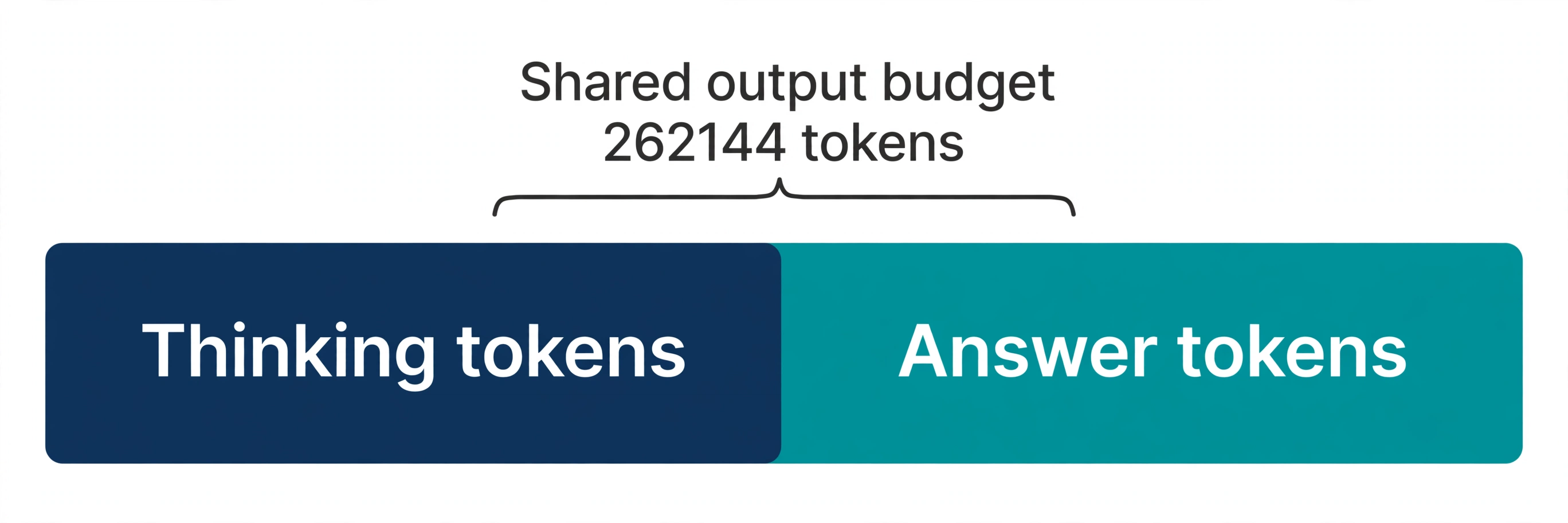
enable_thinking=true,preserve_thinking=true,reasoning_effort=high,thinking_budget=131072. Thinking and the answer share one 262,144-token output budget — cap it withmax_completion_tokens, nevermax_tokens. - The gotchas:
tool_choice"required"is not supported for Qwen models;reasoning_contentmust be sent back in multi-turn tool flows; never set a token cap on a structured-output call; the preview IDqwen4-max-previewretires November 25, 2026.

Alibaba made Qwen4-Max generally available today, November 16, 2026 — five days after a preview that could only be reached through a subscription. The general release changes the terms completely: a public pay-per-token API, a published price, and a 1M-token context window. The model ID is qwen4-max, the Singapore price is $1.50 per million input tokens and $4.50 per million output tokens, and the endpoint speaks the OpenAI Chat Completions protocol — which means the code you already have for any OpenAI-compatible model works with a different base URL and a different key.
That is the whole story in one paragraph, and it is enough to start building. Qwen4-Max is the first model of the Qwen4 generation and Alibaba's new flagship. It reads text, images, and video, reasons by default, calls tools, and returns schema-valid JSON. It is also API-only: there are no downloadable weights and no fine-tuning, so the API is not one way to use the model — it is the only way. What follows is the fastest useful thing you can build on it: a small coding agent that reads a project, fixes a bug, runs the tests, and prints what the run cost. Every call in it was verified against the QwenCloud documentation and the installed OpenAI Python SDK before publication.
One honest caveat before the code: Alibaba has published no independent leaderboard result for Qwen4-Max yet, and neither has any third-party evaluator. The numbers in this tutorial are the vendor's own — prices, context limits, and API behavior from QwenCloud's documentation — not benchmark claims. The tutorial teaches you to call the model correctly; it does not tell you the model is the best at anything.
What you'll need#
- Python 3.10 or newer. The examples use the official
openaiPython SDK, version 3.51.0 at time of writing. Any recent 1.x or 3.x release works the same way for the calls here. - A QwenCloud account and a pay-as-you-go API key. Create the key in the QwenCloud console in the Singapore region; keys are region-specific, and the examples below use the Singapore endpoint. Keys for pay-as-you-go access start with
sk-ws-. New Singapore accounts are listed with a free-token grant — check the console's free-quota page for the current amount before you count on it. - A few dollars of API credit. At the Singapore rates, a 100,000-input / 10,000-output-token run costs $0.195. The verification harness in this tutorial ran against a mocked transport, so the code paths were exercised end to end without spending anything — the live calls need your key.
- A scratch directory. The agent in Step 3 reads and writes files. Keep it in a folder you can throw away, and never point it at a repository you care about.
Step 1 — Get a key and make your first call#
Sign in to the QwenCloud console, switch the region to Singapore, and create a pay-as-you-go API key on the API Keys page. Export it — the SDK in this tutorial reads DASHSCOPE_API_KEY, the same variable the QwenCloud quickstart uses:
mkdir qwen-agent
cd qwen-agent
python3 -m venv .venv
source .venv/bin/activate
pip install openai pydantic pytest
export DASHSCOPE_API_KEY="sk-ws-..."   # your key from the console
Confirm the install, then send the first request. This is the QwenCloud quickstart, verbatim from the documentation — the only thing changed is the prompt:
import os
from openai import OpenAI

client = OpenAI(
    api_key=os.environ["DASHSCOPE_API_KEY"],
    base_url="https://ap-southeast-1.maas.qwencloudapi.com/compatible-mode/v1",
)

completion = client.chat.completions.create(
    model="qwen4-max",
    messages=[{"role": "user", "content": "Summarize the benefits of solar energy in three bullet points."}],
)

print(completion.choices[0].message.content)
Two things about that base URL are easy to get wrong. First, it is region-coded: ap-southeast-1 is Singapore, and each region has its own base URL and its own keys. A key created in Singapore does not work against another region's endpoint. Second, it is not the only base URL in the QwenCloud docs. The Token Plan — the subscription route for coding tools — uses https://token-plan.maas.qwencloudapi.com/compatible-mode/v1, and its keys start with sk-sp-. Do not mix them: a Token Plan key on the pay-as-you-go endpoint, or a pay-as-you-go key on the Token Plan endpoint, will fail. Step 6 covers when each route is the right one.
If the call fails, the error tells you which side is wrong: a 401 means the key, a 404 means the model ID or the base URL. The model ID is qwen4-max — not qwen4-max-preview, which was the preview ID. The preview stays on the Token Plan at a discounted credit rate until November 25, 2026, and is then retired. Use qwen4-max for everything new.
Step 2 — Thinking is on by default#
Qwen4-Max is a hybrid thinking model, and thinking is enabled by default — the model reasons before it answers, and the reasoning comes back in a reasoning_content field on the response message. The defaults, from the QwenCloud thinking guide, are worth knowing before you tune anything:
| Setting | Default on qwen4-max | What it does |
|---|---|---|
enable_thinking | true | Reasoning on or off, per request |
preserve_thinking | true | Earlier reasoning is re-read in multi-turn calls |
reasoning_effort | high | Thinking intensity: low, high, xhigh |
thinking_budget | 131,072 | Maximum thinking tokens per request |
Thinking and the final answer share one output budget of up to 262,144 tokens, and thinking tokens are billed as output tokens — the expensive kind, at $4.50 per million. That makes the thinking budget the cost dial for this model: the 131,072-token default is generous, and a routine task does not need it. Cap it per request with thinking_budget, passed through extra_body because it is a QwenCloud extension, not part of the OpenAI protocol:
completion = client.chat.completions.create(
    model="qwen4-max",
    messages=[{"role": "user", "content": "Who are you?"}],
    extra_body={"enable_thinking": True},
    # max_completion_tokens limits the total output length
    # (chain of thought + reply). Do NOT use max_tokens here:
    # on Qwen4-Max it caps thinking and answer together, and a
    # limit set for the answer alone can leave you with no answer.
    max_completion_tokens=65536,
)

msg = completion.choices[0].message
print(msg.reasoning_content)   # the thinking, when thinking is on
print(msg.content)             # the answer
print(completion.usage.completion_tokens, "output tokens")
Three details in that snippet decide whether your calls behave. First, max_completion_tokens — not max_tokens — is the right cap, because the thinking guide states it limits the total output length with no 32,768 cap, while max_tokens counts thinking and answer together. Second, reasoning_content is a first-class field: print it while you develop, and — this matters in Step 3 — send it back in multi-turn conversations. QwenCloud's own guidance is explicit: omitting it degrades accuracy, and for qwen4-max the preserve_thinking default is already true. Third, thinking effort maps through named levels: low, high, xhigh, with medium mapping to high and max to xhigh; none disables thinking. Set it with extra_body={"enable_thinking": True, "reasoning_effort": "medium"} when you want a cheaper, shorter think.
Two operational notes from the same guide. Streaming is recommended for long prompts — non-streaming calls can time out while the model thinks, and streaming delivers thinking tokens first, so you see progress instead of a hung request. And if you keep thinking on for long prompts, set the client timeout to 180 seconds or more; the default is too short once a 131,072-token thinking budget is in play. The client in Step 3 sets timeout=180 for exactly this reason. Turn thinking off entirely with extra_body={"enable_thinking": False} when the task does not need reasoning — Step 4 does this for the structured review, where thinking would only add output tokens to a JSON answer.
Step 3 — Build the agent loop#
A single call is a demo. An agent is a loop: send messages, run the tool calls that come back, append the results, repeat until the model stops calling tools. The loop below is the whole tutorial in one file — about 150 lines, three tools, no framework. The demo project is deliberately trivial so the mechanics are visible: a two-function module with one bug, and a test file that catches it.
mkdir demo_proj
cat > demo_proj/calc.py <<'EOF'
"""A tiny demo project with one deliberate bug for the agent to fix."""


def add(a, b):
    """Return the sum of a and b."""
    return a - b  # BUG: subtracts instead of adding


def multiply(a, b):
    """Return the product of a and b."""
    return a * b
EOF
cat > demo_proj/test_calc.py <<'EOF'
from calc import add, multiply


def test_add():
    assert add(2, 3) == 5
    assert add(-1, 1) == 0
    assert add(0, 0) == 0


def test_multiply():
    assert multiply(2, 3) == 6
    assert multiply(-1, 5) == -5
EOF
python3 -m pytest demo_proj -q   # expect 1 failed, 1 passed
Now the agent. Save this as qwen_agent.py. The tools are plain Python functions with JSON Schema descriptions in the standard OpenAI format — the same shape QwenCloud's function-calling guide documents — and the loop enforces two rules from that guide: keep the tool set small, and send the assistant's reasoning_content back with every turn:
"""Qwen4-Max coding agent: a minimal tool-calling loop."""
import json
import os
import subprocess
import sys
from pathlib import Path

from openai import OpenAI

BASE_URL = "https://ap-southeast-1.maas.qwencloudapi.com/compatible-mode/v1"
MODEL = "qwen4-max"
IN_PER_MILLION = 1.50    # Singapore list price, Nov 16 2026
OUT_PER_MILLION = 4.50
CACHED_PER_MILLION = 0.075

PROJECT_DIR = Path(sys.argv[2] if len(sys.argv) > 2 else "./demo_proj").resolve()

client = OpenAI(
    api_key=os.environ["DASHSCOPE_API_KEY"],
    base_url=BASE_URL,
    timeout=180,  # long prompts + thinking need more than the default
)


def _safe(path: str) -> Path:
    p = (PROJECT_DIR / path).resolve()
    if not p.is_relative_to(PROJECT_DIR):
        raise ValueError(f"path escapes project dir: {path}")
    return p


def read_file(path: str) -> str:
    return _safe(path).read_text()


def write_file(path: str, content: str) -> str:
    p = _safe(path)
    p.parent.mkdir(parents=True, exist_ok=True)
    p.write_text(content)
    return f"wrote {len(content)} bytes to {path}"


def run_tests() -> str:
    proc = subprocess.run(
        [sys.executable, "-m", "pytest", "-q"],
        cwd=PROJECT_DIR, capture_output=True, text=True, timeout=120,
    )
    out = (proc.stdout + proc.stderr)[-2000:]
    return f"exit={proc.returncode}\n{out}"


TOOLS_IMPL = {"read_file": read_file, "write_file": write_file, "run_tests": run_tests}

TOOLS = [
    {"type": "function", "function": {
        "name": "read_file",
        "description": "Read a file inside the project directory and return its contents.",
        "parameters": {"type": "object", "properties": {
            "path": {"type": "string", "description": "Path relative to the project root, e.g. calc.py"}},
            "required": ["path"]}}},
    {"type": "function", "function": {
        "name": "write_file",
        "description": "Write content to a file inside the project directory, creating parent folders as needed.",
        "parameters": {"type": "object", "properties": {
            "path": {"type": "string", "description": "Path relative to the project root"},
            "content": {"type": "string", "description": "Full new contents of the file"}},
            "required": ["path", "content"]}}},
    {"type": "function", "function": {
        "name": "run_tests",
        "description": "Run pytest in the project directory and return the exit code and output.",
        "parameters": {"type": "object", "properties": {}}}},
]

SYSTEM_PROMPT = (
    "You are a careful coding agent. Fix the task using the tools. "
    "Read before you edit, change as little as possible, and run the tests "
    "before you declare the task done. Reply with a short summary when finished."
)
The loop itself. Each turn sends the full message history, prints the thinking, executes any tool calls, and appends the results as tool messages. The cost accounting reads the usage object after every call, splitting cached input — billed at $0.075 per million — from fresh input:
def cost_of(usage) -> tuple[float, int, int, int]:
    """Return (dollars, prompt, completion, cached) for one response usage."""
    prompt = usage.prompt_tokens or 0
    completion = usage.completion_tokens or 0
    details = getattr(usage, "prompt_tokens_details", None)
    cached = (details.cached_tokens or 0) if details else 0
    dollars = ((prompt - cached) * IN_PER_MILLION
               + cached * CACHED_PER_MILLION
               + completion * OUT_PER_MILLION) / 1_000_000
    return dollars, prompt, completion, cached


def run_agent(task: str, max_steps: int = 10) -> str:
    messages: list[dict] = [
        {"role": "system", "content": SYSTEM_PROMPT},
        {"role": "user", "content": task},
    ]
    total_cost = total_in = total_out = total_cached = 0.0
    for step in range(1, max_steps + 1):
        resp = client.chat.completions.create(
            model=MODEL,
            messages=messages,
            tools=TOOLS,
            # Thinking is on by default for qwen4-max; cap the thinking
            # budget so a cheap task does not burn 131k reasoning tokens.
            extra_body={"enable_thinking": True, "thinking_budget": 20000},
            # max_completion_tokens caps thinking + answer together.
            max_completion_tokens=65536,
        )
        dollars, pin, pout, pcached = cost_of(resp.usage)
        total_cost += dollars
        total_in, total_out, total_cached = total_in + pin, total_out + pout, total_cached + pcached

        msg = resp.choices[0].message
        print(f"\n--- step {step} ---")
        if getattr(msg, "reasoning_content", None):
            print(f"[thinking] {msg.reasoning_content[:300]}...")
        # QwenCloud docs: send reasoning_content back in multi-turn
        # tool-call flows, or accuracy degrades.
        assistant_msg: dict = {"role": "assistant", "content": msg.content or ""}
        if getattr(msg, "reasoning_content", None):
            assistant_msg["reasoning_content"] = msg.reasoning_content
        if msg.tool_calls:
            assistant_msg["tool_calls"] = [
                {"id": tc.id, "type": "function",
                 "function": {"name": tc.function.name,
                              "arguments": tc.function.arguments}}
                for tc in msg.tool_calls
            ]
        messages.append(assistant_msg)

        if not msg.tool_calls:
            print(msg.content)
            break

        for tc in msg.tool_calls:
            name, args = tc.function.name, json.loads(tc.function.arguments or "{}")
            print(f"[tool] {name}({args})")
            try:
                result = str(TOOLS_IMPL[name](**args))
            except Exception as exc:  # tool errors go back as results
                result = f"ERROR: {exc}"
            print(f"[result] {result[:500]}")
            messages.append({"role": "tool", "tool_call_id": tc.id, "content": result})
    else:
        print("Stopped: step budget reached.")

    print(f"\nCost: ${total_cost:.4f} "
          f"({int(total_in)} in, {int(total_out)} out, {int(total_cached)} cached)")
    return messages[-1].get("content", "")


if __name__ == "__main__":
    task = sys.argv[1] if len(sys.argv) > 1 else "Fix the failing tests in this project."
    run_agent(task)
Run it:
python qwen_agent.py "Fix the failing tests in this project." ./demo_proj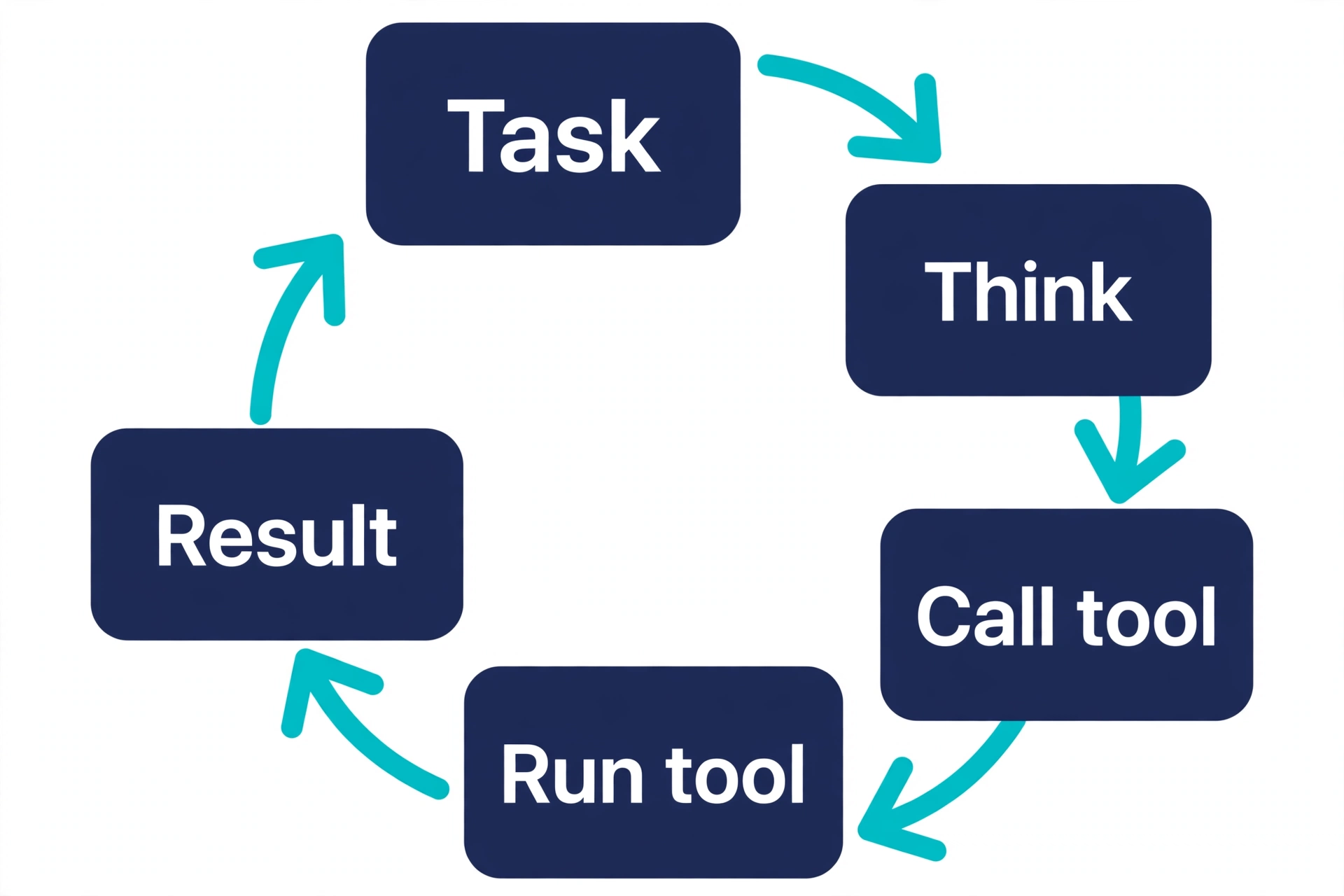
What the run looks like. This output comes from the verification run, in which a scripted stand-in for the model drove the loop through a mocked transport — no QwenCloud key was available in the sandbox, so the model was not called live. The tool calls, the file edit, the pytest result, and the cost line are real outputs of that run; a live model's own words will differ, but the shape of the run is the same:
--- step 1 ---
[thinking] The tests fail, so the bug is in calc.py. Read it first....
[tool] read_file({'path': 'calc.py'})
[result] """A tiny demo project with one deliberate bug for the agent to fix."""
...
def add(a, b):
    """Return the sum of a and b."""
    return a - b  # BUG: subtracts instead of adding
...

--- step 2 ---
[thinking] add() subtracts. Replace a - b with a + b....
[tool] write_file({'path': 'calc.py', ...})
[result] wrote 223 bytes to calc.py

--- step 3 ---
[thinking] Edit applied. Verify with the test suite....
[tool] run_tests({})
[result] exit=0
..
2 passed in 0.01s

--- step 4 ---
Fixed: calc.add now returns a + b. All 2 tests pass.

Cost: $0.0144 (4800 in, 1600 out, 0 cached)
Four design choices in that loop deserve a sentence each. First, thinking_budget is capped at 20,000: the default 131,072-token budget would let a one-line fix burn an order of magnitude more reasoning than the task needs, all billed as output tokens. Second, max_steps is a hard cap, not a suggestion — an unbounded loop on a 1M-token context is how a one-cent task becomes a forty-dollar task. Third, tool errors go back to the model as tool message content, not as Python exceptions: a failed tool is information the model can act on, and raising out of the loop throws the conversation away. Fourth, _safe confines every file operation to the project directory. An agent with a write tool and no path guard is a footgun; the guard is three lines, and there is no reason to skip it.
One Qwen-specific trap the verification run caught: the OpenAI SDK flattens extra_body into the top level of the request JSON, so enable_thinking and thinking_budget arrive as top-level fields, not nested under extra_body. That is the SDK behaving correctly — the docs' examples use the same call shape — but if you inspect the request body while debugging, look for the flat keys.
Step 4 — Structured output for the review#
Once the agent finishes, ask for a machine-readable review of what it changed. Qwen4-Max supports JSON Schema mode, which constrains the output to a schema exactly — no ```json wrapper, no missing fields, no extra keys. The OpenAI SDK's parse method takes a Pydantic class and builds the schema for you, so you never write it by hand:
from pydantic import BaseModel, Field


class Finding(BaseModel):
    severity: str = Field(description="'high', 'medium', or 'low'")
    file: str
    line: int
    issue: str
    fix: str


class ReviewReport(BaseModel):
    verdict: str = Field(description="'pass' or 'needs-work'")
    summary: str
    findings: list[Finding]


def review_file(path: str) -> ReviewReport:
    """Ask for a schema-validated review. Thinking off: cheaper, and the
    JSON Schema mode output must not be truncated by a thinking budget."""
    code = read_file(path)
    resp = client.beta.chat.completions.parse(
        model=MODEL,
        messages=[
            {"role": "system",
             "content": "Review the code and return your report as JSON."},
            {"role": "user",
             "content": f"Review this file for bugs and style issues:\n\n```python\n{code}\n```"},
        ],
        response_format=ReviewReport,
        extra_body={"enable_thinking": False},
        # Do not set max_tokens/max_completion_tokens here: the docs warn
        # it can truncate the JSON mid-output and produce invalid JSON.
    )
    report = resp.choices[0].message.parsed
    assert report is not None
    return report


print(review_file("calc.py").model_dump_json(indent=2))
Expected output, from the same verification run:
{
  "verdict": "pass",
  "summary": "Fixed addition; no remaining issues.",
  "findings": []
}
Two rules from the structured-output guide apply here and nowhere else in the tutorial. First, do not set max_tokens or max_completion_tokens when structured output is enabled: the cap can truncate the JSON string mid-output and hand you invalid JSON. Second, thinking is off for this call on purpose. A review needs a short, exact answer, and thinking tokens would only add output-token cost to a response that has to match a schema character for character. JSON Object mode ({"type": "json_object"}) is the lighter alternative when you want valid JSON without a strict schema — but it requires the word "JSON" in the prompt, or the API returns a 400.
Step 5 — Price every run#
The usage object on every response is the only honest record of what a run cost, and Qwen4-Max reports one field most OpenAI-compatible APIs do not: prompt_tokens_details.cached_tokens, the count of input tokens served from cache. The Singapore rate card, checked November 16, 2026:
| Token type | Price per million |
|---|---|
| Input, fresh | $1.50 |
| Input, cached | $0.075 |
| Output (including thinking tokens) | $4.50 |
Work the numbers for a realistic session. A 100,000-token prompt with 10,000 output tokens costs $0.15 + $0.045 = $0.195. The same run with the prompt fully cached costs $0.0075 + $0.045 = $0.0525 — a quarter of the price, which is why long agent sessions should reuse context instead of re-sending it. Thinking changes the arithmetic more than anything else: a request that spends 20,000 thinking tokens before a 2,000-token answer pays for 22,000 output tokens, $0.099, before the prompt is even counted. That is the real reason for the 20,000-token thinking budget in Step 3 — not latency, but the output-token bill.
Outside Singapore the same model lists slightly lower: $1.413 in and $4.24 out per million in the other regions. And the comparison that frames the launch: Qwen3.8-Max, the previous flagship, lists at $2.00 and $6.00 in Singapore — Qwen4-Max is 25% cheaper on both sides of the meter. None of that makes it cheap in absolute terms. A million-token prompt with a 100,000-token answer still costs $1.50 + $0.45 = $1.95, and a ten-turn agent loop that re-sends a 200,000-token codebase each turn costs ten times the prompt. The cost_of helper in Step 3 exists so you see that number after every call instead of at the end of the month.
Step 6 — The shortcut: Qwen4-Max inside your coding agent#
If you do not need the raw API, the fastest route to Qwen4-Max is a coding agent that already knows how to drive it. That route uses the Token Plan, not the pay-as-you-go key from Step 1 — a monthly subscription that buys a pool of credits for interactive use in designated tools. The Individual plans, checked November 16, 2026: Lite $6 a month ($3 for new users) for 20,000 credits, Essential $10 for 45,000, Standard $18 for 80,000, and Pro $43 for 200,000. The plan's terms are the part to read twice: interactive use only — production automation, batch scripts, and background scheduled tasks are not allowed on a plan key — and Singapore only, with keys starting sk-sp- that do not work on the pay-as-you-go endpoint.
To point Claude Code at it, QwenCloud's setup page maps its model slots to Token Plan models, with Qwen4-Max in the Opus slot. Add this to ~/.claude/settings.json:
{
  "env": {
    "ANTHROPIC_AUTH_TOKEN": "YOUR_TOKEN_PLAN_API_KEY",
    "ANTHROPIC_BASE_URL": "https://token-plan.maas.qwencloudapi.com/apps/anthropic",
    "ANTHROPIC_MODEL": "auto",
    "ANTHROPIC_DEFAULT_HAIKU_MODEL": "qwen3.6-flash",
    "ANTHROPIC_DEFAULT_SONNET_MODEL": "qwen3.8-flash",
    "ANTHROPIC_DEFAULT_OPUS_MODEL": "qwen4-max",
    "CLAUDE_CODE_SUBAGENT_MODEL": "auto",
    "CLAUDE_CODE_MAX_CONTEXT_TOKENS": "983616"
  }
}
Open a new terminal and run claude -p "Hello" to check the connection. To force Qwen4-Max for a whole session instead of auto, set ANTHROPIC_MODEL to qwen4-max. If long answers get cut off, the same page says to set CLAUDE_CODE_MAX_OUTPUT_TOKENS=64000 — the same thinking-plus-answer budget from Step 2, seen from the other side. Qwen Code and any other OpenAI-compatible tool take the same key with the OpenAI-compatible base URL, https://token-plan.maas.qwencloudapi.com/compatible-mode/v1, and model qwen4-max.
Which route should you use?#
Five routes reach the same model, and the right one depends on what you are doing rather than what you prefer:
| Route | Use it when | Cost | Watch out for |
|---|---|---|---|
| QwenCloud API (this tutorial) | You build an app, a backend, a batch job, or a CI step | $1.50 / $4.50 per MTok | Keys are region-specific; Singapore endpoint in the examples |
| Token Plan | You write code with an agent, interactively, for hours | $6–$43/month for credits | Interactive use only; no production automation; Singapore only |
| OpenRouter | You already route models through one key | $1.50 / $4.50 per MTok, model qwen/qwen4-max | Same price, different console and billing |
| Qoder | You want an agentic IDE that handles setup | Credit-based; check the selector | Rates differ by model; check before a long session |
| QwenStudio / QwenWork | You want a first impression or a finished document, not code | Free to sign in; quotas unpublished | No published Qwen4-Max quota; expect limits |
Many developers will use two: a Token Plan key in the coding agent while they build, and a pay-as-you-go key in the app that agent builds. That split is not a workaround — it is what the terms require, since the plan key may not run production automation.
Five gotchas, before they cost you an afternoon#
1. You cannot force a tool call. Qwen series models do not support tool_choice set to "required": in non-thinking mode it cannot guarantee a tool is always called, and in thinking mode it is not supported at all. Keep tool_choice on auto — the default — and if a turn must use a tool, say so in the prompt. Remove tool_choice entirely when you ask the model to summarize tool outputs, or the API keeps returning tool calls instead of an answer.
2. max_tokens is not the cap you think it is. On Qwen4-Max it counts thinking and answer together, so a limit set for the answer alone can leave you with no answer at all. Use max_completion_tokens for the total output budget, and set it generously at high effort — the thinking guide's own example uses 65,536.
3. Drop reasoning_content and accuracy drops with it. In multi-turn tool-call flows, the assistant message you send back must include its reasoning_content. The loop in Step 3 does this; a hand-rolled loop that rebuilds assistant messages from content alone silently loses the reasoning the next turn was built on.
4. The preview ID is already dying. qwen4-max-preview and its alias qwen4.0-max-preview are retired after 24:00 on November 25, 2026 (UTC+8). Anything you build this week on the preview ID stops working then. Use qwen4-max.
5. Never set a token cap on a structured-output call. A max_tokens or max_completion_tokens limit can truncate the JSON string mid-output and hand you invalid JSON. The review function in Step 4 leaves both unset, as the structured-output guide instructs.
The takeaway#
Qwen4-Max's launch is a pricing event as much as a model release: the same OpenAI-compatible API shape as every other hosted model, a million-token context, thinking on by default, and a rate card 25% below the flagship it replaces. The interesting part is not the model — it is how little code stands between you and a working agent on it. The loop in Step 3 is about 150 lines: three tools, a thinking budget, a step cap, a path guard, and a cost printout. Everything else in the tutorial is the contract around that loop: send the reasoning back, cap the output with max_completion_tokens, never force a tool call, and read the usage object after every request.
Start with the pay-as-you-go API for anything that runs without you, and the Token Plan for the hours you spend inside a coding agent. Keep the thinking budget low until a task proves it needs more, and measure cost per finished task before you conclude the cheaper model is the cheaper run. The preview ID retires November 25 — build on qwen4-max, and the code in this tutorial keeps working after it.
Sources#
- QwenCloud Docs — Developer quickstart — the first-call code, the Singapore base URL, and the region rule. All SDK snippets in Steps 1–4 follow this page and the guides below.
- QwenCloud Docs — Thinking — hybrid thinking on by default for
qwen4-max; theenable_thinking,thinking_budget, andreasoning_effortparameters; the 131,072 default budget, the 262,144-token shared output budget, and thepreserve_thinkingandreasoning_contentrules. - QwenCloud Docs — Function calling — the tool schema, parallel tool calls, the
tool_choicerules including the unsupported"required"value for Qwen models, streaming with tool calls, and thinking mode with tools. - QwenCloud Docs — Structured output — JSON Object and JSON Schema modes,
qwen4-maxin the JSON Schema support list, the SDKparsemethod, and the rule against settingmax_tokenswith structured output. - Apidog — How to Use Qwen4-Max (November 16, 2026) — the access-route comparison, Token Plan prices and terms, the Claude Code settings mapping, and the 991K max input / 393K max output figures, all checked against Alibaba's own pages the same day.
- The Latent Daily — Alibaba releases Qwen4-Max with 1M context and 25% lower prices (November 16, 2026) — the general-availability date, the six regions, the $1.413/$4.24 non-Singapore prices, and the API-only, no-fine-tuning status.