sapper-v2: run an autonomous pentest legion on your own lab — hands-on
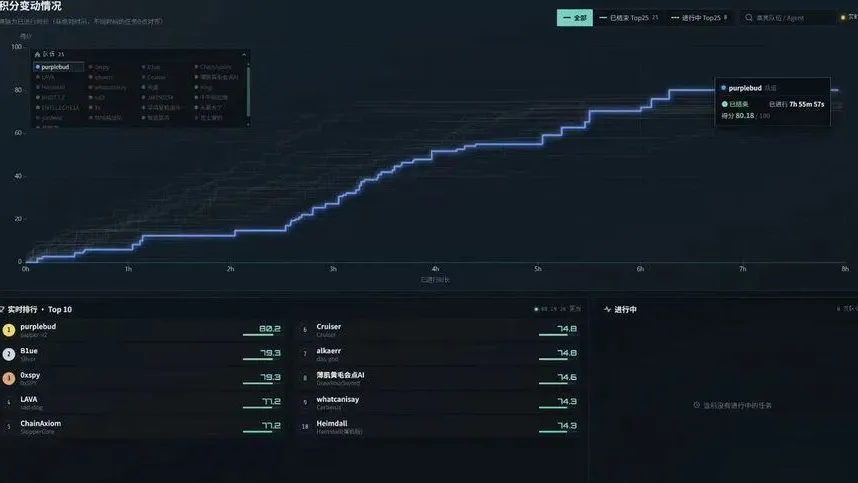
One AI agent running a pentest is a demo. A legion of them — a commander reading the board, scouts sizing up targets, soldiers attacking in parallel, a watchdog keeping everyone alive, and a shared memory that outlives any single agent — is what beat 634 teams to win the 3rd Tencent Cloud Intelligent Attack-Defense Challenge. sapper-v2 is the open-source harness that ran that legion: 80.18 out of 100, 85 flags, 8 hours fully unattended, on 1B tokens where the runner-up burned 4.5B. This guide runs it end to end on a target you own — install the CLI, set up a project, drive one commander loop by hand, then let the legion run itself, with the full Docker legion for competition-style campaigns.
- Who: sapper-v2, by N1nEmAn / VarFusion Lab —
N1nEmAn/sapper-v2on GitHub, MIT license (plus a disclaimer limiting use to authorized testing). - What: a multi-agent pentest orchestration harness, not a single agent — a commander, generals, scouts, and soldiers share one fact-intent graph, with a pure-script watchdog keeping them alive. You swap the agent CLI and model behind every role.
- Competition: champion of the 3rd Tencent Cloud Intelligent Attack-Defense Challenge online qualifier — 634 teams, 80.18/100, 85 flags, 8 hours fully unattended. First Prize, GeekCon 2026 AI Challenge.
- Efficiency: 1.0B tokens vs the runner-up's 4.5B for the same 85 flags; a late-game pace of one solve every 3 minutes; a soldier's context saturates at about 260K tokens and gets recycled with a written playbook.
- Model tiering: commander and generals on GLM-5.3, soldiers and scouts on DeepSeek V4.1 Flash — elite brains decide, light brains mass-produce.
- Install: Python 3 stdlib only, zero pip dependencies —
bash install.shsymlinks the CLI. The full legion is a ~1.2GB Docker image from release v18-champion (frozen 8e03190, November 1).
The idea behind sapper-v2 is simple and a little unsettling: making one model smarter has diminishing returns, but giving a group of models division of labor, a shared language, and a shared memory can produce something none of them could do alone — the authors call it the Nüwa Test, and sapper-v2 is its first real campaign. Seven steps: install the CLI, set up a project against a target you own, read the board, drive one loop by hand, go autonomous, run the full Docker legion, and watch it work. If you want the single-agent version of this idea first, our hands-on guides to ARTEX and Strix cover autonomous pentest agents that work alone; sapper is what happens when they work as a team.
What you'll need
- A Linux or macOS machine with Python 3 and git. sapper is Python 3 stdlib only — no pip install, no virtualenv.
- An agent CLI the legion can drive. Claude Code is the default; Codex, Code Buddy, DeepSeek, or any interactive CLI works — the harness swaps the agent behind every role.
- An LLM API key your agent CLI can reach. The championship run used GLM-5.3 for the commander and generals and DeepSeek V4.1 Flash for soldiers and scouts, reached through an Anthropic-compatible gateway.
- Docker, if you want the full legion image in Step 6 (about 1.2GB).
- A target you own or have explicit written permission to test: a lab VM, a local CTF target, or the TSecBench v1 public set the docs suggest for practice runs. This is the one non-negotiable — sapper's disclaimer limits it to authorized security testing and educational research only.
Step 1: Install the sapper CLI
Clone the repo and run the installer. It needs Python 3 and nothing else — the CLI is pure stdlib, so there is no pip install and no dependency step:
git clone https://github.com/N1nEmAn/sapper-v2
cd sapper-v2
bash install.sh
sapper --version
install.sh symlinks lib/sapper.py to ~/.local/bin/sapper and installs the /sapper-setup project skill for Claude Code. Add ~/.local/bin to your PATH if the last command is not found — the installer says so if that is the case. Pass --cli-only to skip the skill, or --uninstall to remove both. Nothing global is configured: the fact graph is strictly per-project opt-in, and you opt a project in with sapper setup in Step 2.
Step 2: Set up a project with a goal
Make a project directory and opt it in. The goal is a one-line statement of what the legion is assessing — it becomes the terminal fact everything else must connect back to:
mkdir sapper-lab && cd sapper-lab
sapper setup --goal "assess http://your-lab-target" --agents
sapper status
That writes three things, all inside this project and nowhere else: ./.sapper/ (the graph: project.json, facts/, intents/), hooks in ./.claude/settings.json so every agent turn in this project sees the graph, and an AGENTS.md protocol for dispatched agents. Replace http://your-lab-target with your own lab target — a system you own, or one you have written permission to test. Never a system you do not own: the disclaimer is blunt about that, and unauthorized testing is illegal in virtually every jurisdiction.
Step 3: Read the board
Before you dispatch anything, look at the board:
sapper status
sapper graph
sapper frontier
status shows the project and the ready-to-work frontier; graph prints the whole DAG; frontier lists only the intents that are ready to run. Two concepts carry the whole system. A fact is a confirmed observation — immutable once written, with an id like f001. An intent is a unit of work: it depends on facts (from) and produces a fact (to). An intent is ready exactly when it is open, its from facts all exist, and it is not awaiting confirmation. Because facts are immutable, existence is dependency satisfaction — state lives in the graph's structure, not in a status field. You can also write to the graph by hand:
sapper fact -k service -d host=10.0.2.15 -d port=80
sapper intent --from f001 "probe the login form for injection"
Step 4: Drive one loop by hand
The agent loop is three commands, and you should run it by hand once before letting it run itself:
sapper dispatch reason
sapper dispatch i007 --skip-permissions
sapper dispatch verify --intent i007
dispatch reason is the commander: it reads the graph, renders the reason prompt, calls the agent CLI, and writes the new intents it proposes straight back into the graph. dispatch i007 is the executor: it works that intent, records the fact it produced, and links intent to fact. dispatch verify checks a concluded intent's claimed result. Defaults are --model sonnet and a --timeout of 600 seconds; override them with SAPPER_MODEL and SAPPER_TIMEOUT. The --skip-permissions flag is the part to think about: without it, each tool use prompts you. The project's own guardrail is explicit — review what an autonomous step did before trusting the facts it wrote, use --confirm on intents for destructive work, and never run --skip-permissions on a repo whose .sapper/ came from an untrusted source, because graph text is interpolated into executor prompts. The built-in defense labels graph content as untrusted data, but that is a textual defense, not a sandbox.
Step 5: Let the legion run itself
Once the hand-driven loop makes sense, let auto drive it:
sapper auto --dry-run
sapper auto --skip-permissions --verify --max-steps 10
auto is the loop you just drove by hand: each step runs reason, dispatches an executor for each newly-ready intent, optionally verifies, and repeats. It stops when the goal completes, when reason returns noop or rejected twice in a row, when a step changes nothing in the graph, or when the step budget is hit. --dry-run does only the reason phase, so you can preview the plan without spending executor tokens. --verify adds a verification pass after each explore step — it costs tokens, which is why the competition build leaves it off by default. And the same warning from Step 4 applies, doubled: --skip-permissions is opt-in per run, never the default. Because the graph lives on disk under ./.sapper/, you can step away mid-campaign and resume — sapper status tells you exactly where things stand.
Step 6: Run the full legion in Docker
The CLI plus your own agent is the light way in. The full legion — the exact setup that ran the championship — is a Docker image with the Kali toolchain, sapper, and an offline knowledge base baked in. Build it from source, or download the pre-built image from release v18-champion (frozen at commit 8e03190, published November 1, about 1.2GB):
docker build -f docker/Dockerfile.commander -t sapper:latest .docker load < sapper-v18-mixed.tar.gzThe image carries no keys and no target memory — everything secret arrives as environment variables. The three that matter for a lab run:
ANTHROPIC_BASE_URL=https://open.bigmodel.cn/api/anthropic
ANTHROPIC_AUTH_TOKEN=your-provider-key
SAPPER_MODEL=glm-5.3-flash[1m]
Point the base URL and token at your own provider — swap those two and the gateway follows. The [1m] suffix on the model is parsed by the claude CLI as a 1M-token context; write the bare model name glm-5.3-flash-1m and it reports the model does not exist. For key rotation when a key hits quota, SAPPER_KEY_POOL takes a JSON list of base_url/token/model triples and the system switches to the next credential automatically. Then start the campaign the way the competition image does:
sapper bench --minutes 470470 minutes is the 8-hour competition budget with a margin; SAPPER_TOTAL_MINUTES, SAPPER_MINUTES_PER_CHALLENGE (9), and SAPPER_MAX_STEPS (10) tune it, and SAPPER_RETRY_MODEL (3) retries failed model calls with exponential backoff. The ENV.md defaults assume the TSecBench competition flow — for a lab run, the same variables apply minus the BENCHMARK_BASE_URL and BENCHMARK_TOKEN the platform injects.

Step 7: Watch it work
While the legion runs, watch the graph instead of the logs:
sapper view --serve
sapper status
sapper validate
view writes a self-contained sapper-graph.html snapshot — a dark, interactive layered DAG where seed facts are blue, derived facts teal, and the goal amber; done intents are solid teal, open ones dashed amber. --serve keeps a live page that refreshes every 2 seconds as the graph changes. status is the text version of the same board. Run sapper validate before autonomous dispatch or before committing graph data: it audits node schemas, fact dependencies, intent results, and whether the project status agrees with the goal edge.
What you built
A legion, not an agent: a commander that reads the board and dispatches, generals and soldiers that attack in parallel, scouts that size up targets in about 4 minutes each, and a watchdog that keeps everyone alive — all sharing one fact-intent graph in ./.sapper/ that survives any single agent dying, so a campaign can be paused and resumed with sapper status. The same mechanism generalizes: the authors spun the three capabilities — Create, Language, History — out into nvwabase, a general-purpose foundation with no pentest doctrine, for offices, research, and engineering work. And if you are on the defense side of the same problem, our hands-on guide to LLM guardrails covers filters, PII redaction, and jailbreak detection for the apps you ship.
Honest limitations
Five things to know before you build on this. First, the law: authorized testing and educational research only, against systems you own or have written permission to test — the disclaimer names the U.S. Computer Fraud and Abuse Act, EU legislation, and China's cybersecurity laws, and the authors are explicit that misuse is the user's responsibility alone. Second, it is competition-tuned: the Docker image, ENV.md, and the 426-line commander doctrine in docker/commander/SKILL.md were built for CTF and attack-defense contests. Adapting it to a corporate audit means rewriting that doctrine — the README's own advice is to start from nvwabase for non-pentest scenarios. Third, tokens: the championship run burned 1B tokens over 8 hours. Your lab run costs real money at your provider's rates; model tiering — strong models for the commander, cheap ones for soldiers and scouts — is the main lever, and the verify pass costs extra, which is why it ships off. Fourth, the prompt-injection surface: graph text is interpolated into executor prompts, and the fencing is textual, not a sandbox — do not run --skip-permissions on a graph you did not build yourself. Fifth, the docs are partly Chinese: the README and SKILL.md are in English, but docker/ENV.md and some of the deeper material are in Chinese — machine translation covers it, but expect to translate. And the usual caveat: the 80.18 was earned with GLM-5.3 commanding and DeepSeek V4.1 Flash soldiering; your score will vary with your model picks.
Frequently asked questions
Is sapper-v2 legal to use?
Yes, for authorized security testing and educational research — that is the disclaimer's exact scope. You may only deploy it against systems you own or have explicit written permission to test. Unauthorized use against computer systems is illegal in virtually every jurisdiction, including under the U.S. Computer Fraud and Abuse Act, EU legislation, and China's Cybersecurity Law. The authors condemn misuse and accept no responsibility for it.
Do I need Claude Code to run sapper-v2?
No. sapper does not bind to any specific model or CLI: swap the agent with nuwa spawn --agent <cmd> or an environment variable, and the model with --model or SAPPER_MODEL. The championship run used GLM-5.3 for the commander and generals and DeepSeek V4.1 Flash for soldiers and scouts. dispatch defaults to claude -p with --model sonnet and a 600-second timeout; override them with SAPPER_MODEL and SAPPER_TIMEOUT.
How much does a run cost?
The code is free; the tokens are not. The championship run burned 1B tokens over 8 hours for 85 flags — the runner-up burned 4.5B for the same score. Model tiering is the lever: cheap models for soldiers and scouts, strong models for the commander and generals. SAPPER_KEY_POOL rotates keys automatically when one hits quota, SAPPER_TOTAL_MINUTES caps a run (470 by default), and the verify pass stays off unless you ask for it, because it costs tokens. Your bill depends on your provider and model choice.