Claude Ship tutorial: let AI review, fix, and approve your pull requests
Anthropic's Claude Ship, launched November 23, 2026, hands the whole pull-request pipeline — review, fixes, and approval — to three agents working under a policy your team writes. Here is how to run it on one PR with /ship, then roll it out to a whole repository without handing over the merge button on day one.
- Three agents, one pipeline: Code Review is generally available; PR Steward and Claude Approvals are in beta. Each does one job, and each is switched on separately, repository by repository.
- Two ways in: developers run /ship in Claude Code for their own pull requests; admins enable the agents for a whole repository in Organization settings > Claude Ship.
- Observe before you enforce: an approval policy in observe mode shows what it would decide without approving anything — and observe mode is still billed, so set a spend limit first.
- What it costs: usage is billed on tokens. Eligible Enterprise organizations can claim at least $10,000 in Ship credits, to use within 30 days of claiming; claim by January 15, 2027.
- Hard limits: Team and Enterprise plans, GitHub repositories only. Not available to organizations with Zero Data Retention, the HIPAA configuration, or customer-managed encryption keys.
The review queue is the new bottleneck. Agents now write a large share of the code — on Anthropic's own Claude Code team, Claude writes most of it — but every pull request still waits on a human to read it, ask for fixes, and approve it. The work that starts after a PR opens has become the slowest part of shipping.
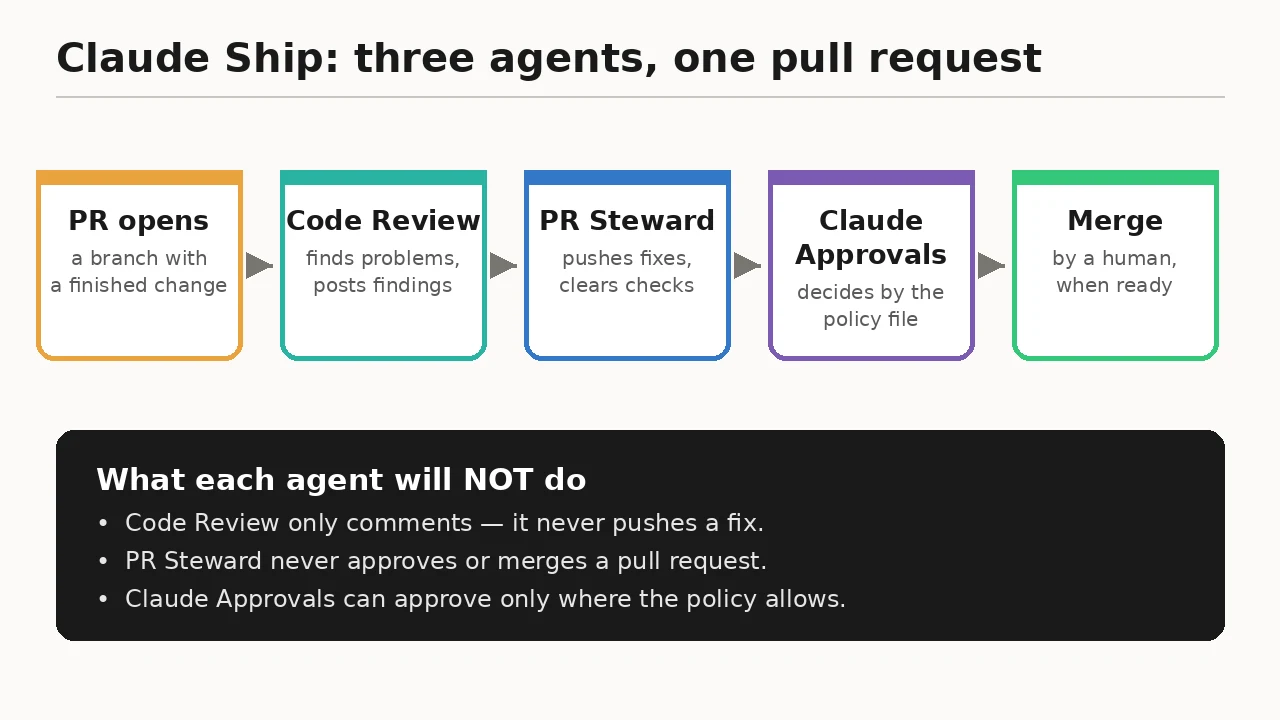
Claude Ship, launched by Anthropic on November 23, 2026, is built for exactly that stretch. It is not one agent but three, each with one job: Code Review finds the problems, PR Steward pushes the fixes, and Claude Approvals decides — against a policy file your team writes — whether a change is routine enough to approve on its own. On Anthropic's own team, where Claude's review is one layer of a broader process, merged pull requests more than doubled from June to September while the share that got reverted fell by more than 40%.
This tutorial takes the two paths in order. First, the developer path: ship one pull request with the new /ship command in Claude Code — no admin setup, no policy file. Then the team path: turn the three agents on for a whole repository, write the approval policy, and run it in observe mode until you trust it enough to enforce. Every command, file, and setting below comes from Anthropic's own documentation, and both policy files are the starters from the official setup guide, verified to parse.
What you'll need#
Ship has two tiers of requirements, and it matters which path you are on:
- For the developer path (Steps 1–2): Claude Code, a GitHub account with write access to the repository, and the three tools below at the minimum versions. No admin role, no plan change.
- For the team path (Steps 3–6): a Claude organization on a Team or Enterprise plan, the Owner role in that organization, and a GitHub organization owner to install the Claude GitHub App and link it to your Claude organization. Repositories must be on GitHub — github.com, or a connected GitHub Enterprise Server instance on port 443 for PR Steward.
- Cost: Ship usage is billed on tokens, so turning it on can add to your organization's costs.
/shipcounts as regular Claude Code usage. Code Review and PR Steward can each take a monthly spend limit — set one before you scale. Claude Approvals has no base charge, but classifiers in a policy are billed on the tokens they use, and a policy that uses Claude's review triggers a billed Code Review, even in observe mode. - Not available if: your organization uses Zero Data Retention, the HIPAA configuration, or customer-managed encryption keys. Eligible Enterprise organizations can claim at least $10,000 in Claude Ship credits, to use within 30 days of claiming; the claim deadline is January 15, 2027.
Step 1: Check your tools#
The /ship command needs three tools at minimum versions: Claude Code 2.1.330 or later, the GitHub CLI 2.63 or later signed in with gh auth login, and git 2.38 or later. Check them before you start:
claude --version
gh --version
git --version
gh auth status
What you should see: a Claude Code version of 2.1.330 or higher, a gh version of 2.63 or higher, and git 2.38 or higher. (On the machine this tutorial was verified from, gh reported 2.102.0 and git 2.43.0 — both comfortably above the minimums.) With an older gh, Claude cannot push fixes; with an older git, Claude leaves branch merges to you. If /ship is missing entirely, update Claude Code — the command rolled out starting November 23, 2026.
Step 2: Ship one pull request with /ship#
Open Claude Code in your local clone of the repository and type /ship at the prompt. If you made the change with Claude, use that same session: Claude writes the commit message from the session's conversation, and anyone who can see the pull request can read that message. From there your change goes through four steps:
- Pull request:
/shipcommits your work, pushes your branch, and opens the pull request as you. - Review: Claude reviews your change with
/code-review. - Watch: Claude keeps checking the pull request from your Claude Code session — working on failing checks, merge conflicts, reviewers' comments, and the findings from its review, and pushing fixes.
- Merge: once the pull request is ready, you merge it yourself.
Two behaviors catch people out the first time. First, /ship proceeds with no confirmation prompt. Before the commit, and again before the push, a line ending in Esc to cancel says what is about to happen — do nothing and it continues after a few seconds. If you cancel before the push, a commit that /ship made stays; undo it and keep your files with git reset HEAD~1 in your shell.
Second, /ship does not commit your uncommitted changes in three cases: a pull request is already open for the branch (commit and push what you want in it yourself); the repository is public and you are on a branch other than the default with commits of its own (/ship pushes those and opens a pull request without your uncommitted changes); or an uncommitted file's name suggests a secret, such as .env — in a repository that is not public, /ship then commits or pushes nothing at all. If you want a draft pull request, a different base branch, your repository's pull request template, or a pull request on GitHub Enterprise or from a fork, open the pull request yourself first, then run /ship.
Before you type it, clean up the working tree. /ship can commit all your uncommitted changes, new files included, so run git status and delete or stash anything that does not belong in the pull request:
git status
git stash push -u -- <file-you-dont-want-in-the-pr>
Check the files for secrets yourself. /ship looks for secrets by file name, so look inside your files — a deny rule such as Read(./notes.txt) does not keep a file out of the commit.
You can steer the review effort and the target. /ship takes an effort level — low, medium, high, xhigh, or max — with high as the default; a pull request number or URL; and +botname to also read a bot's comments. Put the effort level first when combining them:
/ship low 41 +my-lint-botOnce the review is done, the watch is what does the unglamorous work. In auto mode, Claude takes these actions without asking: it works on the review findings it judges to be problems, can post one comment summing up its review, pushes commits to your branch, merges the base branch into yours to resolve conflicts or bring your branch up to date, works on failing checks and re-runs the failed ones, and answers review comments, resolves threads, and re-requests reviews. While a watch runs, keep the session open and in the foreground, the computer awake, and your pull request's branch checked out — Claude edits files in the same checkout as you. To start your next change, work in another folder, such as a second clone, and open another Claude Code session there.
Check whether a watch is running with /tasks: a running watch appears as a scheduled task whose name starts with /steward --tend. End it with /ship stop at the Claude Code prompt — if Claude is working when you type it, the watch ends when the current turn does. Pressing Esc or Ctrl+C also ends it, as do merging or closing the pull request, checking out another branch, or seven days passing. To start a watch again — or to watch an already-open pull request without a review first — type /steward.
If you want to see the findings before Claude acts on them, say so in a message at the prompt, ideally while the review is still running:
From now on, don't push code changes or reply to reviewers without asking me first. Show me the review findings and wait.That message is a request to Claude, and Claude Code does not enforce it — but in practice it is the lever most developers reach for on their first few ships.
One warning before you leave a watch alone: run it only where you trust everyone who can merge to the base branch or push to your branch. Any of them can run programs on your computer with your credentials. During a watch, Claude Code blocks the gh and git commands that merge the pull request, approve it, turn on auto-merge, or force-push — type /ship terms at the prompt to see the full list of limits. The limits do not cover everything: the watch uses your sign-ins, so it could merge a pull request your branch rules let you merge without another person's approval.
Step 3: Turn on Code Review for a repository#
The developer path is per-PR. The team path switches the agents on for a whole repository, and it starts with Code Review. An Owner of your Claude organization turns it on in Organization settings > Claude Ship on claude.ai: connect GitHub, install the Claude GitHub App, link it to your Claude organization, and choose repositories. Reviews run on Anthropic infrastructure, so you add no workflow files to your repositories.
Each repository gets two settings. First, the review level — how thorough each review is:
| Level | What it trades | Use it for |
|---|---|---|
| Quick | A lighter pass. The fastest level, at the lowest cost | High-traffic repos, first rollout |
| Standard | Balanced depth, speed, and cost. The default level | Most repositories |
| Deep | The most thorough pass. Takes the longest and costs the most | Security-sensitive or core code |
Second, when reviews run:
- Once after PR creation — a review runs when a pull request is opened, reopened, or marked ready for review.
- After every push — a review runs on pushes to the pull request branch, catching new issues as the PR evolves and auto-resolving threads when you fix flagged issues. New repositories start here.
- Manual (@claude review) — opening or pushing to a pull request starts no review. Comment
@claude reviewto request one, or@claude review alwaysto also subscribe the pull request to reviews on subsequent pushes.
Two details matter in practice. Automatic reviews skip drafts and pull requests from forks — but a developer with write access can still request one with @claude review, including on those. And developers can tune what reviews flag without the Owner role, by committing REVIEW.md and CLAUDE.md files to the repository. Set a monthly spend limit for Code Review now, before you add the second repository — a higher review level and more frequent reviews both cost more.
Step 4: Add PR Steward#
PR Steward is the fixer. In the same Organization settings > Claude Ship page, turn it on for the repository — and start in Manual mode, where it only acts when someone comments @claude steward. Switch it to automatic once you have watched it work.
When it is on, PR Steward starts when a pull request opens, reopens, or is marked ready for review, and again at the next push to an open pull request it has not started on. It skips drafts, pull requests from forks, pull requests a bot opened, and authors without write access. While it watches a pull request, the PR carries the claude-pr-steward-watching label, and after every push it comments with what it changed and how to undo it. What it works on:
- A failing check — attempts a fix when the cause is in code the pull request touches.
- A merge conflict — attempts to merge the base branch in and resolve the conflicts.
- A person's review comment — attempts small, specific changes and replies to the comment; it can reply without pushing when the request is large or about the design.
- A review bot's finding — works on the findings Code Review marks Important, and on lint findings and bugs from other bots.
- The Claude Approvals check — where the check waits for something a commit can fix, such as open Code Review findings, it works on that. Where the check waits for people's approvals, it leaves it alone.
To stop it on one pull request, remove the claude-pr-steward-watching label or comment @claude stop. Developers can steer it by commenting @claude with an instruction. And it never approves or merges — that is the point of the split. Use branch protection to require the approvals you want before anything merges.
To tell PR Steward (and the local /steward watch, which reads the same file) how to look after pull requests in a repository, save instructions at .claude/skills/steward/SKILL.md in the repository's top folder — which checks matter, how to run the tests. One file serves both.
Do not confuse the two stewards. The /steward command from Step 2 runs in your own session, acts as you, and counts against your usage. PR Steward runs in a cloud session, acts as the Claude GitHub App, and bills your organization. If you ask to auto-fix a pull request that PR Steward is watching, the request fails — one steward at a time.
Step 5: Write the approval policy#
Claude Approvals is the agent that makes the merge decision — and the policy file is where your team writes the rules it must follow. Save it as .claude/approvals.yml in the repository's root, on the default branch. Approvals reads policy files from the default branch, so the rules apply once the file is merged. A change to the policy takes effect once it merges; open pull requests get the new rules from their next evaluation, or immediately if you comment @claude approvals rerun.
Start with the first starter policy from Anthropic's setup guide. It asks for two people to approve a change — or one person when Claude's review passes — and it always asks for two people on a change to the review rules themselves. Both starter policies below were verified to parse as YAML:
# .claude/approvals.yml
version: 1
mode: observe
rules:
  - purpose: "A change takes two people. When Claude's review passes, one is enough and Claude approves."
    paths: ["**"]
    verdict: { claude: comments, seats: 2 }
    override:
      - { if: "claude/code_review = pass", verdict: { claude: approves, seats: 1 } }
  - purpose: "A change to the review rules takes two people."
    paths: ["**/.claude/**"]
    nested: inherit
    verdict: { claude: comments, seats: 2 }
What each line does:
| Line | What it does |
|---|---|
version: 1 | The schema version, as a bare number. Required — Approvals refuses a file without it. |
mode: observe | The check shows what the rules would decide; Claude does not approve, and the check normally counts as passing. Delete the line to enforce — enforce is the default. |
paths: ["**"] | The first rule matches every file in the repository. |
verdict: { claude: comments, seats: 2 } | Two people have to approve, and the author can count as one. Claude comments and does not approve. |
override | While claude/code_review reads pass, one person — who can be the author — is enough, and Claude can approve. |
paths: ["**/.claude/**"] + nested: inherit | The second rule matches files under any .claude/ directory, including the policy file itself, and stays in force in subdirectories with their own policy files. |
A file under .claude/ matches both rules, and Approvals takes the strictest of the verdicts that apply — so once you enforce the policy, a change to that file needs two people, because the second rule has no override. That is deliberate: an edit to the policy file can weaken the review of later pull requests, so the policy protects itself.
If you would rather Claude never approved at all, use the second starter policy instead. It asks for two people on each change, and lists claude/code_review under advisory so reviews follow your Code Review settings rather than starting extra billed reviews:
# .claude/approvals.yml
version: 1
mode: observe
rules:
  - purpose: "A change takes two people."
    paths: ["**"]
    verdict: { claude: comments, seats: 2 }
    advisory: [claude/code_review]
  - purpose: "A change to the review rules takes two people."
    paths: ["**/.claude/**"]
    nested: inherit
    verdict: { claude: comments, seats: 2 }
Three semantics to internalize before you write your own rules. First, rules combine by strictness: blocks outranks comments, which outranks approves, and every rule's seats have to be filled. Second, conditions can read the pull request itself — pr/files_changed, pr/diff_lines, pr/authors, pr/base — and classifiers such as claude/code_review = pass or repo/change_risk <= medium. Third, some files are protected by default and always need a person: every policy and classifier file, REVIEW.md, .gitmodules, .gitattributes, symlinks, submodule pointers, and any file named CODEOWNERS. Write your own rules for the files that matter to you, such as .github/, CLAUDE.md, and the rest of .claude/.
One prerequisite that surprises teams: you need two people with write access before you enforce either starter policy. With only one, the check cannot pass on a change under .claude/, or where Claude's review fails or gives no result — and under the policy that keeps two people on each change, it cannot pass on any change at all.
Step 6: Enforce the policy and require the check#
Enforce the policy only once the Claude Approvals check titles you see in observe mode match what your reviewers decide. Until then, the check is a prediction; after, it can block a merge. The switch has an order, and the order matters:
- Add the policy file in a pull request of its own, then open a second pull request to see the Claude Approvals check. If nothing appears, check the troubleshooting guide — a missing check usually means the file never reached the default branch, or the GitHub App is not installed on the repository.
- Decide which files and branches to protect. Decide which files need a person's approval whatever Claude finds, and list each branch whose merges the check should gate. An enforced policy also covers pull requests into branches other than the default branch — and on those branches, a pull request with no covered file gets no check, so a required check waits.
- Switch from observe to enforce. A policy file's
modeisobserveorenforce, andenforceis the default — delete themode: observeline. After the first step, an open pull request can keep a check that GitHub counts as passing until you rerun Approvals on it, so keep open pull requests out of the merge queue until you have rerun them with@claude approvals rerun. - Require the check in GitHub. Add Claude Approvals to the required checks of each branch protection rule or ruleset — and set the required check's source to the Claude app, so GitHub does not accept a same-named check from elsewhere. Through GitHub's API, put the Claude app's ID,
1236702, inintegration_idin a ruleset orapp_idin a branch protection rule. - Change GitHub's required approvals only after the last step. Only now lower the number of approvals GitHub itself requires, letting the policy carry the weight.
If you ever need to turn it off, follow the reverse order: turn on GitHub's Dismiss stale pull request approvals when new commits are pushed first (otherwise GitHub can keep counting Claude's approval after a new push), remove Claude Approvals from the required checks, turn Approvals off for the repository or organization, then dismiss Claude's reviews on open pull requests it approved.
Which approach should you use?#
| Situation | Use | Why |
|---|---|---|
| Solo developer, one pull request | /ship | No admin setup, no policy file; billed as your Claude Code usage. |
| Team, one repository | Code Review (Quick) + PR Steward in Manual + Approvals in observe mode | Every agent on, none of them able to merge anything yet. |
| Team, many repositories | Roll out repository by repository | Cover a whole GitHub organization only with a spend limit set — it can raise spend significantly. |
| Regulated or high-stakes code | The strict starter policy; Claude never approves | Two people on every change, reviews as advisory, Approvals in observe until its titles match your reviewers' calls for weeks. |
| Pro plan, or code not on GitHub | /ship only — or nothing yet | The repository-wide agents need a Team or Enterprise plan and GitHub repositories. |
The shape of the answer is the same in every row: start narrow, watch the decisions, widen only when the evidence says to. Anthropic's own rollout advice is one repository, one review level, one spend limit, and an approval policy in observe mode until the team trusts it.
What can still go wrong#
Ship moves fast, and the failure modes are worth naming before they bite. A watch runs code with your credentials. To resolve conflicts or bring your branch up to date, Claude merges the base branch into yours, including scripts that run by themselves; other people's pushes to your branch get merged in; programs from your branch, such as your tests, run and can merge or force-push with your credentials; and your Claude Code hooks run without asking. If Claude Code sees that a merge would change its settings, .mcp.json, or git's config files, it leaves that merge to you.
Auto-merge can finish the job for you. If auto-merge is on for the pull request, GitHub merges once the checks and reviews allow — and what Claude does during the watch, such as pushing a fix, can bring that about. Turn it off with gh pr merge --disable-auto <number> in your shell.
Observe mode is billed. A policy with claude/code_review in an if condition starts a billed Code Review when a pull request opens and at each push. To stop those reviews, move it from the conditions to advisory. And remember that billing can start — and continue — while usage credits are turned off; to keep any policy file from starting billing, an Owner can turn off Approvals for the whole organization.
The agents can miss things. Anthropic's own warning, printed on the announcement: Ship 'uses AI and may miss bugs, security vulnerabilities, or other issues.' Treat it as one layer of review, not the whole process — that is how Anthropic's own team runs it. And if your organization ever wants the commands off entirely, an admin can set skillOverrides in managed settings to turn off ship-local and steward; a deny rule such as Bash(git push *) stops /ship's pushes and prevents a watch from starting.
The takeaway#
- Ship one PR with /ship first. Check the three tool versions, clean the working tree, and watch one review-and-fix loop end to end before touching any admin setting.
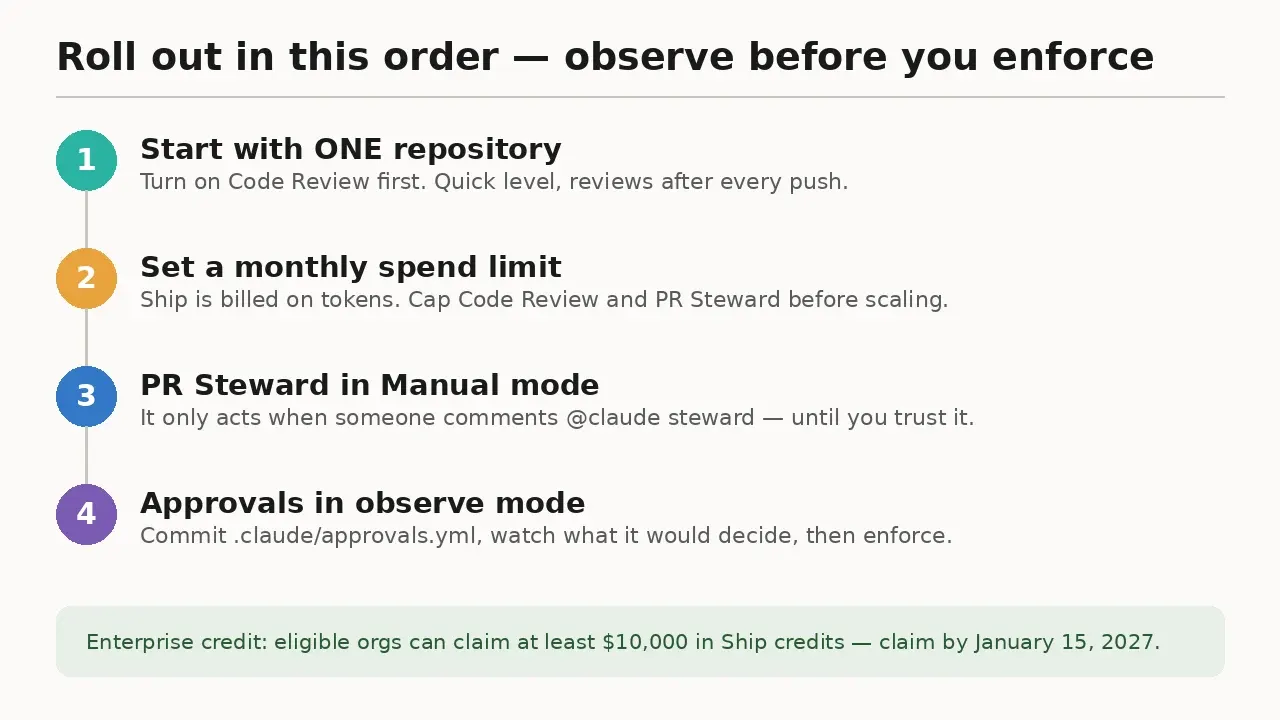
- One repository, Quick review, spend limit set. Code Review on, Manual steward, nothing enforced.
- Let PR Steward earn automatic mode. Start Manual (
@claude steward), read what it pushes and how it explains the rollback, then switch it on. - Commit the policy in observe mode. Compare the check's titles against what your reviewers actually decide, for real pull requests, over real weeks.
- Enforce, then require the check — in that order. Delete
mode: observe, rerun Approvals on open PRs, require the check from the Claude app (ID1236702), and only then lower GitHub's required approvals. - Re-check spend after the first month. A policy that reads
claude/code_reviewbills a review on every push; move it toadvisoryif the bill surprises you.
The review queue was the bottleneck because every step after the PR opened needed a person in the loop. Ship does not remove the person — the policy file, the spend limit, and the branch protection rules are all written by the team, and the merge still belongs to a human. What it removes is the waiting: the review, the fix, and the routine approval happen while you are already on the next thing.
Sources#
- Introducing Claude Ship — Anthropic's announcement, November 23, 2026: the three agents, availability, billing, and the $10,000 Enterprise credit.
- Get a pull request ready with /ship and /steward — Claude Code docs: prerequisites, the watch, limits, and arguments.
- Set up Code Review — Claude Code docs: Organization settings, review levels, when reviews run, spend limits.
- PR Steward — Claude Code docs: what it fixes, when it starts, how to stop it.
- Set up Claude Approvals — Claude Code docs: both starter policies, observe mode, enforcement, costs.
- Claude Approvals policy file reference — Claude Code docs: keys, conditions, how rules combine, protected files.
- Anthropic launches Claude Ship, letting AI agents review, fix, and approve code changes — TechCrunch, November 23, 2026.