Colibri v2.1.0: run GGUF models as-is and use the new chat UI — hands-on
Colibri (JustVugg/colibri, Apache-2.0, 47,760 GitHub stars at the 4 November 2026 check) runs huge open mixture-of-experts models on the machine you already have. Version 2.1.0, released 31 October 2026, reads published GGUF files exactly as they are — no conversion — and adds a new chat UI. This guide installs v2.1.0, imports a GGUF, opens the new UI, and points your other apps at the local server.
coli ui, that runs beside coli serve. Install the release, import a GGUF you already have, and chat locally.- Who: colibri, by JustVugg (
JustVugg/colibrion GitHub). Apache-2.0, written in pure C. - What: version 2.1.0, released 31 October 2026: GGUF files run natively on every engine, and a new chat UI (
coli ui) joins the older dashboard (coli web). - Scale: 47,760 GitHub stars at the 4 November 2026 check; 387 pull requests since v2.0.0, 208 of them from 35 contributors, per the v2.1.0 release notes.
- Needs: at least 8 GB of RAM (16 GB or more is better) and 22 GB free on disk for the smallest model. No GPU is required; a fast NVMe drive sets the speed of the largest models.
- New models in v2.1.0: Mistral-Large-4 (1 trillion parameters, 52 billion active), Muse Spark Open (816 billion), Flint (40 billion) and LFM3-VL-2B arrive as GGUFs, read as published.
- Long context: Qwen3.8-Flash-Next runs a 262,144-token context; the project measures prompt reads of 15.6 to 149 tokens/s and decode of 9.6 to 45.7 tokens/s on its CUDA test machine.
Why v2.1.0 changes the on-ramp
Part one of this series ran GLM-5.2, a 744-billion-parameter mixture-of-experts model, on 16 GB of RAM with no GPU: colibri keeps the model's dense part in RAM and streams its routed experts from disk, a few at a time, as each token needs them. That tutorial installed the model through colibri's own setup catalog. Version 2.1.0, released on 31 October 2026, changes what happens if you already have model files in the other format most local runners use. The release notes describe 387 pull requests since v2.0.0, 208 of them from 35 contributors, and two changes matter most to someone setting it up today: GGUF files now run natively on every engine, and there is a new chat UI. This guide is rebuilt hands-on against the v2.1.0 docs, and it assumes part one only for the idea itself — every command below is the current one.
The GGUF change is the practical one. If you have run models with llama.cpp tooling, you probably have GGUF files on disk already; before v2.1.0, using them with colibri meant a conversion step, and now coli import reads the published file exactly as it is. The chat UI is the visible one: coli ui replaces the older dashboard as the place you actually talk to the model, with the model's reasoning in its own block, a live map of which experts each answer used, and a monitor showing speed, RAM and CPU. The rest of the release is depth: four new models, a routed-expert tier for CUDA, and a 262,144-token context mode for Qwen3.8-Flash-Next aimed at agent turns. Start with the two changes you can use in ten minutes; the long-context model is step 5, and it is the one that costs real disk.
What you’ll need
- A Linux, macOS or Windows machine with at least 8 GB of RAM (16 GB or more is better) and 22 GB free on disk for the smallest model, per the README. A graphics card is optional; a fast NVMe drive matters most for the largest models, whose experts stream from disk.
gitand Python 3 for the setup. On Linux the README's install line issudo apt install git python3 build-essential; on macOS it isxcode-select --installplusbrew install libomp git python; on Windows, download the repository ZIP and double-clickSTART-HERE.bat, which offers to install Python if it is missing. A C compiler is optional: with none present, the setup downloads the prebuilt engine instead of building it.- A GGUF file already on your disk, for step 2 — optional. If you have none, steps 1, 4 and 6 still work with a model from the setup catalog, and step 2's import is the part to come back to.
- Patience about download sizes. The small catalog model is 23 GB; the large ones run to hundreds of gigabytes and Kimi K3 to 1.56 TB. Downloads resume: stop the setup whenever you like and run it again, and it continues where it stopped.
Step 1: Install v2.1.0 and confirm the version
Clone the repository, pin the release tag so the setup builds v2.1.0 rather than whatever main holds today, and run the one-step setup. The docs write the launcher as ./coli from an unpacked release; from a source checkout it is c/coli. The commands below use the release form.
git clone https://github.com/JustVugg/colibri
cd colibri
git checkout v2.1.0
./start-here.sh
The setup does five things, in the README's order: it surveys your machine (RAM, free disk, CPU and GPUs); it recommends a model that fits, where fitting means the part that always stays in RAM plus a minimum expert cache fit in your RAM and the download fits on your disk; it gets the engine, building for your GPU when that pays (CUDA for an NVIDIA card on Linux when the toolkit is installed, otherwise Vulkan) or downloading the prebuilt one; it downloads the model with progress and resume; and it starts colibri, opens the dashboard, and prints the addresses other apps can use. Answer the one question — which model — or press Enter for the recommendation. Useful options: --list shows every model against your machine, --model qwen36-35b installs the 23 GB small model, --model glm-5.2 the 429 GB reference model, plus --yes, --dir DIR (default ~/colibri-models), --backend cpu and --reconfigure.
Confirm the version before going further. The README shows the terminal chat banner as:
$ ./coli chat
  colibri v2.1.0 · GLM-5.2 · 744B MoE · int4 · streaming CPU
  √ ready in 32s · resident 9.9 GB
That last number is the point of the whole design: the 744-billion-parameter model lives on disk, and under 10 GB sits in RAM. Your banner will name whichever model you installed, but the version must read v2.1.0. Two status commands from the one-step setup are worth learning now: c/coli status shows what is installed and whether it runs, and c/coli stop stops it. Run the setup again next time and colibri starts straight away, with no download and no build.
Step 2: Import a GGUF you already have — nothing is converted
This is the step that did not exist in part one. coli import takes a GGUF file you already have and writes a model directory next to it, holding config.json, the tokenizer, the chat template and gguf.json, which points at the file. From there, coli chat, coli serve, coli web, coli plan and coli doctor treat it like any other model. The docs' own example uses a split GLM file:
./coli import ~/models/GLM-5.3-UD-IQ1_S-00001-of-00006.gguf   # first part of a split model
./coli chat --model ~/models/GLM-5.3-UD-IQ1_S.colibri         # or coli serve / coli web
Point the importer at the first file of a split model, with the other parts beside it. The engine computes the ggml blocks as the file holds them, from IQ1_S to Q8_0, F16, BF16 and MXFP4: nothing is converted or quantized a second time, and the same blocks produce the same tokens on the CPU, Vulkan and CUDA. Two modes control what is written. --mode link, the default, reads the GGUF where it is and copies nothing. --mode copy additionally writes model.colibri.gguf, with every dense tensor byte for byte and each layer's routed experts re-laid out one expert per 4 KiB-aligned slot, so an expert is one aligned read. Both are lossless; copy trades disk space for read speed. The importer only accepts the architectures it has engines for — the Qwen3.5/3.6 and Qwen3 families, Flint, Muse Spark, LFM3-VL, Qwen3.8-Flash-Next, DeepSeek V4/V4.1, Inkling, GLM-5.3-Flash, GLM-5.2/5.3, Mistral-Large-4, MiMo-V2.6, OLMoE and Kimi K3 — and a GGUF of another architecture is refused, with that list, rather than silently misread.
The four models that arrive in v2.1.0 as GGUFs are the clearest demonstration. Flint, from RecursiveSI/flint, is the small one to learn on: 40 billion parameters with 2.5 billion active, Apache-2.0, with unsloth files from UD-IQ1_M at 11.4 GB up to BF16 at 79.6 GB, and the docs' import line is simply coli import flint-UD-Q3_K_XL.gguf — any file from unsloth/flint-GGUF. At the other end, Mistral-Large-4 is 1 trillion parameters with 52 billion active, and its unsloth UD-IQ1_S file is 233 GB; the engine doc's import is ./coli import ~/models/Mistral-Large-4-1T-A52B-UD-IQ1_S-00001-of-00006.gguf followed by ./coli chat --model ~/models/Mistral-Large-4-1T-A52B-UD-IQ1_S.colibri, measured by the project at 1.34–1.36 tokens/s with CUDA and 1.16–1.17 with Vulkan. Between them sit Muse Spark Open (816 billion parameters, 42 billion active, UD-IQ1_S 176 GB) and LFM3-VL-2B, the small vision model. The earlier consumer-hardware tutorial covered the same engine family from the catalog side; what is new here is that none of these four needs a catalog download or a conversion at all.
Step 3: Chat with the imported model, and check it is healthy
Chat exactly as with a catalog model, naming the directory the importer wrote. Before you serve anything, run the two read-only checks the README documents for every model:
./coli chat --model ~/models/GLM-5.3-UD-IQ1_S.colibri
./coli plan --model ~/models/GLM-5.3-UD-IQ1_S.colibri    # where the model will live: VRAM, RAM, disk
./coli doctor --model ~/models/GLM-5.3-UD-IQ1_S.colibri  # read-only check: is everything ready?
./coli tune --model ~/models/GLM-5.3-UD-IQ1_S.colibri    # measure and save this machine's fastest safe settings
coli doctor tells you exactly what is missing if something is, which is the fastest route through a failed first run. In the chat itself, documents go in with /file PATH (or coli chat --file PATH): only a file named that way is read, never a path inside a message, and it must be a regular file with a text suffix or .pdf, within 64 MiB and 2 million characters. A PDF is parsed in a separate process with time and memory limits. That boundary matters for the next step: the new UI inherits the same rule, and nothing in this guide sends a local file anywhere except the model running on your own machine.
Step 4: Open the new chat UI next to a running server
coli ui is new in v2.1.0, and it works differently from the dashboard part one used. It is one page and a small server, in Python's standard library only, that sits in front of a colibri gateway. Start the gateway first, then the UI in a second terminal, using the UI readme's own example with the small catalog model:
coli serve --model ~/colibri-models/qwen36-35b     # the gateway, on 127.0.0.1:8000
coli ui                                            # the UI on http://127.0.0.1:8790, the browser opened on it
Use your own installed model directory in place of the example path. The UI server proxies /v1/, /health, /profile and /experts to the gateway, so page and API share one origin — the gateway sends no CORS headers — and a chat stream passes through chunk by chunk; stopping a request in the page closes the upstream connection, which stops the engine. coli ui --backend http://HOST:PORT points it at a gateway on another machine. What you get is a chat with streaming, the reasoning in its own block, Markdown, copy, regenerate and continue, with conversations kept in the browser; pictures appear as an attach option only when the model card lists image input, which the gateway does only when the engine loaded its vision tower. Web search reads pages before the model answers: results come from a SearXNG instance when coli ui --searx URL names one, otherwise from DuckDuckGo's plain HTML results with no key, and only the pages' readable text, at public addresses only. That search is the one part of this setup that fetches anything from the internet during a chat; the inference itself stays local.
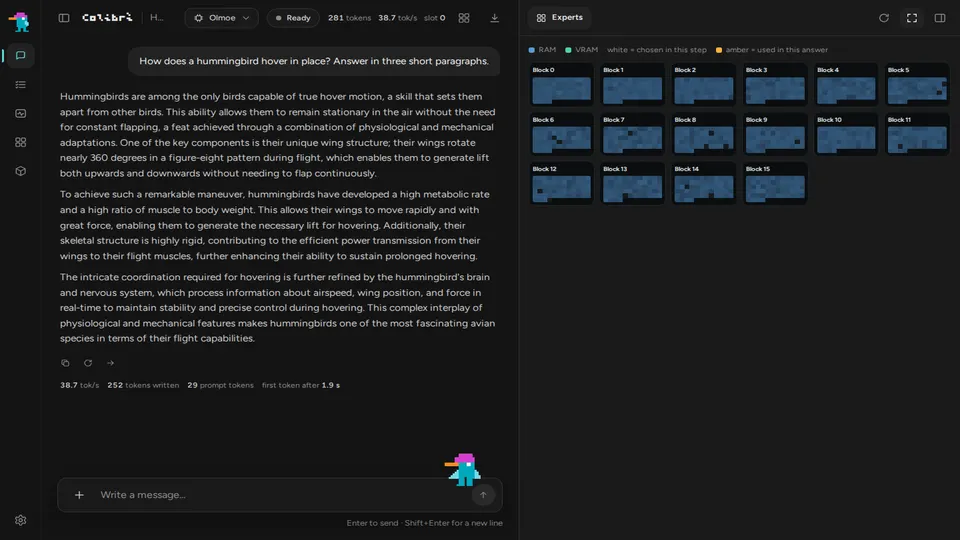
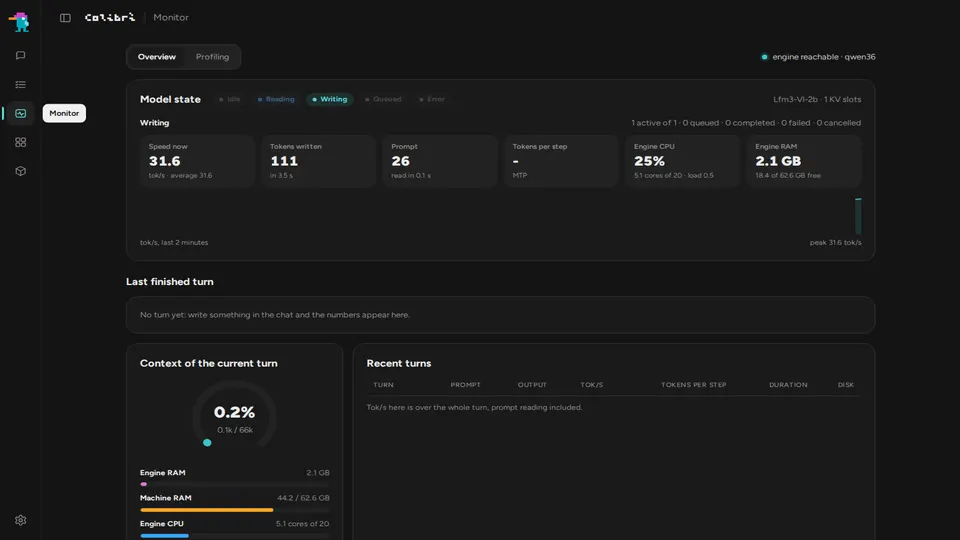
Two panels repay a first look. The expert map shows one card per transformer block, its experts in a grid, coloured by where they live (RAM or VRAM) and by what the current answer used; engines that send per-step frames light the experts each step routes. It turns the streaming idea from step 1 into something you can watch: most of the model stays on disk, and only the routed few light up. The monitor shows the turn in flight — reading the prompt or writing, tokens, tokens/s over the last 32 tokens — and the box itself: RAM, the engine's RSS and CPU, and load. The same UI holds a Profiling page, a System One page (a decision with a probability, over answers you allow), and a Models page showing what fits the machine and how fast it would go, plus a search over the GGUFs on Hugging Face that colibri reads. In Settings, the Agents panel finds Pi, Codex, Claude Code, opencode, OpenClaw and Hermes and opens them already pointed at colibri; that panel is Windows and WSL only for now. coli web remains as the older dashboard the gateway serves itself — same server, older page. If you only remember one distinction: serve first, ui second, and the UI lives on port 8790, not 8000.
Step 5: Try the long-context model built for agent turns
The v2.1.0 change with the most headroom is Qwen3.8-Flash-Next at a 262,144-token context. The catalog route is ./start-here.sh --model qwen38-flash-next: 186 GB to download, 24 GB of RAM to start and 32 GB as measured, on CUDA or Vulkan. The engine doc pins the checkpoint instead, so a later upstream update cannot silently change the local tensors:
hf download Qwen/Qwen3.8-Flash-Next-FP8 \
  --revision bcd9f01ddc9cff2316eb84281bebcd5b058bddce \
  --local-dir ~/Models/Qwen3.8-Flash-Next-FP8
The official FP8 repository is about 185.5 GB. The model itself is 125 billion ordinary parameters with 6 billion activated, plus a 51-billion hashed n-gram embedding, in 48 layers. Its MTP layer drafts tokens for speculative decoding and is on by default (Q38_MTP=0 turns it off). What v2.1.0 adds on top is the agent behaviour: a short request between two turns — an agent asking for the conversation's title, say — parks the conversation instead of taking its state, on every engine, under the COLI_PARK setting. The project's measured case is a second turn of 14,810 tokens on Qwen3.8-Flash-Next falling from 86 seconds to 4.9. At the full 262,144-token context, on the CUDA chain of the project's test machine with the IQ2_XS quant, the release notes measure prompt reads of 15.6 to 149 tokens/s and decode of 9.6 to 45.7 tokens/s — the long context running at the speed the 64k context used to. Those are the project's numbers on its machine, not a promise for yours; treat the first long run as a measurement, with coli tune and the monitor from step 4 open beside it.
Scale has a ceiling worth stating plainly before you chase it. Kimi K3, at 2.8 trillion parameters, is the largest model colibri runs: 1.56 TB to download, 32 GB of RAM to start and 64 GB as measured, and about 9.4 seconds per token with experts read at 6.3 GB/s. That is a demonstration that the streaming design holds at the frontier's size, not a daily driver; Moonshot's newer Kimi K3.1 Pro open weights, which landed on Hugging Face on 4 November, were covered separately, and the K3 engine in colibri is the original K3 checkpoint. Start with Flint or Qwen3.6-35B, graduate to Qwen3.8-Flash-Next for long agent sessions, and treat the trillion-parameter models as the reason the architecture exists rather than the place to begin.
Step 6: Point your other apps at the local server
coli serve, which the setup starts for you, is one server with several APIs: OpenAI-compatible (/v1/chat/completions, /v1/completions, /v1/models), Anthropic-compatible (/v1/messages, so Claude Code and the Anthropic SDKs work against it), tool calling on every chat engine except Inkling and OLMoE, and images in on GLM-5.3-Flash, DeepSeek V4.1 Flash, MiMo-V2.6, Qwen3.8-Flash-Next, Qwen3.8-27B, LFM3-VL and Mistral-Large-4 (from a GGUF, with the mmproj file next to it). Coding CLIs and editors connect as to any OpenAI-compatible provider: base URL http://127.0.0.1:8000/v1, the model id coli status prints, and any non-empty key. A first check with curl, substituting the id your own status command prints:
curl http://127.0.0.1:8000/v1/chat/completions \
  -H "Content-Type: application/json" \
  -H "Authorization: Bearer local" \
  -d '{"model": "<the id coli status prints>", "messages": [{"role": "user", "content": "Hello"}]}'
Decisions go to POST /v1/systemone, and the same System One mode is in the terminal (/decide in coli chat) and on the dashboard's System One page: give the model a document and the only answers it may pick, and get a probability per allowed answer instead of generated text. The gateway also speaks the Jev API, so a TypeSafe Jev client switches by changing its base URL and nothing else. If a client misbehaves, the likeliest causes are the wrong model id (re-run coli status) or a client pointed at port 8790, the UI, instead of 8000, the gateway.
What you built, and where it stops
What you built is a local inference stack with no account and no hosted bill: a pinned v2.1.0 engine, a GGUF imported without conversion, the new chat UI on port 8790, and an OpenAI- and Anthropic-compatible gateway on port 8000 that your editors and agents can use. The honest limits are the ones the project's own tables state. Speed is set by disk and RAM more than by anything you configure: GLM-5.2 measures 0.05–0.1 tokens/s cold on a 25 GB laptop and 9.0–9.2 on six RTX 5090s. A GGUF of an unsupported architecture is refused, not repaired — check the architecture list before downloading a large file. The UI's coding-agents panel is Windows and WSL only for now, and its web search fetches public pages, so it is the one feature here that is not purely local. And v2.1.0 is a fast-moving project: 387 pull requests in one release cycle is the reason to pin the tag, as step 1 does, and to re-check the docs before trusting a command from an older guide — including this one, a release or two from now.
Frequently asked questions
Does v2.1.0 convert my GGUF files?
No. It reads the ggml blocks exactly as the file holds them, from IQ1_S to Q8_0, F16, BF16 and MXFP4: nothing is converted or quantized a second time. The default link mode reads the file where it lies; copy mode additionally writes a re-laid-out copy. Both are lossless — the same blocks, the same tokens.
Do I need a GPU to run colibri?
No. The minimum is 8 GB of RAM, with 16 GB or more recommended, and no GPU is required. A GPU helps some engines: the setup builds for CUDA on NVIDIA cards or Vulkan on any GPU a Vulkan driver can see, and falls back to the CPU when a build is not possible. The largest models are limited most by disk speed, and a fast NVMe drive helps most.
What is the difference between coli ui and coli web?
coli ui is the new chat UI added in v2.1.0: one page and a small Python server that runs beside a running coli serve, on port 8790. coli web is the older dashboard the gateway serves itself. Both talk to the same server; ui adds the expert map, the monitor, web search and a Models page.