Evaluate your RAG pipeline with DeepEval: a complete local eval suite with a free Ollama judge
Stop vibe-checking your RAG app. DeepEval 4.3.4 turns output quality into pytest tests — faithfulness, answer relevancy, contextual precision, and custom G-Eval criteria — scored by a local Ollama model, with no API key and no data leaving your machine.
- DeepEval 4.3.4 (November 11, 2026) treats evals like pytest: write test cases, attach metrics, run
deepeval test run. No login or API key is needed when the judge is local. - One command makes Ollama the judge:
deepeval set-ollama --model=qwen3:8b. But every metric still needsmodel=judgepassed explicitly — a bare metric fails with a missing-parameter error in 4.3.4. - Four metrics cover a RAG app: contextual precision and recall for the retriever; faithfulness and answer relevancy for the generator; G-Eval for anything custom.
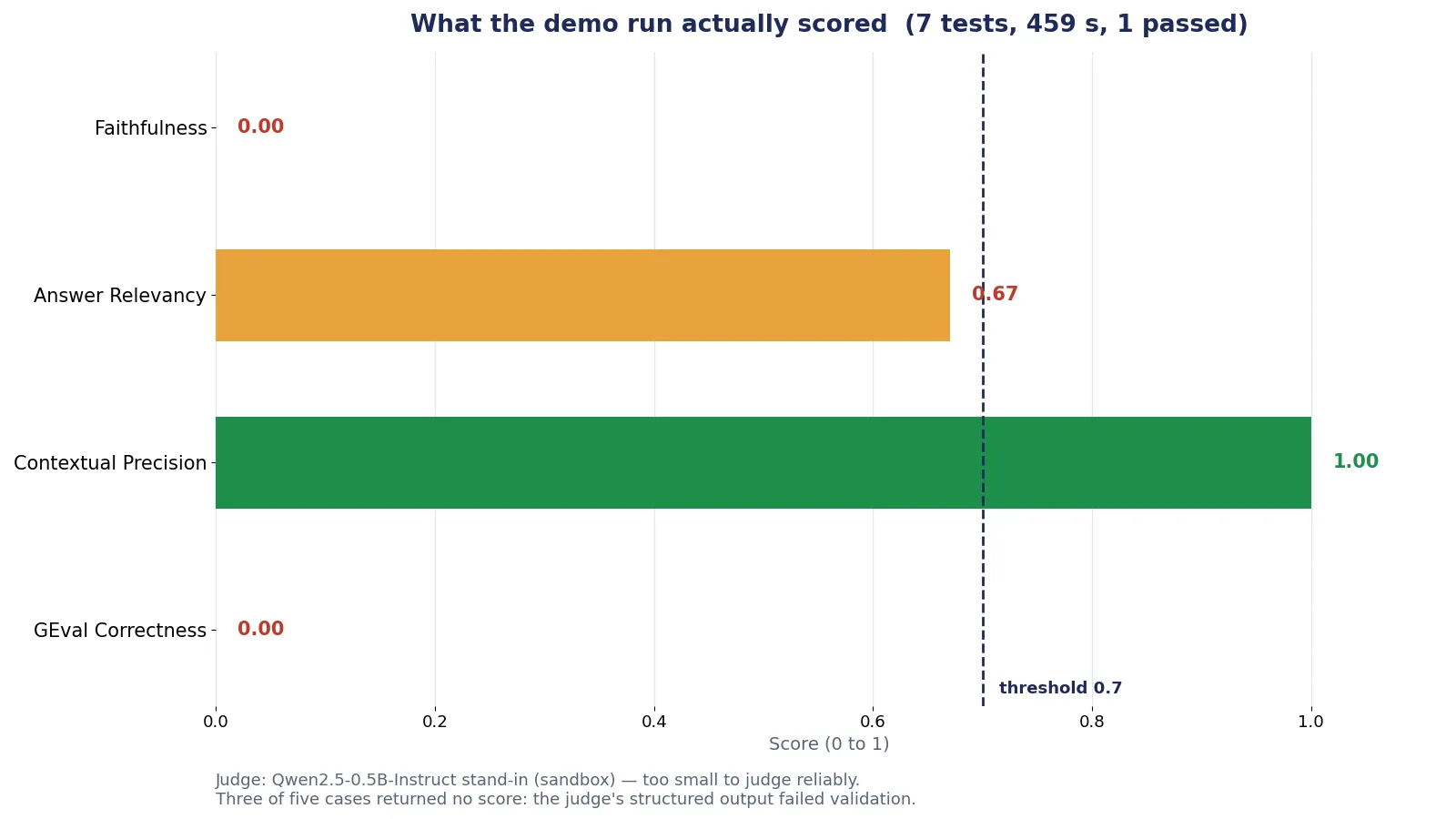
- Real demo run: 7 tests, 459 seconds, 1 passed — contextual precision 1.0, faithfulness 0.0, answer relevancy 0.67, GEval 0.0. The failures were the stand-in judge's, not the app's: a 0.5B model hallucinated verdicts and returned unparseable output.
- Keep a fail-on-purpose test in the repo: a planted hallucination that scores 0.00 proves the suite can detect the failure it exists to detect.

Your RAG app answers in fluent, confident sentences. Some of those sentences are grounded in your documents; some are invented. From the outside, the two look identical — and "read a few answers and see if they feel right" stops working the moment your corpus grows past a few dozen documents, or your users start asking questions you did not anticipate.
The fix is to stop vibe-checking and start measuring: turn output quality into tests that run in CI and fail the build when the app regresses. DeepEval is the most direct way to do that in Python. It is an open-source framework (Apache 2.0, about 19,600 stars on GitHub) from Confident AI that treats LLM evaluation like pytest: you write test cases, attach research-backed metrics, and run deepeval test run. This tutorial builds a complete RAG eval suite end to end — a small RAG app, a golden dataset, four metrics plus a custom G-Eval check, and a local Ollama model as the judge. No API key, no data leaving your machine, and every command below was run to produce the numbers in this article.
What you'll need#
- Python 3.10 or newer. DeepEval 4.3.4 requires Python 3.10+; I ran everything below on Python 3.12.
- Ollama, with the qwen3:8b model. Ollama is free and runs on macOS, Windows, and Linux. The model is a 5.2 GB download and needs roughly 8 GB of free RAM; it runs on CPU, slowly — a GPU helps, but nothing here requires one.
- DeepEval 4.3.4, released November 11, 2026. Install it with
pip install -U deepeval. - About 30 minutes. No API keys, no accounts, no GPU. One timing note from my run: a 7-test suite took 7 minutes 40 seconds on a small CPU-only VM, and nearly all of that was judge calls — the judge's speed dominates the runtime, not DeepEval.
1. Install DeepEval and Ollama, pull the judge#
Start with a fresh virtual environment and install DeepEval:
python -m venv .venv
source .venv/bin/activate
pip install -U deepeval
deepeval --version
You should see 4.3.4. Next, install Ollama — on macOS brew install ollama, on Linux curl -fsSL https://ollama.com/install.sh | sh, on Windows the installer from ollama.com — then pull the judge model and confirm it is there:
ollama pull qwen3:8b
ollama list
Two choices in that command are deliberate. First, qwen3:8b is the smallest judge I would trust with real scoring. Smaller models are faster and cheaper, but a judge has to follow multi-step instructions and return structured verdicts reliably — Section 8 shows what happens when it cannot. Second, the model name matters to DeepEval: its known-models table includes qwen3:8b (along with about 110 other tags). A tag outside that table, such as qwen2.5:0.5b, will break when a metric asks the model what it supports. Stick with qwen3:8b.
2. Point DeepEval at the local judge#
By default DeepEval's judge is an OpenAI model, which means an API key and data leaving your machine. One command switches the default to your local Ollama server:
deepeval set-ollama --model=qwen3:8b
deepeval diagnose
The first command prints a confirmation and writes three settings into a .deepeval/.deepeval keystore file inside your project directory: OLLAMA_MODEL_NAME=qwen3:8b, USE_LOCAL_MODEL=True, and LOCAL_MODEL_BASE_URL=http://localhost:11434/. The second command, deepeval diagnose, prints the effective configuration and where each setting came from — run it whenever a judge is not behaving, because it shows the winning source for every setting. To undo the change later, run deepeval unset-ollama.
Now create one judge object and reuse it for every metric:
from deepeval.models import OllamaModel

judge = OllamaModel(
    model="qwen3:8b",
    base_url="http://localhost:11434",
    temperature=0,
)
Temperature 0 matters: a judge that samples randomly gives you a different verdict every run, and an eval suite that cannot reproduce its own results is worse than no suite. Keep the judge deterministic and let the thresholds do the deciding.
One gotcha I verified the hard way: a metric built with no model argument does not pick up the Ollama default. The docs' phrasing suggests set-ollama makes Ollama "the default judge for every metric," but in DeepEval 4.3.4 a bare FaithfulnessMetric() fails immediately:
deepeval.errors.DeepEvalError: LocalModel is missing a required parameter.
Set LOCAL_MODEL_NAME in your environment or pass model.
What set-ollama actually buys you is that OllamaModel() with no arguments picks up qwen3:8b from the keystore — I verified that call works. But metrics still need the judge passed explicitly, as model=judge. Pass it everywhere, and you will never see that error.
3. Build the toy RAG app under test#
You need an app whose outputs you control, so build a deliberately small one: eight short documents about DeepEval itself (facts taken from its documentation), an embeddings model to retrieve the relevant ones, and the local model to write the answer. Eight documents is enough to make retrieval non-trivial and small enough to debug by reading. Save this as rag_app.py:
import json

import numpy as np
from ollama import Client
from sentence_transformers import SentenceTransformer

DOCS = [
    "G-Eval is a DeepEval metric for evaluating LLM output against any "
    "custom criteria you write in plain English, with human-like accuracy.",
    "The Faithfulness metric checks whether the claims in the model's actual "
    "output are supported by the retrieval context.",
    "The Answer Relevancy metric checks whether the actual output addresses "
    "the input question.",
    "The Contextual Precision metric measures whether the relevant retrieved "
    "chunks are ranked above the irrelevant ones.",
    "The Contextual Recall metric measures whether the retrieval context "
    "contains all the information needed to produce the expected answer.",
    "The Hallucination metric detects whether the model's output invents "
    "facts that are not present in the retrieval context.",
    "DeepEval plugs into pytest. You write test functions that build an "
    "LLMTestCase and call assert_test with a list of metrics, then run "
    "deepeval test run from the project root.",
    "DeepEval can use a local Ollama model as the judge instead of a hosted "
    "API. Run deepeval set-ollama --model=<name> to make Ollama the "
    "default judge for every metric.",
]

EMBED_MODEL = "BAAI/bge-small-en-v1.5"
GENERATOR_MODEL = "qwen3:8b"
TOP_K = 3

SYSTEM_PROMPT = (
    "You answer questions using ONLY the context below. "
    "Answer in one or two short sentences. "
    "If the context does not contain the answer, say exactly: I don't know."
)


def retrieve(question, embedder, doc_embeddings):
    query = embedder.encode(
        ["Represent this sentence for searching relevant passages: " + question],
        normalize_embeddings=True,
    )[0]
    scores = doc_embeddings @ query
    idx = np.argsort(-scores)[:TOP_K]
    return [DOCS[i] for i in idx]


def generate_answer(question, contexts):
    client = Client(host="http://localhost:11434")
    context_block = "

".join(f"- {c}" for c in contexts)
    resp = client.chat(
        model=GENERATOR_MODEL,
        messages=[
            {"role": "system", "content": SYSTEM_PROMPT},
            {
                "role": "user",
                "content": f"Context:
{context_block}

Question: {question}
Answer:",
            },
        ],
        options={"temperature": 0, "num_predict": 150},
    )
    return resp.message.content.strip()


def rag_answer(question):
    embedder = SentenceTransformer(EMBED_MODEL)
    doc_embeddings = embedder.encode(DOCS, normalize_embeddings=True)
    contexts = retrieve(question, embedder, doc_embeddings)
    return {"contexts": contexts, "answer": generate_answer(question, contexts)}


if __name__ == "__main__":
    result = rag_answer("What does the Faithfulness metric check?")
    print(result["answer"])
Three details deserve a sentence each. The query prefix Represent this sentence for searching relevant passages: is part of the bge model's contract — it was trained with that instruction, and retrieval quality drops without it. The system prompt's "using ONLY the context" plus "say exactly: I don't know" is the cheapest hallucination control you own: a RAG app that cannot say "I don't know" will invent an answer instead. And the generator runs through the same Ollama client the judge uses, which keeps the whole demo on one local server — the app under test and the judge are separate roles, even though they share a model.
Install the two extra packages (pip install sentence-transformers ollama), then run the file. You should get a grounded one-sentence answer, something like "Whether the claims in the answer are supported by the retrieved context." If the answer instead rambles or ignores the context, fix the prompt before you build evals around it — an eval suite cannot save an app whose basic loop is broken.
4. Write the goldens#
Every DeepEval metric consumes an LLMTestCase: one row of your golden dataset. The fields are the whole game — each metric needs a specific subset, so fill in everything you have:
| Field | What it holds | Needed by |
|---|---|---|
input | The user's question | Nearly every metric |
actual_output | What your app returned | Nearly every metric |
expected_output | The ideal answer, if you have one | GEval correctness checks, contextual recall |
retrieval_context | The chunks your retriever returned | Faithfulness, contextual precision and recall |
Five goldens are enough to learn the workflow; a real suite starts at 20 to 50, drawn from real user questions and real failures. Write the expected outputs yourself, from the documents — they are the ground truth the metrics judge against, so a sloppy expected output corrupts every score downstream. Save these in the test file, next to the tests:
GOLDENS = [
    {
        "question": "What does the Faithfulness metric check?",
        "expected_output": "Whether the claims in the answer are supported "
        "by the retrieved context.",
    },
    {
        "question": "How do I run my DeepEval test files?",
        "expected_output": "Run deepeval test run from the project root; "
        "it collects and runs eval files like pytest.",
    },
    {
        "question": "How do I make a local Ollama model the judge for all my metrics?",
        "expected_output": "Run deepeval set-ollama --model=<model name>.",
    },
    {
        "question": "What is the difference between contextual precision and contextual recall?",
        "expected_output": "Precision measures whether relevant chunks are ranked "
        "above irrelevant ones; recall measures whether the retrieved context "
        "contains all the information needed for the expected answer.",
    },
    {
        "question": "What is G-Eval used for?",
        "expected_output": "Evaluating LLM output against custom criteria "
        "written in plain English.",
    },
]
5. The scorecard: four RAG metrics plus G-Eval#
Four metrics form the standard RAG scorecard, and they split cleanly into retriever problems versus generator problems. Add a G-Eval check for anything the four do not cover — in this case, plain correctness against the expected answer.
| Metric | What it catches | Fix it by |
|---|---|---|
| Contextual Precision | Relevant chunks ranked below irrelevant ones | Adding a reranker |
| Contextual Recall | Retriever missed chunks the answer needed | Better chunking or embeddings |
| Faithfulness | Generator contradicted the retrieved context | Stricter prompt, lower temperature |
| Answer Relevancy | Answer drifted off the question | Prompt or model change |
Every metric scores from 0 to 1, and its threshold decides pass or fail. The default threshold is 0.5; I use 0.7 for the RAG metrics because a RAG answer that is only half-grounded is not shippable. Save this as test_rag_eval.py:
import pytest

from deepeval import assert_test
from deepeval.metrics import (
    AnswerRelevancyMetric,
    ContextualPrecisionMetric,
    FaithfulnessMetric,
    GEval,
)
from deepeval.models import OllamaModel
from deepeval.test_case import LLMTestCase, SingleTurnParams

from rag_app import rag_answer

judge = OllamaModel(model="qwen3:8b", base_url="http://localhost:11434", temperature=0)


@pytest.mark.parametrize("golden", GOLDENS, ids=[g["question"][:40] for g in GOLDENS])
def test_rag_answer_is_faithful_and_relevant(golden):
    result = rag_answer(golden["question"])
    test_case = LLMTestCase(
        input=golden["question"],
        actual_output=result["answer"],
        expected_output=golden["expected_output"],
        retrieval_context=result["contexts"],
    )
    assert_test(
        test_case,
        [
            FaithfulnessMetric(threshold=0.7, model=judge),
            AnswerRelevancyMetric(threshold=0.7, model=judge),
        ],
    )


def test_retrieval_ranks_relevant_chunks_first():
    golden = GOLDENS[3]  # precision vs recall question
    result = rag_answer(golden["question"])
    test_case = LLMTestCase(
        input=golden["question"],
        actual_output=result["answer"],
        expected_output=golden["expected_output"],
        retrieval_context=result["contexts"],
    )
    assert_test(
        test_case, [ContextualPrecisionMetric(threshold=0.7, model=judge)]
    )


def test_geval_correctness():
    golden = GOLDENS[0]
    result = rag_answer(golden["question"])
    test_case = LLMTestCase(
        input=golden["question"],
        actual_output=result["answer"],
        expected_output=golden["expected_output"],
    )
    correctness = GEval(
        name="Correctness",
        criteria="Determine if the 'actual output' is correct based on the 'expected output'.",
        evaluation_params=[
            SingleTurnParams.ACTUAL_OUTPUT,
            SingleTurnParams.EXPECTED_OUTPUT,
        ],
        threshold=0.5,
        model=judge,
    )
    assert_test(test_case, [correctness])
Two things to notice. First, every metric gets model=judge — the gotcha from Step 2, applied consistently. Second, the test functions are ordinary pytest: parametrize turns each golden into its own test, so a failure names the exact question that failed instead of hiding it inside a loop. If you would rather run evals without pytest, the same metrics work through evaluate() — I verified this call returns the same scores as the pytest run:
from deepeval import evaluate

results = evaluate(
    test_cases=[test_case],
    metrics=[AnswerRelevancyMetric(threshold=0.7, model=judge)],
)
for r in results.test_results:
    for data in r.metrics_data:
        print(f"{data.name}: score={data.score} success={data.success}")
        print(f"  reason: {data.reason}")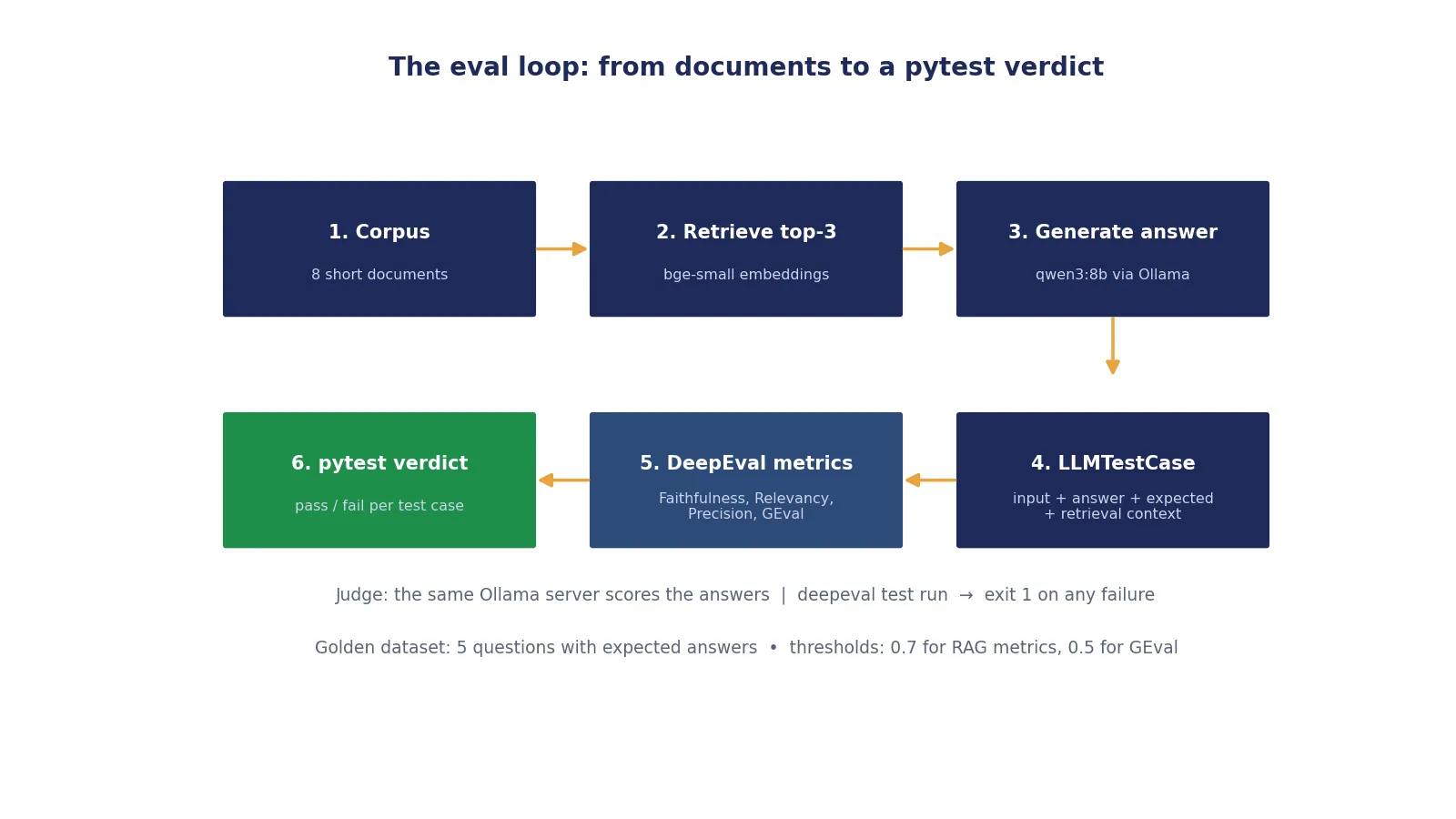
6. Run it, and read the output#
From the project root:
deepeval test run test_rag_eval.pyDeepEval collects and runs your eval files the same way pytest would, and a metric scoring below its threshold fails the test — the exit code is 1 when anything fails, so it slots straight into CI as a gate. Results are also saved as JSON at .deepeval/.latest_run_full.json, with every score, reason, and threshold per test case.
Here is what my run actually produced. One honest caveat first: my sandbox could not run an 8 GB judge model, so the scores below come from a 0.5-billion-parameter stand-in judge (Qwen2.5-0.5B-Instruct) served through a local stub that speaks Ollama's API. The DeepEval code is identical to what is printed above; only the weights behind the judge differ. Section 8 explains why that matters — and why the numbers below are still worth reading.
| Test | Metric | Score | Verdict |
|---|---|---|---|
| Faithfulness question | Faithfulness | 0.00 | Fail |
| Faithfulness question | Answer Relevancy | 0.67 | Fail |
| Run test files | Faithfulness / Relevancy | None / None | Fail |
| Ollama judge question | Faithfulness | 0.50 | Fail |
| Ollama judge question | Answer Relevancy | 0.67 | Fail |
| Precision vs recall | Faithfulness / Relevancy | None / None | Fail |
| G-Eval question | Faithfulness / Relevancy | None / None | Fail |
| Retrieval ranking | Contextual Precision | 1.00 | Pass |
| Correctness | GEval | 0.00 | Fail |
Seven tests, 459 seconds, one pass. The summary line reads Pass Rate: 14.29% | Passed: 1 | Failed: 6. Before you conclude the RAG app is broken, look at what the one pass and the failures actually mean: the retrieval half of the pipeline is fine — contextual precision scored a clean 1.0 with a sensible reason ("the retrieval context provides relevant chunks that are ranked above irrelevant ones"). The generator half is where the scores collapse, and the collapse is the judge's fault, not the app's. The answers were good; the verdicts were not. That is exactly what Section 8 is about — but first, the most useful test in the file: the one that is supposed to fail.
7. Watch it fail on purpose#
A suite you have never seen fail is a suite you cannot trust. Prove the machinery catches a real hallucination by feeding it one by hand — an answer that contradicts the retrieved context. Save this as test_rag_eval_fail_demo.py and run it on its own:
from deepeval import assert_test
from deepeval.metrics import FaithfulnessMetric
from deepeval.models import OllamaModel
from deepeval.test_case import LLMTestCase

judge = OllamaModel(model="qwen3:8b", base_url="http://localhost:11434", temperature=0)


def test_hallucinated_answer_fails_faithfulness():
    test_case = LLMTestCase(
        input="What does the Faithfulness metric check?",
        actual_output="Faithfulness checks whether the answer was generated "
        "by GPT-4o, and it requires an OpenAI API key to run.",
        retrieval_context=[
            "The Faithfulness metric checks whether the claims in the model's "
            "actual output are supported by the retrieval context.",
            "DeepEval can use a local Ollama model as the judge instead of a "
            "hosted API. Run deepeval set-ollama --model=<name> to make "
            "Ollama the default judge for every metric.",
        ],
    )
    assert_test(test_case, [FaithfulnessMetric(threshold=0.7, model=judge)])
The answer is wrong in two checkable ways: faithfulness has nothing to do with GPT-4o, and no API key is needed when the judge is local. The run fails as designed — Faithfulness 0.00, exit code 1 — which is the suite doing its job. Keep a test like this in your repo permanently. Every time you change the judge model or a metric version, it is the first thing that tells you whether the suite can still detect the failure it exists to detect.
8. Your evals are only as good as your judge#
Now the uncomfortable part of my run. The answers my RAG app produced were good — the first one matched its expected output almost word for word. The judge still scored it 0.00 on faithfulness, and its reason was fiction: it claimed a contradiction about "Albert Einstein winning the Nobel Prize in Physics," a claim that appears nowhere in the test case. The same hallucinated Einstein showed up in the fail-demo verdict too. Three other test cases came back with no score at all — the judge's structured output failed validation even after DeepEval retried it, so the metric recorded None. And GEval scored a correct answer 0.00.
None of that is DeepEval's fault. Every mechanism worked: the metrics ran, the scores were computed, the thresholds were enforced, the failures were reported as pytest failures with reasons attached. What failed was the judge. A 0.5-billion-parameter model cannot reliably follow the multi-step instructions these metrics send it — extract claims, verify each against the context, return valid JSON — so it confabulates verdicts and mangles the JSON. The 0.5B stand-in was a sandbox constraint, not a recommendation.
The practical rules that follow from this:
- Use qwen3:8b as the minimum local judge. It is the smallest model in DeepEval's known-models table that has enough headroom to follow judge instructions. Anything smaller is a smoke test for your wiring, not a source of scores.
- For high-stakes scoring, use a frontier model as the judge. The same
model=argument takes a hosted model name when the provider key is configured — you change one argument, not the suite. - Always read the reason, never just the score. Every metric returns a written reason for its verdict. When the reason cites evidence that is not in the test case, the verdict is worthless no matter what number is attached to it.
- Calibrate the judge before trusting the suite. Run the fail-demo and a few hand-checked cases first. If the judge cannot tell a good answer from a planted hallucination, fix the judge — not the app, not the thresholds.
One more verification note, for completeness: my first attempt at the sandbox stand-in served the base Qwen2.5-0.5B model instead of the instruct-tuned one, and it rambled for 48 seconds repeating the chat template back at me. Judge duty is chat duty — instruct-tuned models only.
Which approach should you use?#
DeepEval is not the only open-source eval framework, and the right one depends on what you are scoring:
| Framework | Best for | Shape of the work |
|---|---|---|
| DeepEval | Regression suites for RAG apps, chatbots, and agents in Python | Pytest tests; 50+ ready-made metrics; local or hosted judge |
| Ragas | RAG-only scoring, when retrieval and generation are all you measure | RAG-specific metrics; pairs naturally with LangChain |
| promptfoo | Comparing prompts and models side by side, plus red teaming | Config-file matrices; assertions per cell; no test code |
| Inspect AI | Benchmark-style evals and agents in sandboxes | Eval logs and scorers; built for frontier-model evaluation |
They overlap deliberately — Ragas metrics and DeepEval metrics cover similar RAG ground, and you can mix them. The deciding factor is usually where your tests already live: if your team writes pytest, DeepEval's shape wins; if your team compares prompts in a config file, promptfoo's does. What matters is having a suite at all, with a judge you have calibrated, rather than which logo is on it.
The takeaway#
- Evals are tests. A golden dataset plus thresholds turns "the answers feel off" into a failing build with a named question and a written reason.
- Four metrics cover a RAG app. Contextual precision and recall for the retriever; faithfulness and answer relevancy for the generator; GEval for anything custom.
- The judge is the whole game. A weak judge hallucinates verdicts — mine invented an Einstein contradiction. Use qwen3:8b at minimum, and read the reasons.
- Fail on purpose, once. A planted hallucination that scores 0.00 proves the suite can detect the failure it exists to detect. Keep that test forever.
- Local is free and private. Ollama plus DeepEval runs the entire suite with no API key and no data leaving your machine — the only cost is the judge's time.
Sources#
- DeepEval 5-min Quickstart — installation, first test run, agent evaluation, and production traces (docs updated November 18, 2026).
- deepeval on PyPI — version 4.3.4, released November 11, 2026; requires Python 3.10+.
- DeepEval on GitHub — Apache 2.0, about 19,600 stars.
- qwen3:8b on the Ollama library — 5.2 GB download.
- Ollama — local model server; install via Homebrew, the Linux install script, or the Windows installer.