Run your job search on your own server: hands-on with Dossier, the self-hosted resume tailor
Dossier (AienTech/dossier, AGPL-3.0) keeps one career profile in its own PostgreSQL database, scores job postings against it, and drafts a tailored resume and cover letter for each one using only facts from your profile. This guide installs it with Docker Compose, connects a local or hosted model, and takes one posting from paste to PDF.
- Who: Dossier, by AienTech (AienTech/dossier on GitHub) — about 3,400 stars and 717 forks at the time of writing; the repository was created on 3 October 2026.
- What: a self-hosted job search app: one profile, a tailored resume and cover letter per job, and an application tracker from draft to offer.
- Stack and licence: Next.js 16 with PostgreSQL 18, free software under AGPL-3.0; the Docker image is about 1.7 GB on first download and needs about 2 GB of free memory.
- The honesty rule: drafts only use facts already in your profile — a requirement your profile does not cover is shown as a gap, not invented.
- Documents: twelve resume themes plus a theme builder, printed to PDF on your server by Chromium; documents can be written in 21 languages, while the interface itself is in English.
- Limits: desktop browser only, single user with one profile, one instance per database; the optional daily job agent never sends or applies for anything.
Why this matters now
Applying for jobs is two jobs. One is the search: postings scattered across boards, each with its own wording for the same skills. The other is the paperwork: a resume and cover letter rewritten for every role, from a career history that never changes. Hand the paperwork to a hosted resume service and your employment history lives on someone else's server; do it by hand and the tailoring is the first thing that slips when the search gets long.
Dossier takes the middle path. It is a self-hosted web app that keeps your career history in one profile, in your own PostgreSQL database, and renders a tailored resume and cover letter for each posting from that profile alone. The model you use is your choice: a local one through Ollama or LM Studio, so the data stays on your hardware, or a hosted one through any OpenAI-compatible API, Anthropic, or Mistral. And it has one rule that matters more than any feature list: drafts only use facts from your profile. If a posting asks for something you have not recorded, Dossier shows you the gap instead of inventing the experience.
That combination — self-hosted, one profile, honest drafts — is why a project created in early October 2026 passed 3,400 stars within weeks. This guide installs it, connects a model, and takes one real posting from paste to PDF.
What you’ll need
- Docker Desktop on macOS or Windows, or Docker Engine with the Compose plugin on Linux (WSL on Windows). About 2 GB of free memory; the first start downloads an image of about 1.7 GB.
- A terminal, and
opensslfor generating the secrets in Step 1. - An AI model: either Ollama (Dossier can run it as part of the Compose stack) or an account with a hosted provider. No model, no drafts — Dossier stores and tracks applications without one, but the tailoring needs it.
- An existing resume (PDF, Word, or Markdown) if you want to import your profile instead of typing it. Optional, but it saves the longest step.
- On an Apple Silicon Mac, one extra file: the image is built for Intel/AMD processors and runs under emulation. Step 1 covers it.
Step 1: Get Dossier running with Docker Compose
Dossier ships a production Compose file with two services: the app and PostgreSQL 18. Everything below is from the project's README. Run it in a terminal, in a folder of its own:
mkdir ~/dossier && cd ~/dossier
curl -fsSL -o compose.yml https://raw.githubusercontent.com/AienTech/dossier/main/compose.production.yml
echo "POSTGRES_PASSWORD=$(openssl rand -hex 24)" > .env
echo "DOSSIER_SECRET=$(openssl rand -base64 32)" >> .env
On an Apple Silicon Mac, also create compose.override.yml so Docker runs the Intel/AMD image under emulation:
printf 'services:\n app:\n platform: linux/amd64\n' > compose.override.ymlNext, choose your sign-in password. This command asks for it twice and prints a hash — one line starting with argon2id:. Add that line to .env as DOSSIER_PASSWORD=argon2id:… with any text editor. Dossier only keeps the hash, never the password:
docker run --rm -it --platform linux/amd64 ghcr.io/aientech/dossier hash-passwordThen start it:
docker compose up -dThe first start downloads the image and sets up the database. Open http://localhost:3000, sign in with your password, and you are in. The app binds to your own computer only (127.0.0.1:3000 in the Compose file) — nobody else on the network can reach it. docker compose stop stops it and docker compose start starts it again, with your data kept.
Step 2: Choose your AI model
Pick the model in Settings → AI provider. There are two honest routes, and the choice is really a privacy-versus-convenience call:
Local, with Ollama. Add COMPOSE_PROFILES=ai to .env and run docker compose up -d again: the Compose file adds an Ollama service (ollama/ollama:0.40.10), which Dossier reaches at http://ollama:11434. Pull a model as the project's AI-provider guide describes, then select it in Settings. Your profile and documents never leave your machine. The trade-off is speed and quality: on the project's own note, reading a posting and writing the documents takes from a few seconds to a few minutes with a real model, and a small local model will write plainer drafts than a frontier one.
Hosted. Enter the provider's key in Settings and pick any OpenAI-compatible API, Anthropic, or Mistral. Drafts will generally read better, and the cost is whatever that provider charges — plus the fact that your profile text is sent to the provider to be written from. If you already run Ollama or LM Studio on the host, the Compose file already maps host.docker.internal to it (Ollama on :11434, LM Studio on :1234), so point Dossier at the host instead of adding the bundled service.
Whichever route you take, verify it before building your profile: paste any posting (Step 4) and confirm a draft actually comes back. A misconfigured provider fails silently into an empty application, and you want to find that out with a throwaway posting, not your best lead.
Step 3: Build your one profile
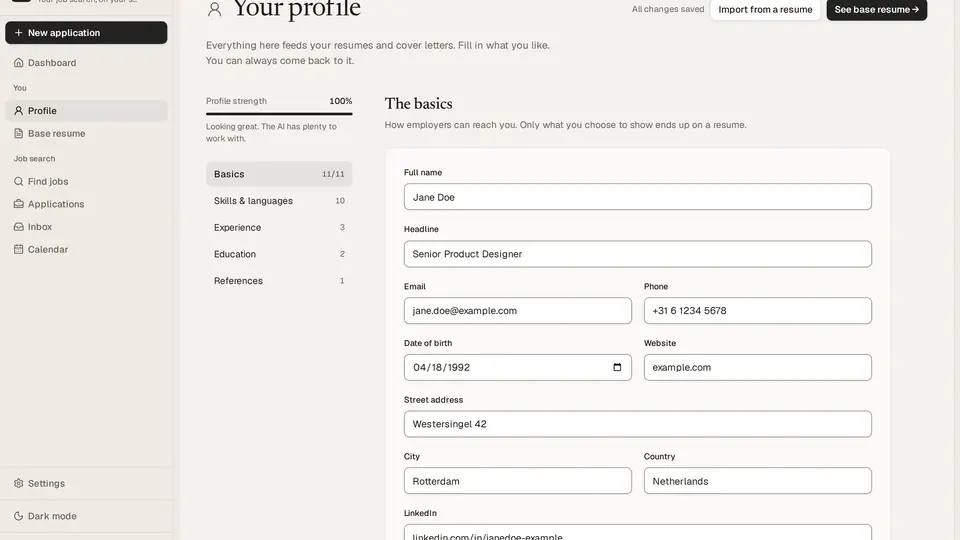
Everything Dossier writes comes from the profile, so this step decides the quality of every draft. The sections are basics, skills and languages, experience, projects, education, publications, and references, in the order you choose. Two details are worth your time:
- Projects count. Side, open-source, course, and thesis work get their own section, because they show what you can do where job titles do not yet. If your strongest evidence is a project, put it here, not buried in a job entry.
- Import instead of typing. Start from an existing resume in PDF, Word, or Markdown. Check the import line by line afterwards — an imported profile with a wrong date will put that wrong date in every tailored resume.
The profile editor has a strength meter that counts only what a profile needs. Treat it as a checklist, not a score to maximise: a complete profile with one thin section beats a padded one, because every fact you add is a fact a draft may use. Publications go on resumes word for word, cited in your own style, with bold and italics — another reason to proofread the source, not the output.
Step 4: Turn a posting into a matched application
There are two ways in. Paste a posting into New application — Dossier pulls out the details and requirements and matches them against your profile. Or search postings from Find jobs, through JSearch (LinkedIn, Indeed, and more), Adzuna, or FreeHire (company career pages), and start an application from a posting with one click. Startups hiring near you come from YC startup posts and Hacker News' monthly “Who is hiring?” thread.
Before any drafting, read the match screen. What you have is ticked off, with where it comes from in your profile; what you do not have is shown as a gap. That screen is the whole point of the tool: it tells you, before you invest an hour, whether this posting is a strong match, a stretch, or a polite no. If a gap is real and closable — a skill you have but never recorded — go back to Step 3 and add it to your profile, then re-check the match. Do not edit the draft to claim it; the draft is downstream of the profile by design.
Choose a tone for the documents when you create the application. The tone you pick here is the voice every draft for this posting starts in.
Step 5: Generate, refine, and export the tailored documents
Creating the application writes a tailored resume and a cover letter from your profile, in the tone you picked. Then refine them the way you would with a colleague: ask for changes in the chat, edit or regenerate any part — every part of the cover letter, including sender block, date, recipient, greeting, and sign-off, written in the letter's language — undo an AI change, or go back to any earlier version. Keep private notes on the application; they are yours, not part of the documents.
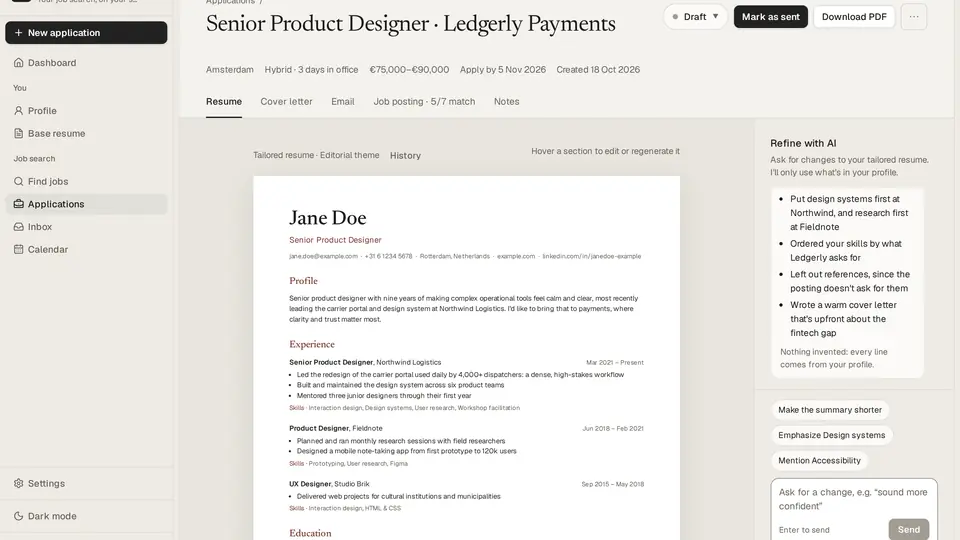
When the documents read right, pick a theme. There are twelve, plus a theme builder; duplicate one and adjust it rather than rebuilding from scratch, and share themes as files if you want the same look on another machine. Preview live, then download the PDFs — they are printed on your server by Chromium, so what you preview is what the employer gets. The README's own measurements put a base resume at about 0.25 seconds to render (1 second when Chromium has to start first).
Each application also gets an email draft, addressed to whoever the posting says to send it to, ready to copy or open in your mail app, with the PDFs to attach. Edit or refine it like the documents. Nothing is sent from here without your say-so; connecting Gmail is optional and covered in Step 6.
Step 6: Track it, and let the job agent watch
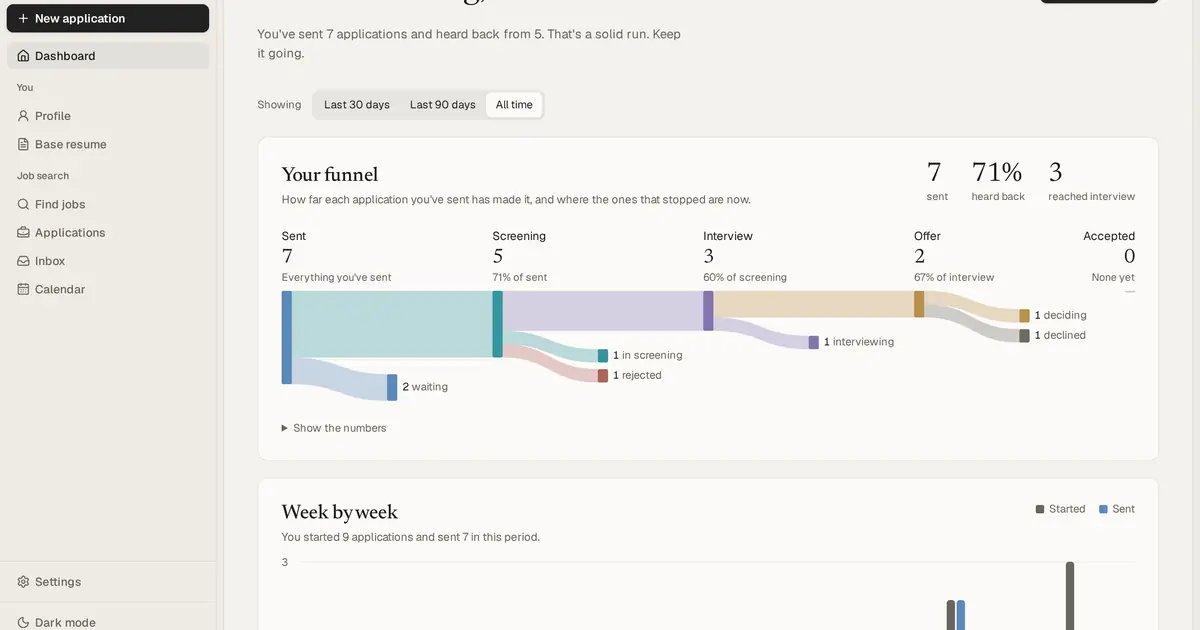
Every application lands on a board and a table, from draft to offer, with a dashboard showing your funnel (last 30 days, 90 days, or all time), a week-by-week chart, upcoming interviews, and what is worth a look next. Move cards as replies come in; the funnel only means something if the statuses are honest.
The optional job agent is the one piece of automation, and it is deliberately timid: once a day it runs one search for you, skips what you have seen, scores the new postings against your profile, and keeps the best on the Agent screen, with its reasons. It can prepare tailored drafts too, which wait for your review. It never sends or applies. Switch it on in Settings once the profile is solid; with a thin profile it will faithfully surface the wrong jobs.
Two optional connections are worth knowing about, both off by default. Gmail and Calendar (your own Google OAuth client, entered in Settings → Google) sends an application from your own address with its PDFs attached, shows employers' replies next to each application, drafts answers from your profile, and keeps interviews in step with Google Calendar both ways — nothing is sent without your confirmation. The Claude connector lets Claude search jobs, score them, read your profile and applications, and save what it writes as a Draft, checked like Dossier's own; it never sends or deletes anything. Neither is needed for the core workflow above.
What you built
A job search that lives on your own machine: one profile in your own database, a matched application for every posting you care about, tailored documents you can defend line by line because every line traces to the profile, and a board that shows where everything stands. Your data exports and imports as one file, with nightly backups, and Delete everything does what it says.
Honest limitations
- Desktop only, single user. Dossier is made for a laptop or desktop browser, not phones; one password, one profile, no accounts, one instance per database. A household sharing a job search needs separate installs.
- The model is the ceiling. Dossier will not invent experience, but it will faithfully reproduce a thin profile in polished language. Draft quality tracks the model you attach and the profile you feed it; read every draft as if you wrote it, because you are sending it as if you did.
- Job sources need keys and coverage varies. JSearch and Adzuna are third-party services with their own accounts and limits; FreeHire covers company career pages. A posting source that does not cover your market will not be fixed by better prompting.
- Local models cost time and hardware. The bundled Ollama route keeps data at home but needs the machine to run the model, and generation takes seconds to minutes per application. The hosted route is faster and reads better, at the price of sending your profile to the provider.
- English interface. Documents can be written in 21 languages, with headings, dates, and language levels in that language; the app itself is in English.
Sources: the Dossier README and production Compose file (install commands, stack, sizing, features, limitations, performance figures, read 30 October 2026), the project repository page (star and fork counts, licence, creation date, topics), and the project homepage (provider list, demo flow). Star counts move daily; the figure quoted is from the day of writing. No draft was generated for this article — the workflow above is the project's documented flow, not an independent run.
Frequently asked questions
Does Dossier apply to jobs on my behalf?
No. The optional job agent prepares tailored drafts that wait for your review, and it never sends or applies. Email is only sent when you confirm it, and nothing is deleted without you.
Does my career history leave my machine?
Not if you use a local model. Through Ollama or LM Studio your profile and documents stay on your own hardware; a hosted provider — any OpenAI-compatible API, Anthropic, or Mistral — receives what it writes from. The project's Privacy wiki page says what goes where.
Can two people share one Dossier, or use it on a phone?
No. Dossier is built for one person on a desktop browser: one password, one profile, no accounts, and one instance per database.