See how your app actually fits together: hands-on with Floorplan
Floorplan (haydenschmitty/floorplan, MIT, 2,376 GitHub stars) is a Claude Code and Codex plugin that has Claude or Codex read your codebase and draw an interactive, plain-English map of its parts, files, endpoints, screens and outside services, with a health check and a record of recent work. This guide installs it, makes a first map, questions the map, updates it after a change, and exports it, with the local-only limits the project states itself.
- Who: Floorplan, by Hayden Smith (haydenschmitty/floorplan on GitHub). MIT licence.
- What: A plugin for Claude Code and Codex: a scan plus Claude or Codex naming every part, file and endpoint in plain English, built into an interactive map at
floorplan/index.html, with Ask, Health check, Recent work, guided flows and Export. - When: Repository created 27 October 2026. At research time on 3 November 2026: 2,376 GitHub stars, 174 forks, version 0.6.3 in the README badge.
- Needs: Node.js 18 or newer, plus Claude Code (desktop Code tab or CLI) or Codex (app or CLI, signed in with ChatGPT). No API keys; it runs on the plan you already have.
- Coverage: TypeScript, JavaScript, Python, Go, Rust, Java, Kotlin and Scala, plus Vue, Svelte and Astro files, with lighter support for others; endpoints from Express, FastAPI, Django, Go, Actix, Spring and more; screens from Next.js, React Router, Vue, SvelteKit, Remix, Nuxt, Astro, Expo, Angular and TanStack.
- Privacy: The scan, the map and its small local server run on your computer; the server only accepts connections from your own machine. The Health check never stores or shows secret values, only where they are.
Why this matters now
Your app works. That is no longer the hard part. The hard part is the question that follows every change: what happens when someone checks out, and what breaks if you touch this file? If an AI assistant wrote much of the code, the honest answer is often that nobody drew the diagram — there is no diagram. Floorplan, created on 27 October 2026 by Hayden Smith, is a plugin for Claude Code and Codex that makes the diagram for you, in plain English, from the code you already have. Claude or Codex reads the codebase, decides what its parts are, and names every file and endpoint the way a person would: “Takes card payments at checkout”, not “Stripe API wrapper”. A few minutes later you have a map you can zoom through, question, and keep up to date as you work. It had 2,376 GitHub stars by 3 November 2026, a week after creation — a sign of how many builders share the same blind spot.
Try the live demo first if you want proof before installing anything: the project publishes a demo map of Brewline, a coffee-subscription app built across four repos, at haydenschmitty.github.io/floorplan-demo. Click around it. If that map is the answer you keep wishing you had for your own app, install the plugin and make one.
What you’ll need
Node.js 18 or newer — Floorplan’s scripts run on it, and it has zero dependencies. Check with node --version. You also need Claude Code (the Code tab in the Claude desktop app, or the Claude Code CLI) or Codex (the app or the CLI, signed in with ChatGPT). There are no API keys to create and no new subscription: Floorplan runs on the Claude or ChatGPT plan you already have, like any other task in those tools. With Claude Code, installing the CLI as well is recommended even if you mainly use the desktop app, because it lets the map’s Ask bar read your real code when it answers questions. Point it at a project you own. A frontend and backend in separate repos is fine — open the folder that holds both, and Floorplan maps them together and connects the requests between them.
Step 1: Check Node.js and install the plugin
Confirm Node.js first. Floorplan needs version 18 or newer:
node --versionThen install the plugin once. In Claude Code, run these two commands in any terminal:
claude plugin marketplace add haydenschmitty/floorplan
claude plugin install floorplan@floorplan
The first command adds the repository as a plugin source; the second installs Floorplan for all your projects. The desktop app and the CLI share the same settings, so it shows up in both. Start a new session afterwards — plugins load when a session starts. In the Claude desktop app you can also browse plugins with the + button next to the prompt box, once the marketplace has been added.
In Codex, no terminal is needed. Open Plugins, choose Add a marketplace, enter haydenschmitty/floorplan as the source, then find Floorplan and install it. Or, from a terminal:
codex plugin marketplace add haydenschmitty/floorplan
codex plugin add floorplan@floorplan
Start a new chat and it is ready. The project is explicit about what installing means: no hooks, no MCP servers, no dependencies, nothing downloaded from the internet, and the only outside request it ever makes is the opt-in waitlist for a future Floorplan Cloud — and only if you sign up. Keep the plugin current later with claude plugin update floorplan@floorplan; updates apply in your next session.
Step 2: Open your project and ask for a first map
Open your project folder in Claude Code or Codex. In the Claude desktop app’s Code tab, choose the folder in the row under the prompt box before sending your first message; in a terminal, run claude or codex from the project folder. Then ask, in plain words:
Make me a floorplan of this app.In Claude Code you can also pick floorplan from the / menu or type /floorplan:floorplan; in Codex, type $floorplan. Then let it work. A scan lists every file, import, endpoint and web request — that part takes seconds and costs no tokens. Claude or Codex then reads your READMEs, setup files and entry points, decides the main parts of your app and what each one is for, and writes a plain-English name and a one-line description for every file and endpoint. Projects with more than about 150 files are split across parallel helpers in Claude Code. You may be asked to let it run Floorplan’s scripts (node …); allow them. Codex also asks to start the map’s server outside its sandbox, so the map keeps running and its Ask bar can reach Codex. A small app takes a few minutes, a large one longer, because every file and endpoint gets described. The map opens by itself, in the app’s browser pane or your web browser, starting with a one-minute Start here tour, and the reply sums up how your app fits together and flags anything serious the Health check found.
No code yet? Floorplan has a second use. Open the folder you will build in, share your PRD or spec, and ask: “Here’s my PRD. Make me a floorplan of what we’d need to build.” You get a blueprint — the same kind of map, with dashed cards marking it as a plan, a review of what the plan still leaves open, and a ready request on each part to build just that part. Once the code exists, ask to map the real code and the blueprint becomes a normal map.
Step 3: Read the map — zoom in, start from a screen, ask a question
Start at the top and double-click into a part, then a group of files, then a file and its endpoints. Each view shows what the thing is used by and what it uses, and one switch shows the developer view instead of the plain-English one. If a name is wrong for how your team talks about the app, fix it in place: ask “rename ‘Main server’ to ‘Shop API’ on the floorplan”, or edit floorplan/architecture.json and floorplan/descriptions/ yourself — your edits are kept on every update.
The fastest way in is from a screen you already know. Pick a page and see everything behind it: its parts, the requests it makes, the server code, the data, and the outside services. Then ask the map the questions you would normally grep for. The project’s own examples are a good first set — adapt the nouns to your app:
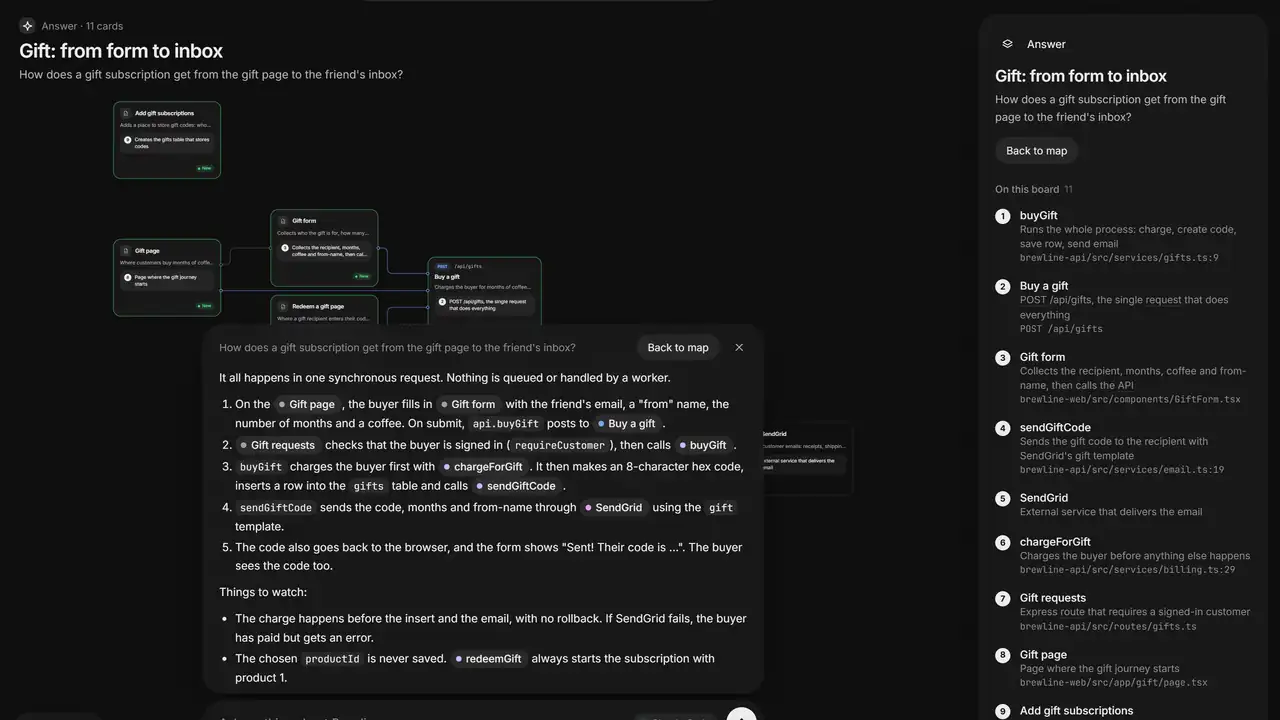
What happens when someone places an order?
Where do we talk to Stripe?
If I change the users table, what breaks?
Which files handle login?
An answer comes back with a mini-map of just the pieces involved and a step-by-step walkthrough. You can also ask for a guided flow — “Add a flow showing how a new user signs up” — and watch a request travel through the app step by step. Search, keyboard shortcuts and right-click actions on every card are all in the map; the project documents them in its guide to using the map.
Step 4: Run the health check — and treat it as a check, not an audit
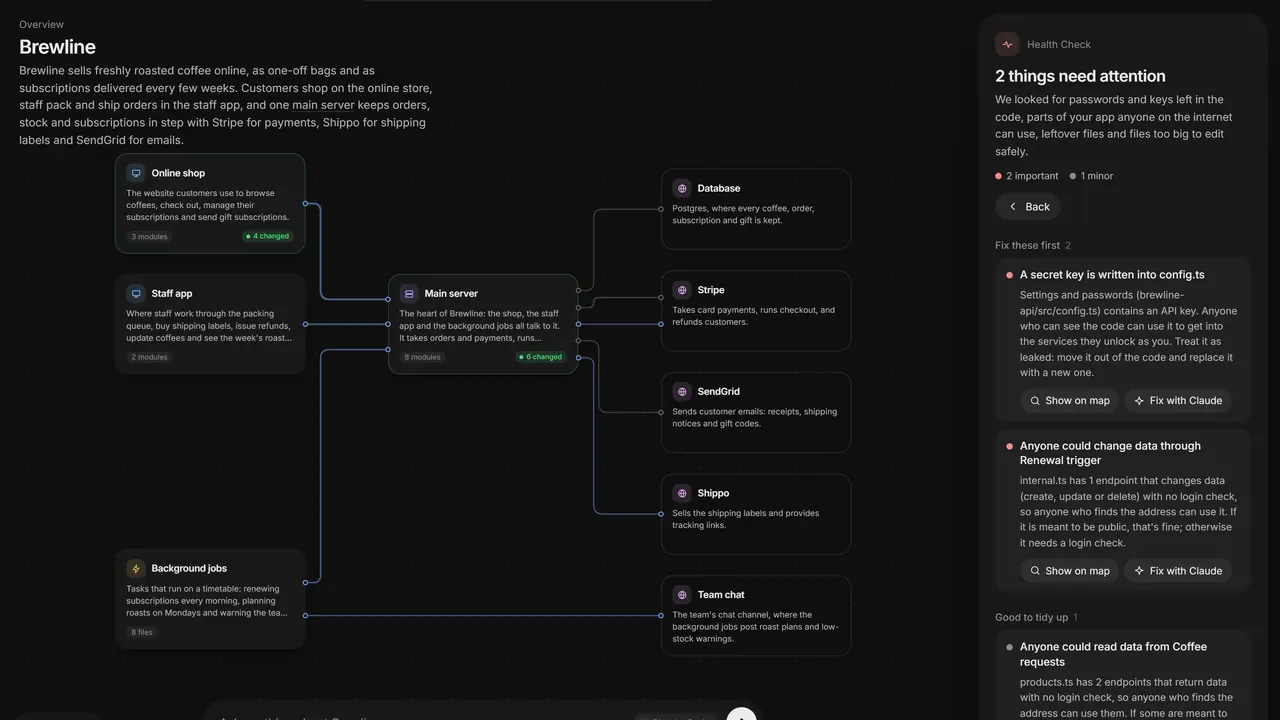
Open the Health panel. It catches the classic mistakes in AI-built apps: keys written into the code or sent to the browser, Supabase tables anyone can read, open Firebase rules, Stripe webhooks anyone could fake, and endpoints with no sign-in. Each finding comes with a ready-to-paste fix, and a Fix prompt you can send straight back to Claude or Codex:
Fix the important issues from the floorplan's Health checkRead each finding before you accept its fix. The project says it plainly: this is a check, not an audit. It will not catch everything, and a flagged endpoint may be intentionally public. Just as important is what the check does not do: it never stores or shows secret values, only where they are. If you disagree with a finding, mark it Not a problem with your reason; that decision is recorded in floorplan/health-dismissed.json and can be shown again later. Do not paste a secret into chat to discuss it — the finding tells you the file and the line, which is all you need to fix it in code.
Step 5: Update the map after real work, and read Recent work
A map that goes stale is worse than no map, because you start trusting it. After you — or your AI assistant — have worked on the code, ask for an update with the same plain prompt:
Update the floorplan.Floorplan re-scans and compares with the last map. Moved files keep their descriptions, deleted ones disappear, and only what is new or what changed in purpose is rewritten, so updates are quick and cheap compared with the first map. A map already open in your browser reloads itself, and the cards that just changed light up green under Recent work, each with a note on how the change serves what you asked for. That panel is the quickest review of an AI session you did not watch line by line: what was asked, what changed, and why each change was needed, on one board. If you want the same treatment in words, ask: “What did we change for refunds?” Make the update part of finishing a piece of work, not a monthly chore — one prompt, every time, is the whole habit.
Step 6: Reopen it yourself, export it, and remove it cleanly
The map lives in your project, in a floorplan/ folder. To open it without Claude or Codex, serve it locally:
node floorplan/serve.mjsIt serves at http://127.0.0.1:4378 with a working Ask bar. Double-clicking floorplan/index.html also works, but everything except asking questions — the Ask bar needs the local server. The server runs in the background and stops by itself two hours after you close the last tab; to stop it sooner, run node floorplan/serve.mjs --stop.
To send the map to someone who does not have the plugin, ask: “Export the floorplan so I can send it to the team”, or use the map’s Export button, which downloads it as one HTML file. Know what is inside the folder before you poke at it: index.html and graph.json are rebuilt every time, architecture.json and descriptions/*.json are yours to edit, and serve.mjs and query.mjs do the serving and lookups. The folder ignores itself in git, and your .gitignore and other tracked files are never touched — in Claude Code, if you say yes, a short section is also added to CLAUDE.local.md so future sessions know the map is there, and that file goes in your clone’s private ignore list. Nothing is committed, and the map is personal to each clone: teammates who install Floorplan make their own.
To remove it, uninstall the plugin and delete the folder from any project you used it in:
claude plugin uninstall floorplan@floorplanThen delete the floorplan/ folder (and, if you used Claude Code, the Floorplan section of CLAUDE.local.md). If a floorplan/ folder was committed before ignoring took effect, the project gives the untracking command that keeps the files on disk: git rm -r --cached floorplan. In Codex, remove the plugin from the Plugins screen instead.
What you built, and where it stops
You built a living diagram of your own app: its parts in plain English, the files and endpoints inside each part, the requests that connect frontend to backend even across repos, the screens that start each flow, the outside services it relies on, a health check over the risky corners, and a record of what just changed and why. It stays current with one prompt, it works offline once built — its layout engine and fonts are built in — and it runs on phones and tablets too, with drag and pinch.
Its limits are the honest kind. The names and groupings are an AI reader’s judgement, so check them against how your team actually talks about the system and rename what is wrong; the map is only as good as the code it read, and a messy codebase maps messily. Coverage is broad but not universal: the documented languages, endpoint frameworks and screen frameworks are listed in the key facts above, with lighter support for everything else. The Health check is a check, not an audit, and it cannot see runtime behaviour. Your code leaves your computer only the way Claude Code and Codex always work — the AI reads the files it needs through your own account — and the map itself is a local file whose server only listens on your own machine. Without the Claude Code CLI, the Ask bar in the Claude app uploads the map (names, descriptions and structure, not your source code) to your private account, and asks first. And a map is not documentation: it shows how the app fits together today, not why a decision was made. For that, you still need the conversation with the people who built it. For everything else — “what happens when someone checks out?” — you now have an answer you can point at.
Frequently asked questions
Does Floorplan send my code to a server?
No server of Floorplan's own receives it. The scan, the map and its small local server all run on your computer, and the server only accepts connections from your own machine. Your code reaches Claude or Codex only the way those tools always work: the AI reads the files it needs through your own account. If you open the map in the Claude app without the CLI, Claude uploads the map — names, descriptions and structure, not your source code — to your private account, and asks first.
Do I need an API key or a new subscription?
No. Floorplan runs on the Claude or ChatGPT plan you already have, with no API keys. You need Node.js 18 or newer and Claude Code or Codex. Installing the Claude Code CLI as well is recommended if you use the desktop app, so the map's Ask bar can read your real code; the Codex app already includes what the Ask bar needs.
Will it change or commit my code?
No. It only writes its own floorplan/ folder — and, in Claude Code and only if you say yes, a short section in CLAUDE.local.md — and neither is committed to git. It never changes your code, your .gitignore or your CLAUDE.md. Edits you make to architecture.json and descriptions/ are kept on every update.