Archon: make your AI coding agents deterministic — hands-on with the open-source harness builder
Your coding agent improvises; Archon makes it follow a plan you can read, version, and gate. This guide installs the open-source harness builder, writes two workflows in YAML, and runs them with no account, no API key, and no model — then shows exactly where the paid agent step begins.
- Who: Archon (coleam00/Archon on GitHub), MIT, copyright 2025–2026 Cole Medin; a tracking review put it at 17,906 stars with +452 on October 28, 2026, ranked #2 on GitHub Trending, after an April 2026 rewrite.
- What: a workflow engine: YAML graphs of agent, bash/script, loop, wait, and child-workflow nodes, with durable run records, transcripts, and an attention queue; 25 bundled SDLC workflows ship with the install.
- When: CLI verified here as v0.13.0 (linux-x64, git commit 0d39c1f2, SQLite database), October 28, 2026.
- Requirement: Linux or macOS, git, ~90 MB for the binary. No account, no API key, no GPU for install, doctor, listing, validation, or bash-only workflows; a provider subscription or key only for agent nodes.

Why this is blowing up now
Every coding agent you run today improvises. Give Claude Code or Codex the same task twice and you get two different plans, two different file layouts, and two different definitions of "done" — because the plan lives inside the model's head, not in a file you can read, version, and reuse. Archon moves the plan out of the model and into YAML: you describe the work as a graph of steps, checks, and human gates, and the engine runs that graph the same way every time, with the agent supplying judgment only inside each step. The project's own governing rule, stated in its workflow-language constitution, is "YAML coordinates. Code computes. Agents judge." That sentence is the whole pitch, and it is why the project is trending.
The numbers: a review tracking the project put coleam00/Archon at 17,906 GitHub stars with +452 stars on October 28, 2026, ranked #2 on GitHub Trending that day, after a complete rewrite in April 2026 that reframed the project from a coding assistant into a harness builder. The rewrite landed on Hacker News twice in one week in April — a 93-point thread reframing multi-agent development as a distributed-systems problem, and a report that the same model, wrapped in a structured harness, jumped from a 6.7% pull-request acceptance rate to nearly 70% with only the harness changed. The project's README makes its own, bolder claim for the current system: of the 524 pull requests merged into the Archon repository between October 1 and 19, 2026, Archon runs built 363 of them. That is the project's claim, not a figure this guide re-measured, and it is worth reading as a claim about a team dogfooding its own factory, not as a benchmark. What this guide does verify, command by command, is the part a reader can actually use today: installing the CLI, writing a workflow in YAML, validating it, running it with no model and no API key, and putting a human approval gate in the middle of it.
That last point matters more than the star count. Most agent tools in this wave fail the first hands-on test for a reader without a subscription: install succeeds, then the first real command asks for a key. Archon's engine separates deterministic steps from AI steps, so a workflow made only of bash: nodes runs end to end with nothing but the binary. You learn the workflow language, the validation, the run records, and the approval gate for free — and you only pay when you add an agent node, which needs a Claude Code, Codex, or Pi provider. This guide draws that line in every step, and never asks you to take an AI node's behaviour on faith: the AI half is described from the project's docs, clearly labelled as not run here, while everything else below is output copied from runs on this machine.
What you'll need
- A Linux or macOS machine with a terminal. This guide ran on Linux x86_64. Windows users should use WSL2 — the installer itself refuses native Windows.
- Git, and a scratch git repository for the demo. Repository runs get their own git worktree by default, which is why the demo needs a real repo with at least one commit.
- No account, no API key, no GPU, and no model for Steps 1–5. The installer, the doctor check, workflow listing and validation, and both demo workflows are local and keyless.
- About 90 MB of free disk for the CLI binary alone — the downloaded binary measured 85,595,616 bytes — plus room for Archon's workspace under
~/.archon. - A Claude Code or Codex subscription, or a Pi setup with a model key or a local model, only if you go on to run workflows containing agent (
prompt:) nodes. That step is outside this guide, and it is the only step that costs anything. - Optional:
gh, the GitHub CLI, if you later want the bundled SDLC pack's issue-to-pull-request factory, which works throughghtoday.
Step 1 — Install the CLI with no providers
Archon ships as a single prebuilt binary installed from archon.diy. The installer downloads the release binary for your platform and verifies its checksum before installing it, which is worth noting because curl-piped installers usually do not. Install it into a directory on your PATH without answering the interactive provider prompt by passing an empty provider list:
curl -fsSL https://archon.diy/install -o install.sh
INSTALL_DIR=~/.local/bin bash install.sh --providers=
export PATH="$HOME/.local/bin:$PATH"
archon version
Expected output, exactly as verified on October 28, 2026:
Archon CLI v0.13.0
  Platform: linux-x64
  Build: binary
  Database: sqlite
  Git commit: 0d39c1f2
Two things to know about this step. First, the installer prints a warning you should expect, not fear: "No providers installed. AI workflows and chat need one; add it with archon provider add <claude|codex|pi>". That is the correct state for this guide — providers connect Archon to an agent CLI you already have; adding one does not install that CLI, and no provider is needed for anything in Steps 2–5. Second, if the download fails with curl: (23) Failure writing output to destination, the installer's temporary directory is full, not the download broken: the installer stages the binary in a temporary directory under /tmp, and a full /tmp aborts the download. Re-run with a temporary directory you control, for example TMPDIR=$HOME/tmp INSTALL_DIR=~/.local/bin bash install.sh --providers=. That failure, and that fix, both happened during the verification of this guide.
Step 2 — Run the doctor and list what you just got
Before writing anything, confirm the install is healthy and see what ships with it:
archon doctor
archon workflow list
The doctor output ends with "No check failed; 2 warning(s) above." The two warnings are the expected no-provider state from Step 1: "Installed providers: No providers installed" and "Assistant login: could not check assistant login: No providers installed." The passing checks that matter here are "Database: reachable (sqlite); schema created by 0.13.0", "Workspace: /home/user/.archon is writable" (with your own home directory in place of the example), "Bundled defaults: 25 workflow(s), 27 command(s) loaded", and "Telemetry: anonymous, embedded key (opt out: DO_NOT_TRACK=1)". Archon sends anonymous usage events — which workflows run and whether they succeed, never your code, prompts, or paths — and DO_NOT_TRACK=1 opts out. If you want telemetry off from the start, export that variable before you run anything else.
archon workflow list in an empty directory prints the bundled workflows, and in a project directory it adds that project's workflows to the count. In the demo repository below it reported 26 workflows: 25 bundled and 1 project workflow. The bundled set is the SDLC pack — the issue-to-pull-request factory described in Step 6 — including archon-intake, archon-build-queue, archon-merge-queue, archon-investigate, and archon-discoveries. You do not run those yet; you just need to know they exist, because they are the reason a fresh install already feels like a factory rather than an empty engine.
Step 3 — Make a demo repository and write your first workflow
Create a scratch repository with one file for the workflow to inspect. Keep this out of any repository you care about:
mkdir demo-archon && cd demo-archon
git init -q
git config user.email [email protected]
git config user.name Demo
printf 'hello archon\nsecond line\n' > notes.txt
git add -A && git commit -qm "demo start"
Now write the workflow. A workflow is one YAML file in .archon/workflows/, named after the file: demo-check.yaml defines a workflow called demo-check. It has a name, a description, and a list of nodes. Each node is one step; depends_on wires the order; a bash: node runs a shell command and succeeds on exit code zero. Nothing in this file mentions a model:
# .archon/workflows/demo-check.yaml
name: demo-check
description: Count the lines in notes.txt and write a one-line report, with no AI node at all.
nodes:
  - id: count
    bash: "wc -l notes.txt > report.txt && cat report.txt"
  - id: verify
    depends_on: [count]
    bash: "grep -q 'notes.txt' report.txt && echo VERIFIED"
Commit the workflow, then validate it before you run it. Validation is a separate command, and it is the cheapest gate in the whole system — it catches bad node references and bad wiring without starting a run:
git add -A && git commit -qm "add demo-check workflow"
archon validate workflows demo-check
Expected output:
Validating workflows in /path/to/demo-archon

  demo-check                               ok

Results: 1 valid, 0 with errors
If validation fails, fix the YAML — do not run first and debug later. The engine's rule is that YAML declares only what it must govern (topology, gates, joins, retries, artifacts); computation belongs inside the node. A workflow that fails validation has a governance problem, not a typo in a shell command, and running it will not clarify anything.
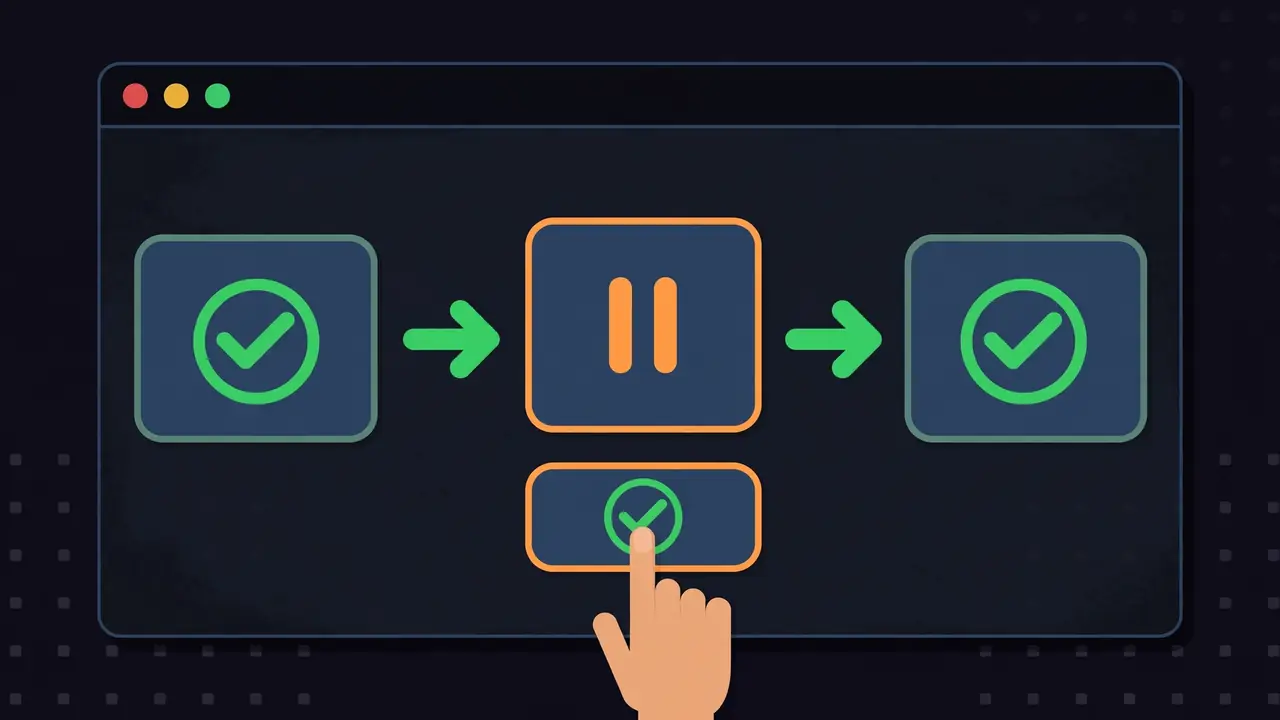
Step 4 — Run it, and meet the worktree rule
Run the workflow. Your first attempt will probably fail, and the failure is instructive, so run it the default way first:
archon workflow run demo-check "demo run"Expected output in a repository with no git remote:
Error: **Error:** Could not create isolated workspace (Cannot determine git remote
for /path/to/demo-archon: no git remote is configured. Add one with
`git remote add origin URL`, or use `--no-worktree` to run in the live checkout.).
This is Archon's isolation model doing its job. Repository runs get their own git worktree by default, so several runs can work on one repository at once without stepping on each other — but a worktree needs a remote to anchor against, and a scratch repo has none. The fix for a local demo is --no-worktree, which runs in the live checkout instead. In a real repository with a remote, drop the flag and let the engine isolate the run:
archon workflow run demo-check "demo run" --no-worktreeExpected output, copied from the verified run:
Running workflow: demo-check
Working directory: /path/to/demo-archon

Dispatching workflow: **demo-check**
🚀 **Starting workflow**: `demo-check`

> Count the lines in notes.txt and write a one-line report, with no AI node at all.
[workflow] Transcript: ~/.archon/workspaces/_local/demo/logs/<run-id>.jsonl
[count] Started
[count] Completed (101ms)
[verify] Started
[verify] Completed (52ms)
VERIFIED

Workflow completed successfully.
  Usage (recorded totals; completeness unknown):
    Cost: unknown
    Input tokens: unknown
    Output tokens: unknown
Check the artefact the run left behind, and the run record the engine kept:
cat report.txt
archon workflow runs
archon workflow get <run-id>
report.txt contains 2 notes.txt — the file has two lines, exactly as written in Step 3. archon workflow runs lists the run as completed alongside the earlier failed attempt, so the failed worktree run is not hidden: it stays in the record as failed with its own run id. archon workflow get shows the run's start commit, its transcript path under ~/.archon/workspaces/_local/<project>/logs/, and its status. That transcript is the audit trail the whole design exists for: every node, its timing, and its output, kept outside the repository in the Archon workspace. "Cost: unknown" is also honest output — bash nodes cost nothing and report no tokens, so the engine records the totals as unknown rather than inventing a zero.
Step 5 — Put a human gate in the middle
A workflow that only runs shell commands is a script with extra steps. The feature that justifies the engine is the wait: a node that pauses the run and asks a person to decide. Add a second workflow that checks the file, waits for your approval, and only then writes a release note:
# .archon/workflows/gate-check.yaml
name: gate-check
description: A bash check followed by a human approval gate, then a release note.
nodes:
  - id: check
    bash: "test -s notes.txt && echo CHECK-OK"
  - id: approve
    depends_on: [check]
    wait:
      attention: "Release the note for notes.txt?"
      form: approval
  - id: release
    depends_on: [approve]
    when: "$approve.output.decision == 'approve'"
    bash: "echo RELEASED > release.txt && cat release.txt"
Validate it, then run it the same way:
archon validate workflows gate-check
archon workflow run gate-check "gate demo" --no-worktree
The run executes check, then stops — it does not hang, it pauses, and it tells you exactly how to continue:
[check] Started
[check] Completed (86ms)
[approve] Started

Workflow paused — waiting for approval.
While it is paused, archon workflow status shows it as paused with approve as the active node, and archon workflow attention lists the open question with the commands that answer it. Approve it from the same terminal:
archon workflow approve <run-id> "looks good"Expected completion:
[check] Skipped (prior_success)
[approve] Completed
[release] Started
[release] Completed (151ms)
RELEASED

Workflow completed successfully.
Three details in that output are worth pausing on. First, check is skipped on resume with reason prior_success — completed nodes are not re-run when a paused run continues, which is what makes a gate safe to put in front of a slow or side-effectful step. Second, the release node only runs because its when: condition matched the approval decision; a rejection would have skipped it, and the run would have ended without writing release.txt. Third, release.txt now contains RELEASED, which you can verify with cat release.txt. A gate you cannot verify after the fact is theatre; this one leaves a file, a transcript, and a run record.

Step 6 — What the bundled SDLC pack is, and where the free part ends
The 25 bundled workflows are a working factory, not samples. In the project's own description: you open an issue, archon-intake triages it against the current code, the build queue claims it and runs a delivery workflow (plan, implement, review through specialist lenses, fix the findings, wait for CI) until it stops at a pull request whose review says Ready, and the merge queue lands the pull requests that are ready and merge cleanly. Queues start by hand or bind to schedules or issue events through triggers, and the pack binds nothing by default — nothing runs on your repository until you start it. Starting that factory is a real project in its own right (repository registration, provider setup, GitHub CLI access), and this guide deliberately does not walk through it: every node in it is an agent node, so it needs a provider, and the provider is the paid step.
That is the boundary, stated plainly. To cross it, install the agent CLI first — Claude Code or Codex, or Pi — then connect it: archon provider add claude, codex, or pi. Adding a provider connects Archon to your agent CLI or SDK; it does not install that CLI, and the project's docs are explicit that a node's provider configuration and native authentication contract are preserved, not rerouted. Pi is the interesting option for readers without a subscription: the project's docs list Pi backends including local models through Ollama and LM Studio alongside the hosted providers, so a local-model agent node is at least architecturally possible. This guide did not verify a Pi-backed agent run — no local model was pulled here, and a model download is exactly the heavyweight step this desk refuses to do speculatively — so treat the local-model path as documented but unverified, and budget a model download before you promise yourself a free agent run. What is verified here is everything up to that boundary: the engine, the language, the validation, the run records, and the gates all work with no provider at all.
When to use this vs alternatives
Use Archon when the process matters as much as the output: a delivery pipeline with review gates, a release checklist with a human approval in the middle, a research or content process with fixed steps and an audit trail. The YAML graph is the artefact — reviewable, versionable, and re-runnable — and the engine's guarantees (completed nodes are not re-run, gates pause rather than hang, every run keeps a transcript) are the reason to pay the cost of writing YAML instead of a shell script.
Do not use it when a shell script or a Makefile already does the job. A two-command check with no gate, no branching, and no audit requirement gains nothing from a workflow engine and loses the simplicity of a script anyone can read in ten seconds. Likewise, if you want one agent rather than a governed process, a single-agent CLI is the smaller tool — this blog's Pi tutorial covers that shape — and if you want to mint whole new harnesses rather than run workflows, the MetaHarness factory covered earlier is the tool built for that job. Ruflo, covered the same day as this guide's verification, is the closer comparison: Ruflo is one finished harness with swarms and local memory, while Archon is the engine for describing your own processes, including processes that call harnesses like Ruflo as one step among others. And if your graph is Python and your agent loop is the product, LangGraph — also covered on this blog, running locally on a small Qwen model with no API key — may fit your codebase better than Archon's YAML. Choose by where the logic should live: in Python code, in a harness you own, or in a YAML graph an operator can audit without reading code.
The takeaway
Archon earns its trending spot for a narrow, defensible reason: it makes the process a first-class artefact instead of a prompt. Install the binary, write a YAML graph, validate it, run it, and gate it — all verified here with no account, no key, and no model, in an afternoon's worth of commands that each produced the output shown above. The honest limit is equally narrow: the moment a node needs judgment, you need a provider, and the provider is a subscription, a key, or a local model you have to download and run yourself. Go in with that boundary clear, start with bash-only workflows for your checklists and release gates, and add agent nodes only where a human would otherwise have to improvise the same step twice. That is the shape of tool this is: not an agent, but the factory floor the agent works on.
Sources: the coleam00/Archon repository (README, workflow-language reference, and AGENTS.md, read October 28, 2026), the Archon CLI v0.13.0 installed and run for this guide (installer checksum verified; demo-check and gate-check workflows executed with the outputs shown), and a review tracking the project reporting 17,906 stars with +452 stars on October 28, 2026 and a #2 GitHub Trending ranking. Star counts and the project's pull-request claim are the sources' figures, not re-measured here; every command, timing, and file content in Steps 1–5 is from runs on the verification machine. Agent-node behaviour and the Pi local-model path are described from the project's docs and were not executed here — no provider was configured and no model was downloaded.