One tiny board for you and your coding agents: hands-on with Kanzo
Kanzo 0.2.1 (emanuele-em/kanzo, AGPL-3.0, 216 GitHub stars) is a self-hosted kanban board and MCP server in one small Rust program: the whole board is one folder, a private git repo syncs it between machines, and coding agents work the same cards you do. This guide installs it, runs the board, connects Claude Code and Codex, and syncs it to a second machine.
- Who: emanuele-em. Kanzo is a single-author open-source project: a kanban board in the browser and an MCP server in one Rust program.
- What: A self-hosted board where humans and coding agents work the same tasks. The whole board is one folder (
~/kanzo:kanzo.dbplusconfig.toml), synced between machines through a private git repo. No account, no server to rent. - When: Repository created 25 October 2026; version 0.2.1 released 27 October 2026; 216 GitHub stars and 12 forks at research time on 31 October 2026. AGPL-3.0.
- Size: The project reports a 4.1 MB program, 4.5 MB idle memory (8 MB with 3,000 tasks), a 2 ms start and a 17 ms load for a 3,000-task board, measured on an Apple M4. Its tool list costs agents about 900 tokens once per session.
- Verified here: The 0.2.1 release binary was run for this guide: board served on a test port, Markdown and JSON export, and project and task creation over MCP. The installer and sync commands are the project's documented ones.
- Hard limit: No logins. The board trusts whoever can reach its port, so it binds to localhost unless you deliberately open it.
Why this matters now
Coding agents got good at doing tasks and bad at telling you which tasks exist. The work lives in chat transcripts, in half-remembered prompts, in a markdown file nobody updates. You ask an agent to continue yesterday's work and it starts by reconstructing what yesterday's work was. A shared list fixes the boring half of that problem: one place where the next task is written down, where the agent can take it, and where its progress is visible without asking.
Kanzo is that list, stripped to the minimum. It is one Rust program that serves a kanban board in your browser and an MCP server for agents, backed by a SQLite database in a single folder. There is no account and no hosted service: the board is ~/kanzo, and a private git repository you own is what carries it to your laptop, desktop or Raspberry Pi. The trade for that simplicity is stated plainly in its own generated settings file: there are no logins, so anyone who can reach the port can read and change the board.
Every binary behavior below was run for this guide on 31 October 2026 with the 0.2.1 release binary: the version check, the board serving on a test port, the Markdown and JSON export, and project and task creation over MCP. The installer, the agent-registration commands and the sync flow are the project's documented ones, copied from its README.
What you’ll need
- macOS or Linux, including a Raspberry Pi. The installer covers both; the README documents no Windows installer, so Windows users should use the cargo install or run it on another machine on their network.
- Claude Code or Codex, only for Step 4. The board itself needs neither.
- A private git repository you own, only for Step 5. Anywhere git can push works; GitHub is the documented example.
- Almost nothing else: the project reports a 4.1 MB program and about 4.5 MB of idle memory. This is a tool that should disappear into the background of a machine you already own.
Step 1: Install it and check the version
Install with the project's script, which fetches the release for your system. Every release is signed by GitHub, and the README shows how to check a download with gh attestation verify if you want the receipt. Then confirm the binary you got is the one this guide was checked against:
curl -LsSf https://github.com/emanuele-em/kanzo/releases/latest/download/kanzo-installer.sh | sh
kanzo --version
# kanzo 0.2.1
The --help output is the whole manual, and it is short: mcp, init, sync, export, update and service. If a command in this guide does not appear in your --help, stop and check the version first \u2014 this project is six days old at the time of writing, and its surface is still moving.
Step 2: Start the board and learn the keys
Run the board. With no arguments it starts on port 4242 and opens your browser; --no-open keeps it in the terminal, which is what you want on a headless machine or when you are scripting around it. The first run creates the data folder itself \u2014 kanzo init exists if you want to create it explicitly, and every command takes --home <dir> to use another folder.
kanzo --no-open --port 4242
# Kanzo board at http://localhost:4242, data in ~/kanzo
# MCP over HTTP at http://localhost:4242/mcp
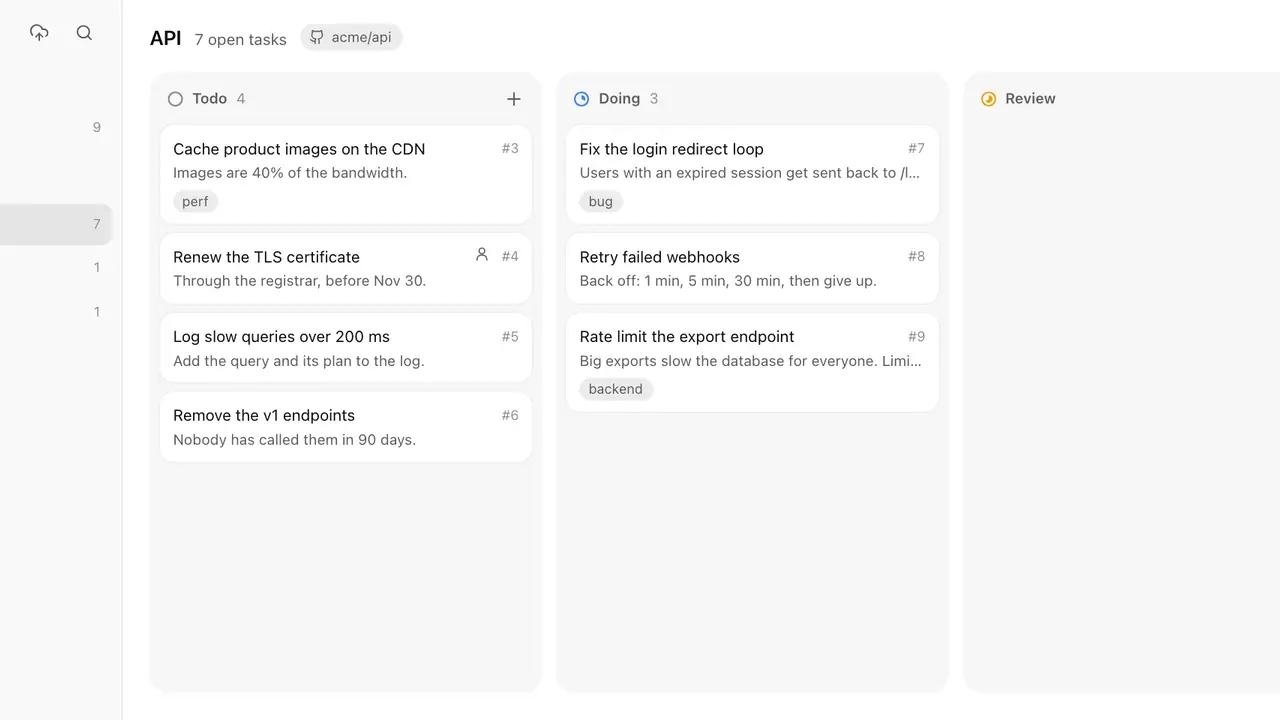
On first run the board creates kanzo.db and a commented config.toml in the data folder. The defaults are the safe ones: port 4242, listening on 127.0.0.1 only, MCP over HTTP on. Learn four keys and you can drive the whole board without the mouse: n adds a task, / or ⌘K searches every project, Tab moves to the description, ⌘↵ saves and closes, Esc cancels. Turn on the Backlog column in Settings, at the bottom of the sidebar, for ideas: agents leave its tasks alone until you move them to todo. You can paste or drop an image into a task or a comment; agents receive its file path and can open it.
Step 3: Make a project and export the board
Create a project from the board \u2014 the sidebar's New project button \u2014 and add a few real tasks, with descriptions a stranger could act on. Then check the escape hatch before you depend on the tool: export prints the whole board as Markdown, or as JSON with -f json, optionally for one project with -p or into a file with -o. An empty board exports as a heading and a timestamp; a board with one project and one task exports like this (from the run for this guide, project and task created over MCP in Step 4):
kanzo export
# # Kanzo board
#
# ## Tutorial demo `tutorial-demo`
#
# ### todo
#
# #### tutorial-demo#1 Verify the Kanzo agent loop

kanzo export -f json -o board.json
Note the task id format: tutorial-demo#1, project slug plus a number. That is how agents refer to tasks, and how you will refer to them in conversation. The JSON export adds the board's statuses \u2014 todo, doing, review, done \u2014 and an exported_at timestamp. A tool whose entire state can be printed to the terminal is a tool you can back up, grep, and leave.
Step 4: Connect an agent and hand it the next task
Register the MCP server once per agent. The agent starts kanzo mcp itself over stdio; you never run it by hand except to test it. Other MCP clients can use the running board at http://localhost:4242/mcp instead, with the full path to the binary where a client needs it.
claude mcp add kanzo --scope user -- kanzo mcp   # Claude Code
codex mcp add kanzo -- kanzo mcp                 # Codex
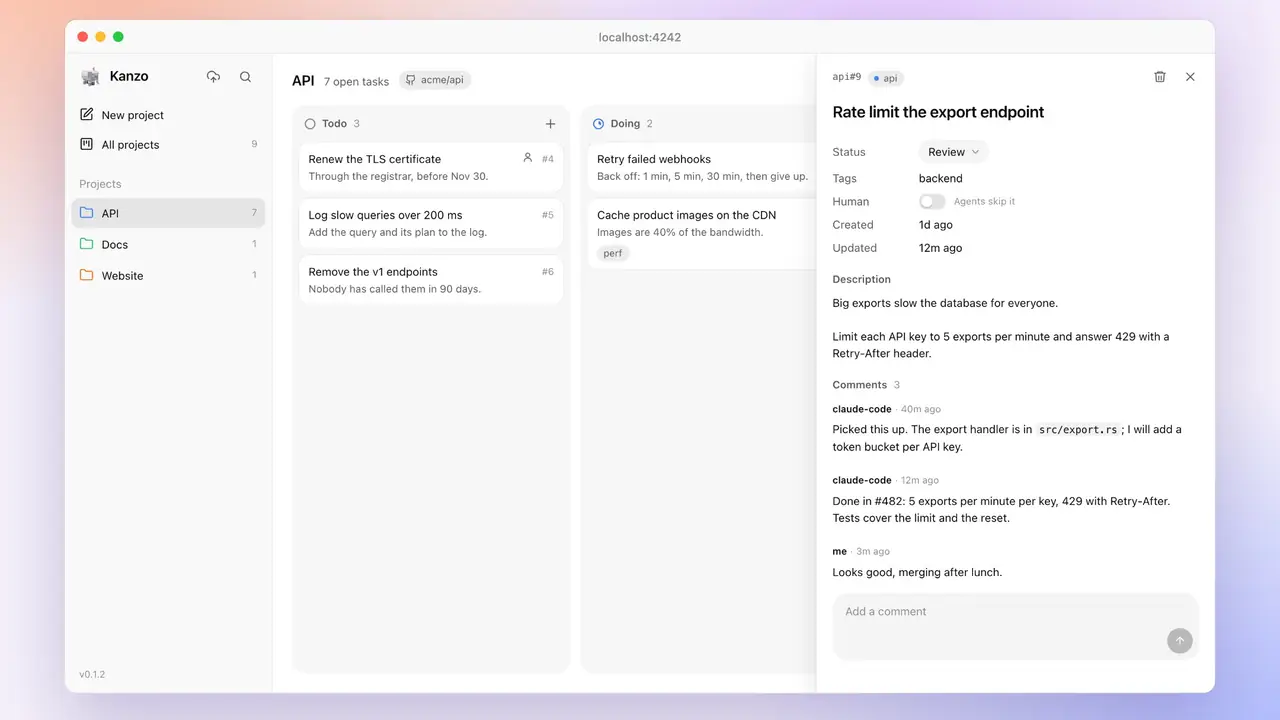
Then ask, in plain language: “take the next task from kanzo and do it.” The agent moves the card to doing and comments as it works, finds the right project from the git remote of the repo it is working in, and links more repos to a project from the project's menu. The server exposes ten tools, verified against the running binary: create_project, create_task, list_projects, list_tasks, next_task, get_task, update_task, add_comment, link_repo and delete_task. Two details from the live run are worth knowing before you script against them: creating a project requires a slug \u2014 a name alone is rejected \u2014 and creating a task answers in plain text, “Created tutorial-demo#1 in todo: Verify the Kanzo agent loop”. The instructions the server gives every agent are the workflow itself: keep the board current without being asked, comment on what was done, move finished or stuck work to review, and leave done \u2014 and tasks marked Human \u2014 to you.
Step 5: Sync the board to your other machines
Create an empty private repository, then tell Kanzo where it is: Settings at the bottom of the sidebar, Sync, paste the URL. Kanzo makes ~/kanzo a git repo and pushes the board. On each other machine, do the same with the same URL, and Kanzo offers to use the board that is already there. From then on, sync when you switch machines, from the sidebar or the command line:
kanzo sync --repo https://github.com/you/kanzo-data
kanzo sync
kanzo sync --keep-local    # both sides changed: keep this machine
Sync commits the board and pulls or pushes it, and it is safe to run while the board and your agents are running. If both machines changed the board, Kanzo asks which one to keep; --keep-local and --keep-remote answer that question from the command line. Treat sync as a handoff, not as live collaboration: work on one machine, sync, move to the other. If agents on several machines must share one board at the same time, run a single board with listen = "0.0.0.0" on a network you trust and point every agent at that host's /mcp endpoint, passing the project by name \u2014 remembering, again, that there are no logins on that endpoint.
Step 6: Keep it running, and keep it current
Install the login service so the board is there when you sit down, and let the board tell you when a new version exists: the sidebar offers it, one click installs it and restarts the service. The command-line equivalents do the same without the browser:
kanzo service install    # starts at login; uninstall removes it
kanzo update           # latest release, restarts the service
Settings live in ~/kanzo/config.toml \u2014 port, listen address and the mcp_http switch \u2014 or in another folder with --home or the KANZO_HOME environment variable. Change the port there rather than memorizing a flag, and keep the listen address at 127.0.0.1 unless you have read the warning in Step 5 twice.
What you built
A task list that two kinds of worker share: you, in a browser, and your coding agents, over MCP \u2014 backed by one SQLite file, synced through a git repo you own, running in a few megabytes. The project's own framing is the honest pitch: the agent's tool list is about 900 tokens once per session, and its replies are 10 to 60 tokens of plain text. The board costs almost nothing to keep, which is the point: the system that tracks the work should never become work itself.
Honest limitations
- No authentication, by design. The board and its MCP endpoint trust the network. Localhost is safe; a shared or public network is not. Do not expose port 4242 beyond a network you control.
- Sync is a handoff, not a merge. Conflicting changes on two machines resolve by picking a side, not by merging cards. If two agents on two machines write to the same board concurrently, one side's work can be discarded by a
--keep-remote. Use one board per moment, or one shared board over HTTP. - Agents can destroy as well as build.
delete_taskcannot be undone. The git repo is your undo button: sync before risky agent sessions, and check the board after them. - Young and small. Version 0.2.1, one maintainer, macOS and Linux only for the installer. The surface is small enough to verify with
--helpin a minute, and you should: pin the version you verified before building habits around it.
Frequently asked questions
Does Kanzo have logins, and can my agent reach it from another machine?
There are no logins at all. Anyone who can reach the board's port can read and change the board and use its MCP endpoint, so by default it listens only on 127.0.0.1, on your own machine. Open it to a network only with listen = "0.0.0.0" on a network you trust, and point remote agents at http://
What happens if two machines change the board before syncing?
Kanzo asks which side to keep. Run kanzo sync to commit the board and pull or push it; if both sides changed, pass --keep-local to keep this machine's board and overwrite the remote, or --keep-remote to take the remote board and drop this machine's changes. Sync is for switching machines, not for editing the same board from two places at once.
Can an agent delete tasks, or mark its own work done?
It can delete: delete_task removes a task with its comments and images and cannot be undone, so keep the board in its private git repo and sync often. By the board's own instructions to agents, they move a task to doing when they start it, comment as they work, and move it to review when they finish or get stuck — done, and tasks marked Human, are left to you. Ideas you do not want agents touching can sit in the optional Backlog column until you move them to todo.