Google Maps in AI Studio: build a location app from one prompt, free for 100 calls a day
Google removed the setup tax from building location apps. On November 9, the company put Google Maps Platform inside AI Studio, so describing an app to Gemini — a store locator, a 3D tour of New York, a route planner for a dog-grooming van — now wires up the maps, the API keys and a live preview, with no credit card and no trip to the Cloud Console.
What we checked: Google’s Developers Blog announcement “From prompt to app: Build with Google Maps in AI Studio,” published November 9, 2026, by Abinaya Selvam and Mike Taylor-Cai — cross-checked against Unite.AI’s same-day report and Google’s Maps Platform documentation on demo keys.
- What: Google Maps Platform inside Google AI Studio, announced November 9, 2026, on the Google Developers Blog.
- How: describe an app to Gemini; AI Studio configures Maps Platform and the API keys with zero redirects, or auto-connects existing Google Cloud projects.
- Free tier: 100 calls per API per day, resetting every 24 hours, no credit card; new users get a free project and a Maps Demo Key.
- Four API groups: Maps, Places, Routes and Environment — from photorealistic 3D cityscapes to live pollen alerts.
- Excluded from the demo key: Route Optimization, Solar and Nav Connect.
- Production: requires a linked Google Cloud billing account, on standard Maps Platform pricing with recurring monthly free usage.
- Gallery examples: City Immersive Tour, Pet Grooming Route Optimizer and Store Locator & Near Me Finder, all remixable in AI Studio.
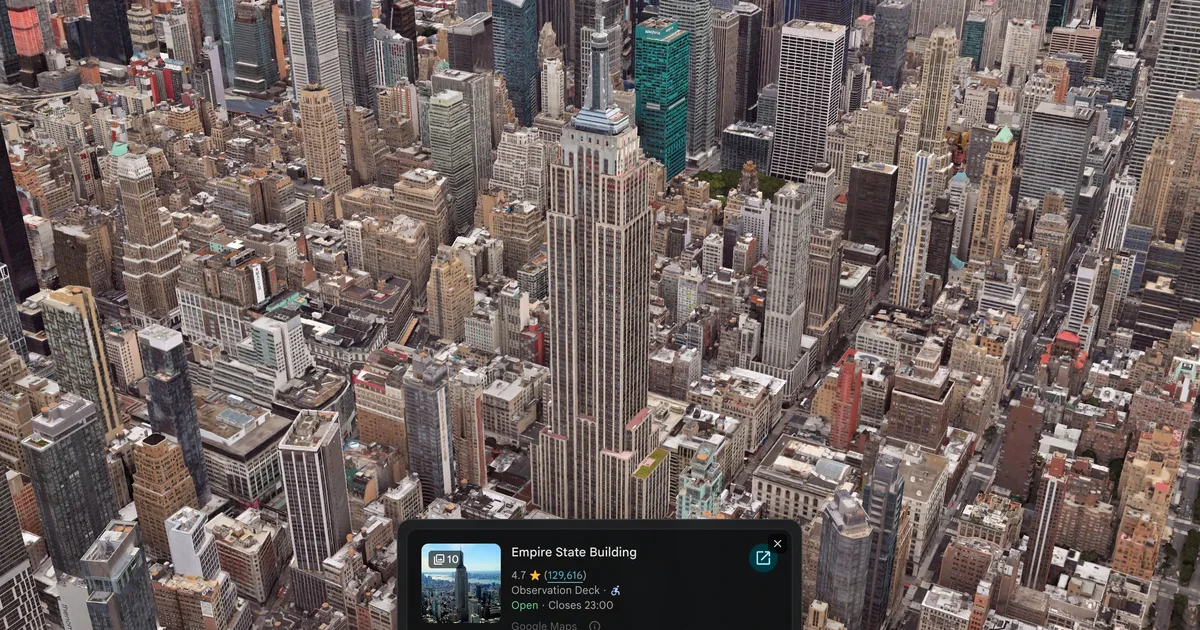
For years, the gap between “I have an idea for a map app” and a working map was a Cloud Console maze: create a project, enable half a dozen APIs, generate a key, restrict it, paste it somewhere safe, then debug the billing error. Google’s announcement on November 9 collapses that whole sequence into a sentence typed to Gemini. AI Studio now notices when a prompt needs geography and switches Maps Platform on by itself.
What actually changed#
The flow has three steps, according to Google’s post. First, describe the idea in AI Studio — the company’s example is “Build an interactive 3D tour of NYC showcasing iconic landmarks.” Second, AI Studio enables Maps Platform with zero redirects: no credit card, no console detour, or it auto-connects your existing Google Cloud projects if you have them. Third, it adds Google Maps to the app and loads a live, interactive map in the preview area, ready to iterate on.
It arrives on a busy day for Google’s AI infrastructure. The company also announced two new TPU systems on November 9 — the 8tx for confidential inference and the 8i Max for massive context — and has spent the autumn opening its stack up: it open-sourced TorchTPU in October, making TPUs a native PyTorch device. Maps in AI Studio is the developer-facing end of the same push: less friction between Google’s AI tools and the people building on them.
What you can build#
Google organises the capabilities into four groups of Maps Platform APIs, and they map neatly onto the apps people actually ask for:
| API group | What it adds | Example app |
|---|---|---|
| Maps | Custom-styled maps, photorealistic 3D cityscapes, data overlays | 3D city tour with flyover camera paths |
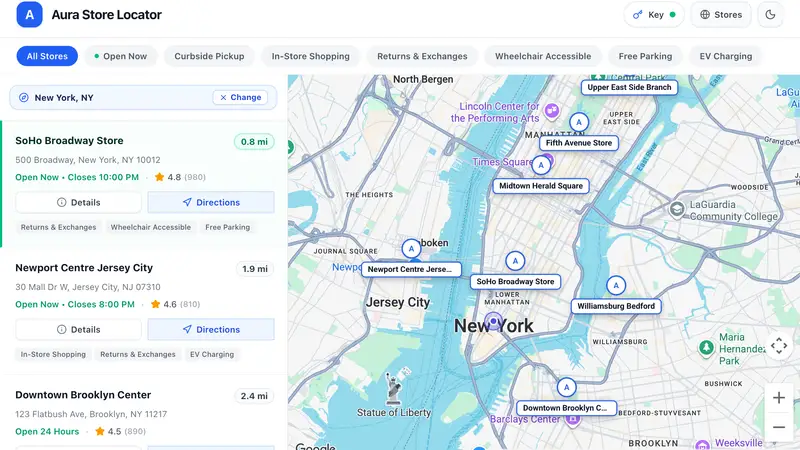
| Places | Conversational local search, place profiles, photos, recommendations | Store locator with distance filters and opening hours |
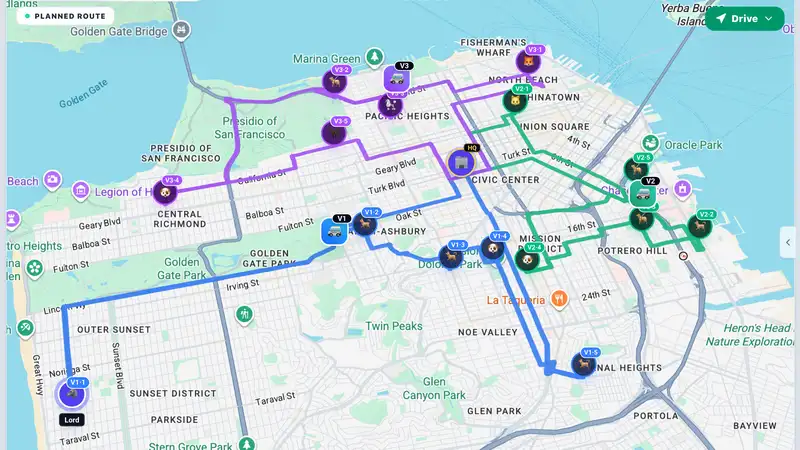
| Routes | Multi-stop itineraries, commute calculators, transit-aware planners | Mobile dog-grooming route planner |
| Environment | Clean-air routing, live pollen alerts, hyper-local monitors | Real-time air quality monitor |
The AI Studio gallery ships three working examples to remix. City Immersive Tour renders interactive 3D city maps with custom flyover paths, variable playback speeds and data markers. Pet Grooming Route Optimizer calculates multi-stop routes for a mobile service fleet — fixed appointment times, priority stops, driver shift limits, route timelines and simulated driving progress. Store Locator & Near Me Finder pairs vector maps with the Places API so users can filter branches by distance and check opening hours. Each one is a starting point, not a finished product: what Gemini generates is demo code, and the map is the part that works first.
The free tier, in numbers#
The part that makes this worth trying today is the sandbox quota: 100 calls per API per day, resetting every 24 hours, with no credit card required. For someone new to Google Cloud, AI Studio creates a free project and a Maps Demo Key, storing the credentials in the app’s secrets settings. That is enough to build a store locator over a weekend and show it to a few friends — and small enough that a link going briefly viral would burn through the day’s allowance in minutes.
Google has been here before with AI Studio itself: the tool already lets anyone prototype apps from prompts, and the Maps integration follows the same pattern — the model does the configuration that used to stop people at the door. The difference now is that the output has a live map in it, which makes the demo feel like a real product long before it is one.
The catch#
Three limits matter, and Google’s blog post only states one of them outright. First, the demo key does not cover everything: Route Optimization, Solar and Nav Connect are excluded, so the fanciest routing example in the gallery — the one that optimises stops — is also the one you cannot fully reproduce on the free key. Second, the key needs a personal Google account; Google’s documentation says Workspace corporate accounts cannot use it, which rules out building on a work login. Third, nothing built this way ships to real users: a paid Cloud billing account is required for production, which moves the app to standard Maps Platform pricing, including its recurring monthly free usage.
None of that is a reason not to try it. It is a reason to be honest about what the free tier is: a prototyping allowance with a hard ceiling, attached to a billing funnel that starts the moment your app outgrows it. The 100-call cap is the line between the two.