Herdr: run every coding agent in one terminal — hands-on with the 41K-star Rust multiplexer
Herdr is a 41K-star Rust terminal multiplexer rebuilt for the agent era: a background server keeps your coding agents’ terminals alive, marks each one working, blocked, or idle, and exposes everything over a socket API you can drive headlessly. Install it, build a three-pane dev rig, and survive a server restart — every command verified.
Why this is blowing up now
You did not plan to run five coding agents at once. Then one morning you looked at your screen and counted: Claude Code refactoring the API in one terminal, Codex writing tests in another, a dev server in a third, tail -f on the logs in a fourth — and somewhere in the tab bar, the one that has been sitting on an approval prompt for twenty minutes while you assumed it was working. The agent era did not give you a better terminal. It gave you more terminals than you can watch.
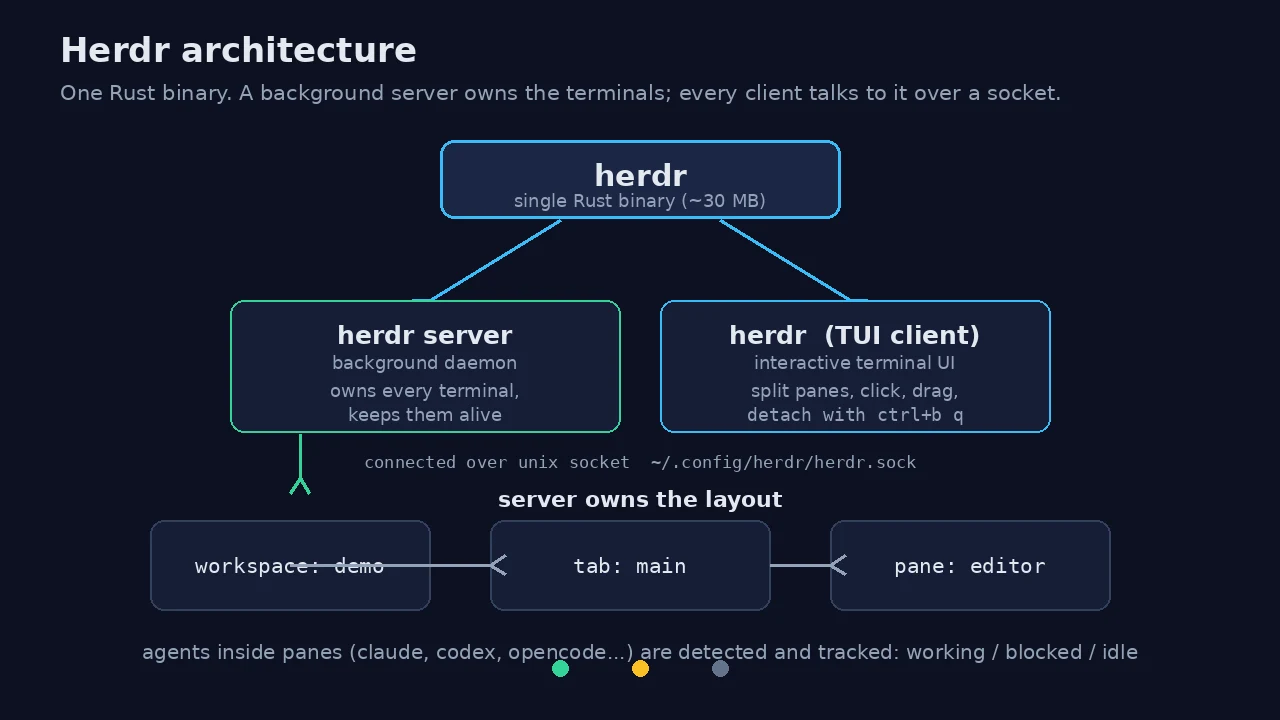
Herdr (herdrdev/herdr, Apache-2.0) is the project the terminal-multiplexer idea has been waiting for. It is a single ~30 MB Rust binary that owns every terminal your agents live in: a background server keeps the sessions running when you close the client or lose SSH, a socket API lets you (or your agents) create panes, run commands, read output, and wait on results without ever opening the UI, and it recognizes the coding agents running inside your panes — Claude Code, Codex, Cursor, OpenCode, Grok — and marks each one working, blocked, or idle so you stop hunting for the stuck one.
The numbers explain the heat: 41,743 stars, 3,226 forks, 94 releases, and a commit history stretching back to March 2026. It is leading this week's AI-tooling trending roundups — the October 1 "Top 10 Trending AI GitHub Repos" list ranked it on real 24–48h momentum, and it has been a fixture of the weekly AI-repo countdowns through September. The pitch that is landing: tmux's persistence model, rebuilt for a world where the things in your panes are agents, not just shells.
What makes it worth a tutorial: it installs in under a minute, costs $0, needs no API key, no account, and no GPU — and, unusually for a TUI tool, every workflow that matters is drivable headlessly through its socket API. I verified that claim the hard way: every command below ran exactly as shown, against herdr 0.9.3, with no interactive terminal involved at any point.
What you'll need
- A Linux, macOS, or Windows machine with a terminal. (Linux x86_64 and ARM64 binaries ship; macOS and Windows too.)
curlfor the installer. Nothing else: no API key, no account, no GPU, no model downloads.- About five minutes. The install is one command; the binary is self-contained.
Step 1 — Install it in one command
The official installer fetches a manifest, picks the right binary for your OS and architecture, and drops it in ~/.local/bin:
curl -fsSL https://herdr.dev/install.sh | shOn my machine that printed installed herdr to /home/hatch/.local/bin/herdr — a 29,962,088-byte binary, roughly 30 MB. Alternatives from the README: brew install herdr, mise use -g herdr, or on Windows, irm https://herdr.dev/install.ps1 | iex in PowerShell. Verify the install:
herdr --version
# herdr 0.9.3
That is the whole install. Compare it with building a Rust TUI from source on a small VM — the project's own dev docs call for cargo build --release, which would eat a large chunk of a two-core box. The binary is the sane path, and it is the project's recommended one.
Step 2 — Understand the two halves
Herdr is one binary with two roles. herdr server runs headless in the background and owns every terminal; the herdr TUI client (or any herdr CLI command) talks to it over a Unix socket. Start the server:
herdr serverIt prints where everything lives and then sits in the foreground of that shell — run it under your process manager of choice, or just leave the shell open. The headline output:
herdr server running; you can use any herdr CLI command in another terminal.
api socket: /home/hatch/.config/herdr/herdr.sock
logs: /home/hatch/.config/herdr/herdr-server.log
From a second shell, check the state of the world:
herdr statusclient:
version: 0.9.3
channel: stable
protocol: 22
endpoint_protocol_generation: 1
server:
status: running
version: 0.9.3
endpoint_compatible: yes
private_protocol: 22
private_protocol_compatible: yes
socket: /home/hatch/.config/herdr/herdr.sock
update:
restart_needed: no
server_binary_stale: noThis is the architectural fact everything else rests on: the terminals belong to the server, not to your client. Close the client, kill your SSH connection, reboot the machine — the server (once restarted) brings the layout back. That is what ctrl+b q detaches from in the TUI, and it is what makes the next steps scriptable.
Step 3 — Create a workspace and split panes
Herdr organizes terminals in three levels: workspaces (a project), tabs (a task), panes (a terminal). Create a workspace for a demo project:
mkdir -p /tmp/herdr-demo
herdr workspace create --cwd /tmp/herdr-demo --label demo
The command returns JSON describing what it made — a workspace w1 with one tab (w1:t1) and one root pane (w1:p1), both starting in /tmp/herdr-demo. The IDs are stable handles you will reuse for every later command. List what exists:
herdr pane listNow split the pane the way you would in the TUI — but from a script:
herdr pane split w1:p1 --direction rightThat returns a second pane, w1:p2, in the same tab and working directory. Give the panes names you will recognize at 2 a.m.:
herdr pane rename w1:p2 builder
herdr tab rename w1:t1 main
Note the rename syntax: herdr tab rename <TAB_ID> <LABEL> — positional, no --label flag. I learned that by passing --label main and watching my tab get named, literally, "--label main". The CLI is forgiving in the worst way here; the JSON it returns always shows you what actually happened, so read it.
Step 4 — Run commands and read output without opening the UI
This is the step that separates Herdr from every other multiplexer: pane run executes a command in a pane and pane read returns the terminal output as text, all headless. Run something in the first pane:
herdr pane run w1:p1 'echo hello && pwd'
herdr pane read w1:p1 --lines 6 --format text
# echo hello && pwd
hello
/tmp/herdr-demo
#One sharp edge, verified by breaking it twice: pane run joins its arguments with spaces and types the result into the pane's shell. So herdr pane run w1:p2 sh -c 'for i in 1 2 3; ...' becomes the literal line sh -c for i in 1 2 3; do ... — which the shell rejects with a syntax error, because -c only received the word for. Pass your whole command as a single quoted argument and it runs exactly as typed:
herdr pane run w1:p2 'for i in 1 2 3; do echo step-$i; sleep 0.2; done; echo TASK-B-DONE'Then block until the output you care about appears, instead of polling in a loop:
herdr pane wait-output w1:p2 --match TASK-B-DONE --timeout 8000
herdr pane read w1:p2 --lines 8 --format text
# for i in 1 2 3; do echo step-$i; sleep 0.2; done; echo TASK-B-DONE
step-1
step-2
step-3
TASK-B-DONE
#wait-output also accepts --regex with Rust regex syntax, and --lines N to restrict the searched snapshot. Between run, read, and wait-output, you have a complete headless terminal driver: spawn work, watch for completion, pull the results. The project's agent skill (herdr --skill) documents this as the intended way for AI agents to drive each other's terminals — agents can spawn panes, prompt each other, and wait until another agent is genuinely blocked.
Step 5 — Build a real three-pane dev rig
Put the primitives together the way you would on a real morning: one workspace, one tab, three labeled panes. Adapt the commands to your own project directory:
herdr workspace create --cwd ~/my-project --label my-project
# -> workspace w2, tab w2:t1, pane w2:p1

herdr pane split w2:p1 --direction right        # -> w2:p2
herdr pane split w2:p2 --direction down         # -> w2:p3

herdr pane rename w2:p1 editor
herdr pane rename w2:p2 builder
herdr pane rename w2:p3 logs

herdr pane run w2:p2 'npm test 2>&1 | tail -20'
herdr pane run w2:p3 'tail -f /var/log/myapp/app.log'
Then, from anywhere — another shell, a cron job, an agent — poll the rig without attaching:
herdr pane wait-output w2:p2 --regex '(passed|failed|FAIL)' --timeout 120000
herdr pane read w2:p2 --lines 25 --format text
When the test pane reports, you read the summary; the log pane keeps streaming in the background. Nothing here required opening the TUI, and nothing required an agent to be "inside" Herdr — plain shells work identically. The agent-awareness is a layer on top: when a pane is running Claude Code, Codex, Cursor, OpenCode, or Grok, herdr agent list shows it with a lifecycle state — working, blocked (it is waiting on an approval or a question), idle, done — and herdr agent wait blocks until an agent reaches a state you name. I verified the full CLI surface; I did not have a coding agent installed in this sandbox to trigger the detection path itself, so treat the state names as documented behavior, confirmed against the project's own skill file and CLI help.
Step 6 — Walk away: detach, kill the server, come back
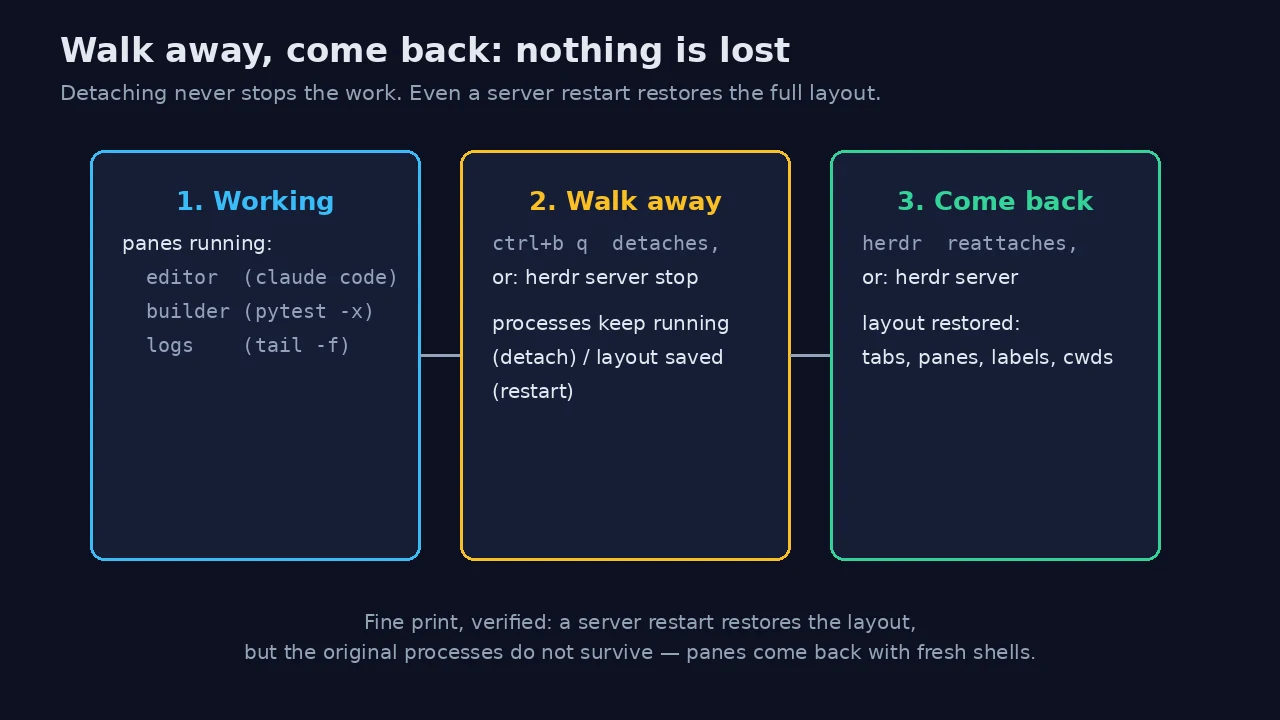
Two different promises live under "persistence", and Herdr keeps them separately. Detaching (ctrl+b q in the TUI) never stops anything: the server keeps every process running and herdr reattaches to the exact layout. That is the tmux behavior you already know.
The stronger promise is the restart. I tested it directly: with the demo workspace running (tab main, panes w1:p1 and builder, both in /tmp/herdr-demo), I stopped the server and started it again:
herdr server stop
# ... later, or after a reboot:
herdr server
herdr pane list
w1:p1 None /tmp/herdr-demo
w1:p2 'builder' /tmp/herdr-demoThe workspace, the tab, both panes, the pane label, and both working directories all came back — verified line by line against the pre-restart state. Here is the fine print, also verified: the layout survives, the processes do not. After a server restart the panes return with fresh shells, not with your test run still going. Plan accordingly: for detach, nothing stops; for restart, treat it as a layout restore and re-launch long jobs. The README states this plainly ("the original processes do not survive"), and my test confirms the behavior matches the docs — no more, no less.
Step 7 — Let agents drive it (the skill file)
Herdr ships an agent skill that teaches coding agents to operate it. Print it any time:
herdr --skillThe contract is deliberately narrow: the skill only activates when the agent is itself running inside a Herdr-managed pane (it checks HERDR_ENV=1), and it forbids using Herdr merely as a background-task runner. Inside that contract, an agent can inspect neighboring panes, create layout, start commands, read output, and — the genuinely new bit — coordinate with other agents: spawn a pane for a teammate, submit a prompt to it with herdr agent prompt, and herdr agent wait until that teammate is blocked or done. Nine skills also install into Claude Code / Cursor / Codex via npx skills add herdrdev/herdr, per the README.
Practically, this means your orchestrator agent no longer needs to guess whether a worker finished: it waits on the socket. That is the workflow the trending-list buzz is really about — not prettier panes, but agents that can see and steer each other's terminals.
When to use Herdr vs the alternatives
- vs tmux / Zellij: if all you need is persistent shells and you already have muscle memory, stay. Herdr's premium over tmux is agent awareness (working/blocked/idle badges, the agent skill,
agent wait) and a real socket API with JSON everywhere instead of tmux's command-and-parse. The cost is a young project (0.9.3) with a smaller community and fewer battle-tested edge cases. - vs Orca-style parallel agent launchers: different layer. Launchers fan one prompt across parallel agents in isolated git worktrees; Herdr is the terminal those agents (and everything else) live in. They compose — an Orca-style fan-out inside a Herdr workspace is a sensible setup — but if you only run one agent at a time, the launcher buys you little and Herdr buys you persistence.
- vs running agents in bare terminal tabs: if you have ever lost a two-hour agent run to a laptop lid closing or a flaky SSH connection, Herdr's server-owns-the-terminals model is the fix, and it is the single cheapest reliability upgrade in this list.
Honest limits: version 0.9.3 is young — expect rough edges in exactly the places I flagged (rename syntax, argument joining in pane run). The TUI itself is mouse-and-keyboard first; everything I verified was the headless path, which is the path that matters for automation. And agent detection is only as good as the roster Herdr recognizes — check the docs' supported-agents page before assuming your niche CLI shows up with a status badge.
The takeaway
Herdr earns its trending spot on one idea executed well: the terminal is no longer where you type, it is where your agents work, so the multiplexer should be built for them — persistent by default, observable from the outside, and drivable over an API. Install the 30 MB binary, start the server, and your next agent swarm gets a control plane instead of a tab bar. The full command reference lives at herdr.dev/docs, and every command in this tutorial ran verbatim against herdr 0.9.3 — if yours behaves differently, check your version first.