Stop tabbing back to the terminal: monitor Claude Code from your Mac's notch — hands-on with Coucou
Coucou (3,200+ stars, MIT) parks a live companion in your Mac's notch that watches your coding agents — live session steps, file diffs as they happen, and permission approvals with one click. Download it, install the Claude Code hooks, and stop tabbing back to the terminal.
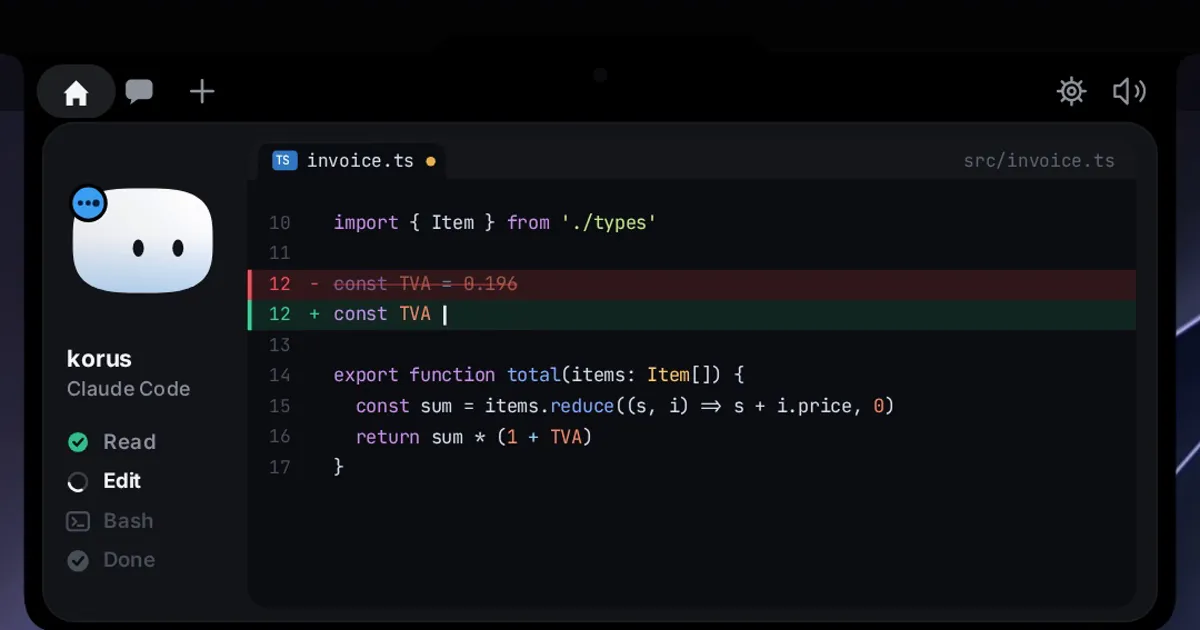
Your coding agent spends most of its time waiting for you — not the other way around. It hits a permission prompt — run this command? edit that file? — and sits idle while you are in the browser, in Slack, in a doc. A notification banner flashes, you tab back to a terminal that has scrolled a hundred lines past the interesting part, and the one question you need answered — what is it doing right now? — takes thirty seconds of squinting to reconstruct.
Coucou (French for "hello") takes a different approach: a tiny companion named Mochi — a soft squircle with big eyes — that lives in your Mac's notch, or slides out of the top edge of the screen on Windows and Linux, and keeps a live watch on your coding agents. Every Claude Code, Cursor, Codex, Gemini CLI, and Antigravity session shows up as a pill in the notch: what the agent is reading, editing, and running, step by step. When it edits a file, the ticker shows the filename with +N −M counts and you can tap to read the full diff. When it needs you, a permission card pops out — Allow / Deny / Always — and one click sends it back to work. The project (Louis-CFM/coucou, MIT) picked up 3,200+ stars in its first week of October 2026. Every step below comes from the project's own README.
What you'll need
- macOS 15+ for the main build (Windows and Linux builds exist — see the platform notes in step 1)
- Claude Code — or Cursor, Codex, Gemini CLI, Antigravity — already working in your terminal
- No API keys and no account: Coucou has no telemetry, and any keys you add yourself live in your system keychain
1. Download and install
Grab the latest Coucou.zip from the Releases page, unzip it, and move Coucou.app to /Applications. Launch it and click Open when macOS asks you to confirm. On a notch-less Mac — iMac, Mac mini, or a closed-lid MacBook on an external display — Mochi sits in a small bar at the top of the screen instead.
Linux (beta, x86_64): download the build tagged linux-v0.1.1 from the same Releases page, then:
# AppImage (any distribution)
chmod +x Coucou-Linux-*.AppImage

# Debian / Ubuntu
sudo apt install ./Coucou-Linux-*.deb

# Fedora / openSUSE
sudo dnf install ./Coucou-Linux-*.rpm

# verify the download
sha256sum -c SHA256SUMS --ignore-missing
Windows: the installer is temporarily unavailable — Microsoft Defender wrongly flags the unsigned installer as malware, and a false-positive report is under review at Microsoft. Until it is cleared and signed, Windows users build from source (the README covers the Tauri 2 build).
2. Install the Claude Code hooks
This is the wiring that makes the notch live. Click the Coucou icon in the menu bar and open Settings…, then hit Install hooks next to Claude Code. Coucou backs up ~/.claude/settings.json, merges its hooks into it, and — the part worth noticing — shows you the diff before writing anything. Review it, approve, and the hooks go live.
Under the hood, a tiny nb-hook script receives Claude Code's hook events and forwards them over a Unix socket to the app. For approvals it waits for your click in the notch, then answers the hook. And if Coucou is not running, the hook exits immediately — Claude Code is never blocked, so quitting or uninstalling Coucou cannot wedge your workflow.
Confirm the merge landed:
jq '.hooks' ~/.claude/settings.jsonThe same Settings screen offers hook installs for Gemini CLI (backs up ~/.gemini/settings.json) and Antigravity (backs up ~/.gemini/config/hooks.json). Running any other agent? Tag its hook payload with coucou_agent and it gets its own pill in the notch — the README points to docs/AGENTS.md for the protocol.
3. Watch your first session
Start a Claude Code session in your terminal and give it something real to chew on. In the notch, a pill lights up with the session: each step appears as it happens — file reads, edits, bash runs — ticking off as it completes, and Mochi does a happy little jump when the session finishes.
Edits are the good part. Each file modification scrolls through the ticker with the filename and +N −M line counts; tap it to read the full diff without leaving what you are doing. On macOS there is also a Jump to the right terminal action that opens the exact terminal window of the session — useful when you want the full scrollback.
4. Approve permissions and answer questions from the notch
When Claude Code hits a permission request, a card pops out of the notch with Allow / Deny / Always. When it asks you a question through AskUserQuestion, the choices render right in the notch — single or multi-select, up to 4 questions. One click answers; Reply in terminal falls back to the CLI when you want to type a longer answer. Codex sessions get Allow / Deny too. This is the whole point of the app: the agent's most frequent stall — waiting on you — now resolves in one click from wherever you are.
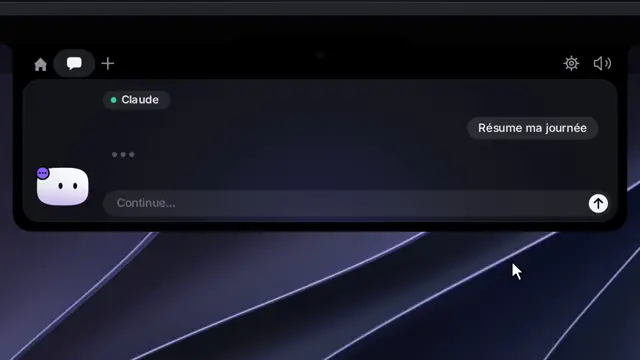
5. Chat, drop files, and plug in your services
Beyond monitoring, the notch island is a command post. Click the chat tab and talk to Claude, Gemini, OpenAI, or a local model via Ollama / LM Studio — click the model name above the input box to switch provider. Cloud providers use your own API key; keys live in your macOS Keychain (Windows Credential Manager, Linux Secret Service), never on a Coucou server — there is no Coucou server and no account.
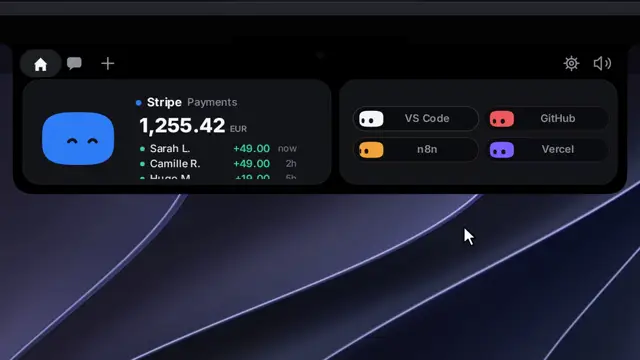
Drag a file onto the island and Mochi turns into a box and swallows it — then ask a question about it, or send it by email (macOS, Mail.app). Under Settings → Active pills you declare your tools: pick a main workspace tool and toggle up to 4 more, plus service integrations — Stripe, n8n, GitHub, Vercel, Resend, Notion, Cal.com — each with its own colored Mochi. GitHub pills show open PRs, reviews requested, and CI status; Stripe shows payments rolling in.
And when the work is done, Mochi is a pet: hover the notch and he peeks out and waves; click him and he squishes, annoyed; click three times fast and he goes dizzy for a few seconds. Since v0.1.6 (October 4, 2026) you can drag him out of the island and set him loose on the desktop as a 120 pt floating companion who follows your cursor and comes back where you left him on next launch.
What you built
A monitoring and approval layer over your coding agents that lives where your eyes already are. The permission bottleneck — the single most common reason an agent session stalls — becomes a one-click decision from anywhere. Sessions become ambiently visible: one glance at the notch tells you whether your agent is reading, editing, running, or done, with diffs on tap and no context-switching into terminal scrollback.
Honest limitations
- One week old. The first release landed September 27, 2026; v0.1.6 shipped October 4. It moves fast and the README is candid about beta status on Linux — expect rough edges, and check the releases page before filing a bug that may already be fixed.
- Windows is build-from-source for now. The installer is held up by a Defender false positive on the unsigned binary. The app itself (Tauri 2, Rust + TypeScript, same as Linux) runs fine once built — it is the packaged installer that is blocked.
- Chat beyond Claude is macOS-only. Gemini, OpenAI, and local-model (Ollama / LM Studio) chat, the plan-usage pill, and Apple Music controls are macOS builds only for now. On Linux you get the agent monitoring and approvals; the rest is on the roadmap.
- It is a window into your agents, not a sandbox. Coucou shows you what your agents do and gatekeeps permissions, but it does not sandbox them — the security boundary is still the one you set in Claude Code's own permission system.
- GNOME users lose the ambient premise. The Linux island needs layer-shell (COSMIC, KDE Plasma, Hyprland, Sway, other wlroots compositors) for the top-edge overlay; on GNOME, which has no layer-shell, it opens as a regular window.