Horizon hands-on: your own AI news radar, from install to your first daily briefing
Horizon is a self-hosted Python tool that pulls Hacker News, RSS, Reddit and GitHub into one place, scores every item with a model you choose, and writes a ranked daily briefing. This guide installs it, wires up a model, and produces a real briefing — every command verified.
- Who: Horizon (Thysrael/Horizon), an AI-powered news radar, MIT licensed, created February 2026.
- What: Fetches from Hacker News, RSS, Reddit, Telegram, X, GitHub, OpenBB, OSS Insight, GDELT, and Google News; scores each item 0–10 against a profile rubric; enriches survivors with summary, background, impact, and community-discussion blocks; writes a dated Markdown briefing.
- When: Verified November 7, 2026: commit 5dcbfbe, version 0.1.0, Python 3.12.3, uv sync and pip installs both working, full pipeline run exit 0 in 8.4s, briefing written to data/summaries/horizon-2026-11-07-en.md.
- Requirement: Python 3.11+ and about 300 MB disk. No GPU, no model download, no account with the project; a model API key, a ChatGPT plan, or a local Ollama model is needed for scoring.

Every morning the same pile is waiting: Hacker News, a dozen RSS feeds, a few subreddits, GitHub releases. Reading all of it takes an hour; skimming it takes twenty minutes and still leaves the feeling that the one important item slipped past. Horizon is a self-hosted Python tool that does the triage for you. It pulls Hacker News, RSS, Reddit, Telegram, GitHub, and more into one place, scores every item 0–10 with a model you choose, and writes a ranked daily briefing as plain Markdown — with a short summary, background, likely impact, and the best of the community discussion attached to each item that makes the cut.
The project is Thysrael/Horizon, and it is having a week: about 12,300 stars on November 4 and over 13,000 by November 7, a spot on GitHub's weekly trending list, 1,866 forks, and 346 commits since February 2026. The pitch is specific — profiles that score different kinds of content by different rubrics, enrichment that adds context instead of just summarizing, and output you own as Markdown files rather than a feed locked inside someone else's app. This guide installs it, wires up a model, and produces a real briefing — every command below was run against the repository as it stood on November 7, 2026.
What you need#
- Python 3.11 or newer. The project declares
requires-python = ">=3.11". The verification run used Python 3.12.3. - Git and uv (or pip as a fallback). The README's install path is
uv sync; both paths are verified below. - A model to do the scoring. Horizon talks to Anthropic, OpenAI, Gemini, DeepSeek, MiniMax, DashScope, Doubao, Azure OpenAI, and Ollama — or to a ChatGPT plan through its
openai-chatgptprovider, which uses saved OAuth credentials instead of an API key. You need one of these; the scoring is the whole product. A local Ollama model works with no key at all. - About 300 MB of disk for the checkout plus dependencies. No GPU, no model download, no account with the project.
- Linux or macOS for the commands below. Windows works through the same Python install; the Docker path in the README is the alternative there.
The license is MIT. Horizon keeps its state — fetched items, history, and generated briefings — in a data/ directory inside the checkout, and it never sends anything anywhere except to the model provider you configure and the sources you list.
Step 1: Install#
Clone the repository and install with uv, exactly as the README prescribes:
git clone https://github.com/Thysrael/Horizon.git
cd Horizon
uv sync
uv sync resolves the lockfile and builds a .venv in the project directory. In this run it installed the full dependency set — httpx, feedparser, the Anthropic and OpenAI SDKs, trafilatura, and the rest — without errors. If you would rather not install uv, the pip path works too:
python3 -m venv venv
./venv/bin/pip install -e .
./venv/bin/horizon --help
Either way, confirm the entry point answers:
uv run horizon --help _ _ _
| | | | (_)
| |__| | ___ _ __ _ ___ ___ _ __
| __ |/ _ \| '__| |_ / / _ \| '_ \
| | | | (_) | | | |/ / | (_) | | | |
|_| |_|\___/|_| |_/___| \___/|_| |_|
AI-Driven Information Aggregation System
usage: horizon [-h] [--hours HOURS] [-d PATH] [-c PATH] [-l LEVEL]
Horizon - AI-Driven Information Aggregation System
options:
-h, --help show this help message and exit
--hours HOURS Force fetch from last N hours
-d PATH, --data-dir PATH
Path to the data directory (default: 'data')
-c PATH, --config PATH
Path to config file (default: <data-dir>/config.json)
-l LEVEL, --log-level LEVEL
Logging level (default: WARNING)Four flags is the whole CLI. --hours sets how far back to fetch, -d and -c relocate the data directory and config file, and -l controls log verbosity. There are companion entry points — horizon-wizard for interactive setup, horizon-chatgpt for the ChatGPT-plan provider, horizon-mcp for the MCP server — but the core loop is the single horizon command.
Step 2: Pick a model and put the key in .env#
Horizon's one rule about secrets is easy to get wrong: ai.api_key_env is the name of an environment variable, never the key itself. Put the key in .env in the repository root, then point the config at the variable name. For OpenAI:
OPENAI_API_KEY=sk-your-key-hereThe same pattern holds for every provider — ANTHROPIC_API_KEY, GOOGLE_API_KEY, DEEPSEEK_API_KEY, MINIMAX_API_KEY, DASHSCOPE_API_KEY, DOUBAO_API_KEY, AZURE_OPENAI_API_KEY. If you put a value that looks like a key into api_key_env itself, Horizon refuses to start and tells you so.
The no-key option is Ollama. Point the provider at a local model and leave the key empty:
{
  "ai": {
    "provider": "ollama",
    "model": "llama3.1",
    "api_key_env": "",
    "throttle_sec": 0
  }
}
Omit base_url and Horizon uses Ollama's OpenAI-compatible endpoint at http://localhost:11434/v1; set it explicitly for a remote server. The docs' own example uses llama3.1 as the model. A local model is slower and weaker at scoring than a frontier API model, but it costs nothing per run and keeps everything on your machine. A third option needs no API key either: eligible ChatGPT subscribers can run uv run horizon-chatgpt login and select a model from their plan, then use the openai-chatgpt provider.
One setting matters if your model has a strict per-minute cap: throttle_sec pauses between scored items. The docs suggest 4.5 as a starting point for free-tier models capped around 15 requests per minute, and 0 when you have headroom. Scoring runs one item at a time by default; analysis_concurrency and enrichment_concurrency raise throughput if your endpoint allows it.
Step 3: Tell it what to read#
Copy the shipped example and trim it to two sources for the first run:
cp data/config.example.json data/config.jsonThen replace the ai and sources sections with a minimal config. This is the exact config the verification run used, with an OpenAI-compatible provider:
{
  "ai": {
    "provider": "openai",
    "model": "gpt-4",
    "api_key_env": "OPENAI_API_KEY",
    "temperature": 0.3,
    "max_tokens": 4096,
    "throttle_sec": 0,
    "analysis_concurrency": 1,
    "enrichment_concurrency": 1
  },
  "processing": {
    "default_profile": "tech-news",
    "profile_settings": {
      "tech-news": {
        "threshold": 7.0,
        "topic_dedup": true
      }
    },
    "profiles_dir": "profiles"
  },
  "sources": {
    "hackernews": {
      "enabled": true,
      "fetch_top_stories": 5,
      "min_score": 100,
      "profile": "tech-news"
    },
    "rss": [
      {
        "name": "Simon Willison",
        "url": "https://simonwillison.net/atom/everything/",
        "enabled": true,
        "category": "ai-tools",
        "profile": "tech-news"
      }
    ]
  }
}
Three things in this config do the real work. The profile on each source routes items straight to the tech-news profile — without it, Horizon asks the model to classify each item into a profile first. The threshold of 7.0 is the cut line: the tech-news rubric scores 9–10 for groundbreaking work, 7–8 for high-value developments, 5–6 for interesting but not urgent items, 3–4 for routine updates, and 0–2 for noise, and only items at or above the threshold reach the briefing. And topic_dedup merges items covering the same event so one story does not occupy three slots.
Run Horizon from the repository root. That matters: the profiles live in profiles/ next to the code, and the loader resolves that path from your working directory. Running from anywhere else fails with No profiles found. The same applies to .env — it is loaded from the directory you launch from.
Step 4: Run your first briefing#
uv run horizon --hours 24The run fetches, scores, dedupes, enriches, and renders in one pass. Here is the console output of the verification run, verbatim except for the local data path:
🌅 Horizon - Starting aggregation...

📅 Fetching content since: 2026-11-06 23:30:33

🔍 Fetching from Hacker News...
🔍 Fetching from RSS Feeds...
🔍 Fetching from Reddit...
   Found 0 items from Reddit
🔍 Fetching from Telegram...
   Found 0 items from Telegram
   Found 0 items from RSS Feeds
   Found 4 items from Hacker News
📥 Fetched 4 items from all sources
🤖 Analyzing content with AI...
🤖 Analyzed 4 items with AI
⭐️ Selected 4 items with profile filters
📚 Enriching with background knowledge...
   Enriched 4/4 items

💾 Saved EN summary to:
data/summaries/horizon-2026-11-07-en.md

📄 Copied EN summary to GitHub Pages:
docs/_posts/2026-11-07-summary-en.md

✅ Horizon completed successfully!
Two details in that output deserve attention. First, the RSS feed returned zero items — not because the feed failed (it answered HTTP 200) but because its newest entry was about 30 hours old and the --hours 24 window only covers the last day. The window is a filter, not a failure mode. Second, the run ends with a token-usage summary broken down by provider, so the cost of a briefing is visible rather than a surprise on an invoice. A run costs roughly three model calls per item — one to score, two to enrich — plus one dedup call, so a 20-item day is on the order of sixty short calls.
Step 5: Read the briefing#
Open data/summaries/horizon-2026-11-07-en.md. The file opens with a one-line count, then a ranked list with each item's score, then the full entries grouped by profile. The verification run's file began like this:
# Horizon Daily - 2026-11-07

> From 4 items, 4 important content pieces were selected

---

**Technology News**
1. [The end of Microsoft Research's AI Frontiers group](#item-tech-news-1) ⭐️ 8.0/10
2. [Show HN: Coldframe, a honeypot that poses as a supermarket fridge controller](#item-tech-news-2) ⭐️ 8.0/10
3. [What I run on my $10 USD OpenStick homelab](#item-tech-news-3) ⭐️ 8.0/10
4. [Apple's grey list: Words and phrases your iPhone won't help you spell](#item-tech-news-4) ⭐️ 8.0/10
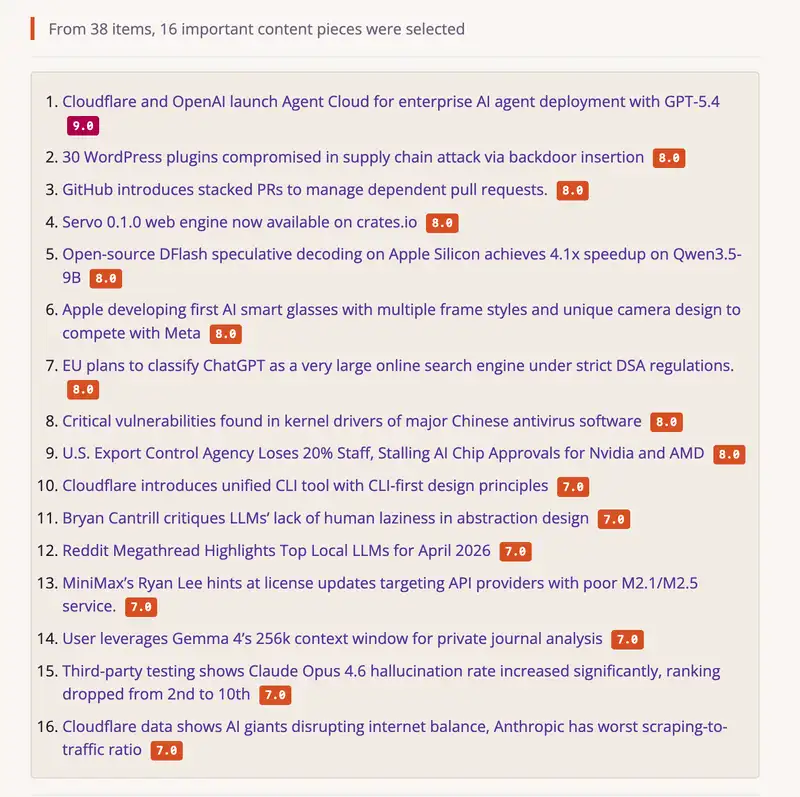
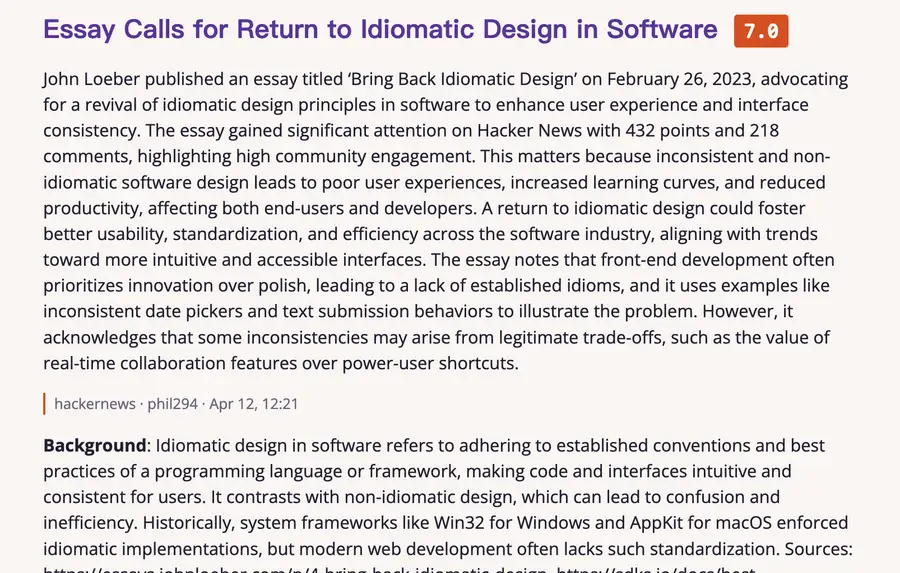
Each entry then carries four blocks defined by the tech-news profile: a two-to-four-sentence summary that leads with what actually changed, a background block explaining the prerequisite context, an impact block stating one concrete consequence, and a community-discussion block distilling the best of the comments — plus the source, author, timestamp, discussion link, and tags. That is the difference between Horizon and a prettier RSS reader: the briefing is not a list of links, it is a list of verdicts with the reasoning attached. The project's own README shows the same structure on a real day's output, with scores from 9.0 down to 7.0:
And a single enriched item reads like a short reported piece rather than a summary — summary first, then background, references, and a discussion section that attributes opinions instead of presenting them as fact:
The same run also copies the briefing into docs/_posts/, which is the input for the optional GitHub Pages site — the project publishes its own daily briefings that way. If you run with a second language configured, a -zh file is generated alongside the -en one.
Step 6: Make it yours#
The default config is a starting point, not the product. Four profiles ship with the repository: tech-news for events and context, tech-blog for engineering deep dives with background and takeaways, finance-news for market-moving items, and ai-creator for material aimed at people who make things with AI. Each profile is a folder under profiles/ with its own matching prompt, scoring rubric, and enrichment blocks — editing profiles/tech-news/analysis.md changes what the model rewards, no Python required.
Three adjustments cover most real setups. First, lower the threshold if your briefing comes back thin: a tech-news threshold of 6.0 instead of 7.0 admits the solid-but-not-urgent items. Second, cap the digest so one busy topic cannot crowd out the rest — the README's digest section sets max_items and per-category limits, for example five AI items and five finance items per day. Third, add sources. The full list is Hacker News, RSS/Atom, Reddit, Telegram, X, GitHub user events and repo releases, OpenBB financial news, OSS Insight, GDELT, and Google News. GitHub works without a token at 60 requests an hour and 5,000 with one; X needs an Apify token, whose free tier the docs put at $5 a month of credit, roughly 20,000 tweets.
Two more capabilities are worth knowing before you invest in the setup. Horizon can run as an MCP server (horizon-mcp), so an AI assistant can configure sources, customize profiles, and trigger runs for you — the repository even ships an agent skill for it (npx skills add Thysrael/Horizon --skill horizon -g). And the enrichment blocks can call tools: the background block may run a web search or a history search over your earlier briefings, so a follow-up story can cite what your own digest said about the previous development.
Step 7: Automate it#
A briefing you have to remember to run is a briefing you will stop running. The repository ships a disabled GitHub Actions workflow at .github/workflows/daily-summary.yml.disabled: it checks out the code, installs Python 3.12 and uv 0.11.26, runs uv sync, copies data/config.github.json over data/config.json, runs uv run horizon --hours 24 with API keys from repository secrets, and publishes docs/ to the gh-pages branch. To use it, fill in data/config.github.json with your sources and provider, add the matching secrets, and rename the file to daily-summary.yml. The default schedule is 0 23 * * * UTC with a manual trigger enabled.
If you would rather keep it on your own machine, a cron line does the same job without GitHub:
0 7 * * * cd /home/you/Horizon && uv run horizon --hours 24 >> ~/horizon.log 2>&1Either way, the briefing lands in data/summaries/ every morning. The history search enrichment reads those files back, so the archive is not just output — it is the memory the next briefing reasons over.
When to use Horizon — and when not to#
Horizon earns its keep when you follow many sources and want a defensible shortlist rather than another inbox. Against a plain RSS reader, the difference is the scoring and enrichment: the reader shows you everything; Horizon shows you the four things worth your time and tells you why. Against asking ChatGPT or Claude for a morning briefing, the difference is ownership: your sources, your rubric, your archive, your choice of model — and a Markdown file you can grep, unlike a chat transcript. Against a hosted aggregator, the difference is that nothing about your reading habits leaves your machine except the scoring calls.
It is the wrong tool in three cases. If you only follow two or three feeds, a reader is faster and the scoring adds nothing. If you need real-time alerts, a daily batch is the wrong shape — Horizon is a digest, not a pager. And if you cannot give it a competent model, do not expect much: the whole pipeline is one scoring call and two enrichment calls per item, so a weak model produces weak verdicts, and a local model small enough to run on a laptop will score noticeably worse than a frontier API model. The honest test is a week of briefings against your own judgment; the threshold and the profile rubric are the dials, and both are one edit away.
Troubleshooting#
- The briefing is empty. Horizon writes a file either way. If it says no items met the threshold, check three things in order: the
--hourswindow (a quiet feed with nothing new in 24 hours yields zero items, as the RSS feed did in the verification run), the profile threshold, and whether the model is actually reachable. A model outage does not fail the run — the verification run against an unreachable local endpoint still exited 0 with an empty briefing — so check the log forAPIConnectionErrorbefore assuming a quiet news day. No profiles foundon startup. You launched from outside the repository root.cdinto the checkout, or setprocessing.profiles_dirto the absolute path of itsprofiles/folder.Missing API keyon startup. You put the key itself inapi_key_env, or the variable is not in.env. The field holds a variable name; the secret lives in.envor the shell.- Rate-limit errors mid-run. Set
throttle_secto 4.5 for free-tier models capped near 15 requests a minute, and keepanalysis_concurrencyat 1 until you know the endpoint tolerates parallel calls. - X returns nothing. The X source needs an Apify token in
.env; without it the source is skipped silently.
The takeaway#
Horizon does one job and does it in the open: it turns a pile of feeds into a short, scored, explained briefing you can read in five minutes and audit in full. The install is a clone and a uv sync; the config is one JSON file; the output is Markdown in a folder you control. The quality of the result tracks the model you point it at, and the two dials that matter — the profile rubric and the threshold — are plain text you can edit. Set it up tonight, read tomorrow's briefing against your own sense of what mattered, and adjust the threshold once. That loop is the whole product.
Frequently asked questions
Do I need a paid API key to use Horizon?
No — but you need a model from somewhere. Ollama runs a local model with no key at all, and ChatGPT subscribers can use the openai-chatgpt provider with their plan instead of an API key. If you use a hosted provider (OpenAI, Anthropic, Gemini, DeepSeek, MiniMax, DashScope, Doubao, Azure), that provider's key goes in .env. The docs' throttling guidance is written for free-tier models capped around 15 requests a minute — set throttle_sec to 4.5 to stay under the cap.
How much does a daily briefing cost?
Roughly three short model calls per item — one to score, two to enrich — plus one dedup call per run, so a 20-item day is about sixty calls. With a cheap model that is cents per day; the exact figure depends on the model and how much content each item carries. Horizon prints a per-provider token-usage summary at the end of every run, so you can measure it on your own sources instead of trusting an estimate.
Why did my briefing come back empty?
Horizon writes a file either way. The usual causes, in order: the --hours window covered a period with nothing new (an RSS feed whose newest entry is 30 hours old yields zero items in a 24-hour window), the profile threshold is higher than anything scored, or the model was unreachable — and a model outage does not fail the run, it just leaves every item unscored, so check the log for APIConnectionError before assuming a quiet news day.
Can it read X / Twitter?
Yes, through an Apify token set in .env; the docs put the free tier at $5 a month of credit, roughly 20,000 tweets. Without the token the source is skipped. Hacker News, RSS, Reddit, Telegram, and GitHub need no token at all, though a GitHub token raises the rate limit from 60 to 5,000 requests an hour.
How is this different from asking ChatGPT for a morning briefing?
Ownership and auditability. Your sources, your scoring rubric, your archive, your choice of model — and the output is a Markdown file you can grep, version, and publish, not a chat transcript. The trade-off is setup: you maintain the config and the model key instead of outsourcing both to a chatbot.
Sources
- Thysrael/Horizon — GitHub repository (README, quick start, install, configuration, sources)
- Horizon documentation — configuration guide, providers, profiles, scoring, scrapers
- Horizon configuration guide — AI providers, Ollama setup, throttling, GitHub Actions workflow
- GitHub Trending — weekly (Horizon listed in week 45 of 2026)
- ExplainX — Horizon AI News Radar: setup, cost and risks (12.3k stars, November 4, 2026)