Direct a short film with an AI agent — no video model required: a hands-on guide to lemo-opuscar
lemo-opuscar (lemomo-ai, MIT, 4,100+ stars) is a Claude Code skill that directs short films made entirely in code — canvas and WebGL frames, synthesized scores, TTS narration. Full hands-on: install, pick from 51 styles, commission your film, and design your own style.
- What: lemo-opuscar — a Claude Code skill/plugin that directs short films made entirely in code, from the 51-style library down to the final mix.
- By: LemoLab (Lemomo, @lemomo_ai); code and docs are MIT, demo films and their stills are CC BY 4.0.
- Traction: 4,100+ GitHub stars since late September 2026; styles tuned for Claude Opus 5.5.
- Cost per film: about 30–60 minutes of agent work and “a fair amount of tokens” (README).
- Stack: Node 20+, ffmpeg, Python 3.11+ (or uv); default output 1920×1080 at 24 fps.
- Newest features: “Make a style your own” (Oct 19, 2026 — custom style in ~/lemo-my-styles/ plus a 15–30 s test film) and Evidence Films (Oct 16 — 8 styles built on real, measured material).
AI video generators are slot machines: write a prompt, wait, hope the hands come out right, re-roll. lemo-opuscar takes the opposite bet. Your coding agent directs a short film where every frame is written in code — canvas and WebGL pages rendered frame by frame, an original score assembled from free sample libraries, narration via text-to-speech. No diffusion model, no stock footage, and nothing to re-roll: if you don't like a shot, you change the code that draws it.
The project is lemomo-ai/lemo-opuscar by LemoLab (Lemomo), and it has pulled in more than 4,100 GitHub stars since late September 2026. The library ships 51 film styles, each with a finished short film made entirely in code — pick one, bring your own story, and let your coding agent direct. Code and docs are MIT; the demo films and their stills are CC BY 4.0.
What you'll need
- Claude Code (the
claudeCLI) with access to a Claude model. The styles are tuned for Claude Opus 5.5 — the README warns other models may not reproduce them well, so use them with care. - Node 20+, ffmpeg, and Python 3.11+ (or uv). The agent installs everything else itself.
- 30–60 minutes and a fair amount of tokens per film. This is an agent doing studio work, not a one-click generator — budget accordingly.
Step 1 — Install the skill
In your terminal:
claude plugin marketplace add lemomo-ai/lemo-opuscar
claude plugin install lemo-opuscar@lemolab
On first use it downloads the guides, tools and style prompts to ~/lemo-opuscar, shared by all your films, and each film's project goes in the folder you started from. Prefer cloning? git clone https://github.com/lemomo-ai/lemo-opuscar.git, cd lemo-opuscar, claude — films then land in films/<name>/ inside the repo. For non-Claude agents, copy plugin/skills/lemo-opuscar/ into their skills folder.
Step 2 — Pick a style from the gallery
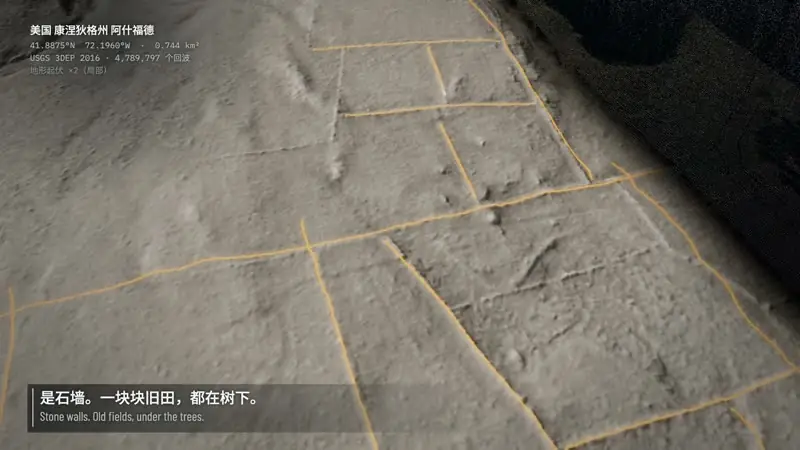
Browse the 51 styles in styles/README.md, or watch the finished films in the gallery. There's real range here — from a glass-product commercial look to an ASCII CRT terminal aesthetic. New on October 16: Evidence Films, eight styles that film real material where every number is measured or sourced. The LiDAR Survey style, for example, strips the canopy off a Connecticut forest layer by layer and finds the stone walls of the farms that were there: 3.4 km of them, measured.
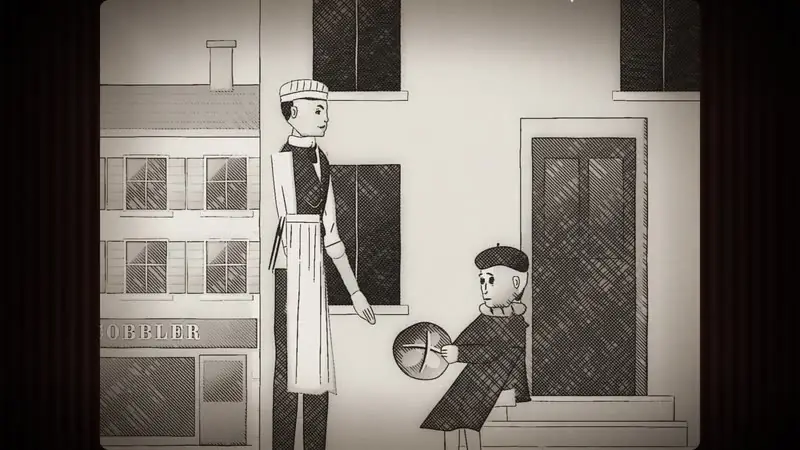
The feature presentation shows the ceiling: OPUSCAR 98 walks one character through all 98 Best Picture winners from 1927 to 2025 — a 6:31 film using 98 styles (77 in 2D, 4 in 2.5D, 17 in 3D), every frame written by Claude Opus 5.5.
Step 3 — Commission your film
From any folder, just say what you want — name the style in English or Chinese:
Make a 45-second film in the watercolor style about the coffee farm my family runs. Warm female narrator.
Or, for something data-driven:
Make a 40-second LiDAR Survey film about the old quarry in the hills behind our town, from public laser-scan data.
Before it starts, the agent asks you once, up front: anything it can't decide about your topic, whether you have your own voice, music or other material to supply, and whether you want to see a storyboard first. Say yes to the storyboard and it stops once to show you the key shots in the real style; say no and it goes straight to the finished film.
Step 4 — Let the little studio work
The agent reads three guides and works like a small studio: DIRECTOR.md (story, sound, rhythm, camera, performance, self-checks), TECHNIQUE.md (frame-by-frame rendering, voice, music, mixing), and styles/<style>/STYLE.md (what the style looks and sounds like — the story is yours).
Picture is canvas and WebGL pages rendered frame by frame; music is original scores built from free sample libraries; voice is text-to-speech narration. Expect the agent to take 30–60 minutes. The default output is 1920×1080 at 24 fps; other sizes on request.
Step 5 — Make a style your own
Added October 19: like a style but want it a little different? Pick one and say so:
I want to change the Ukiyo-e style into my own version.
The agent tells you what can change in that style — what's safe, what changes its character, and what can't change without it becoming a different style. You say what to change and give it a name; it writes your style to ~/lemo-my-styles/<name>/, outside the library, and shows you a style frame next to the original. Once you approve, it makes a 15–30 second test film that shows every change. After that, name it like any other: “Make a 30-second film in my Night Ukiyo-e style about…”. Library updates never touch it; the procedure lives in MY-STYLES.md.
Step 6 — Update or uninstall
Update, then restart Claude Code (the library in ~/lemo-opuscar updates itself on the next film):
claude plugin marketplace update lemolab && claude plugin update lemo-opuscar@lemolabTo remove it: claude plugin uninstall lemo-opuscar@lemolab, then delete ~/lemo-opuscar.
What you built
A 45-second, 1080p24 short film in the watercolor style — frames written as canvas/WebGL code, an original score from free samples, TTS narration — and, more durably, a reusable recipe: a skill, a 51-style library, and a procedure for minting your own styles. Your next film starts from a one-line prompt.
Honest limitations
- Claude-tuned. The styles were tuned for Claude Opus 5.5; the README is explicit that other models may not reproduce them well.
- Stylized, not photoreal. This is code-rendered animation with a deliberately graphic look — don't expect the textural chaos (or the happy accidents) of diffusion video.
- Voice and music are assembled, not performed. TTS narration and scores built from free sample libraries won't fool anyone into thinking a studio recorded them.
- It costs agent time. 30–60 minutes and a fair amount of tokens per film makes this a deliberate production process, not an infinite scroll of generations.
Frequently asked questions
Do I need a video model or a GPU?
No — that is the point. Every frame is rendered from code (canvas and WebGL pages, frame by frame), music is assembled from free sample libraries, and narration is text-to-speech: no video generation and no stock footage. You do need Claude Code with a model the styles are tuned for — Claude Opus 5.5 — plus Node 20+, ffmpeg, and Python 3.11+ (or uv), which the agent installs the rest on top of.
How much does one film cost in time and tokens?
The README says a film takes an agent about 30–60 minutes and “a fair amount of tokens.” This is agentic studio work — directing, rendering, scoring, mixing — not a one-click generator, so budget accordingly and start with the storyboard option if you want a checkpoint.
Can I use the films commercially, and can I make my own style?
Films you make with the library are yours, no credit needed. The demo films and their stills are CC BY 4.0 — you may share, adapt and use them commercially as long as you credit LemoLab with a link to the repository. And since October 19, 2026 you can fork any of the 51 styles into your own named style, written to ~/lemo-my-styles/<name>/ outside the library, with a 15–30 second test film to approve it.