20 AI testers on 20 phones at once: hands-on with mobile-agent-testers
Your app works on your phone, in your language, at your font size. Twenty Claude Code agents on twenty emulators — free GitHub runners, about $5 of model usage — find where it breaks everywhere else.
- Who: mobile-agent-testers (pierridotite/mobile-agent-testers, MIT), a GitHub Actions template by Pierre Raffalli. It does not replace scripted tests — it adds exploratory testing by agents.
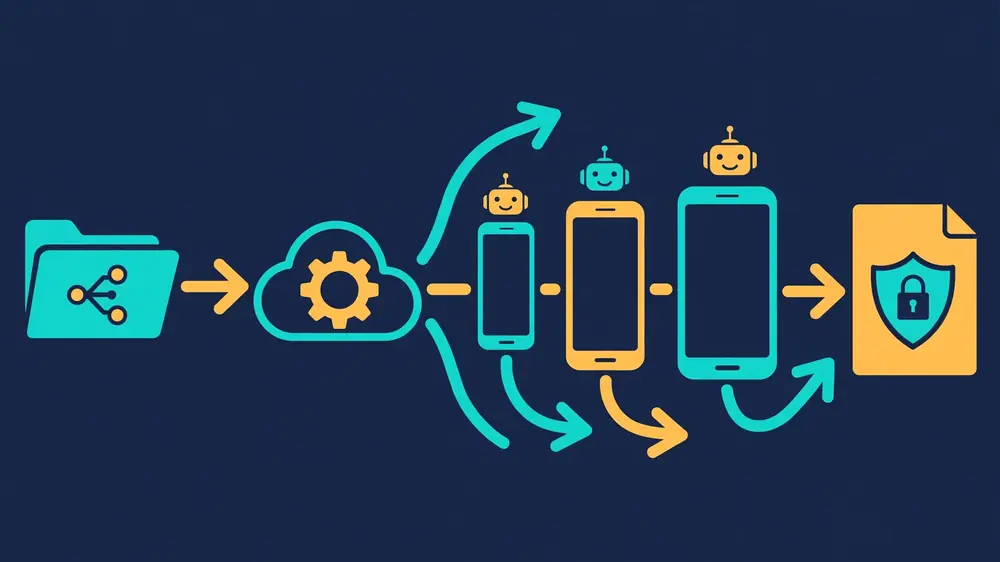
- What: One workflow builds your app for Android and iOS, then gives each of 20 personas its own emulator or simulator, each driven by a headless Claude Code agent that reports bugs with screenshots.
- When: Verified November 25, 2026: 2,167 stars, 215 forks, v0.1.0 tagged November 19; 133 unit tests pass, matrix generation and the dashboard CLI verified in a 2-core sandbox.
- Requirement: A public GitHub repo, the gh CLI, and a Claude subscription or API key. Runners are free for public repos; model usage runs $0.15–$0.55 per phone. No Mac, no GPU, no local model needed.

Mobile testing has a coverage problem that no amount of unit tests fixes: your app works on your phone, in your language, at your font size. It breaks on a small iPhone in Swedish at the largest text size, or a Pixel 7 at 200 percent font, or a tablet in Arabic. The usual answer is a device lab or a QA team. mobile-agent-testers offers a cheaper one: twenty Claude Code agents, each with its own phone, running in parallel on GitHub's free runners.
The project launched on November 16, 2026, and the growth since is the kind that usually takes months. It passed 2,100 stars within nine days, adding 431 in the last 24 hours alone, with 215 forks — and it did it with receipts: full reports from runs against LocalSend, AnkiDroid, and Flutter's own sample app, each reproducible with one command. This guide sets it up from the template, runs the demo with its 11 planted bugs, reads the reports, and then points it at a real app.
One thing to understand first: this is not scripted testing. Maestro, Appium, and Detox run the tests you write. mobile-agent-testers writes no test scripts at all. Each agent gets a persona — a device, a language, a font size, a goal — and uses the app like a new user, screenshotting after every action and writing a bug report with numbered screenshots. It finds what nobody thought to test for, which is exactly the class of bug that ships.
What you'll need#
- A GitHub account and the GitHub CLI (
gh), authenticated withgh auth login. The testers repo must be public for the runners to be free. - Claude access: a Claude Pro or Max subscription (via
claude setup-token) or an Anthropic API key. Model usage is the only cost — about $0.15 to $0.55 per phone in the project's runs. opensslon your machine, for the key pair that encrypts the results. No Mac required for your own machine: iOS runs happen on GitHub's macOS runners, Android on Linux runners.- About 15 minutes of setup and roughly 20 minutes for the demo run. No GPU, no model weights, nothing to install locally beyond
ghandopenssl.
Step 1: Create your testers repo#
The project ships as a GitHub template repository, so you do not fork or clone it — you create your own repo from it:
gh repo create my-testers --public --template pierridotite/mobile-agent-testers --clone
cd my-testers
What lands in your repo is the whole machine: the agent-testers.yml workflow, the 20 personas in personas.json, the demo app, the agent brief, and the scripts that build apps, collect reports, and draw the dashboard. The repo must stay public if you want the free runners; on a private repo, each macOS minute counts ten times against your Actions minutes, and the setup script warns you about it.
The 20 personas are the heart of it. Ten Android, ten iOS, covering 14 languages across 17 locales — including Arabic right-to-left — Android 10 through 15, phones and tablets, text from small to iOS's largest accessibility size, dark mode, increased contrast, and reduced motion. Each persona has a profile and a goal: Anna is a 68-year-old retired teacher on a Nexus 5 with large text who wants to create an account unaided; Malik is a 21-year-old student on a Pixel 7 in dark mode who skips every text and taps fast; Clara is on an iPhone SE in French at large text; Jonas is on an 11-inch iPad Air in German at accessibility-extra-large text; Grace runs a Pixel 7 at 200 percent font with increased contrast. The personas are data, not code — edit personas.json to add your own.
Step 2: Run setup.sh — keys and secrets#
./setup.sh # Windows: .\setup.ps1The script does four things, and it is worth knowing what they are before you run it, because the security model is the point. First, it generates a 4096-bit RSA key pair in ~/.mobile-agent-testers/ — the private half never leaves your machine — and writes the public half to results_public.pem, which it commits and pushes. Second, it sets an ARTIFACT_PASSPHRASE secret, a random 32-byte hex string. Third, it asks for your Claude access: option 1 is a subscription token from claude setup-token (stored as CLAUDE_CODE_OAUTH_TOKEN), option 2 is an Anthropic API key (stored as ANTHROPIC_API_KEY). If you paste an API key, the script checks it against Anthropic's /v1/models endpoint — a free call that uses no tokens — before saving it, and warns if the value does not look like a token.
Why the encryption: the workflow runs on a public repo, where logs and artifacts are public. Every report, screenshot, build log, and optional screen recording is encrypted with your public key before upload — RSA-OAEP wraps a per-file key, AES-256-CBC encrypts the content — so only the holder of the private key can read them. The workflow also blocks analytics and ad hosts inside the phones (PostHog, Facebook Graph, Mixpanel, Amplitude by default) via dnsmasq and iptables on Android and /etc/hosts plus pf on iOS, so a test run never pollutes your real analytics.
Verify the setup took by listing the secrets:
gh secret list
git log --oneline -1   # "Add results public key"
You should see ARTIFACT_PASSPHRASE and either CLAUDE_CODE_OAUTH_TOKEN or ANTHROPIC_API_KEY. If the workflow later fails with results_public.pem is missing, the plan job is telling you setup.sh never ran in that repo.
Step 3: Run the demo — four testers, eleven planted bugs#
gh workflow run agent-testers.yml
gh run watch
With no inputs, the workflow runs its defaults: the demo app, two Android personas (Anna, Malik) and two iOS personas (Clara, Jonas), model Sonnet. The demo app is Tiny Todo, a small Expo/React Native app that ships in the repo with 11 deliberate bugs listed in demo-app/BUGS.md — a sign-up form that rejects + addresses, a keyboard that hides Continue on small iPhones, case-sensitive search, empty tasks allowed, a fixed-height header that clips at large text, dark-mode text that is unreadable, a 12-point delete target with no confirmation, and more. The bugs are the scoring key: run the testers, read the summary, count how many they found.
Behind the scenes, the workflow has five jobs. plan checks the public key exists and turns your persona selection into a matrix — verified locally, scripts/matrix.py turns anna,malik into exactly the two Android jobs with their devices, locales, font scales, and API levels. build-android (Ubuntu, Node 20, Java 17, Gradle cache) and build-ios (macOS 15, latest Xcode) build the app; the Android and iOS jobs then boot one emulator or simulator per persona and hand it to a headless Claude Code agent. Each agent works from AGENT_BRIEF.md: screenshot after every action, about 30 actions of budget, and a report in results/<persona>/report.md plus a machine-readable findings.json with a score out of 10. An accessibility check runs on every screen the agent reads, flagging controls with no name and touch targets under 48 dp on Android or 44 pt on iOS.
The project's own demo run took about 21 minutes, builds included, and the four testers found 9 of the 11 planted bugs — plus real issues nobody planted, like a button under the Android navigation bar and data lost after a relaunch — for $0.87 of model usage. Expect roughly 20 minutes for yours; Android jobs run up to 10 in parallel, iOS up to 5 at a time on the free plan, and each job has a 120-minute timeout.
Step 4: Collect and read the reports#
bash scripts/collect.sh $(gh run list --workflow agent-testers.yml -L 1 --json databaseId -q '.[0].databaseId')collect.sh downloads every encrypted artifact of the run, decrypts each with your private key, and writes runs/<id>/SUMMARY.md — one grouped list of findings across all personas, with duplicates merged, plus a per-agent status line (finished, out of turns, usage limit, refused token, no API credit, rate limit) from scripts/agent_status.py. Open the summary first, then the individual report.md files for the screenshots behind any finding you intend to file. Open the screenshots before you file anything: agents occasionally report things that are emulator quirks rather than app bugs, and the docs are explicit about that.
For the spatial view, run the dashboard:
python3 scripts/dashboard.py runs/<id>It opens a page on your machine with a map of every screen of the app, the testers' paths drawn on it, arrows as wide as the number of testers who took them, and a tap heat map per screen. Nothing leaves your machine. A map-maker agent (briefs/map.md) can first walk every screen so the map shows the screens no persona reached. A finding becomes a check in two clicks — pick the element, must be visible or not — and the check goes into trace.json, where the compiled flow stays red until the bug is fixed.

Step 5: Point it at your own app#
gh workflow run agent-testers.yml -f source_repo=you/app -f app_id=com.you.app \
  -f android_personas=anna,malik -f ios_personas=clara,jonas
That is the whole command for your own app. source_repo is the app's repo (empty means the testers repo itself); for a private app repo, add a read-only SOURCE_REPO_TOKEN secret. app_id is the Android package or iOS bundle id. The framework is auto-detected — Flutter, React Native/Expo, native Kotlin/Swift, Kotlin Multiplatform, Capacitor, and .NET MAUI (beta) are supported out of the box, and anything else takes a custom build command plus apk_path or ios_app_path, or a prebuilt download. A prebuilt APK skips the build entirely, which is how the AnkiDroid run worked: ten agents straight from the release APK, no build, 43 distinct issues in under 10 minutes for $4.69.
Pass all for either platform to run all ten of its personas, or none to skip a platform. The full 20-phone run is the showcase: the project ran it against LocalSend, the 100k-star Flutter app — 10 Android emulators and 10 iOS Simulators, 14 languages, 103 reports that grouped into 46 distinct bugs, including one blocker: on an iPhone SE in Swedish at the largest text size, the message dialog overflows by 149 pixels and the text field and Confirm are off screen, so you cannot send text at all. Sixty-nine minutes, $4.62 of model usage. Thirty-four of the 46 bugs had nothing to do with text size or accessibility — broken flows, silent failures, missing translations, tablet layouts.
Three inputs deserve attention before a big run. build_args passes extra arguments to the build — --dart-define=API_URL=https://staging.example.com for Flutter, Gradle and xcodebuild arguments for the rest — but run inputs are public on a public repo, so keys go in the BUILD_ARGS secret, never in the input. block_hosts defaults to the analytics blocklist; add your own hosts space-separated. And model defaults to Sonnet: keep it for a first look at an app, and switch to Haiku for repeat runs, as Step 6 explains.
Step 6: Briefs, cheaper models, and replay#
Exploration is the default, but the brief input changes the mission. briefs/improve.md turns each persona's run into an improvement report — where they hesitated, what they expected, what to change first, by area and impact. briefs/map.md sends an agent to find every screen for the dashboard map. And bug_report takes an issue (owner/repo#123 or its URL) or plain steps, and every agent follows it on its own device and answers yes, no, or unclear, with screenshots — a reproduction pass across the whole device matrix for the price of one command.
To spend less, run -f model=haiku. At the API list prices quoted in the docs (November 2026), Haiku costs $0.10 per million input tokens and $0.50 per million output tokens up to 100K tokens, against $2 and $10 for Sonnet — and because an agent resends its history with every action, long sessions go past 100K tokens, so expect roughly 4 to 20 times less than Sonnet. The trade is real: a weaker model gives up sooner, repeats itself, and reports more false positives, and a model that cannot read images is blind — the agent gets a text placeholder instead of the screen. Keep Sonnet or Opus for a first look and anything you will file; use Haiku for a quick pre-release check or a second reproduction pass.
The same input also takes any Anthropic-compatible API: set llm_base_url and put the key in the LLM_API_KEY secret. OpenRouter (https://openrouter.ai/api), DeepSeek, Kimi, GLM, MiniMax, and Qwen endpoints are documented, with the warning to pick a model that takes image input. And SUMMARY_MODEL=haiku bash scripts/collect.sh <run id> makes the duplicate-grouping step cheaper too.
Two experimental features are worth knowing about. record_video=true records each phone's screen, encrypted with the reports. replay_path=true compiles each Android tester's path into a Maestro flow (via the Explore-Compile-Replay project) and replays it on the same phone with no model — the run page says in one line whether it passed or at which step it stopped, and a failed replay never fails the run. The direction is clear: the agent finds the bug once, the replay proves the fix on every pull request without spending model calls.
What it costs, and the limits#
The honest accounting: GitHub's runners are free for public repos, macOS included, so the infrastructure bill is zero and the model is the only cost — $0.15 to $0.55 per phone in the project's runs, about $5 for all 20. With a Claude subscription, runs count against your plan's usage instead of a bill, and that is where the one sharp edge is: on plans with a 5-hour usage limit, 20 agents can burn through it in about 15 minutes. Run batches of 6 to 10 personas instead of all 20 at once. Each agent explores for 1 to 18 minutes; the LocalSend 20-device run took 69 minutes mostly because the free plan runs 5 macOS jobs at a time.
Other limits, stated plainly in the docs: hosted runners are meant for the repo's own project, so for a closed-source app, run the workflow in your private repo (macOS minutes at 10x) or on your own Mac. Findings are only as good as the model's reading of screenshots and its reasoning. And the agents need labelled widgets — Flutter Semantics, contentDescription, accessibilityLabel — for precise tap targets; unlabelled controls still get tested, just with less precision.
When to use it — and when not to#
Use it when you ship a mobile app and want a cheap, repeatable smoke pass before every release: parallel persona-based exploratory testing on real simulator and emulator builds, bug reports with screenshots in your repo, and no test-infra bill beyond Claude usage. It is strongest at the things scripted tests never cover — onboarding friction, layout breakage at large text, untranslated strings, dark-mode contrast, flows that fail silently — and at answering whether a reported bug reproduces across the device matrix.
Do not use it as a replacement for scripted tests. Maestro, Appium, and Detox run the assertions you write, deterministically, on every pull request; agents explore and report, they do not assert. Do not use it for performance, security, or backend testing — the agent drives the UI, nothing else. And do not run the full 20-persona matrix on a subscription's 5-hour window without batching, or the run will eat the plan before it finishes. For a first pass on an unfamiliar app, four personas and Sonnet is the right size; scale to twenty once you know the reports are worth reading.
What was verified here#
Every local claim in this guide was checked in a sandbox against the repository as of November 25, 2026: the clone, the workflow file, the setup and collection scripts, the docs, and personas.json. The project's own test suite passes — 133 unit tests in about 6 seconds — and every shell script passes a syntax check. The persona matrix was generated for the default selection and for all: Anna on a Nexus 5 at Android 11 with 1.3x text, Malik on a Pixel 7 at Android 14 in dark mode, Clara on an iPhone SE at large text, Jonas on an 11-inch iPad Air at accessibility-extra-large text, and Grace at 200 percent font with increased contrast all come out exactly as personas.json specifies. The dashboard CLI prints its help and accepts a run directory.
What was not run here: a live GitHub Actions run. That needs the reader's own GitHub account and Claude subscription or API key — the sandbox has no authenticated gh session and no Claude token, and creating repos or spending usage under someone else's account is not something a tutorial setup does. The run figures quoted above — the demo's $0.87, LocalSend's $4.62, AnkiDroid's $4.69, the Flutter sample's $0.47 — are the project's own documented runs, with device-by-device reports in its docs/runs/ directory, and the commands that reproduce them are quoted verbatim from its README and configuration docs.
The takeaway#
Mobile QA has always been a coverage problem with an expensive answer: more devices, more hands, more time. mobile-agent-testers reframes it as a parallelism problem with a cheap answer — twenty agents, twenty phones, one workflow, about five dollars. The demo takes twenty minutes and scores itself against eleven planted bugs; the LocalSend run is the evidence that the findings hold up on a real app, in fourteen languages, on devices from a Nexus 5 to a 13-inch iPad. Create the repo from the template, run setup.sh, run the demo, read the summary. If the four demo testers find the bugs you planted, point the other sixteen at your app.
Sources: the mobile-agent-testers repository page and README (star, fork, and commit counts, quick start, applied examples, read November 25, 2026); .github/workflows/agent-testers.yml (workflow inputs, jobs, runners, timeouts, and parallelism, read November 25, 2026); setup.sh and scripts/collect.sh (key generation, secrets, token handling, decryption, read November 25, 2026); docs/configuration.md, docs/examples.md, docs/faq.md, and docs/cheaper-models.md (supported frameworks, run reports, costs, model pricing, read November 25, 2026); AGENT_BRIEF.md and personas.json (agent tools, action budget, the 20 personas, read November 25, 2026); CHANGELOG.md (v0.1.0 tagged November 19, 2026); Repovil trending listings (24-hour gain +431 stars, 7-day gain +1,885, November 24–25, 2026); and the verification runs quoted above (133 unit tests passing, persona matrix generation for the default and all-persona selections, shell syntax checks, dashboard CLI help, run November 25, 2026 in a 2-core sandbox). The live GitHub Actions run figures are the project's documented runs in docs/runs/.