Poki: let an AI agent drive your real iPhone — a hands-on setup guide
Your AI agent can read the web, write code, and book flights. It cannot pick up your phone. Poki changes that: a local MCP server that lets Claude Code, Codex, or Poki's own agent see your iPhone's screen and tap, type, and scroll on it — no jailbreak, no extra hardware, and the phone never leaves your hand.
- What: Poki is a local MCP server plus an iPhone app that lets an AI agent operate a real iPhone — see the screen, tap, type, and scroll — with no jailbreak and no extra hardware.
- Project: JosssphZhou/poki — 736 stars on GitHub as of November 9, 2026; AGPL-3.0; created November 5, 2026; current release v0.2.9 (672) Alpha, November 9, 2026.
- Requirements: A Mac (macOS 15+ for the MCP server, 14+ for the iPhone app), Node.js 24+, full Xcode and Rust for the source build, iOS 18+, a USB cable, and a free Apple Account — whose signing lasts 7 days.
- Cost: $0 for Poki itself; you bring your own model — Poki Agent defaults to GPT-6.1 Terra, or use your Claude Code or Codex subscription.
- Verified: November 9, 2026 — README, install guide, physical-iPhone setup, and release list read the same day; every command quoted from those docs.
Your AI agent can read the web, write code, and book flights. It cannot pick up your phone. Poki changes that: a local MCP server that lets Claude Code, Codex, or Poki's own agent see your iPhone's screen and tap, type, and scroll on it — no jailbreak, no extra hardware, and the phone never leaves your hand.
The project is four days old and already has 736 stars. That is not a normal launch curve for a tool that demands a Mac, full Xcode, and a USB cable. It is a sign of how many people have been waiting for exactly this: an agent that can do the small phone jobs — check a delivery, look something up, send a message — instead of handing you a summary and asking you to do them yourself.
How Poki works#
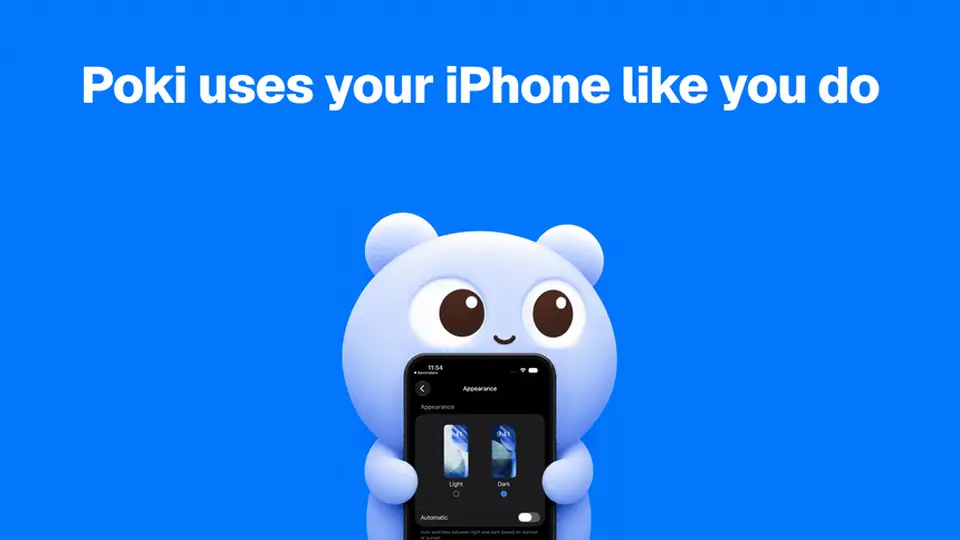
Poki is a loop with three parts. A daemon runs on your Mac and speaks MCP to your agent. A native bridge talks to the iPhone over USB using Apple's own developer tooling — the same plumbing Xcode uses. And a small Poki app on the phone puts it in Automation Mode, so the bridge can drive it.
One loop, end to end, looks like this. You ask Poki Agent: poki "Search esp32 in Chrome and summarize the top result". The agent asks the daemon what devices exist, then reads the phone twice: a screenshot to see the screen, and the accessibility tree to know what each element is. It finds Chrome, taps it, taps the address bar, types the query, reads the results, and writes you a summary. Each action is followed by a fresh screen read, so the agent sees what actually happened before deciding the next move.
The concrete detail that tells you this is real engineering, not a demo: a contributor traced slow taps on a physical iPhone to a missing display service, and the fix that followed made taps about a third faster. Poki also remembers. It records the route a task took — which taps, in which order — and reuses it on repeat, so the second time you ask for the same job it runs faster.
| Piece | Where it runs | What it does |
|---|---|---|
| Poki MCP daemon | Your Mac, on 127.0.0.1:47825 | Speaks MCP to Claude Code, Codex, or any client; hands tasks to the bridge |
| Native bridge | Your Mac (Rust, built by ./bin/setup) | Screenshots, accessibility reads, taps, typing, and app launch over USB |
| Poki app | Your iPhone (iOS 18+) | Automation Mode; the phone side of the connection |
Nothing here is a cloud service. The daemon binds to localhost by default, and its endpoint and bearer token live in a file only you can read. What does leave your machine is the screen itself: screenshots and accessibility data go to whatever model service you configured, because that is how the agent sees. Keep that in mind before pointing it at your banking app.
What you'll need#
There are two ways in, and they need different things. The app path puts Poki on your iPhone with a guided installer. The MCP path builds the server from source and plugs it into the agent you already use. This guide does the MCP path — it is the one developers will actually live in — and notes where the app path differs.
| Path | You need |
|---|---|
| Poki on your iPhone (app) | macOS 14+, Node.js 24+, iOS 18+, a USB data cable, an Apple Account, and a VPN/proxy app on the iPhone that routes 10.7.0.1 back to it (Karing or Shadowrocket, configured through Poki Setup) |
| Poki MCP (this guide) | macOS 15+, full Xcode from the App Store, Git, Node.js 24+, Rust with 2024-edition support, Python 3, ffmpeg, and an iPhone on iOS 18+ |
Two costs to know before you start. A free Apple Account signs the iPhone app for 7 days, then needs renewal. And Poki is $0 — but the model is yours: Poki Agent defaults to GPT-6.1 Terra, or you use your own Claude Code or Codex subscription through MCP.
Step 1 — Install Poki MCP on your Mac#
Clone the repo, run the setup script, and start the daemon:
git clone https://github.com/JosssphZhou/poki.git
cd poki
./bin/setup
npm start
The first build takes a few minutes. ./bin/setup checks every prerequisite and stops with an install hint if one is missing. It fetches the idevice library at a pinned commit, installs locked npm dependencies, and builds the Rust physical-device bridge, the Swift OCR helper, and the Objective-C simulator bridge. Keep npm start running while you use any MCP client — the stdio wrapper connects to this daemon and does not start it for you.
Short on patience or on Rust? The v0.1.1 prebuilt package for Apple Silicon skips the build:
tar -xzf poki-v0.1.1-macos-arm64.tar.gz
cd poki-v0.1.1
npm ci --no-audit --no-fund
npm start
The package includes the native bridge and idevice tools, so you skip Rust and ./bin/setup. You still need macOS on Apple Silicon, full Xcode, Node.js 24+, Python 3, and ffmpeg. The current release is newer — v0.2.9 (672) Alpha, published November 9, 2026, with PokiSetup 0.2.2 installers for macOS and Windows — so check the releases page before settling for the 0.1.1 tarball. Update later with ./bin/poki update.
Step 2 — Pair your iPhone over USB#
Connect the iPhone with a USB data cable, unlock it, and tap Trust This Computer. Then, on the phone, enable Developer Mode and turn on UI Automation in Developer settings. These are the only steps Poki cannot do for you — iOS insists a human taps them.
Next, make sure the developer services are mounted:
node bin/prepare-device.mjs YOUR_DEVICE_IDIf exactly one device is connected, you can omit the device ID. The helper checks device services and mounts the local developer disk image when needed. It does not download Apple files, change security settings, or reboot the device. If touch fails later with no display service, run this helper again — the mounted image is what provides the display service input needs.
Before a session, set Auto-Lock to Never in Settings > Display & Brightness, turn off Sleep Focus, and keep the phone unlocked with the target app visible. A locked phone makes accessibility reads and input fail or time out, and waking the screen does not unlock it. Once paired over USB, the Mac and iPhone can also work over the same local network while the phone stays unlocked.
Step 3 — Connect Claude Code or Codex#
Register the server with one command. From the checkout directory:
claude mcp add --scope user poki-mcp -- node "$PWD/src/stdio.mjs"   # Claude Code
codex mcp add poki-mcp -- node "$PWD/src/stdio.mjs"                 # Codex
Any client that takes an mcpServers JSON object works the same way:
{
  "mcpServers": {
    "poki-mcp": {
      "command": "node",
      "args": ["/absolute/path/to/poki/src/stdio.mjs"]
    }
  }
}
Make sure Node.js 24+ is on the MCP client's PATH, and use the absolute path to your checkout. The default tool list exposes the tools for phone tasks; set POKI_MCP_TOOLS=all in the client's environment and reconnect to discover the complete catalog. If MCP itself is new to you, our TypeScript MCP server guide covers the protocol from the server side.
Step 4 — Verify from the terminal#
Before asking the agent to do anything, prove the plumbing works. bin/call.mjs makes one call per run:
node bin/call.mjs poki_mcp_status
node bin/call.mjs list_devices
node bin/call.mjs take_screenshot '{"device":"YOUR_DEVICE_NAME_OR_ID"}'
node bin/call.mjs list_elements '{"device":"YOUR_DEVICE_NAME_OR_ID","source":"accessibility"}'
list_devices should show your iPhone. take_screenshot should return an image of its screen. list_elements should return the accessibility tree — the buttons, fields, and labels the agent will tap. No simulator? You can spin one up instead with node bin/call.mjs start_simulator '{"model":"iPhone 18 Pro"}', which creates a simulator named Poki MCP iPhone 18 Pro.
Step 5 — Run your first phone task#
Poki Agent is the standalone terminal agent. Install it, sign in, and check its status — keep npm start running in another terminal:
npm ci --prefix agent
export PATH="$PWD/bin:$PATH"
poki login
poki status
Then give it a real job:
poki "Search esp32 in Chrome and summarize the top result"Watch the phone while it works. The agent opens Chrome, searches, reads the results, and summarizes the top one — and you see every tap happen on the glass. With one iPhone connected it is selected automatically; with several, add --device '<device UUID>' (find it with node bin/call.mjs list_devices). The default model is GPT-6.1 Terra with low reasoning — the fastest setup the project tested for phone tasks — and you can override it with POKI_AGENT_MODEL.
What you built: an agent with hands. It can open apps, read screens, fill forms, and report back — the same loop, for any task you can describe in a sentence.
Step 6 — Drive it from anywhere (optional)#
Once a channel is configured, start it and text your phone's agent from wherever you are:
poki imessage
poki telegram
The same agent, the same phone, reachable from a message thread. One contributor runs Poki on a router so Telegram can drive the iPhone with the Mac powered off — that is the shape of where this goes: the phone as a tool your agent carries, not a screen you babysit.
How it compares#
Poki is not the first attempt at giving an agent a phone. It is the first that does it with Apple's own tooling instead of a workaround. The differences matter more than the similarities:
| Approach | What the agent drives | Needs | Best for |
|---|---|---|---|
| Poki | A real iPhone, over USB or Wi-Fi | Mac, full Xcode, iPhone, free Apple Account | Everyday iPhone tasks from Claude Code or Codex |
| Simulator control (e.g. Meta's idb, which Poki builds on) | An iOS Simulator on the Mac | Mac, Xcode | Developers testing apps — no real accounts, no real phone |
| Mika | A real Android phone, on-device | Android phone | Android users who want the agent living on the phone itself |
| ESP32 hardware rig | A real iPhone, by physically tapping the glass | ESP32 + servo hardware build | Any phone with no software on it — but a weekend of building |
The simulator route is the developer's default, and it is honest about what it is: great for testing an app you wrote, useless for checking a delivery in an app tied to your account. Mika does the same job Poki does, on Android — the agent runs on the phone itself, no Mac in the loop — which makes Poki's Mac-and-cable requirement look clumsy until you remember the iPhone never had an equivalent. And the hardware route is real — we covered an ESP32 rig that taps the glass for you — but it is a build project, not an install. Poki's bet is that software, through Apple's developer door, is the practical path for iPhone owners who already have a Mac.
The catch#
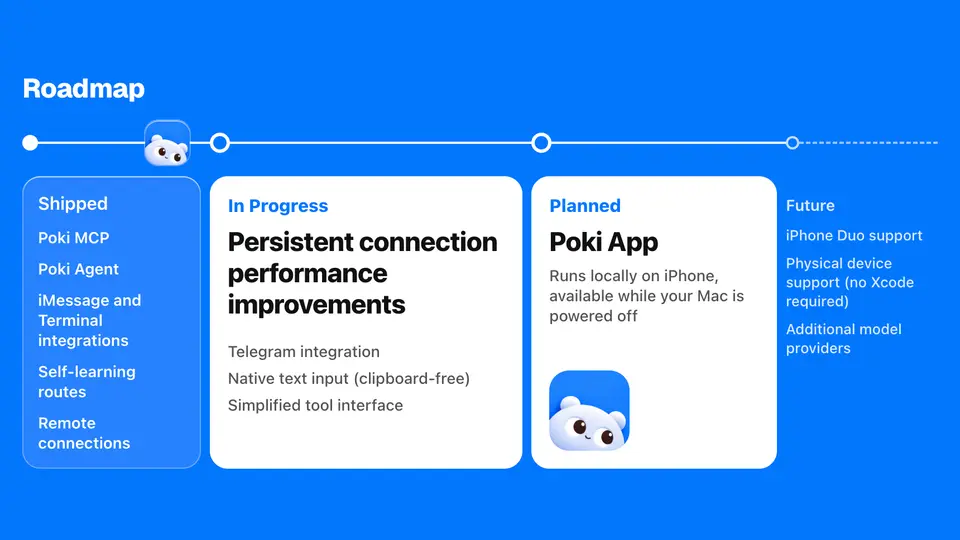
Four things to weigh before you install. First, this is an alpha moving at alpha speed: v0.2.9 landed today, the README was rewritten around a new Poki Setup installer, and the prebuilt MCP package still points at v0.1.1. Expect the setup steps to shift under you. Second, physical iPhone support has been verified only on the Chinese interface, in portrait orientation — if your phone is set to English, you are outside the tested path. Third, the free Apple Account signature lasts 7 days, so the iPhone app needs re-signing weekly unless you have a paid developer account. Fourth, the safety question is yours: Poki will send messages and make payments if you ask it to, and automating a third-party app may violate that app's terms of service.
None of that is a reason to skip it. It is a reason to install it the way the project intends: on a spare evening, with a task you can watch, and with the understanding that you are responsible for what it does on your device and accounts. The upside is an agent that finally reaches the last screen in your life that it couldn't.
Frequently asked questions
Do I need to jailbreak my iPhone to use Poki?
No. Poki uses Apple's own developer tooling — a developer disk image, UI Automation, and a free Apple Account for signing. No jailbreak, no extra hardware. The trade-off is that free-account signing expires after 7 days and must be renewed, and you still do the on-device steps (Trust This Computer, Developer Mode, trusting the developer) yourself.
Does Poki run on Windows or Linux?
The Poki Setup installer for the iPhone app ships for macOS and Windows, but the MCP server itself targets macOS — it needs full Xcode, and the daemon is built and tested there. Community ports exist for Linux and Windows, maintained outside the repo and not tested by the Poki team.
What does Poki send to the AI model?
Whatever is on your iPhone's screen. Poki reads screenshots and the accessibility tree and sends them to your configured model service, so the agent can decide what to tap. The daemon binds to 127.0.0.1 by default and writes its token to a file only you can read — but the screen contents still leave your machine, so do not point it at banking apps or anything you would not show a stranger.
Verification note#
Verified November 9, 2026: the Poki README, install guide, and physical-iPhone setup were read the same day, and every command in this guide is quoted from those docs — git clone, ./bin/setup, npm start, the claude mcp add and codex mcp add registrations, node bin/call.mjs list_devices, and the poki "Search esp32 in Chrome…" first task. The star count (736), release v0.2.9 (672), and PokiSetup 0.2.2 were read from the GitHub API the same day. I did not run the setup end to end — it needs a Mac and a physical iPhone — so the on-device steps follow the project's own docs, not a local test run.
Sources#
- Poki README — requirements, quick start, commands, known limits, and roadmap; read November 9, 2026.
- Poki install guide — source build, MCP client registration, and verification commands; read November 9, 2026.
- Poki physical-iPhone setup — pairing, Developer Mode, UI Automation, and prepare-device; read November 9, 2026.
- Poki releases — v0.2.9 (672) Alpha and PokiSetup 0.2.2, November 9, 2026.