Ponytail: teach your AI coding agent to write less code — a hands-on tutorial
Ponytail is the "lazy senior dev" skill for AI coding agents — roughly 148,000 GitHub stars and climbing. We installed it, fired its hooks, ran its MCP server and its 121-test suite, and walked the seven-rung ladder. Every command verified.

Ask any coding agent for a date picker and watch what happens. It installs a date-picker library, writes a wrapper component, adds a stylesheet, and opens a discussion about timezones. A senior developer would have typed <input type="date"> and moved on. That gap — between what the agent builds and what the task needs — is the entire premise of Ponytail, and it is why the project has blown up: roughly 148,000 GitHub stars, number four on the September 28 AI-repository momentum ranking, MIT-licensed, with one job — make your AI agent think like the laziest senior developer in the room.
In this tutorial you will install Ponytail into a real agent harness, prove it is alive by firing its activation hooks yourself, walk the seven-rung "ladder" it teaches, run its review commands and its MCP server, and execute the project's own 121-test suite. Every command below was run and every output captured on a fresh Linux machine, against release 4.10.0. One honest boundary up front: the full before-and-after agent sessions need a real coding agent with a model subscription, which a sandbox does not have — so everything up to activation is verified here, and the measured numbers are the project's own published, reproducible benchmark, cited with its methodology and its caveats.
1. What Ponytail actually is#
Ponytail is not a model, not a framework, and not a wrapper around an API. It is a behavioral skill plus the plumbing to keep it switched on: a Markdown ruleset (skills/ponytail/SKILL.md), a set of tiny Node.js lifecycle hooks that inject that ruleset into every agent session, six slash commands, and an MCP server for hosts whose only injection point is the prompt menu. It ships adapters for twenty agent harnesses — Claude Code, Codex, Copilot CLI, Cursor, Gemini CLI, OpenCode, Pi, Hermes Agent, Qoder, Windsurf, Cline, Antigravity, OpenClaw, Devin, Grok Build, and more.
The core is the ladder: seven rungs the agent is required to stop at, in order, before writing code. You will climb it yourself in step 3. The mascot is the senior dev who has been at the company longer than version control: you show him fifty lines, he says nothing, and replaces them with one. The tagline is a mission statement: the best code is the code you never wrote.
Why now? Because the failure mode Ponytail attacks has gotten visibly worse as agents got more capable. Give a 2026-era agent a ticket and it does not under-build — it over-builds: new dependencies for solved problems, abstractions with one implementation, scaffolding "for later." Every extra line is a line you review, maintain, and pay tokens for. Ponytail's bet is that a short, always-on ruleset — persistence, not cleverness — fixes most of it. The star count suggests a lot of people share the diagnosis.
2. What you'll need#
- Node.js 18+ — the hooks and MCP server are plain Node. (
node --versionon the test machine reported v24.) - One supported agent harness — Claude Code, Codex, Copilot CLI, Cursor, OpenCode, Pi, Gemini CLI, or any of the others. For the full before-and-after effect you need a working model subscription or API key in that harness; everything in this tutorial up to activation runs without one.
- About 20 minutes. No accounts, no Docker, no build step.
3. Step 1 — Install it#
Pick the path for your harness. The canonical one is Claude Code, and it is two commands — the README is explicit that you must send them as two separate prompts for the install to work:
/plugin marketplace add DietrichGebert/ponytail/plugin install ponytail@ponytailThat registers a marketplace entry and then installs the plugin from it. If you would rather not touch a marketplace, the npm package is the same code — this is the install I verified on the test machine:
npm install -g @dietrichgebert/ponytailadded 1 package in 4sConfirm the version you got:
node -e "console.log(require('@dietrichgebert/ponytail/package.json').version)"4.10.0Every other host has a one-liner, all read from the README and present in the repo:
# Codex
codex plugin marketplace add DietrichGebert/ponytail
codex plugin add ponytail@ponytail
# then run `codex`, open /hooks, review and trust its two lifecycle hooks

# GitHub Copilot CLI
copilot plugin marketplace add DietrichGebert/ponytail
copilot plugin install ponytail@ponytail

# Pi agent harness
pi install git:github.com/DietrichGebert/ponytail

# OpenCode — add to opencode.json
{ "plugin": ["@dietrichgebert/ponytail"] }

# Gemini CLI (and the renamed Antigravity CLI via `agy plugin install`)
gemini extensions install https://github.com/DietrichGebert/ponytail

# Hermes Agent
hermes plugins install DietrichGebert/ponytail --enable

# Cursor hooks (project-level with --project)
node scripts/cursor-hooks.js install
The Claude Code and Codex plugins (and the Cursor hooks) run two tiny Node.js lifecycle hooks, so node needs to be on your PATH — including on the non-interactive shell's PATH, a detail the README flags for Nix and nvm users. If it is not, the skills still work; the always-on activation just stays quiet instead of erroring on every prompt.
4. Step 2 — Prove it's alive#
Do not take "installed" on faith. Ponytail's activation is a real, inspectable mechanism: a SessionStart hook (hooks/ponytail-activate.js) that writes a flag file and injects the ruleset as hidden session context. You can fire it by hand, exactly as the harness would. I pointed it at a throwaway config directory to keep the test clean:
export CLAUDE_CONFIG_DIR=/tmp/pt-fake-claude
echo '{}' | node hooks/ponytail-activate.js | head -4
cat /tmp/pt-fake-claude/.ponytail-active
PONYTAIL MODE ACTIVE — level: full
# Ponytail
You are a lazy senior developer. Lazy means efficient, not careless...
fullExit code 0. The hook emitted the full ruleset as session context — the header line names the active intensity level — and wrote .ponytail-active containing full. That flag file is what the optional statusline reads, so you can see the current mode in your terminal at a glance. This is the moment most "agent skill" tutorials skip: the skill is not a file you hope gets read, it is a hook you can watch fire.
Three intensity levels control how aggressive the agent gets: lite, full (the default), and ultra — "for when the codebase has wronged you personally," per the README. Switch any time with the /ponytail command (/ponytail ultra, /ponytail off), or set the default for every session with an environment variable or config file:
PONYTAIL_DEFAULT_MODE=ultra        # or: lite, full, ultra, off
# alternative: ~/.config/ponytail/config.json
5. Step 3 — Climb the ladder#
The ladder is the whole product, so learn it cold. Before writing code, the agent must stop at the first rung that holds:
- Does this need to exist at all? Speculative need means skip it, and say so in one line. (YAGNI.)
- Already in this codebase? A helper, util, type, or pattern that already lives here — reuse it. Re-implementing what sits a few files over is, in the README's words, "the most common slop."
- Stdlib does it? Use it.
- Native platform feature covers it?
<input type="date">over a picker library, CSS over JS, a database constraint over app code. - Already-installed dependency solves it? Use it. Never add a new one for what a few lines can do.
- Can it be one line? One line.
- Only then: the minimum code that works.
Two design details keep this from being a code-golf license. First, the ladder runs after the agent understands the problem — it reads the code the change touches and traces the real flow first, then climbs. "Lazy about the solution, never about reading." Second, there is an explicit never-cut list: trust-boundary validation, data-loss handling, security, and accessibility are never on the chopping block. The code ends up small because it is necessary, not because it is golfed.

Walk one rung in your head with the date-picker trap from the introduction. Rung 1: does the picker need to exist? The task says "add a date picker" — yes, a date input is genuinely needed. Rung 2: already in the codebase? Suppose not. Rung 3: stdlib? No. Rung 4: native platform feature — the browser ships <input type="date">. Stop. One line, no library, no wrapper, no timezone discussion. The project's measured result on exactly this task: 404 lines down to 23. A color picker the agent over-built the same way fell from 287 lines to 23.
And the corollary the skill is strict about: a bug fix means fixing the root cause, not the symptom. Before editing, the agent greps every caller of the function it is about to touch — one guard in the shared function is a smaller diff than a guard in every caller, and patching only the path the ticket names leaves every sibling caller still broken.
6. Step 4 — Put the commands to work#
Installation is passive; the commands are where you steer. Six ship with the plugin:
/ponytail [lite|full|ultra|off]   # switch intensity (defaults to full)
/ponytail-review [target]           # review changes for over-engineering
/ponytail-audit [target]            # deeper audit pass
/ponytail-debt                     # find accumulated cruft
/ponytail-gain                     # measure what the skill saved you
/ponytail-help                     # the rest of the manual
/ponytail-review is the one you will reach for daily. Point it at your working tree after an agent session and it reviews the diff for over-engineering only, not correctness — one line per finding, each tagged: delete (dead code or speculative feature), stdlib (reinvented standard library), native (a dependency doing what the platform does), yagni (an abstraction with one implementation), shrink (same logic, fewer lines). It closes with the net lines removable, or the sentence "Lean already. Ship." Run it before every commit for a week and you will start seeing your agent's habits in the tags.
For MCP-only hosts — tools whose only injection point is the prompt menu — Ponytail ships a small server, ponytail-mcp, that serves the identical ruleset as a prompt and a tool. I ran it and drove it over stdio, exactly as an MCP host would:
cd ponytail-mcp && npm install && node index.js # speaks MCP over stdio{ "mcpServers": { "ponytail": { "command": "node",
"args": ["/path/to/ponytail-mcp/index.js"] } } }The verified transcript: prompts/list returns one prompt, ponytail, with an optional mode argument (lite, full, or ultra). tools/list returns ponytail_instructions. Calling the prompt with mode: ultra returns the ruleset tagged "PONYTAIL MODE ACTIVE — level: ultra"; calling the tool with mode: lite returns the same text plus machine-readable structuredContent ({"mode":"lite","instructions":"…"}) for hosts that pull context through tools. Mode resolution reuses the same config file and PONYTAIL_DEFAULT_MODE variable as the hooks, so every adapter emits byte-identical rules — the README is explicit that this parity is the point, and the test suite asserts it.
Speaking of the test suite: the repo ships one, and I ran it. npm test executes the hook tests, the plugin-manifest tests for every adapter (OpenCode, Copilot, Cursor, Qoder, Gemini, Grok, Hermes, OpenClaw), the package tests, and the MCP tests — 121 tests, 121 passing, 0 failing on release 4.10.0. A skill project that tests its own activation plumbing across twenty hosts is rarer than it should be.
7. Step 5 — Measure it yourself#
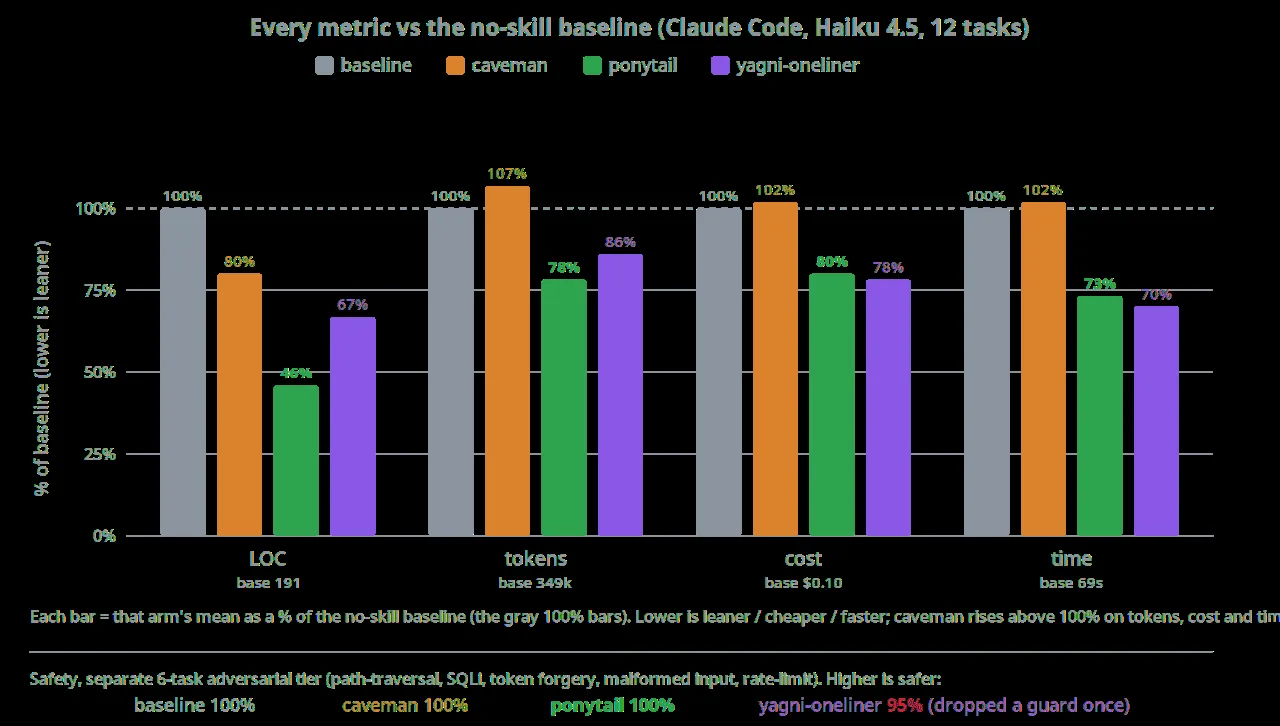
The headline numbers — 54% less code, 22% fewer tokens, 20% cheaper, 27% faster, 100% safety — come from the project's own agentic benchmark, and the README documents it unusually honestly, so read it as a template for how to evaluate any agent skill. Method: twelve feature tickets against tiangolo's full-stack-fastapi-template (a real FastAPI + React repo), the same headless Claude Code agent with and without the skill, four repetitions each, scored on the git diff the session leaves behind, on Haiku 4.5. The control arms matter: a "caveman" terse-prose control cut lines 20% but raised tokens, cost, and time slightly; a bare "YAGNI + one-liners" prompt cut 33% of lines but dropped a safety guard once in the adversarial tier. Ponytail was the only arm that cut every metric and kept the 100% safety score.
The honesty worth noting: an earlier single-shot benchmark reported 80–94% less code, and the README now says plainly that this was partly an artifact of the bare model padding answers with prose — the agentic numbers above are "the corrected, defensible version." The single-shot run is reproducible with npx promptfoo eval -c benchmarks/promptfooconfig.yaml, and the repo keeps per-task tables and limitations in benchmarks/results/2026-06-18-agentic.md. You can also measure your own sessions with /ponytail-gain.
Two caveats before you quote the numbers. The benchmark used one model (Haiku 4.5) on one repo; a terse reasoning model that spends thinking tokens deliberating the rungs can behave differently (the README notes GPT-5.5 went the other way on cost). And the cut is biggest where there is a real over-build trap — the date picker, the color picker — and near zero where the code was already minimal. Ponytail does not make good code shorter; it stops okay code from being born long.
8. Ponytail vs the alternatives#
The agent-skills space is crowded right now, so place Ponytail on the map. Caveman — the terse-style control from Ponytail's own benchmark — is the minimalist alternative: shorter prose, less philosophy. It cuts lines but measured worse on tokens, cost, and time, because terseness without the ladder's read-first discipline just makes the agent guess faster. addyosmani/agent-skills (around 99k stars, a late-September trending regular) is a curated collection of 25 production engineering skills — breadth where Ponytail is one opinionated doctrine. affaan-m/ECC (over 265k stars) is a full harness-optimization layer — skills plus memory, security, and research tooling across Claude Code, Codex, Cursor, and OpenCode — a platform where Ponytail is a plugin. And Anthropic's own knowledge-work-plugins are official role-specialist plugins (document, data, and research roles); narrower, vendor-blessed, and without the minimalism crusade.
The rule of thumb: if your complaint is specifically "my agent writes too much code," Ponytail is the most targeted tool on this list, and the only one with a published agentic benchmark measuring exactly that complaint. If your complaint is broader — memory, security, workflow — you want the collections or the platforms, and Ponytail can ride along as one skill inside them.
9. The takeaway#
Most agent skills try to make the model smarter. Ponytail tries to make it lazier — and the distinction holds up. The ladder is seven rungs you could print on an index card, the activation is a hook you can watch fire, the commands give you a daily review loop, and the benchmark is published with its own corrections. Install it in your harness of choice, run /ponytail-review on the next diff your agent produces, and count the tags. If the review comes back "Lean already. Ship." — your agent did not need the ponytail. If it comes back with a page of native and yagni tags, you just found the cheapest performance improvement in your stack: the code that never gets written.