Build typed, testable AI agents with Pydantic AI: tools, structured output, and tests that run without an API key
Pydantic AI turns an agent's output into a contract: a Pydantic model the model must satisfy, tools built from typed functions, and test models that let you prove it all without an API key. This guide builds a support-ticket triage agent and tests it three ways, all verified on Pydantic AI 2.62.0.
- Who: Pydantic AI 2.62.0, the agent framework from the Pydantic team.
- What: Typed tools, typed dependencies, and a validated output type — plus test models that make the whole agent unit-testable offline.
- When: Verified 27 October 2026 on Python 3.12.3 (requires Python 3.11 or later).
- Requirements: Python 3.11+; no API key, model account, or GPU for steps 1 to 5. A real provider key is needed only for the final, documented-not-run step.
- Verified results: TestModel run returned a valid TicketAction (usage: 118 input / 23 output tokens, 2 requests, 2 tool calls); 3 tests passed in 2.41s; invalid output raised UnexpectedModelBehavior after 1 retry; real-request guard raised RuntimeError; the real-model step was documented, not run.

Most AI agent demos end where production begins. The demo prints a string, the string looks right, and everyone moves on. Then the model returns a refund amount as a sentence, or a status word your code has never seen, or a JSON blob with one field missing, and the code downstream does whatever it does with garbage. The failure is not that the model is stupid. It is that nothing between the model and your database checks the shape of what came back.
Pydantic AI fixes that by making the output type the contract. You declare, as a Pydantic model, exactly what the agent is allowed to return. The framework builds the schema the model must fill, validates what comes back, and sends validation errors back to the model for a retry instead of handing your code a broken object. Tools get the same treatment: typed function signatures become the tool schemas, and dependencies arrive through an explicit object instead of being smuggled in through prompt text.
This guide builds a real example end to end: a support-ticket triage agent that looks up an order, checks the customer tier, and returns one validated decision — refund, retry, or escalate — with an amount in cents and a reason. Then it tests that agent three ways without spending a cent on API calls: a test model that exercises every tool, a scripted model that forces one exact path, and a guard that makes real model requests impossible inside the test suite. Every command below was run, and every output quoted is the output that came back.
What you will need
- Python 3.11 or later. This guide was verified with Python 3.12.3.
- No API key for steps 1 to 5. The install, the agent, and all three tests run locally with test models. You need a real provider key only for step 6, where the agent is pointed at a real model — and that step is documented, not run, because this guide ran with no key at all.
- A terminal and a text editor. No GPU, no Docker, no model download: the test models live inside the library.
- About 15 minutes. The install is the slow part, and only because of downloads.
Step 1: Install Pydantic AI
Pydantic AI is the agent framework from the Pydantic team, the same people behind the validation library most Python shops already use. Install it with pip, pinning the version this guide verified:
python3 -m venv .venv
source .venv/bin/activate
pip install "pydantic-ai==2.62.0" pytest
Check the install:
python -c "import pydantic_ai; print(pydantic_ai.__version__)"Expected output:
2.62.0The install also lands Pydantic itself (2.14.1 here) and the test-model machinery. One detail that will matter in step 5: the pydantic-ai package is a thin wrapper around pydantic-ai-slim, which is where the agent code lives. You never import the slim package directly.
Step 2: Run an agent with no model at all
Before the triage agent, get one fact straight: Pydantic AI ships a built-in test model, TestModel, that stands in for a real language model. It calls the agent's tools, then returns a dummy answer. That sounds useless until you realise what it buys you: every line of your code around the model — tool logic, dependency wiring, output validation — runs and can be asserted on, with no key, no network, no cost, and the same result every time.
The one catch, learned the hard way in this guide's sandbox: constructing an agent with a real model name, like 'openai:gpt-6.1-sol', requires the provider's API key variable to be set, even if you intend to override the model in tests. Without it, construction fails immediately with a clear error:
pydantic_ai.exceptions.UserError: Set the `OPENAI_API_KEY` environment variable
or pass it via `OpenAIProvider(api_key=...)` to use the OpenAI provider.
To try Pydantic AI without an API key, use the built-in test model: `Agent('test')`.
So for offline work, set a placeholder. It is never sent anywhere, because the tests override the model and block real requests (step 5 proves both). Keep it in the shell, not in the code:
export OPENAI_API_KEY=placeholder-for-offline-testsSave the triage agent as triage.py. This is the full file used for every run in this guide, and step 3 explains each piece:
"""Support-ticket triage agent: tools, deps, and a validated output type.

Every run in this file works with no API key: the tests override the model
with TestModel / FunctionModel, and ALLOW_MODEL_REQUESTS=False blocks any
accidental real request.
"""
from dataclasses import dataclass
from typing import Literal

from pydantic import BaseModel, Field
from pydantic_ai import Agent, RunContext


@dataclass
class SupportDeps:
    """Everything the tools need, injected per run (never baked into prompts)."""

    customer_id: str
    orders: dict[str, str]  # order_id -> status, e.g. {'ord_1': 'failed'}


class TicketAction(BaseModel):
    """The only shape this agent is allowed to return."""

    action: Literal['refund', 'retry', 'escalate']
    amount_cents: int = Field(ge=0, le=20_000)
    reason: str


agent = Agent(
    'openai:gpt-6.1-sol',
    deps_type=SupportDeps,
    output_type=TicketAction,
    instructions=(
        'Triage support tickets. Refund failed orders under $200, '
        'retry transient failures, escalate everything else.'
    ),
)


@agent.tool
def order_status(ctx: RunContext[SupportDeps], order_id: str) -> str:
    """Return the status of an order."""
    return ctx.deps.orders.get(order_id, 'unknown')


@agent.tool
def customer_tier(ctx: RunContext[SupportDeps]) -> str:
    """Return the customer tier."""
    return 'pro'
Now run it under TestModel with a small driver script, demo_run.py:
from pydantic_ai.models.test import TestModel
from triage import SupportDeps, agent

deps = SupportDeps(customer_id='cus_123', orders={'ord_1': 'failed'})
with agent.override(model=TestModel()):
    result = agent.run_sync('My order ord_1 never arrived. Fix it.', deps=deps)
print(result.output)
print(result.usage)
python demo_run.pyExpected output, exactly as it came back:
action='refund' amount_cents=0 reason='a'
RunUsage(input_tokens=118, output_tokens=23, requests=2, tool_calls=2)
Read that output carefully, because it teaches the most important lesson in this guide. The output is a valid TicketAction — the right type, the amount inside its 0–20,000 range — but its values are meaningless: amount 0, reason 'a'. TestModel invents placeholder values that satisfy the schema. It proves the wiring works. It says nothing about whether a real model would make a good decision. Hold that distinction for the whole guide: test models check your code, evals check the model's judgment, and neither substitutes for the other.
Step 3: Tools and dependencies, the typed way
Two design decisions in triage.py do most of the work, so they are worth naming explicitly.
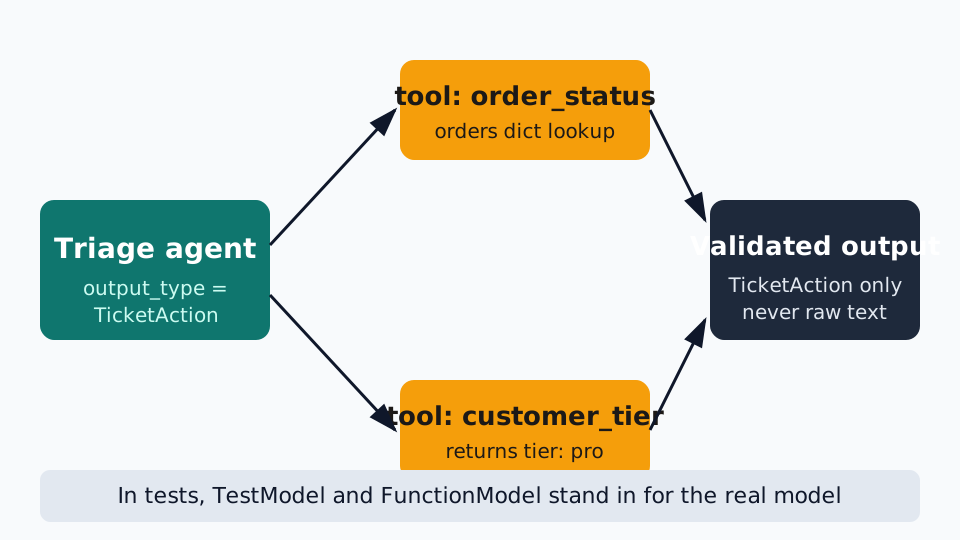
First, dependencies are a typed object, not prompt text. SupportDeps is a dataclass holding the customer id and the orders map, declared as deps_type=SupportDeps on the agent and passed per run with deps=deps. Tools receive it as ctx: RunContext[SupportDeps] and read ctx.deps. Nothing about the customer or their orders is pasted into a prompt string, which means nothing about them can be garbled by prompt formatting, and tests can swap in a fake dependency object without touching the agent.
Second, tools are plain functions with type hints. The @agent.tool decorator turns order_status into a tool whose schema comes from its signature: one string argument, order_id, and a docstring that becomes the tool's description to the model. The return type, str, is what the model gets back. There is no separate schema file to keep in sync with the function, because the function is the schema. Change the signature and the schema changes with it — which is also why a test that asserts on tool calls (step 5) is worth writing: it catches signature drift.
Step 4: The output type is the contract
output_type=TicketAction is the line that changes the agent from a chatbot into a component. Under the hood, Pydantic AI registers a tool named final_result whose arguments are the model's fields, and the model must call it to finish. The returned arguments are validated against TicketAction before your code ever sees them. Three consequences fall out of that, all verified in this guide's sandbox.
Invalid values never reach your code. The amount field is Field(ge=0, le=20_000), so a $200 ceiling is enforced by the type, not by hoping the model respects a sentence in the instructions. When a scripted model was made to return 99,999 cents, the agent retried once and then raised instead of returning a bad object:
pydantic_ai.exceptions.UnexpectedModelBehavior: Exceeded maximum output retries (1)The default is one output retry: the framework feeds the validation error back to the model once, and if the model still cannot produce a valid object, it raises. Your code gets a validated TicketAction or an exception — never a string with a JSON fence stuck to it, never an amount your database has to second-guess.
The action vocabulary is closed. Literal['refund', 'retry', 'escalate'] means the model cannot invent a fourth action like 'partial_refund' and hope your switch statement handles it. A value outside the literal fails validation the same way an out-of-range amount does.
Validation context stays out of the prompt. Pydantic AI supports a validation_context for validators that need data the model should not see (for example, a list of valid countries for a field validator). This guide's example does not need it, but the pattern matters: checks that belong to your code should not be smuggled into instructions where the model can argue with them.
Step 5: Three tests that run without an API key
Save the tests as test_triage.py. They use only the standard pytest runner — no async plugin, because every test here calls the synchronous run_sync API at the top level:
"""Tests for triage.py. No API key, no network, same result every run."""
import pytest
from pydantic_ai import ModelResponse, ToolCallPart, capture_run_messages, models
from pydantic_ai.models.function import FunctionModel
from pydantic_ai.models.test import TestModel

from triage import SupportDeps, TicketAction, agent

models.ALLOW_MODEL_REQUESTS = False

DEPS = SupportDeps(customer_id='cus_123', orders={'ord_1': 'failed'})


def test_testmodel_calls_every_tool_and_returns_valid_output():
    with agent.override(model=TestModel()):
        with capture_run_messages() as messages:
            result = agent.run_sync('My order ord_1 never arrived. Fix it.', deps=DEPS)
    assert isinstance(result.output, TicketAction)
    tool_calls = [
        part.tool_name
        for msg in messages
        for part in msg.parts
        if part.part_kind == 'tool-call'
    ]
    assert 'order_status' in tool_calls
    assert 'customer_tier' in tool_calls
    assert 'final_result' in tool_calls  # the structured-output tool


def test_functionmodel_forces_the_failed_order_path():
    def scripted(messages, info):
        if len(messages) == 1:
            return ModelResponse(
                parts=[ToolCallPart('order_status', {'order_id': 'ord_1'})]
            )
        return ModelResponse(
            parts=[
                ToolCallPart(
                    'final_result',
                    {
                        'action': 'refund',
                        'amount_cents': 4999,
                        'reason': 'Order failed; refund under $200 policy.',
                    },
                )
            ]
        )

    with agent.override(model=FunctionModel(scripted)):
        result = agent.run_sync('My order ord_1 never arrived. Fix it.', deps=DEPS)
    assert result.output == TicketAction(
        action='refund',
        amount_cents=4999,
        reason='Order failed; refund under $200 policy.',
    )


def test_real_model_requests_are_blocked():
    with pytest.raises(RuntimeError, match='ALLOW_MODEL_REQUESTS'):
        agent.run_sync('Hello', deps=DEPS)
Each test covers a different layer, and the distinction is the point:
TestModeltests the wiring. By default it calls every tool, then thefinal_resultoutput tool. The test asserts the output type and that all three tool calls happened. It also exposes a useful honesty check:capture_run_messagesshowsTestModelcalledorder_statuswith the placeholder argument{'order_id': 'a'}. It does not read your prompt and extract the real order id. If your tool logic depends on receiving a realistic argument,TestModelcannot prove that path — which is what the next test is for.FunctionModeltests one exact path. You write a function that receives the message list and returns the next model response. On the first call it forces anorder_statuscall withord_1; on the second it returns thefinal_resultcall with exact values. This is how you test the branch where the order really failed, the tool really ran, and the output really validates — without a model in the loop at all. Note the shape: for a structured-output agent, the scripted function must return afinal_resulttool call whose arguments are the output model's fields, not a plain text reply.- The guard test proves accidents are impossible.
models.ALLOW_MODEL_REQUESTS = Falsemakes any real model request raiseRuntimeError: Model requests are not allowed, since ALLOW_MODEL_REQUESTS is False. The test runs the agent with no override and asserts that error. If someone later removes an override or adds a test that forgets one, the suite fails loudly instead of spending money and waiting on a network call.
Run them with the placeholder key from step 2 (needed at import time, as explained there — the guard test proves it is never used):
OPENAI_API_KEY=placeholder-for-offline-tests python -m pytest test_triage.py -qExpected output:
3 passed in 2.41sThree tests, two and a half seconds, zero network. That is the loop you want for agent code: fast enough to run on every save, strict enough that a broken tool signature or a changed output field fails here instead of in production.
Step 6: Point it at a real model (one line, documented not run)
Everything above runs without a key. To go live, you change nothing about the agent's structure: set a real provider key in the environment, and remove the override so the agent uses the model string it was constructed with:
export OPENAI_API_KEY="your-real-key"
python -c "
from triage import SupportDeps, agent
deps = SupportDeps(customer_id='cus_123', orders={'ord_1': 'failed'})
result = agent.run_sync('My order ord_1 never arrived. Fix it.', deps=deps)
print(result.output)
"
This step is documented, not run: this guide had no real key, and it would be dishonest to quote an output from a model call that never happened. What changes when you do run it is only the model behind the same contract — the tools, the dependency object, and the TicketAction validation are identical. And the first thing to check on a real run is the usage object: result.usage reports input tokens, output tokens, requests, and tool calls, which is what you need to price the agent before it meets real traffic. Keep the guard test from step 5 in place: it only blocks requests inside the test process, where ALLOW_MODEL_REQUESTS is set to False, and does not affect production runs.
What these tests do not prove
The framework's own testing guide says it plainly, and it is worth repeating because it is the easiest thing to get wrong: unit tests check your code around the model — tools, dependencies, output validation, failure handling. They do not tell you whether the model's answers are good. TestModel returning refund for your ticket proves nothing about what a real model will return for a real ticket, and FunctionModel returning your scripted answer proves even less about the model. What they prove is that if the model behaves, your code handles it correctly, and if it misbehaves, your code fails safely instead of writing garbage downstream.
Answer quality needs a different tool: evals. Run the agent against a fixed set of real tickets with a real model, record the outputs, and grade them — ideally with assertions on the structured fields (was the action right? was the amount within policy?) rather than vibes about the prose. The structured output type is what makes that grading mechanical: you are asserting on fields, not reading paragraphs. Treat the unit tests in step 5 as the gate that runs on every commit, and evals as the gate that runs before every model or prompt change.
When to use this vs alternatives
| Approach | What you get | Use it when |
|---|---|---|
| A raw provider SDK | Full control over every request, and full responsibility for parsing, validation, retries, and tool plumbing | You need one unusual provider feature the frameworks do not expose, and you are willing to build the surrounding machinery yourself |
| A graph-based agent framework | Explicit multi-step workflows with branching, loops, and state machines between steps | The workflow itself is the product: approval chains, retries across steps, and human-in-the-loop stages |
| Pydantic AI | Typed tools, typed dependencies, and a validated output type, with test models that make the whole thing unit-testable offline | One agent must return data your code can trust, and you want its tests to run in seconds with no key |
| A multi-agent orchestration framework | Teams of specialised agents with handoffs, shared memory, and delegation | The task genuinely splits across roles that need to talk to each other, not just one agent with tools |
The deciding factor is where your risk lives. If your risk is a malformed output reaching a database, the output type is the whole argument. If your risk is a ten-step workflow with approvals, the graph is the argument. Most single-purpose production agents — triage, extraction, classification, routing — are the first kind, and they are where Pydantic AI earns its place.
Gotchas worth knowing before you build
- The model string needs a key at import time. Constructing
Agent('openai:gpt-6.1-sol')raisesUserErrorwithoutOPENAI_API_KEYset, even if every test overrides the model. Set a placeholder for offline work; the guard test proves it is never used. run_synccannot run inside a running event loop. Calling it from async code raisesRuntimeError: This event loop is already running. Inside async code, useawait agent.run(...);run_syncis for scripts and synchronous tests.TestModelcalls every tool, with placeholder arguments. It does not extract values from your prompt. If a tool's behaviour depends on a realistic argument, script that path withFunctionModelinstead.- A structured-output agent finishes through the
final_resulttool. A scripted model must return afinal_resulttool call with the output model's fields. A plain text reply will not satisfy an agent whoseoutput_typeis a Pydantic model. - Output retries default to one. A model that keeps returning invalid output gets one retry, then the agent raises
UnexpectedModelBehavior. That is a feature — it is the guarantee that bad data never reaches your code — but budget for it: a model that cannot satisfy a tight schema will fail loudly instead of degrading gracefully. - Instructions are not validation. A sentence in the instructions saying "never refund over $200" is a suggestion to the model.
Field(le=20_000)is a guarantee enforced after the model answers. Put policy in the type whenever the policy can be expressed as one.
The takeaway
An agent that returns a string is a demo. An agent that returns a validated object is a component, and components can be tested, priced, and trusted. Declare the output type, inject dependencies as a typed object, let tool signatures be the tool schemas, and test the whole thing with models that never touch the network. The triage agent in this guide is 60 lines of application code and 60 lines of tests, and the tests run in under three seconds with no key. That ratio — tests as cheap as the code, and as strict as the contract — is what makes an agent safe to ship. Build your next agent that way, and let the model argue with the schema instead of your database.
Sources
- Pydantic AI testing guide: pydantic.dev/docs/ai/guides/testing/ — TestModel, FunctionModel, Agent.override, ALLOW_MODEL_REQUESTS, and capture_run_messages.
- Pydantic AI output documentation: pydantic.dev/docs/ai/core-concepts/output/ — output_type, structured output via tool calling, and output validation.
- All version numbers, outputs, and error messages in this guide were verified by running Pydantic AI 2.62.0 on Python 3.12.3; the real-model step was documented, not run, because no provider key was available.