Harden your Pydantic AI agent for production: capabilities, fallbacks, and guardrails in v2.71
Pydantic AI 2.71 turns a typed, testable agent into one that survives the real world. This guide takes a support-ticket triage agent and hardens it layer by layer — capabilities, model fallback, retries, and harness guardrails — with every step run and verified using no API key.
- Pinned and verified:
pydantic-ai==2.71.0andpydantic-ai-harness==0.71.0, both released November 18, 2026. Every code block in this guide was executed against those versions. - ModelFallback default: it moves on for
ModelAPIError,ContentFilterError, andOutputTokenLimitExceeded. Each model tried is an attempt inside one request step, andfailed_attemptsrecords the chain. - Retry is not fallback:
RetryOnModelErrorsretries only transient errors (rate limit, unavailable, server, connection). A plainModelAPIErroris not retried by default. - Harness guardrails:
Goalrefuses to end the run until a verifier accepts the answer;Permissionsdeny rules never execute the tool;WrapUpAtLimitsanswers instead of raisingUsageLimitExceeded. - No API key needed: every runnable step uses the framework’s own test models. The real-model step is documented, not run.

Pydantic AI shipped version 2.71.0 on November 18, 2026, and it changes what the framework is for. The 2.0 release in June made agents typed and testable; 2.71 is the release that makes them survivable. The new capabilities system lets you bundle instructions, tools, and hooks into reusable units. ModelFallback moves a request to another model when the first one fails, refuses, or runs out of tokens. And the companion harness package adds the guardrails production agents need: a completion check that refuses to let a run end early, permission rules that keep dangerous tools out of the model's reach, and a budget-aware wrap-up that answers instead of crashing when the tokens run out.
This tutorial is the production sequel to our earlier guide, which built a typed, testable support-ticket agent. We will take that same agent — it triages tickets into refunds, retries, and escalations — and harden it, layer by layer, until it can survive a dead provider, a refusing model, a blank answer, a transient outage, an unguarded refund, and a blown budget. Every step runs with no API key and no network: deterministic stand-in models play the part of real providers, and a safety switch blocks any accidental real request. The last step shows how to point the finished agent at a real model.
What you'll need#
- Python 3.11 or later. The examples were run on Python 3.12.
- Two packages, pinned:
pydantic-ai==2.71.0andpydantic-ai-harness==0.71.0. Pin both — the harness is on 0.x releases and its API can change between minors. - No API key, no account, no cost. Every runnable step uses the framework's own test models. You will need a provider key only for the final step, and that step is marked as documented, not run.
- About 45 minutes. Each step is a file you can run, with the exact output shown.
Step 1: Install and pin the versions#
Create a virtual environment and install the two pinned packages:
python3 -m venv .venv
source .venv/bin/activate
pip install "pydantic-ai==2.71.0" "pydantic-ai-harness==0.71.0"
Confirm the versions before going further — everything in this guide was verified against them:
python -c "import pydantic_ai; print(pydantic_ai.__version__)"
pip show pydantic-ai-harness | grep ^Version
2.71.0
Version: 0.71.0One safety habit for the whole tutorial: every demo file in this guide sets models.ALLOW_MODEL_REQUESTS = False at the top. That is the framework's own kill-switch — with it set, any attempt to make a real provider request raises immediately instead of going to the network. The stand-in models below never need it, but the switch means a typo can never cost you an API bill.
Step 2: The baseline agent, still keyless#
Start from the agent our earlier guide built. It triages support tickets: given a customer and their orders, it returns one validated TicketAction — refund, retry, or escalate — with an amount in cents and a reason. Save this as triage.py:
"""Support-ticket triage agent: tools, deps, and a validated output type.

Every run in this file works with no API key: the runs override the model
with TestModel / FunctionModel, and ALLOW_MODEL_REQUESTS=False blocks any
accidental real request.
"""
from dataclasses import dataclass
from typing import Literal

from pydantic import BaseModel, Field
from pydantic_ai import Agent, RunContext, models

models.ALLOW_MODEL_REQUESTS = False


@dataclass
class SupportDeps:
    """Everything the tools need, injected per run (never baked into prompts)."""

    customer_id: str
    orders: dict[str, str]  # order_id -> status, e.g. {'ord_1': 'failed'}


class TicketAction(BaseModel):
    """The only shape this agent is allowed to return."""

    action: Literal['refund', 'retry', 'escalate']
    amount_cents: int = Field(ge=0, le=20_000)
    reason: str


agent = Agent(
    deps_type=SupportDeps,
    output_type=TicketAction,
    instructions=(
        'Triage support tickets. Refund failed orders under $200, '
        'retry transient failures, escalate everything else.'
    ),
)


@agent.tool
def order_status(ctx: RunContext[SupportDeps], order_id: str) -> str:
    """Return the status of an order."""
    return ctx.deps.orders.get(order_id, 'unknown')


@agent.tool
def customer_tier(ctx: RunContext[SupportDeps]) -> str:
    """Return the customer tier."""
    return 'pro'


DEPS = SupportDeps(customer_id='cus_123', orders={'ord_1': 'failed'})
Notice what is missing: the Agent has no model. In 2.71 the provider is created eagerly, so Agent('openai:gpt-6.1-sol') raises an error unless OPENAI_API_KEY is set. Building the agent without a model string and supplying the model per run keeps the file importable and runnable with no key at all — the pattern every step below uses.
Run it with the built-in test model, which calls every tool and returns a dummy-but-valid output:
from pydantic_ai.models.test import TestModel
from triage import SupportDeps, agent

deps = SupportDeps(customer_id='cus_123', orders={'ord_1': 'failed'})
with agent.override(model=TestModel()):
    result = agent.run_sync('My order ord_1 never arrived. Fix it.', deps=deps)
print(result.output)
print(result.usage)
action='refund' amount_cents=0 reason='a'
RunUsage(input_tokens=118, output_tokens=23, requests=2, tool_calls=2)Read that output honestly: amount_cents=0 and reason='a' are placeholder values. The test model proves the plumbing — both tools ran, the output validated against TicketAction, and the usage was tracked — not the judgment. Real judgment arrives in Step 7. What matters here is the shape: a typed output, injected dependencies, and a run you can execute a hundred times for free. Everything after this step hardens that shape.
Step 3: Bundle the refund policy into a capability#
Before 2.0, configuring an agent meant threading arguments through the Agent constructor: instructions here, model settings there, a toolset somewhere else. A capability is the replacement — a reusable, composable unit that bundles related behavior into one object you pass via capabilities=[...]. Capabilities can provide tools, lifecycle hooks, instructions, model settings, and model selection, and they compose with each other.
The simplest way to define one is the declarative Capability class: give it an id, a description the model uses to decide when it applies, and instructions. Tools attach with decorators. Save this as capability.py — a scripted stand-in model calls the capability's tool, then answers:
"""Capability: bundle the refund policy into one reusable unit."""
from pydantic_ai import Agent, ModelMessage, ModelResponse, TextPart, ToolCallPart, models
from pydantic_ai.capabilities import Capability
from pydantic_ai.models.function import AgentInfo, FunctionModel

models.ALLOW_MODEL_REQUESTS = False

refunds = Capability(
    id='refunds',
    description='Use for refund eligibility and refund status.',
    instructions='Always confirm the order ID before issuing a refund.',
)


@refunds.tool_plain
def refund_status(order_id: str) -> str:
    """Look up the refund status for an order."""
    return f'Order {order_id}: refund issued on 2026-05-01.'


def script(messages: list[ModelMessage], info: AgentInfo) -> ModelResponse:
    responses = sum(1 for m in messages if m.kind == 'response')
    if responses == 0:
        return ModelResponse(parts=[ToolCallPart('refund_status', {'order_id': 'ord_1'})])
    return ModelResponse(parts=[TextPart('Refund confirmed for ord_1.')])


agent = Agent(
    FunctionModel(script, model_name='cap-model'),
    instructions='You are a support agent.',
    capabilities=[refunds],
)

result = agent.run_sync('What is the refund status of order ord_1?')
print(result.output)
Refund confirmed for ord_1.A capability can also be loaded on demand: pass defer_loading=True and it stays collapsed to a one-line catalog entry until the model loads it — the same mechanism the harness uses for agent skills. That keeps the prompt small when a capability's tools are only occasionally relevant. For behavior beyond instructions, tools, and toolsets — lifecycle hooks, model settings, native tools — subclass AbstractCapability instead.
The point of this step is organizational, and it pays off immediately: every capability that follows — fallback, retry, goal, permissions — attaches to the agent the same way, in the same list. Your agent's production behavior becomes a legible list of named parts rather than a constructor full of scattered arguments.
Step 4: Survive a dead, refusing, or rambling model#
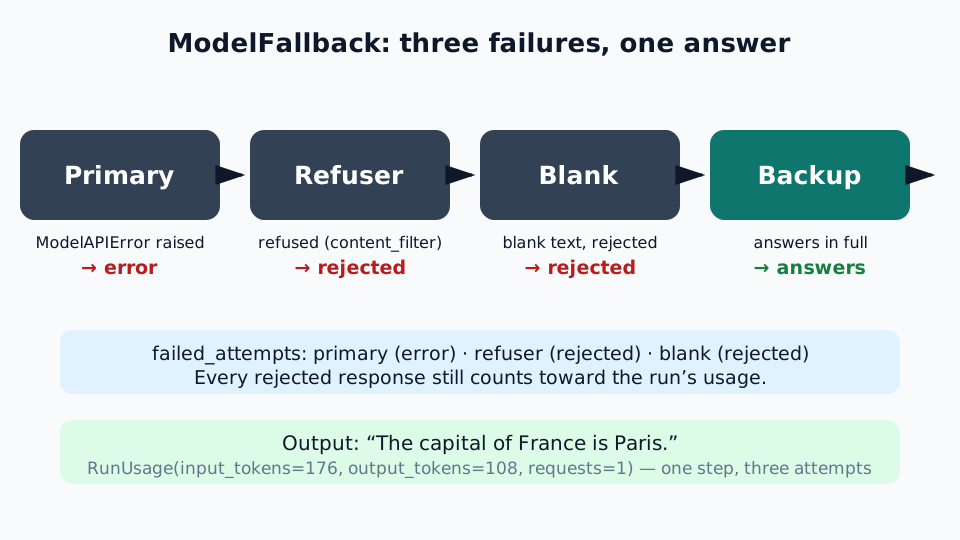
The most useful capability in 2.71 is ModelFallback. It attempts other models when the one serving a request fails, or returns a response you reject. The chain starts from the model selected for the step, then tries the capability's models in order. By default it moves on when a request raises ModelAPIError, when a model refuses, and when the output is cut off by the token limit — fallback_on defaults to (ModelAPIError, ContentFilterError, OutputTokenLimitExceeded).
Save this as fallback.py. Three deterministic stand-ins play three providers: one is down, one refuses, one answers with a blank — and the backup answers:
"""ModelFallback: a dead primary, a refusing model, a blank answer, a backup."""
from pydantic_ai import (
    Agent,
    ModelAPIError,
    ModelMessage,
    ModelResponse,
    TextPart,
    models,
)
from pydantic_ai.capabilities import ModelFallback
from pydantic_ai.exceptions import ContentFilterError, OutputTokenLimitExceeded
from pydantic_ai.models.function import AgentInfo, FunctionModel
from pydantic_ai.usage import RequestUsage

models.ALLOW_MODEL_REQUESTS = False


def down(messages: list[ModelMessage], info: AgentInfo) -> ModelResponse:
    raise ModelAPIError('primary', 'Service unavailable')


def refuse(messages: list[ModelMessage], info: AgentInfo) -> ModelResponse:
    return ModelResponse(
        parts=[],
        finish_reason='content_filter',
        provider_details={'refusal': "I can't help with that request."},
    )


def blank(messages: list[ModelMessage], info: AgentInfo) -> ModelResponse:
    return ModelResponse(
        parts=[TextPart('\n\n')],
        usage=RequestUsage(input_tokens=60, output_tokens=100),
    )


def complete(messages: list[ModelMessage], info: AgentInfo) -> ModelResponse:
    return ModelResponse(
        parts=[TextPart('The capital of France is Paris.')],
        usage=RequestUsage(input_tokens=60, output_tokens=8),
    )


def is_blank(response: ModelResponse) -> bool:
    return not response.tool_calls and not (response.text or '').strip()


agent = Agent(
    FunctionModel(down, model_name='primary'),
    capabilities=[
        ModelFallback(
            FunctionModel(refuse, model_name='refuser'),
            FunctionModel(blank, model_name='blank'),
            FunctionModel(complete, model_name='backup'),
            fallback_on=[
                ModelAPIError,
                ContentFilterError,
                OutputTokenLimitExceeded,
                is_blank,
            ],
        )
    ],
)

result = agent.run_sync('What is the capital of France?')
print(result.output)
print(result.usage)
for attempt in result.response.failed_attempts or []:
    print(attempt.model_name, attempt.outcome, attempt.usage)
The capital of France is Paris.
RunUsage(input_tokens=176, output_tokens=108, requests=1)
primary error None
refuser rejected RequestUsage(input_tokens=56)
blank rejected RequestUsage(input_tokens=60, output_tokens=100)Three details in that output are worth understanding. First, the blank answer is rejected by the is_blank response handler — a function that takes a ModelResponse and returns whether to reject it. Handlers can be sync or async, and you can mix exception types and response handlers in fallback_on. Second, the run counts as one request (requests=1) even though three models were tried: each model is an attempt within the same step, so UsageLimits.request_limit bounds steps, not models tried. The rejected responses' tokens still count toward usage. Third, failed_attempts records every model the chain moved on from, with its outcome — the audit trail you want when a user asks why the answer came from the backup.
Two options change the behavior in ways you will use. sticky=True keeps a conversation on the model that answered, instead of going back to the first model at the next step — that keeps hitting the same provider's prompt cache and stops every step waiting on a model that is failing. And to have a refusal end the run instead of falling back, opt out with fallback_on=(ModelAPIError, OutputTokenLimitExceeded): an empty refusal then raises ContentFilterError, and one with text becomes the run's output. If every model fails or is rejected, ModelFallback raises a FallbackExceptionGroup with every exception plus a count of rejected responses — a loud, diagnosable failure instead of a silent wrong answer.
One caveat, straight from the docs: a streamed refusal or cut-off response is not fallen back from. It is only known once it has been streamed, so it is accepted as-is. If you stream, catch the refusal and run again with another model passed as model=.
Step 5: Retry the same model before you abandon it#
Falling back is not retrying. A dropped connection or a 503 from an overloaded provider is usually fixed by waiting a second and asking the same model again — moving to another model throws away the prompt cache the first request built and can answer differently at a different price. RetryOnModelErrors handles the transient case: it attempts the same model again when a request fails with a transient error. By default it retries ModelRateLimitError, ModelUnavailableError, ModelServerError, and ModelConnectionError, up to max_attempts=3, waiting an exponentially growing, jittered delay between attempts.
Save this as retry.py — a stand-in that fails twice with a transient 503, then answers:
"""RetryOnModelErrors: the same model, tried again on transient failures."""
from pydantic_ai import Agent, ModelMessage, ModelResponse, TextPart, models
from pydantic_ai.capabilities import RetryOnModelErrors
from pydantic_ai.exceptions import ModelUnavailableError
from pydantic_ai.models.function import AgentInfo, FunctionModel

models.ALLOW_MODEL_REQUESTS = False

calls = {'n': 0}


def flaky(messages: list[ModelMessage], info: AgentInfo) -> ModelResponse:
    calls['n'] += 1
    if calls['n'] < 3:
        raise ModelUnavailableError('flaky', 'Transient 503')
    return ModelResponse(parts=[TextPart('Recovered on try 3.')])


agent = Agent(
    FunctionModel(flaky, model_name='flaky'),
    capabilities=[RetryOnModelErrors()],
)

result = agent.run_sync('Hello?')
print(result.output)
print('model calls:', calls['n'])
Recovered on try 3.
model calls: 3Note what the default retry set does not include: a plain ModelAPIError is not retried. If your provider raises a generic API error for a transient failure, name it explicitly with retry_on=[ModelAPIError] — or better, map it to the specific subclass. With a ModelFallback in the same capabilities list, each model in the chain gets its own max_attempts attempts, whatever order the two capabilities are listed in: the request is retried on one model, and falls back to the next once its attempts are used up. Retried attempts are recorded in failed_attempts with kind='retry', distinct from fallbacks.
Step 6: Harness guardrails — Goal, Permissions, ToolBridge, WrapUpAtLimits#
Core capabilities make the agent resilient. The harness — pydantic-ai-harness==0.71.0, imported as pydantic_ai_harness — makes it governable. Four of its capabilities cover the failure modes that actually cause production incidents: an agent that declares success too early, one that runs a tool it should never have touched, one whose tool list breaks the prompt cache, and one that burns the whole budget and dies with no answer. Each is one entry in the same capabilities=[...] list.
Goal: don't let the run end until the answer is actually complete
Goal keeps an unattended agent working until a caller-defined completion check accepts its final answer. You supply the goal text and an async verify(ctx, output) callable; it returns None to accept, or a nonempty string describing what remains. Save this as goal.py — the verifier rejects a refund with an empty reason, and the model tries again:
"""Goal: the run cannot end until the verifier accepts the answer."""
from pydantic_ai import Agent, ModelMessage, ModelResponse, RunContext, ToolCallPart, models
from pydantic_ai.models.function import AgentInfo, FunctionModel
from pydantic_ai_harness import Goal

from triage import SupportDeps, TicketAction, DEPS

models.ALLOW_MODEL_REQUESTS = False


async def verify_ticket(ctx: RunContext[SupportDeps], output: object) -> str | None:
    action = TicketAction.model_validate(output)
    if not action.reason.strip():
        return 'The reason must explain the decision in a sentence.'
    if action.action == 'refund' and action.amount_cents > 20_000:
        return 'Refunds above $200 must be escalated, not refunded.'
    return None


def script(messages: list[ModelMessage], info: AgentInfo) -> ModelResponse:
    n = sum(1 for m in messages if m.kind == 'response')
    payload = (
        {'action': 'refund', 'amount_cents': 4999, 'reason': ''}
        if n == 0
        else {
            'action': 'refund',
            'amount_cents': 4999,
            'reason': 'Order failed; refund under $200 policy.',
        }
    )
    return ModelResponse(parts=[ToolCallPart('final_result', payload)])


agent = Agent(
    FunctionModel(script, model_name='goal-model'),
    deps_type=SupportDeps,
    output_type=TicketAction,
    retries={'output': 3},
    capabilities=[
        Goal(
            goal='Triage the ticket with a refund under $200 or escalate it, with a one-sentence reason.',
            verify=verify_ticket,
        )
    ],
)

result = agent.run_sync('My order ord_1 never arrived.', deps=DEPS)
print(result.output)
action='refund' amount_cents=4999 reason='Order failed; refund under $200 policy.'The verifier ran twice: the first answer was rejected for its empty reason, and the second passed. Set Agent(retries={'output': n}) to bound these continuations — rejections share the output retry budget, and exhausting it raises UnexpectedModelBehavior rather than returning an unverified answer. Define completion using evidence you trust: a model declaring success is not proof that files were written or tests passed. Keep verifiers read-only and idempotent, and perform irreversible commits only after agent.run() returns an accepted result — Goal does not roll back tool calls.
Permissions: deny the refund tool, keep the run alive
Permissions asks before file writes and shell commands by mode, and lets rules allow, ask about, or deny tool calls. A denied call never executes: the model receives a failure message and keeps working. Add this to the triage agent — a rule that denies issue_refund while everything else stays allowed:
"""Permissions: a deny rule stops the refund tool, not the run."""
from pydantic_ai import Agent, ModelMessage, ModelResponse, RunContext, ToolCallPart, models
from pydantic_ai.models.function import AgentInfo, FunctionModel
from pydantic_ai_harness import Permissions
from pydantic_ai_harness.permissions import PermissionRule

from triage import SupportDeps, TicketAction, DEPS

models.ALLOW_MODEL_REQUESTS = False


def script(messages: list[ModelMessage], info: AgentInfo) -> ModelResponse:
    responses = sum(1 for m in messages if m.kind == 'response')
    if responses == 0:
        return ModelResponse(
            parts=[ToolCallPart('issue_refund', {'order_id': 'ord_1', 'amount_cents': 4999})]
        )
    return ModelResponse(
        parts=[
            ToolCallPart(
                'final_result',
                {'action': 'escalate', 'amount_cents': 0, 'reason': 'Refund blocked by policy; escalate.'},
            )
        ]
    )


agent = Agent(
    deps_type=SupportDeps,
    output_type=TicketAction,
    instructions='Triage support tickets.',
    capabilities=[
        Permissions(
            rules=[
                PermissionRule(
                    'deny',
                    tools='issue_refund',
                    reason='Refunds need a human approver.',
                )
            ]
        )
    ],
)


@agent.tool
def order_status(ctx: RunContext[SupportDeps], order_id: str) -> str:
    """Return the status of an order."""
    return ctx.deps.orders.get(order_id, 'unknown')


@agent.tool
def issue_refund(ctx: RunContext[SupportDeps], order_id: str, amount_cents: int) -> str:
    """Issue a refund for an order."""
    return f'Refunded {amount_cents} for {order_id}.'


result = agent.run_sync(
    'My order ord_1 never arrived. Refund it.',
    deps=DEPS,
    model=FunctionModel(script, model_name='perm-model'),
)
print(result.output)
action='escalate' amount_cents=0 reason='Refund blocked by policy; escalate.'The refund tool never executed — zero calls — and the run still completed with a valid answer. The model saw this tool result for its blocked call: “A permission rule denied this tool call, so it did not run. Do not retry it. Reason: Refunds need a human approver.” When several rules match a call, deny beats ask, which beats allow. A call the rules ask about raises ApprovalRequired and joins the run's deferred approval flow, where a HandleDeferredToolCalls handler can put it to a person inline. Use deny rules for the tools that must never run unattended — refunds, deletes, deploys — and ask rules for the ones a human should see first.
ToolBridge: keep the tool list fixed behind three tools
Every tool you add changes the tool definitions at the head of the prompt, which breaks the prompt cache on the next request. ToolBridge fixes that by replacing the agent's tools with three whose definitions never change — tool_search, tool_describe, and tool_call — while the real tools sit behind them. A tool added, removed, or changed mid-run changes what tool_search finds, not the definitions sent to the provider:
from pydantic_ai import Agent
from pydantic_ai_harness import ToolBridge

agent = Agent(
    'anthropic:claude-fable-5-2',
    instructions='Triage support tickets.',
    capabilities=[ToolBridge()],
)
With the bridge in place, the model searches for the tool it needs, reads its schema, then calls it through tool_call with the arguments as a JSON string. The snippet above names a real model, so it needs ANTHROPIC_API_KEY set to run — see Step 7 for the key setup. Use the bridge when the tool population is large or changes during a run — several MCP servers, for example — on providers with no cache-safe way to reveal a tool mid-run. Tools that need approval or run outside the agent stay native, so approval requests still name the real tool.
WrapUpAtLimits: answer now instead of dying at the budget
Usage limits are the last line of defense, and by default they raise UsageLimitExceeded — the run dies with no answer at all. WrapUpAtLimits changes the ending: when the limits leave room for only one more model request, that request is made the last, with tool_choice='none' and an instruction to answer now. Save this as wrapup.py — a model that would keep calling tools forever, stopped after two requests with an answer:
"""WrapUpAtLimits: a final answer instead of UsageLimitExceeded."""
from pydantic_ai import (
    Agent,
    ModelMessage,
    ModelResponse,
    RunContext,
    ToolCallPart,
    UsageLimits,
    models,
)
from pydantic_ai.models.function import AgentInfo, FunctionModel
from pydantic_ai_harness import WrapUpAtLimits

from triage import SupportDeps, TicketAction, DEPS

models.ALLOW_MODEL_REQUESTS = False


def loopy(messages: list[ModelMessage], info: AgentInfo) -> ModelResponse:
    # Request 1: keep working. Request 2 is the wrap-up request
    # (request_limit=2), so answer now instead of calling another tool.
    responses = sum(1 for m in messages if m.kind == 'response')
    if responses == 0:
        return ModelResponse(parts=[ToolCallPart('order_status', {'order_id': 'ord_1'})])
    return ModelResponse(
        parts=[
            ToolCallPart(
                'final_result',
                {'action': 'escalate', 'amount_cents': 0, 'reason': 'Could not resolve within budget; escalate.'},
            )
        ]
    )


agent = Agent(
    FunctionModel(loopy, model_name='loopy'),
    deps_type=SupportDeps,
    output_type=TicketAction,
    instructions='Triage support tickets.',
    capabilities=[WrapUpAtLimits()],
)


@agent.tool
def order_status(ctx: RunContext[SupportDeps], order_id: str) -> str:
    """Return the status of an order."""
    return ctx.deps.orders.get(order_id, 'unknown')


result = agent.run_sync(
    'My order ord_1 never arrived.',
    deps=DEPS,
    usage_limits=UsageLimits(request_limit=2),
)
print(result.output)
print(result.usage)
action='escalate' amount_cents=0 reason='Could not resolve within budget; escalate.'
RunUsage(input_tokens=142, output_tokens=24, requests=2, tool_calls=1)Two things to note. First, usage_limits is a per-run argument — pass it to run_sync, not to the Agent constructor, which does not accept it. Second, the wrap-up only returns an answer the Goal accepts if you combine the two: a wrap-up answer still goes through the goal check, and if the verifier rejects it with no request left, the run raises UsageLimitExceeded anyway.
Step 7: Point it at a real model#
Everything above runs with no key. To run the same agent against a real provider, set the key and name the model — one line changes:
export OPENAI_API_KEY="sk-..."
export ANTHROPIC_API_KEY="sk-ant-..."
export GOOGLE_API_KEY="..."
agent = Agent(
'openai:gpt-6.1-sol', # or 'anthropic:claude-fable-5-2'
deps_type=SupportDeps, # or 'google:gemini-4-neon'
output_type=TicketAction,
instructions='Triage support tickets. ...',
capabilities=[...], # every capability from Steps 3-6, unchanged
)This step is documented, not run: no provider key is available in the environment this guide was verified in, and a tutorial should never ask you to trust a live call it did not make. What was verified is that all three model strings resolve — openai:gpt-6.1-sol, anthropic:claude-fable-5-2, and google:gemini-4-neon (Gemini 4 Neon support on GoogleModel arrived with 2.71) — and that the keys above are the ones each provider reads. Two behaviors change with a real model: the fallback chain starts costing real money on every attempt, including rejected ones, and a streamed refusal or cut-off is accepted as-is rather than fallen back from, so prefer non-streamed runs when fallback matters. The harness also gains two helpers worth adding once you are live: ReportRemainingBudget, which tells the model on every request how much of its budget is left, and SpendLimits, which enforces cross-window dollar budgets.
Which approach should you use?#
Not every agent needs every layer. Match the capability to the failure you actually expect:
| Failure you expect | Use this | Skip it when |
|---|---|---|
| Provider outage, refusal, or cut-off answer | ModelFallback | You have one provider and no second model to fall back to |
| Transient 503 / rate limit / dropped connection | RetryOnModelErrors | Failures are deterministic — retrying a bad request three times is just slower failure |
| Agent declares success too early | Goal with a deterministic verifier | A human reads every answer before anything happens |
| Agent might run a destructive tool | Permissions deny rules | The agent has no write tools at all |
| Large or changing tool catalog breaks caching | ToolBridge | Fewer than ~10 tools that never change mid-run |
| Run dies at the budget with no answer | WrapUpAtLimits + UsageLimits | Runs are short and bounded by construction |
| Same behavior needed in several agents | A Capability bundle | One-off behavior used by exactly one agent |
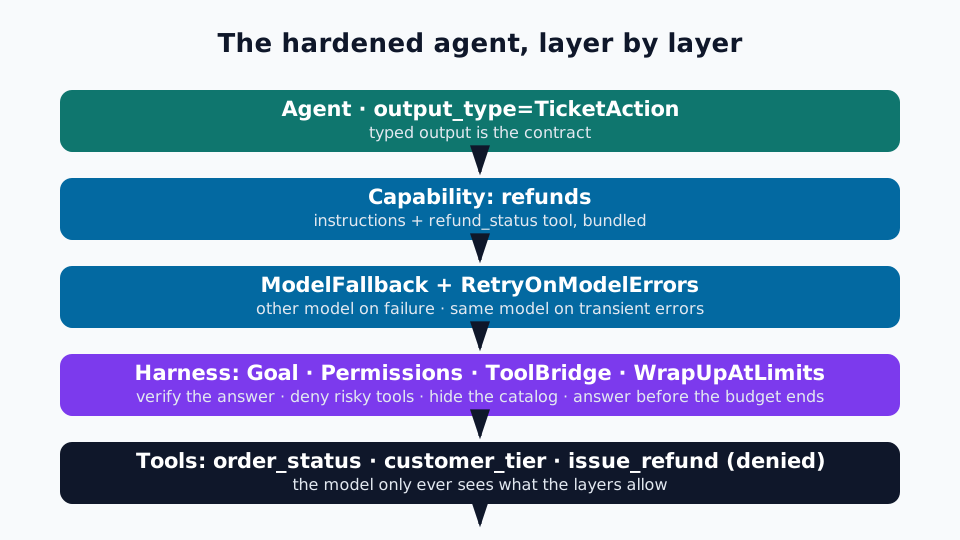
The default production stack is the one this tutorial built: Capability for shared behavior, ModelFallback plus RetryOnModelErrors for model resilience, Goal for completion, Permissions for safety, and WrapUpAtLimits for the budget. Add ToolBridge when the tool count grows.
Gotchas worth knowing before you ship#
- The provider is created eagerly. In 2.71,
Agent('openai:gpt-6.1-sol')raises aUserErrorat construction time ifOPENAI_API_KEYis not set. Build keyless agents with no model string and supply the model per run, as Step 2 does. usage_limitsis per-run, not per-agent. Passing it to theAgentconstructor raisesTypeError. Put it onrun_sync/run.- Retry is not fallback.
RetryOnModelErrorsretries onlyModelRateLimitError,ModelUnavailableError,ModelServerError, andModelConnectionErrorby default. A plainModelAPIErroris not retried — name it inretry_onif your provider raises it for transient failures. - Fallback does not apply to streamed refusals or cut-offs. They are accepted as streamed. Catch them and re-run with another model if fallback matters for your use case.
final_resultis framework plumbing. It is the name of the structured-output tool the framework creates. The test scripts above call it to script exact outputs; application code should never call it directly.- The harness is 0.x. Its API may change between minor releases — the release notes carry migration guidance when it does. Pin the version and read the notes before upgrading.
- Rejections cost money. Every attempt that produced a response, including rejected ones, counts toward the run's usage and is checked against token and cost limits before the next attempt.
The takeaway#
A demo agent needs one model and one happy path. A production agent needs a plan for every way the happy path breaks — and in Pydantic AI 2.71, that plan is a list of capabilities, not a rewrite. Bundle shared behavior into a Capability. Put a second model behind the first with ModelFallback and give the first model its retries with RetryOnModelErrors. Refuse to end the run until a verifier accepts the answer with Goal. Deny the tools that must never run unattended with Permissions. Hide a growing tool catalog behind ToolBridge, and make sure the budget ends with an answer, not an exception, with WrapUpAtLimits. Each layer is a few lines, each is independently testable with no API key, and together they turn the typed, testable agent from our earlier guide into one you can leave running unattended. That is the whole point of the 2.71 release — and the whole point of this tutorial.
Sources#
Sources: the Pydantic AI capabilities index (the Capability class, the full harness catalog, and the Agent(capabilities=[...]) pattern), the Model Fallback documentation (default fallback_on, response handlers, sticky=True, streaming caveats, and the runnable FunctionModel examples this tutorial adapts), the Goal documentation (verifier contract, output retries, and durable execution), the Tool Bridge documentation (tool_search / tool_describe / tool_call semantics), PyPI: pydantic-ai 2.71.0 and PyPI: pydantic-ai-harness 0.71.0 (both released November 18, 2026), and the v2.71.0 release notes (PeerConnection rename, gateway providers, and the new harness controls). Every code block in this tutorial was executed against the pinned versions with deterministic stand-in models; the live-model step is documented, not run, and says so.