Compose a full song on your own GPU: hands-on with YuE2, the open model taking on Suno
Suno makes music from text and keeps the machinery hidden. YuE2, the open-weight model that topped GitHub's trending list this month, does something stranger: it writes an editable melody-and-chord plan first, and only then renders it as a full song with vocals and accompaniment. You get to read the score before you hear the music — and change it. This tutorial installs it, generates a song, reads the plan it wrote, and re-renders an edited version.
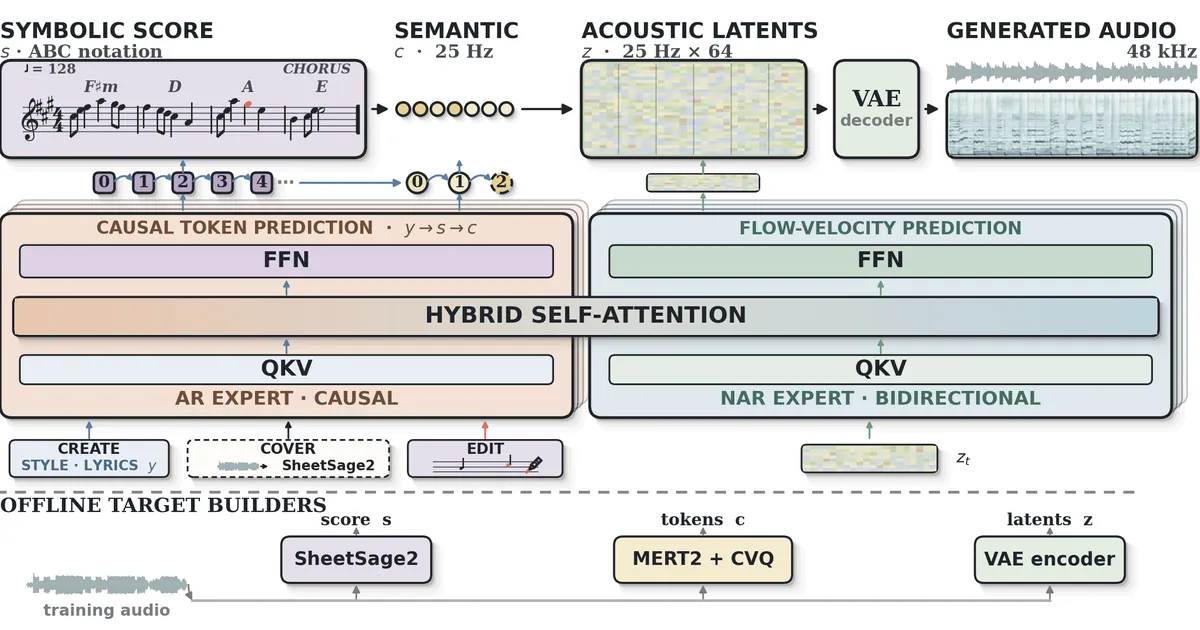
This month a repository called YuE2 (multimodal-art-projection/YuE) hit #1 on GitHub trending across all languages, topped Hugging Face's text-to-audio trending, and collected over 10,500 stars — then the authors put their paper on arXiv today (arXiv:2609.33757). The pitch is worth the attention: frontier-quality song generation with a white-box middle step. Give it lyrics and a style prompt and it doesn't go straight to audio. It writes a plan — an explicit melody-and-chord score in ABC notation — and then renders that plan as a complete 48 kHz stereo song with vocals and accompaniment. On the WildSongBench evaluation the best-of-8 setting scored 6.9632 SongBench average, ahead of Suno v5, v5.5, v6, and every other system tested.
The plan is the whole point. Because the composition exists as a readable score before rendering, you can inspect it, play it, change the harmony or the melody, and re-render — or transcribe an existing recording and restyle it as a cover. Closed music generators sell you the audio; YuE2 sells you the composition process. Here is the full path from zero to your own generated song, with every command verified against the project's own quick start and examples.
What you'll need#
- Linux, Python 3.12, and an NVIDIA GPU with BF16 support and 24 GB of VRAM — those are the project's stated requirements, and they are the honest gate for this tutorial. There is no 8 GB path; music diffusion-style flow matching at 48 kHz stereo is heavy.
- No API keys, no accounts, no cost for personal use. Model files download from Hugging Face on first use. Code, docs, and the agent skill are Apache 2.0; the weights carry a CC BY-NC 4.0 license with an additional creator permission — free for personal users, content creators, and musicians to use and monetize (attribution encouraged, #YuE2), with commercial companies expected to contact the authors for a license. Read the license terms before shipping anything commercial.
- No GPU? The project runs a free browser demo hosted by NOIZ — no installation — and a public blind listening arena comparing YuE2 with proprietary systems. The commands below assume your own machine.
Step 1: Install YuE2#
The quick start is genuinely short — clone, venv, install the package itself:
git clone https://github.com/multimodal-art-projection/YuE.git
cd YuE
python3.12 -m venv .venv
source .venv/bin/activate
python -m pip install --upgrade pip
python -m pip install .
The weights — the 3B generation model m-a-p/YuE2-3B and the VAE decoder m-a-p/YuE2-Vae — download from Hugging Face the first time you generate. There is also a pinned v0.1.6 wheel on the releases page if you prefer installing from a fixed artifact instead of the source tree.
Step 2: Write your song request#
YuE2 takes a JSON request. Save this as my_song.json — it follows the project's own examples/song.json format, with your own lyrics and style:
{
  "id": "harbor_lights",
  "style": "English, warm indie folk, earnest male vocal, fingerpicked acoustic guitar, brushed drums, memorable chorus melody, steady build, 96 BPM",
  "lyrics": "[Verse]\nSalt air on the harbor wire\nGulls are writing in the blue\nEvery boat returns by fire\nEvery wave returns to you\n\n[Chorus]\nTurn the harbor lights back on\nGuide the tired ships home\nWe were never really gone\nWe were never quite alone",
  "cot": "full",
  "seed": 831001
}
The fields that matter: style is a free-form production prompt — language, genre, vocal character, instrumentation, tempo. The lyrics use [Verse]/[Chorus] section tags. cot picks the planning mode: "full" generates an editable melody-and-chord plan (the default and the interesting one), "melody" plans only the melody with free accompaniment (recommended for covers), and "off" skips planning and goes straight from lyrics and style to audio. seed fixes the run.
Step 3: Generate your first song#
python examples/generate.py --request my_song.json --output outputs/harbor-lightsThe flags, exactly as the project's CLI defines them: --request (defaults to the bundled examples/song.json), --abc-file to supply your own score (more in Step 5), --cot overriding the request's planning mode, --output (required), --model (default m-a-p/YuE2-3B), --vae (default m-a-p/YuE2-Vae), plus --revision / --vae-revision to pin exact model commits. Open outputs/harbor-lights/audio.flac and you have your song.
The output directory is more interesting than the audio. Alongside the recording it keeps the score (the plan), the semantic music tokens, the acoustic latents, the generation settings, and the model identities. A YuE2 song is a reproducible artifact, not a black-box lottery ticket — same request, same seed, same pipeline.
Step 4: Read the plan before you listen#
This is the step no closed generator offers. Open outputs/harbor-lights/score.abc — it's ABC notation, a plain-text music format you can read and play back with any ABC-capable tool. You are looking at the actual composition YuE2 intended: the vocal melody line, the chord symbols per bar, the tempo, the form. If the chorus harmony is blander than you wanted, you know exactly where it happened — in the plan, not somewhere inside an inscrutable latent.
Internally the pipeline is staged, and the README exposes it as an explicit Python API — plan() → generate_semantic() → synthesize() → decode() — with one mixture-of-transformers backbone predicting the score and semantic tokens autoregressively, then flow-matching the acoustic latents and decoding them through a VAE into stereo audio. Creation, covers, and editing differ only in where the score comes from: generated by YuE2, transcribed from a recording, or edited by you.
Step 5: Edit the score, render it again#
The editable score is the white-box interface. Export a plan, revise the musical details, render the edited score. The project documents the loop with a short Python API:
import json
from pathlib import Path
from yue2 import YuE2Pipeline

request = json.loads(Path("my_song.json").read_text(encoding="utf-8"))
with YuE2Pipeline.from_pretrained("m-a-p/YuE2-3B", device="cuda") as pipe:
    plan = pipe.plan(**request)
    plan.save("outputs/plan")
Now copy outputs/plan/score.abc to edited.abc, change what you want — reharmonize the chorus, raise the bridge melody, slow the tempo — and feed it back:
python examples/generate.py --request my_song.json \
  --abc-file edited.abc --cot full --output outputs/harbor-lights-v2
Two things to understand about this step. First, it works: the project ships a reproducible harmony-edit example and a full editing guide. Second, the honest caveat from the docs: editing produces a new complete recording; it does not preserve the original waveform. You're re-composing and re-rendering, not surgically splicing stems. For the demo site the agentic editing flow shows what this looks like in practice: one song taken through nine steps and fourteen versions, from Mandarin pop to English jazz with new harmony and a saxophone solo, each version re-rendered from an edited score.
Step 6: Cover a song in a new style#
Covers work because the score is decoupled from the audio. The flow: transcribe a source recording with the companion SheetSage2 model (m-a-p/SheetSage2), review its melody ABC, then generate with new lyrics or a new target style. The recipe from the project's cover guide:
from pathlib import Path
from yue2 import YuE2Pipeline

with YuE2Pipeline.from_pretrained("m-a-p/YuE2-3B", device="cuda") as pipe:
    cover = pipe(
        style="English, jazz-funk, warm lead vocal, Rhodes, bass and drums",
        lyrics=Path("cover-lyrics.txt").read_text(encoding="utf-8"),
        abc=Path("cover-score/score.abc").read_text(encoding="utf-8"),
        cot="melody",
        seed=42,
    )
    cover.save_artifacts("outputs/cover")
The key choice is cot="melody" with a score that carries no chord symbols, so the accompaniment can adapt to the new style while the transcribed melody holds. On the project's cover evaluation (948 works), full-score YuE2 reached 0.647 CLEWS mAP for source-identity preservation versus 0.006 without a score — the score is doing the preservation work. SheetSage2 itself is a strong transcriber in its own right: 82.51% vocal-melody pitch-class F1 on RWC-Pop, 67.08% on Rock Corpus. The repo includes an examples/melody.abc if you want to try score-conditioned generation immediately.
What the benchmarks actually say#
The numbers come from the project's own WildSongBench evaluation — 192 prompts, automatic metrics, September 12, 2026:
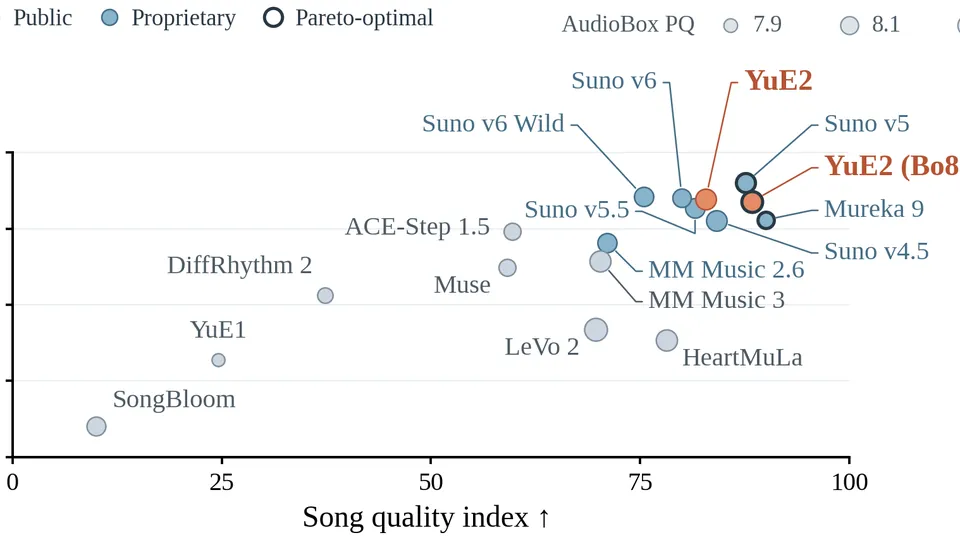
- YuE2 best-of-8: 6.9632 SongBench average — the top score among all 17 evaluated settings, ahead of Mureka 9 (6.9377), Suno v5 (6.8721), Suno v5.5 (6.7150), and Suno v6 (6.5562). Standard YuE2 (two candidates) scores 6.7316 — still ahead of all three Suno versions.
- Audio quality (AudioBox production quality): YuE2 leads at 8.2598, 8.2714 for best-of-8, versus 8.1698 for Suno v5. Text alignment (MuLan) is where Suno v5 still leads at 0.5428 against YuE2's 0.5068 — rankings vary by metric, and the authors note the small gap between the highest means does not establish statistical significance.
- Open competition: the strongest open rival on the board is ACE-Step 1.5 at 6.0118 — a real gap, and a reminder of how fast this category moved in a month.
- The two sibling models matter for the tutorial above: MERT2 leads 14 of 15 MARBLE music-understanding metrics (91.72% genre accuracy on GTZAN), and SheetSage2 leads 12 of 15 transcription metrics — the infrastructure the covers and editing stand on.
When to use this vs. the alternatives#
- Use YuE2 when you want local, inspectable, editable song generation: the score is the deliverable, the audio is a rendering of it. Songwriters who want to argue with the harmony, producers who want stems-as-scores, agents composing and revising music.
- Use Suno or Udio when you want the fastest path from idea to listenable song with no hardware of your own — see our Suno vs. Udio comparison. YuE2's answer is control; theirs is convenience.
- Use ACE-Step 1.5 when your hardware is modest and you want a diffusers-native music model that runs lighter — it trails on the benchmark but asks far less of your machine.
- Use the yue2-music agent skill (ships in the repo; the authors recommend GPT-6 Astra as the driving agent) when you want an agent to do the loop for you — it teaches an agent to generate songs and instrumentals, transcribe and cover recordings, edit ABC scores, and check musical invariants.
Honest limitations#
- The 24 GB VRAM gate is real. The project's stated requirement is Linux, Python 3.12, and an NVIDIA GPU with BF16 support and 24 GB of VRAM. This is not a "runs on your laptop" tutorial — it is a "runs on your workstation GPU" tutorial. The free browser demo exists precisely for everyone else.
- Editing re-renders everything. There is no stem-level surgery: an edited score becomes a brand-new full recording. Keep the settings artifacts so you can reproduce any version, and version-control your ABC files.
- License boundaries. Code is Apache 2.0, but the weights are CC BY-NC 4.0 with an additional creator permission. Personal creators and musicians can use and monetize outputs freely; if a company wants to ship a product on YuE2 weights, that conversation goes to the authors. The usual "open weights ≠ do anything you want" split — read it before you build on it.
- Best-of-8 costs 8×. The benchmark-topping score comes from generating eight candidates and picking the best. Budget that compute (or serve it with the community's YuE2-Turbo toolkit) if you need peak quality every time.
The takeaway#

YuE2's real argument isn't "better than Suno" — though on WildSongBench the numbers currently say that. It's that music generation gets better when the model shows its work. The ABC score between your prompt and the audio is a seam you can open: read the melody, argue with the chords, transcribe a recording and reimagine it, hand the whole loop to an agent. Every closed generator gives you a take; YuE2 gives you the take, the score, the tokens, and the settings, and invites you to change any of them.
The habit to carry out of this tutorial: treat the plan as the first draft. Generate with cot="full", read score.abc before you judge the audio, and make your changes where the composition lives. The audio is just the render.