
Most money software is someone else’s database with your numbers in it. Aurelio (LosaLosSantos/aurelio-finance, MIT) flips it: a wealth-management and financial-planning app that runs on your computer, keeps your records in a local file, and talks to you through an AI advisor that only spends money when you ask it to. Net worth, portfolios, fund look-through, cash flow, goals — plus a chat that answers from your own records and proposes every change as a card you confirm or reject. It went from zero to 800+ GitHub stars in its first three days. This walkthrough takes it from a fresh clone to your first analysis.
git clone https://github.com/LosaLosSantos/aurelio-finance.git
cd aurelio-finance
./start.sh --demo   # macOS and Linux
On Windows, run ./start.ps1 -Demo in PowerShell (if scripts are blocked, powershell -ExecutionPolicy Bypass -File .\start.ps1 -Demo). The first start installs everything inside the folder and opens http://localhost:8000 on an invented household — fake money you can push around without consequences. Start without --demo later to use your own data.
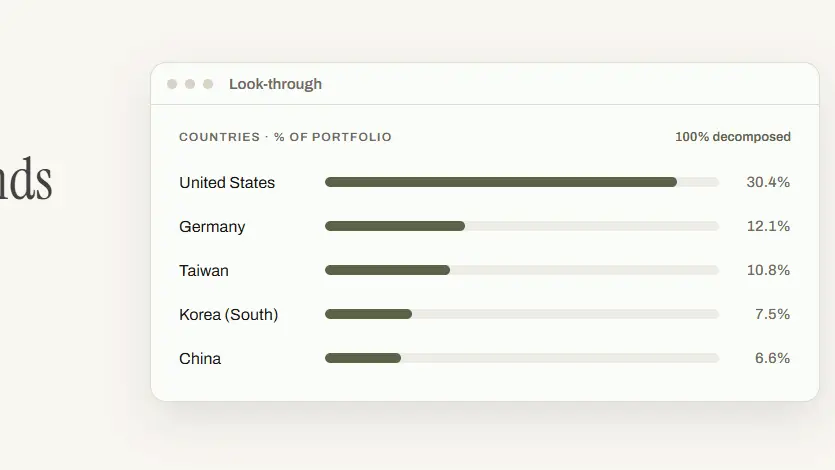
Click around the demo before touching anything real. The dashboard shows net worth and what makes it up; the portfolio view prices every position from the market with cost, gain, and dividends; and the look-through view is the one worth pausing on — it decomposes your funds by country, sector, company, and currency, so an ETF stops being a ticker and becomes the pile of companies it actually is.
./start.sh    # macOS and Linux
./start.ps1   # Windows, in PowerShell
Without the demo flag you get an empty vault. Your records live in one file: backend/data.db. The one safety net the README is explicit about: before an update changes the database format, the app saves a copy next to the original. Back that file up yourself — there is no cloud to restore from, which is the entire point and the entire trade-off.
Add institutions, their cash, and dated snapshots of what you hold; log buys, sells, dividends, and closes in the ledger; add recurring investments, real assets, and loans. The design doc (docs/how-aurelio-reasons.md) is worth ten minutes: wealth is not a running balance but dated “photographs” of what each institution held, plus every ledger entry strictly after the latest one — which is what stops the numbers from double counting. A wrong number is traceable to a wrong photograph or a wrong event. There is no third possibility.
The AI part is optional and billed to you, not to the app. Create an OpenRouter account, add credit, and create a key at openrouter.ai/keys, then:
cp backend/.env.example backend/.env
# edit backend/.env and set OPENROUTER_API_KEY
The default model is Claude Opus 5.5 ($4 per million input tokens, $20 per million output tokens, per the README) — and you can pick a cheaper one in the chat. What it actually costs, measured by the author in October 2026: a first question answered in one round, $0.11; a follow-up, $0.017; a request for advice with one web search, $0.16; a full analysis, $0.33–$0.51. Keep the demo household around for the expensive experiments.
Open Ask Aurelio. It answers from your own records, can search the web when your records are not enough, and — the mechanism that matters — never just does things: every proposed change arrives as a card you confirm or reject. Ask the demo household the question from the project’s banner: “I have €1,235 left each month. Where should it go?” and you get a proposed split, line by line, waiting on you.
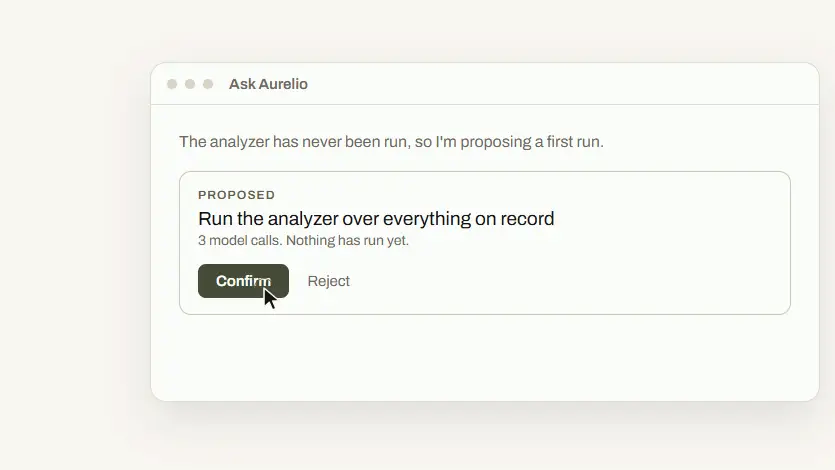
The marquee feature is The analysis: an analyst and a confidant who knows you argue over your portfolio, and a synthesis says what to look at first. Nothing runs uninvited — the chat proposes “Run the analyzer over everything on record,” states the cost in model calls, and waits for your confirm. It is the most opinionated part of the app, and the closest thing to a second brain for your money.
A local wealth manager: net worth and institutions on your machine, every position priced from the market, fund look-through by country, sector, company, and currency, cash flow and goals with the savings rate and the return each goal needs, and an AI advisor that answers from your records, searches the web when needed, and proposes everything as a confirm/reject card — plus a three-perspective portfolio analysis on demand.
backend/data.db is the whole vault. The app backs it up before format-changing updates, but off-machine backups are on you.Still: most “AI finance” products want your credentials in their cloud. Aurelio asks for the opposite — your numbers stay in a file on your machine, the AI reads them only when you ask, and every action waits for your click. For something as private as money, that architecture is the feature.