Turn a technical book into a Claude Code skill: hands-on with book-to-skill
book-to-skill turns any technical book into a structured agent skill — frameworks, decision rules, and anti-patterns your coding agent loads on demand. This tutorial installs it, extracts a real book and a real PDF, and generates a working skill, with every command verified.
- What it is: an MIT-licensed converter from virgiliojr94 — 38,302 stars, number 10 on GitHub’s Python trending page, 246 commits.
- Install (verified):
npx skills add virgiliojr94/book-to-skill -g -a claude-code -yinstalls to~/.claude/skills/book-to-skill(2.3 MB); the bare command opens an interactive host picker. - The extraction: the project’s own docs (8 files, 6,791 words, ~9K tokens) plus a 4-page test PDF (3 chapters); technical mode without Docling falls back to pdftotext and records it in the metadata.
- The skill (verified): 10 files, 68 KB, 6 chapter files; the validator passes both lenses, and the security scan’s one advisory finding was a false positive, reviewed and disclosed.
- The payoff: ~5,000 tokens per question instead of 24×–51× that as a context dump; a full conversion costs roughly $1 per book, once.

You buy a great technical book. You read it once. Three months later you cannot remember chapter 7 existed. The usual fixes do not help: searching the PDF returns page numbers, not answers; asking your agent about the book gets you a hallucinated summary or a shrug; taking notes produces a document you never open again.
book-to-skill converts the book into a structured agent skill instead — named frameworks, decision rules, and anti-patterns, in the author's exact terms, split into files your agent loads on demand. It sits at number 10 on GitHub's Python trending page today with 38,302 stars, and unlike most of this month's trending repos it is a small, documented, immediately usable tool rather than a demo: one slash command, a deterministic extractor, and a spec your agent follows step by step. This tutorial installs it, extracts a real set of documents and a real PDF, generates a working skill, and uses it — every command below was run in a clean sandbox for this article.
What you'll need
- Python 3.10 or later. The extractor is Python; the sandbox run used Python 3.12.3.
- Node.js. The
skillsCLI that installs the skill runs on Node; the sandbox used Node 24.22.1. Check withnode --versionbefore you start. - A coding agent that supports Agent Skills: Claude Code, GitHub Copilot CLI, Amp, Codex, Hermes Agent, OpenCode, or OpenClaw. The skill follows the open Agent Skills standard, so the same files work across all of them.
- A book or document you own — PDF, EPUB, DOCX, Markdown, HTML, RTF, or MOBI/AZW. The demo below converts the project's own documentation (MIT-licensed, so you can reproduce every step) and a short PDF built for the test.
- poppler-utils for PDF text extraction (
pdftotext). The sandbox already had it; on Debian/Ubuntu it issudo apt install poppler-utils. Without it, the extractor falls back topypdforpdfminer.six. - Cost: the tool is free under the MIT license. The generation step runs inside your agent, so it costs whatever your agent's model costs for that session — the project measures roughly $1 per book, once (see Step 5). No account, no API key, and no upload: extraction runs on your machine.
How the pieces fit
Two halves, one contract. The extractor is deterministic Python: it turns your documents into clean text plus a metadata receipt, and it never guesses. The generator is your agent following the skill's own SKILL.md spec, Steps 0–10: analyze the structure, ask what the skill is for, write one chapter file per chapter, then a glossary, a patterns file, a cheatsheet, and a master SKILL.md that indexes them all. The contract between the halves is the work directory: full_text.txt (all sources merged, with source markers) plus metadata.json (word counts, token estimates, and the real extraction method per source).
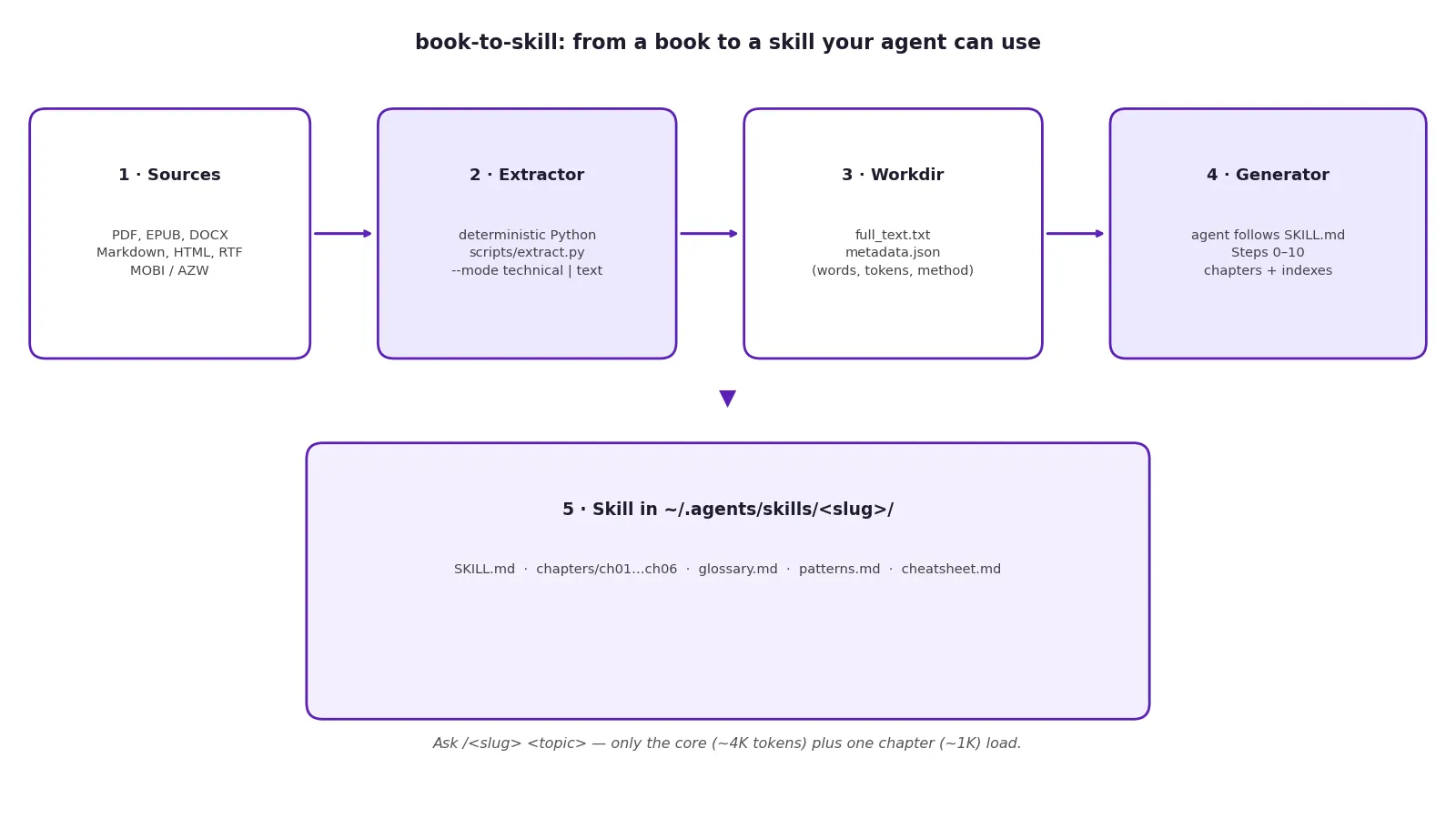
Three design choices shape everything that follows. First, structure, not summaries: a chapter file holds named frameworks with exact formulations, principles, techniques, and anti-patterns — never a book report. Second, on-demand chapters: the master SKILL.md stays under 4,000 tokens and points at chapter files that load only when the topic is relevant, so one question costs about 5,000 tokens whatever the book's size. Third, graceful degradation: every format has a fallback extractor, and one bad source is skipped with a warning instead of killing the run.
Step 1 — Install the skill
Install with the skills CLI. The bare command opens an interactive host picker; for a non-interactive install, name the agent and pass -y (or --all for every host):
npx skills add virgiliojr94/book-to-skill -g -a claude-code -y --jsonVerified in the sandbox: the command exits 0 and reports the skill installed at ~/.claude/skills/book-to-skill, mode copy, with a pinned content hash and a clean security report (no socket alerts, low Snyk severity). The install is 2.3 MB and its SKILL.md is 880 lines — that file is the whole generator spec. Confirm the extractor arrived with it:
python3 ~/.claude/skills/book-to-skill/scripts/extract.py --checkIf you prefer a manual install, clone into the cross-agent root instead — Copilot CLI, Amp, Codex, and OpenCode all discover it there, and Claude Code picks it up via a symlink:
git clone https://github.com/virgiliojr94/book-to-skill.git ~/.agents/skills/book-to-skill
# Claude Code reads ~/.claude/skills, so link it in:
ln -sfn ~/.agents/skills/book-to-skill ~/.claude/skills/book-to-skill
There is a third path — a standalone pip CLI that installs only the extractor, no skill — but it is not on PyPI yet, so pip takes it straight from the repository. Use it for scripting, not for the slash-command workflow this tutorial covers.
Step 2 — Check your extractors
Before touching a book, run the dependency check. It prints, per format, which extractors are installed and the exact command for anything missing — no file needed:
python3 scripts/extract.py --checkOn the sandbox, the report came back: PDF text-heavy ready (pdftotext present; pypdf and pdfminer.six missing but not needed), DOCX ready (python-docx installed), and everything else on fallback — Docling missing (technical PDFs fall back to the text chain), ebooklib and beautifulsoup4 missing (EPUB and HTML fall back to stdlib parsers), striprtf missing (RTF falls back to regex), Calibre missing (MOBI/AZW has no fallback and will fail). That is a usable machine for Markdown and text-heavy PDFs, and the check tells you so in one command instead of failing mid-book. The one number to remember: Docling is what preserves tables and code blocks in technical PDFs, at about 1.5 seconds per page. Without it, extraction still works — it just flattens structure.
Step 3 — Extract your first book
The demo source is the project's own documentation: the README plus seven docs pages (how it works, usage, install, FAQ, performance, architecture, index). It is MIT-licensed, so you can reproduce this run exactly, and it is real technical content with named frameworks, tables, and code — a fair test of the pipeline. Pass the files explicitly:
python3 scripts/extract.py README.md docs/how-it-works.md docs/usage.md \
  docs/install.md docs/faq.md docs/performance.md docs/architecture.md \
  docs/index.md --mode technical --install-missing no
Verified output:
Sources : 8 processed
Words   : 6,791
Tokens  : ~9K
Chapters: 27 detected overall (structural)
ToC     : not detected
WARN    : No table of contents detected — chapter mapping in Step 3 will rely
          on heading scan only, which may miss or duplicate sections.
Workdir -> /var/tmp/bts-test/work-demo
Text    -> /var/tmp/bts-test/work-demo/full_text.txt
Meta    -> /var/tmp/bts-test/work-demo/metadata.json
Two details matter. First, pass explicit files, not a bare folder: an earlier folder run swept in 11 sources including 404.md, robots.txt, and a research-notes page — the extractor takes every supported file under the folder, and junk inputs become junk chapters. Second, the "27 chapters detected" are markdown headings across eight documents, not book chapters; for a document set, you group sources into chapters yourself at generation time (Step 6 does this). The work directory paths come from the run's own output — take them from there, never assume a fixed location, because the directory name differs per run.
Step 4 — Extract a real PDF
For the PDF path, the test used a short book built for this run — A Short Field Guide to Python Testing, four pages, three chapters, one code block, one table, generated with fpdf2:
python3 scripts/extract.py field-guide-testing.pdf --mode technical --install-missing noVerified output: 384 words, ~512 tokens, 3 chapters detected (numeric — the Chapter 1/2/3 headings were found at lines 16, 34, and 52 of the extracted text). The metadata records the extraction honestly:
{
  "filename": "field-guide-testing.pdf",
  "extraction_method": "pdftotext",
  "fallback_reason": "docling_unavailable",
  "words": 378
}
Technical mode asked for Docling, Docling was not installed, and the extractor fell back to the text chain and wrote that fact into the receipt instead of failing or pretending otherwise. The prose, the chapter headings, and the code block (def test_parse_amount(): and the arrange/act/assert comments) all survived intact. One failure is mine, not the tool's: the fixture-scope table's rows were too wide for the page and clipped at render time, so the table came out truncated. pdftotext extracts what is actually on the page — keep table lines short, or they will not survive the round trip. And a scanned PDF stops the run early by design: a scan has no text layer, so the extractor checks the first pages and quits with an explanation instead of grinding through 400 pages to produce an empty skill. Run ocrmypdf first, then convert.
Step 5 — Read the receipt before generating
Generation is the expensive step, so the spec puts a gate in front of it: read metadata.json and confirm the extraction is the document you asked for before anything is generated. Check the filename and source_file fields, or the SOURCE: header on the first line of full_text.txt. Then check the per-source extraction_method and fallback_reason — that is where you learn the technical-mode run actually used pdftotext, not Docling.
One more honest finding from this run: the chapter_ranges field was empty in both metadata files, even though chapter detection reported 39 structural chapters for the docs and 3 numeric chapters for the PDF. The spec anticipates this — Step 7 says to use chapter_ranges "when present", otherwise grep for headings — and the grep path works: grep -n -E "^\s*(Chapter|CHAPTER)\s+[0-9]+" full_text.txt finds the PDF's three chapters directly. Treat the chapter count in the extraction summary as a hint, and verify the chapter list yourself before generating.
The gate also produces a cost estimate from the metadata: input tokens ≈ estimated tokens × 1.3 (prompt overhead), output ≈ chapters × per-chapter budget + 4,000 for SKILL.md + 4,500 for the supporting files. For the 8-document demo (~9K tokens, 6 chapters), that is roughly 12K input and 15K output tokens — under a dollar on most frontier models at current rates, and the project publishes its own measured table (see Step 6). Report token counts and multiply by your model's current per-million rates; never hardcode prices, because model names and rates change.
Step 6 — Generate the skill
Generation runs inside your agent: it analyzes the structure, asks what the skill is for (which sets the depth — reference-only means lean chapters, anything else means study depth with worked examples), names the skill, and writes the files. In this run the generation was done by following the SKILL.md spec step by step — the same spec your agent reads when you run /book-to-skill. The eight documents became six chapters: the idea, the pipeline, running a conversion, installation, cost, and architecture. The result, at ~/.agents/skills/book-to-skill-docs/:
book-to-skill-docs/
├── SKILL.md                  # core frameworks + chapter & topic index
├── chapters/
│   ├── ch01-why-a-skill.md
│   ├── ch02-pipeline.md
│   ├── ch03-running-a-conversion.md
│   ├── ch04-install.md
│   ├── ch05-cost-rag-discovery-tax.md
│   └── ch06-architecture-security.md
├── glossary.md               # 26 terms, alphabetized, with chapter refs
├── patterns.md               # 8 techniques with when/how/trade-offs
└── cheatsheet.md             # decision rules, trees, matrices, thresholds
Ten files, 68 KB, 6,746 words across the master file and the six chapters. Then the spec's own verification: tools/validate_skill.py passed with zero warnings under both the Claude and Copilot lenses, and the Step 9.5 security scan flagged one advisory finding — an exfiltration-shaped-language warning on a line in the architecture chapter that describes the project's own sanitization hardening. That is a false positive (the scanner itself warns its rules are broad and match legitimate systems text); it was reviewed in context, kept as written, and is disclosed here rather than silently rewritten. The scan's rule is a human gate, not a suggestion: a non-zero exit means stop and review, which is what happened.
Finally, the Claude Code symlink — with the read-back the spec insists on:
mkdir -p ~/.claude/skills
ln -sfn ~/.agents/skills/book-to-skill-docs ~/.claude/skills/book-to-skill-docs
readlink ~/.claude/skills/book-to-skill-docs
# /home/hatch/.agents/skills/book-to-skill-docs  — linked, read back OK
Claude Code only scans ~/.claude/skills, so without that link it would never see the skill. A symlink is a claim, not a fact — the spec requires reading it back, because on some systems ln -s copies instead of linking. If the link path already holds a real directory, migrate it first: linking into it would nest the new skill inside the old one.
Step 7 — Use it
A skill is invoked like any other: bare for the core frameworks, with a topic to find the chapter, with a chapter number to load one file, or with a browse question for the index.
/book-to-skill-docs                        # load core frameworks
/book-to-skill-docs conversion cost        # find and explain a topic
/book-to-skill-docs ch05                   # dive into chapter 5
/book-to-skill-docs "what chapters do you have?"
The lookup test that proves the structure works: ask about conversion cost. The topic index points to ch05, and ch05 carries the measured table — a full conversion costs roughly $1 per book, once: Think Python 2 $0.88, Working Backwards $0.96, Pro Git $1.23, Moby-Dick $1.42. The answer is a number with a source, not a paragraph to hunt through. That is the whole point of the skill: the agent reasons with pre-extracted structure instead of re-reading the book.
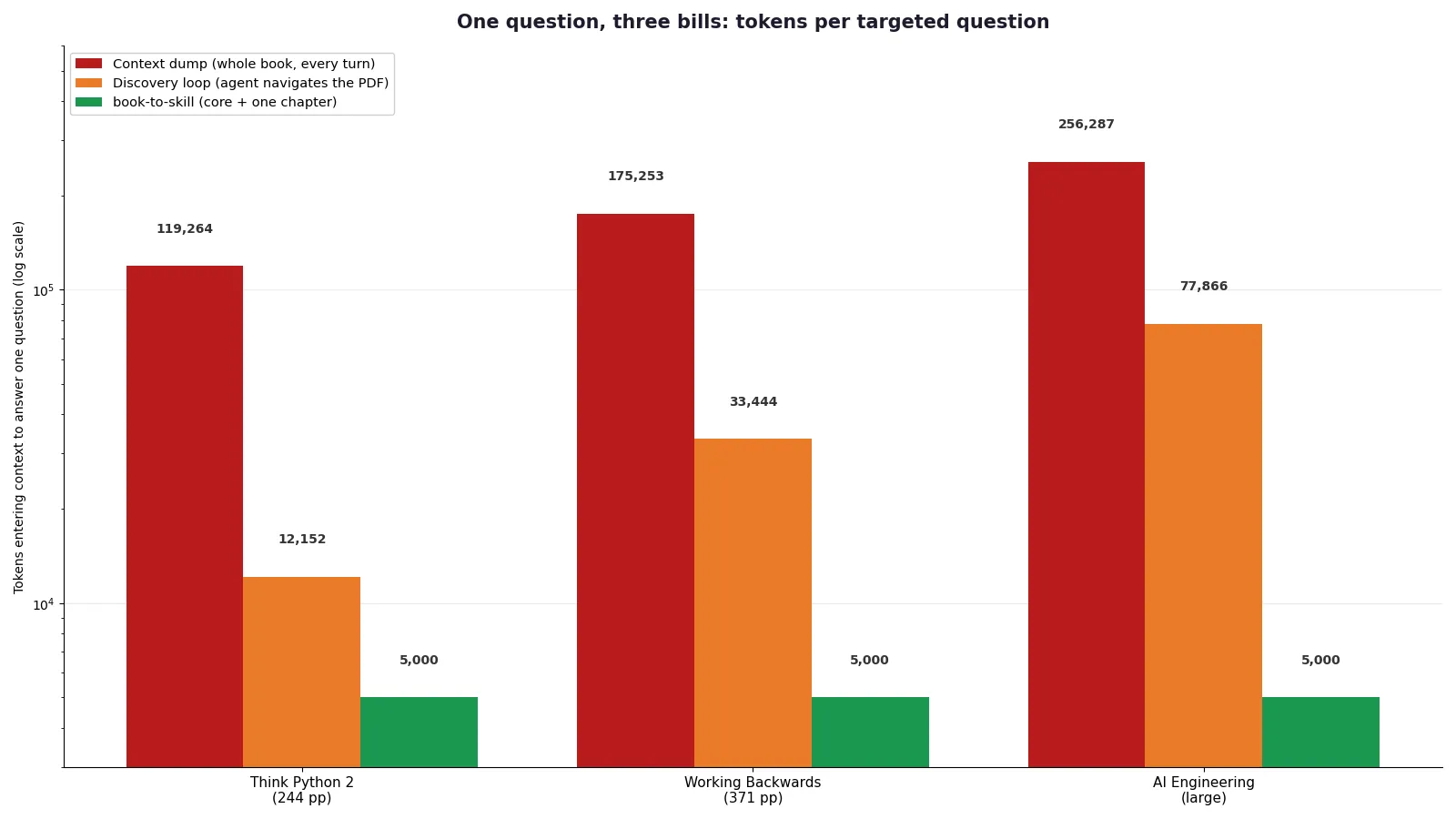
That chart is the project's strongest claim, and it is measured, not estimated: answering one targeted question costs about 5,000 tokens with a skill (a ~4K core plus one ~1K chapter), against 119,264 tokens for a context dump of Think Python 2 and 12,152 for an agent navigating the PDF to find the chapter. Across the three measured books the skill runs 24×–51× cheaper than the dump — and the dump's cost recurs on every turn of every session, while the conversion is paid once.
When to use this vs alternatives
Use book-to-skill when one book — or a tight cluster of related documents — is knowledge you will reach for repeatedly while you work: a technical reference, a methodology book, internal documentation, a paper stack. The value is compile-time structure: one deep pass extracts the author's frameworks, and every later question loads kilobytes.
Use RAG when the job is wide and shallow: dozens of books, "find the part that mentions X." RAG indexes a shelf; book-to-skill masters a spine. NotebookLM is the right call for the same wide job with a search interface across many sources. And a big context window is the right call for a one-off pass over material you will never need again — it makes the dump possible, not cheap. Three reasons the window is not a substitute: you pay per token per call, recall degrades as the context fills ("lost in the middle"), and a full book in context is still raw text the model must re-parse every turn. A 1K curated chapter beats 200K of raw prose for answering one question.
| Job | Best tool | Why |
|---|---|---|
| One book, apply its frameworks while working | book-to-skill | Compile-time structure, ~5K tokens per question |
| Dozens of books, find the part that mentions X | RAG / NotebookLM | Query-time retrieval across a shelf |
| One-off material, never needed again | Big context window | No setup; pay the dump once |
| Niche or internal book the model does not know | book-to-skill | Grounded in your actual copy, no training-data drift |
What to watch
- Scanned PDFs stop early. A scan is page images with no text layer; the extractor quits on the first pages with an explanation. Run
ocrmypdf input.pdf output.pdffirst, then convert. The tool does not run OCR itself, deliberately. - Chapter detection needs explicit headings. Books without
Chapter Nheadings — Pro Git uses section titles, Moby-Dick uses bare titles and roman numerals — do not auto-segment. Extraction still works; you point at sections manually. - Technical mode without Docling flattens tables and code. On a 103-page technical book,
pdftotexttook 0.1 seconds and preserved zero tables and zero code blocks; Docling took 164 seconds and preserved 48 tables and 36 code blocks. Same tokens, different structure. Checkfallback_reasoninmetadata.jsonso the loss is visible. - MOBI and AZW need Calibre. Every other format degrades gracefully to a stdlib fallback; these have none. Install Calibre's
ebook-convertor convert the file first. - Publishing is private by default, and the visibility question is literal. A generated skill goes to GitHub only if you accept the offer, and only the bare word
publicmakes the repo public. "It's public domain" describes the book, not the repository, and still gets you a private repo. Skills from third-party copyrighted books must stay private. - Skills run with your agent's permissions. A skill file is executable instructions your agent will follow. Read the
SKILL.mdfiles you install, and run the Step 9.5 scan on anything you generate before loading it into another session or publishing it. - A matching slug means fold-in, not overwrite. Converting a second source into an existing skill name triggers the Update/Fold-in workflow: new chapters append after the highest existing number, and the glossary, patterns, and indexes merge. Never a silent rebuild.
The takeaway
book-to-skill earns its 38,302 stars by doing one unglamorous job well: it turns a book you would otherwise read once and forget into a tool your agent can reason with, for about a dollar, in minutes, with no account and no upload. The extractor is honest about what it did — every method and fallback is in the receipt — and the generator is a readable spec, not a black box, so you can audit exactly what your agent is about to do. Install it with one command, run --check, extract a book you own, read the metadata, and generate the skill. The next time you need chapter 7, you will not re-read the book. You will ask for it, and the answer will cost 5,000 tokens.