Turn Claude Code into a bug bounty hunter: hands-on with Claude-BugHunter
Claude-BugHunter is the number-one trending repo on GitHub: 83 Claude Code skills that turn a coding agent into a methodical bug bounty hunter. Install it, run a practice hunt on Juice Shop, and put your first finding through the 7-question validation gate — every deterministic step verified.
- The numbers: #1 on GitHub trending November 17, 2026; 8,654 stars, 1,307 forks, 339 commits, MIT license; version 2.1.0. A dozen commits landed on November 17 alone.
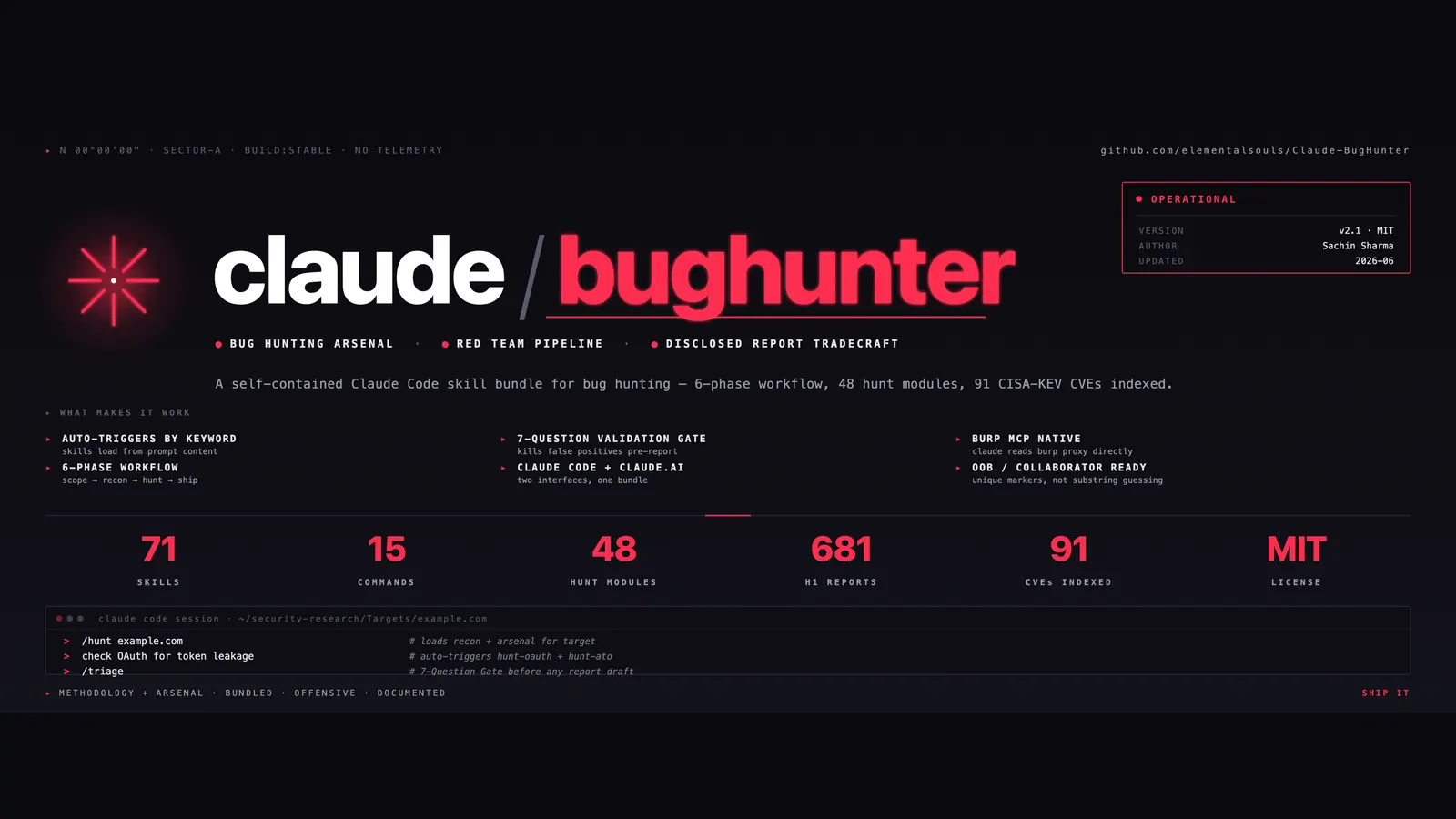
- What it is: 83 skills + 15 slash commands for Claude Code; 58 per-class
hunt-*skills across 24 vulnerability classes; 681 disclosed-report patterns, 433 of them individually cited and content-verified; a 7-question validation gate; a deterministiccbhCLI with five subcommands. - Verified here: the installer copied 83 skills + 15 commands;
huntscaffolded a complete engagement folder;cbh classifymatched 7 skills on a test URL;cbh reconon example.com found 7 subdomains, 2 live; triage went KILL → DOWNGRADE → PASS on a demo finding;cbh reportemitted a draft with(fill in)placeholders. - Cost: the bundle is free. It needs Claude Code with a paid plan (Pro/Team/Max) or an Anthropic API key, and Python 3.9+ for the CLI. Install, scaffolding, recon, classify, and triage need no key.
- The catch: the interactive hunt needs a live Claude Code session, so those steps follow the project’s usage guide — the sandbox can’t run them. And Anthropic’s cyber safeguards can refuse offensive-security work even when authorized; the supported route is the free Cyber Verification Program.

Claude Code is a strong coding agent. Point it at a web app and ask "is this secure?" and you get a generic answer: a checklist, a few guesses, no method. Claude-BugHunter closes that gap, and it is the number-one trending repository on GitHub today: 8,654 stars, 1,307 forks, and a dozen commits landed on November 17 alone.
Built by Sachin Sharma, the bundle is 83 skills and 15 slash commands for Claude Code, distilled from 681 disclosed HackerOne reports across 24 vulnerability classes. The 58 per-class hunt skills — from hunt-sqli to hunt-graphql — carry the detection patterns, payloads, bypass tables, and chain templates that real triagers paid for. A methodology layer plans the engagement, a deterministic CLI handles recon and triage without the model, and a 7-question validation gate kills weak findings before you draft a report. It is free under MIT and CC BY 4.0, and the install takes about ten minutes.
This tutorial installs it, scaffolds a practice engagement, runs a first hunt against OWASP Juice Shop, and puts a finding through the validation gate. The deterministic steps — install, scaffolding, and the cbh CLI — were run in a sandbox for this tutorial, and their real outputs are quoted below. The Claude Code conversation steps follow the project's own usage guide, which is the part of the flow that needs a live Claude Code session.
What you'll need#
- Claude Code with a paid plan (Pro, Team, or Max) or an Anthropic API key with credit. Free Claude.ai does not include Claude Code.
- Python 3.9+ for the
cbhCLI, and git. - macOS, Linux, or Windows. macOS and Linux use the bash installer; Windows uses the PowerShell installer.
- A target you are authorized to test. That means one you own, one in scope for a bug bounty program, one covered by a signed pentest letter, or a deliberately vulnerable practice app. Do not point this at a live site you have no permission to test. Start with OWASP Juice Shop, below.
- About 30 minutes for setup and a first practice hunt.
Optional, not required: Burp Suite (Community or Pro) if you want traffic routed through a proxy, and subfinder for richer passive subdomain enumeration. Without them, the CLI runs in curl-only mode and everything still works.
1. Install the bundle#
There are two install paths. The plugin is fastest; the clone gives you the cbh CLI and the hunt scaffolder as well. If you want everything this tutorial uses, take the clone path.
Option A — install as a Claude Code plugin. From inside Claude Code:
/plugin marketplace add elementalsouls/Claude-BugHunter
/plugin install claude-bughunter@elementalsouls
All 83 skills and 15 commands load namespaced under claude-bughunter: and update when you bump the plugin version. Nothing is copied into ~/.claude/.
Option B — clone and run the installer (recommended for this tutorial).
mkdir -p ~/security-research && cd ~/security-research
git clone https://github.com/elementalsouls/Claude-BugHunter.git
cd Claude-BugHunter
bash scripts/install.sh
On Windows, the last line is pwsh ./scripts/install.ps1. The installer copies the 83 skills to ~/.claude/skills/, the 15 commands to ~/.claude/commands/, and the hunt scaffolder to ~/.claude/scripts/hunt.sh, then adds a source line to your shell rc file. Existing skills with the same name are backed up outside the loading path, and a manifest is written so uninstalling later (bash scripts/install.sh --uninstall) removes exactly what the installer placed.
I ran the installer in a sandbox to verify it. It completed cleanly and installed 83 skills and 15 commands, with a 99-entry manifest (83 skills + 15 commands + the hunt script). Verify your own install the same way:
ls ~/.claude/skills | wc -l     # expect 83
ls ~/.claude/commands | wc -l   # expect 15
The skills are plain Agent Skills, so they also run outside Claude Code: bash scripts/install.sh --all detects and installs to OpenCode, Codex CLI, Hermes Agent, and Google AntiGravity as well. The slash commands and the /hunt engine stay Claude-Code-only; other harnesses get the skill knowledge.
2. Scaffold your first engagement#
Reload your shell so the hunt command becomes available (source ~/.zshrc or restart the terminal), then scaffold a practice engagement:
hunt juiceshop-practice
cd ~/Targets/juiceshop-practice
Running hunt with no arguments prints its usage: it creates a new engagement folder at $HUNT_BASE/<target-name>, defaulting to ~/Targets. The folder it creates is the whole engagement in miniature:
~/Targets/juiceshop-practice/
├── CLAUDE.md          # engagement context Claude Code reads first
├── scope.md           # in-scope assets, out-of-scope list, bounty bands
├── findings/          # one markdown file per candidate finding
├── evidence/          # screenshots and HAR files (gitignored)
├── submissions.txt    # submission UUID tracker
└── notes.md           # running scratchpad
That structure is the point. Bug bounty work fails most often on organization, not technique: findings, evidence, and submission IDs scattered across folders, scope rules forgotten mid-hunt, screenshots leaking cookies. The scaffold makes the discipline the default. I verified the scaffold in the sandbox — the folder above is exactly what hunt juiceshop-practice produced, file for file.
3. Run your first practice hunt on Juice Shop#
Do not point this at a real bounty program yet. Practice on a deliberately vulnerable app first, so you learn the workflow before there are real stakes. The project's guide recommends three: OWASP Juice Shop (every OWASP Top 10 bug, no auth concerns), Acunetix testphp at testphp.vulnweb.com, and HackerOne's free Hacker101 CTF. This tutorial uses Juice Shop, hosted at juice-shop.herokuapp.com or locally with docker run bkimminich/juice-shop.
Open Claude Code from the engagement folder:
cd ~/Targets/juiceshop-practice
claude
Then paste this, from the project's usage guide:
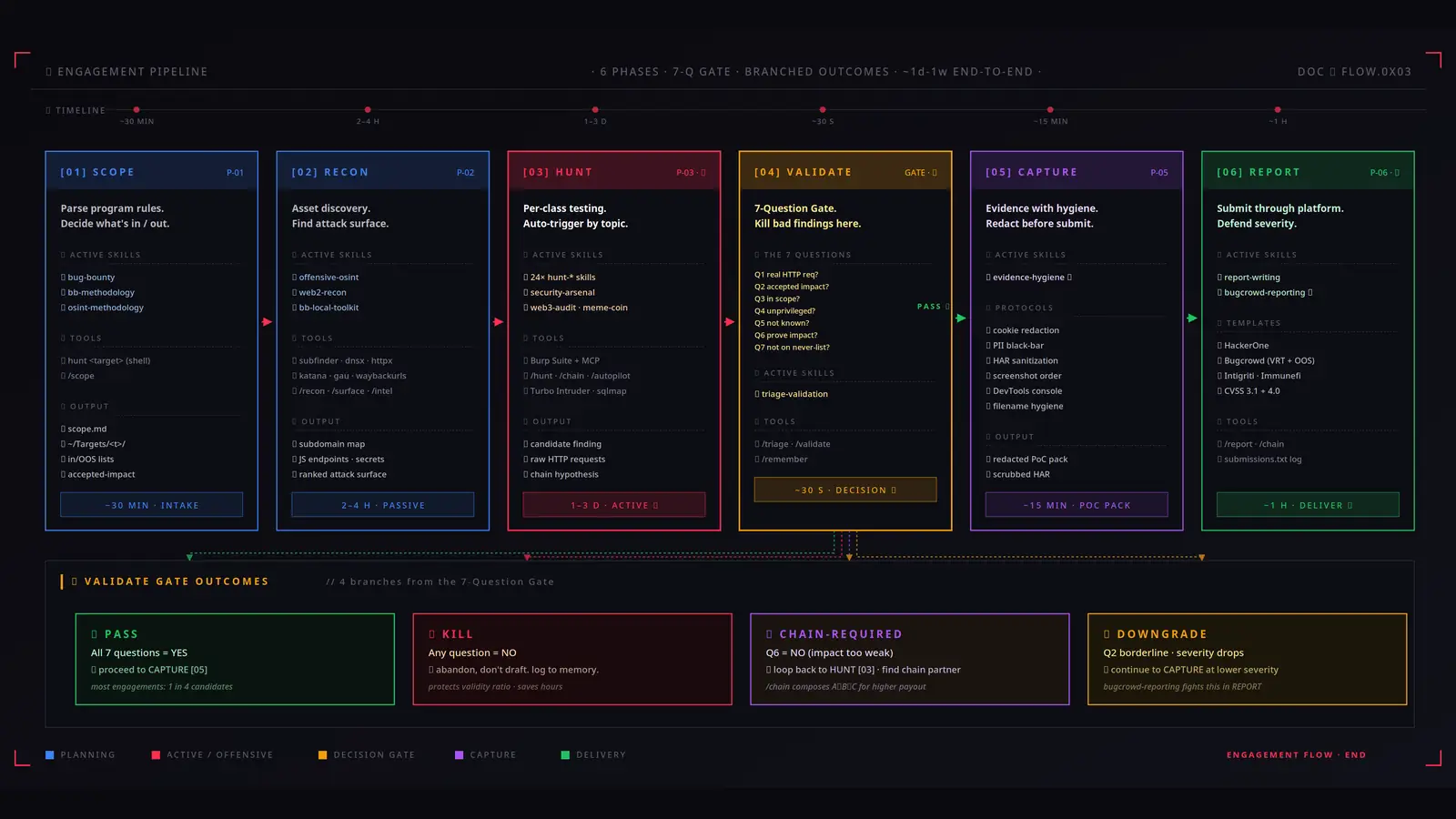
I'm practicing on OWASP Juice Shop running at https://juice-shop.herokuapp.com. This is a deliberately vulnerable training app, no authorization concerns. Walk me through finding my first bug — start with how to do recon on this target.Claude reads your CLAUDE.md, triggers bb-methodology (the six-phase workflow), and walks you through Phase 1, scope — including asking whether this is practice mode. It then triggers web2-recon or offensive-osint and hands you concrete commands to run. You run them in another terminal tab and report back what came back.
You never invoke a skill by name. You describe what you are testing in plain English and the matching skill loads automatically. When you find Juice Shop's /api/users/{id}/orders endpoint, for example, Claude loads hunt-idor and walks you through testing for insecure direct object reference with two test accounts — HTTP method swaps, array wrapping, GraphQL node() resolvers — and reminds you to verify with both accounts before believing the result.
Two things to know before your first real engagement. First, Anthropic's models apply real-time cyber safeguards that can block vulnerability exploitation work by default, even when authorized. For legitimate offensive-security work, enroll in Anthropic's free, application-based Cyber Verification Program, which adjusts the safeguards. Second, on Opus 5 a narrow set of higher-risk cyber requests falls back to Opus 4.8 rather than being refused — you get a notice, but in a long agentic run it is easy to scroll past. The /hunt command states the engagement frame (authorized, scope-bounded) on its first turn for exactly this reason.
4. Classify and recon without the LLM: the cbh CLI#
The slash commands are the primary interface, but the bundle also ships cbh, a terminal-native deterministic runner. Same skills, different execution model: use it for scripted runs, scheduled recon, or verifying a lab reproducibly. It needs only Python 3.9+ and has zero dependencies. From a clone, run it directly:
python3 scripts/cbh.py --helpOr install it standalone with pipx install git+https://github.com/elementalsouls/Claude-BugHunter. It has five subcommands: recon, surface, classify, triage, and report.
cbh classify pattern-matches a URL against the hunt skills. I ran it on a sample API URL:
cbh classify "https://api.target.com/v1/users/42?next=https://evil.com"It returned seven matches. The high-confidence ones were hunt-api-misconfig and hunt-idor (the /api/users/{id} shape) and hunt-ssrf (the ?next= redirect parameter), each pointing at the skill file and, where one exists, the pattern library of disclosed reports behind it. Lower-confidence keyword matches (hunt-nextjs, hunt-saml, and others) were listed separately. The output ends with next moves: read the pattern library, pick the highest-confidence attack, then run cbh triage once you have a candidate finding.
cbh recon does passive recon with no model in the loop: certificate-transparency lookup via crt.sh, DNS resolution, and a concurrent HTTP probe. I ran it against example.com:
cbh recon example.comIt found 11 crt.sh candidates, deduplicated to 7 subdomains, resolved all 7, and found 2 HTTP-live hosts — example.com and www.example.com, both returning 200. It wrote subdomains.txt, resolved.txt, live-hosts.json, a RECON_SUMMARY.md with a live-host table, and a manifest.json that cbh surface and the /hunt scaffold consume to rank the attack surface. On a real target, that manifest is what seeds scope.md.
Optional: if you run Burp Suite, cbh recon target.com --burp routes all traffic through Burp's proxy (default 127.0.0.1:8080), so every request lands in Proxy history one click from Repeater. The Burp MCP server (BApp Store extension, port 9876) goes further: Claude Code reads and replays Burp traffic conversationally, so you stop pasting curl output into chat.
5. Validate before you draft: the 7-Question Gate#
The most valuable skill in the bundle is not a hunt skill. It is triage-validation: a 7-question gate that runs before you draft anything, via /triage or /validate in Claude Code — or deterministically with cbh triage. The questions:
- Q1: Can an attacker use this right now, with a real HTTP request? Show it.
- Q2: Is the impact on the program's accepted-impact list?
- Q3: Is the asset in scope?
- Q4: Does it work without privileged access an attacker can't get?
- Q5: Is this not already known or documented behavior?
- Q6: Can the impact be proved beyond "technically possible"? Show actual victim data, not just a 200 OK.
- Q7: Is this not on the never-submit list — self-XSS, missing security headers, clickjacking on non-sensitive pages?
The verdicts are PASS, DOWNGRADE (failed Q2 or Q5 only — continue with a tempered severity claim), KILL (anything else — do not draft), or CHAIN-REQUIRED (Q6 failed — the finding needs a chain partner to matter). I exercised the gate in the sandbox with a demo finding file describing an IDOR on a /api/users/{id}/orders endpoint, and the gate behaved exactly as documented — including catching my own sloppy drafting. The first version, with curl evidence and impact but no scope statement and no duplication check, came back KILL, failing Q3 and Q5. Adding an explicit scope section moved it to DOWNGRADE, failing Q5 only. Adding a duplication-check line — "checked HackerOne Hacktivity and public write-ups: not duplicate, previously unknown behavior for this endpoint" — produced a clean PASS:
VERDICT: PASS — all 7 questions answered with evidence.
Eligible for report drafting via `cbh report <finding.md>`.
One honest detail: the CLI gate is keyword-based. I read its source to confirm — each question matches keyword signals in the finding text, and absence of evidence counts as "not answered." That is why the scope and duplication sections matter in the file, not just in your head. Write the finding so the gate can see the evidence: a scope section, the curl commands, the leaked data, and the duplication check. A finding that can't pass its own gate in 30 seconds is a finding that would have burned hours in drafting and a triager's patience.
6. Draft the report#
Once a finding passes the gate, draft it:
cbh report findings/idor-demo.md --platform h1 --out draft.mdPlatforms are h1, bugcrowd, intigriti, and immunefi; Bugcrowd drafts add the VRT mapping and a severity-request paragraph. I ran this on the demo finding that passed the gate. The output is a platform-shaped draft with the finding's own text slotted in — and (fill in) placeholders everywhere the finding didn't supply a section:
# IDOR on /api/users/{id} exposes other users' order history

**Severity:** P3
**Asset:** (fill in)
**Reporter:** researcher
**Date:** 2026-11-17

## Steps to reproduce
(fill in — curl commands per step)

## Impact
An authenticated attacker can read any user's order history...
That is the CLI's discipline, not a bug: it never invents content. You own every placeholder. Two practical notes from the run: the --out path must be inside the current working directory (an absolute path outside it is rejected), and you should read evidence-hygiene before capturing any screenshot — it walks you through cookie redaction, PII black-barring, and HAR sanitization before you take the shot, not after. Once submitted, log the UUID in submissions.txt so chained findings can cross-reference it later.
When to use this vs alternatives#
- Use Claude-BugHunter when you are hunting as a researcher. Bug bounty programs, authorized pentests, CTFs, and vuln research are its home ground. The methodology, the per-class skills, and the reporting templates are built for that loop: scope, recon, hunt, validate, capture, report.
- Use a security scanner when the code is yours. OpenAI's Codex Security CLI, which we covered separately, finds and fixes vulnerabilities in your own repositories. BugHunter hunts for bugs in someone else's in-scope target and writes the bounty report. Different job, different tool.
- Use a code-review tool when the diff is yours. Alibaba's open-code-review gives your own pull requests a deterministic review pipeline with line-level comments. It reviews code you wrote; BugHunter attacks systems you are authorized to test. They complement each other; they do not overlap.
- Use the disclosed reports directly when you want depth on one class. The bundle's pattern libraries link to the underlying HackerOne reports. Reading three full reports on one class teaches you more about it than any skill summary — the skill is the index, not the replacement.
- Do not use it for what it deliberately excludes. Internal Active Directory attacks, C2 frameworks, post-exploitation and persistence, evasion, iOS and hardware work, and binary exploitation are out of scope by design. If your engagement needs those, this bundle will tell you so up front rather than fail you mid-test.
- Do not use it without authorization. The bundle's own validation gates ask whether the asset is in scope before anything else, and its license posture is explicit: assets you own or have written authorization to assess, training apps, and CTFs. Testing a live site because it is reachable is not authorization.
The takeaway#
Claude-BugHunter earns its trending spot for an unglamorous reason: it replaces vibes with procedure. Most Claude security setups are a single generic prompt; this is 83 skills built from 681 disclosed reports, a six-phase workflow, a deterministic CLI for the parts that should not need a model, and a validation gate that kills weak findings in 30 seconds. Install takes ten minutes: the plugin, or a clone and one script. Scaffold one practice engagement, run one hunt on Juice Shop, and put one finding through the gate before you ever touch a real program. The researchers who get paid are rarely the ones who find the most bugs — they are the ones whose reports survive triage. This bundle is built for the second group.
Sources#
- Claude-BugHunter on GitHub — repository, README, star and fork counts, install and usage docs (MIT / CC BY 4.0)
- USAGE.md — workflow walkthrough, skill inventory, worked engagement example, practice targets
- INSTALL.md — full setup, multi-harness install, Burp MCP, troubleshooting, uninstall
- docs/cbh-cli.md — cbh CLI reference: five subcommands, curl-only vs Burp modes, composition example