Semantic search on your own machine: Chroma and local embeddings, no API key, no server
Chroma is the open-source vector database that runs inside your Python process: one pip install, a folder on disk, and your documents become searchable by meaning. This tutorial builds a working semantic search engine from scratch — add, query, filter, update, persist — with every command and output verified on chromadb 1.5.9.
- The project in one sentence: Chroma is the Apache 2.0 open-source embedding database — nearly 30,000 GitHub stars — that runs inside your Python process and persists to a folder on disk.
- The verified install:
pip install ‘chromadb==1.5.9’on Python 3.12.3 (requires 3.9+); a fresh venv measures 489 MB; no key, no account, no GPU, no Docker. - The default embedding:
all-MiniLM-L6-v2as ONNX, 79.3 MB downloaded once on first add, 384-dimensional vectors, cosine distance by default. - The gotchas: adding an existing ID is a silent no-op in 1.5.9 (use
upsert); ten-document rankings are noisy, with the top three within 0.15 of each other;l2distances are squared Euclidean. - The server path:
chroma runserves the same data over HTTP — verified on port 8001 — andHttpClientconnects with two lines; authentication exists only in server mode.
Every RAG pipeline starts with the same unglamorous layer: the place where documents live as vectors, waiting to be searched by meaning. The usual advice jumps straight to a hosted vector database — an account, an API key, a bill — before you have even proven that retrieval works for your documents. That is the wrong order. Retrieval is the part you should learn first, on your own machine, with your own documents, where a bad ranking costs you nothing and teaches you everything.
That is what Chroma is for. It is the open-source embedding database that runs inside your Python process: one pip install, a folder on disk, no server, no key, no account. It is the default local vector store in most RAG tutorials for a reason — the API is four verbs (add, query, update, delete), it ships with a local embedding model, and the data survives a restart in a directory you can inspect. This tutorial builds a working semantic search engine from scratch: a ten-document knowledge base, real queries with real distances, metadata filters, updates, and a persistence check — with every command and every output below run on chromadb 1.5.9, including the two places where Chroma’s behavior differs from what older guides describe.
What you’ll need#
- Python 3.9 or newer. Verified here with Python 3.12.3.
- About 500 MB of free disk for the install, plus about 80 MB for the one-time embedding-model download. A fresh virtual environment with
chromadb1.5.9 measures 489 MB on disk. - No API key, no account, no GPU, no Docker. The default embedding model runs locally on CPU. A key only enters the picture if you choose a hosted embedding provider in Step 6, which this tutorial does not use.
- Network access for the first run only. The embedding model downloads once (79.3 MB) and is cached; everything after that works offline.
1. Install Chroma#
Chroma is Apache 2.0 licensed, with nearly 30,000 GitHub stars, and releases weekly. Install the current version into a virtual environment and confirm it imports:
python3 -m venv .venv
source .venv/bin/activate
pip install 'chromadb==1.5.9'
python -c "import chromadb; print(chromadb.__version__)"1.5.9The install took about two and a half minutes on this machine, most of it downloading wheels. The resulting environment is 489 MB — dominated by onnxruntime, numpy, and the HTTP client stack, not by Chroma itself. Pin the version as shown: Chroma ships weekly releases, and the behaviors in this tutorial — including the duplicate-ID behavior in Step 5 — are version-specific.
2. Build your first collection#
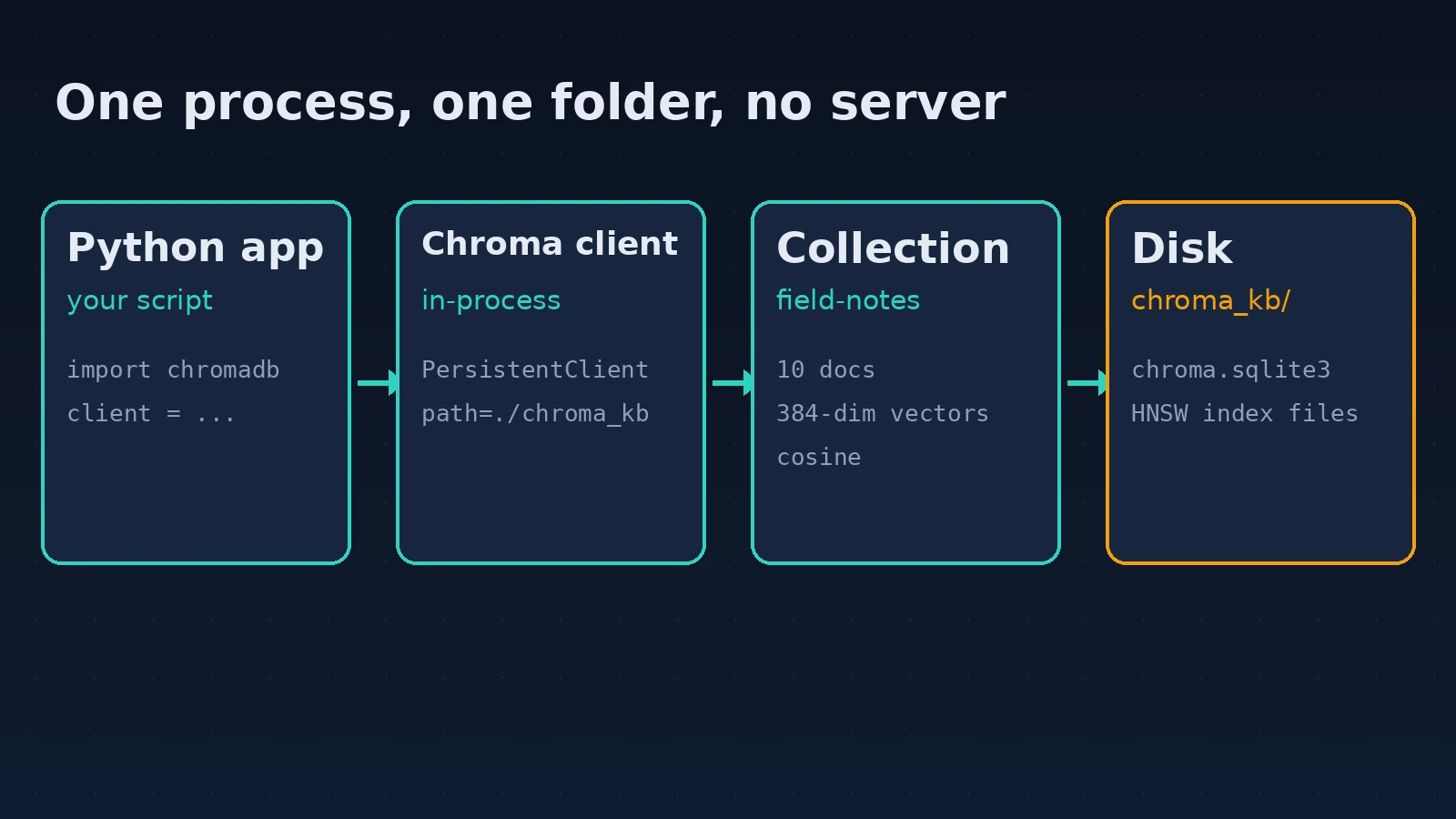
Three concepts carry the whole API. A client is your connection to a database — in-process, or over HTTP in server mode. A collection is a group of related records, roughly a table, and it owns one embedding function. A record is one document plus its embedding, its metadata, and its unique ID. This script creates a persistent client, a collection, and ten short documents about AI engineering, each tagged with the metadata you will filter on later:
import chromadb

client = chromadb.PersistentClient(path="./chroma_kb")
collection = client.get_or_create_collection(
    name="field-notes",
    metadata={"hnsw:space": "cosine"},
)

documents = [
    "Splitting long documents into overlapping chunks of 500 to 800 tokens keeps each retrieved passage self-contained for retrieval-augmented generation.",
    "A vector database stores embeddings and returns the nearest neighbours to a query vector, ranking by cosine distance or Euclidean distance.",
    "Embedding models turn text into dense vectors, so sentences with similar meaning land close together in vector space.",
    "LoRA fine-tuning freezes the base model weights and trains small low-rank adapter matrices, cutting GPU memory far below full fine-tuning.",
    "An LLM eval scores model outputs against a rubric or ground truth, catching regressions before a new prompt ships to production.",
    "Tool-calling agents plan a sequence of function calls, observe the results, and adjust the plan until the user's task is done.",
    "Ollama runs open-weight models on a laptop, serving them through a local OpenAI-compatible API with no data leaving the machine.",
    "Prompt caching stores the key-value states of a repeated system prompt, so later requests skip recomputing the prefix.",
    "4-bit quantization shrinks a model's weights to a quarter of their size, letting a 7-billion-parameter model run on a laptop CPU.",
    "Constrained decoding forces a model to emit valid JSON by restricting its token choices to a schema at generation time.",
]
ids = [f"doc-{i:02d}" for i in range(1, 11)]
metadatas = [
    {"source": "blog", "topic": "rag", "year": 2026, "difficulty": 2},
    {"source": "paper", "topic": "vector-search", "year": 2025, "difficulty": 2},
    {"source": "notes", "topic": "embeddings", "year": 2026, "difficulty": 1},
    {"source": "paper", "topic": "fine-tuning", "year": 2025, "difficulty": 3},
    {"source": "blog", "topic": "evals", "year": 2026, "difficulty": 2},
    {"source": "notes", "topic": "agents", "year": 2026, "difficulty": 2},
    {"source": "blog", "topic": "local-llms", "year": 2026, "difficulty": 1},
    {"source": "paper", "topic": "inference", "year": 2025, "difficulty": 3},
    {"source": "notes", "topic": "inference", "year": 2024, "difficulty": 1},
    {"source": "blog", "topic": "structured-output", "year": 2026, "difficulty": 2},
]

collection.add(documents=documents, metadatas=metadatas, ids=ids)
print("count:", collection.count())
print("peek ids:", collection.peek()["ids"])
count: 10
peek ids: ['doc-01', 'doc-02', 'doc-03', 'doc-04', 'doc-05', 'doc-06', 'doc-07', 'doc-08', 'doc-09', 'doc-10']The first add() took 6.23 seconds, and almost all of it was a one-time download: the default embedding function is all-MiniLM-L6-v2 as an ONNX model, 79.3 MB, fetched from Chroma’s model bucket and SHA-256-verified, then cached under ~/.cache/chroma/onnx_models/. Every later run reuses it. Each document becomes a 384-number vector — check it yourself with collection.get(ids=["doc-01"], include=["embeddings"]) and measure len(...); it returns 384.
Three details matter here. First, PersistentClient(path="./chroma_kb") writes to that folder on every add; there is no separate save step, and the data is there when you open a new client against the same path — Step 5 proves it. Second, get_or_create_collection is the call you want in scripts: plain create_collection raises if the name already exists. Third, collection names must be 3–512 characters from [a-zA-Z0-9._-], starting and ending with an alphanumeric character — verified: create_collection(name="ab") fails with InvalidArgumentError and the rule spelled out in the message. The metadata={"hnsw:space": "cosine"} argument sets the distance metric; it is also the default for the built-in embedding function, so passing it explicitly only documents a choice Chroma already makes. You cannot change it later — modify() refuses with “Changing the distance function of a collection once it is created is not supported currently.”
3. Ask your first question#
Querying is one call: Chroma embeds your question with the same model, finds the nearest vectors, and returns the documents, their metadata, and their distances. Distances are cosine distances here — 0 means identical, 2 means opposite, and in practice anything under about 1.0 is in the same neighborhood:
results = collection.query(
    query_texts=["how do I search documents by meaning"],
    n_results=3,
    include=["documents", "metadatas", "distances"],
)
for doc_id, doc, meta, dist in zip(results["ids"][0], results["documents"][0],
                                   results["metadatas"][0], results["distances"][0]):
    print(f"{doc_id} dist={dist:.4f} topic={meta['topic']} :: {doc[:80]}")
#1 doc-01 dist=0.6296 topic=rag :: Splitting long documents into overlapping chunks of 500 to 800 tokens keeps each
#2 doc-03 dist=0.7478 topic=embeddings :: Embedding models turn text into dense vectors, so sentences with similar meaning
#3 doc-02 dist=0.7723 topic=vector-search :: A vector database stores embeddings and returns the nearest neighbours to a querThe query took 0.48 seconds on this small virtual machine — mostly model and session startup inside the process, not the search itself; a second query in a fresh process took 0.68 seconds, and the search over ten vectors is microseconds. Read the ranking honestly: the chunking document (doc-01) comes first for a question about searching by meaning, and the top three sit within 0.15 of each other. On a ten-document corpus with a small general-purpose model, that is expected — the vectors are close because the documents are all about nearby ideas. A second query shows the ranking working as intended when the question is more specific:
results = collection.query(
    query_texts=["make my model cheaper to run on a laptop"],
    n_results=2,
    include=["documents", "metadatas", "distances"],
)
doc-07 dist=0.6704 topic=local-llms :: Ollama runs open-weight models on a laptop, serving them through a loc
doc-09 dist=0.6822 topic=inference :: 4-bit quantization shrinks a model's weights to a quarter of their sizTwo API details worth knowing. First, the result dictionary always carries the same eight keys — ids, embeddings, documents, uris, included, data, metadatas, distances — even when include asks for only some of them; the unrequested ones come back as None. Second, query accepts query_embeddings instead of query_texts if you already have a vector — the same call, the same ranking, no text step.
4. Filter before you search#
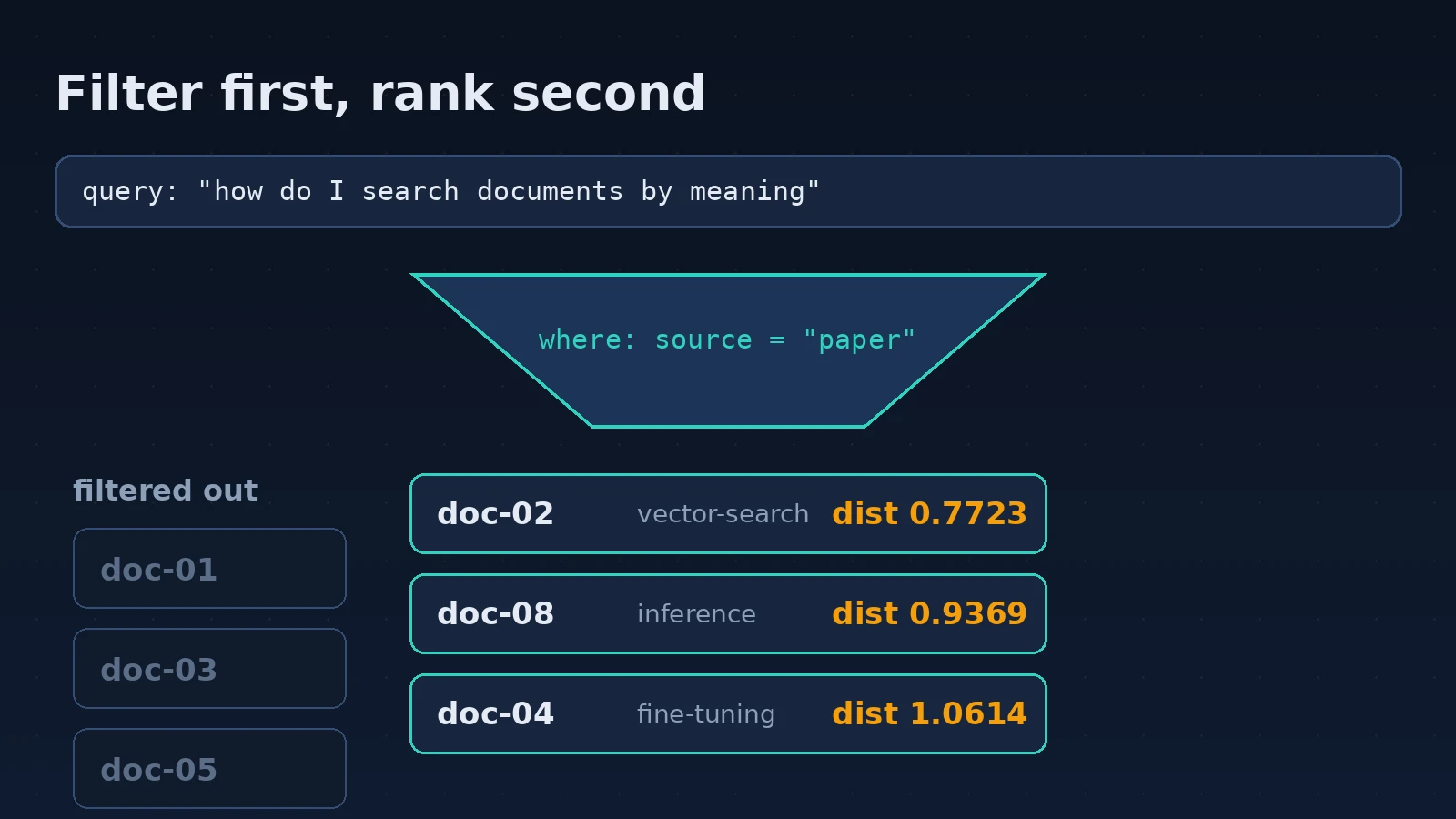
Pure similarity search answers “what is close to this?” Metadata filters answer “what is close to this, among the records I care about?” — and the filter runs before the ranking, so it narrows the candidate pool instead of re-sorting it. The where clause uses MongoDB-style operators. Only papers, same question as before:
results = collection.query(
    query_texts=["how do I search documents by meaning"],
    n_results=5,
    where={"source": "paper"},
    include=["documents", "metadatas", "distances"],
)
print([(i, round(d, 4)) for i, d in zip(results["ids"][0], results["distances"][0])])
[('doc-02', 0.7723), ('doc-08', 0.9369), ('doc-04', 1.0614)]The same three paper-sourced records, in the same order — the filter removed the other seven before ranking, it did not change the ranking. Compound conditions use $and and $or, and comparisons use $gt, $gte, $lt, $lte, $eq, $ne, $in, and $nin. Recent, easier material only:
results = collection.query(
    query_texts=["model training and inference"],
    n_results=5,
    where={"$and": [{"year": {"$gte": 2026}}, {"difficulty": {"$lte": 2}}]},
    include=["documents", "metadatas", "distances"],
)
[('doc-05', 2026, 2), ('doc-03', 2026, 1), ('doc-10', 2026, 2), ('doc-06', 2026, 2), ('doc-07', 2026, 1)]There is also a second filter axis, where_document, which matches on the document text itself with $contains and $not_contains — keyword search inside a vector query:
results = collection.query(
    query_texts=["model"],
    n_results=5,
    where_document={"$contains": "quantization"},
    include=["documents", "metadatas", "distances"],
)
print(results["ids"][0])  # ['doc-09']
And when you do not want a search at all, get() fetches by ID or by filter with no ranking involved — the fastest way to check what is actually stored:
collection.get(ids=["doc-04", "doc-07"], include=["documents", "metadatas"])
collection.get(where={"topic": "inference"})["ids"]  # ['doc-08', 'doc-09']
One pleasant surprise, verified rather than assumed: metadata values are not limited to strings and numbers. A list value stores fine — collection.add(documents=["x"], ids=["t1"], metadatas=[{"tags": ["a", "b"]}]) succeeds — and where={"tags": {"$contains": "a"}} finds it. Older guides say metadata must be a string, integer, float, or boolean; on 1.5.9, lists work and filter with $contains and $not_contains.
5. Keep the collection alive#
A collection you cannot change is a snapshot, not a database. update rewrites a record, upsert inserts or overwrites, and delete removes. All three were run against the collection from Step 2:
collection.update(
    ids=["doc-03"],
    documents=["Embedding models turn text into dense vectors of 384 numbers, so sentences with similar meaning land close together in vector space."],
    metadatas=[{"source": "notes", "topic": "embeddings", "year": 2026, "difficulty": 1}],
)
collection.upsert(
    ids=["doc-11"],
    documents=["Retrieval-augmented generation grounds an LLM's answer in documents fetched at query time, cutting hallucinations on questions the model was never trained on."],
    metadatas=[{"source": "blog", "topic": "rag", "year": 2026, "difficulty": 2}],
)
print("count after upsert new id:", collection.count())   # 11
collection.upsert(ids=["doc-11"], documents=["Retrieval-augmented generation grounds an LLM's answer in documents fetched at query time."],
                  metadatas=[{"source": "blog", "topic": "rag", "year": 2026, "difficulty": 2}])
print("count after upsert same id:", collection.count())  # 11
collection.delete(ids=["doc-11"])
print("count after delete doc-11:", collection.count())   # 10
Updates re-embed the document: after the doc-03 rewrite, its distance to the Step 3 question moved from 0.7478 to 0.7729, dropping it from second to third place. That is the behavior to expect — an update is a new embedding, not a patch to the old one.
Now the gotcha. Older guides say adding a document with an existing ID raises DuplicateIDError. On 1.5.9 it does neither — it silently does nothing:
collection.add(documents=["duplicate"], ids=["doc-01"])
print(collection.count())                          # 10, unchanged
print(collection.get(ids=["doc-01"])["documents"])  # the original chunking text, untouched
No error, no overwrite, no new record. If your ingestion loop re-adds documents — a re-run, a retry after a crash — add will quietly skip the ones it has seen, and you will not notice until you wonder why a corrected document never changed. Use upsert whenever a run may repeat itself; it is the only call of the three with overwrite semantics.
Persistence is the claim the whole tutorial rests on, so verify it with a fresh process, not the one that wrote the data:
client = chromadb.PersistentClient(path="./chroma_kb")
collection = client.get_collection(name="field-notes")
print("count after fresh client:", collection.count())  # 10
count after fresh client: 10
same ranking as before: [('doc-01', 0.6296), ('doc-02', 0.7723), ('doc-03', 0.7729)]The same ten records, the same distances — including the updated doc-03 at its new 0.7729. What is actually on disk is small and inspectable: the store measured 392 KB for ten documents, as one chroma.sqlite3 file (188 KB, the metadata and document store) plus a UUID-named folder holding the HNSW index (header.bin, data_level0.bin, length.bin, link_lists.bin). Do not edit those files by hand, but do back the folder up like any other database directory — copy it while no process has it open, and exclude it from version control.
6. Swap the embedding function and pick your distance#
The default model is a deliberate trade: small, fast, local, and good enough for English prose at small scale. When retrieval quality starts to matter, change the model — but change it at collection creation, because the embedding function is fixed for the life of the collection. Two replacements cover most cases. A local sentence-transformers model, no key:
from chromadb.utils.embedding_functions import SentenceTransformerEmbeddingFunction

ef = SentenceTransformerEmbeddingFunction(model_name="all-mpnet-base-v2")
collection = client.get_or_create_collection(name="field-notes-v2", embedding_function=ef)
Or a hosted provider, which needs its key as an environment variable — shown here from the documentation, not run, because this tutorial uses no keys:
from chromadb.utils.embedding_functions import OpenAIEmbeddingFunction

openai_ef = OpenAIEmbeddingFunction(api_key="sk-...", model_name="text-embedding-3-small")
collection = client.get_or_create_collection(name="field-notes-openai", embedding_function=openai_ef)
The distance metric is the second choice, set with hnsw:space at creation: cosine, l2, or ip (inner product). Cosine is the right default for text embeddings, which is why the default function reports it as its own default space. One measured subtlety: Chroma’s l2 distances are squared Euclidean distances. On the same two documents, the same near-identical query scored 0.0976 under cosine and 0.1951 under l2 — almost exactly double, which is what squared Euclidean distance gives on normalized embeddings. If you switch spaces and your distances suddenly look twice as large, nothing broke; you are reading a different ruler.
7. When to graduate to server mode#
The embedded client is one application process talking to local files. When a second process needs the same data — a web app and a worker, or a teammate’s machine — run Chroma as a server. The same package ships the server; start it against a folder and it listens on port 8000 by default:
chroma run --path ./chroma_server --port 8001Verified here: the heartbeat endpoint answers, the version endpoint reports "1.0.0", and the HTTP client connects with two lines and sees the same collections:
client = chromadb.HttpClient(host="localhost", port=8001)
client.heartbeat()       # nanosecond heartbeat, e.g. 1795822383858888084
client.list_collections()
The client API is identical from there — add, query, get, update, delete all work the same way. If even that is more operations than you want, Chroma Cloud is the hosted form of the same API; the embedded client in this tutorial is the place to learn the semantics before you pay for them. Server mode also adds authentication, which the embedded client does not have — the usage guide is explicit that auth is a server-mode feature, so do not expose an embedded store to a network and expect it to defend itself.
Which approach should you use?#
Four tools cover the local vector layer, and the right one depends on what you are building:
| Tool | What it does best | Use it when |
|---|---|---|
| Chroma (this tutorial) | Zero-setup embedded search with a built-in embedding model | You are prototyping RAG, building a small app, or learning retrieval — one process, one folder |
| sqlite-vec | Vector search inside a plain SQLite file, next to your relational data | You already live in SQLite and want vectors as one more column type, not a second database |
| Qdrant | A real server: filtering, payload indexes, replication, and scale | More than one process needs the data, or the collection outgrows a laptop |
| Hosted (Pinecone, Chroma Cloud, and others) | No operations at all; managed scaling and availability | The search layer is production infrastructure and someone else should run it |
The practical rule: start with Chroma, because the API you learn is the shape every other vector store copies — collections, records, metadata filters, nearest-neighbor queries. The blog’s sqlite-vec tutorial covers the single-file alternative with the same fixture discipline, and the LlamaIndex local RAG tutorial shows what the next layer looks like once retrieval works: chunking, an index, and a local model answering from the retrieved passages.
What it gets wrong#
Stated plainly, with the outputs to back each one:
- Re-adding an ID silently does nothing. On 1.5.9,
addwith an existing ID returns without error and leaves the old document in place. Older guides promise aDuplicateIDError; the installed version does not raise it. Useupsertfor repeatable ingestion. - Small corpora rank noisily. With ten documents about nearby ideas, the top three results for a generic question sat within 0.15 of each other, and a chunking document outranked the embedding document for a question about searching by meaning. The model is fine; the corpus is small. Judge retrieval quality on hundreds of documents, not ten.
- Chroma does not chunk or parse. It stores the documents you hand it and embeds them whole. Long documents need splitting before
add— the 500-to-800-token overlapping chunks in doc-01 are a rule of thumb, not something Chroma does for you. - The first run needs the network. The 79.3 MB embedding model downloads on first use. If that download fails with an
httpxerror about an invalid port, check your proxy environment: Chroma downloads the model withhttpx, which parsesNO_PROXYstrictly — bracketed IPv6 entries such as[::1]break it. This sandbox hit exactly that failure; removing the brackets fixed the download. - Embedded mode is one process, no auth. Authentication exists only in server mode. Keep the embedded store local, and graduate to
chroma runwhen a second process — or another machine — needs the data. - Not tested here: the OpenAI embedding function (needs a key), the SentenceTransformer replacement model (same API, different weights — the call is documented, the ranking change is not measured here), Chroma Cloud, and collections larger than a few hundred documents. All are documented options, not verified steps.
The takeaway#
You now have the whole retrieval layer in one package: install Chroma, point it at a folder, and get back a database your code can search by meaning — ten documents indexed in about six seconds including a one-time model download, queries in under a second, metadata filters that narrow before ranking, and data that survives a restart in a folder you can back up. The cost is $0, no key, no GPU, and about 500 MB of disk. The limits are specific and checkable: re-adding an ID is a silent no-op, small corpora rank noisily, and the first run needs the network for the model. None of them is a reason not to use it; all of them are reasons to use upsert, test on a real corpus, and check the output before you build on it. Start with the documents you already have — that folder is the knowledge base your next RAG pipeline is waiting for.
Sources#
- Chroma documentation — the quickstart, the usage guide (clients, collections, embedding functions, filtering, server mode and authentication), and the feature overview. The API surface used here —
PersistentClient,get_or_create_collection,add,query,get,update,upsert,delete— matches the documented signatures. - Chroma on GitHub — Apache 2.0, 29,797 stars, 2,631 forks at the time of writing; the README quickstart and the installed 1.5.9 source (default ONNX embedding function,
default_spacereturningcosine, model download URL and SHA-256). - ChromaDB on PyPI — package 1.5.9, the latest stable release; requires Python ≥3.9.