Semantic search in a single SQLite file: build a local document search engine with sqlite-vec
Vector search usually means a server. sqlite-vec puts it in one SQLite file: this tutorial builds a local semantic search engine over your own documents — embeddings, KNN queries, hybrid keyword search, and quantization — with every number measured, no API key, and no server.
sqlite-vec and FastEmbed, embed your documents with the local all-MiniLM-L6-v2 model (384 dimensions, no key, no GPU), store the vectors in a vec0 table beside an FTS5 keyword index, and query with WHERE embedding MATCH ? AND k = 5. Five test questions all returned the right document first; over 500 documents a query takes 1.46 ms.- What it is: a local semantic search engine in one SQLite file — documents in a plain table, vectors in a
vec0table, keywords in FTS5, all queried from Python with plain SQL. - Verified here: every snippet was executed end to end on November 10, 2026 (Python 3.12.3, SQLite 3.45.1, sqlite-vec 0.1.9, fastembed 0.9.1, onnxruntime 1.31.1, numpy 2.5.4). The five test questions, the hybrid-search scores, the quantization numbers, and the 500-document benchmarks below are the actual outputs of those runs.
- The model:
sentence-transformers/all-MiniLM-L6-v2— 384-dimensional vectors, intended as a sentence and short-paragraph encoder. Inputs longer than 256 word pieces are truncated, so chunk long documents first. - The cost: $0. No accounts, no keys, no GPU. About 250 MB of downloads, most of it the ONNX Runtime and NumPy wheels; the model itself is 90 MB and downloads once to FastEmbed's cache.
- The catch: sqlite-vec is pre-v1, so expect breaking changes — pin the version. And a
vec0KNN query scans the table, so query time grows linearly with the number of vectors; Step 7 measures exactly what that costs.

Vector search usually means a server. You install a database, run it as a service, learn its API, and pay to keep it up — all before you have searched a single document. For a personal project, a sidecar RAG pipeline, or a desktop app, that is a lot of machinery for a simple need: given some text, find the documents that mean the same thing.
sqlite-vec removes the server. It is a small C extension for SQLite that adds a vec0 virtual table for storing and searching vectors — the same SQLite file you already know, with vector search inside it. No daemon, no network port, no account, no API key. This tutorial builds a complete local semantic search engine with it: twelve documents embedded with a small local model, KNN queries in SQL, hybrid keyword-plus-vector search, and quantization that shrinks the index 4× and 32×. Every number in this article was measured in a sandbox on November 10, 2026, with the exact code shown — including the two places where the obvious approach fails and the fix that actually works.
What you'll need#
- Python 3.9 or newer. The runs here used 3.12.3.
- SQLite 3.41 or newer. The sqlite-vec docs recommend 3.41+; some queries only work correctly there. Check with
python3 -c "import sqlite3; print(sqlite3.sqlite_version)"— this run showed 3.45.1. - About 250 MB of free disk for the packages and the one-time 90 MB model download. No GPU, no account, no API key.
- A scratch directory. The tutorial writes
docs.dband a virtual environment there.
One platform note, straight from the sqlite-vec docs: the SQLite library bundled with macOS blocks extensions by default, so enable_load_extension raises AttributeError on a stock Mac Python. Use the Homebrew Python (brew install python) instead — it ships a SQLite that allows extensions. Linux and Windows Pythons work as-is.
Step 1 — Install and load sqlite-vec#
Two packages do the whole job. sqlite-vec is the extension itself; FastEmbed generates the embeddings with ONNX Runtime, so there is no PyTorch install and no GPU involved. Create a project folder and a virtual environment, then install both:
mkdir vec-search
cd vec-search
python3 -m venv .venv
source .venv/bin/activate
pip install sqlite-vec fastembed
Confirm the install before writing any search code — these are the versions every snippet in this tutorial was verified against:
pip show sqlite-vec fastembed | grep -E "Name|Version"Expected output:
Name: sqlite-vec
Version: 0.1.9
Name: fastembed
Version: 0.9.1
Pin sqlite-vec at 0.1.9. It is pre-v1, and the README warns to expect breaking changes; the 0.1.10 line is alpha builds, so a bare pip install sqlite-vec correctly lands on the stable 0.1.9. Loading the extension takes four lines, and the load/unload dance matters: enable extension loading, load sqlite-vec, then disable it again so nothing else can load arbitrary code into your process:
import sqlite3
import sqlite_vec

db = sqlite3.connect("docs.db")
db.enable_load_extension(True)
sqlite_vec.load(db)
db.enable_load_extension(False)

print(db.execute("select vec_version()").fetchone()[0])  # v0.1.9
vec_version() is the smoke test. If it prints a version, the extension is loaded and every vec_* SQL function in this tutorial is available. Save the connection setup as a helper — every later snippet reuses it:
def connect(path):
    db = sqlite3.connect(path)
    db.enable_load_extension(True)
    sqlite_vec.load(db)
    db.enable_load_extension(False)
    return db
Step 2 — Turn documents into vectors#
An embedding model turns text into a list of numbers — a point in a 384-dimensional space where nearby points mean similar things. This tutorial uses all-MiniLM-L6-v2, the small workhorse of local embeddings: it maps sentences and short paragraphs to 384-dimensional vectors, was fine-tuned on over a billion sentence pairs with a cosine-similarity objective, and runs on CPU in milliseconds. FastEmbed's default model is a different one (BAAI's bge-small, 768 dimensions), so pin MiniLM explicitly — the dimension you pick here has to match the table you create in Step 3.
from fastembed import TextEmbedding

model = TextEmbedding(model_name="sentence-transformers/all-MiniLM-L6-v2")
vecs = list(model.embed(["Hello world", "The cat sat on the mat"]))
print(len(vecs), vecs[0].shape, vecs[0].dtype)  # 2 (384,) float32
The first run downloads the 90 MB ONNX model to FastEmbed's cache (about 12 seconds here) and then reuses it. embed() takes a list of strings and returns a generator of NumPy arrays — 384 float32 values each. Two details to get right now and never think about again: pass the texts as a list, not one string at a time, because batching is where the speed comes from; and remember the model card's truncation rule — inputs longer than 256 word pieces are silently truncated, so split long documents into paragraphs or sentences before embedding them.
The corpus for this tutorial is twelve short documents across six topics — Python, cooking, planets, git, SQL, and science — written so the right answer to each test question is unambiguous:
DOCS = [
    (1, "Python lists", "In Python, reverse a list in place with list.reverse() or get a reversed copy with reversed() or slicing [::-1]."),
    (2, "Python dicts", "A Python dict maps keys to values. Use d.get(key, default) to look up a key without raising KeyError when it is missing."),
    (3, "Sourdough bread", "Bake sourdough at 230C in a covered Dutch oven for 20 minutes, then uncovered for 20 more until the crust is deep brown."),
    (4, "Pasta sauce", "Simmer crushed tomatoes with garlic, olive oil and basil for 30 minutes. Salt the pasta water so it tastes like the sea."),
    (5, "Mars", "Mars is the Red Planet. Its thin atmosphere is mostly carbon dioxide and its largest volcano, Olympus Mons, is about 22 km high."),
    (6, "Jupiter", "Jupiter is the largest planet in the solar system. Its Great Red Spot is a storm wider than Earth that has raged for centuries."),
    (7, "Git branching", "Create a branch with git checkout -b feature, commit on it, then merge it back with git merge feature after reviewing the diff."),
    (8, "SQL joins", "An INNER JOIN returns only rows with matches in both tables. A LEFT JOIN keeps every row from the left table and fills missing right-side values with NULL."),
    (9, "Photosynthesis", "Photosynthesis converts sunlight, water and carbon dioxide into glucose and oxygen inside chloroplasts, using the pigment chlorophyll."),
    (10, "Black holes", "A black hole forms when a massive star collapses. Its event horizon marks the boundary beyond which nothing, not even light, escapes."),
    (11, "Bread starter", "Feed a sourdough starter equal weights of flour and water daily, discarding half first, until it doubles in size within a few hours."),
    (12, "Sorting algorithms", "Quicksort picks a pivot, partitions the array around it and recurses. Average case is O(n log n); worst case is O(n^2) without a good pivot."),
]

texts = [f"{title}: {body}" for _, title, body in DOCS]
embs = list(model.embed(texts))
print(f"embedded {len(embs)} docs, dim={embs[0].shape[0]}")  # embedded 12 docs, dim=384
Prefixing each text with its title ("Python lists: In Python, reverse...") is a small choice with a real effect: the title is the most informative part of a short document, and including it gives the model something to match a question against. Embedding all twelve takes about half a second once the model is loaded.
Step 3 — Build the index: one file, three tables#
The design is three tables in one file, each doing the job it is good at. A plain docs table holds the text. A vec0 virtual table holds the vectors. An FTS5 virtual table holds the keyword index for Step 5. The three tables are joined by one rule: the vector table's rowid is the document's id.
db = connect("docs.db")
db.execute("CREATE TABLE docs (id INTEGER PRIMARY KEY, title TEXT, body TEXT)")
db.execute(
    "CREATE VIRTUAL TABLE docs_vec USING vec0("
    "embedding float[384] distance_metric=cosine)"
)
db.execute(
    "CREATE VIRTUAL TABLE docs_fts USING fts5("
    "title, body, content='docs', content_rowid='id')"
)
The vec0 declaration has two parts worth reading carefully. float[384] fixes the element type and the dimension — it must match the model, and sqlite-vec will reject a vector of the wrong length. distance_metric=cosine sets how KNN ranks results; the default is Euclidean distance, but cosine is the right metric for text embeddings, because these models are trained and compared with cosine similarity. The FTS5 table is an external-content table (content='docs'), so it indexes the docs table instead of duplicating the text.
Inserting is one loop. Vectors go in as raw bytes — tobytes() on a float32 array — and the astype(np.float32) is not cosmetic: some embedding libraries return float64, and sqlite-vec expects 32-bit floats:
for (doc_id, title, body), emb in zip(DOCS, embs):
    db.execute("INSERT INTO docs VALUES (?, ?, ?)", (doc_id, title, body))
    db.execute(
        "INSERT INTO docs_vec(rowid, embedding) VALUES (?, ?)",
        (doc_id, emb.astype(np.float32).tobytes()),
    )
    db.execute(
        "INSERT INTO docs_fts(rowid, title, body) VALUES (?, ?, ?)",
        (doc_id, title, body),
    )
db.commit()
print(db.execute("SELECT count(*) FROM docs_vec").fetchone()[0])  # 12
That is the whole index. Twelve documents, three tables, one file — docs.db is about 1.5 MB at this size, most of it per-table overhead rather than vectors (Step 7 shows what the file looks like at 500 documents). Close the connection and the index is on disk, ready to reopen; there is no server to keep running and no export step.
Step 4 — Ask your first question#
A search is two operations: embed the question with the same model, then ask the vec0 table for its nearest neighbours. The KNN query has a shape that looks odd the first time you see it — the MATCH operator takes the query vector, k = 5 sets how many neighbours to return, and distance is a pseudo-column the table provides:
def search(query, k=3):
    q = next(model.embed([query])).astype(np.float32)
    rows = db.execute(
        "SELECT rowid, distance FROM docs_vec "
        "WHERE embedding MATCH ? AND k = ?",
        (q.tobytes(), k),
    ).fetchall()
    titles = {d[0]: d[1] for d in DOCS}
    return [(titles[r[0]], round(r[1], 4)) for r in rows]

print(search("How do I reverse a list in Python?"))
Expected output:
[('Python lists', 0.1279), ('Python dicts', 0.7105), ('Sorting algorithms', 0.8826)]Distance here is cosine distance: 0 means identical direction, 2 means opposite. The right document wins by a wide margin — 0.1279 against 0.7105 for the runner-up — and that gap is the signal. You can check the arithmetic yourself: the cosine similarity between the question and the "Python lists" vector is 0.8721 in NumPy, and 1 − 0.8721 = 0.1279, exactly the distance SQLite reports. The k = 5 form is the one the docs recommend; a ORDER BY distance LIMIT 5 version also works, but only on SQLite 3.41 and newer.
Five questions, five correct first answers — the actual output of the verification run:
Q: How do I reverse a list in Python?
   [('Python lists', 0.1279), ('Python dicts', 0.7105), ('Sorting algorithms', 0.8826)]
Q: What temperature should I bake sourdough at?
   [('Sourdough bread', 0.3943), ('Bread starter', 0.6282), ('Sorting algorithms', 0.9494)]
Q: Which planet is known as the Red Planet?
   [('Mars', 0.3741), ('Jupiter', 0.3989), ('Black holes', 0.7994)]
Q: How do I merge a git branch?
   [('Git branching', 0.4081), ('Pasta sauce', 0.9304), ('Bread starter', 0.9337)]
Q: What does an INNER JOIN do in SQL?
   [('SQL joins', 0.3096), ('Photosynthesis', 0.8182), ('Sorting algorithms', 0.8628)]
Two of the five are worth a second look, because they show what the distances mean. "Which planet is known as the Red Planet?" returns Mars at 0.3741 with Jupiter close behind at 0.3989 — both are planets, so both are near, and the question's wording decides the order. "How do I merge a git branch?" returns Git branching at 0.4081 and then nonsense at 0.93 — when the model is confident, the gap is large; when it is guessing between near neighbours, the gap is small. Read the gap, not just the ranking: a top hit at 0.13 is a match, a top hit at 0.85 is the model shrugging.
Step 5 — Hybrid search: keywords plus meaning#
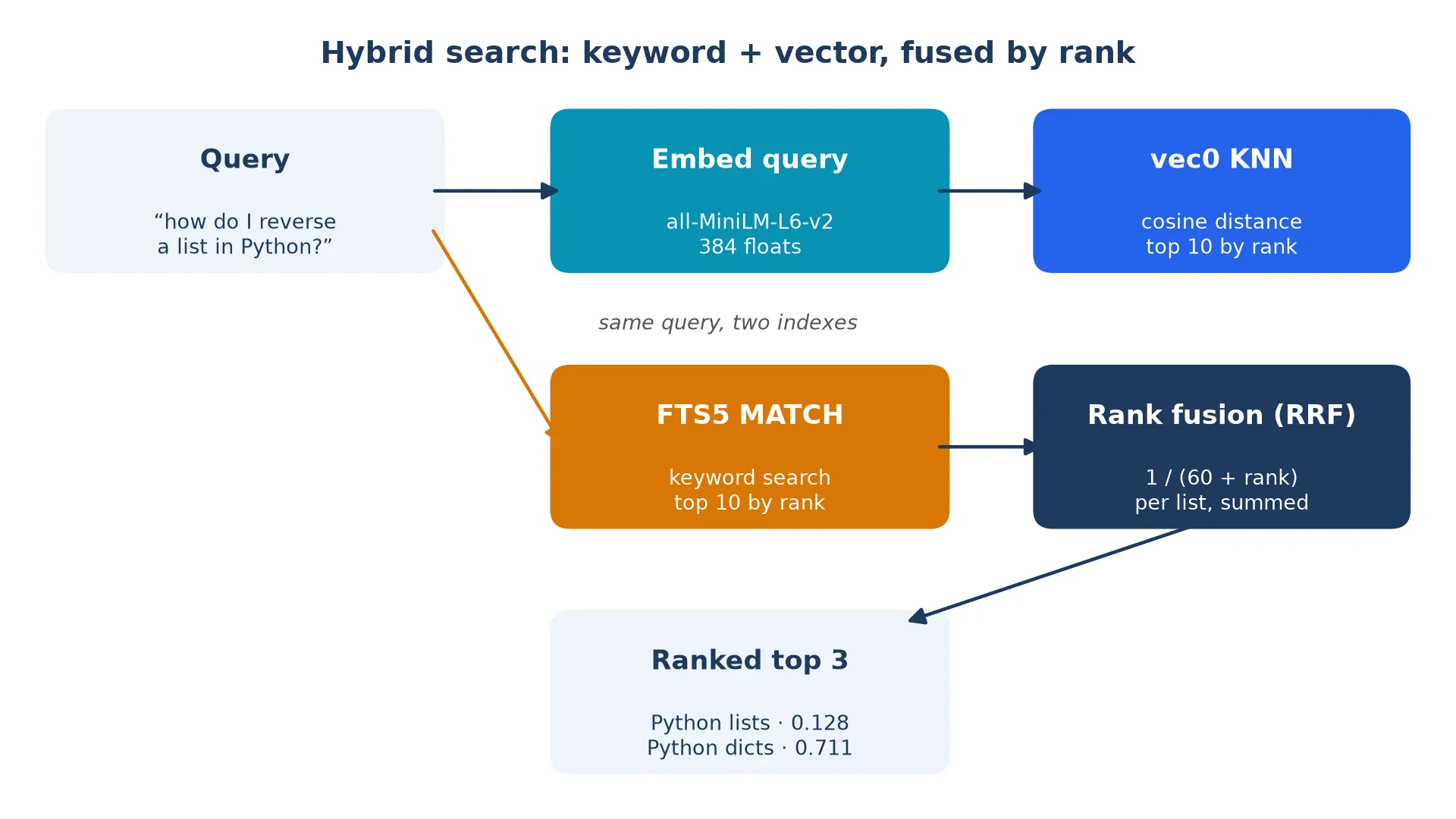
Vector search understands meaning but is blind to exact words. Ask for "sourdough starter feeding" and the vector ranking puts the bread-starter document first — good — but a question containing a rare exact term, a name, or an error code can lose to a merely similar document. Keyword search has the opposite failure: it finds the exact words and misses the paraphrase. Hybrid search runs both and fuses the rankings. The standard fusion is reciprocal rank fusion (RRF): each list contributes 1 / (60 + rank) per document, and the scores are summed. A document that ranks high in both lists wins; a document that appears in only one list can still win if it ranks first there.
def hybrid_search(query, k=3):
    q = next(model.embed([query])).astype(np.float32)
    vec = db.execute(
        "SELECT rowid FROM docs_vec WHERE embedding MATCH ? AND k = 10",
        (q.tobytes(),),
    ).fetchall()
    fts = db.execute(
        "SELECT rowid FROM docs_fts WHERE docs_fts MATCH ? ORDER BY rank LIMIT 10",
        (query,),
    ).fetchall()
    K = 60
    scores = {}
    for rank, (rid,) in enumerate(vec):
        scores[rid] = scores.get(rid, 0) + 1.0 / (K + rank + 1)
    for rank, (rid,) in enumerate(fts):
        scores[rid] = scores.get(rid, 0) + 1.0 / (K + rank + 1)
    titles = {d[0]: d[1] for d in DOCS}
    top = sorted(scores.items(), key=lambda kv: -kv[1])[:k]
    return [(titles[rid], round(s, 4)) for rid, s in top]

print(hybrid_search("sourdough starter feeding"))
print(hybrid_search("git merge branch"))
Expected output:
[('Bread starter', 0.0164), ('Sourdough bread', 0.0161), ('Pasta sauce', 0.0159)]
[('Git branching', 0.0328), ('SQL joins', 0.0161), ('Photosynthesis', 0.0159)]
Read the first result: "Bread starter" scores 0.0164 because it ranks first in the vector list and matches the keywords — the fusion rewards agreement. "Git branching" scores 0.0328, nearly double, because it ranks first in both lists. The constant 60 is the standard RRF damping factor; it keeps the fusion from being dominated by a single first-place finish. Take the top 10 from each list, not the top 3 — fusion needs room to find documents that one list ranks low and the other ranks high.
One FTS5 detail: the query goes through WHERE docs_fts MATCH ? with the table name qualified, because the docs_fts table is an external-content table and SQLite needs to know which table the MATCH belongs to. For production use, sanitize the query string first — FTS5 query syntax treats quotes and parentheses specially, and a user-typed " will error the query.
Step 6 — Shrink the index: int8 and binary quantization#
A 384-dimensional float32 vector is 1,536 bytes. At a thousand documents that is 1.5 MB of vectors; at a million, 1.5 GB. Quantization trades a little accuracy for a lot of space, and sqlite-vec supports two smaller formats natively: int8 (1 byte per dimension, 384 bytes) and bit (1 bit per dimension, 48 bytes). The table declaration changes by one word — int8[384] or bit[384] instead of float[384] — but getting values into those tables has a trap that cost this tutorial a real debugging session, so here it is plainly.
The trap: sqlite-vec tags vectors with a type, and Python's sqlite3 module cannot set that tag — a blob read back from SQL and passed in again as a parameter loses its type. Quantizing in Python and inserting the raw bytes fails with Inserted vector for the "e" column is expected to be of type int8, but a float32 vector was provided. The fix is to do the conversion inside the SQL statement, where the tag survives:
def to_int8(v):
    return (np.clip(v, -1, 1) * 127).astype(np.int8).tobytes()

db.execute(
    "CREATE VIRTUAL TABLE docs_vec_int8 USING vec0("
    "embedding int8[384] distance_metric=cosine)"
)
for (doc_id, _, _), emb in zip(DOCS, embs):
    db.execute(
        "INSERT INTO docs_vec_int8(rowid, embedding) VALUES (?, vec_int8(?))",
        (doc_id, to_int8(emb)),
    )
db.commit()
Note the two conversions doing different jobs. The NumPy line is the actual quantization: clip to [−1, 1], scale to [−127, 127], cast to int8. The vec_int8(?) in the SQL is only the type tag — it reinterprets the bytes as an int8 vector. The same rule applies at query time: convert inside the query, never in Python:
q = next(model.embed(["How do I reverse a list in Python?"])).astype(np.float32)
print(db.execute(
    "SELECT rowid, distance FROM docs_vec_int8 "
    "WHERE embedding MATCH vec_int8(?) AND k = 3",
    (to_int8(q),)).fetchall())
Expected output:
[(1, 0.13195525109767914), (2, 0.7080276012420654), (12, 0.8812423348426819)]The int8 ranking is identical to float32, and the top distance moves only from 0.1279 to 0.1320 — quantization costs almost nothing here. Binary is the coarser option: vec_quantize_binary() packs each float's sign into one bit, and distances become Hamming distances (count of differing bits):
db.execute("CREATE VIRTUAL TABLE docs_vec_bit USING vec0(embedding bit[384])")
for (doc_id, _, _), emb in zip(DOCS, embs):
    db.execute(
        "INSERT INTO docs_vec_bit(rowid, embedding) VALUES (?, vec_quantize_binary(?))",
        (doc_id, emb.astype(np.float32).tobytes()),
    )
db.commit()
print(db.execute(
    "SELECT rowid, distance FROM docs_vec_bit "
    "WHERE embedding MATCH vec_quantize_binary(?) AND k = 3",
    (q.tobytes(),)).fetchall())
Expected output:
[(1, 59.0), (2, 157.0), (7, 176.0)]The top hit is still right — 59 of 384 bits differ, against 157 for the runner-up — but be honest about what binary gives up. On a stress test of random near-orthogonal vectors, the int8 table's top 3 matched float32's top 3 on 10 of 12 queries, while the binary table matched on only 2 of 12. Binary is a first-pass filter: use it to cut a million candidates to a thousand cheaply, then re-rank the survivors in float32. Do not use it as the final ranking.
| Format | Bytes / vector | Distance | Use it for |
|---|---|---|---|
| float32 | 1,536 | cosine / L2 | Final ranking; anything under ~100K vectors |
| int8 | 384 (4× smaller) | cosine / L2 | Default at scale; ranking barely changes |
| bit | 48 (32× smaller) | Hamming | First-pass filtering; always re-rank after |
Step 7 — What it costs at 500 documents#
Twelve documents prove correctness; they say nothing about cost. The same code was run against 500 documents (the twelve topics repeated with varied wording), and the numbers are the point of this step:
| Operation | Measured |
|---|---|
| Model load (cached) | 0.6 s |
| Embedding 500 docs | 11.7 s (23.3 ms per doc) |
| Indexing 500 docs (float32 + int8 tables) | 0.31 s |
| Database file, all tables | 2,136 KiB |
| KNN query, float32, 500 docs | 1.46 ms |
| KNN query, int8, 500 docs | 0.90 ms |
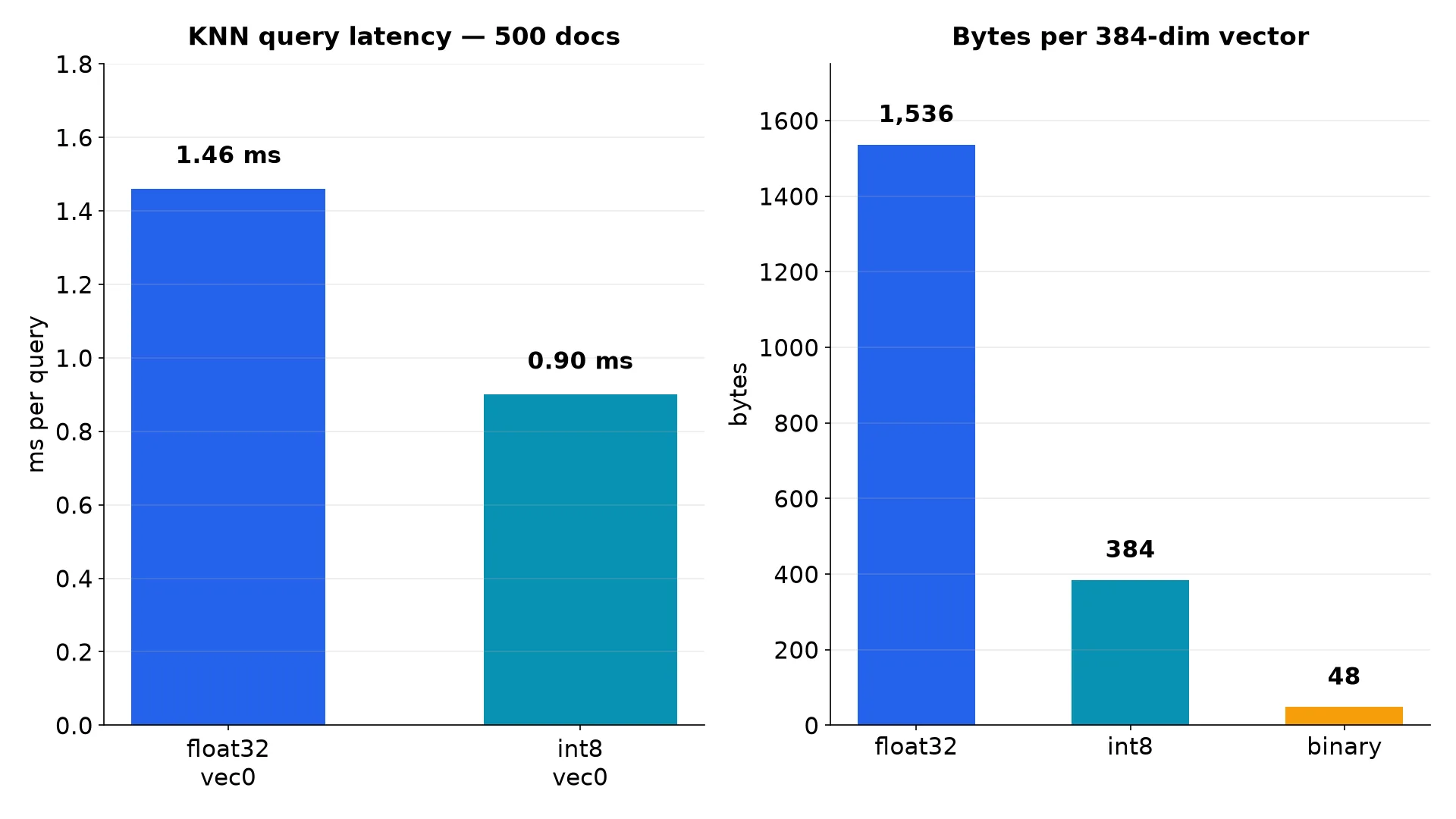
Three things to take from that table. First, embedding dominates everything — 11.7 seconds to embed against 0.31 seconds to index — so if your corpus is large, embed once and store the vectors; never re-embed on every query. Second, the query itself is a millisecond: a vec0 KNN scan over 500 vectors is 1.46 ms, and int8 is faster still at 0.90 ms because each comparison moves a quarter of the bytes. Third, the file stays small: 2,136 KiB for 500 documents with both vector tables, the text, and the FTS5 index — about 4.3 KB per document all-in. Query time grows linearly with the number of vectors, so extrapolate honestly: at 50,000 documents the same query costs roughly 150 ms, which is fine for a local tool and too slow for a user-facing search box — that is the point where the decision in the next section changes.
Which approach should you use?#
Four ways to do local vector search exist, and the right one depends on how many vectors you have and who else needs them:
| You want to | Use | What you get |
|---|---|---|
| Search your own notes, docs, or code on one machine | This tutorial: sqlite-vec + FastEmbed | One file, no server, no key; millisecond queries to ~50K vectors |
| Cut the index size 4× with no visible ranking change | int8 quantization | 384 bytes per vector; the same KNN query, faster |
| Filter by category, date, or owner during the search | vec0 metadata columns | Up to 16 filterable columns (text, integer, float, boolean) applied inside the KNN query — see below |
| Serve many users, millions of vectors, or sub-10 ms at that scale | A server: Qdrant, pgvector, or similar | Approximate indexes, concurrent writers, and an API — the machinery sqlite-vec deliberately skips |
The decision rule is simple. If the search runs on your machine, for you, over a corpus you can count in the tens of thousands, the single file wins: there is nothing to operate, nothing to pay for, and the database is a file you can copy, back up, or email. If the corpus passes a few hundred thousand vectors, or a second process needs to write while the first reads, graduate to a server with an approximate index — that is what they are for, and pretending a scan will keep up is how local tools get slow in production. And whichever path you take, keep the embedding model and the vector dimension as a pair: change one, re-embed everything, rebuild the table.
One more thing sqlite-vec gives you for free: metadata columns. Declare a filterable column in the vec0 table and constrain it inside the KNN query — the filter applies during the search, not after it:
db.execute("CREATE VIRTUAL TABLE v USING vec0("
           "embedding float[384] distance_metric=cosine, category text)")
# ... insert rows with a category value, then:
db.execute("SELECT rowid, distance FROM v "
           "WHERE embedding MATCH ? AND k = 5 AND category = 'code'",
           (q.tobytes(),)).fetchall()
Verified on a five-document test: filtering to category = 'code' returned only the two code documents, and filtering to 'cooking' returned only the two cooking documents, with their true distances. The docs cap metadata at 16 columns and restrict the operators to =, !=, >, >=, <, <= — no LIKE, no functions in the filter. For text you will never filter on, the + auxiliary-column form stores it beside the vectors without indexing it.
The takeaway#
- Vector search does not need a server. sqlite-vec puts it in the SQLite file you already know how to copy, back up, and open.
- Pin the model to the table. all-MiniLM-L6-v2 means
float[384]anddistance_metric=cosine. Change the model, re-embed everything. - Embed once, query many times. Embedding is 97% of the cost; indexing and querying are milliseconds.
- Read the distance, not just the ranking. A top hit at 0.13 is a match; a top hit at 0.85 is the model shrugging.
- Hybrid beats either half. FTS5 catches exact terms, vectors catch meaning; reciprocal rank fusion lets them vote.
- Quantize inside SQL. Blob subtypes do not survive a round-trip through Python's sqlite3 —
vec_int8(?)andvec_quantize_binary(?)belong in the query, not in Python. - Know the ceiling. A vec0 KNN query scans the table, so cost grows linearly — about 1.5 ms per 500 vectors here. Past a few hundred thousand, graduate to a server with an approximate index.
The file this tutorial builds — twelve documents, three tables, one docs.db — is a complete semantic search engine you can carry anywhere SQLite runs: a laptop, a Raspberry Pi, a phone, a browser via WASM. Start with your own documents: export your notes, chunk them under 256 word pieces, embed them with the same three lines, and ask the questions you actually want answered. The index is a file. The search is a query. That is the whole system.
Sources#
- sqlite-vec on GitHub — the extension, sample usage, and the pre-v1 warning. Read November 10, 2026.
- sqlite-vec with Python — install, loading the extension, working with vectors, SQLite version requirements, and the macOS extension block. Read November 10, 2026.
- KNN queries — vec0 tables vs manual tables, the
k = Nquery form, and the SQLite 3.41 note. Read November 10, 2026. - vec0 virtual table — metadata columns, partition keys, and auxiliary columns, with their limits. Read November 10, 2026.
- API reference —
vec_f32,vec_int8,vec_quantize_binary, distance functions, andvec_version(). Read November 10, 2026. - FastEmbed documentation —
TextEmbedding, supported models, and the ONNX Runtime backend. Read November 10, 2026. - all-MiniLM-L6-v2 model card — 384-dimensional vectors, the 256 word-piece truncation rule, and the 1B+ sentence-pair training data. Read November 10, 2026.