Turn any website into a design system you can reuse: hands-on with designlang
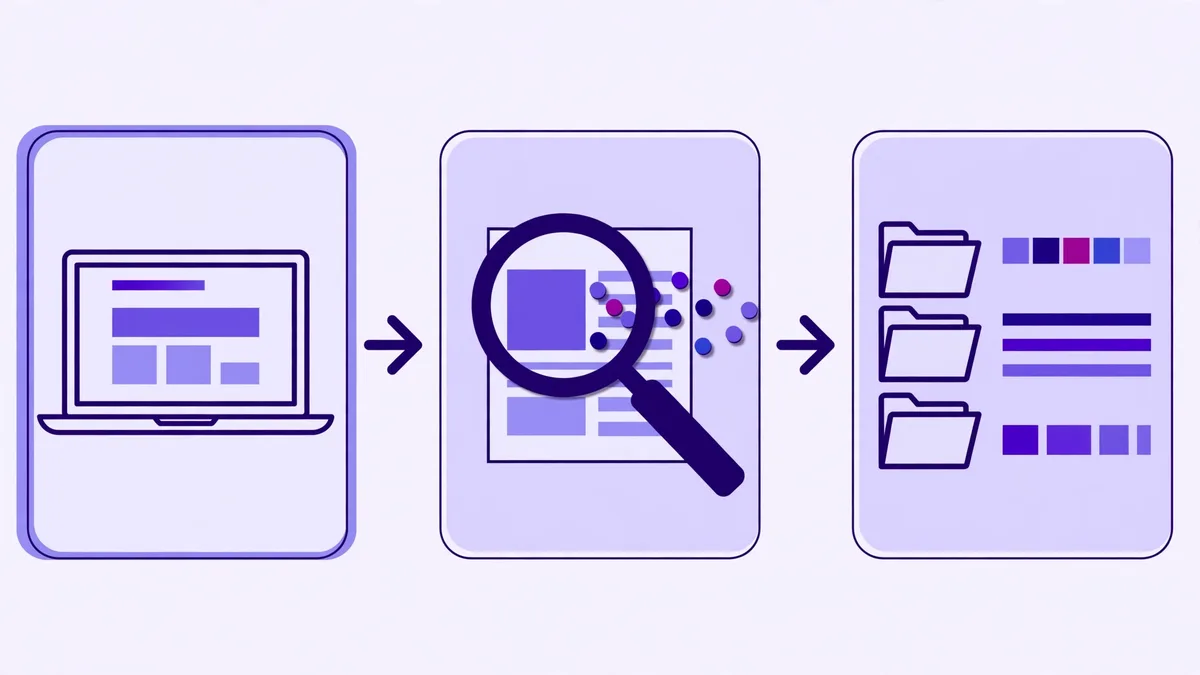
Every designer has done it: open a site you admire, open devtools, and start copying hex codes one at a time. designlang does the same job properly — it points a real browser at any live URL, reads the computed styles of every element on the page, and hands you the whole design system.
- What: designlang 13.4.0: a CLI (plus MCP server) that extracts a complete design system from any live website — tokens, themes, grades, and agent prompts — by reading the rendered DOM in a real browser.
- Versions:
designlang13.4.0 (npm, Manavarya09/design-extract, MIT). Node.js 20 or later; this guide used Node v24.22.1. - Verified: November 8, 2026: full extraction of stripe.com (80.5s, 2,518 elements, 40+ files), grade B 88/100, battle vs aifrontierpost.com (88 vs 80), apply into a scratch project, and the MCP server over stdio (initialize, 17 tools, 5 resources).
- Requirement: Node.js 20+ and about 30 minutes. First run downloads a ~150 MB Chromium. No API key, no account, no model bill.

Every designer has done it: open a site you admire, open devtools, and start copying hex codes one at a time. It takes an hour, you miss half the tokens, and the type scale never survives the trip. designlang does the same job properly. It points a real browser at any live URL, reads the computed styles of every element on the page, and hands you the whole design system: DTCG tokens, a Tailwind theme, Figma variables, a shadcn theme, a graded report card, and a brief your coding agent can build from.
The project is Manavarya09/design-extract (MIT), the CLI is designlang on npm, and it is accelerating: 4,896 stars, with 388 gained in the five days to November 8 and its star pace up from 14 to 78 a day over the same period, according to whatstrending.ai's weekly acceleration report. This guide installs it, extracts Stripe's design system, applies it to a project, grades two sites head to head, and wires its MCP server into an agent. Every step below was run on November 8, 2026, with designlang 13.4.0 on Node v24.22.1.
One warning up front, because it matters: designlang measures what a site actually renders. Colors, spacing, and type scales are facts about a public page, and the tool reads them the same way your browser does. That does not make the site's brand yours. Use the output as a specification and a learning reference; do not republish another company's logo, fonts, or trademarked assets as your own.
Step 1 — Install designlang
You need Node.js 20 or later and nothing else: no account, no API key, no model bill. Check your Node version, then install the CLI globally, pinned to the version verified here:
node --version   # v20 or later
npm i -g [email protected]
designlang --version   # 13.4.0
On first run the tool downloads a Playwright Chromium build (about 150 MB) to drive the browser. If you already have Google Chrome installed and would rather use it, add --system-chrome to any command and the download is skipped. The rest of this guide uses the bundled Chromium.
Confirm the CLI surface while you are here — designlang --help lists the extract command and its subcommands: grade, battle, diff, apply, clone, mcp, brand, remix, pack, theme-swap, and history, among others. This guide exercises the five that matter most: extract, grade, battle, apply, and mcp.
Step 2 — Extract your first design system
Stripe is the canonical example — the project's own README uses it — and it is a demanding target: thousands of elements, custom fonts, gradients, and a lot of CSS. Run the extraction into its own directory:
designlang https://stripe.com -o ./stripe-designThe run took 80.5 seconds here and analyzed 2,518 elements. It printed a summary that is worth reading in full, because it is the whole design system in one paragraph:
Summary:
Colors: 26 unique colors
Fonts: sohne-var
Spacing: 8 values (base: 8px)
Shadows: 2 unique shadows
Radii: 4 unique values
Breakpoints: 0 breakpoints
Components: 11 patterns detected
CSS Vars: 724 custom properties
Layout: 37 grids, 284 flex containers
Design Score: 88/100 (B) — 3 issues
Gradients: 19 unique gradients
Z-Index: 6 layers
Icons: 106 SVG icons (filled)
Images: 67 images, 4 style patterns
A11y: 75% WCAG score (3 failing pairs)
The output directory holds more than forty files. The ones you will actually open first:
| File | What it is |
|---|---|
stripe-com-DESIGN.md | Agent-native brief: YAML front matter plus a prose summary of the system |
stripe-com-design-language.md | The full 19-section reference: palette, type, spacing, components, accessibility, motion, voice |
stripe-com-design-tokens.json | W3C DTCG tokens, primitive + semantic tiers |
stripe-com-tailwind.config.js | Drop-in Tailwind theme with full color scales |
stripe-com-figma-variables.json | Figma Variables import (light mode) |
stripe-com-shadcn-theme.css | shadcn/ui globals.css variables |
stripe-com-AGENT.md | One-page brief that starts "You are building UI in the stripe.com design system" |
stripe-com-prompts/ | Paste-ready prompts for v0, Lovable, Cursor, and Claude Artifacts |
stripe-com-mcp.json | The full design payload the MCP server serves |
stripe-com.brand.html | A rendered brand book for the extracted system |
Start with DESIGN.md. Its front matter is the system at a glance:
site: "Stripe | Financial Infrastructure to Grow Your Revenue"
url: "https://stripe.com"
intent: landing
material: flat
tokens:
  colors:
    primary: "#533afd"
    secondary: "#7389ff"
    accent: "#061b31"
    background: "#ffffff"
    foreground: "#061b31"
  typography:
    sans: sohne-var
    base: 16
  spacing:
    base: 8
    scale: "[8, 16, 24, 32, 40, 48, 64, 96]"
The prose below it is genuinely useful: it names the page intent (landing, heuristic confidence 0.75), the material (flat), the brand voice (neutral, sentence-case headings), and even the detected reading order of the page's sections. The 72 KB design-language.md goes deeper — tonal ramps generated in OKLCH so the steps are perceptually even, component clusters with variant and size hints, the WCAG contrast table, and a motion-language section built from the site's real transitions.
Step 3 — Use the tokens: Tailwind, Figma, shadcn
The token file follows the W3C Design Tokens Community Group format, so it imports into anything that speaks DTCG. The metadata block says exactly what produced it:
{
  "$metadata": {
    "generator": "designlang",
    "version": "7.0.0",
    "spec": "https://design-tokens.github.io/community-group/format/",
    "source": "https://stripe.com",
    "generatedAt": "2026-11-08T11:24:01.826Z"
  },
  "primitive": {
    "color": {
      "brand": {
        "primary": { "$value": "#533afd", "$type": "color" },
        "secondary": { "$value": "#7389ff", "$type": "color" }
      }
    }
  }
}
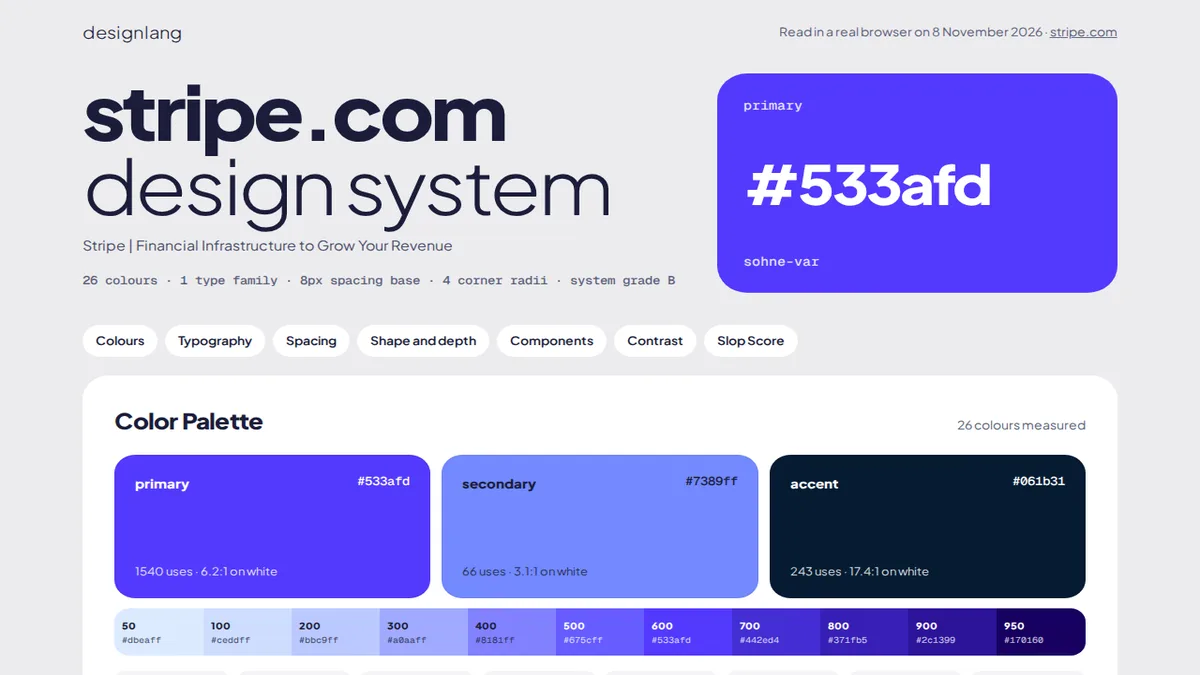
The measured primary is #533afd — Stripe's violet — used 1,540 times on the page at a 6.2:1 contrast ratio on white. Secondary #7389ff appears 66 times (3.1:1), accent #061b31 243 times (17.4:1). Those usage counts and contrast ratios come from the render itself, not from a brand-guidelines PDF, which is the point: you are reading the site as it ships, not as someone documented it.
The Tailwind config turns each role color into a full 50–950 scale in HSL, with the measured color as the default:
// Measured with designlang: https://designlang.app
export default {
  theme: {
    extend: {
      colors: {
        primary: {
          '50': 'hsl(248, 98%, 97%)',
          '500': 'hsl(248, 98%, 50%)',
          '600': 'hsl(248, 98%, 40%)',
          '950': 'hsl(248, 98%, 10%)',
          DEFAULT: '#533afd'
        },
        // secondary, accent, neutrals follow the same pattern
      }
    }
  }
}
The Figma file is a Variables import: a Brand collection with color/primary, color/secondary, color/accent, and the neutral ramp as RGB floats, one mode (light). Import it into Figma, and the tokens you just measured become the variables your designers edit. The shadcn theme is the same palette expressed as globals.css variables, ready to drop into a shadcn/ui project.
Step 4 — Grade any site
Extraction tells you what a design system is. The grade command tells you how disciplined it is. It re-extracts the site and scores it across eight dimensions:
designlang grade https://stripe.com -o ./stripe-grade --format json --badgeGrade B · 88/100 · https://stripe.com
Nearest of 8 systems: https://vercel.com (distance 0.17)The JSON report breaks the 88 down. Stripe is near-perfect on structure and weak exactly where a site with 7,702 duplicate CSS declarations should be:
| Dimension | Score |
|---|---|
| Color discipline | 80 |
| Typography consistency | 92 |
| Spacing system | 100 |
| Shadow consistency | 100 |
| Radius consistency | 100 |
| Accessibility | 75 |
| CSS health | 60 |
| Tokenization | 100 |
Strengths: consistent typography, a well-defined spacing scale, a clean elevation system, consistent border radii, good CSS variable tokenization. Issues: 3 WCAG contrast failures, 59% of CSS unused, 7,702 duplicate CSS declarations. The --badge flag also emits a shields.io-style SVG — design · B · 88 — you can drop into a README. The --format all default adds a shareable HTML report card on top of the JSON.
Step 5 — Apply it to your project
Tokens in a file are only half the job. apply extracts a site and writes its design into your project in one move, detecting the framework from the files already there:
designlang apply https://stripe.com -d ./my-projectAgainst a bare project directory — a package.json and an index.html, no Tailwind config, no components.json — it detected no framework and wrote the CSS path:
✔ Applied auto design!

  ✓ ./my-project/design-variables.css — css-variables
The file is 35,539 bytes of :root custom properties, starting with the roles and their full ramps:
:root {
  /* Colors — Primary */
  --color-primary: #533afd;
  --color-secondary: #7389ff;
  --color-accent: #061b31;

  /* Ramp — primary (base is 600) */
  --color-primary-50: #dbeaff;
  --color-primary-100: #ceddff;
  --color-primary-200: #bbc9ff;
  --color-primary-300: #a0aaff;
  --color-primary-400: #8181ff;
  --color-primary-500: #675cff;
  --color-primary-600: #533afd;
  --color-primary-700: #442ed4;
  --color-primary-800: #371fb5;
  --color-primary-900: #2c1399;
  --color-primary-950: #170160;
If the directory has a tailwind.config.js, apply overwrites it with the extracted theme instead; with a components.json it treats the project as shadcn and merges the variables into globals.css. Force a path with --framework tailwind, --framework shadcn, or --framework css. One honest note: this run took several minutes in the sandbox, where the same extraction normally takes about 80 seconds — the extraction itself is the slow part, not the writing. Budget a few minutes for large pages.
Step 6 — Battle two designs
battle extracts two sites in parallel and grades both. The obvious demo is your own site against the best in the business, so this run pitted Stripe against this blog:
designlang battle https://stripe.com https://aifrontierpost.com -o ./stripe-vs-afp --format jsonB · 88 https://stripe.com
vs
B · 80 https://aifrontierpost.com
Verdict: https://stripe.com winsThe JSON report carries both scorecards. The interesting part is where each site wins and loses:
| Dimension | Stripe | AI Frontier Post |
|---|---|---|
| Color discipline | 80 | 92 |
| Typography consistency | 92 | 65 |
| Spacing system | 100 | 70 |
| Shadow consistency | 100 | 100 |
| Radius consistency | 100 | 90 |
| Accessibility | 75 | 91 |
| CSS health | 60 | 45 |
| Tokenization | 100 | 100 |
Both sites grade B; Stripe wins on typography and spacing discipline, this blog wins on color discipline and accessibility. Two caveats from the run: the battle loads both pages in parallel, and the first attempt — Stripe against Vercel — timed out twice at the 30-second page-load limit, on each site in turn. Very heavy pages can stall a parallel run on a small machine. If a battle fails, retry it, or pick a lighter second site the way this demo does.
Step 7 — Wire it into your coding agent
The most useful surface is the MCP server. It exposes the latest extraction as resources and tools, so an agent can measure a site instead of guessing at it. Start it over stdio against an extraction directory:
designlang mcp --output-dir ./stripe-designRegister it in Claude Code (or Cursor, or any MCP client) with the standard config:
{
  "mcpServers": {
    "designlang": {
      "command": "npx",
      "args": ["-y", "[email protected]", "mcp", "--output-dir", "./stripe-design"]
    }
  }
}
Verified here with a scripted JSON-RPC client: initialize answers with server designlang 13.4.0 on protocol 2024-11-05, and the server lists 17 tools and 5 resources. The tools cover the full workflow — extract_design (async, returns a job id), get_tokens, get_colors, get_typography, get_components, compute_drift (production vs. a preview deploy), get_findings, search_tokens, find_nearest_color (nearest palette color passing a WCAG rule), verify_ui (renders a URL at 390, 768, and desktop widths and checks it against the brand), and export. The resources are designlang://tokens/primitive, designlang://tokens/semantic, designlang://regions, designlang://components, and designlang://health.
Two cheaper integrations need no MCP client at all. Drop AGENT.md — the one-page brief from Step 2 — into your repo and your agent builds in the extracted system. Or hand it one of the prompt packs: prompts/cursor.md, prompts/v0.txt, prompts/lovable.txt, and prompts/claude-artifacts.md are paste-ready prompts for rebuilding a page in the measured design.
When to use designlang vs the alternatives
| Approach | Use it when | It cannot do |
|---|---|---|
| designlang | You want the design system of a site you can open in a browser — as files your project can import | Judge taste; it measures what ships, good or bad |
| Design skills (Hallmark, Impeccable) | You want your agent to design new pages with good taste | Extract a real site's tokens; they steer generation, they don't measure |
| Figma | You own the design and the file is the source of truth | Read a site you don't own |
| Browser devtools | One value, once, right now | Scale: a full system is hundreds of values across thousands of elements |
| v0 / Lovable | You want a new design generated from a prompt | Reproduce an existing site's system faithfully |
designlang and the design skills complement each other: measure a site you admire with designlang, then let Hallmark or Impeccable keep your agent's output from looking AI-made. The blog's hands-on guides to both are linked below.
Troubleshooting
First run downloads a browser. The Playwright Chromium download is about 150 MB. If it fails behind a corporate proxy, install Chrome and use --system-chrome instead.
A heavy page times out. Extraction waits for the page to settle, and very heavy sites can exceed the 30-second load limit — Vercel's homepage stalled two parallel runs here. Retry, or extract a lighter page on the same site first.
A single-page app extracts almost nothing. The DOM at load time is a shell. Add --wait 3000 to let it render, or --deep-interact to scroll and open menus before extraction.
Logged-in pages. Pass --cookie name=value or --cookie-file with a Playwright storage-state file. The extraction runs in your browser session either way.
Self-signed or dev certificates. Add --insecure; it is also the flag for localhost and staging hosts with untrusted certificates.
Only one component interests you. Scope the run with --selector ".pricing-card" and the output covers that subtree alone.
FAQ
Is extracting a site's design system legal? designlang reads computed styles from a public page — the same values any visitor's browser computes. Measuring them is not the same as owning them: don't republish another company's logo, font files, or trademarked brand assets, and don't present their system as your brand. When in doubt, treat the output as a reference spec, not a copy.
Does it need an API key or an account? No. Everything runs locally except the page fetch itself. There is an optional --smart mode that calls an LLM for low-confidence classifications, and only that mode needs a key.
How long does an extraction take? Stripe took 80 seconds here. Small marketing pages finish faster; heavy app shells take longer, and the parallel battle run is the slowest path.
Does it modify the site it reads? No. Extraction is read-only — it loads the page, reads computed styles, and writes files only to your output directory.
The takeaway
designlang turns "I like how that site looks" into a file you can import. Point it at a URL and you get the tokens, the Tailwind theme, the Figma variables, a grade with a fix list, and a brief your agent can build from — all measured from the live render, in about eighty seconds for a site as complex as Stripe. The skills that teach your agent taste are still worth having; this is the other half of the workflow, the part that grounds taste in something real. Extract one site you admire this week, grade yours against it, and fix whatever the scorecard says first.
Sources
- Manavarya09/design-extract on GitHub — repository, README, CLI reference (MIT, 4,896 stars, 407 forks, last push November 5, 2026)
- designlang 13.4.0 on npm — installed and verified version
- AI Repo Acceleration Report, November 8, 2026 (whatstrending.ai) — star pace 14 to 78 a day, +388 stars in five days
- designlang.app — project site
Verification note: all commands, outputs, and scores in this guide were produced on November 8, 2026, in a Linux sandbox (Node v24.22.1, designlang 13.4.0). The sandbox routes traffic through a local proxy and intercepts TLS, so browser-driven runs there used a proxy shim and the documented --insecure flag; on an ordinary machine the plain commands in this guide work as written. The Vercel battle attempt timed out twice at the 30-second page-load limit and is reported as a limit, not a result.