Impeccable: teach your AI coding agent to design like a design director — hands-on with the 72K-star skill
Impeccable — Paul Bakaus’s open-source design skill for AI coding agents — just crossed 72,500 GitHub stars with a simple pitch: stop letting your agent ship the same purple-gradient, Inter-everything, card-in-card UI as everyone else. I ran its 61-rule deterministic detector hands-on: 12 findings on a deliberate slop page, down to zero after fixes. No API key, no LLM, milliseconds per scan.

Ask any frontier model to build you a landing page and you can spot the result from across the room: Inter for everything, a purple-to-blue gradient hero, the rounded-square icon tile floating above every heading, cards nested inside cards, gray text washed out on colored backgrounds. Every model trained on the same SaaS templates, converging on the same handful of tells. Impeccable — Paul Bakaus's open-source design skill for AI coding agents — exists to kill that look at the source.
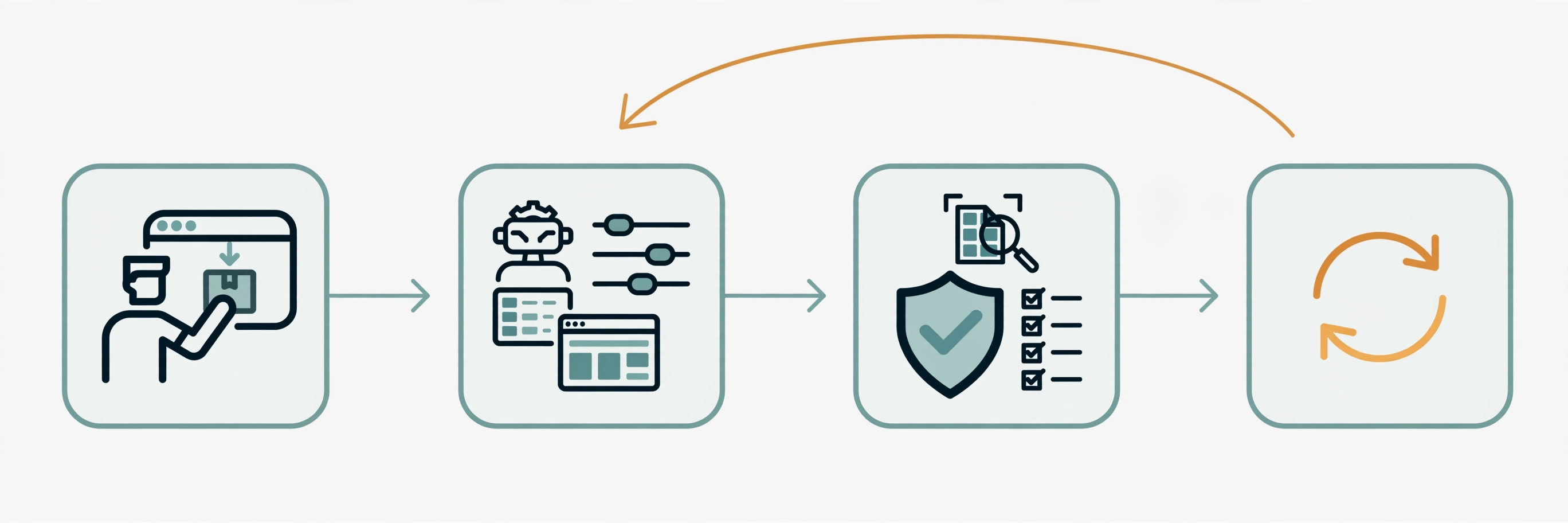
When I checked on September 29, 2026, pbakaus/impeccable sat at 72,542 stars with 4,380 forks, 1,921 commits, and 72 releases, holding a spot on GitHub's weekly trending chart. It is not another prompt pack. It is one installable skill with 24 named commands, a Rust-powered engine that runs 61 deterministic design-detector rules with no LLM and no API key, and hooks that scan your agent's UI edits as they land. I ran the whole thing hands-on: installed the CLI, built a deliberately awful AI-slop page, scanned it, fixed what it flagged, and re-scanned to a clean bill — 12 findings down to zero, every step reproducible below.
Why this is trending now
The skill started from Anthropic's frontend-design — the README says it plainly: that skill was the first widely-used design skill for Claude, and Impeccable grew out of it. What turned it into a 72K-star project is the second half of the package: deterministic rules. LLM design critiques are vibes; a rule that measures your contrast ratio at 4.48:1 against the WCAG AA 4.5:1 floor is a fact. Developers are installing it because it catches the exact failure modes they keep shipping — and because the standalone CLI works with no AI harness at all, so you get value in thirty seconds without changing your workflow.
The timing also tracks the agent-coding wave: with Claude Code, Codex, Cursor, Copilot, and a dozen other harnesses generating UI daily, "make it not look generated" became a real engineering requirement. Impeccable ships provider builds for 17 of those harnesses, a VS Code extension, a browser extension, and an npm CLI — wide surface, one engine.
What you'll need
- Node.js 18+ — only for the
npxshim. The engine itself is a self-contained binary; no Node runtime is needed after install. (I ran everything below with Node v24.) - Any AI coding agent (optional) — Claude Code, Codex CLI, Cursor, GitHub Copilot, Gemini CLI, OpenCode, and twelve more are supported. The CLI half of this tutorial needs none of them.
- Cost: zero. Apache-2.0 licensed, no accounts, no API keys, no telemetry that costs you anything. The detector runs fully locally.
- GPU: none. This is static analysis plus skill markdown, not a model.
Step 1 — Get the CLI and confirm the version
The fastest way to touch the engine is the npm package. It is a small shim around the same binary the skill uses:
npx impeccable --version
# 4.1.0

npx impeccable --help
The help output lists the real surface: detect, ignores, help, install, link, update, check. Everything hands-on in this tutorial runs through detect and ignores — both fully local.
Step 2 — Build a page full of deliberate AI slop
To see what the detector actually catches, I wrote a page containing every tell the README names — Inter everywhere, purple gradient hero, icon tile above the h1, nested cards, buzzword copy, gray-on-color text, skipped heading levels. Save this as slop.html:
<!DOCTYPE html>
<html lang="en">
<head><meta charset="utf-8">
<title>Nimbus — demo</title>
<style>
@import url('https://fonts.googleapis.com/css2?family=Inter:wght@400;600;800&display=swap');
body { font-family: 'Inter', sans-serif; margin: 0; color: #333; }
.hero { background: linear-gradient(135deg, #7c3aed, #2563eb);
        padding: 60px 40px; color: white; }
.hero .icon-tile { width: 64px; height: 64px; border-radius: 16px;
        background: rgba(255,255,255,0.2); font-size: 32px; }
.hero p { color: #e0e0e0; font-size: 18px; }
.card { background: #fff; border: 1px solid #eee; border-radius: 12px;
        padding: 24px; }
.card .card { background: #f9f9f9; margin-top: 12px; }
.card p { color: #777; font-size: 14px; line-height: 1.8; }
</style></head>
<body>
<section class="hero">
  <div class="icon-tile">🚀</div>
  <h1>Welcome to Nimbus</h1>
  <p>The revolutionary platform that leverages cutting-edge AI
     to synergize your workflow</p>
</section>
<section>
  <div class="card">
    <h3>Feature One</h3>
    <p>Amazing feature description goes here.</p>
    <div class="card">
      <h3>Nested card</h3>
      <p>A card inside a card, a classic tell.</p>
    </div>
  </div>
</section>
</body></html>
Step 3 — Run your first scan
npx impeccable detect slop.html
echo $?
# 2
Exit code 2 means the scan completed with primary findings (per the docs: 0 = clean, 2 = findings, 1 = a target could not be scanned). Human-readable diagnostics go to stderr; add --json for machine-readable output on stdout. My run reported 12 anti-patterns. Here is the real output, trimmed:
slop.html
  [gray-on-color] text #e0e0e0 on bg gradient(#7c3aed, #2563eb)
    → Gray text looks washed out on colored backgrounds. Use a darker
      shade of the background color instead, or white/near-white.
  [low-contrast] 3.9:1 (need 4.5:1) — text #e0e0e0 on #2563eb
  [low-contrast] 4.48:1 (need 4.5:1) — text #777777 on #ffffff
  [icon-tile-stack] 64x64px icon tile above h1 "Welcome to Nimbus"
    → A small rounded-square icon container above a heading is the
      universal AI feature-card template — every generator outputs
      this exact shape.
  [overused-font] Primary font: inter
    → Inter, Roboto, Fraunces, Geist, Plus Jakarta Sans, and Space
      Grotesk are used on so many sites they no longer feel distinctive.
  [nested-cards] Card inside card (div)
  [skipped-heading] <h1> "Welcome to Nimbus" followed by <h3> "Feature One"
  [ai-color-palette] Purple/violet accent colors detected
    → Purple/violet gradients and cyan-on-dark are the most recognizable
      tells of AI-generated UIs.
  [marketing-buzzword] 1 buzzword phrase: "t leverages cutting-edge AI to syner"
    → Generic SaaS phrases are instant AI tells. Pick a specific verb and
      noun that says what the product literally does.

12 anti-patterns found.
Note what makes this different from an LLM critique: every finding is computed, not opined. The contrast checker measured real ratios (3.9:1, 4.48:1) against WCAG AA. The font rule names the exact overused faces. The buzzword rule quotes the offending phrase. There is nothing to argue with and nothing hallucinated.
Step 4 — Fix the page, re-scan, watch the count fall
I rewrote the page with a point of view instead of defaults: Spectral instead of Inter, a solid deep-teal hero instead of the purple gradient, the icon tile deleted, the nested card flattened into a divided section, heading order repaired, buzzword copy replaced with a literal product description ("Turns your meeting recordings into searchable notes"). The re-scan came back with 3 findings — and they were instructive:
fixed.html
  [side-tab] border-top: 3px
    → Thick colored border on one side of a card — the most recognizable
      tell of AI-generated UIs. Use a subtler accent or remove it entirely.
  [low-contrast] 3.6:1 (need 4.5:1) — text #ffffff on #c96f2b

3 anti-patterns found.
My "fix" had introduced two new tells I would have shipped without thinking: a thick accent border on the cards and a button whose white-on-amber text measured 3.6:1. That is the honest value proposition — the detector catches the things your eye forgives. I removed the border and darkened the button to #8f4a12:
npx impeccable detect fixed.html
echo $?
# 0
Exit 0. Twelve findings to zero, with the middle step teaching more than the endpoints.

Step 5 — Waive what you actually mean
Not every finding is a bug. If Inter genuinely is your brand font, waive it at the repo level rather than ignoring the tool:
npx impeccable ignores add-value overused-font Inter --reason "Brand font"
# Added overused-font=inter to shared detector ignoreValues (.impeccable/config.json).

npx impeccable ignores add-file "src/legacy/**"
npx impeccable ignores list
For a waiver that should travel with one file instead of the repo config, add an inline comment — I verified this suppresses the rule for that file:
<!-- impeccable-disable overused-font: brand font -->
Pass --no-config to detect for a raw scan that ignores all waivers, and --no-inline-ignores to honor the config but skip inline markers. Waivers are explicit, scoped, and reviewable in git — the opposite of "the linter complained so I turned it off."
Step 6 — Install the skill into your coding agent
The CLI is the audit half. The other half is the skill itself: 24 named commands your agent can invoke as /impeccable <command> <target>. Install it from your project root:
npx impeccable install
The installer detects your harnesses (~/.claude, ~/.codex, ~/.cursor, and the rest), lets you keep or customize the set, and asks whether to install into the current project or globally. For scripts, skip the prompts:
npx impeccable install --providers=claude,codex --scope=project --no-hooks
npx impeccable update   # refresh an existing install later
Start every new project with /impeccable init: it inspects the project, asks only about genuine gaps, and writes durable product truth — audience, purpose, constraints, voice — to PRODUCT.md, so later commands stop confusing product facts with visual direction. From there the vocabulary opens up:
- Evaluate:
/impeccable audit(technical: a11y, performance, responsive),/impeccable critique(UX review with heuristic scoring) - Refine:
/impeccable polish,bolder,quieter,distill,harden(errors, i18n, edge cases),onboard - Enhance:
animate,colorize,typeset,layout,delight,overdrive - Fix:
clarify(UX copy),adapt(devices),optimize(performance) - Iterate:
/impeccable live(pick elements in the browser, iterate on variants),/impeccable generate
Pin the ones you reach for — /impeccable pin audit creates a standalone /audit shortcut. The installer also drops in a provider-native design hook: on Claude Code, Copilot, and Codex it surfaces detector findings after UI edits (and a deeper pass on Stop); on Cursor it blocks bad writes before they land. Every hook invocation goes through the launcher in the skill's scripts/ directory, which runs the engine binary — downloaded once into ~/.impeccable/bin/ — with no Node required. Pass --no-hooks at install if you want the skill without the automation, and keep the generated .impeccable/ working directory out of git with the ignore block from the README (shared artifacts like config.json and DESIGN.md stay tracked).
When to use Impeccable vs the alternatives
| Tool | Best for | Trade-off |
|---|---|---|
| Impeccable | AI-generated UI: kills the recognizable "slop" tells deterministically, plus a full design-command vocabulary for your agent | Frontend only; the skill's taste is opinionated by design |
| Anthropic's frontend-design skill | Lightweight design guidance inside Claude with no install | Guidance only — no deterministic checks, no hooks, no CLI; Impeccable explicitly started from it and added the machinery |
| Lighthouse / axe-core | Performance budgets and WCAG auditing in CI | Says nothing about whether the design looks generated; no agent integration, no design vocabulary |
| Asking the LLM to critique | Subjective, holistic feedback ("does this feel premium?") | Non-deterministic, slow, costs tokens every run, and invents issues; use it after the deterministic pass, not instead of it |
| Nothing (ship it) | Internal tools nobody looks at | Your landing page looks like everyone else's landing page |
The honest stack is layered: Impeccable's detector as the fast, free, always-on gate (it runs in milliseconds with no API key), the skill commands for the actual design work, and human or LLM judgment for the subjective remainder. The README is explicit that a clean detector run is evidence, not proof — it does not replace looking at the rendered page.
Limitations worth knowing before you commit
- It is a taste, enforced. Rules like
overused-fontwill flag Inter even when Inter is the right call — that is what the waiver system is for, but expect to configure it. - Static scans see code, not rendering. File and directory scans parse markup and CSS; URL scans (which need an installed Chrome, Chromium, or Edge) inspect the rendered DOM and computed layout. Some checks only make sense in the latter.
- The skill needs a capable agent. The 24 commands are procedure documents for an AI harness — without one, you get the CLI detector only, which is still genuinely useful but is half the project.
- Live mode is local-only. It edits a local checkout through a dev server; injecting its helper into a production site is not supported, and the docs warn against weakening production CSP to force it.
- Version drift: I verified everything against CLI
4.1.0and the repository at commit36034d4(September 2026). Command names and rule sets move — pin what you depend on.
The takeaway
Impeccable earned its trending spot by solving the exact problem the agent-coding era created: models that write competent code and interchangeable design. The detector is the rare dev tool that is both opinionated and checkable — it flagged 12 real issues in my test page, caught 2 more I introduced while fixing the first batch, and went silent at zero, all locally, all in milliseconds, all without an API key. The skill layer then gives your agent the vocabulary (audit, distill, bolder, typeset) to act on those findings like a design director instead of a template applier.
Start where I did: npx impeccable detect on the last page your agent built. If the output reads like a description of your own site — purple gradients, icon tiles, nested cards — you have just found the cheapest design review you will ever run. Then install the skill, run /impeccable init, and stop shipping the default.
Links: pbakaus/impeccable on GitHub · impeccable.style (docs) · impeccable on npm · I verified this tutorial against CLI 4.1.0 and repository commit 36034d4 (September 29, 2026), running the detector on a CPU-only Linux VM with Node v24.