ECC: the 269K-star agent harness OS — install, skills, and AgentShield scans, hands-on
ECC is the agent-harness operating system blowing up GitHub: 269,000 stars, MIT-licensed, with a real CLI that installs skills, agents, and rules into your coding agent — plus AgentShield, a 102-rule scanner for your agent config. We installed it, scanned a sloppy config, and fixed it. Every command verified.
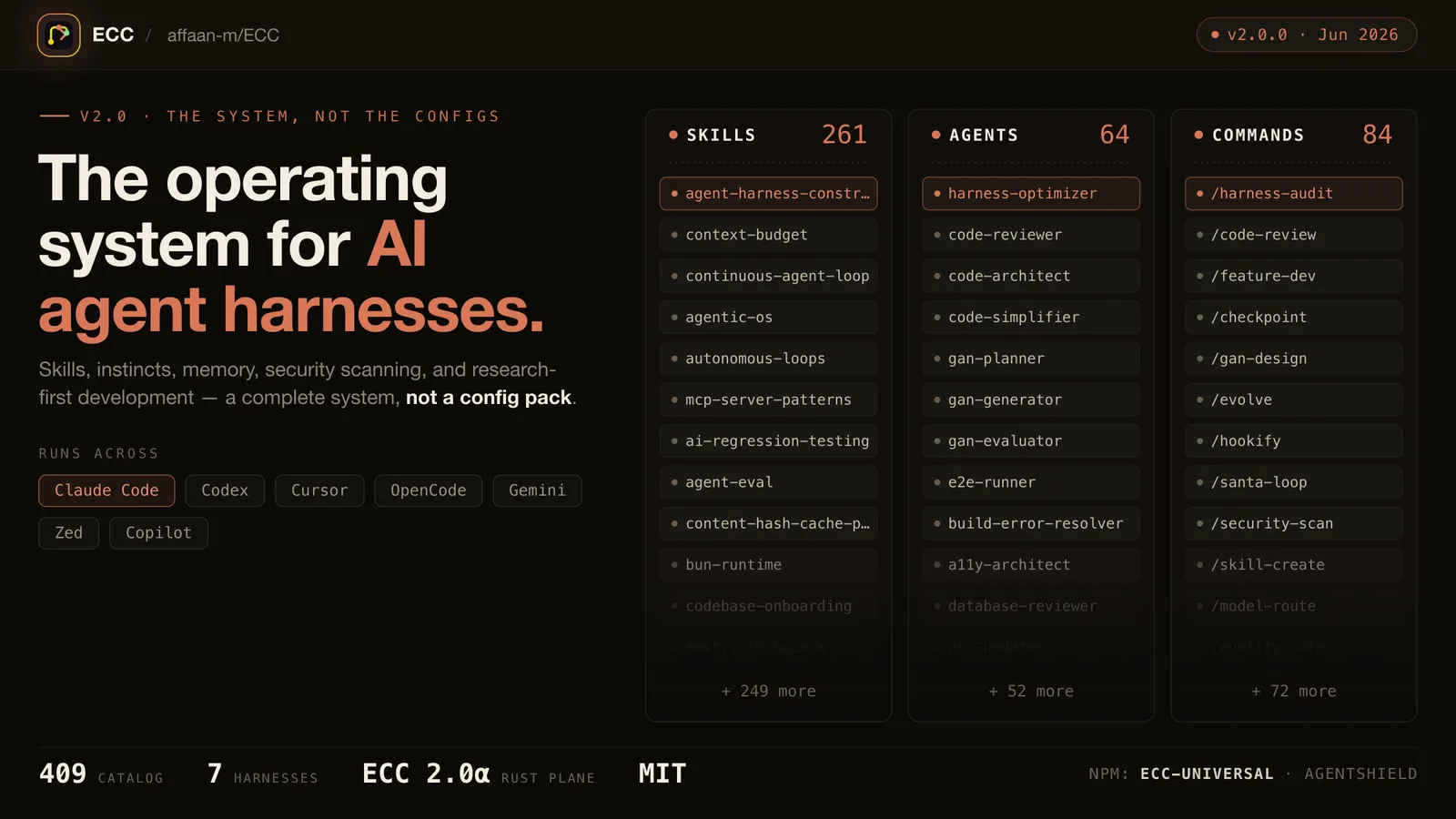
Some GitHub phenomena deserve suspicion: the repository that appears from nowhere, collects hundreds of thousands of stars in a few months, and ships a README the size of a novella. ECC (affaan-m/ECC) is that phenomenon right now — 269,127 stars at last count (GitHub API, September 29, 2026), created in January 2026, pushed yesterday, MIT-licensed. It describes itself as "the agent harness performance optimization system": skills, instincts, memory, security, and research-first development for Claude Code, Codex, OpenCode, Cursor, and more than a dozen other agent harnesses.
What separates ECC from most trending repositories is that it is genuinely installable and genuinely testable. It ships two npm packages: ecc-universal, a CLI that installs and manages the whole system, and ecc-agentshield, a 102-rule static scanner for your agent configuration. This tutorial installs both, runs a real minimal install into a project, audits a deliberately sloppy agent config with the scanner, and fixes it. Every command below ran on a plain Linux VM on September 29, 2026 — no API keys, no subscriptions, and no Claude Code install required.
What you'll need #
- Node.js 18 or newer (
node --versionto check; this run used Node 24). npm or npx must be on your PATH. - A terminal and about 15 minutes. The install copies a few hundred small text files; nothing compiles.
- No accounts, no API keys, no GPU. Everything in this tutorial runs locally. The one thing you do not need is Claude Code itself — ECC's project-local target installs into a plain directory, and the scanner audits config files, not running agents.
Step 1 — Pin the real version #
ECC's README currently documents version 2.2.2 in every install example. Run this and you will learn something important about the project:
$ npm view ecc-universal version
2.2.1
$ npm view ecc-agentshield version
1.6.0
2.2.2 is not published to npm. The README tracks the repository's main branch; the npm registry tracks release tags, and they have drifted apart. Pin the version that actually exists — every command in this tutorial uses [email protected] and [email protected]. Treating a README's version pin as gospel is exactly the kind of assumption this tutorial refuses to make.
Step 2 — Explore before you install #
ECC's CLI has a discovery layer, so you do not have to install anything to understand what it would do. Two commands are worth your time first:
$ npx -y [email protected] consult "security reviews" --target claudeconsult takes a natural-language query and recommends installable components. For "security reviews" it returned five: capability:security, agent:code-reviewer, skill:security-review, agent:fsharp-reviewer, and agent:security-reviewer — each with the exact install command and a one-line explanation of why it matched. This is the fastest way to learn the component vocabulary (capability:, agent:, skill:) that the installer speaks.
$ npx -y [email protected] plan --profile minimal --target claude --with skill:security-reviewplan prints the full operation plan without touching the disk: profile minimal, target claude, seven modules (rules-core, agents-core, commands-core, platform-configs, skill-unified-memory, workflow-quality, security), and roughly 80 file operations. One warning: the plan for the claude target points at ~/.claude — your global agent config. For a first run, that is more commitment than you need, which brings us to the next step.
Step 3 — Install the minimal profile, project-local #
ECC supports fifteen install targets (claude, cursor, codex, opencode, kimi, and more), but claude-project installs into ./.claude/ inside the current directory instead of your home folder. That makes it the right target for trying ECC without touching your real setup:
$ mkdir ecc-demo && cd ecc-demo
$ npx -y [email protected] install --profile minimal \
    --target claude-project --with skill:security-review --no-hooks
Two deviations from the README are deliberate. First, the README's examples append --yes, but the installer rejects it (Error: Unknown argument: --yes) — a fully specified command simply runs without prompting. Second, --no-hooks skips the automatic hook runtime. Hooks are shell commands that fire on agent events; installing them means third-party code can execute inside your agent loop, so leaving them out on a first install is the cautious move. You can add them later with --enable-hooks.
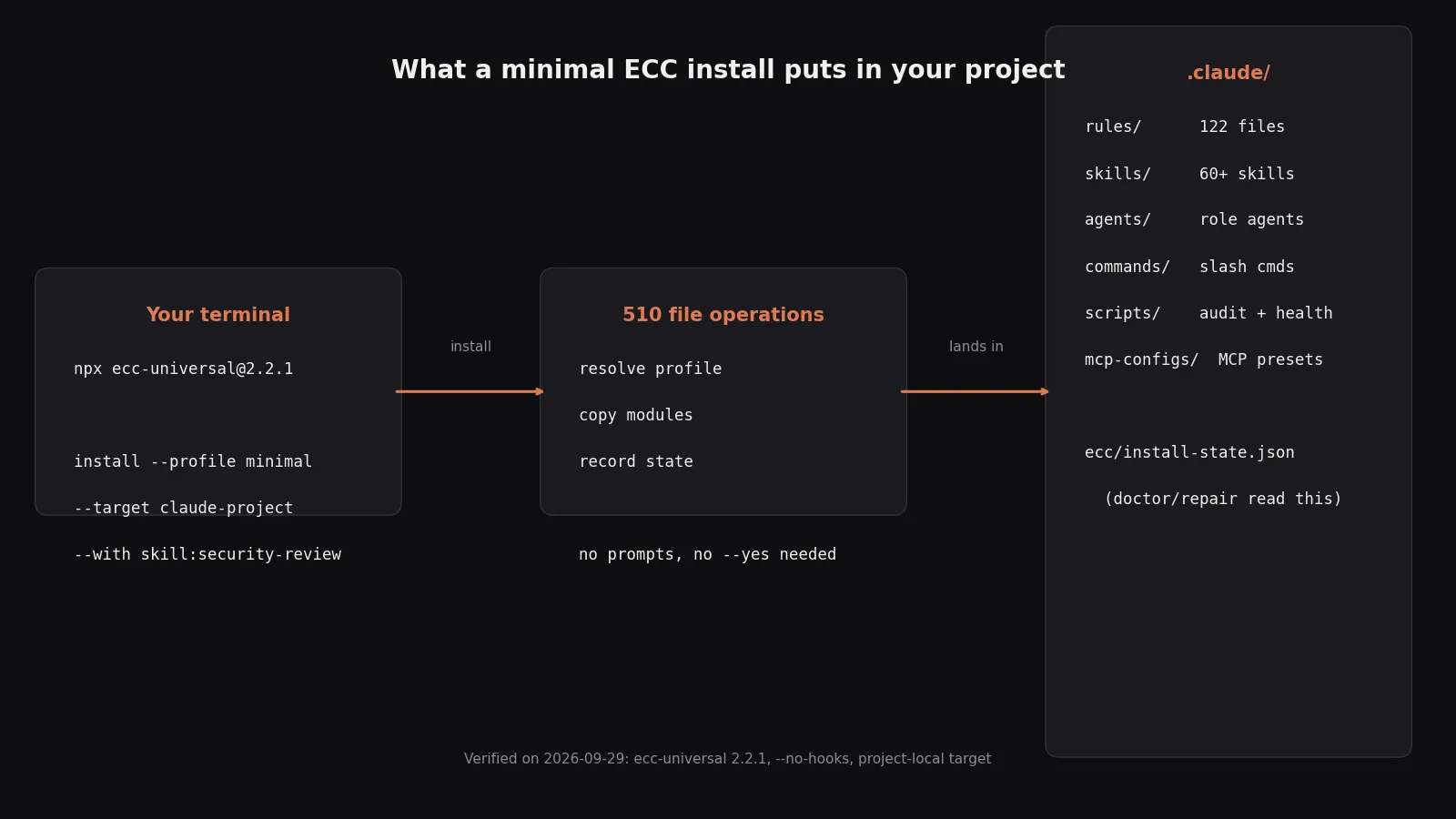
The install reported 510 file operations. Here is what landed in .claude/:
rules/— 122 rule files: per-language coding style, security, testing, and pattern docs (Python, TypeScript, Go, Rust, and more).skills/— 60+ skills, including the requestedsecurity-reviewskill (SKILL.mdplus a cloud-infrastructure security companion file).agents/— role agents (architect,build-error-resolver,chief-of-staff, …).commands/,scripts/(audit and health checks),mcp-configs/(MCP presets).ecc/install-state.json— the manifest thatdoctor,repair, anduninstallread. This file is what makes the install managed rather than a file dump.
Step 4 — Verify the install #
A managed install should be inspectable. ECC gives you two commands for that:
$ npx -y [email protected] list-installed
Installed ECC targets:

- claude-project
  Root: /path/to/ecc-demo/.claude
  Installed: 2026-09-29T05:15:46.073Z
  Profile: minimal
  Modules: rules-core, agents-core, commands-core, platform-configs,
           skill-unified-memory, workflow-quality, security
  Legacy languages: (none)
  Source version: 2.2.1

$ npx -y [email protected] doctor
Doctor report:

- claude-project
  Status: OK
  Issues: none

Summary: checked=1, ok=1, warnings=0, errors=0
doctor checks every managed file against the install state and reports drift. If a rule file goes missing or gets edited by hand, repair restores it. This lifecycle — install, verify, repair, uninstall — is the real differentiator between ECC and a zip file of prompt templates.
Step 5 — Scan your agent config with AgentShield #
The second package, ecc-agentshield, is the more interesting half of the story. According to the README it was built at the Claude Code Hackathon (Cerebral Valley × Anthropic, February 2026) and ships 102 static analysis rules. It audits the surfaces most developers never think to secure: their own agent configuration — permissions, hooks, MCP servers, secrets, and agent definitions.
Set up a deliberately sloppy config to see it work:
$ mkdir sloppy && cd sloppy && mkdir .claude
$ cat > .claude/settings.json <<'EOF'
{
  "permissions": {
    "allow": ["Bash(*)", "Read"],
    "defaultMode": "acceptEdits"
  }
}
EOF
$ npx -y -p [email protected] agentshield scan --path .
The report:
AgentShield Security Report
Target: /path/to/sloppy

Grade: A (91/100)

Score Breakdown
Secrets        ████████████████████ 100
Permissions    ███████████░░░░░░░░░ 55
Hooks          ████████████████████ 100
MCP Servers    ████████████████████ 100
Agents         ████████████████████ 100

Summary
Files scanned: 1
Findings: 3 total — 1 critical, 1 high, 1 medium

● CRITICAL — Overly permissive allow rule: Bash(*)
  Unrestricted Bash access — any command can run
  Fix: Restrict to specific commands: Bash(git *), Bash(npm *), Bash(node *)

● HIGH — No deny list configured
  settings.json has no deny list.

● MEDIUM — No PreToolUse security hooks configured
Three observations. First, the scanner correctly identified the harness ("Matched: 1/9, Claude Code (strong)") from the config alone. Second, Bash(*) — the single most common permission sin in real agent setups — is flagged critical with a concrete fix. Third, try --fix:
$ npx -y -p [email protected] agentshield scan --path . --fix
Fix Engine Results
────────────────────────────────────────
No auto-fixable findings to apply.
The scanner refuses to rewrite your permission policy for you. Tightening Bash(*) changes what your agent is allowed to do, and that is a human decision — auto-"fixing" it would be the tool guessing at your threat model. Do it yourself:
{
  "permissions": {
    "allow": ["Read", "Bash(npm test *)", "Bash(npm run *)",
              "Bash(git *)", "Bash(node scripts/*)"],
    "deny": ["Bash(rm -rf *)", "Bash(sudo *)",
             "Read(.env*)", "Read(**/*.pem)"],
    "defaultMode": "acceptEdits"
  }
}
Re-scan: 0 critical, 1 high, 4 medium. The remaining high is honest — Bash(node scripts/*) is interpreter access, and the scanner says so plainly ("agent can run arbitrary code via scripting language"). The mediums are specific, not generic: your deny list does not block chmod 777, ssh, or writes to /dev/, and you still have no PreToolUse hooks. This is a scanner that keeps pushing after you comply — the useful kind. For CI, the same scan emits machine-readable output: --format sarif (or json, markdown, html), and --corpus validates the scanner itself against its built-in attack corpus.
Step 6 — Start from a secure baseline #
If you would rather not hand-write settings.json, AgentShield generates a starting point:
$ npx -y -p [email protected] agentshield init
Created:
  + .claude/settings.json
  + .claude/CLAUDE.md
  + .claude/mcp.json
Now scan the baseline the tool just generated for you. It scores Grade C (71/100) — and lists its own deny list under "Recognized Defenses (1, listed for credit, never scored)". Even the tool's own template does not earn an A. A security scanner that hands out easy As is decoration; one that grades its own output at 71 is calibrated. Customize the permissions for your project, then re-scan until the findings describe risks you have consciously accepted rather than ones you never noticed.
When to use ECC vs the alternatives #
- You want one narrow skill. Install just that skill (
install --skills <skill-id>) instead of 510 files. ECC's ownconsultcommand helps you find it. - You want a deep security audit of code, not config. Cloudflare's
security-audit-skillruns a six-phase adversarial audit; AgentShield audits the agent's configuration. They complement rather than replace each other. - You want vendor-blessed role plugins. Anthropic's
knowledge-work-pluginsturn Claude Code into role specialists; ECC is harness-agnostic (fifteen targets) and adds the install/doctor/repair lifecycle. - You want spec-driven development. GitHub's Spec Kit enforces the spec-first workflow; ECC is the broader harness operating system that a spec workflow could live inside.
- You do not use an agentic coding tool. Then none of this applies — ECC configures agents, and there is nothing to configure.
- Your environment forbids third-party hooks. Install with
--no-hooks(as in this tutorial) and use the scanner standalone. Hooks are the one ECC component that executes code in your agent loop; everything else is text files.
On cost: the open-source system is free under MIT. The README also advertises ECC Pro plus a GitHub App (private repositories from $19/seat/month) — nothing in this tutorial needs it.
The takeaway #
ECC earns its star count the hard way: it is a real installer with real subcommands, a real install-state database with doctor/repair/uninstall, and a security scanner that found genuine issues in a sloppy config, refused to auto-fix the ones requiring judgment, and graded its own baseline a C. The rough edges are real too — the README documents an npm version that does not exist, and --yes is advertised but rejected — which is why this tutorial pins versions and shows the exact commands that ran. Install the minimal profile project-local, scan your agent config, and fix what the scanner finds. Your agent's permissions are executable configuration; treat them that way.
Cleanup #
Nothing in this tutorial touched your global config — the install lived in ecc-demo/.claude/. To remove a managed install anywhere, preview first, then run it:
$ npx -y [email protected] uninstall --dry-run   # from the directory you installed into
$ npx -y [email protected] uninstall
ECC only removes files recorded in its install-state; it does not claim unrelated files in your directories.