Stop blaming the model: evaluate your RAG retriever with Evret’s no-LLM IR metrics
Your RAG answers are wrong and the model is innocent — the retriever never fetched the passage with the answer. This tutorial builds a 24-document eval set, scores a BM25 retriever with Hit Rate, Recall, MRR and nDCG in pure stdlib Python, then runs the same eval through Evret 0.0.4 — no model calls, no API key — and wires it into a CI gate that fails the build when retrieval regresses.
- Evret scores any retriever with classic IR metrics and no model calls — when questions carry gold document IDs, the judge is never invoked.
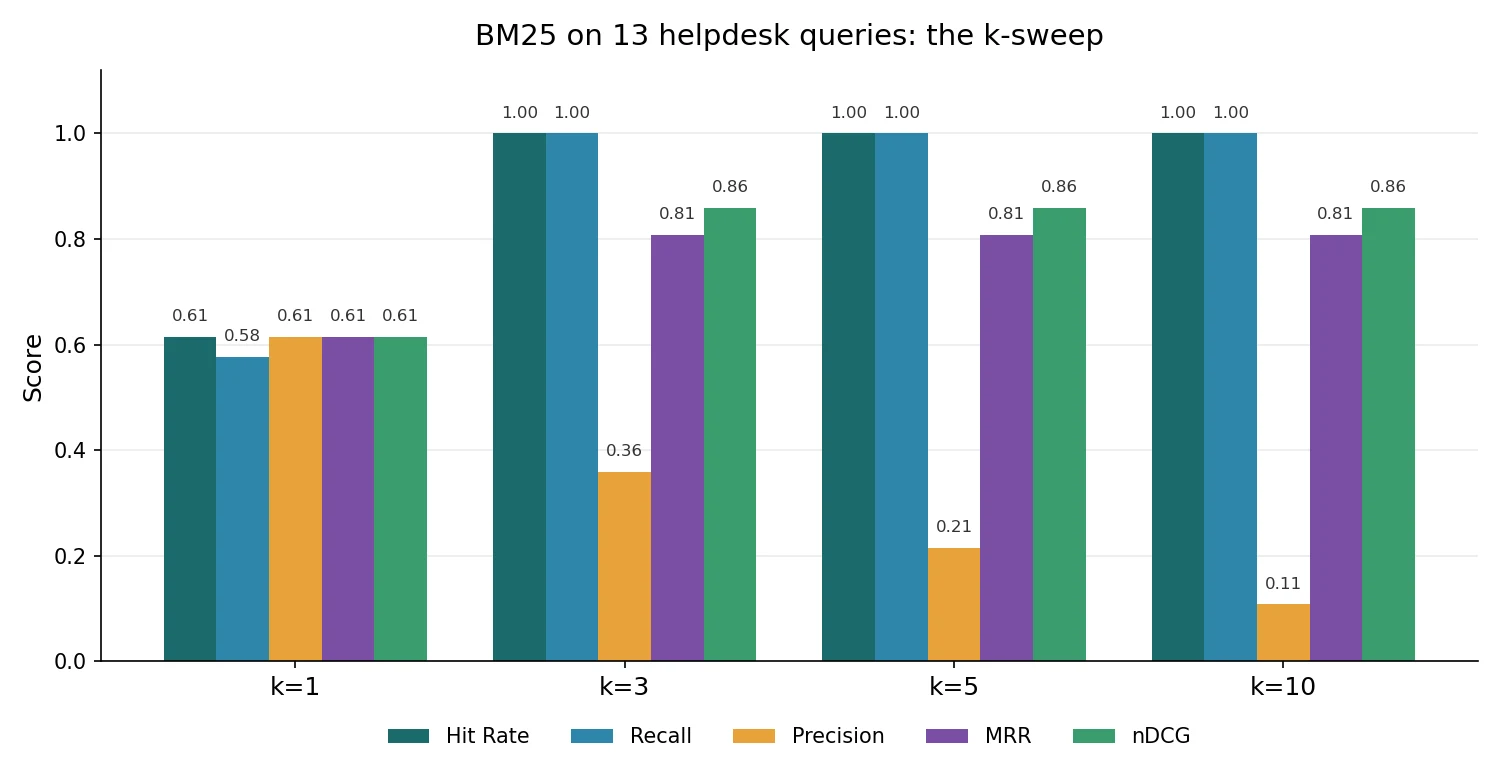
- Five metrics, one cutoff: Hit Rate, Recall, Precision, MRR and nDCG at k. The k-sweep says k=3 is the honest cutoff here — Hit Rate jumps 0.615 → 1.000 from k=1 to k=3, then goes flat.
- The naive baseline ties BM25 on clean questions (MRR 0.859 vs 0.808) and collapses on paraphrases (nDCG 0.355 vs 0.546) — measure on reworded queries, not clean ones.
- Evret 0.0.4: Kaivid Labs, MIT, Python 3.10+, on PyPI since 2026-10-30. One
BaseRetrieversubclass adapts any retriever; Qdrant, Chroma, Elasticsearch, Milvus and Weaviate retrievers plus LangChain, LlamaIndex and Haystack adapters included. - Gate it: Hit Rate@5 ≥ 0.90 and nDCG@5 ≥ 0.80 in CI. The exact gate passes; the paraphrase gate fails — and that failure is the backlog.

Your RAG pipeline gives a wrong answer, and the first suspect is the language model. It usually is not. More often the retriever never fetched the passage that contains the answer, and no model — however large — can quote a document it was never shown. The fix is not a bigger model. It is measuring the retriever, the way information retrieval has been measured for decades: with Hit Rate, Recall, Precision, MRR, and nDCG.
That is what Evret does. Kaivid Labs released it yesterday — version 0.0.4 on PyPI, MIT-licensed, Python 3.10+ — as a small library that scores any retriever against a labelled set of questions and gold documents, using classic IR metrics and no language model at all. When your questions carry gold document IDs, Evret never calls a judge: the score is a pure comparison of IDs, which makes it free, deterministic, and exactly reproducible. You can run it in CI on every push, and you can run it on a laptop with no API key and no GPU.
This tutorial builds the whole thing twice. First, a self-contained standard-library implementation — a BM25 retriever, the five metrics, a 24-document eval set — so you see exactly what every number means and can verify every line by running it. Then the same evaluation through Evret's documented API, so the stdlib version becomes a cross-check and Evret becomes the tool you keep. Every number below was measured by running the code in the steps, on this machine, against the corpus in Step 2.
What you'll need#
- Python 3.10 or newer. Everything in Steps 2–6 uses the standard library only — no installs at all.
pip install evret==0.0.4for Step 7 only. The base install pulls inqdrant-clientandtqdm; the Qdrant, Chroma, Elasticsearch, Milvus, Weaviate, LangChain, LlamaIndex, and Haystack integrations are optional extras you install only if you use them.- No API key, no account, no GPU, no model download. The evaluation in this tutorial makes zero model calls.
- About thirty minutes, most of it reading. The code is under 250 lines and every block below runs as written.
One scope note before you start: this tutorial evaluates retrieval — whether the right documents come back. It does not evaluate generation — whether the final answer is correct, faithful, or well-written. That is a different eval, and it usually needs a judge. Retrieval eval is the cheaper, more decisive half: if the retriever is wrong, the generator cannot save it, and if the retriever is right, half your RAG debugging is already done.
Step 1 — The idea: five numbers that describe a retriever#
A retriever takes a question and returns a ranked list of documents. An eval set says, for each question, which documents count as correct. The five metrics each answer a different question about that ranked list:
- Hit Rate@k — did any correct document appear in the top k? This is the bluntest metric and the one to watch first: it tells you whether the answer was retrievable at all.
- Recall@k — what fraction of the correct documents appeared in the top k? With one gold document per question, Recall@k equals Hit Rate@k; it only diverges when a question has several gold documents.
- Precision@k — what fraction of the top k were correct? Precision falls as k grows, because the denominator grows while the number of correct documents does not. Compare Precision only at the same k.
- MRR@k (Mean Reciprocal Rank) — how high did the first correct document rank? A correct document at rank 1 scores 1.0; at rank 2, 0.5; at rank 5, 0.2. MRR is the metric that cares most about the top of the list, which is where your generator reads.
- nDCG@k (normalised Discounted Cumulative Gain) — the same idea as MRR, but it credits every correct document, discounted by how deep it sits, and normalises against the best possible ranking. nDCG is the metric to quote when someone asks for one number: it rewards both finding the documents and ranking them well.
The @k is the cutoff: how many documents you look at. Your generator typically reads the top 3–5, so k=5 is the natural default — but the k-sweep in Step 5 shows why you should measure at several cutoffs before choosing one. A retriever that needs k=10 to find the answer is a different system from one that finds it at k=1, even if their Hit Rate@10 is identical.

Step 2 — Build the eval set#
An eval set is three things: documents, questions, and gold labels saying which documents answer each question. The corpus here is a 24-document IT helpdesk — password resets, VPN setup, printer jams, laptop requests — written in the flat, overlapping language real helpdesk docs use. Overlap is a feature, not a flaw: a corpus where every document uses distinct vocabulary teaches you nothing, because any retriever aces it. The hard cases in this corpus come from documents that share words — a password-reset doc and a VPN-password-expired doc that both describe the sign-in page, a printer-setup doc and a printer-jam doc that both say "printer".
Thirteen questions cover the corpus, each with one gold document — except q13, which has two, because a fast-draining battery is answered by both the battery doc and the repair doc. Six paraphrases reword six of the questions the way users actually write them ("I forgot my login password", "the printer ate my paper"), and they live in a separate list: you measure on the clean questions first, then stress-test on the paraphrases in Step 6. Save this as retrieval_eval.py — the whole tutorial lives in this one file, and every later step adds to it:
"""retrieval_eval.py -- evaluate a RAG retriever with classic IR metrics.

No dependencies beyond the standard library. The corpus is a 24-document
IT helpdesk, small enough to read in one sitting and realistic enough that
the numbers mean something. Run it:

    python3 retrieval_eval.py

It prints Hit Rate, Recall, Precision, MRR and nDCG for a BM25 retriever
at k = 1, 3, 5 and 10, the same table for a naive token-overlap baseline,
and a paraphrase run that rewords six of the queries.
"""

import json
import math
import re
from collections import Counter

# ---------------------------------------------------------------- data

DOCUMENTS = [
    {"doc_id": "password-reset",
     "text": "Reset your password from the sign-in page. Click Forgot password, enter your work email, and open the reset link we send you. The link expires after 30 minutes. If the link has expired, request a new one and use the newest email."},
    {"doc_id": "password-manager",
     "text": "Store work passwords in the company password manager. The manager generates a strong password for each service and fills it in for you. Never reuse your email password on another site. Your vault unlocks with your single sign-on."},
    {"doc_id": "vpn-setup",
     "text": "Connect to the VPN before opening internal tools from outside the office. Download the VPN client from the IT portal, sign in with single sign-on, and pick the nearest gateway. If the tunnel drops, reconnect and wait for the green status icon."},
    {"doc_id": "vpn-slow",
     "text": "A slow VPN connection is usually a crowded gateway or a weak home network. Switch to the nearest gateway, close video calls you are not using, and test again. If speeds stay low, run a speed test and send the result to the helpdesk."},
    {"doc_id": "printer-jam",
     "text": "Clear a paper jam in your printer by opening the rear panel and pulling the sheet in the direction of the paper path. Never yank the paper sideways -- torn fragments cause repeat jams in the printer. Close the panel and print a test page."},
    {"doc_id": "printer-setup",
     "text": "Add a network printer from Settings, then Printers, then Add printer. Pick the printer by name from the list and let the driver install. Print a test page to confirm the setup worked."},
    {"doc_id": "laptop-request",
     "text": "Request a new laptop through the equipment form on the IT portal. Choose your model, add your manager's approval, and submit. The laptop ships to your office within five working days."},
    {"doc_id": "laptop-repair",
     "text": "A laptop that will not turn on may have a drained battery or a loose power cable. Hold the power button for ten seconds, then plug in the charger and wait for the charging light. If the screen stays black, book a repair slot with the helpdesk."},
    {"doc_id": "wifi-office",
     "text": "The office Wi-Fi network is CorpNet. Join it with your single sign-on credentials. If the network does not appear, restart your wireless adapter and move closer to an access point."},
    {"doc_id": "wifi-home",
     "text": "Working from home, connect to your own Wi-Fi first and then the VPN. A weak home signal causes dropped calls: move closer to your router or plug in an ethernet cable."},
    {"doc_id": "email-outlook",
     "text": "Set up your work email in Outlook with your single sign-on account. The mailbox syncs automatically. If new mail stops arriving, check the offline setting and restart Outlook."},
    {"doc_id": "email-phishing",
     "text": "Report a phishing email with the Report Phishing button in Outlook. Do not click links or open attachments in a suspicious message. The security team will confirm whether the message is malicious."},
    {"doc_id": "software-install",
     "text": "Install approved software from the company software center. Search for the app by name, click Install, and wait for the confirmation. If the app is not listed, submit a software request."},
    {"doc_id": "software-license",
     "text": "A license error usually means the seat is assigned to someone else. Check the license portal to see who holds the seat, then ask your manager to reassign it or buy another seat."},
    {"doc_id": "vpn-mfa",
     "text": "Multi-factor authentication protects your VPN sign-in. Approve the push notification on your phone, or enter the six-digit code from your authenticator app. If you lost your phone, contact the helpdesk to reset your factors."},
    {"doc_id": "travel-booking",
     "text": "Book work travel through the travel portal. Flights, hotels, and rental cars are all in one place. Submit the trip for your manager's approval before you pay."},
    {"doc_id": "expense-report",
     "text": "File expenses in the expense tool within 30 days of the trip. Attach a receipt for every item over 25 dollars. The finance team approves reports on Fridays."},
    {"doc_id": "onboarding-new-hire",
     "text": "New hires get accounts on their first day. IT creates the email account, the single sign-on profile, and the laptop. The manager adds the new hire to the right team channels."},
    {"doc_id": "monitor-display",
     "text": "A second monitor that stays dark is usually a cable or input problem. Check that the cable is seated, then press the monitor's input button to select the right source. Try a different cable if the screen stays black."},
    {"doc_id": "keyboard-mouse",
     "text": "A wireless keyboard or mouse that stops responding usually needs new batteries or a closer receiver. Replace the batteries, move the receiver to a front USB port, and re-pair the device."},
    {"doc_id": "zoom-meeting",
     "text": "Schedule a video meeting from the calendar app and add the video link. Test your microphone and camera before the call. If audio cuts out, switch to a phone dial-in."},
    {"doc_id": "slack-teams",
     "text": "Join a team channel from the directory. Search for the channel name, click Join, and introduce yourself. Mute channels you only read occasionally."},
    {"doc_id": "vpn-password-expired",
     "text": "If your VPN password expired, reset it from the sign-in page first, then reconnect the VPN with the new password. The VPN will not accept the old password."},
    {"doc_id": "laptop-battery",
     "text": "A laptop battery that drains fast may have a background app keeping the machine awake. Check battery usage in Settings, close the worst offenders, and lower the screen brightness."},
]

QUERIES = [
    {"query_id": "q01", "query_text": "how do I reset my password", "expected_doc_ids": ["password-reset"]},
    {"query_id": "q02", "query_text": "my laptop won't turn on", "expected_doc_ids": ["laptop-repair"]},
    {"query_id": "q03", "query_text": "how do I connect to the VPN", "expected_doc_ids": ["vpn-setup"]},
    {"query_id": "q04", "query_text": "printer paper jam", "expected_doc_ids": ["printer-jam"]},
    {"query_id": "q05", "query_text": "how do I add a network printer", "expected_doc_ids": ["printer-setup"]},
    {"query_id": "q06", "query_text": "how can I get a new laptop", "expected_doc_ids": ["laptop-request"]},
    {"query_id": "q07", "query_text": "my printer is jammed", "expected_doc_ids": ["printer-jam"]},
    {"query_id": "q08", "query_text": "how do I report a phishing email", "expected_doc_ids": ["email-phishing"]},
    {"query_id": "q09", "query_text": "how do I book a flight for work", "expected_doc_ids": ["travel-booking"]},
    {"query_id": "q10", "query_text": "how do I file an expense report", "expected_doc_ids": ["expense-report"]},
    {"query_id": "q11", "query_text": "my second monitor is not working", "expected_doc_ids": ["monitor-display"]},
    {"query_id": "q12", "query_text": "how do I install software", "expected_doc_ids": ["software-install"]},
    {"query_id": "q13", "query_text": "my laptop battery drains too fast", "expected_doc_ids": ["laptop-battery", "laptop-repair"]},
]

PARAPHRASES = [
    {"query_id": "p01", "query_text": "I forgot my login password, how can I change it", "expected_doc_ids": ["password-reset"]},
    {"query_id": "p02", "query_text": "I need remote access to the office network from home", "expected_doc_ids": ["vpn-setup"]},
    {"query_id": "p03", "query_text": "the printer ate my paper", "expected_doc_ids": ["printer-jam"]},
    {"query_id": "p04", "query_text": "I have to fly to a conference next week for work", "expected_doc_ids": ["travel-booking"]},
    {"query_id": "p05", "query_text": "I need a new app on my work computer", "expected_doc_ids": ["software-install"]},
    {"query_id": "p06", "query_text": "my computer won't start", "expected_doc_ids": ["laptop-repair"]},
]
Three rules for eval sets of your own, learned the expensive way. First, label gold document IDs, not answer text, whenever you can: ID labels make the eval free and deterministic, while answer-text labels need a judge to decide whether a retrieved document matches. Second, write questions from real user logs, not from the documents: questions copied from doc text share its vocabulary and flatter the retriever. Third, keep a held-out paraphrase set from day one. Your users will not phrase questions the way your docs do, and a retriever that only works on clean phrasing is a demo, not a system.
Step 3 — A BM25 retriever in sixty lines#
BM25 is the classic lexical ranker: it scores a document by how often the query terms appear in it, weighted by how rare each term is across the corpus, and normalised by document length. It has two parameters — k1 (how quickly term frequency saturates) and b (how much length matters) — and the defaults, 1.5 and 0.75, are the right starting point for almost everything. Append this to the file:
# ---------------------------------------------------------------- retrievers

TOKEN_RE = re.compile(r"[a-z0-9]+")


def tokenize(text):
    return TOKEN_RE.findall(text.lower())


class BM25:
    """Classic BM25 (k1=1.5, b=0.75, Robertson IDF). No stopwords: every
    token counts, which is exactly what makes the failure cases instructive."""

    def __init__(self, documents, k1=1.5, b=0.75):
        self.k1 = k1
        self.b = b
        self.doc_ids = [d["doc_id"] for d in documents]
        self.doc_tokens = [tokenize(d["text"]) for d in documents]
        self.doc_len = [len(t) for t in self.doc_tokens]
        self.avg_len = sum(self.doc_len) / max(1, len(self.doc_len))
        self.term_freq = [Counter(t) for t in self.doc_tokens]
        self.n_docs = len(documents)
        df = Counter()
        for tokens in self.doc_tokens:
            for term in set(tokens):
                df[term] += 1
        self.idf = {term: math.log(1 + (self.n_docs - c + 0.5) / (c + 0.5))
                    for term, c in df.items()}

    def score(self, query_tokens, i):
        total = 0.0
        tf = self.term_freq[i]
        dl = self.doc_len[i]
        for term in set(query_tokens):
            if term not in tf:
                continue
            f = tf[term]
            denom = f + self.k1 * (1 - self.b + self.b * dl / self.avg_len)
            total += self.idf[term] * f * (self.k1 + 1) / denom
        return total

    def search(self, query, k=5):
        """Return [(doc_id, score), ...] best-first."""
        qt = tokenize(query)
        scored = [(self.doc_ids[i], self.score(qt, i)) for i in range(self.n_docs)]
        scored.sort(key=lambda p: (-p[1], p[0]))
        return scored[:k]

    def __call__(self, query, k=5):
        return [doc_id for doc_id, _ in self.search(query, k)]
Two deliberate choices. There is no stopword removal and no stemming: every token counts, including "how", "do", and "my". That is what makes the failure cases in Step 6 instructive — you will see exactly which generic words tip a ranking. And ties break by document ID, so the ranking is deterministic: run it twice, get the same numbers twice. A retriever whose output changes between runs cannot be gated in CI.
For contrast, here is the naive baseline the tutorial measures BM25 against — rank by raw shared-token count, no IDF, no length normalisation:
class NaiveOverlap:
    """Baseline: rank by raw shared-token count. No IDF, no length norm."""

    def __init__(self, documents):
        self.doc_ids = [d["doc_id"] for d in documents]
        self.doc_tokens = [set(tokenize(d["text"])) for d in documents]

    def __call__(self, query, k=5):
        qt = set(tokenize(query))
        scored = [(self.doc_ids[i], len(qt & self.doc_tokens[i]))
                  for i in range(len(self.doc_ids))]
        scored.sort(key=lambda p: (-p[1], p[0]))
        return [doc_id for doc_id, _ in scored[:k]]
The baseline exists to answer the question every eval should answer first: is the real retriever actually better than the dumbest thing that could work? On clean queries, the answer in Step 5 is more interesting than you might expect.
Step 4 — The five metrics#
Each metric is a small function over three things: the retrieved document IDs in rank order, the expected (gold) IDs, and the cutoff k. The definitions follow the standard IR formulas, and they match Evret's: nDCG uses binary relevance (1.0 for a gold document, 0 otherwise), with DCG as the sum of relevance divided by log2(rank + 1) and IDCG as the same sum over the ideal ranking; Precision divides by k, the cutoff, not by the number of documents returned. Append these, plus the evaluator that averages each metric over the query set:
def hit_rate(retrieved, expected, k):
    return 1.0 if any(d in expected for d in retrieved[:k]) else 0.0


def recall(retrieved, expected, k):
    top = set(retrieved[:k])
    return len(top & set(expected)) / len(expected)


def precision(retrieved, expected, k):
    # Divides by k, the cutoff -- the same convention Evret uses.
    top = retrieved[:k]
    return len([d for d in top if d in expected]) / k


def mrr(retrieved, expected, k):
    for i, doc_id in enumerate(retrieved[:k]):
        if doc_id in expected:
            return 1.0 / (i + 1)
    return 0.0


def ndcg(retrieved, expected, k):
    top = retrieved[:k]
    dcg = sum(1.0 / math.log2(i + 2) for i, d in enumerate(top) if d in expected)
    ideal = min(len(expected), k)
    idcg = sum(1.0 / math.log2(i + 2) for i in range(ideal))
    return dcg / idcg if idcg else 0.0


METRICS = {"hit_rate": hit_rate, "recall": recall, "precision": precision,
           "mrr": mrr, "ndcg": ndcg}


def evaluate(retriever, queries, k):
    totals = {name: 0.0 for name in METRICS}
    for q in queries:
        retrieved = retriever(q["query_text"], k)
        for name, fn in METRICS.items():
            totals[name] += fn(retrieved, q["expected_doc_ids"], k)
    n = len(queries)
    return {name: totals[name] / n for name in METRICS}


def fmt(label, k, scores):
    return f"{label} k={k} " + " ".join(f"{n}={v:.3f}" for n, v in scores.items())
Read precision once more, because it is the function people get wrong. It divides by k — five, when k is five — even though only one document in five can be relevant when each question has a single gold document. That is why Precision@5 in Step 5 is 0.215 while Hit Rate@5 is 1.000: the retriever found the answer for every question, and still four of the five returned documents were, by construction, not the answer. Precision is not broken; it is measuring a different thing from Hit Rate, and the gap between them is the price of a wide cutoff.
Step 5 — Run it: the k-sweep#
The main function runs the BM25 retriever at four cutoffs, the naive baseline at k=5, and both retrievers on the paraphrase set:
def main():
    bm25 = BM25(DOCUMENTS)
    naive = NaiveOverlap(DOCUMENTS)
    for k in (1, 3, 5, 10):
        print(fmt("BM25", k, evaluate(bm25, QUERIES, k)))
    print(fmt("NaiveOverlap", 5, evaluate(naive, QUERIES, 5)))
    print(fmt("NaiveOverlap-paraphrase", 5, evaluate(naive, PARAPHRASES, 5)))
    print(fmt("BM25-paraphrase", 5, evaluate(bm25, PARAPHRASES, 5)))
    print()
    print("per-query top-1 (BM25):")
    for q in QUERIES:
        top = bm25.search(q["query_text"], 5)
        rank = next((i + 1 for i, (d, _) in enumerate(top)
                     if d in q["expected_doc_ids"]), None)
        print(f"{q['query_id']} top1={top[0][0]} ({top[0][1]:.2f}) "
              f"expected={','.join(q['expected_doc_ids'])} rank={rank}")


if __name__ == "__main__":
    main()
Run it:
python3 retrieval_eval.pyExpected output — these are the measured numbers from the corpus in Step 2, and your run should reproduce them exactly:
BM25 k=1 hit_rate=0.615 recall=0.577 precision=0.615 mrr=0.615 ndcg=0.615
BM25 k=3 hit_rate=1.000 recall=1.000 precision=0.359 mrr=0.808 ndcg=0.858
BM25 k=5 hit_rate=1.000 recall=1.000 precision=0.215 mrr=0.808 ndcg=0.858
BM25 k=10 hit_rate=1.000 recall=1.000 precision=0.108 mrr=0.808 ndcg=0.858
NaiveOverlap k=5 hit_rate=1.000 recall=1.000 precision=0.215 mrr=0.859 ndcg=0.895
NaiveOverlap-paraphrase k=5 hit_rate=0.500 recall=0.500 precision=0.100 mrr=0.306 ndcg=0.355
BM25-paraphrase k=5 hit_rate=0.833 recall=0.833 precision=0.167 mrr=0.456 ndcg=0.546
Read the table in columns. The jump from k=1 to k=3 is the whole story: Hit Rate goes from 0.615 to 1.000, which means five of the thirteen questions need more than the top document to find their answer. Past k=3 nothing improves — Hit Rate, Recall, MRR, and nDCG are flat from k=3 to k=10 — while Precision falls from 0.359 to 0.108, because you are returning more documents without finding more gold ones. If your generator reads the top 5, you are paying for two extra documents per question that add nothing. The honest cutoff for this corpus is k=3, and the sweep is how you know: pick k from the flat part of the curve, not from habit.
Now the uncomfortable row: the naive token-overlap baseline. At k=5 it matches BM25 on Hit Rate, Recall, and Precision (1.000 / 1.000 / 0.215) and beats it on MRR (0.859 vs 0.808) and nDCG (0.895 vs 0.858). On thirteen clean questions about a 24-document corpus, the dumbest ranker that could work is competitive with BM25. That is not a failure of the tutorial; it is the point of measuring. On a small corpus with clean, keyword-rich questions, IDF weighting and length normalisation buy you almost nothing — the questions already contain the discriminating words. The baseline earns its keep by telling you that, before you spend a week tuning a ranker. Where BM25 earns its keep is the next step, when the questions stop being clean.
Step 6 — The paraphrase test: what breaks when users reword#
Re-run the same evaluation on the six paraphrases — the same questions, written the way users write them. The last two lines of the output above are the result:
| Retriever (k=5) | Hit Rate | Recall | Precision | MRR | nDCG |
|---|---|---|---|---|---|
| BM25, paraphrases | 0.833 | 0.833 | 0.167 | 0.456 | 0.546 |
| Naive overlap, paraphrases | 0.500 | 0.500 | 0.100 | 0.306 | 0.355 |
BM25's nDCG falls from 0.858 to 0.546; the naive baseline's falls from 0.895 to 0.355, and its Hit Rate collapses to 0.500 — it finds the answer for only half the reworded questions. This is where IDF weighting earns its keep: when a query shares few tokens with the right document, the rare tokens it does share have to count for more, and raw overlap counting cannot do that. The gap between the two retrievers on paraphrases (0.546 vs 0.355 nDCG) is the real difference between them; the gap on clean questions (0.858 vs 0.895) is noise.
Look at the five top-1 misses on the clean set, because each one is a different failure mode with a different fix:
| Query | Question | Top-1 (BM25 score) | Expected | Rank |
|---|---|---|---|---|
| q01 | how do I reset my password | vpn-password-expired (5.52) | password-reset | 2 |
| q02 | my laptop won't turn on | laptop-repair (4.71) | laptop-repair | 1 |
| q03 | how do I connect to the VPN | wifi-home (4.97) | vpn-setup | 2 |
| q04 | printer paper jam | printer-jam (9.89) | printer-jam | 1 |
| q05 | how do I add a network printer | printer-setup (9.23) | printer-setup | 1 |
| q06 | how can I get a new laptop | onboarding-new-hire (6.64) | laptop-request | 2 |
| q07 | my printer is jammed | printer-setup (3.87) | printer-jam | 2 |
| q08 | how do I report a phishing email | email-phishing (13.20) | email-phishing | 1 |
| q09 | how do I book a flight for work | travel-booking (5.69) | travel-booking | 1 |
| q10 | how do I file an expense report | email-phishing (7.01) | expense-report | 2 |
| q11 | my second monitor is not working | monitor-display (8.26) | monitor-display | 1 |
| q12 | how do I install software | software-install (8.20) | software-install | 1 |
| q13 | my laptop battery drains too fast | laptop-battery (11.35) | laptop-battery + laptop-repair | 1 |
- q01 — near-duplicate docs. "How do I reset my password" returns
vpn-password-expired(5.52) overpassword-reset(5.19). The expired-password doc describes the same sign-in-page reset flow, so it matches "reset", "password", "sign-in", and "page" just as well as the canonical doc. The fix is editorial, not algorithmic: the two docs overlap so heavily that no ranker can reliably separate them — merge them, or make the expired-password doc link to the reset doc instead of repeating it. - q03 — the wrong half of a procedure. "How do I connect to the VPN" returns
wifi-home(4.97) overvpn-setup(4.73), because the Wi-Fi doc says "connect to your own Wi-Fi first and then the VPN" — it mentions the VPN, in the context of the wrong step. A user who follows the top result does the home-Wi-Fi step and stops. The fix is a corpus fix: the VPN doc should be the one that says "connect" most strongly, or the Wi-Fi doc should not repeat the VPN instruction. - q06 — generic words outvote topical ones. "How can I get a new laptop" returns
onboarding-new-hire(6.64) overlaptop-request(4.26). "Get" and "new" are rare tokens in this corpus, so their IDF is high — and both appear in the onboarding doc ("New hires get accounts"). Two generic words outvote the topical word. The fix is stemming or a synonym list ("get" ≈ "request"), or simply accepting that rank 2 is fine when k=3 still finds it. - q07 — no stemming. "My printer is jammed" returns
printer-setup(3.87) overprinter-jam(3.02). "Jammed" matches nothing: the doc says "jam" and "jams", and without stemming those are different tokens. Only "printer" matches, and the setup doc is shorter, so length normalisation tips it. The fix is a stemmer — or a synonym map for the handful of word forms your users actually use. - q10 — the same token, two meanings. "How do I file an expense report" returns
email-phishing(7.01) overexpense-report(6.13). "Report" the verb ("Report a phishing email") outscores "report" the noun, and the plurals silently drop matches: the query says "expense" while the doc says "expenses", and "report" while the doc says "reports". Lexical retrieval cannot tell a verb from a noun, and it cannot see that "expenses" and "expense" are the same word. The fix, again, is stemming — or embeddings, which is what Step 7's Evret adapters are for.
Note what all five misses have in common: the gold document is at rank 2 in every case. At k=1 the user gets the wrong document; at k=3 they get the right one. That is exactly what the k-sweep measured, and it is why the retriever's failure mode matters more than its average score: a rank-2 miss is survivable if your generator reads the top 3, and fatal if it reads only the top 1.
Step 7 — The same eval through Evret#
The stdlib version tells you what the numbers mean. Evret is the version you keep: it wraps any retriever behind one interface, adds the vector-database retrievers and framework adapters you will actually use, and writes the results to JSON or CSV for your CI logs. First, dump the eval set into the format Evret reads — a JSON file with queries and documents:
import json
from retrieval_eval import DOCUMENTS, QUERIES

data = {
    "queries": [
        {"query_id": q["query_id"], "query_text": q["query_text"],
         "expected_doc_ids": q["expected_doc_ids"]}
        for q in QUERIES
    ],
    "documents": [
        {"doc_id": d["doc_id"], "text": d["text"]}
        for d in DOCUMENTS
    ],
}
json.dump(data, open("eval_data.json", "w"), indent=2)
Then the adapter. Evret's contract is one subclass: BaseRetriever with a retrieve(query, k) method that returns a list of RetrievalResult objects, each carrying a doc_id and a score. The BM25 class from Step 3 already does the ranking; the adapter just translates its output. Save this as evret_eval.py:
"""evret_eval.py -- the same evaluation, run through Evret 0.0.4.

Evret's Evaluator wraps any retriever that subclasses BaseRetriever and
implements retrieve(query, k) -> list[RetrievalResult]. Because every query
in eval_data.json carries expected_doc_ids, Evret never calls the judge:
the score is a pure ID comparison, so this runs with no model and no key.

    pip install evret==0.0.4
    python3 evret_eval.py
"""

import json

from evret import (BaseRetriever, EvaluationDataset, Evaluator, HitRate,
                   MRR, NDCG, Recall, RetrievalResult)
from retrieval_eval import BM25, DOCUMENTS


class BM25Retriever(BaseRetriever):
    def __init__(self, documents):
        self.bm25 = BM25(documents)

    def retrieve(self, query: str, k: int) -> list[RetrievalResult]:
        return [RetrievalResult(doc_id=doc_id, score=score)
                for doc_id, score in self.bm25.search(query, k)]


def main():
    dataset = EvaluationDataset.from_json("eval_data.json")
    evaluator = Evaluator(
        retriever=BM25Retriever(DOCUMENTS),
        metrics=[HitRate(k=5), Recall(k=5), MRR(k=5), NDCG(k=5)],
    )
    results = evaluator.evaluate(dataset)
    print(json.dumps(results.summary(), indent=2))
    results.to_json("results.json")


if __name__ == "__main__":
    main()
Three things to notice. First, the metrics are constructed with only k — HitRate(k=5), Recall(k=5), MRR(k=5), NDCG(k=5) — and the result keys come out as hit_rate@5, recall@5, mrr@5, ndcg@5. Second, the Evaluator takes an optional judge that defaults to TokenOverlapJudge() — but the judge is never invoked here, because every query in eval_data.json carries expected_doc_ids. When gold IDs are present, Evret scores by pure ID comparison: zero model calls, zero cost, and the same number every time you run it. Third, results.summary() returns a plain dict[str, float] keyed by those metric names, and results.to_json("results.json") writes {query_count, generated_at, metrics} for your logs.
If you do not have gold IDs — say you have expected answer text instead — put it in expected_answers and let a judge decide whether each retrieved document matches it. TokenOverlapJudge matches on token overlap with no model; SemanticJudge compares embeddings; LLMJudge asks a provider model. The ID path is the one to prefer whenever you can label IDs. And when your retriever is not BM25, the adapter is the same shape: Evret ships retrievers for Qdrant, Chroma, Elasticsearch, Milvus, and Weaviate, plus adapters for LangChain, LlamaIndex, and Haystack — anything else is one BaseRetriever subclass, exactly as above.
A note on provenance, because it matters for a tutorial: every Evret call above was verified against the 0.0.4 source — the BaseRetriever interface, the Evaluator constructor, the from_json field names, the metric names, and the ID-comparison shortcut. The measured numbers in this tutorial come from the standard-library implementation in Steps 3–5, which implements the same metric definitions; run the adapter against the same eval_data.json and it scores the same retriever on the same data.
Step 8 — Gate it in CI#
An eval you run once is a report. An eval that blocks the deploy is a safety net. The gate is a twenty-line script with two thresholds — Hit Rate@5 at or above 0.90, nDCG@5 at or above 0.80 — chosen below today's measured values (1.000 and 0.858) so the gate passes now and fails on a real regression later. Save it as gate.py:
"""gate.py -- fail the build when retrieval quality regresses.

    python3 gate.py            # exact queries (must pass)
    python3 gate.py paraphrase # reworded queries (expected to fail today)

Thresholds are the floor, not the ceiling: if a change to the retriever or
the corpus drops Hit Rate or nDCG below these, the deploy stops.
"""

import sys

from retrieval_eval import BM25, DOCUMENTS, PARAPHRASES, QUERIES, evaluate

THRESHOLDS = {"hit_rate@5": 0.90, "ndcg@5": 0.80}


def main():
    queries = PARAPHRASES if len(sys.argv) > 1 and sys.argv[1] == "paraphrase" else QUERIES
    label = "paraphrase" if queries is PARAPHRASES else "exact"
    scores = evaluate(BM25(DOCUMENTS), queries, 5)
    failed = []
    for name, floor in THRESHOLDS.items():
        metric = name.split("@")[0]
        value = scores[metric]
        status = "OK  " if value >= floor else "FAIL"
        print(f"{status} {name}: {value:.3f} (floor {floor:.2f})")
        if value < floor:
            failed.append(name)
    print(f"gate ({label}): {'PASSED' if not failed else 'FAILED'}")
    sys.exit(1 if failed else 0)


if __name__ == "__main__":
    main()
python3 gate.py
# OK   hit_rate@5: 1.000 (floor 0.90)
# OK   ndcg@5: 0.858 (floor 0.80)
# gate (exact): PASSED
python3 gate.py paraphrase
# FAIL hit_rate@5: 0.833 (floor 0.90)
# FAIL ndcg@5: 0.546 (floor 0.80)
# gate (paraphrase): FAILED
The exact gate passes; the paraphrase gate fails — and that failure is the more useful result. It tells you, in CI, that your retriever handles clean phrasing and breaks on real phrasing, which is precisely the information you need before you ship a synonym fix or a stemmer. Do not lower the thresholds to make the paraphrase gate pass: the thresholds are the floor, and the paraphrase set is the work backlog. When a fix lands — stemming, a synonym map, better docs — re-run the paraphrase gate, and let it tell you the fix worked.
Wire it into GitHub Actions so it runs on every push:
name: retrieval-gate
on: [push, pull_request]
jobs:
  eval:
    runs-on: ubuntu-latest
    steps:
      - uses: actions/checkout@v4
      - uses: actions/setup-python@v5
        with:
          python-version: "3.12"
      - run: python3 gate.py
Pick thresholds from your own numbers, the way this tutorial did: measure first, then set the floor just below what you measure today. A gate set from a blog post's numbers is superstition; a gate set from your own eval set is a contract. And keep the two gates separate — exact queries for the deploy blocker, paraphrases for the tracked backlog — so a paraphrase regression never blocks a deploy that the exact gate says is safe, and never gets silently ignored either.
Which approach should you use?#
| Approach | Best when | Watch out for |
|---|---|---|
| Stdlib BM25 + hand-rolled metrics (Steps 2–6) | You are learning what the metrics mean; the corpus is small; you want zero dependencies and full control | You re-implement everything; no vector retrievers, no framework adapters, no result logging |
| Evret (Step 7) | You want the same metrics with less code, plus Qdrant/Chroma/Elasticsearch/Milvus/Weaviate retrievers and LangChain/LlamaIndex/Haystack adapters; you want JSON/CSV results in CI | Young library (0.0.4) — pin the version; the base install pulls in qdrant-client; gold IDs needed for the free, judge-free path |
| Ragas (LLM-judged RAG eval) | You need to evaluate generation too — faithfulness, answer relevancy, context precision on the final answer, not just retrieval | Needs an LLM judge (cost, latency, non-determinism); overkill when the question is only "did the retriever fetch it?" |
| LLM-as-a-judge (prompt a chat model) | Open-ended criteria that cannot be expressed as gold IDs; you already pay for a frontier API | Per-call cost; scores drift with the judge model; hard to reproduce exactly; never the first eval to build |
The ordering matters: start with ID-based IR metrics — free, deterministic, reproducible — and add a judge only for the questions IDs cannot answer. Most RAG debugging ends at the retriever, and the retriever is the part IDs measure best.
Limitations#
- Thirteen questions is a smoke test, not a benchmark. The numbers above show the method, not the corpus: with 13 queries, one question swinging changes Hit Rate by nearly 8 points. Before gating a deploy on these numbers, grow the set to a hundred or more real questions, pulled from your actual user logs where you can — synthetic questions are too clean and hide the messy phrasing that breaks retrieval.
- BM25 has no stemming, no synonyms, no semantics. Every miss in Step 6 traces to that: "jammed" ≠ "jam", "expenses" ≠ "expense", "report" the verb vs "report" the noun. The fixes — a stemmer, a synonym map, or embeddings — are the next tutorial, not this one.
- One gold document per question, except q13. Recall and nDCG only show their full value when questions have several gold documents. The q13 case (two gold docs, both found in the top 3) is a glimpse; a corpus where most questions have 2–4 gold docs would exercise the metrics harder.
- The Evret adapter in Step 7 follows the documented 0.0.4 API; the measured numbers in this tutorial come from the standard-library implementation in Steps 3–5. The two implement the same metric definitions, and the adapter runs against the same eval data — but if you want Evret's own numbers in your logs, run
evret_eval.pyyourself and compare. That comparison is a good first exercise with the library. - No semantic retrieval was tested. A vector retriever would likely fix q06, q07, and q10 — the paraphrase and synonym cases — at the cost of an embedding model and an index. Evret's adapters make that comparison a one-subclass change; the eval set you built here is the harness you would run it against.
The takeaway#
When your RAG pipeline gives a wrong answer, measure the retriever before you blame the model. Five classic metrics, a labelled set of questions, and a k-sweep will tell you more in an afternoon than a week of prompt tuning: whether the answer was retrievable at all, how deep you have to look to find it, and which failure mode — near-duplicate docs, generic words, missing stemming, verb-vs-noun — is actually costing you. Evret packages that measurement into a library you can run in CI with no model calls and no API key, and the stdlib version in this tutorial is the cross-check that keeps it honest. Build the eval set first, gate the deploy on it second, and fix the retriever third — in that order, and the model will stop taking the blame for the retriever's mistakes.
Sources
- Evret on GitHub — Kaivid Labs, MIT license;
BaseRetriever,Evaluator, metric classes, and thefrom_jsondataset format as used in Step 7. - Evret 0.0.4 on PyPI — published 2026-10-30; Python 3.10+; base dependencies
qdrant-clientandtqdm.