QMD: turn your notes and docs into a local hybrid search engine your coding agent can query
QMD 2.9.0 is a local search engine for your markdown: BM25, vector search, LLM reranking and query expansion, all on your machine with no API key — plus an MCP server your agent can call. This tutorial installs it, indexes a real docs folder, and measures every search mode.
qmd init, and you get BM25 keyword search, vector search, and a hybrid query pipeline with LLM expansion and reranking — plus an MCP server your coding agent can call. Everything runs on your machine with no API key; the three local models total about 2.3 GB on first use.- Three search modes: BM25 keyword search (no models), vector search (embedding model), and hybrid
query(expansion + RRF + reranker). - Three local models: EmbeddingGemma 300M, Qwen3-Reranker 0.6B, and QMD's fine-tuned query-expansion 1.7B — about 2.25 GB total, cached in
~/.cache/qmd/models/. - Measured on a 2-core CPU VM: BM25 search is instant; a typed vector query took 6.9 s; embedding 6 documents took 3m 10s including the 318 MB model download.
- MCP server, 5 tools:
query,get,multi_get,status,metadata— over stdio or HTTP, verified with a JSON-RPC client. - v2.9.0 (November 18): adds metadata filtering, document processors, and remote model support.

Your notes are only useful if you can find the right one in seconds — the runbook paragraph, the decision from last month's meeting, the incident review that already solved today's outage. Grep finds keywords. What it cannot do is find the document that means the same thing in different words, rank a dozen near-matches, or hand a clean answer to your coding agent.
QMD does all three, on your machine, with no API key. It is a local search engine for markdown: BM25 keyword search, vector search over local embeddings, and a hybrid mode that expands your query with a small local model, fuses the results, and reranks them. Version 2.9.0, released November 18, adds metadata filtering, document processors, and remote-model support — and it is currently trending on GitHub, with 31,248 stars and 1,970 forks at the time of writing. This tutorial installs it, indexes a real folder of docs and notes, and measures every search mode end to end. The project is tobi/qmd on GitHub, MIT licensed.
What you will need#
- Node.js 22 or newer. QMD is published as the npm package
@tobilu/qmd; Bun 1.0+ also works. The tutorial was verified with Node v24.22.1 and npm 10.9.4 on Linux. macOS needs Homebrew SQLite (brew install sqlite) for extension support; Linux needs nothing extra. - About 2.3 GB of disk for models, on first use. QMD auto-downloads three GGUF models from Hugging Face: EmbeddingGemma 300M (~318 MB) for embeddings, a fine-tuned Qwen3 1.7B (~1.19 GiB) for query expansion, and Qwen3-Reranker 0.6B (~610 MB) for reranking. They are cached in
~/.cache/qmd/models/. Keyword search needs none of them. - No API key, no account, no GPU. Everything runs locally. On a CPU-only machine the small models are slow — budget minutes, not seconds, for the first embedding pass — but they work. This tutorial was verified on a 2-core VM with no GPU.
- A folder of markdown. Notes, docs, meeting transcripts, a wiki — anything
*.md. The tutorial uses a six-document sample (deploy runbook, API auth notes, billing migration plan, onboarding checklist, meeting notes, incident review) so every result below is reproducible.
Step 1 — Install QMD#
npm install -g @tobilu/qmd
qmd --version
Expected output:
qmd 2.9.0 (aa247d0)The version string includes the git commit the release was built from; aa247d0 is the current tip of tobi/qmd. If you prefer not to install globally, npx @tobilu/qmd runs it directly. qmd --help lists the three search modes up front: search (BM25 only), vsearch (vector only), and query (hybrid — the recommended default).
Step 2 — Create a project index and add collections#
QMD keeps its configuration in a single YAML file and its index in SQLite. A project-local index keeps both inside the project:
cd ~/my-docs
qmd init
qmd collection add ./docs --name docs
qmd collection add ./notes --name notes
qmd collection list
qmd init prints ready to go with new local index and writes .qmd/index.yml, pre-filled with the three default model URIs, plus an empty index.sqlite (about 220 KB before any documents are indexed). Each collection add indexes its folder immediately — four documents from docs/, two from notes/ in the sample — and reports how many chunks still need vectors:
Indexed: 4 new, 0 updated, 0 unchanged, 0 removed

Run 'qmd embed' to update embeddings (4 unique hashes need vectors)
A collection is a folder plus a glob (default **/*.md). You can scope later searches with -c docs or -c notes -c docs, exclude a collection from default searches with qmd collection exclude, and attach a shell hook that runs before every re-index with qmd collection update-cmd notes 'git pull --rebase'. Re-indexing after edits is qmd update; it reported 0 new, 0 updated, 4 unchanged on an unchanged folder. qmd status summarizes the whole index: document count, how many still need embedding, collections, and the model URLs.
Step 3 — First search: BM25, no models required#
Before any model downloads, keyword search already works. QMD's search is BM25 full-text search over the SQLite FTS index:
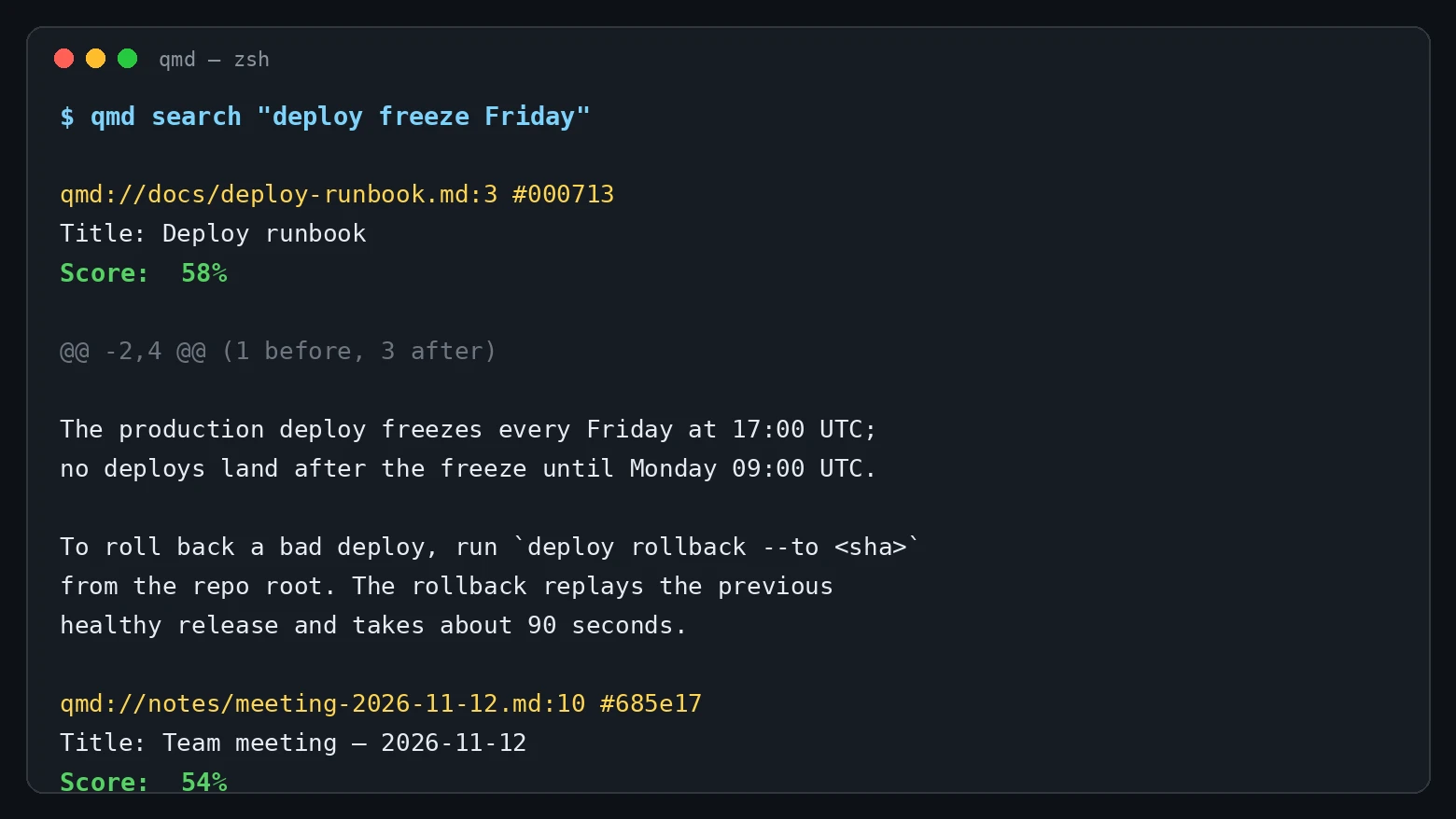
qmd search "deploy freeze Friday"qmd://docs/deploy-runbook.md:3 #000713
Title: Deploy runbook
Score: 58%
@@ -2,4 @@ (1 before, 3 after)
The production deploy freezes every Friday at 17:00 UTC; no deploys land after the freeze until Monday 09:00 UTC.
To roll back a bad deploy, run `deploy rollback --to <sha>` from the repo root. The rollback replays the previous healthy release and takes about 90 seconds.The correct document is first at 58%, ahead of the meeting notes at 54% (which mention the freeze as an open question). A scoped search is sharper still — qmd search "Postgres 16 migration" -c docs returns the billing migration plan at 73%. Scores are normalized to a 0–100% scale; the README's own guide reads 0.8–1.0 as highly relevant, 0.5–0.8 as relevant, 0.2–0.5 as somewhat relevant.
For agents and scripts, --json emits structured results with docid, score, file, line, title, and snippet. qmd search "checkout 500 error rate" --json returned the incident review at 0.79. qmd get then retrieves a full document by path or docid, line-numbered — qmd get "#000713" prints the deploy runbook with its folder context attached.
Step 4 — Embeddings and vector search#
Vector search needs embeddings. qmd embed downloads the EmbeddingGemma model on first use and embeds every indexed chunk:
qmd embedModel: embeddinggemma-300M-Q8_0.gguf
✓ Done! Embedded 6 chunks from 6 documents in 3m 10sThe 3m 10s includes the ~318 MB model download; embedding six short documents is seconds of that. An incremental run after adding one document took 7 seconds. Embeddings are 768-dimensional vectors stored in sqlite-vec; re-running qmd embed only processes changed chunks.
One behavior worth knowing before you run vsearch: it does more than embed your query. QMD expands the query with the 1.7B expansion model first, then runs the original plus the expanded variants through vector search. So the first vsearch also downloads the ~1.19 GiB expansion model. That is the single biggest first-run cost in QMD, and it is not obvious from the command name — budget for it.
qmd vsearch "how do I roll back a bad release"The expansion model rewrote the question into four vector queries — two paraphrases and one hypothetical passage (HyDE) — and searched them in parallel. The runbook still came first, but the scores are raw cosine similarity, so the gap between first and fourth is narrow:
$ qmd vsearch "how do I roll back a bad release"
├─ how do I roll back a bad release
├─ vec: steps for rolling back software releases
├─ vec: best practices for rollback management
└─ hyde: To roll back a bad release, start by reviewing the requirements and d...
Searching 4 vector queries...

qmd://docs/deploy-runbook.md:5 #000713 — Deploy runbook — 54%
qmd://notes/adr-2026-11-15.md:13 #ff3e50 — ADR: freeze deploys on Fridays — 39%
qmd://notes/incident-2026-11-10.md:3 #b9bf56 — Incident review — 2026-11-10 — 34%
qmd://docs/billing-migration.md:5 #8b613b — Billing migration plan — 32%
Total time: 33.3 seconds on this 2-core CPU VM, most of it loading the 1.7B expansion model. The paraphrase test also shows the small model's limits — asked "are we allowed to ship code over Christmas", it expanded to "how do i navigate christmas celebrations with work schedules?" and returned a single hit, the Friday-freeze ADR at 30%, just above the 0.3 cutoff, in 21.9 seconds.
Paraphrase is where vector search earns its keep: the query shares almost no keywords with the runbook ("roll back" vs "rollback", "bad release" vs "bad deploy"), yet the semantic match still surfaces the right paragraph first. BM25 alone would have ranked it lower or missed it.
If you want vector search without the expansion step, use a typed query document with --no-rerank (see Step 5). The typed form skips expansion entirely and, at 6.9 seconds end to end on this VM, is the fastest semantic path QMD offers.
Step 5 — The full pipeline: qmd query#
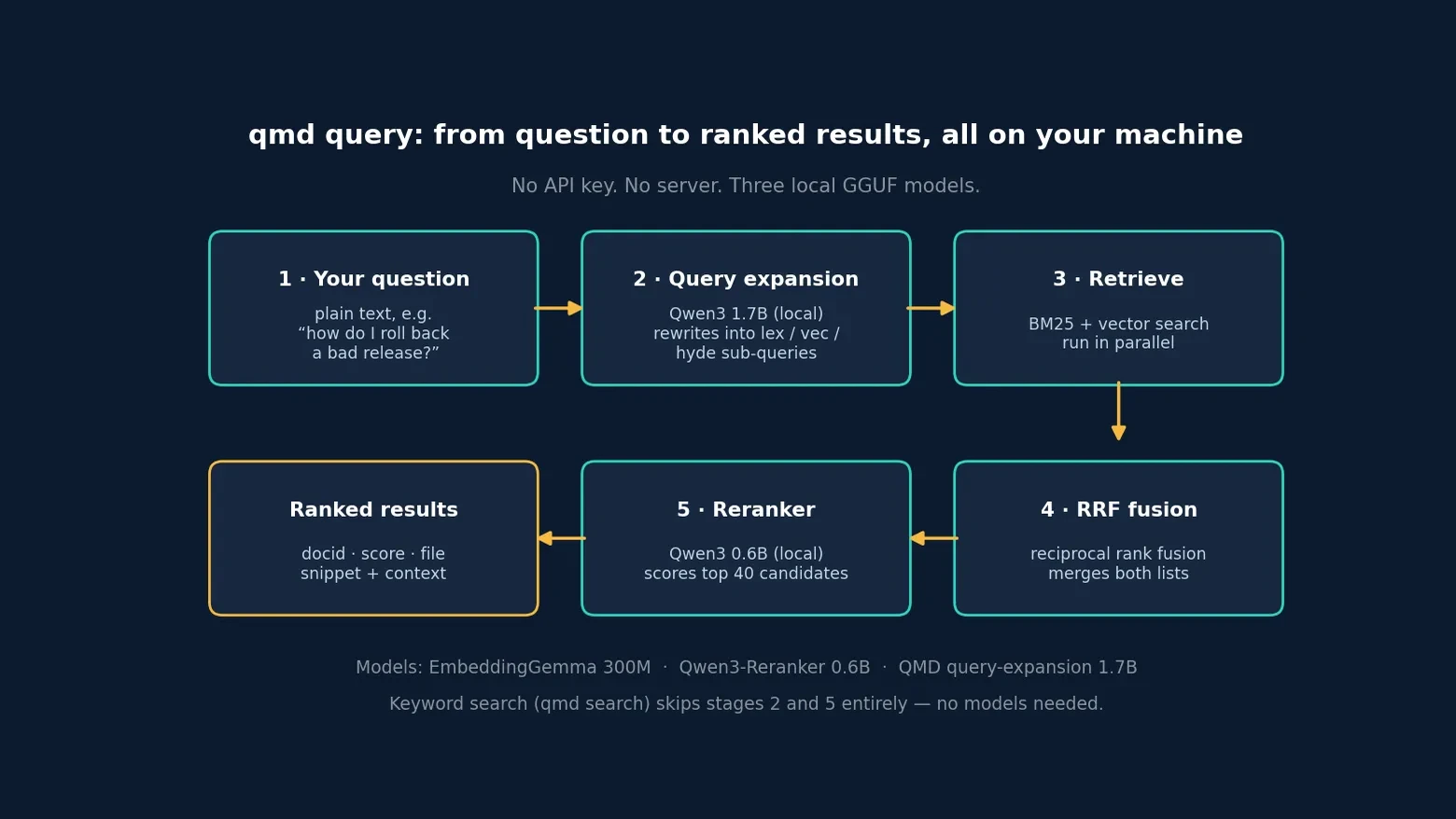
qmd query is the mode the README recommends, and it runs all four stages: the expansion model rewrites your question into typed lex:, vec:, and hyde: sub-queries; BM25 and vector search run in parallel; reciprocal rank fusion merges the lists; the Qwen3 reranker scores the top candidates. The first run downloads the reranker (~610 MB) on top of the other two models.
qmd query "how do I roll back a bad release"The full pipeline expands the same question into six sub-queries — the original, two lex: keyword queries, two vec: paraphrases, and one HyDE passage — runs BM25 and vector search in parallel, fuses the results with RRF, and reranks the top chunks:
$ qmd query "how do I roll back a bad release"
Expanding query... (0ms)
├─ how do I roll back a bad release
├─ lex: steps for rolling
├─ lex: best practices for rollback
├─ vec: steps for rolling back software releases
├─ vec: best practices for rollback management
└─ hyde: To roll back a bad release, start by reviewing the requirements and d...
Searching 6 queries...
 (4.4s)
Reranking 7 chunks... (28.2s)

qmd://docs/deploy-runbook.md:5 #000713 — Deploy runbook — 100%
qmd://notes/adr-2026-11-15.md:13 #ff3e50 — ADR: freeze deploys on Fridays — 40%
qmd://notes/incident-2026-11-10.md:3 #b9bf56 — Incident review — 2026-11-10 — 25%
qmd://docs/billing-migration.md:5 #8b613b — Billing migration plan — 15%
qmd://docs/onboarding.md:7 #c0df37 — Onboarding checklist — 12%
Total time: 33.1 seconds, of which 28.2 seconds was reranking. The reranker is what makes the result usable: the runbook jumps to 100% while the next result drops to 40% — compare with raw vector search, where the spread was 54% to 39% and the ranking was far less decisive.
The pipeline is slower than either mode alone — three model loads on CPU — but it is also the most forgiving of vague questions, because expansion adds the vocabulary your documents actually use. Two flags control the cost: --no-rerank skips the reranker and returns RRF scores (faster on CPU), and -C / --candidate-limit caps how many candidates reach the reranker (default 40).
You can also write the query document yourself, which is what agents should do. A typed query skips the expansion model entirely:
qmd query $'vec: rolling back a failed deployment' --no-rerankStructured search: 1 queries (vec)
├─ vec: rolling back a failed deployment
└─ Searching...
(6.5s)
qmd://docs/deploy-runbook.md:5 #000713
Title: Deploy runbook
Score: 100%
@@ -4,4 @@ (3 before, 1 after)
To roll back a bad deploy, run `deploy rollback --to <sha>` from the repo root. The rollback replays the previous healthy release and takes about 90 seconds.The runbook is first at 100%, followed by the incident review at 50% and the billing migration at 33% — the ranking a human would produce. The same typed form is what the MCP server accepts, so the CLI and the agent path behave identically.
Step 6 — Context and metadata filters#
Two v2.9.0 features make a large index manageable. First, context: short human-written descriptions attached to a collection or a path, returned with every result so an agent knows what it is looking at.
qmd context add qmd://docs "Engineering runbooks: deploys, auth, billing migration"
qmd context add qmd://notes "Team meeting notes and incident reviews"
qmd context list
Second, metadata filtering. Documents opt in with a namespaced frontmatter block — the frontmatter stays searchable content, it just also becomes filterable data:
---
qmd:
  metadata:
    topics:
      - deployment
      - reliability
    status: published
    priority: 4
---

# ADR: freeze deploys on Fridays
After qmd update and qmd embed (one new chunk, 7 seconds), qmd collection metadata notes reports every key with types and value counts — priority number, 1 of 3 documents, status string, published 1, topics string[], deployment 1, reliability 1. Filters are a JSON AST and work on every search surface:
qmd search "deploy freeze" --filter '{"field":"status","operator":"eq","value":"published"}'
qmd search "deploy freeze" --filter '{"field":"status","operator":"eq","value":"draft"}'
The first returns only the ADR (32%); the second returns No results found. Filters compose with and / or / not, comparisons (eq, gte, lt), membership (in, all), and text operators (contains, prefix). Every returned result satisfies the filter before fusion and reranking, so a filter cannot be outvoted by a high score.
Step 7 — Hand it to your agent: the MCP server#
The point of indexing your notes is that your agent can read them. QMD exposes an MCP server with five tools — query, get, multi_get, status, and metadata — over stdio or HTTP:
qmd mcp                    # stdio transport, for Claude Code / Claude Desktop
qmd mcp --http               # localhost:8181, shared long-lived server
qmd mcp --http --daemon      # background daemon; qmd mcp stop to end it
For Claude Code there is a plugin (claude plugin marketplace add tobi/qmd, then claude plugin install qmd@qmd); other clients take the manual mcpServers block from the README. The HTTP server binds loopback by default and rejects non-loopback Origin headers, which blocks DNS-rebinding reads from a web page.
Verified end to end with a small JSON-RPC client over stdio: initialize returns server qmd 2.9.0 with the instruction QMD is your local search engine over 7 markdown documents; tools/list returns exactly the five documented tools; status reports 7 documents, 0 needing embedding, vector index present; metadata returns the three keys with counts; and a typed query call (vec: rolling back a failed deployment, rerank off, limit 3) returns the runbook at 100%, the ADR at 50%, and the incident review at 33% — the same ranking as the CLI. The MCP query tool accepts the same typed search documents, so an agent that generates its own expansions never pays the 1.7B-model cost.
QMD also ships a bundled agent skill (qmd skills list, qmd skill show): a SKILL.md that teaches an agent the search-then-retrieve workflow — search for candidates, fetch the full source with qmd get, and answer from retrieved text rather than from snippets.
Step 8 — Measure it: qmd bench#
QMD ships a benchmark runner so you can measure retrieval quality on your own corpus instead of trusting it. A fixture is a JSON file of queries with expected files and a top-k requirement:
{
  "description": "Retrieval checks for the tutorial corpus",
  "version": 1,
  "queries": [
    {"id": "exact-rollback", "query": "deploy rollback --to", "type": "exact",
     "expected_files": ["deploy-runbook.md"], "expected_in_top_k": 1},
    {"id": "semantic-rollback", "query": "how do I undo a bad release", "type": "semantic",
     "expected_files": ["deploy-runbook.md"], "expected_in_top_k": 1},
    {"id": "exact-postgres", "query": "Postgres 16 migration", "type": "exact",
     "expected_files": ["billing-migration.md"], "expected_in_top_k": 1},
    {"id": "semantic-auth", "query": "how long do login tokens last", "type": "semantic",
     "expected_files": ["api-auth.md"], "expected_in_top_k": 3}
  ]
}
Five queries, four backends each, 3 minutes 20 seconds total. The summary:
Backend   P@k    R@1    R@3    R@5    MRR    F1     Avg
bm25      0.200  0.200  0.200  0.200  0.200  0.200  12ms
vector    1.000  1.000  1.000  1.000  1.000  1.000  939ms
hybrid    1.000  1.000  1.000  1.000  1.000  1.000  14,232ms
full      1.000  1.000  1.000  1.000  1.000  1.000  24,861ms
BM25 scored 1 of 5. It missed the exact rollback query because the query string contains --to: qmd search "deploy rollback --to" returns "No results found", while qmd search "deploy rollback" finds the runbook at 66% — the flag-like token kills the keyword match. Vector, hybrid, and full all scored a perfect 1.00 on every query and every metric. The cost is time: BM25 answers in about 12 ms, vector in about 1 s, hybrid in about 14 s, and the full reranked pipeline in about 25 s on this 2-core CPU VM. On a machine with a GPU the full pipeline is much faster — but on CPU, the reranker dominates the latency.
When to use QMD vs the alternatives#
| Tool | Best when | Retrieval | Agent access |
|---|---|---|---|
| QMD | Your knowledge lives in markdown and you want hybrid search + reranking, fully local | BM25 + vectors + LLM expansion + reranker | MCP server (5 tools) + agent skill |
| XERJ | The corpus is a codebase and the agent needs an Elasticsearch-compatible API | Full-text over code, reference coding | MCP + Elasticsearch API |
| Kensaku | You need desktop-wide file search with OCR over PDFs and images | Local file search + OCR | MCP |
| sqlite-vec | You are building your own retrieval into an app and want a library, not a CLI | Vector search in SQLite | Your code |
| PageIndex | Your documents are PDFs and you want reasoning-based retrieval without embeddings | Tree index + keyword search + reranking | Python API |
| ripgrep | You know the exact string and want the fastest possible answer | Exact match only | Shell |
The honest summary: if the corpus is code, XERJ's Elasticsearch-compatible API fits an agent's existing tooling better; if the corpus is PDFs, PageIndex's tree index is the stronger choice; if you are building retrieval into your own application, sqlite-vec is the component to use. QMD wins when the corpus is markdown notes and docs, you want all four retrieval stages without running a server or paying an API, and you want the same search available to your agent over MCP.
Limitations and honest caveats#
- First-run downloads are the price of admission. The full pipeline needs ~2.25 GB of models. Keyword search works with none of them, and the typed-query form needs only the 318 MB embedding model — but the first
vsearchor defaultquerypulls the 1.7B expansion model, and the first defaultqueryalso pulls the reranker. Tell readers that upfront. - CPU-only is slow. Embedding six short documents took minutes only because of the download; the 1.7B expansion model is the slow part on CPU, and every default
queryloads it. On a laptop with a GPU (Metal, CUDA, or Vulkan) it is faster;qmd doctorreports the device mode and warns when it is CPU-only. - Scores are relative, not absolute. A 58% BM25 score and a 100% vector score come from different normalizations; compare scores within one mode, not across modes. The
--min-scoredefault forvsearchis 0.3, which hides weak matches — raise-nor lower the threshold if a search comes back thin. - Metadata requires the frontmatter convention. Only documents with a
qmd.metadatablock are filterable; everything else indexes normally but cannot be filtered.qmd collection metadatashows what is actually indexed before you write a filter. - Model downloads show a progress bar but no timeout. During verification, a stalled download (the sandbox's disk quota interrupted writes) left the command waiting with no further output until it was killed and the download re-run. If a first-run download appears stuck, check
~/.cache/qmd/models/and runqmd pullagain. qmd doctorchecks presence, not integrity. It counts a model as cached when the file exists; a partial download can pass the check. Verify sizes against the README table (318 MB / 1.19 GiB / 610 MB) if a model-backed command misbehaves.
The takeaway#
QMD is the smallest honest answer to "my agent should be able to search my notes": one npm install, one qmd init, three search modes that go from instant keyword search to a full expand–fuse–rerank pipeline, and an MCP server that gives your agent the same retrieval you have in the terminal. The costs are explicit — ~2.25 GB of local models and CPU time on the first run — and the payoff is a search layer that works offline, keeps your notes on your machine, and returns the right paragraph first. Index your docs folder tonight; the next time your agent asks where the runbook is, it will already know.