Don't trust the proof — check it: verify AI-generated math with Lean 4
AI agents now write proofs faster than any human can read them — DeepMind's Gemini teams proved quantum speedups in Lean this month. This tutorial installs Lean 4, writes your first machine-checked proofs, and builds a harness that makes the kernel, not the model, the judge.
- Lean 4.36.0, via elan: install the version manager, not Lean directly; the project pins
leanprover/lean4:v4.36.0inlean-toolchainso every run checks against the same compiler. - Silence means proved:
lake env lean Proofs.leanprints only#evaland#checkoutput — a file with no errors is a file of proved theorems. - The harness is one script:
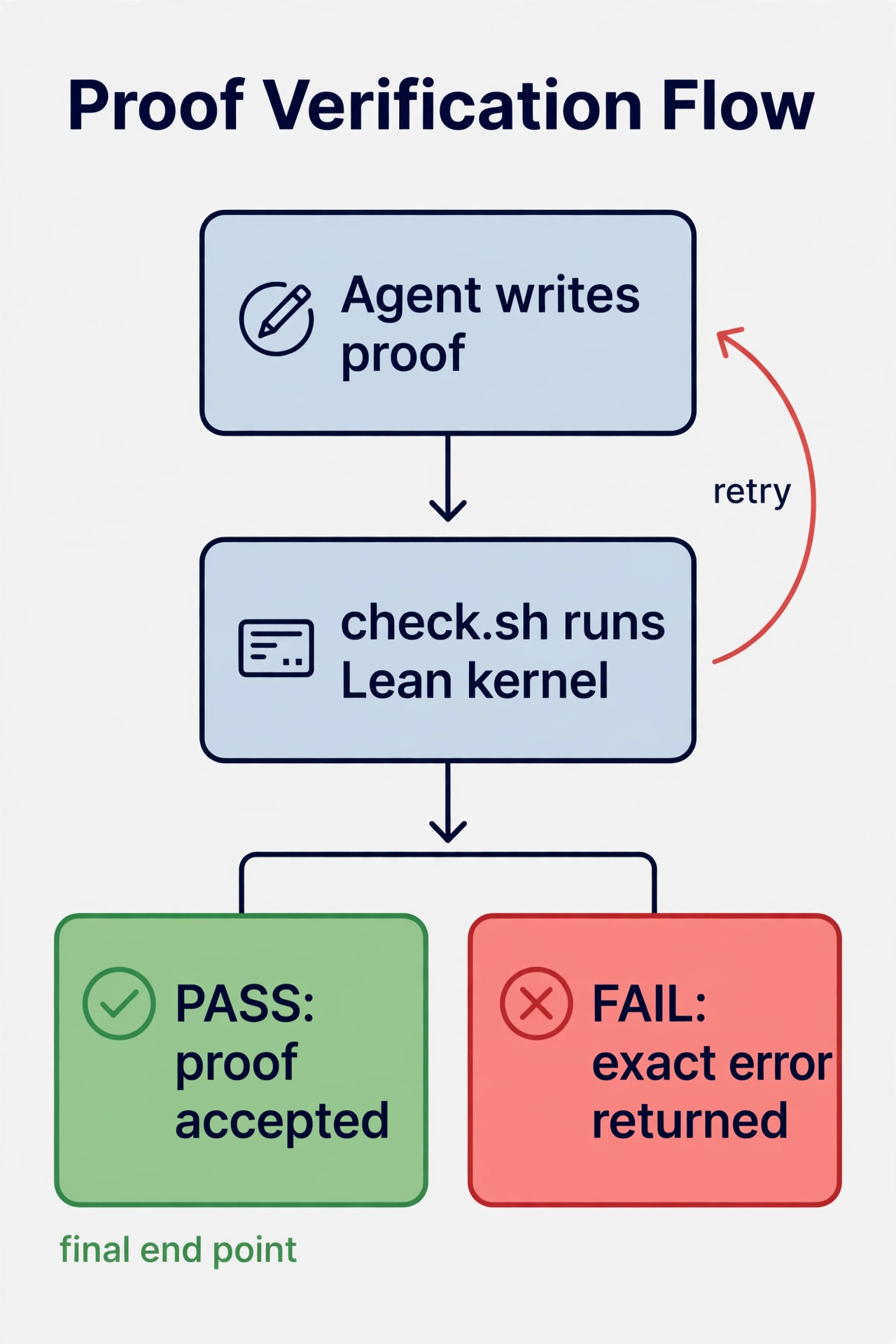
check.shexits 0 and prints PASS only when the kernel accepts the whole file; a wrong lemma fails loudly with atype mismatchnaming both types. sorryis the hole: it compiles but proves nothing, and shows up assorryAxunder#print axioms— forbid it in CI with a grep.- Mathlib is optional: core-only for this tutorial; the Mathlib path costs roughly 7.5 GB and a long first build, and its
irrational_sqrt_twoexample is verified against Mathlib source, not executed here.

In November 2026, the bottleneck in mathematics moved. On November 23, Google DeepMind described teams of Gemini 4 agents that found faster quantum algorithms — a 290× speedup on the arcsin routine, 2.57× on a Grover search implementation, 11.8× cheaper fusion calculations — and proved each one correct in Lean, a formal theorem prover, before it counted. Two days later, Google’s Cogentic agent posted six math papers, OpenAI’s team claimed a new matrix-multiplication exponent bound, and the Riemann proof that Claude produced days earlier was certified in Lean. The pattern is the same in all four stories: generating a proof is now the cheap part. Checking it is the work — and the check is done by a machine.
That machine is Lean 4, and this tutorial teaches you to run it. You will install Lean, scaffold a project, write proofs the Lean kernel accepts, watch it reject a confident wrong proof, and build a small pass/fail harness that turns the kernel into the judge of any proof an AI agent hands you. No GPU, no API key, no account. The only thing you need to believe is the output of one command: exit code 0 means proved; anything else means not proved.
What you’ll need#
- Linux, macOS, or Windows. The walkthrough below runs on Linux; the macOS steps are identical, and Windows works under WSL or Git Bash.
gitandcurl. Lean’s installer needs both. On Ubuntu:sudo apt install git curl.- About 3.5 GB of free disk. The Lean 4.36.0 toolchain is about 2.7 GB once unpacked, and the installer holds the 580 MB download alongside it while extracting. Do not skimp here: the install fails with a quota error if the disk fills mid-download, and the fix is freeing space and starting over.
- Nothing else. No model calls, no GPU, no paid service. The proofs in this tutorial use Lean’s core library only, so there is no 7.5 GB Mathlib download. Mathlib gets its own step at the end, clearly marked optional.
One thing to know before you start: Lean is two things at once — a programming language and a proof checker — and this tutorial uses both halves. The programming half (#eval, function definitions) gives you fast feedback while you learn the syntax. The proof half (theorems, tactics) is the point: when Lean accepts a theorem, the kernel has checked every logical step, and no amount of confident prose can substitute for that.
Step 1: Install Lean with elan#
You do not install Lean directly. You install elan, a version manager in the rustup mould: it downloads the right Lean toolchain per project and forwards your commands to it. The official install is one command:
curl https://elan.lean-lang.org/elan-init.sh -sSf | shAccept the default install when prompted (option 1), then add elan to the PATH of your current shell:
source $HOME/.elan/env
lean --version
Expected output — this is the version this tutorial was verified against on November 25, 2026:
Lean (version 4.36.0, x86_64-unknown-linux-gnu, commit 611c117bfaf7b7ae1cfcf246ce6fba31e8f509e9, Release)If you see a newer version, the commands in this tutorial still apply, but pin the version in Step 2 so your project stays reproducible: elan reads the pin automatically whenever you enter the project directory. If the install fails partway with a disk or quota error, delete the partial toolchain under ~/.elan and free space before retrying — a half-extracted toolchain is the one failure mode that produces confusing errors later (a lean binary that cannot find its own shared library). The install in this tutorial hit exactly that failure once, on a nearly-full home directory; the fix was removing the broken toolchain and running the install a second time, with nothing else touching elan while it ran.
Step 2: Scaffold a project and pin the toolchain#
Lean’s build tool is lake. Scaffold a project called proof-check:
lake new proof-check
cd proof-check
The scaffold is small and worth reading in full:
proof-check
proof-check/Main.lean
proof-check/ProofCheck
proof-check/ProofCheck.lean
proof-check/ProofCheck/Basic.lean
proof-check/README.md
proof-check/lakefile.toml
proof-check/lean-toolchain
Three files matter. lean-toolchain pins the compiler version:
leanprover/lean4:v4.36.0That single line is what makes the project reproducible: anyone (or any agent) who enters this directory gets exactly Lean 4.36.0, never whatever happens to be newest that month. lakefile.toml is the build configuration; ProofCheck/Basic.lean is the library’s starting file, and Main.lean is the executable entry point. Build it:
lake build
lake exe proof-check
Expected output:
✔ [2/11] Built ProofCheck.Basic (550ms)
✔ [4/11] Built ProofCheck.Basic:c.o (156ms)
✔ [5/11] Built ProofCheck (595ms)
✔ [7/11] Built ProofCheck:c.o (159ms)
✔ [8/11] Built Main (477ms)
✔ [10/11] Built Main:c.o (132ms)
✔ [11/11] Built «proof-check»:exe (267ms)
Build completed successfully (11 jobs).
Hello, world!
lake build compiles the library; lake exe proof-check runs the scaffold’s main, which prints Hello, world!. Neither output is exciting. Both matter: a green build means the toolchain, the pin, and the project layout all agree — the same three things that have to agree before a single proof can be checked.
Step 3: Your first machine-checked proofs#
Create a file called Proofs.lean in the project root. It holds six small proofs, each teaching one mechanism. Save it exactly as written — every line below was checked against Lean 4.36.0:
/-
  Proofs.lean — the tutorial's working file.
  Every proof below was checked with Lean 4.36.0 (`lake env lean Proofs.lean`).
  A file with no errors and no `sorry` is a file Lean accepts in full.
-/

/- Smoke test: `#eval` runs code and prints the result. -/
#eval 2 + 2

/- Ask Lean the type of a core lemma. -/
#check @Nat.add_comm

/-- A tiny function, evaluated on the spot. -/
def double (n : Nat) : Nat := n + n

#eval double 21

/-- Proof by term: the statement *is* the lemma. -/
theorem add_comm_nat (a b : Nat) : a + b = b + a :=
  Nat.add_comm a b

/-- Proof by `rfl`: both sides compute to the same value. -/
example : 2 + 3 = 5 := rfl

/-- Proof by `decide`: Lean evaluates a finite check. -/
example : (List.range 5).sum = 10 := by decide

/-- Proof by induction. The `omega` tactic closes the step case
    from the induction hypothesis and the `Nat.pow_succ` rewrite. -/
theorem two_pow_ge (n : Nat) : n + 1 ≤ 2 ^ n := by
  induction n with
  | zero => simp
  | succ k ih =>
    have h : 2 ^ (k + 1) = 2 ^ k * 2 := by rw [Nat.pow_succ]
    omega
Check it with lake env lean, which runs Lean with the project’s environment (so the pinned toolchain applies):
lake env lean Proofs.leanExpected output:
4
Nat.add_comm : ∀ (n m : Nat), n + m = m + n
42
Three things to notice. First, Lean prints the #eval and #check results and nothing else — silence about a theorem means the kernel accepted it. A file that produces no errors is a file of proved theorems. Second, the proofs use four different mechanisms, and knowing which one fits where is most of the skill: a term proof (Nat.add_comm a b) when the statement is already a lemma; rfl when both sides compute to the same value; decide when the claim is a finite computation; and a tactic block (induction, then omega) when the proof needs steps. Third, two_pow_ge is a real induction, not a toy: the base case is closed by simp, and the step case rewrites 2 ^ (k+1) into 2 ^ k * 2 so omega can finish the linear arithmetic from the induction hypothesis.
If you are following along in VS Code with the Lean 4 extension, the same file gives you a live goal display as you type. The command line is the authority, though: the editor can lag or misconfigure, and lake env lean is what the harness in Step 5 runs.
Step 4: Watch Lean say no#
A checker you have never seen reject anything is a checker you do not trust yet. Feed Lean a false statement:
example : 1 = 2 := rflSave that as Broken.lean and run lake env lean Broken.lean:
Broken.lean:6:19: error: Type mismatch
  rfl
has type
  ?m.8 = ?m.8
but is expected to have type
  1 = 2
The error is the whole point. rfl asks the kernel to check that both sides are the same value by computation; 1 and 2 are not, so the proof is refused and the file fails. Lean does not grade on effort, plausibility, or how convincing the surrounding paragraph was.
Now the subtler failure — the one AI-generated proofs actually produce. An agent asked to prove that multiplication commutes might reach for the lemma it remembers best, addition’s commutativity, and write this:
/-- WRONG: `Nat.add_comm` proves `a + b = b + a`, not `a * b = b * a`. -/
example (a b : Nat) : a * b = b * a := Nat.add_comm a b
Save it as Attempt1.lean and check it:
Attempt1.lean:9:39: error: Type mismatch
  Nat.add_comm a b
has type
  a + b = b + a
but is expected to have type
  a * b = b * a
Read the error the way Lean means it: the term Nat.add_comm a b has type a + b = b + a, but the goal needs a * b = b * a. The lemma is true; it is simply the wrong true statement. This is the characteristic failure of a model that has seen many proofs and retrieves the near-miss: the shape is right, the operation is wrong, and only the kernel notices. Keep this error message in mind — Step 5 turns it into a loop.
Step 5: Build the harness — the kernel becomes the judge#
One command, run by hand, is a demo. A script with an exit code is a gate. Save this as check.sh in the project root:
#!/usr/bin/env bash
# check.sh — the acceptance test for every proof file.
# Usage: ./check.sh Proofs.lean
# Exits 0 and prints PASS only if Lean accepts the whole file.
# Any error (wrong lemma, false statement) exits non-zero.
# NOTE: `sorry` is only a warning — it still exits 0. Catch it with
# `#print axioms` (see below) or `grep -r sorry *.lean` in CI.
set -euo pipefail
cd "$(dirname "$0")"
export PATH="$HOME/.elan/bin:$PATH"
if [ $# -ne 1 ]; then
  echo "usage: $0 <file.lean>" >&2
  exit 2
fi
lake env lean "$1"
echo "PASS: $1"
Make it executable and run it against the wrong proof first:
chmod +x check.sh
./check.sh Attempt1.lean; echo "exit code: $?"
Expected output:
Attempt1.lean:9:39: error: Type mismatch
  Nat.add_comm a b
has type
  a + b = b + a
but is expected to have type
  a * b = b * a
exit code: 1
Now fix the proof. The statement was right; the lemma was wrong. Multiplication has its own commutativity lemma, Nat.mul_comm. Save this as Attempt2.lean:
/-- RIGHT: multiplication has its own commutativity lemma. -/
example (a b : Nat) : a * b = b * a := Nat.mul_comm a b
./check.sh Attempt2.lean; echo "exit code: $?"Expected output:
PASS: Attempt2.lean
exit code: 0
That is the entire workflow, and it is the same shape DeepMind’s agent teams run at scale: propose a candidate, hand it to Lean, read the error, fix, repeat — except their loop runs over quantum circuits and yours runs over one file. Two properties make the harness trustworthy. First, the exit code is the verdict: scripts, CI, and agents can all branch on it without parsing prose. Second, the harness checks the file, not the claim: if the agent edits the statement to something easier instead of fixing the proof, the file still has to pass — and the changed statement is visible in the diff.
One hole remains, and you should know its name: sorry. Lean accepts sorry anywhere a proof is expected, and the file still compiles — it is a placeholder that says “trust me”, which is exactly what this tutorial exists to stop doing. A file can pass check.sh while containing a sorry, so add one more command to the workflow: #print axioms lists every axiom a theorem depends on, and a sorry shows up as sorryAx. Try it:
theorem fake (n : Nat) : n = n + 1 := sorry
#print axioms fake
Expected output:
Sorry.lean:1:8: warning: declaration uses `sorry`
'fake' depends on axioms: [sorryAx]
And for a genuinely proved theorem, the same command reports only the standard axioms the proof itself relies on — no sorryAx:
'two_pow_ge' depends on axioms: [propext, Quot.sound]The rule for your projects: a proof is done when check.sh prints PASS and #print axioms shows no sorryAx. Better still, forbid the word outright — grep -r sorry *.lean in CI costs nothing and catches the placeholder before it ever reaches a human.
Step 6: Wire the loop into your coding agent#
The harness is only useful if the agent actually runs it — and an agent with no instruction to run it will do what agents do: read its own proof, decide it looks right, and report success. Give it the rule in writing, as a skill. Save this as SKILL.md inside ~/.claude/skills/proof-check/ (for Claude Code) or your agent’s equivalent skills folder:
---
name: proof-check
description: Verify Lean 4 proofs with the Lean kernel before claiming any mathematical result. Use when an agent writes, edits, or reviews a Lean proof, or when a claim of the form "X is proved" needs checking.
---

# Proof check — Lean 4 is the judge

A mathematical claim is **not proved** until `lake env lean` exits 0 on the
file containing it. No exceptions. A proof that "looks right", typechecks in
the editor, or passed a language model's self-review does not count.

## Rules

1. Every proof lives in a `.lean` file inside the project (see `lakefile.toml`
   and `lean-toolchain` for the pinned Lean version).
2. Run `./check.sh <file.lean>` after every edit. It exits 0 and prints
   `PASS: <file>` only when the Lean kernel accepts the whole file.
   Then run `#print axioms` on the theorem: it must show no `sorryAx`.
3. On failure, read the error, fix the proof, re-run. Do not weaken the
   statement to make it pass, and never insert `sorry` — `sorry` compiles
   but proves nothing, and a file containing it is a failed check.
4. Never claim a result is proved in chat, in a commit message, or in a
   document until step 2 has passed for the exact file being claimed.
5. If the same error survives three fix attempts, stop and show the human
   the statement, the latest proof, and the latest Lean error verbatim.

## Common errors and what they mean

- `type mismatch` on a lemma application: the lemma proves a different
  statement than the goal (e.g. `Nat.add_comm` where `Nat.mul_comm` was
  needed). Find the lemma whose statement matches the goal.
- `unsolved goals`: the tactic block ended with goals remaining. Add the
  missing step; `omega` closes linear arithmetic, `simp` closes
  definitional equalities, `decide` closes finite checks.
- `unknown identifier`: the name is misspelled or lives in Mathlib, which
  this project does not depend on. Check `#check` output first.
With the skill installed, the instruction to your agent becomes one sentence: “Prove it, then run ./check.sh — I only accept what passes.” The three-attempt rule in step 5 is the part people skip and then regret: a loop that never stops is worse than no loop, because it burns tokens while looking busy. Three failed fixes means the agent does not understand the error, and the error text plus the proof belong in front of a human.
Note what this does not do. Lean checks that the proof is valid; it cannot check that the statement is the one you meant. If the agent proves a + b = b + a when you asked for a * b = b * a, the kernel passes it happily — the statement is true, just not yours. The harness catches wrong proofs. Reading the statement still belongs to you.
Step 7 (optional): Scale up with Mathlib#
Everything so far used Lean’s core library, which is deliberately small: natural numbers, lists, basic logic. Real mathematics lives in Mathlib, the community library of definitions and proofs — and it is the library the Riemann certification, the Cogentic papers, and DeepMind’s quantum library all build on. Adding it is one flag at scaffold time:
lake new proof-check-math math
cd proof-check-math
lake exe cache get   # downloads prebuilt Mathlib oleans
lake build
Go in with your eyes open: a Mathlib project costs roughly 7.5 GB of disk and a long first build, and lake exe cache get is the step that saves you from compiling Mathlib from source (which takes hours). With Mathlib available, the same workflow checks real theorems — for example, that the square root of two is irrational:
import Mathlib

example : Irrational (Real.sqrt 2) := irrational_sqrt_two
Note on verification: the Mathlib snippet above was checked against Mathlib's published source (the lemma irrational_sqrt_two in Mathlib/NumberTheory/Real/Irrational.lean), not executed in this tutorial's sandbox — a Mathlib project needs about 7.5 GB of disk and a long first build, so it sits outside the verified core loop. Steps 1–6 above are the fully executed workflow: every command and output shown was run against Lean 4.36.0 on November 25, 2026.
If you never touch Mathlib, nothing in this tutorial breaks: the core-library workflow is the complete loop, and Mathlib only widens the set of statements you can write. The reverse is not true — do not add Mathlib “just in case” and then wonder why your disk is full and your first build is still running.
Which approach should you use?#
The right setup depends on what you are checking, not on how serious you feel about it:
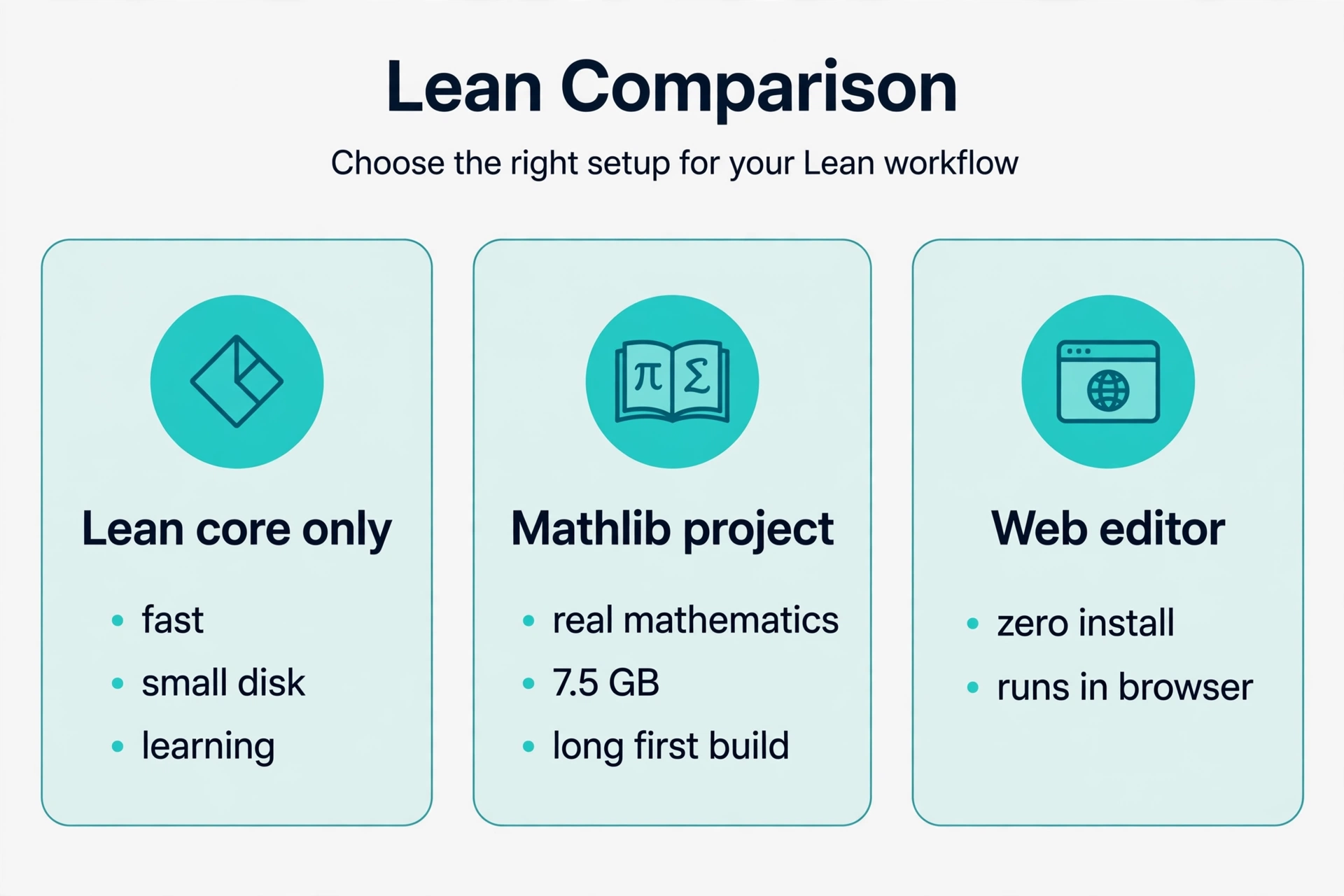
- Lean core only (this tutorial) — for learning the loop, checking arithmetic and induction proofs, and wiring the harness into an agent. Fast install, small disk, everything verified above.
- Mathlib project — for real mathematics: analysis, algebra, number theory, anything beyond the core library. Accept the 7.5 GB and the long first build; use
lake exe cache getand never compile Mathlib from source. - Lean 4 web editor — for a zero-install first try. It runs Lean with Mathlib in the browser, so you can paste any snippet from this tutorial and check it without installing anything. Use it to evaluate, not to build: there is no project, no pin, and no harness.
#evalsmoke tests only — for checking that code runs, not that a theorem holds. Useful while learning syntax; not a proof of anything.
One rule covers all four: the statement and the pin travel together. A proof checked against Lean 4.36.0 with Mathlib v4.36.0 is a different claim from the same text checked against another version — libraries move, lemma names change, and a proof that passed in May can fail in November. Record the versions with the proof, the way you would record the dataset with a benchmark.
The takeaway#
AI agents now produce proofs faster than humans can read them, and the month’s headlines prove it: quantum speedups, six math papers, a matrix-multiplication bound, a certified Riemann proof — all of them landing as Lean files before they land as prose. The correct response is not to read faster. It is to stop reading proofs for correctness at all, and let the kernel do it: install Lean, pin the toolchain, write the statement, and accept only an exit code of 0. The loop in this tutorial is fifteen minutes to set up and it never gets tired, never gets flattered by confident prose, and never mistakes a near-miss lemma for the right one. Build it once, and every proof an agent hands you from now on gets the same answer DeepMind’s quantum circuits got: proved — or not yet.
Frequently asked questions
Do I need Mathlib for this tutorial?
No. Every executed example uses Lean's core library only, so there is no Mathlib download. Mathlib is the optional Step 7: it widens the mathematics you can write, at the cost of roughly 7.5 GB of disk and a long first build.
Can Lean check a proof written in plain English?
No. Lean checks Lean code: a formal statement plus a proof in Lean's syntax. An agent can draft the statement from an English claim, but the check only starts once the claim exists as a theorem in a .lean file.
What happens when the agent's proof is wrong?
Lean prints an error naming the exact mismatch — usually a type mismatch on the wrong lemma, or unsolved goals — and the file fails with a non-zero exit code. The harness in Step 5 feeds that error back to the agent for another attempt, up to three times.
How long does the Mathlib setup take?
The download and first build are the slow part: plan on roughly 7.5 GB of disk and well over an hour if Mathlib compiles from source. Always run lake exe cache get first — it downloads prebuilt files and is the difference between minutes and hours.
Which Lean version should I pin?
The one this tutorial was verified against, leanprover/lean4:v4.36.0, written in the lean-toolchain file. A proof checked against one Lean and Mathlib version is a different claim from the same text checked against another — record the versions with the proof.