Escape the subscriber tax: self-host MailCheap and send your newsletter for pennies
MailCheap (marclou/mailcheap, AGPL-3.0, ~1,275 GitHub stars) is a self-hostable newsletter app that swaps per-subscriber pricing for pay-per-email on your own Amazon SES account: 10,000 readers and 4 issues a month costs about $4 to $6. This guide deploys it, wires SES and background sending, and turns on sending behind a 5%-slice warm-up — then drives it from an AI agent over MCP.
- What: MailCheap — a self-hostable newsletter app (marclou/mailcheap), AGPL-3.0, created Oct 10, 2026, ~1,275 GitHub stars.
- The pricing flip: self-hosted costs nothing per subscriber; you pay the email provider per email — Amazon SES $0.10–$0.16 per 1,000 emails. 10,000 readers × 4 issues = 40,000 emails, about $4–$6 a month. MailCheap Cloud starts at $19/month for 20,000 emails.
- Stack: Next.js app (Node.js 22+), MongoDB, Amazon SES or PostShiba for sending, Upstash QStash for background batches (one message sends 50 emails). Signing secrets must be 32+ characters or the server refuses to start.
- Capacity: up to 3 newsletters per account, each with its own contacts, campaigns and website; API keys get 300 requests a minute.
- Deliverability guardrails: warm-up sends a 5% slice first and the rest 3 hours later; a send pauses past 2% hard bounces or 0.08% complaints and the account is blocked past 5% or 0.3%; imports skip invalid, misspelled, spam-trap, role and throwaway addresses.
- Agent control: everything works over MCP and REST; CSV imports from beehiiv, Substack, Mailchimp, Kit, MailerLite, Buttondown, Ghost and EmailOctopus import as-is with each reader's status and signup date.
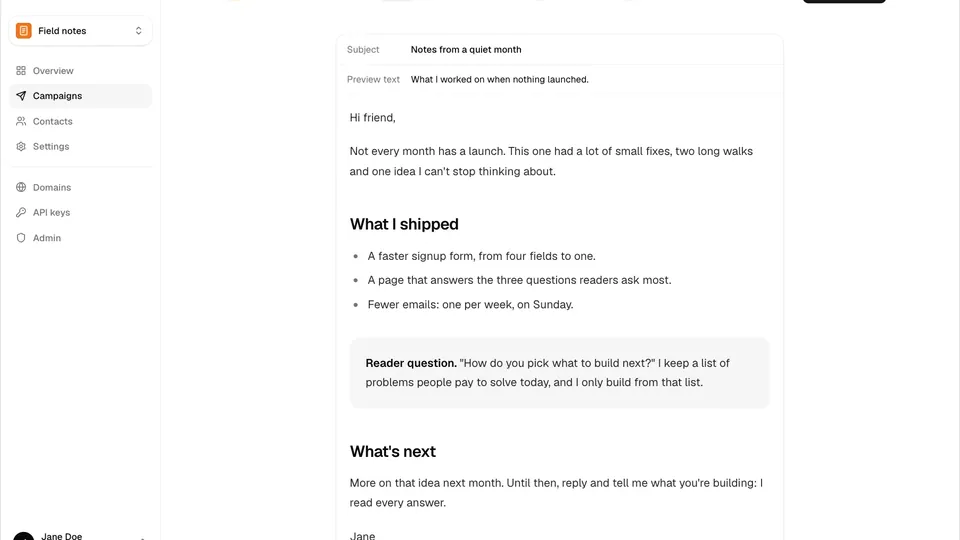
Newsletter platforms charge per subscriber — including the dormant ones who never open a single issue. A list of 10,000 readers on beehiiv or Mailchimp costs you every month whether they read or not. MailCheap (marclou/mailcheap, AGPL-3.0, created Oct 10, 2026, ~1,275 GitHub stars in its first ten days) flips the model: a full newsletter app — editor, pre-send review, per-newsletter websites, signup forms, analytics — where you pay your email provider per email sent, and nothing per subscriber. Self-hosted, 10,000 readers and 4 issues a month is 40,000 emails, about $4 to $6 on Amazon SES. In this guide you will deploy it, wire SES and background sending, turn sending on behind its warm-up, and connect your AI agent so it can write and send campaigns for you.
What you'll need
- MongoDB Atlas — free tier works; stores contacts, campaigns and stats.
- Amazon SES — the email provider: $0.10 to $0.16 per 1,000 emails. (PostShiba is the alternative, invite-only for now.)
- Upstash QStash — background sending and scheduling; free tier to start.
- Vercel (one-click) or any Node.js 22+ host behind HTTPS.
- Resend (optional, free plan) for sign-in codes and alerts — without it, codes go through SES once it is wired.
- A domain you control for the sending address.
- About an hour — most of it waiting for DNS records and SES production access.
Step 1 — Create the database on MongoDB Atlas
MailCheap keeps contacts, campaigns and stats in MongoDB. On a free Atlas cluster:
- Database Access: add a user with a password and the "Read and write to any database" role.
- Network Access: allow
0.0.0.0/0— Vercel has no fixed IP addresses. - Connect > Drivers: copy the connection string and add a database name before the
?, e.g....mongodb.net/mailcheap?retryWrites=true.
That string is your MONGODB_URI.
Step 2 — Deploy the app on Vercel or any Node 22+ host
Click the Deploy button in the repo README and fill in the environment variables. The two secrets need 32+ random characters each — generate them with openssl rand -base64 48 — or the server refuses to start, and the logs say why:
openssl rand -base64 48   # BETTER_AUTH_SECRET (signs sessions and every link)
openssl rand -base64 48   # SUPPRESSION_HASH_KEY (keys the shared never-email list)
The rest of the deploy-time set: MONGODB_URI, ADMIN_EMAILS (who can sign in and open /admin), ALLOWED_EMAILS (who else can sign in — addresses and @domain entries), and EMAIL_FROM (the sign-in codes' from address, on a domain your provider verified). On any other host the same variables work with:
npm ci && npm run build && npm startSending stays off until you finish the next steps, so nothing goes to readers by mistake. /api/health answers 200 when healthy, or 503 telling you exactly what to fix.
Step 3 — Wire Amazon SES as the email provider
Use one AWS region for everything (the examples use us-east-1), and a dedicated AWS account if you can — SES reputation and limits are per account.
- Request production access. New accounts are in the sandbox: 200 emails a day, verified recipients only. In Account dashboard > Request production access, explain that readers opt in, that bounces and complaints are suppressed automatically, and that every email carries one-click unsubscribe. AWS usually answers within a day.
- Create an SNS topic for events (e.g.
mailcheap-ses-events) and switch it to signature version 2, then subscribe the app's webhook with raw message delivery off:
aws sns set-topic-attributes --topic-arn <topic-arn> \
  --attribute-name SignatureVersion --attribute-value 2
# subscribe protocol HTTPS, endpoint https://<your-app>/api/webhooks/ses
MailCheap confirms the subscription by itself once deployed. Then create an IAM user for MailCheap with the repo's policy (notably ses:SendEmail, ses:CreateTenant, ses:CreateConfigurationSet, ses:CreateEmailIdentity) and add the variables: SES_REGION, SES_ACCESS_KEY_ID, SES_SECRET_ACCESS_KEY, SES_AWS_ACCOUNT_ID (the 12-digit account ID) and SES_SNS_TOPIC_ARN. Without Resend, sign-in codes go out through SES from EMAIL_FROM, so verify that domain in the AWS account first (Identities > Create identity > Domain, with Easy DKIM).
Step 4 — Add background sending with Upstash QStash
Campaigns send in batches through QStash. In the Upstash console open QStash and copy QSTASH_TOKEN, QSTASH_CURRENT_SIGNING_KEY and QSTASH_NEXT_SIGNING_KEY into the environment and redeploy. Two things to know: the app must be reachable on the internet — QStash calls APP_URL/api/jobs/... — and one QStash message sends 50 emails, so batch costs stay predictable.
Step 5 — Turn sending on and send your first campaign
- In MailCheap open Domains and add the domain your newsletter sends from — use a subdomain like
mail.example.comso a bad week never touches your main domain's email. Add the DNS records it lists (DKIM, return path, and DMARC if your root domain has none), then click Check now. - Create your newsletter. The from address must be on that domain, and the postal address shows in every email's footer — anti-spam laws require one.
- Set
SENDING_ENABLED=trueand redeploy. - Write a campaign, send yourself a test, then send.
The pre-send Review step is the part most platforms make you do by hand: it flags the subject, preview text, unsubscribe link, Gmail's 100 KB clip, and the postal address before anything leaves. A first send to new contacts goes out in steps by itself — a 5% slice first, the rest 3 hours later if that slice's bounces and complaints stay low. For a new domain, MailCheap's own advice: start with your most engaged readers, then use Send to more on the report once the first step looks healthy. Past 2% hard bounces or 0.08% complaints a send pauses; past 5% or 0.3% the account is blocked — so keep list cleanup on, which re-asks readers who ignored several issues and then stops emailing them. Migrating? CSV exports from beehiiv, Substack and Mailchimp import as-is, with each reader's status and signup date — Kit, MailerLite, Buttondown, Ghost and EmailOctopus too — and imports skip invalid, misspelled (gmial.com), spam-trap, role and throwaway addresses automatically.
Step 6 — Drive the newsletter from your AI agent
Everything the dashboard does also works from an AI agent through the MCP server and from code through the REST API, with the same checks and limits. Create a key on the API keys page (300 requests a minute; a full-access key does everything, a signups-only key just adds contacts):
curl -X POST https://<your-app>/api/v1/contacts \
  -H "Authorization: Bearer $MAILCHEAP_API_KEY" \
  -H "Content-Type: application/json" \
  -d '{"email":"[email protected]","source":"website","ip":"203.0.113.7"}'
Then connect Claude Code with one command:
claude mcp add --transport http --scope user mailcheap https://<your-app>/mcp \
  --header "Authorization: Bearer $MAILCHEAP_API_KEY"
ChatGPT, Claude and Grok Bot connect https://<your-app>/mcp as a connector with OAuth instead. Two safety properties worth knowing: MCP marks sending as an action that can't be undone, so the agent asks you first, and the whole stack needs HTTPS reachable from the internet — /docs on your server has every endpoint and the OpenAPI document at /api/v1/openapi.json.
What you built
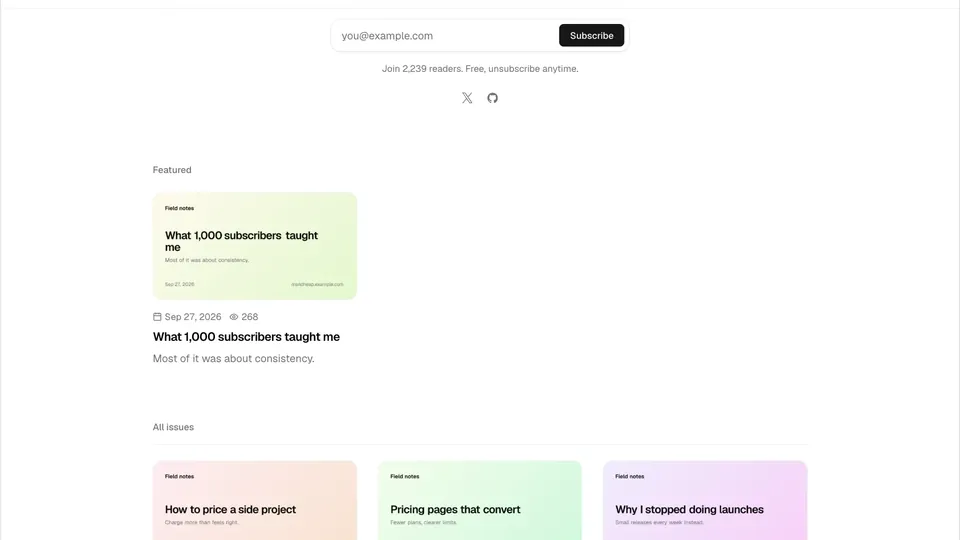
A self-hosted newsletter platform on your own domain: the write/review/send editor with its pre-send checklist, per-newsletter public websites with sitemaps and signup forms, warm-up and list-cleanup guardrails that protect your domain reputation, and the whole thing drivable from an AI agent over MCP and REST — for the cost of the emails you actually send, about $4–$6 a month for 10,000 readers and 4 issues.
Honest limitations
- Self-hosting means no support. Issues are off and setup questions go unanswered — you are the ops team.
- SES starts in the sandbox (200 emails a day, verified recipients only) until AWS grants production access; plan for roughly a day of waiting, and about an hour of real work.
- Rotating
BETTER_AUTH_SECRETsigns everyone out and breaks links in emails already sent — set it once and guard it. - Keep emails under 100 KB, or Gmail clips them and hides the unsubscribe link.
- It is ten days old. Created Oct 10, 2026, it is moving fast — expect the API, the MCP surface and the setup steps to shift while it settles. PostShiba as a provider is invite-only for now.
Frequently asked questions
How is MailCheap cheaper than beehiiv or Mailchimp?
Newsletter platforms price per subscriber, including dormant readers who never open. MailCheap self-hosted costs nothing per subscriber: you pay your email provider per email sent — $0.10 to $0.16 per 1,000 on Amazon SES, so 10,000 readers and 4 issues a month is 40,000 emails, about $4 to $6. (MailCheap Cloud starts at $19 a month for 20,000 emails.)
What do I need to self-host it?
A free MongoDB Atlas cluster, an Amazon SES account, a free Upstash QStash project, and any Node.js 22+ host behind HTTPS (the one-click Vercel deploy works). Plan for about an hour, most of it waiting for DNS records and SES production access; /api/health answers 200 when healthy or 503 telling you what to fix.
Can my AI agent really run the newsletter?
Yes. Everything the dashboard does also works over REST and the MCP server at /mcp with an API key — 300 requests a minute. Connect Claude Code with one command, and the agent can write, review, and send campaigns; sends are flagged as actions that can't be undone, so the agent asks you first.