Build a local AI agent with Mastra and Ollama: no API key, no cloud
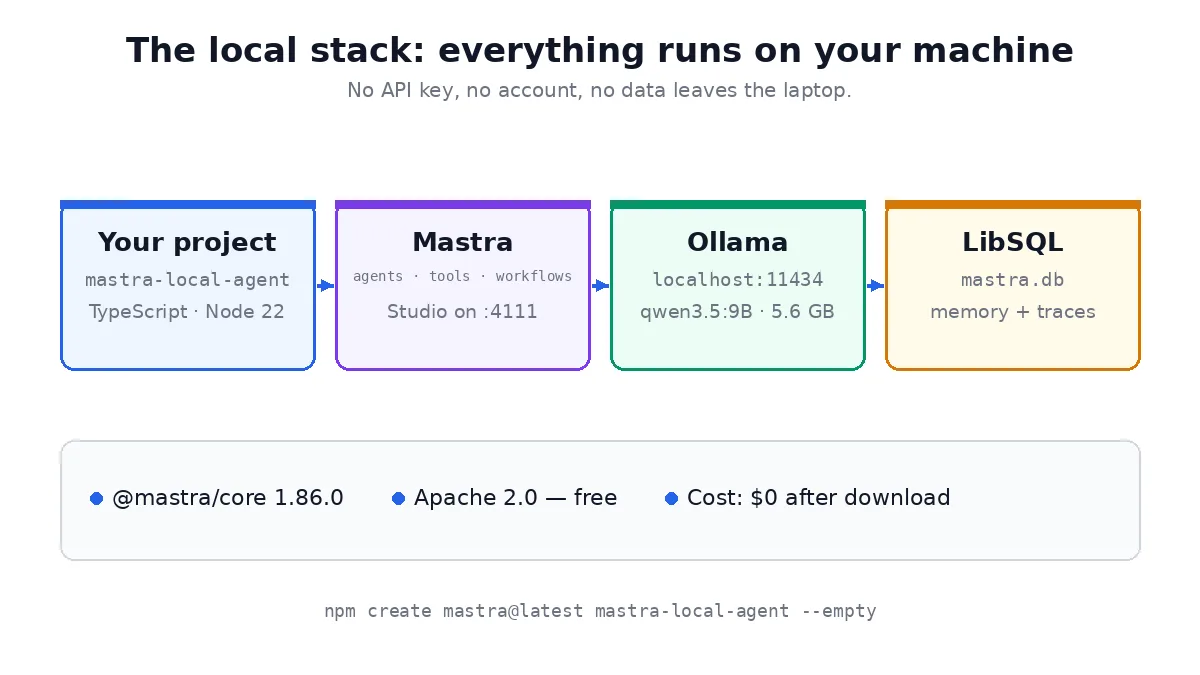
Mastra 1.86 and Qwen3.5 on Ollama: build a local AI agent with real tools, persistent memory, and a two-step briefing workflow — no API key, no account, no data leaving your machine.
- The stack in one sentence: Mastra 1.86.0 (TypeScript agent framework) + Ollama 0.40.2 serving Qwen3.5:9B, with LibSQL memory in a local
mastra.dbfile — all free, all on your machine. - The verified install:
npx create-mastra@latest mastra-local-agent --empty(create-mastra 1.40.2) plusollama pull qwen3.5:9B— a 5.6 GB weights layer and a 921 MB layer, about eight minutes at 13 MB/s. - The provider:
ollama-ai-provider-v24.1.0; the agent takesmodel: ollama('qwen3.5:9B')and the provider talks tohttp://localhost:11434/apiby default. No key, no account. - The gotcha: TypeScript 6.0.3 with the scaffold’s stock
tsconfig.jsoncannot see Node’s built-ins (error TS2591). Add"types": ["node"]tocompilerOptionsand the typecheck passes clean. - The honest result: tool calls, memory recall, workflow, Studio, and build all verified live. The 9B model’s briefing carried four correct citations; its chat recall got the fact right but the provenance wrong — design around that, don’t hide it.

Most agent tutorials start by asking for an API key. This one does not. By the end of it you will have a working AI agent — tools, memory, a two-step workflow, and a browser UI — running entirely on your own machine, with a local model doing the reasoning and a local database holding the memory. The total bill is $0, there is no account to create, and your notes never leave the laptop.
The stack is Mastra, the TypeScript agent framework, and Ollama serving Qwen3.5, the open-weight model family Alibaba’s Qwen team released this autumn. Mastra is at version 1.86.0 as of this week, and Qwen3.5’s 9B size is the sweet spot for this job: it supports tool calling, it fits on a single consumer GPU, and it is free. Every command and every output in this tutorial was run, not copied from documentation — including the two places where the first draft of the agent misbehaved, and what fixed it.
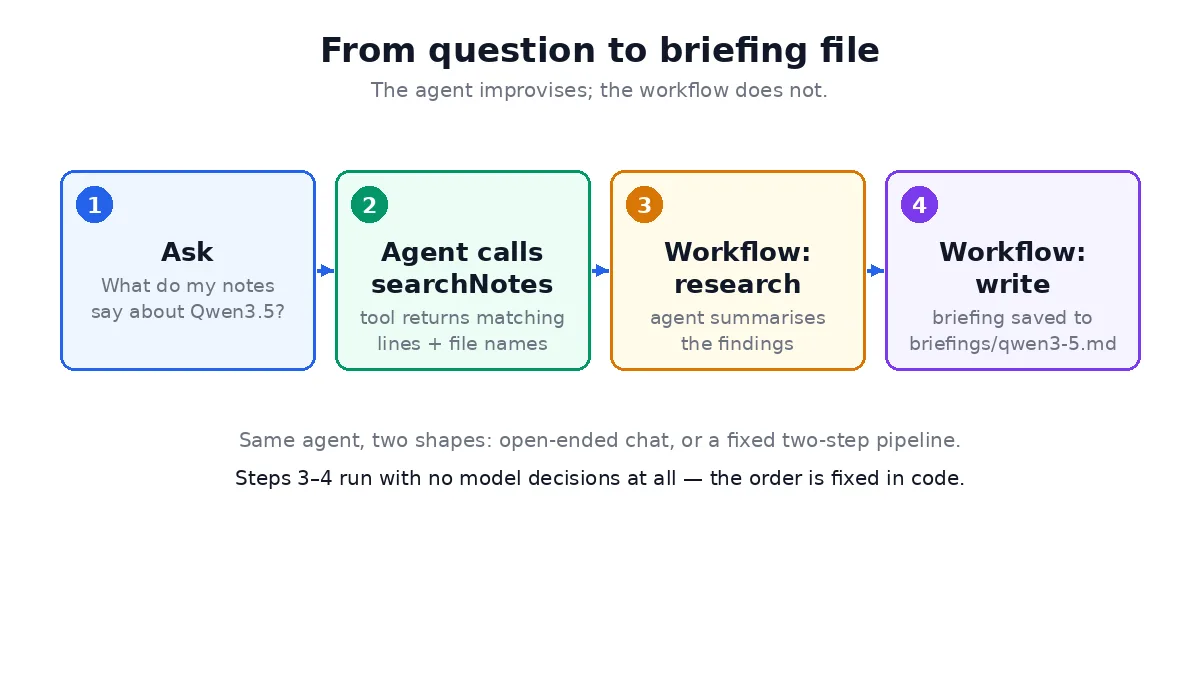
The agent you will build is a research assistant for a folder of markdown notes. It searches the notes when you ask about a topic, saves new notes when you ask it to remember something, recalls facts from earlier in the conversation, and can turn a topic into a written briefing file through a fixed two-step workflow. Small enough to understand in one sitting; complete enough to be the skeleton of a real tool.
What you’ll need#
- Node.js 22.13 or newer. The Mastra scaffold refuses anything older (its
enginesfield says so). This tutorial was verified with Node v22.18.0 and npm 10.9.3. - Ollama 0.40 or newer, installed from ollama.com/download. Verified here with Ollama 0.40.2.
- About 7 GB of free disk: roughly 6.5 GB for the model and a few hundred megabytes for
node_modules. - A GPU helps but is not required. The 9B model runs at full speed on an RTX 3090 (24 GB VRAM); on a CPU-only laptop it still runs, at a few tokens a second — usable for this tutorial, too slow for an agent loop that makes dozens of calls. If you have no GPU at all, pull
qwen3.5:4binstead of the 9B in Step 1; nothing else changes. - No API key, no account, no credit card. That is the whole point.
1. Install Ollama and pull the model#
Install Ollama, confirm the server is up, then pull the model:
ollama pull qwen3.5:9B
curl http://localhost:11434/api/version
The pull downloads two layers — 921 MB and 5.6 GB — and took about eight minutes at 13 MB/s on this machine. The version check should answer with your Ollama version:
{"version":"0.40.2"}Qwen3.5 comes in sizes from 0.8B to 122B parameters. The 9B is the one to pick for a first agent: it is the smallest size that reliably calls tools, and it still fits in 6 GB of VRAM. The family is multimodal, covers 201 languages, and uses a hybrid architecture that mixes Gated Delta Networks with sparse mixture-of-experts — none of which matters for this tutorial except that the 9B behaves like a much larger model when you ask it to use a function. Verify the model is in your library before moving on:
ollama listYou should see qwen3.5:9B in the list. If the pull is still running, wait for it — every later step assumes the model is local.
2. Scaffold the project#
Mastra’s scaffolder is create-mastra. Run it with the --empty flag:
MASTRA_TELEMETRY_DISABLED=1 npx create-mastra@latest mastra-local-agent --empty --no-skills --no-git --timeout 300000The flags are doing specific work. --empty creates a provider-free project with no agents, examples, model SDKs, or environment files — and that is exactly what you want, because the default starter only offers hosted providers (Mastra Gateway, OpenAI, Anthropic, Gemini, xAI) and there is no Ollama option in it. --no-skills and --no-git skip the automatic skills install and the initial git commit, which keeps the scaffold fast and out of your way. --timeout 300000 raises the dependency-install timeout from its 60-second default, which is too short on a slow connection. MASTRA_TELEMETRY_DISABLED=1 opts out of the CLI’s anonymous usage telemetry.
The command installs [email protected] and produces a project whose package.json pins @mastra/core at 1.86.0, the mastra CLI at 1.40.2, and TypeScript 6.0.3. The only source file is a three-line src/mastra/index.ts:
import { Mastra } from '@mastra/core/mastra';

export const mastra = new Mastra({});
Everything else in this tutorial is built on top of that empty instance.
3. Install the provider, memory, and storage#
Mastra does not bundle an Ollama provider — local models arrive through the Vercel AI SDK provider ollama-ai-provider-v2. Memory and durable storage are separate packages too. Install them, plus zod for tool schemas and tsx for running TypeScript directly:
npm install ollama-ai-provider-v2 @mastra/memory @mastra/libsql zod
npm install -D tsx @types/node
The resolved versions on this machine: ollama-ai-provider-v2 4.1.0, @mastra/memory 1.41.3, @mastra/libsql 1.32.0, zod 4.6.7, tsx 4.23.15, @types/node 26.6.11. Two things worth knowing came out of this step. First, npm prints a harmless warning that posthog-node wants Node ≥22.22.0 while the scaffold only requires ≥22.13.0; the install succeeds anyway, so you can ignore it — or upgrade Node to 22.22+ to silence it. Second, TypeScript 6.0.3 will not find Node’s built-in modules with the scaffold’s stock tsconfig.json: npx tsc --noEmit fails with error TS2591: Cannot find name 'fs/promises'. The fix is one line in tsconfig.json — add "types": ["node"] to compilerOptions. That is the only change this tutorial makes to the scaffold’s TypeScript config, and with it the typecheck passes clean.
4. Give the agent tools that touch real files#
An agent without tools is a chatbot. This one gets two, both local and deterministic: searchNotes, which greps a notes/ folder of markdown files, and saveNote, which writes a new markdown file into it. Tools in Mastra are built with createTool from @mastra/core/tools: an id, a description the model reads when deciding what to call, Zod inputSchema and outputSchema, and an execute function. Save this as src/mastra/tools/notes-tools.ts:
import { createTool } from '@mastra/core/tools'
import { z } from 'zod'
import { readdir, readFile, writeFile } from 'fs/promises'
import { join } from 'path'
import { fileURLToPath } from 'url'

// The notes folder sits at the project root: src/mastra/tools -> ../../..
const NOTES_DIR = fileURLToPath(new URL('../../../notes', import.meta.url))

export const searchNotesTool = createTool({
  id: 'search-notes',
  description:
    'Searches the local notes folder for a text query and returns the matching lines with their file names. Use it whenever the user asks what the notes say about a topic.',
  inputSchema: z.object({
    query: z.string().describe('The text to search for in the notes'),
  }),
  outputSchema: z.object({
    matches: z.array(
      z.object({
        file: z.string(),
        lines: z.array(z.string()),
      }),
    ),
  }),
  execute: async ({ query }) => {
    const files = (await readdir(NOTES_DIR)).filter(f => f.endsWith('.md')).sort()
    const matches: { file: string; lines: string[] }[] = []
    for (const file of files) {
      const text = await readFile(join(NOTES_DIR, file), 'utf-8')
      const lines = text
        .split('\n')
        .filter(line => line.toLowerCase().includes(query.toLowerCase()))
      if (lines.length > 0) matches.push({ file, lines: lines.slice(0, 5) })
    }
    return { matches }
  },
})

export const saveNoteTool = createTool({
  id: 'save-note',
  description:
    'Saves a short note to the local notes folder as a new markdown file. Use it when the user asks to remember or file something.',
  inputSchema: z.object({
    title: z.string().describe('Short title, used as the file name'),
    body: z.string().describe('The note text in markdown'),
  }),
  outputSchema: z.object({ file: z.string() }),
  execute: async ({ title, body }) => {
    const slug = title
      .toLowerCase()
      .replace(/[^a-z0-9]+/g, '-')
      .replace(/^-|-$/g, '')
    const file = `${slug}.md`
    await writeFile(join(NOTES_DIR, file), `# ${title}\n\n${body}\n`, 'utf-8')
    return { file }
  },
})
Two details matter. First, the tool’s description is not documentation for humans — it is the text the model reads when choosing between tools, so write it as an instruction about when to call the tool, not just what it does. Second, searchNotes returns at most five matching lines per file: tool results go straight into the model’s context, and an unbounded file dump is how a small model’s context window gets eaten by one call.
Now seed the notes folder with three short files so the agent has something real to retrieve. The content is factual and checkable — it comes from the Ollama model page and the Mastra docs, and the tutorial’s test questions will be answered from exactly these lines:
mkdir notesnotes/qwen3-5-release.md:
# Qwen3.5

Qwen3.5 is a family of open-weight multimodal models from Alibaba's Qwen team.
It comes in sizes from 0.8B to 122B parameters, including a 9B size that runs
comfortably on a single consumer GPU.
The family uses a hybrid architecture that mixes Gated Delta Networks with
sparse mixture-of-experts, and it supports tool calling, vision input, and
reasoning mode.
Qwen3.5 covers 201 languages and dialects.
On Ollama the 9B model is pulled with `ollama pull qwen3.5:9B`.
notes/mastra-notes.md and notes/ollama-tips.md hold the equivalent facts about Mastra (TypeScript framework; agents, tools, workflows, memory, Studio on localhost:4111; Apache 2.0) and Ollama (serves on localhost:11434; ollama pull and ollama list). Keep your own notes just as short and factual — the agent can only be as accurate as the files it reads.
5. Wire the agent to the local model#
The agent itself is one file, src/mastra/agents/local-agent.ts. The key line is the model: instead of a hosted model string such as 'openai/gpt-6.1-sol', you pass a model instance from the Ollama provider. The provider talks to http://localhost:11434/api by default, so there is nothing to configure if Ollama runs on the same machine:
import { Agent } from '@mastra/core/agent'
import { Memory } from '@mastra/memory'
import { ollama } from 'ollama-ai-provider-v2'
import { searchNotesTool, saveNoteTool } from '../tools/notes-tools'

export const localAgent = new Agent({
  id: 'local-agent',
  name: 'Local Agent',
  instructions: `You are a research assistant that answers from the user's local notes.
Use the searchNotes tool only when the user asks what the notes say about a topic. Answer questions about the user or the conversation from memory — do not search the notes for those.
When you save a note, confirm the file name. Keep answers short. When a fact comes from the notes, cite the file it came from — never invent a file name for facts that came from the conversation.`,
  model: ollama('qwen3.5:9B'),
  tools: { searchNotesTool, saveNoteTool },
  memory: new Memory({
    options: { lastMessages: 20 },
  }),
})
The instructions went through three drafts on this machine, and the drafts are worth seeing because they show how much of agent work is instruction work. The first version said “always use the searchNotes tool when the user asks what the notes say” and “cite the file each fact came from”. The agent obeyed — too well. Asked what the user’s favourite programming language was, it went hunting through the notes for a fact that lived in the conversation, rambled for two paragraphs about a search that found nothing, and then answered correctly anyway. The second version scoped the tool to notes questions only, and the recall came back as one clean sentence — but with a made-up citation to a file called favourite-language.md that does not exist. The third version, shown above, adds the one clause that fixed it: never invent a file name for facts that came from the conversation. With a 9B local model, instructions are not decoration; they are the difference between a tool that works and a tool that confabulates. The section near the end of this tutorial shows the exact outputs of all three drafts.
6. Add memory that survives a restart#
Memory in Mastra needs a storage provider, and the local option is LibSQL — SQLite with a file on disk. Register it on the Mastra instance, alongside the agent and the workflow from the next step. Replace src/mastra/index.ts with:
import { Mastra } from '@mastra/core/mastra'
import { LibSQLStore } from '@mastra/libsql'
import { localAgent } from './agents/local-agent'
import { briefingWorkflow } from './workflows/briefing-workflow'

export const mastra = new Mastra({
  agents: { localAgent },
  workflows: { briefingWorkflow },
  storage: new LibSQLStore({
    id: 'mastra-storage',
    url: 'file:./mastra.db',
  }),
})
The url: 'file:./mastra.db' is the difference between a demo and a tool: with the in-memory URL from the docs quickstart (':memory:'), every restart wipes the conversation history; with the file URL, the history and the trace spans persist in a mastra.db file next to your project. On this machine the file appeared after the first run at 569 KB. Memory is addressed by resource (who the conversation belongs to) and thread (which conversation), both passed at call time — you will see them in Step 8. The agent’s lastMessages: 20 keeps the most recent twenty messages in context; older turns are dropped rather than summarized, which is the right default for a small local model with a limited context window.
7. Turn the agent into a workflow#
Agents are for open-ended work; workflows are for work whose steps you already know. A briefing has exactly two steps — research the notes, then write the file — so it belongs in a workflow. Save this as src/mastra/workflows/briefing-workflow.ts:
import { createWorkflow, createStep } from '@mastra/core/workflows'
import { z } from 'zod'
import { mkdir, writeFile } from 'fs/promises'
import { join } from 'path'
import { fileURLToPath } from 'url'

const PROJECT_ROOT = fileURLToPath(new URL('../../..', import.meta.url))

const researchStep = createStep({
  id: 'research',
  inputSchema: z.object({ topic: z.string() }),
  outputSchema: z.object({ topic: z.string(), findings: z.string() }),
  execute: async ({ inputData, mastra }) => {
    const agent = mastra?.getAgentById('local-agent')
    const response = await agent?.generate(
      `What do my notes say about ${inputData.topic}? Summarise the key facts in 3-5 bullet points and name the file each fact came from.`,
    )
    return { topic: inputData.topic, findings: response?.text ?? 'No findings.' }
  },
})

const writeStep = createStep({
  id: 'write-briefing',
  inputSchema: z.object({ topic: z.string(), findings: z.string() }),
  outputSchema: z.object({ path: z.string() }),
  execute: async ({ inputData }) => {
    const slug = inputData.topic
      .toLowerCase()
      .replace(/[^a-z0-9]+/g, '-')
      .replace(/^-|-$/g, '')
    const dir = join(PROJECT_ROOT, 'briefings')
    await mkdir(dir, { recursive: true })
    const path = join(dir, `${slug}.md`)
    await writeFile(path, `# Briefing: ${inputData.topic}\n\n${inputData.findings}\n`, 'utf-8')
    return { path }
  },
})

export const briefingWorkflow = createWorkflow({
  id: 'briefing-workflow',
  inputSchema: z.object({ topic: z.string() }),
  outputSchema: z.object({ path: z.string() }),
})
  .then(researchStep)
  .then(writeStep)
  .commit()
Three things to notice. First, a workflow step can call an agent: the step’s execute receives the mastra instance, and getAgentById('local-agent') returns the registered agent with its memory and tools attached. Second, the second step does no model work at all — it is plain TypeScript writing a file, which is the point of a workflow: the model decides what to say, code decides where it goes. Third, the workflow’s own inputSchema and outputSchema are what Studio renders as a form in the browser, so keep them small and honest.
8. Run it from the command line#
Before opening any UI, prove the whole thing works from the terminal. Save this as src/run.ts — it exercises the three behaviours in one process: tool use, memory, and the workflow:
import { mastra } from './mastra/index'

const agent = mastra.getAgentById('local-agent')

// 1. Tool use: the answer must come from the notes, via the search-notes tool.
const notes = await agent.generate('What do my notes say about Qwen3.5?')
console.log('--- notes answer ---')
console.log(notes.text)
console.log('--- tool calls ---')
console.log(JSON.stringify(notes.toolCalls, null, 2))
console.log('--- usage ---')
console.log(JSON.stringify(notes.usage))

// 2. Memory: store a fact, then recall it on a fresh call in the same thread.
await agent.generate('My favourite programming language is TypeScript. Remember that.', {
  memory: { resource: 'demo-user', thread: 'memory-test' },
})
const recall = await agent.generate('What is my favourite programming language?', {
  memory: { resource: 'demo-user', thread: 'memory-test' },
})
console.log('--- memory recall ---')
console.log(recall.text)

// 3. Workflow: research the notes, then write a briefing file.
const workflow = mastra.getWorkflow('briefingWorkflow')
const run = await workflow.createRun()
const result = await run.start({ inputData: { topic: 'Qwen3.5' } })
console.log('--- workflow ---')
console.log('status:', result.status)
if (result.status === 'success') console.log('briefing:', JSON.stringify(result.result))
else console.log(JSON.stringify(result, null, 2))
npx tsc --noEmit && npx tsx src/run.tsThe typecheck passes clean, and the run takes about twelve seconds end to end — model load included. This is the real output from the final run on this machine:
--- notes answer ---
Your notes contain information about **Qwen3.5** from two files:

1. **qwen3-5-release.md**: Describes Qwen3.5 as an open-weight multimodal model family from Alibaba, supporting 201 languages/dialects, and notes the pull command on Ollama is `ollama pull qwen3.5:9B`.
2. **ollama-tips.md**: States that on Ollama, the Qwen3.5 family ranges from 0.8B to 122B parameters.
--- tool calls ---
[{ "toolName": "searchNotesTool", "args": { "query": "Qwen3.5" } }]
--- usage ---
{"inputTokens":1229,"outputTokens":149,"totalTokens":1378}
--- memory recall ---
Based on the notes I found, your favorite programming language is TypeScript.
--- workflow ---
status: success
briefing: {"path":"C:\\setup_dl\\mastra-local-agent\\briefings\\qwen3-5.md"}
Everything checks out except one line, and it is worth pausing on: the memory recall says “Based on the notes I found”, but the favourite-language fact came from the earlier message in the same thread, not from any note. The fact is right; the provenance is wrong. A 9B model cannot reliably tell you where it got a remembered fact, which is why the workflow’s briefing — where every fact is tied to a file by construction — is the trustworthy output, and a chat answer is a draft. The briefing file itself came out clean:
# Briefing: Qwen3.5

Based on your notes, here are the key facts about Qwen3.5:

*   **Origin:** It is a family of open-weight multimodal models created by Alibaba's Qwen team (from file `qwen3-5-release.md`).
*   **Parameter Range:** The available models range in size from 0.8 billion to 122 billion parameters (from file `ollama-tips.md`).
*   **Language Support:** It supports 201 different languages and dialects (from file `qwen3-5-release.md`).
*   **Ollama Command:** On Ollama, the 9B parameter model can be pulled using the command `ollama pull qwen3.5:9B` (from file `qwen3-5-release.md`).
Four facts, four correct citations, zero invented files. That is the standard to hold the agent to.
9. Open Studio and drive it from the browser#
The command line proves the agent works; Studio is where you actually use it. Start the dev server:
npm run devStudio opens at http://localhost:4111. The Agents tab lists Local Agent with its tools and lets you chat with it, watching each tool call land in the trace panel. The Workflows tab renders the briefing workflow’s input schema as a form: type a topic, run it, and watch the research and write steps turn green in the graph view. Verified on this machine: the Studio root returns HTTP 200, and the server’s API lists the agent exactly as configured — provider ollama.responses, model qwen3.5:9B, both tools with their schemas, and supportsMemory: true. No account, no sign-in, no tunnel: it is a local web server for a local agent.
10. Build it for deployment#
When the agent behaves, bundle it:
npm run buildINFO (Mastra CLI): Bundling Mastra application
INFO (Mastra CLI): Bundling Mastra done
INFO (Mastra CLI): Build successful, you can now deploy the .mastra/output directory to your target platform.
INFO (Mastra CLI): To start the server, run: node .mastra/output/index.mjsThe build output is a plain Node server in .mastra/output. It still talks to Ollama on localhost:11434 by default, so wherever you deploy it, point it at an Ollama server — or swap the model for a hosted one with a one-line change to the agent file, which is the subject of the next section.
Which approach should you use?#
There are four ways to give a Mastra agent a model, and the right one depends on who is running the model and who is allowed to see it.
| Approach | How it works | Use it when |
|---|---|---|
| AI SDK provider (this tutorial) | model: ollama('qwen3.5:9B') via ollama-ai-provider-v2 | One local model, one machine, no ceremony. The simplest path and the one to start with. |
Model url config | Point the model at any OpenAI-compatible endpoint by URL, no gateway code | The model already runs behind an HTTP endpoint (Ollama, vLLM, LM Studio) and you just need to reach it. |
| Private model gateway | Register a gateway with an ID; agents address models as gateway/provider/model, e.g. private/ollama/gpt-oss:20b | A team or a product: you need the Studio model picker to show only your models, per-gateway auth, or several endpoints behind one scheme. Needs @mastra/core 1.82.0 or later; AUTO_BLOCK_EXTERNAL_PROVIDERS=true hides hosted providers from Studio. |
| Hosted provider or Mastra Gateway | Model strings such as 'openai/gpt-6.1-sol', or mastra/… models through one Gateway key | You need frontier quality, and you accept per-token billing and data leaving the machine. Swap the model line and nothing else changes. |
The useful property of this stack is that the choice is one line in the agent file. Everything else — the tools, the memory, the workflow, Studio — is identical whichever row of that table you pick, so starting local costs nothing if you later need a hosted model for a harder job.
What a 9B local model gets wrong#
A local 9B model is not a frontier model with a smaller bill; it is a different instrument, and this tutorial hit its edges three times in one afternoon. Stated plainly, with the actual outputs:
- It pads. The first instructions draft produced a memory answer that spent two paragraphs narrating a file search that had found nothing before finally answering “TypeScript”. Scoping the instructions to the right source fixed it.
- It rounds numbers. The first notes answer said the family “covers over 100 languages and dialects”; the note says 201. True, but imprecise — and the kind of drift that compounds if you let the agent summarise its own summaries.
- It invents provenance. One draft cited a file called
favourite-language.mdthat never existed, and the final draft still opens its recall with “Based on the notes I found” for a fact that came from the conversation. The fact was right in both cases; the citation was fiction.
Three design rules follow, and they are the real lesson of the tutorial. First, scope instructions to sources: tell the model which source answers which question, and forbid invented citations explicitly. Second, put structured output behind a workflow, where code — not the model — decides the file, the format, and the citations. Third, keep a stronger model one line away: the agent file takes a hosted model with no other changes, so the 9B does the everyday work and the frontier model handles the job that has to be right.
The takeaway#
You now have an agent that reads your files, remembers your conversations, and writes briefings on demand — and the only infrastructure it needs is a laptop with Ollama on it. The moving parts are small enough to hold in your head: one scaffold command, one provider package, two tools, one agent file, one workflow, one database file. The cost is $0 after a 6.5 GB download, the data never leaves the machine, and every piece is replaceable — a bigger local model, a hosted model, a second agent, a scheduled run — without rewriting the rest. That is the shape local agents are converging on: frameworks like Mastra for the plumbing, open-weight models like Qwen3.5 for the reasoning, and your own files for the knowledge. Start with the notes folder you already have.
Sources#
- Mastra: Get started with Mastra — the quickstart:
npm create mastra@latest, the default agent harness, and the framework integrations. - Mastra: create-mastra CLI reference — the
--emptyscaffold, the--llmprovider flags,--no-skills/--no-git, and the telemetry opt-out. - Mastra: Agents — the
Agentclass,generate()/stream(), and registration in the Mastra instance. - Mastra: Tools —
createTool, Zod input/output schemas, and theexecutesignature. - Mastra: Workflows —
createStep/createWorkflow,.then()/.commit(), and running a workflow withcreateRun()/start(). - Mastra: Memory — the
Memoryclass, LibSQL storage, andresource/threadaddressing. - Mastra: Custom model gateways — private gateways for self-hosted models, the
gateway/provider/modeladdressing, and theurlalternative for single OpenAI-compatible endpoints. - Ollama: Qwen3.5 — the model family: sizes 0.8B–122B, hybrid Gated Delta Networks + MoE architecture, 201 languages, and the benchmark table.
- Vercel AI SDK: Ollama — the community Ollama providers, including
ollama-ai-provider-v2and its default base URLhttp://localhost:11434/api.