Call now, fetch later: run long MCP tools as background Tasks with FastMCP
MCP tool calls block until they finish — so a four-minute job holds the request open and stalls the agent. FastMCP 4 turns slow tools into background Tasks: submit, get a handle, poll, cancel, even answer questions mid-run. The complete build, verified end to end.
- Tasks (SEP-2663,
io.modelcontextprotocol/tasks): the server answers a tool call with a task handle instead of a result; the client pollstasks/get, answers input withtasks/update, and cancels withtasks/cancel. Generally available in Claude and Claude Code since November 24, 2026. - FastMCP 4.2.6:
mcp.add_extension(TasksExtension())plus@mcp.tool(task=True)is the whole server-side change. The in-memory backend needs no setup; task tools must be async functions. - Measured on the sandbox run: a handle in 0.01 seconds for a 10-second job; the transparent
call_toolpolls under the hood (5.2 seconds for a 3-second job at the default 5-second poll interval); cancel lands incancelled; task TTL is 15 minutes. - Compatibility: optional tools run synchronously for clients without the extension; required tools fail loudly naming it.
tools/listcarries no per-tool task flag in FastMCP 4.2.6 — the handshake is the extension capability, and the server decides per request.
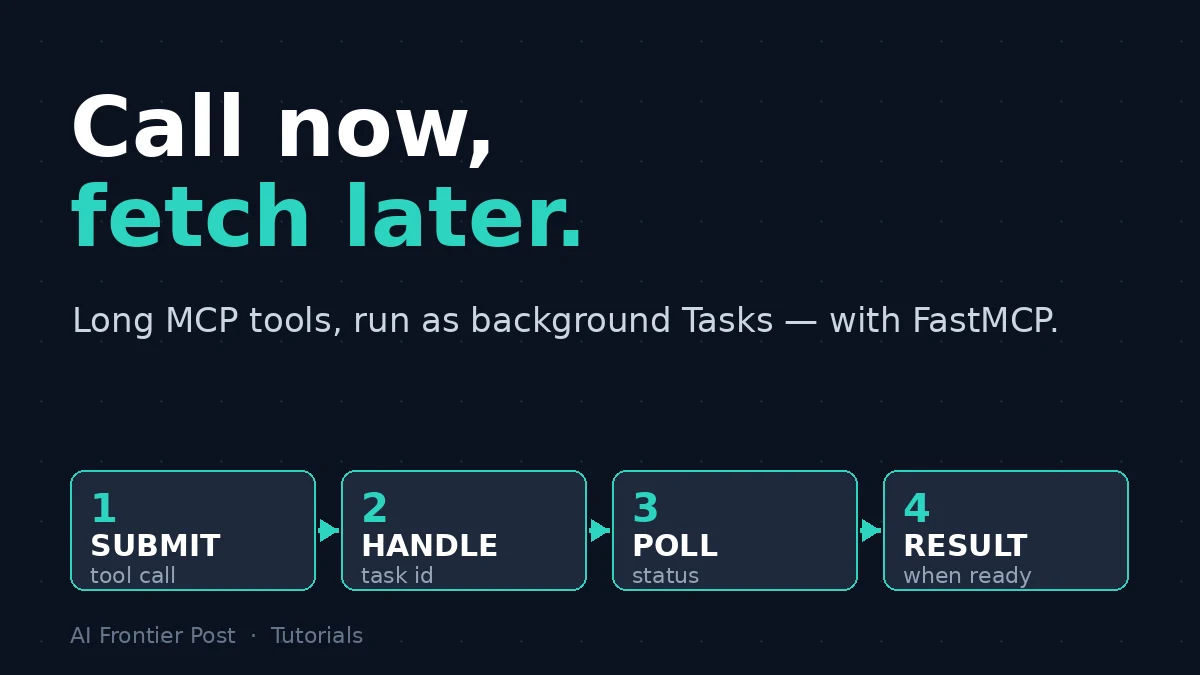
Until now, an MCP tool call was one request and one response. The client sent the call, held the connection open, and waited — however long the work took. A research job that runs four minutes holds a request open for four minutes: through proxies, past timeouts, while the agent that asked for it sits idle. On November 24, 2026, Anthropic marked the second anniversary of the Model Context Protocol by making Tasks generally available in Claude and Claude Code, alongside elicitation. Tasks break the one-request-one-response shape: the server accepts the job, hands back a handle immediately, and the client polls for the result while the agent keeps working. ZoomInfo already runs its deeper account research this way — work that used to take several prompts now runs as a single background job.
This tutorial builds a working Tasks server from scratch with FastMCP 4, the Python framework that implements the extension. You will write a server whose slow tools run in the background, drive it from a client three ways (transparent, explicit, cancelled), make one tool refuse to run synchronously, ask the user a question mid-task, and wire the result into Claude Code. Every code block below is the exact code that was run to produce the quoted output — no API key, no GPU, no account, no Redis.
What you’ll need#
- Python 3.11 or newer. FastMCP 4 requires it; the sandbox run for this tutorial used Python 3.12.
- FastMCP 4.2.6 with the tasks extra:
pip install "fastmcp[tasks]"installs bothfastmcpandfastmcp-tasks. Pin them if you want the exact versions tested here:fastmcp==4.2.6andfastmcp-tasks==4.2.6. - Nothing else. The default backend is in-memory, so there is no Redis to install, no database to provision, and no model calls anywhere — the server sleeps to simulate slow work, and the client is a script.
One thing to know before you start: Tasks are a negotiated capability. The client declares the io.modelcontextprotocol/tasks extension when it connects, and only then may the server answer a tool call with a task handle. A client that never declares it gets the old behavior — synchronous calls — and a tool that requires tasks gets a clean error instead of running. That split is the whole design, and Step 4 proves it.
Step 1: A minimal task server#
Two lines turn an ordinary FastMCP server into a task-capable one: register the extension, and mark a tool with task=True. Save this as minimal_server.py:
"""Minimal task-capable MCP server: two new lines turn a tool into a Task."""
import asyncio

from fastmcp import FastMCP
from fastmcp_tasks import TasksExtension

mcp = FastMCP("report-forge")
mcp.add_extension(TasksExtension())  # line 1: the tasks extension


@mcp.tool(task=True)  # line 2: this tool may run as a background task
async def slow_job(word: str) -> str:
    await asyncio.sleep(10)
    return f"Done: {word}"


if __name__ == "__main__":
    mcp.run()
Run it, then drive it from a client that declares the extension. Save this as minimal_client.py:
import asyncio, time
from fastmcp import Client
from fastmcp_tasks import call_tool_task
from fastmcp_tasks.client import TasksClientExtension
from minimal_server import mcp

async def main():
    async with Client(mcp, extensions=[TasksClientExtension()]) as client:
        t0 = time.monotonic()
        task = await call_tool_task(client, "slow_job", {"word": "hello"})
        print(f"handle in {time.monotonic()-t0:.2f}s, task_id={task.task_id}")
        print("status:", (await task.status()).status)
        print("result:", (await task.result()).content[0].text)

asyncio.run(main())
Expected output — note the timing. The job sleeps for ten seconds, but the handle comes back in a hundredth of one:
handle in 0.01s, task_id=00MIs-nXp1UTNLNOqEW8f7Y9ehwC62PhNE-SJCtOxh0
status: working
result: Done: hello
Your task id will differ; the shape is the point. call_tool_task returns a ToolTask handle the moment the server accepts the job. status() reads the current state, wait() polls until it turns terminal, and result() returns the finished tool result. Two details in the client are easy to miss and both matter. First, the tasks extension is registered on the client too, with extensions=[TasksClientExtension()] — without it, the client never declares the capability and the server never tasks the call. Second, call_tool_task is a module-level function from fastmcp_tasks, not a method on Client — in FastMCP 4.2.6, Client has no call_tool_task method, and the docs page that shows it as one is describing the intent, not the installed API.
If you forget the extension on the server side, FastMCP fails fast instead of silently running everything synchronously. A server with a task=True tool and no extension registered refuses to connect, with this exact error:
RuntimeError: Client failed to connect: Task-enabled tools (slow) require the tasks extension, but no extension with identifier 'io.modelcontextprotocol/tasks' is registered. Install it with `pip install 'fastmcp[tasks]'` and register it via `mcp.add_extension(TasksExtension(...))`.That is the behavior you want from a capability negotiation: a missing piece is a loud error at startup, not a quiet downgrade you discover in production.
Step 2: Build a tool worth tasking — report-forge#
A ten-second sleep proves the plumbing, but it does not teach you when to reach for Tasks. The server for the rest of this tutorial is report-forge: a research-brief service with four tools. The first three cover the three execution modes; the fourth asks the user a question mid-task, and gets its own step (Step 5). Save it as report_forge.py:
"""report-forge: a FastMCP server whose slow tools run as background Tasks.

Verified against fastmcp 4.2.6 + fastmcp-tasks (2026-11-25).
Run it with:  python report_forge.py        (stdio, for Claude Code)
           or fastmcp run report_forge.py  (same server, CLI launcher)
"""
import asyncio
from datetime import timedelta

import mcp_types
from fastmcp import Context, FastMCP
from fastmcp.dependencies import Progress
from fastmcp.utilities.tasks import TaskConfig
from fastmcp_tasks import TasksExtension

mcp = FastMCP("report-forge")
mcp.add_extension(TasksExtension())


@mcp.tool(task=True)
async def build_report(topic: str, sections: int = 3,
                       progress: Progress = Progress()) -> str:
    """Assemble a multi-section research brief. Slow on purpose: ~1s/section."""
    await progress.set_total(sections)
    await progress.set_message(f"Researching {topic!r}")
    lines = [f"# Brief: {topic}", ""]
    for i in range(1, sections + 1):
        await asyncio.sleep(1)  # stand-in for retrieval + synthesis
        lines.append(f"## Section {i}\nFinding {i} about {topic}.\n")
        await progress.increment()
        await progress.set_message(f"Section {i} of {sections} done")
    return "\n".join(lines)


@mcp.tool
def quick_lookup(query: str) -> str:
    """Instant lookup. Synchronous by design: never a task."""
    return f"{query}: 42 (cached)"


@mcp.tool(task=TaskConfig(mode="required", poll_interval=timedelta(seconds=1)))
async def deep_dive(topic: str) -> str:
    """A job that MUST run as a task: refuses synchronous callers."""
    await asyncio.sleep(2)
    return f"Deep dive complete: {topic}"


@mcp.tool(task=True)
async def publish_brief(topic: str, ctx: Context) -> str:
    """Draft a brief, then ask the user whether to publish -- mid-task."""
    responses = ctx.input_responses
    if responses is None:
        # Leg 1: ask, don't wait. The task pauses at input_required and
        # the worker is freed until the client answers.
        return mcp_types.InputRequiredResult(
            input_requests={
                "confirm": mcp_types.ElicitRequest(
                    params=mcp_types.ElicitRequestFormParams(
                        message=f"Publish the {topic} brief to the team channel?",
                        requested_schema={
                            "type": "object",
                            "properties": {
                                "approve": {"type": "boolean", "title": "Approve publish"}
                            },
                            "required": ["approve"],
                        },
                    )
                )
            }
        )
    # Leg 2: the client answered; re-invoked with the answer attached.
    answer = responses["confirm"]
    if getattr(answer, "action", None) != "accept" or not (answer.content or {}).get("approve"):
        return f"Not published: {topic} (declined)"
    await asyncio.sleep(1)
    return f"Published: {topic} brief is live in #team-updates"


if __name__ == "__main__":
    mcp.run()
Three things to notice. First, build_report takes a Progress dependency — injected by FastMCP, imported from fastmcp.dependencies, not from fastmcp itself. set_total, increment and set_message report back to the client while the job runs; the same code works whether the call is synchronous or tasked, so you write progress reporting once. Second, quick_lookup is an ordinary synchronous tool. It is the control group: fast tools stay fast tools, and nothing in this setup forces everything into the background. Third, deep_dive uses TaskConfig(mode="required", poll_interval=timedelta(seconds=1)) — imported from fastmcp.utilities.tasks. The poll interval matters: the server suggests how often the client should check back, and the client honors it. You will see the difference in the timings in Step 3.
One hard rule: task tools must be async functions. Mark a synchronous function with task=True and FastMCP refuses it at decoration time:
ValueError: 'sync_tool' uses a sync function but has task execution enabled. Background tasks require async functions.That is a real constraint, not a style preference — the worker runs the function on an event loop, and a blocking sync function would stall it. If your slow work is a blocking library call, wrap it with asyncio.to_thread inside the async tool.
Step 3: Drive it from a client — three ways to wait#
There are two ways to call a task-capable tool, and they look almost identical from the caller’s side. Save this as client.py:
"""Client for report-forge: transparent calls, explicit tasks, cancellation."""
import asyncio
import time

from fastmcp import Client
from fastmcp_tasks import call_tool_task
from fastmcp_tasks.client import TasksClientExtension

from report_forge import mcp


async def main() -> None:
    async with Client(mcp, extensions=[TasksClientExtension()]) as client:
        # 1. Transparent: call_tool polls under the hood, returns the result.
        t0 = time.monotonic()
        result = await client.call_tool("build_report",
                                        {"topic": "MCP Tasks", "sections": 3})
        print(f"[transparent] {time.monotonic() - t0:.1f}s ->",
              result.content[0].text.splitlines()[0])

        # 2. Explicit: a handle now, the result when you want it.
        t0 = time.monotonic()
        task = await call_tool_task(client, "build_report",
                                    {"topic": "FastMCP", "sections": 3})
        print(f"[explicit] handle in {time.monotonic() - t0:.2f}s,",
              f"task_id={task.task_id}")
        print("  status:", (await task.status()).status)
        done = await task.wait(timeout=30)
        print("  wait() ->", done.status)
        final = await task.result()
        print("  result:", final.content[0].text.splitlines()[0])

        # 3. Cancel a runaway job.
        task2 = await call_tool_task(client, "build_report",
                                     {"topic": "Slow job", "sections": 10})
        await asyncio.sleep(0.5)
        await task2.cancel()
        print("  after cancel:", (await task2.wait(timeout=30)).status)


asyncio.run(main())
Expected output:
[transparent] 5.2s -> # Brief: MCP Tasks
[explicit] handle in 0.01s, task_id=JttpID4NUBpTdiPmBCfNPtz6si-nitfbjQGejOee6co
  status: working
  wait() -> completed
  result: # Brief: FastMCP
  after cancel: cancelled
The first call is the one most code will use. Plain call_tool works exactly as it always has: it returns the finished result. Under the hood, the client sees the task handle, polls tasks/get until the task is terminal, and hands you the result — the task is invisible. That is the right default: the same calling code works whether or not the server tasks the call, and whether or not the client declared the extension. The 5.2 seconds for a three-second job is the polling cadence, not slowness: the server suggests a five-second poll interval (measured: poll_interval_ms: 5000 on the task snapshot), so the client notices completion at the next poll. deep_dive sets a one-second interval and returns in 2.3 seconds for a two-second job — same mechanism, tighter loop.
The second call is for when you want to do other work while the job runs. call_tool_task returns the handle in 0.01 seconds, and from there you drive the task yourself: status() for a snapshot, wait() to block until a state you name (or any terminal state), result() to collect the finished output. Between submitting and collecting, your code is free — start ten reports, poll them in a loop, do something else entirely. The third call shows the escape hatch: cancel() asks the server to stop, and the task lands in cancelled. Cancellation is cooperative — a task that is already finishing may complete before the server notices — but the state machine guarantees the outcome is one of the terminal states, never a half-result.
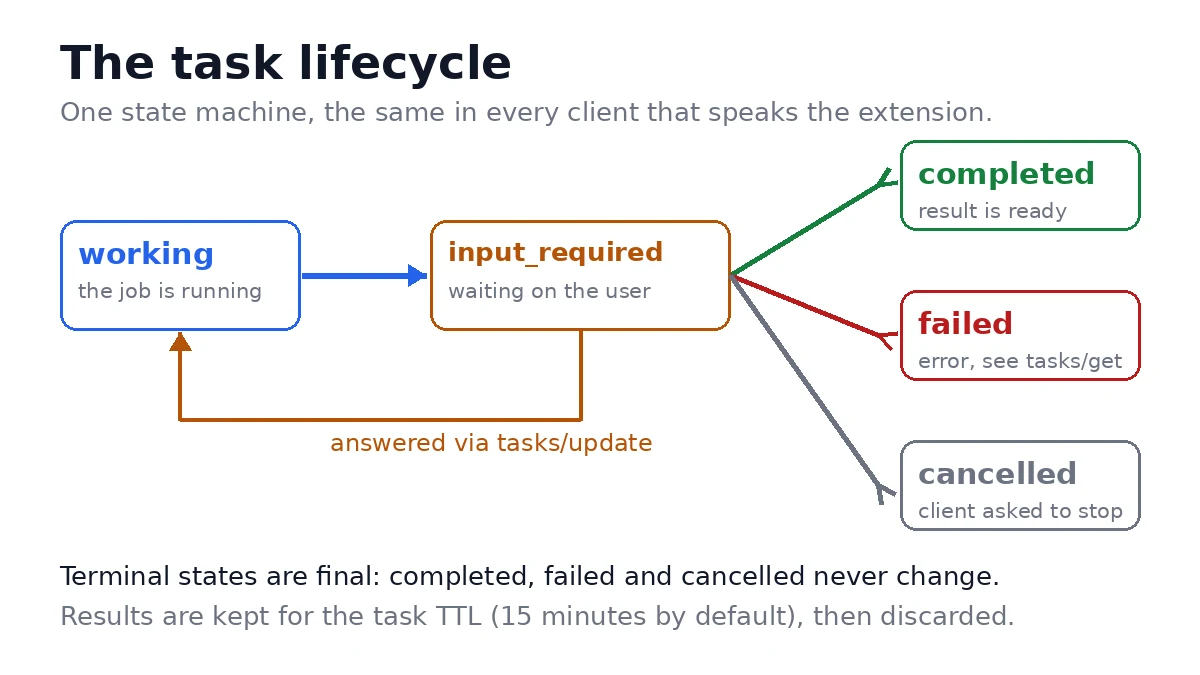
The lifecycle has five states and one rule: working is where a task starts; input_required is an optional pause while the task waits on the client (Step 5); completed, failed and cancelled are terminal and never change. A terminal tasks/get response carries the result or the error inline — there is no separate fetch step. That is the main difference from the first, experimental version of Tasks in the 2025-11-25 spec, which had a blocking tasks/result call and a tasks/list method; both are gone in the extension, and the result rides on the poll itself.
A note for anyone reading the wire: tools/list does not flag which tools support tasks. In FastMCP 4.2.6 the execution field comes back empty for every tool — the 2026-07-28 extension is server-directed, so the handshake is the extension capability and the server decides per request, based on the tool’s execution mode. Do not go looking for a per-tool flag in the listing; there is not one to find.
Step 4: Execution modes — who decides?#
task=True is shorthand for TaskConfig(mode="optional"). The three modes decide what happens for each combination of client and tool:
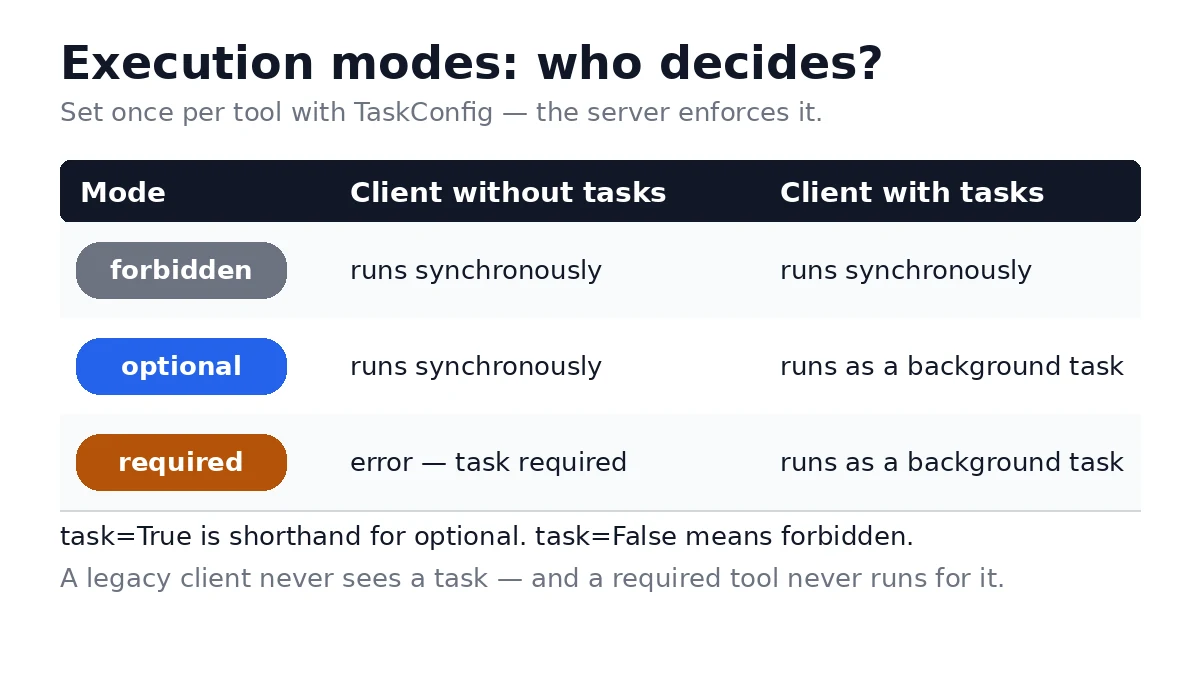
The interesting row is required. It exists for jobs that must never run synchronously — a multi-minute agent loop, a batch export, anything where a synchronous call would be a bug rather than a fallback. Here is what a client without the extension sees. Save this as legacy_client.py and run it against the same server:
"""What a client WITHOUT the tasks extension sees."""
import asyncio
import time

from fastmcp import Client

from report_forge import mcp


async def main() -> None:
    async with Client(mcp, mode="legacy") as legacy:
        # An optional tool just runs synchronously: the caller waits.
        t0 = time.monotonic()
        result = await legacy.call_tool("build_report",
                                        {"topic": "Legacy", "sections": 2})
        print(f"[legacy] build_report took {time.monotonic() - t0:.1f}s "
              f"(synchronous) ->", result.content[0].text.splitlines()[0])
        # A required-mode tool refuses instead of running.
        try:
            await legacy.call_tool("deep_dive", {"topic": "SEP-2663"})
        except Exception as e:  # noqa: BLE001 - demo prints the real error
            print("[legacy] deep_dive raised:", type(e).__name__)
            print(" ", str(e))


asyncio.run(main())
Expected output:
[legacy] build_report took 2.1s (synchronous) -> # Brief: Legacy
[legacy] deep_dive raised: MCPError
  Tool 'deep_dive' requires the tasks extension (io.modelcontextprotocol/tasks); the client did not declare it for this request.
Two behaviors, both deliberate. The optional tool degrades gracefully: the legacy client asked for a report, waited two seconds, and got it — no error, no task, no special handling. The required tool fails loudly with a message that names the missing capability, instead of running a job it was never supposed to run inline. And quick_lookup, the plain tool, is unaffected either way. That is the compatibility story in one script: new clients get background execution, old clients keep working, and the only thing that ever errors is a combination you explicitly forbade.
Step 5: Ask the user a question mid-task#
The second half of the November 24 announcement was interactivity: a server that can check in with the user partway through a job. The fourth tool in report_forge.py does exactly that. It drafts a brief, then asks whether to publish it — and the question arrives while the task is running, not before it starts. Here is that function, isolated from the file:
@mcp.tool(task=True)
async def publish_brief(topic: str, ctx: Context) -> str:
    """Draft a brief, then ask the user whether to publish -- mid-task."""
    responses = ctx.input_responses
    if responses is None:
        # Leg 1: ask, don't wait. The task pauses at input_required and
        # the worker is freed until the client answers.
        return mcp_types.InputRequiredResult(
            input_requests={
                "confirm": mcp_types.ElicitRequest(
                    params=mcp_types.ElicitRequestFormParams(
                        message=f"Publish the {topic} brief to the team channel?",
                        requested_schema={
                            "type": "object",
                            "properties": {
                                "approve": {"type": "boolean", "title": "Approve publish"}
                            },
                            "required": ["approve"],
                        },
                    )
                )
            }
        )
    # Leg 2: the client answered; re-invoked with the answer attached.
    answer = responses["confirm"]
    if getattr(answer, "action", None) != "accept" or not (answer.content or {}).get("approve"):
        return f"Not published: {topic} (declined)"
    await asyncio.sleep(1)
    return f"Published: {topic} brief is live in #team-updates"
This is the guard pattern, and it is deliberately written as a function that can be called twice. On the first leg, ctx.input_responses is None, so the tool returns an InputRequiredResult instead of a result — a form request with a message and a JSON Schema for the answer. Returning, not awaiting, is the point: the leg ends, the worker is freed, and the task sits in input_required as durable state. No worker ever blocks waiting on a human. On the second leg, FastMCP re-invokes the same function with the answer attached to ctx.input_responses, and the tool reads it and proceeds. The same tool works identically as a foreground call — the framework runs the same two legs inline — which means one implementation serves both paths.
The client answers through an elicitation_handler. Save this as input_client.py:
"""Mid-task input: watch publish_brief pause, answer it, get the result."""
import asyncio

from fastmcp import Client
from fastmcp_tasks import call_tool_task
from fastmcp_tasks.client import TasksClientExtension

from report_forge import mcp


async def approve_all(message, response_type, params, context):
    print("  [client] server asks:", message)
    return {"approve": True}


async def main() -> None:
    async with Client(mcp, extensions=[TasksClientExtension()],
                      elicitation_handler=approve_all) as client:
        task = await call_tool_task(client, "publish_brief",
                                    {"topic": "MCP Tasks"})
        print("submitted, task_id:", task.task_id)
        # Observe the pause WITHOUT answering it.
        paused = await task.wait(state="input_required", timeout=30)
        print("wait(state='input_required') ->", paused.status)
        # Drive it to completion; the handler answers the question.
        final = await task.result()
        print("result:", final.content[0].text)


asyncio.run(main())
Expected output:
submitted, task_id: gSyjnIQovInedbUSYM-OtPp4MrxiHNn4C_EDgZcKd_g
wait(state='input_required') -> input_required
  [client] server asks: Publish the MCP Tasks brief to the team channel?
result: Published: MCP Tasks brief is live in #team-updates
Two calls in that script deserve attention. wait(state="input_required") observes the pause without answering it — use it when you want to show the user the question yourself, or log that a task is waiting, rather than have the handler answer automatically. result() drives the task the rest of the way, including answering through the handler. And the handler itself is four lines: it receives the message, the schema-derived response type, and the raw params, and returns a plain dictionary — FastMCP wraps it as an accepted answer. Return {"approve": False} instead and the same run ends with Not published: MCP Tasks (declined); the decline path was verified separately. Without any handler at all, a task that asks for input raises a ToolError rather than hanging — another fail-closed choice.
Step 6: Wire it into Claude Code#
The server speaks stdio by default — mcp.run() with no transport argument — so Claude Code can run it as a local MCP server with no HTTP layer at all. Add it to .mcp.json in your project (or ~/.claude.json for every project), using the absolute path to your copy of the file:
{
  "mcpServers": {
    "report-forge": {
      "command": "python",
      "args": ["/absolute/path/to/report_forge.py"]
    }
  }
}
Or use the FastMCP CLI instead of Python directly — fastmcp run report_forge.py finds the object named mcp and launches the same server. Restart Claude Code, and build_report is a tool like any other, except that Claude Code now moves it to the background as soon as the server returns a task handle, and picks up the result when it finishes. Claude keeps working on the rest of the conversation instead of waiting on the long job — that is the behavior Tasks were made generally available for on November 24. The publish_brief question arrives as a normal confirmation in the conversation, and the answer flows back through tasks/update without Claude ever seeing the polling.
Running it for real: backends, TTL, and workers#
Everything above runs on the default in-memory backend, which is the right choice for a local server and the wrong one for anything else. It is ephemeral: restart the server and every pending task is gone, and you cannot add a second worker process because each process has its own queue. For a deployed server, point the extension at Redis:
FASTMCP_DOCKET_URL=redis://localhost:6379/0 python report_forge.pyTasks then survive restarts, pickup drops from roughly 250 ms to single-digit milliseconds, and additional workers pull from the same queue — each one loads the same server module and uses its registered extension, so no separate worker flag is needed. Two settings are worth knowing by name. FASTMCP_DOCKET_EXECUTION_TTL controls how long task state and results are kept — the default is 15 minutes, measured on a live task snapshot as ttl_ms: 900000 — after which the result is discarded and a late poll finds nothing. And FASTMCP_TASKS_ENCRYPTION_KEY encrypts the task context snapshot at rest: with the in-memory backend the snapshot never leaves the process, but on Redis it is stored as plaintext JSON by default, including the caller’s access token and inbound headers. A worker that cannot decrypt a snapshot fails the task instead of running it with no identity — fail closed again, by design. Treat the backend as sensitive regardless: tool arguments and answers gathered mid-task are still stored as plaintext.
Two versions of Tasks — know which one you are building on#
If you read older material on MCP Tasks, it describes a different protocol. Tasks first shipped as an experimental core feature in the 2025-11-25 specification: the client flagged each request with a task field, tools advertised execution.taskSupport, and the client fetched the result with a blocking tasks/result call. The 2026-07-28 revision — the current spec — moved Tasks out of the core and into the official io.modelcontextprotocol/tasks extension (SEP-2663) and redesigned it: task creation is server-directed, the client only declares the extension once; the blocking tasks/result is gone and the terminal tasks/get response carries the result; tasks/list is gone; and a new tasks/update carries the client’s answers to a task waiting on input. FastMCP 4 implements the extension version. The two versions do not speak to each other on the wire, so when a guide shows tasks/result or per-request task flags, it is describing the superseded surface — build against the extension.
Which approach should you use?#
The decision is per tool, not per server, and it comes down to how long the work takes and what a synchronous caller would experience:
- Synchronous (no task flag) — for work that finishes in seconds: lookups, validation, anything where the caller waiting is the correct behavior.
quick_lookupis the model. - Optional (
task=True) — the default for slow work. New clients get background execution with progress and cancellation; old clients get the same result synchronously. Use it whenever a tool can take minutes but does not have to. Most task-capable tools belong here. - Required (
TaskConfig(mode="required")) — for work that must never run inline: multi-minute agent loops, batch jobs, anything where a synchronous call would time out or block an agent for the whole run. The loud error for legacy clients is the feature — it stops a bad call pattern at the boundary instead of letting it fail slowly in production.
And a rule of thumb for the boundary itself: if a tool regularly takes more than about 30 seconds, it is a task. Below that, the polling overhead costs more than the blocking saves. Above it, the task pays for itself in the first timeout it avoids.
The takeaway#
MCP tool calls used to be a blocking handshake: one request, one response, wait as long as it takes. Tasks turn that into a durable job with a handle — submit, poll, cancel, answer mid-run — and FastMCP 4 makes the whole thing two lines of server code and one extension registration on the client. The compatibility story is what makes it safe to adopt now: optional tools degrade to synchronous calls for old clients, required tools fail loudly instead of running inline, and the in-memory backend means there is nothing to provision before the first task runs. Build one slow tool as a task this week. The next time a job takes four minutes, your agent will be doing something else while it runs — and that is the entire point.
Frequently asked questions
Do I need Redis to run background Tasks?
No. The in-memory backend is the default: TasksExtension() with no arguments runs against memory://, and nothing in this tutorial needs Redis. Reach for Redis (FASTMCP_DOCKET_URL=redis://...) when you need tasks to survive a server restart, single-digit-millisecond pickup, or more than one worker process sharing a queue.
What happens if my client doesn’t support Tasks?
An optional tool (task=True) simply runs synchronously — the caller waits and gets the result, as verified against a legacy client. A required-mode tool fails loudly instead: MCPError naming the io.modelcontextprotocol/tasks extension. Nothing silently degrades the wrong way.
Can a task ask me something halfway through?
Yes. The tool returns an InputRequiredResult instead of a result, the task pauses at input_required, and the client answers through tasks/update — no worker ever blocks waiting on a human. Without an elicitation handler the task raises a ToolError rather than hanging.
What happens to a task if the server restarts?
With the in-memory backend the task is gone: pending work is lost and completed results with it. With Redis the queue survives. Either way, results are kept only for the task TTL — 15 minutes by default, measured as ttl_ms 900000 — then discarded.
Which spec version should I build against?
The 2026-07-28 extension, io.modelcontextprotocol/tasks (SEP-2663). The experimental Tasks in the 2025-11-25 spec — per-request task flags, execution.taskSupport, the blocking tasks/result call — is superseded, and the two versions do not speak to each other on the wire.