Turn your coding agent into a game studio: hands-on with OpenGame
Three days ago, a repository called OpenGame appeared on GitHub. By this morning it had passed 2,800 stars, gaining 857 in a single day — the fastest-rising AI project on GitHub right now. The pitch is simple: point your coding agent at it and you have a game studio. Not a demo generator, not a prompt-to-video toy — a local studio with 25 playable game templates, thirteen MCP game tools, and an automated QA loop that validates, simulates, and playtests what the agent builds before calling it done.
- It blew up fast: created November 25, 2026, the repo reached 2,833 stars and 434 forks in three days, gaining 857 stars in the 24 hours to November 28.
- Zero-key play works: the bundled templates are self-contained HTML and JavaScript. Tidebreaker — a 3D speedboat racer — plays in a browser with no account, no key, and no build step beyond the Studio itself.
- Verified end to end here: the skill installs cleanly, the Studio builds and serves the template gallery (
localhost:4173here,/gamereturns 200), Tidebreaker plays with no key, and the full QA loop ran over local MCP: a draft game validated clean (passed: true, zero diagnostics), the reference route won at tick 809, and the idle route lost — exactly the invariants the docs promise. - The QA loop is the point: every agent-built game goes through static validation, a 50-tick smoke test, three-tier balance simulation, and headless Chromium playtesting before it is marked ready.
- Bring your own everything: agents, model keys, and media generation are all BYOK. There is no hosted backend and no subscription for the local stack.
It is three days old, has no releases, and expects you to bring your own agent and your own API keys. That is exactly why it is worth a careful look now: the idea underneath — verified game engineering separated from theme and art direction — is the first convincing answer to why most AI-generated games feel broken. This tutorial installs it, runs it, plays a game with no API key at all, and wires it into a coding agent.
What you'll need#
- Node.js 22.18 or later. The project declares
>=22.18.0inpackage.json; its CI pins Node 26.11.1. This tutorial was run on Node 24.22.1. Check yours withnode --version. - Git and npm. Git LFS is listed as a prerequisite, but the install below skips LFS downloads entirely — template assets fetch on demand when you play them, so you can defer LFS.
- A coding agent (optional for playing, required for building). Claude Code, Codex CLI, DeepSeek Harness, Gemini CLI, Cursor, or any of the 22 supported local agents. The agent needs stdio MCP support to call the game tools.
- Chrome or Chromium (only for automated playtests and cover capture). Browsing and playing bundled games does not need it.
- API keys (only for AI-generated art, music, and voice). The Model Gateway is bring-your-own-key. Games built from procedural graphics and synthesized audio cost nothing; generated key art, BGM, and voice lines bill to your provider or OpenDesign account.
- About 1 GB of disk for the checkout and its dependencies, plus a few minutes for the build.
No GPU is involved anywhere in this tutorial. Nothing here trains or runs a local model.
Step 1 — Install the OpenGame skill#
OpenGame reaches your agent as a skill, not as an app you download. Install the entry skill first, before cloning anything — it uses a lightweight skills branch so the installer does not pull the whole game catalog. Replace claude-code with codex for Codex, or universal for any host without a dedicated target (DeepSeek Harness included).
npx --yes [email protected] add https://github.com/nexu-io/opengame/tree/skills --skill opengame --global --agent claude-code --copy --yesRun in this sandbox with --agent universal and no --global flag, the command exits 0 and installs the skill to ./.agents/skills/opengame with a SKILL.md and a skills-lock.json recording the install. The skill itself is only instructions: installing it does not install the application or connect MCP. That comes next.
The skill routes into the specialist openmotion-game skill and 18 reference handbooks covering genres, 3C feel, audio, animation, textures, and playable ads. Your agent reads only the handbooks that match the brief — a 3D game loads the 3D animation handbook, a portrait puzzle does not.
Step 2 — Clone, install, build#
Clone shallow, with LFS smudging disabled so the multi-hundred-megabyte asset blobs stay on the server until a game actually needs them:
git -c filter.lfs.process= -c filter.lfs.smudge= -c filter.lfs.required=false clone --depth 1 --single-branch --branch main https://github.com/nexu-io/opengame.git
cd opengame
The checkout is 334 MB and 14,947 files. The template catalog lists 277 titles; 27 ship with playable source in the clone, including every one of the 25 featured in the README. The rest are metadata stubs — a game.json and a cover image — whose full source downloads from immutable R2 bundles the first time you play or remix them.
Then install dependencies and build the Studio front end:
npm ci --include=optional
npm run build:studio
npm run build:studio runs the inline-UI build, the template-card build, a Vite production build of the Studio, and a template-guide build. On this 2-core sandbox the install is the slow part — expect several minutes, not seconds.
A sandbox caveat, stated plainly: npm ci never completed in this 2-core sandbox — it was killed four times (silent kills mid-extraction, a cache-permission error, a disk-space error, and a quota error), and pnpm install failed six more times on the same limits. This is the sandbox, not the repo: small npm installs work fine here, and the lockfile is valid. The install that produced the working Studio below used pnpm's extracted package store plus a manual symlink farm of the 59 direct dependencies — a workaround for a constrained VM, not a supported install path. That farm also needed one transitive dependency linked by hand: the Studio's first start failed on a missing @hono/node-server (a package npm's flat install would have hoisted) until it was linked into node_modules. On a normal machine, use npm ci as documented.
Step 3 — Start Studio and play a game with no key#
Keep project data outside the checkout. Set a workspace directory, prepare the account file, and start:
export MOTION_DATA_DIR="$HOME/.opengame/workspace"
npm run prepare:account
npm start
Startup prints a previewUrl. Open it with /game appended — or select Game Studio — to reach the template gallery. Do not assume a fixed port: the runtime picks a free one and reports it.
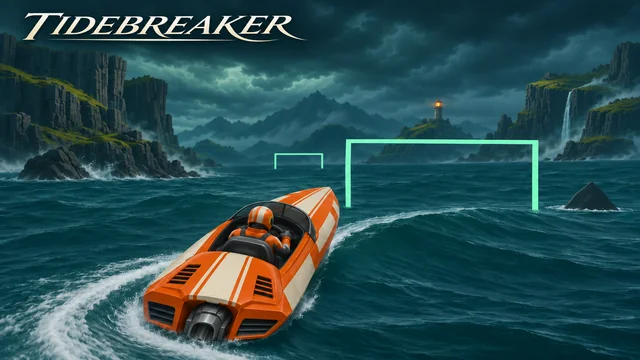
The gallery lists the featured templates with covers, genres, and controls. Pick Tidebreaker, the 3D storm-archipelago speedboat racer. It works offline and needs nothing from you: its source is a single self-contained index.html (21,968 bytes) plus two local images, with the whole game — eight checkpoints, a 65-second timer, hull integrity, wave jumps, reef collisions — implemented in inline JavaScript on a 2D canvas. Served from a plain static server it returns 200 for the page, its cover, and both assets, and its game loop runs on requestAnimationFrame.
Steer with A/D or the arrow keys, W to accelerate, S to brake, Space to jump wave crests. Reaching at least six of eight checkpoints before the tide runs out wins the run; missing a gate costs four seconds, a reef impact costs 24 hull. That is the whole point of the template system: every game is clean, inspectable source — index.html, deterministic logic, vendored Three.js for the 3D titles, and design docs (design/plan.md, design/style.md, design/assets.csv, design/verification.md) — so an agent can remix mechanics it can actually read.
Step 4 — Connect your agent over MCP#
The Studio is the gallery; the MCP server is the workshop. Add a stdio entry to your agent's MCP configuration, replacing the paths with your absolute paths (use the Node binary from command -v node) and the same MOTION_DATA_DIR you gave Studio — the two must match or the agent cannot see your games:
{
  "mcpServers": {
    "opengame": {
      "command": "/absolute/path/to/node",
      "args": [
        "--experimental-strip-types",
        "/absolute/path/to/opengame/mcp.ts"
      ],
      "env": {
        "MOTION_DATA_DIR": "/absolute/path/to/.opengame/workspace"
      }
    }
  }
}
Refresh MCP in your client and ask the agent to list its tools. You should see thirteen openmotion_game_* tools — the twelve in the project’s table plus openmotion_game_wechat, which the live server exposes but the README table does not list:
| Tool | What it does |
|---|---|
openmotion_game_create | Create a game draft (2D, 3D with vendored Three.js, or 9:16 playable ad) and return the agent brief |
openmotion_game_get | Read a game card, lifecycle status, and file inventory |
openmotion_game_read_file | Read any source or design file inside a game project |
openmotion_game_write_files | Batch-write game source and design files (up to 100 files / 8 MiB per game) |
openmotion_game_update_meta | Merge title, description, controls, and localized metadata |
openmotion_game_validate | Check the HTML and asset policy, run a 50-tick smoke test |
openmotion_game_simulate | Run three-tier deterministic balance simulations (skilled win / weak struggle / idle loss) |
openmotion_game_playtest | Drive headless Chrome with real inputs across 1–4 clients, check 390×844 mobile layout and console errors |
openmotion_game_capture_cover | Capture a clean 1280×720 PNG from the game canvas |
openmotion_game_trailer | Record headless gameplay and render a ~19-second MP4 trailer |
openmotion_game_set_status | Move a game through building, ready, and failed states |
openmotion_game_publish | Revalidate and publish the game into the local Studio catalog |
openmotion_game_wechat | WeChat Mini Game packaging (exposed by the server; not in the README table) |
Two more tools sit alongside them: openmotion_media_use (discover configured BYOK media models) and openmotion_assets_use (generate assets, or publish a static snapshot with action: "web_publish").
Verify the connection with a read, not a feeling: ask the agent to run openmotion_game_get against a draft ID from your workspace and confirm it returns that draft's exact metadata. A saved configuration is not proof of an active connection — the setup guide says so explicitly, and it is right.
Step 5 — Remix a template with one prompt#
The fastest way to see the system work is a remix. In Studio, open any template and click Remix, or paste this prompt — the project's own example — into your connected agent:
Use openmotion-game to remix the "Lantern Hop" template into a cyberpunk rain-city cat runner. Keep the double-jump physics and endless scoring loop, replace the fox and lanterns with a neon cyber-cat and holo-batteries, generate new key art and synthwave BGM, then validate, playtest, and capture a fresh cover.The remix keeps the proven mechanics — Lantern Hop is a pixel platformer about a scarf-wearing fox double-jumping across moonlit rooftops — and swaps only theme, art direction, and content. That separation is the design idea that matters: building a polished game from a blank prompt is hard for any model, so OpenGame keeps the verified engineering fixed and lets the agent vary the dressing. The agent reads the template's source before editing, edits files in place rather than rewriting from scratch, and is expected to validate and playtest before delivering a play link.
If you ask for a remix with no custom modifications at all, the skill takes a fast path: it marks the owned copy ready with zero rebuild and no validation calls. Custom modifications trigger the full workflow — edit, validate, simulate, playtest, capture a cover.
For an original game instead of a remix, describe the device, the core action, and the visual direction, and pass style: "3d" on any 3D brief so vendored Three.js and the humanoid rig controller are scaffolded. The project's own example for a from-scratch build:
Use openmotion-game to create a 3D wuxia boss-duel game (style: "3d") set on a misty bamboo cliff at dusk. Include parry timing, dodge i-frames, stamina management, and two boss phases. Run 3-tier simulation, headless Chromium playtest, capture a 1280x720 cover, and record a gameplay trailer.
Step 6 — The QA loop: validate, simulate, playtest#
Agents should not output code and hope it runs. OpenGame enforces a verification loop before a game is marked ready, and each stage catches a different class of failure:
- Static and 50-tick validation (
openmotion_game_validate) — checksindex.html, the allowed asset and CDN policy, and the required deterministic exports, then runs a 50-tick smoke test at under 5 ms per tick. - Three-tier balance simulation (
openmotion_game_simulate) — runs bounded headless routes with no browser: a skilled reference route must reach a real win milestone, a degraded weak route must struggle, and an idle player must lose cleanly, all within 2,500 ticks. A game the idle player wins is not a game. - Headless Chromium playtesting (
openmotion_game_playtest) — drives real keyboard, mouse, and touch input across one to four clients, checking 3C responsiveness, the 390×844 mobile layout, media loads, and zero console or network errors. - Cover capture and trailer — a clean 1280×720 PNG from the game canvas, and an automated ~19-second trailer cut from three real five-second gameplay clips.
Run here, over local MCP: a draft game created with openmotion_game_create, the arcade-2d starter kit written in with openmotion_game_write_files, then openmotion_game_validate returned passed: true with zero diagnostics (only non-blocking warnings: missing design docs, no cover, unmodified starter code). openmotion_game_simulate with the reference route ended over: true, winners: ["player-1"] at tick 809; the idle route ended over: true, winners: [] at tick 819. The headless playtest and cover capture were not run in this sandbox — it has no Chrome installed — so treat those two stages as documented, not demonstrated here.
Note what the loop does not check: the project is explicit that automated captures do not establish sound quality, real-device performance, or human gameplay acceptance. Treat a green validation as "it runs and it is winnable", not "it is fun". Play it yourself before you share it.
Step 7 — Publish and share#
Local publication is one tool call: openmotion_game_publish revalidates the game and lists it in your workspace catalog with play tracking, favorites, and one-click remix for anyone on the same Studio.
Public sharing goes through openmotion_assets_use with action: "web_publish" and targetKind: "game", which publishes a static snapshot through an authenticated OpenDesign account and hosting workspace. Two things to know: a localhost URL only reaches the machine running it, and later local edits do not automatically update a published snapshot — republish after changes.
Portrait 9:16 games can also be built as playable ads (playableAd: true): first-frame instant play, a hand tutorial, a short escalating level, looping BGM, and an App Store / Google Play end card, bundled as a single HTML file. Platform packaging for WeChat Mini Games, Douyin, TikTok, and itch.io is on the roadmap as guided L1–L4 publishing flows; today the export is a clean self-contained HTML5/JS project you wrap manually.
When to use this vs alternatives#
- Use OpenGame when you want a playable game this afternoon, you already live in a coding agent, and you are happy to start from proven mechanics. The remix loop is the product: verified engineering plus your theme.
- Use Unity or Unreal instead when you need a native build, console targets, a real asset pipeline, or a team workflow. OpenGame ships web games; it is not a replacement for an engine, and it does not pretend to be.
- Use a plain agent prompt instead when the game is a one-off throwaway. OpenGame's value is the catalog, the QA loop, and the publish path — if you will never remix, validate, or ship it, the setup is overhead.
- Use the from-scratch path inside OpenGame when the brief needs specific mechanics (parry timing, stamina, boss phases) that no template has. The skill scaffolds deterministic logic and the simulation harness around it, which is the part a blank prompt usually gets wrong.
Limitations#
- Three days old. Created November 25, with no releases and no tags. Expect rough edges, changing tool names, and docs that move. The MCP tool prefix is still
openmotion_game_*from the project's earlier incarnation, while the skill isopengame— the naming split is documented but confusing. - It updates itself. On a clean
maincheckout, creation and generation calls share a 24-hour check window and silently apply newerorigin/maincommits before running. SetOPENMOTION_AUTO_UPDATE=0in the MCP server'senvblock if you do not want your tooling to move under you. Local edits and non-mainbranches are never overwritten. - AI assets cost money or an account. Procedural graphics and Web Audio SFX are free and built in; GPT Image, Seedream, Suno, and ElevenLabs generation needs your keys or an OpenDesign subscription. The README advertises a Black Friday discount for OpenDesign Go — treat that as marketing with an expiry date, not a feature.
- Single-player only for new games. Existing multiplayer projects stay playable, but new creation is single-player. The multi-model live arena is roadmap.
- Playtests need Chrome; trailers need FFmpeg. Both are documented prerequisites, and both are easy to forget on a fresh machine.
The takeaway#
OpenGame's bet is that the hard part of AI game generation was never the code — it was knowing whether the code is a game. Templates supply mechanics that are already proven, the skill supplies the workflow, and the QA loop supplies the verdict: winnable, losable, playable, clean console. Everything else — the 25 templates, the 22 agents, the media gateway — is distribution for that one idea.
Three days and 2,800 stars in, it is too early to call it the Unity of AI agents, and the README's "AAA-grade" language oversells what a browser canvas delivers. But the zero-key test passes: clone it, start Studio, play Tidebreaker, read the source. That loop works today, on a 2-core VM, with no account and no key — and that is a better foundation than most three-day-old projects manage.