Clone any voice on your own machine: hands-on with Zyphra's ZONOS3-Mini
Zyphra's ZONOS3-Mini, released November 9, clones a voice from a 60-second clip, steers pace, emotion and accent down to individual words, and runs in a browser tab or on an ordinary CPU — no GPU, no account, no fee. I built it from source, generated speech, cloned a voice, steered it, and served it over HTTP. Here is the whole workflow, with the real numbers.
- Released November 9, 2026 by Zyphra; weights on Hugging Face under Apache 2.0. 800M parameters total, ~100M active per token — a latent mixture-of-experts with 64 experts and top-2 routing.
- 43 languages, 44.1 kHz output, zero-shot cloning from a clip up to 60 seconds or a 192-dimensional speaker embedding; up to 10 minutes of audio per generation.
- Three ways in: browser studio via WebGPU (zero install), C++/ggml CLI and server on CPU (verified here), SGLang server on NVIDIA GPUs.
- Measured on a 4-core CPU VM: first synthesis in ~9 s wall time; cloning a voice took 52 s the first time (speaker-encoder load included) and 12 s with a saved embedding; the language model generates at 0.4–0.6× real time, the decoder at ~1×.
Voice cloning used to mean one of two things: a hosted API with a per-minute bill, or a multi-gigabyte model that wanted a GPU you probably don't own. ZONOS3-Mini, released by Zyphra on November 9, breaks that trade. It is a sparse mixture-of-experts text-to-speech model — 800 million parameters in total, but only about 100 million active on any given token — trained on 112 H100s in two and a half days, and it does something the bigger cloning models don't: it lets you steer how a line is delivered, down to individual words. Whisper this phrase, speed up that one, make the same voice sound older, British, or angry, without re-recording anything.
The release matters for a second reason: distribution. The weights are Apache 2.0 on Hugging Face, and Zyphra shipped four runtimes on day one — a WebGPU build that runs in a browser tab, an SGLang server for NVIDIA GPUs, an MLX server for Apple Silicon, and a C++/ggml build that runs on a plain CPU with no Python at runtime. That last one is the interesting one for this tutorial, because it means the whole pipeline — clone, steer, serve — works on hardware you already have.
Everything below was run, not read off a press release. The ggml CLI and server were built from source and exercised on a 4-core CPU virtual machine with no GPU: first synthesis, a cloned voice, a saved-and-reused speaker embedding, steering controls, word-level whisper spans, a French generation, and both HTTP endpoints. Every number in this tutorial is a measured one from those runs, and the one place something went wrong — a silent first take, and a browser engine that refused to start — is documented as a finding, not hidden.
What you'll need#
- A computer running Linux, macOS, or Windows. The steps below were run on Linux (x86_64, 4 cores, 7 GB RAM, no GPU). The ggml build is CPU-only; macOS uses the same commands, Windows uses the same CMake build with a C++ toolchain.
- About 4 GB of free disk. The repo checkout is ~270 MB, the build adds a little, and the model files total ~1.2 GB. Keep headroom: the first build attempt in testing died on a disk-quota error, not a compile error.
- git, CMake 3.18+, a C/C++ compiler, and a Rust toolchain. The build compiles Zyphra's text normalizer with Cargo, so
cargomust be on your PATH.curlfor downloads,ffmpegfor cloning from MP3 files (the CLI shells out to it for reference audio). - No account, no API key, no payment. The weights are public on Hugging Face and need no token. Zyphra's hosted cloud exists as a paid option, but nothing in this tutorial touches it.
- Optional: a WebGPU-capable browser (Chrome or Edge 113+ with a real GPU) for Step 1. If your machine has no GPU adapter, Step 1 fails cleanly and Step 2 is the route — that is exactly what happened in testing.
One rule before you start: clone voices you have the right to use — your own voice, a licensed voice, or one of the default voices Zyphra ships. The Apache 2.0 license covers the weights. It does not cover imitating a real person without their permission.
Step 1: Try it in the browser — two minutes, zero install#
The fastest way to hear the model is Zyphra's Lite page, a stripped-down voice-cloning app that runs entirely in your browser:
zyphra.com/zonos3-mini/localplayground/lite — pick a voice from the Library, upload or record your own clip, type text, generate. The full studio at zyphra.com/zonos3-mini/localplayground adds the steering controls from Step 6.
There is no install and no server. The first visit downloads the model weights, and the browser caches them for later visits. That is the whole deal — and it is also the whole catch. The in-browser build runs on WebGPU, so it needs a browser with a real GPU adapter behind it. On a normal laptop that just works. In the headless VM browser used for testing, it did not: the page loaded its shell, showed "Connecting..." for about thirty seconds, then failed with the exact error The in-browser engine couldn't start: No WebGPU adapter found, and every control stayed disabled — empty voice dropdown, empty language dropdown, greyed-out Generate button. A retry produced the identical error.
That failure is environmental, not a broken page: no GPU adapter, no WebGPU. If you see it, don't debug the page — skip to Step 2. The local route needs no GPU at all, and it is the route the rest of this tutorial verifies.
Step 2: Download the weights#
The ggml runtime loads GGUF files from the gguf/ folder of the Hugging Face repo. You need three of them — and only three. The whole folder is 9.3 GB because it includes the full-size decoder; skip that.
mkdir -p ~/zonos3 && cd ~/zonos3
curl -sL -o backbone-ptq.gguf \
  https://huggingface.co/Zyphra/ZONOS3-Mini/resolve/main/gguf/backbone-ptq.gguf
curl -sL -o zac-keep2.gguf \
  https://huggingface.co/Zyphra/ZONOS3-Mini/resolve/main/gguf/zac-keep2.gguf
curl -sL -o spk-encoder.gguf \
  https://huggingface.co/Zyphra/ZONOS3-Mini/resolve/main/gguf/spk-encoder.gguf
# Optional, 200 KB: the steering bundle for Step 6
curl -sL -o steer.gguf \
  https://huggingface.co/Zyphra/ZONOS3-Mini/resolve/main/gguf/steer.gguf
What each file is, and what actually landed in testing:
| File | Role | Size downloaded |
|---|---|---|
backbone-ptq.gguf | The language model itself — Q4_0 experts, Q8_0 mixers, post-training quantized | 663,150,624 bytes (~632 MiB) |
zac-keep2.gguf | The waveform decoder (ZAC-1 codec, keep2_plain head) that turns code frames into 44.1 kHz audio | 452,325,440 bytes (~431 MiB) |
spk-encoder.gguf | The MECT-B2 speaker encoder that turns a reference clip into a 192-d embedding | 45,385,728 bytes (~43 MiB) |
steer.gguf | Steering directions for voice design and delivery controls (Step 6) | 204,960 bytes (~200 KiB) |
Total: about 1.2 GB. No Hugging Face token is needed — the repo is public, and the download links redirect to Hugging Face's CDN, which plain curl -L follows. If you already have the hf CLI, the README's equivalent is hf download Zyphra/ZONOS3-Mini gguf/backbone-ptq.gguf gguf/zac-keep2.gguf gguf/spk-encoder.gguf --local-dir . Verify with ls -la: the backbone must be 663,150,624 bytes exactly.
Step 3: Build the ggml CLI#
The native runtime lives in the Zyphra/ZONOS3-Mini GitHub repo (MIT license). Clone it with submodules — the build needs the ggml submodule and the zyphra-textnorm submodule — then configure and build the servers/ggml directory:
git clone --recurse-submodules https://github.com/Zyphra/ZONOS3-Mini.git
cd ZONOS3-Mini/servers/ggml
cmake -B build -DCMAKE_BUILD_TYPE=Release
cmake --build build -j4
Two things to know before you run this. First, the Rust toolchain is a hard requirement, not a nicety: CMake compiles the text normalizer's C library with Cargo, and without cargo on your PATH the build fails at the zyphra-textnorm step. In testing, the installed Rust was 1.99.1 and the configure step took about two seconds. Second, the build takes a while — roughly eight minutes of compile time on a 4-core machine — and it writes a lot of object files. The first attempt here died with "Disk quota exceeded" partway through, which is why the prerequisites say keep 4 GB free; after clearing scratch space, the resumed build finished cleanly with exit code 0.
Confirm the two binaries exist:
ls -la build/zonos3-cli build/zonos3-server
# -rwxr-xr-x 8687368 ... build/zonos3-cli
# -rwxr-xr-x 8600704 ... build/zonos3-server
Python is not needed at runtime for this path — the CLI and server are native C++. (The SGLang/CUDA server is a different, GPU-only route; the MLX server is for Apple Silicon. Both are documented in the repo README but were not tested here, for the obvious reason that the test machine has neither a GPU nor a Mac.)
Step 4: Your first synthesis#
Run the README's exact first command, from servers/ggml, with the weights in gguf/ beside it. The CLI finds the decoder automatically:
./build/zonos3-cli gguf/backbone-ptq.gguf \
  --tts 'Hello, world.' hello.wav --seed 1
This is what came back in testing, on the 4-core CPU VM:
zonos3: backend = CPU | AMD EPYC 9D25 126-Core Processor; loaded 190 tensors, 0.58 GiB
generate(kv): 45 decode steps in 1.281s = 35.1 frames/s, RTF=0.573
zac: loaded 225 mossdual_istft tensors on CPU (10 MOSS layers, head keep2_plain)
zac: H=49 eos=38 -> 38 frames, 111720 samples = 2.53s, rms=0.0884 peak=1.0329, decode 2.68s (RTF 1.056)
zac: wrote hello.wav
Read the log lines: the language model generated 45 autoregressive steps in 1.28 seconds (RTF 0.573 — faster than real time for the token generation), then the codec decoder rendered 2.53 seconds of audio in 2.68 seconds (RTF 1.056 — about real time). Total wall time for the whole command, model loading included, was about nine seconds. The output is a 44.1 kHz mono 16-bit WAV. Measured with ffmpeg, the file runs 2.53 seconds at a mean level of -23.7 dB and a peak of -2.7 dB — ordinary, healthy speech levels, not a whisper and not clipped.
Two flags are worth understanding now, because you will use them everywhere: --seed fixes the sampling randomness, so the same text and seed reproduce the same take; and --tts takes the text directly, while --generate plus a prompt file is the path for longer scripts. Generation is capped at 10 minutes of audio per call, and the prompt plus generation must fit the 32,768-position context.
One honest gotcha, found the embarrassing way. Before the command above, a first attempt with a longer sentence and the same seed 1 produced a file that measured -91.0 dB mean and max — digital silence, end to end. The model had generated 45 frames of nothing. The fix was trivial: re-run with a different seed (seed 7 spoke fine) or a shorter sentence. Speaker-less generation — no voice at all, the model inventing one — occasionally produces a degenerate silent take, and the README's own notes acknowledge a prompt that every backbone misreads on this path. If your output is silent, change the seed before you change anything else. Speaker-conditioned generation, which is what the next step does, is more reliable.
Step 5: Clone a voice#
Cloning has two modes. The default is speaker-embedding mode: the MECT-B2 encoder turns your reference clip into a single 192-dimensional vector, and the backbone conditions on that vector. The opt-in alternative is raw-reference mode, which encodes the clip into codec codes and prepends them to the prompt — more faithful to the original prosody, but it needs two extra files (zac-encoder.gguf and ssl-teacher.gguf) that this tutorial doesn't download. Embedding mode is the right default, and it's what the command below uses.
The repo ships default voices in assets/default_voices/, each with a precomputed embedding and code file. Use one as your reference — AmericanFemale.mp3, a 15.5-second clip — and save the computed embedding so you never pay the encoder cost twice:
./build/zonos3-cli gguf/backbone-ptq.gguf \
  --tts 'Hello again. This voice was cloned from a short reference clip, and the model is speaking on an ordinary CPU.' \
  clone.wav \
  --clone ../../assets/default_voices/AmericanFemale.mp3 \
  --save-speaker-embedding voice-emb.npy --seed 1
Measured result: 138 decode steps in 3.707 seconds (37.2 frames/s, RTF 0.403), decode in 8.38 seconds (RTF 0.960), producing 8.53 seconds of audio at a mean level of -20.5 dB and a peak of -1.0 dB. Total wall time was 52 seconds, but almost all of that is one-off cost: loading the speaker encoder and encoding the reference clip. The saved embedding, voice-emb.npy, is 896 bytes — a 128-byte header plus 192 float32 values — and reusing it skips all of that:
./build/zonos3-cli gguf/backbone-ptq.gguf \
  --tts 'A cached embedding, no encoder needed this time.' cached.wav \
  --speaker-embedding voice-emb.npy --seed 1
# generate(kv): 70 decode steps in 2.272s = 30.8 frames/s, RTF=0.487
# zac: H=74 eos=63 -> 63 frames, 185220 samples = 4.20s, rms=0.1117 peak=0.8910
# wall time: ~12 s including model load
The workflow that falls out of this: encode each voice once, keep the tiny .npy file, and generate from it forever. The encoder never loads again. The same trick works in the other direction — --save-reference writes raw codec codes for reference mode, reusable with --reference-codes — but embedding mode is cheaper and, for most uses, close enough.
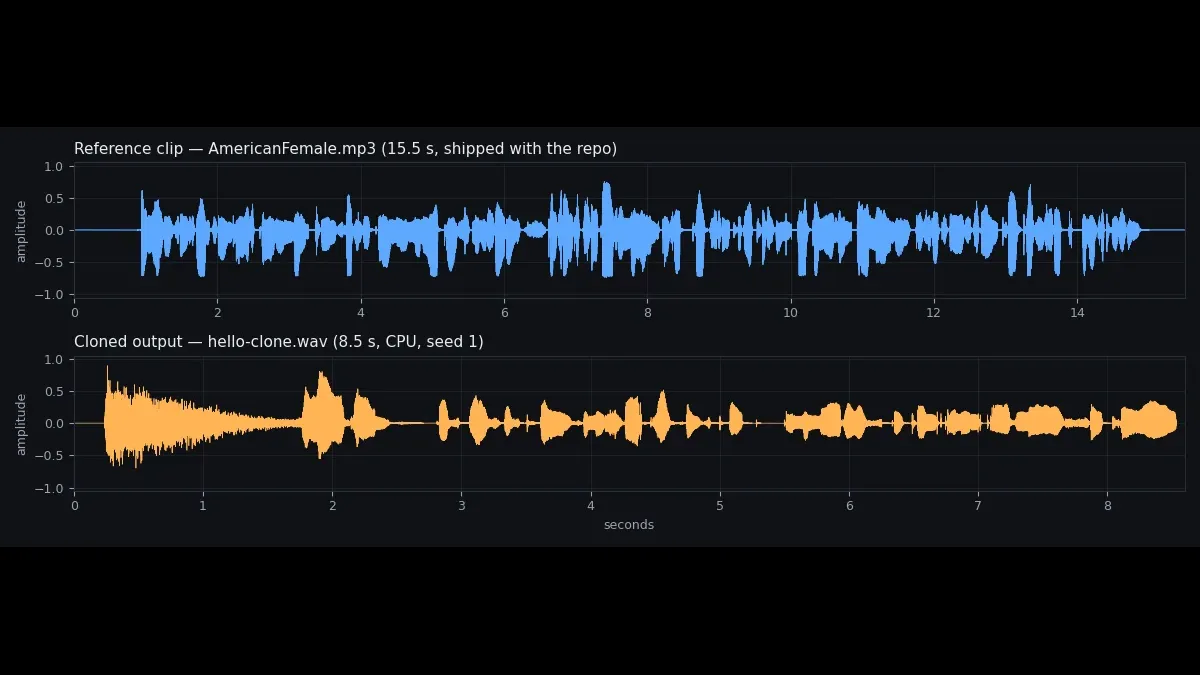
Two practical notes. First, reference audio goes through ffmpeg — the README says so plainly ("For file cloning, install ffmpeg or set ZONOS3_FFMPEG"), and the test machine had ffmpeg 8.1.2, so MP3 input worked as-is. Without ffmpeg, clone from a WAV file instead. Second, the reference clip can be up to 60 seconds; longer clips are truncated to the first 900 codec frames. A clean 10–20 second clip with a single speaker and no background music clones best — the shipped 15.5-second sample is a good template for what to aim for.
Step 6: Steer the voice — pace, accent, emotion, whispering#
This is the feature that separates ZONOS3-Mini from the other local cloning models. The steer.gguf bundle you downloaded in Step 2 carries 65 steering directions in 14 sets, and the server lists them at GET /v2/controls. The useful ones cluster into four groups:
| Group | Control IDs (dose = strength) | What it does |
|---|---|---|
| Identity | identity.age, identity.gender, pitch.pitch, pitch.pitch_range | Design a voice: younger/older, masculine/feminine, higher/lower pitch |
| Texture | texture.deep, texture.soft, texture.raspy, texture.husky, texture.shrill, texture.authoritative | Vocal quality: deep, breathy-soft, raspy, and so on |
| Accent | accents_en.british, .american, .irish, .scottish, .australian, .indian, .welsh; accents_l1.* for first-language accents | Steer the accent while the voice stays recognizable as the same speaker |
| Delivery & emotion | delivery.tempo, delivery.whisper, delivery.loud, delivery.pitch, emotions.happy, .angry, .scared, .sad, mood.valence, mood.arousal | How the line is performed: pace, volume, feeling |
The doses come from Zyphra's own control examples in the release post, and they map directly onto these IDs: age −1.5 for a younger voice and +1.5 for an older one, accents_en.british at 1.5, emotions.happy at 3.5, pace at ±2, whisper at +4. On the CLI, a whole-utterance control is one flag — the steering bundle is found beside the backbone automatically when a control flag is given:
./build/zonos3-cli gguf/backbone-ptq.gguf \
  --tts 'The next train leaves in ten minutes. We have just enough time to grab a coffee and find our seats.' \
  tempo.wav --speaker-embedding voice-emb.npy \
  --control delivery.tempo=2 --seed 42
# 95 decode steps in 3.900s, 5.87 s of audio, mean -25.5 dB
Word-level control is the sharper tool. --control-span takes character offsets into your text and a dose, so you can whisper one phrase inside an otherwise neutral line — Zyphra's example is whispering "I didn't say" versus "she took the keys" in the same sentence, which changes the meaning of the line. The offsets are code-point positions, [START,END):
./build/zonos3-cli gguf/backbone-ptq.gguf \
  --tts "I didn't say she took the keys." whisper.wav \
  --speaker-embedding voice-emb.npy \
  --control-span 0:12:delivery.whisper=4 --seed 42
# "I didn't say" is characters 0..12; 57 decode steps, 3.33 s of audio
Two rules from the README that will save you errors: raw-space controls (identity, pitch, accents, texture) move the speaker embedding, so they need embedding mode — a speaker embedding or a default voice. Hidden-space controls (delivery, emotions, mood) work in both modes. And the server form of the same request takes a controls object — {"delivery.tempo": 2, "identity.gender": -1} — plus control_spans with code-point offsets, which is how the studio drives them.
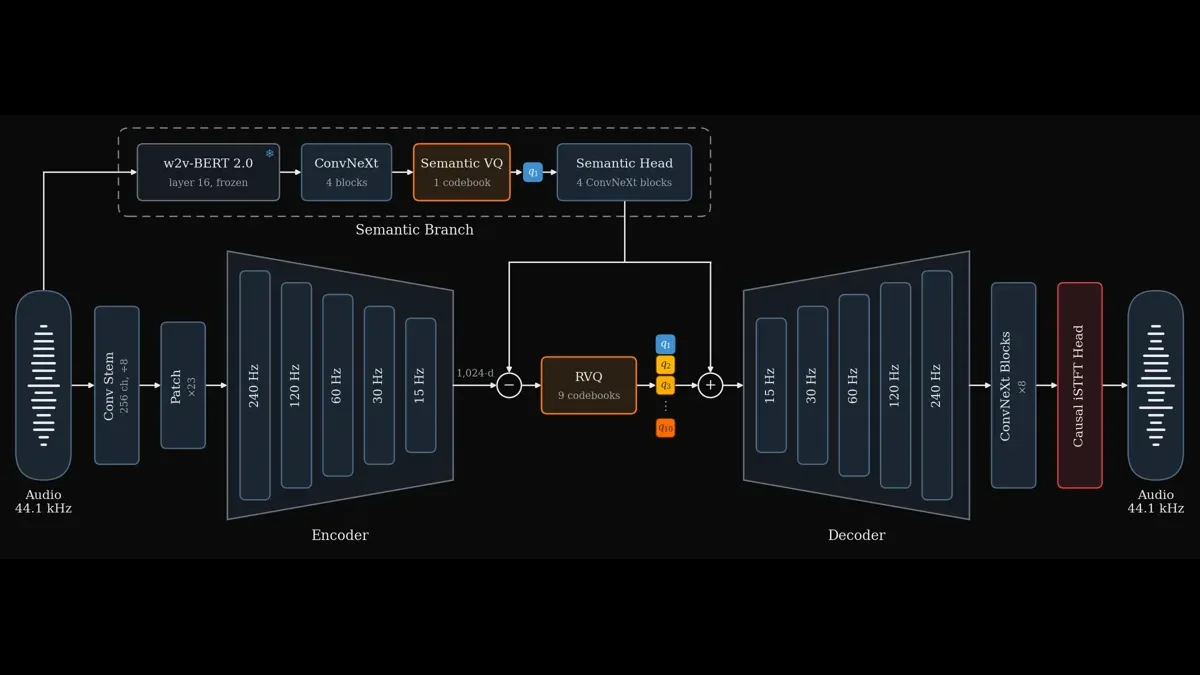
Under the hood, that codec is the reason the model is this small. ZONOS3-Mini's backbone is 11 layers mixing Gated DeltaNet layers with global attention, reading SuperBPE text tokens and predicting ten delayed 4096-entry codebooks at 15 Hz; a causal multi-resolution iSTFT head renders the frames to 44.1 kHz audio as they are produced. The previous generation used the Descript Audio Codec at 86 Hz, which made the model hard to run in real time; ZAC-1's 15 Hz frames are what let 100 million active parameters keep up on a CPU.
Step 7: Serve it over HTTP#
The CLI is for one-off clips. For anything that runs more than once — a narration pipeline, a voice for an agent, a demo for a client — start the server. It is the same binary family, the same weights, and it serves the studio UI plus a versioned HTTP API on port 1919:
./build/zonos3-server gguf/backbone-ptq.gguf \
  --tts-default-voices-dir ../../assets/default_voices \
  --studio-projects-dir ~/.zonos3/projects --port 1919
Open http://127.0.0.1:1919/ and you get a chooser: the full Zonos Voice Studio at /studio and the lightweight cloning page at /lite, served from the checkout's own studio/dist. The API is where the power is. Three calls cover nearly everything:
# What this server can do
curl -fsS http://127.0.0.1:1919/v2/capabilities
# ... "condition_tokens": {"bucket_counts": {"fmax": 10, "loudness": 10,
#     "speaking_rate": 30}}, "codebook_sizes": [4096 x 10], ...

# The 30 built-in voices
curl -fsS http://127.0.0.1:1919/v2/speakers
# 30 speakers, including AmericanFemale, AmericanMale, BritishFemale,
# Ananya (Hindi), Arjun (Hindi), Cillian (Irish), Gaspard (French) ...
Generation is POST /v2/generate, with the same controls as the CLI in JSON form. This request — the AmericanFemale default voice, tempo steered up — returned HTTP 200 and a 4.53-second WAV:
curl -fsS -X POST http://127.0.0.1:1919/v2/generate \
  -H 'Content-Type: application/json' \
  -d '{"text": "The next train leaves in ten minutes. We have just enough time to grab a coffee and find our seats.",
       "language": "en_us", "stream": false, "format": "wav", "seed": 42,
       "speaker_embedding_id": "default_853b30a7338f306e",
       "controls": {"delivery.tempo": 2}}' -o api.wav
# 399,884 bytes, 4.53 s, mean -16.5 dB, max -1.2 dB
There is also an OpenAI-compatible endpoint, POST /v1/audio/speech, which takes model, input, voice (a speaker id from /v2/speakers) and response_format — so anything already wired to OpenAI's speech endpoint can point at this server with a base-URL change. It returned a 3.00-second WAV in testing. Streaming is supported too: "stream": true returns mono float32 PCM at 44.1 kHz as it is generated, with the seed echoed back in the X-Seed header.
The multilingual claim holds up in practice, not just on the model card. A French sentence sent to the Gaspard voice with "language": "fr_fr" came back HTTP 200 as an 8.13-second WAV. The card lists 43 languages — English, French, Spanish, German, Italian, Portuguese, Dutch, Greek, the Scandinavian languages, Polish, Czech, Russian, Turkish, Arabic, Hebrew, Mandarin, Japanese, Korean, Vietnamese, Hindi, Bengali, Tamil, and more — and the server's language parameter is the same xx_yy code throughout (en_us, fr_fr, en_gb).
Which approach should you use?#
Five routes ship on day one, and they are not interchangeable. Pick by what you are actually doing:
| Route | Setup | Needs | Best for |
|---|---|---|---|
| Browser studio / Lite | None — open a URL | WebGPU-capable browser with a real GPU | Trying it once, cloning a voice for a single project |
| ggml CLI | ~8 min build, 1.2 GB of weights | CPU only | Scripts, batches, one-off clips, narration pipelines |
| ggml server | Same build, then run it | CPU only | Apps and integrations; serves the studio UI and the HTTP API |
| SGLang server | GPU stack install | NVIDIA GPU | Production throughput — Zyphra reports 80 ms time-to-first-audio and 457 seconds of audio per second on one H100 |
| Zyphra Cloud | None | An account | Not running anything yourself; hosted inference on H200s |
For most readers, the honest answer is the CLI. The browser route is the fastest demo but depends on hardware you may not control; the server is the same CLI with a port open; SGLang only pays off if you already have the GPU. The CLI is also the only route that is fully offline — no account, no network after the download, no per-minute meter.
Troubleshooting#
- Silent output. Change the seed (
--seed 7), or shorten the text. Speaker-less generation occasionally produces a degenerate silent take; speaker-conditioned generation is more reliable. - "No WebGPU adapter found" in the browser. Your browser has no GPU adapter to offer WebGPU. Use the CLI route (Steps 2–4) — it needs no GPU at all.
- Build fails on
zyphra-textnorm. Cargo isn't on your PATH. Install the Rust toolchain (rustup, stable) and re-run the configure step. - Build fails with "Disk quota exceeded". Free space and re-run the build — it resumes from where it stopped. Budget ~4 GB total for repo, build, and weights.
- Cloning from an MP3 fails. Install ffmpeg, or pass a WAV file as the reference instead. The CLI shells out to ffmpeg for reference audio.
- Controls return an error.
steer.ggufmust sit beside the backbone. Download it (200 KB, Step 2) — the CLI finds it automatically when a control flag is given. - Audio sounds rushed or clipped. Check the levels with ffmpeg's
volumedetectfilter as in Step 4. The CLI's--headroom-dbflag (default 3 dB) attenuates the decoder output; raise it if peaks are hitting full scale.
The takeaway#
ZONOS3-Mini is the first voice-cloning model that is small enough to be boring infrastructure: a 1.2 GB download, an eight-minute build, and then it just runs — on a CPU, offline, at roughly real-time speed, in 43 languages, with word-level control over how a line is delivered. The quality claims are Zyphra's own — first among open models on their ZTTS2-Eval benchmark, ahead of Fish S2 Pro and MOSS TTS — so treat the ranking as vendor data and judge by ear. But the operational facts are now verified independently: the build works, the CLI speaks, the clone works, the steering works, and the server answers. If you need a voice for narration, a prototype, or an agent, and you don't want a GPU or a bill, this is the current default — and it fits in a folder you can delete when you're done.