Your agent can build the interface now: hands-on with A2UI, the generative UI framework
A2UI lets an AI agent answer with a native interface instead of a paragraph: a catalog the agent cannot exceed, a compact Express notation the model writes, and renderers for React, Flutter, SwiftUI and more. The Travel A2UI quickstart runs in minutes — and the Python SDK loop, including the guardrail that refuses bad UI, is verified end to end.
- A2UI (a2ui-project/a2ui): created September 24, 2025; 18,607 stars, 1,499 forks, 1,998 commits; Apache-2.0; specification v1.0 is current. On GitHub’s TypeScript weekly trending board on November 25, 2026.
- Measured on the sandbox run: Travel A2UI answered HTTP 200 with
{"ok":true,"sessions":0};/api/metareports protocol 1.0, default model Gemini 3.8 Flash, and the express-modular skill set at 38,508 characters;/api/catalogdefines 33 components and 16 functions; the recorded trip replays JFK–Madrid, April 12–19, 2027, for two travellers. - What needs a key: only the live agent chat, with a free Gemini key from AI Studio. Without one,
/api/chatanswers HTTP 401: “A Gemini API key is required. Send it as the x-goog-api-key header.”
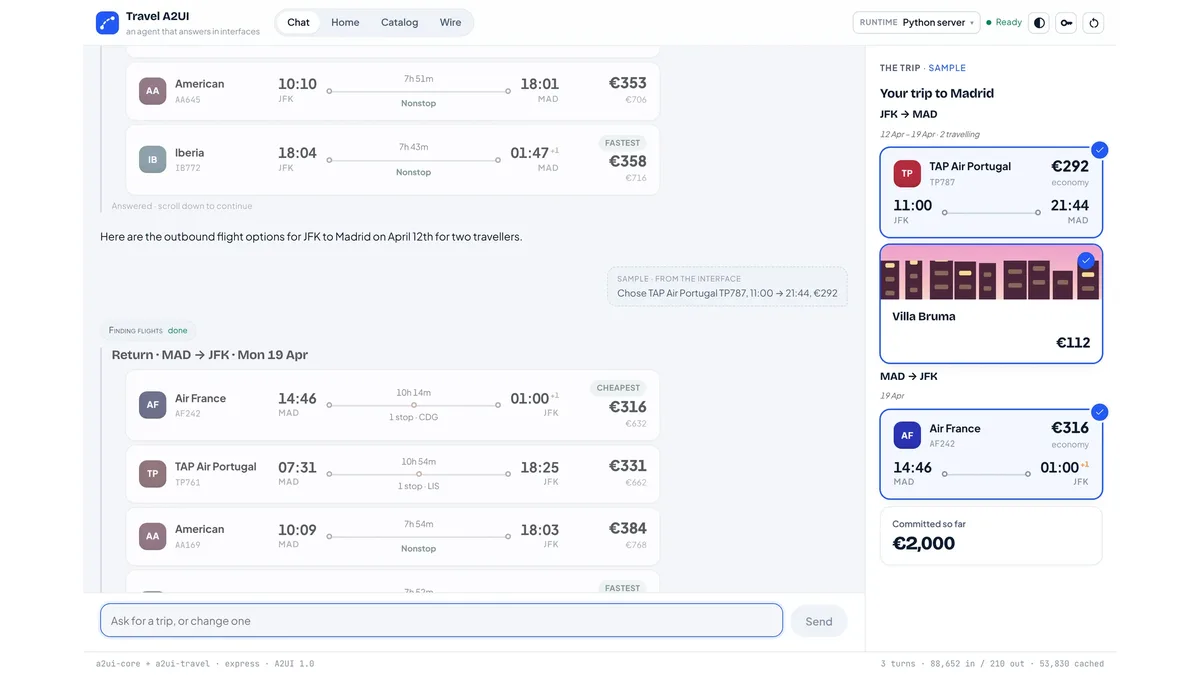
On September 24, 2025, a repository called A2UI appeared on GitHub. Fourteen months later it holds 18,607 stars and 1,499 forks, its 1.0 specification is the current version, and it sits on GitHub’s TypeScript weekly trending board. The pitch is one sentence: let an AI agent answer with an interface instead of a paragraph. Not a screenshot of an interface, and not HTML the model made up on the spot — a real, native UI your app draws, made of components your agent chose from a list you wrote.
That last clause is the whole idea. In most agent products today, the model returns text and the app decides what to do with it. A2UI reverses the responsibility: the model describes the UI as data, and the app renders it — but only from a catalog of components the app already knows how to draw. The agent cannot invent a widget, smuggle in a script, or ask for a layout the client cannot render. The server checks every message against the catalog before anything reaches the screen. What follows is the quickstart, verified end to end on a plain Linux VM, plus the Python SDK loop that compiles the model’s shorthand into wire messages — including the two exact errors the guardrail returns when the model gets it wrong.
What A2UI is, in one picture#
A2UI is a protocol and a set of SDKs, in three layers. The Agent SDK (Python, TypeScript, Dart) turns what the model writes into wire messages and validates them. The Core SDK holds the protocol data structures, the surface state, and the expression evaluator. The Renderer SDK (React, Lit, Angular, Flutter, SwiftUI, Jetpack Compose, Markdown) mounts that state in a UI framework. The sample app in this tutorial moves messages over server-sent events; the protocol itself does not care about the transport.
Four concepts carry the rest:
- Surface — one area of UI the agent controls, such as the chat column or the trip panel beside it. A surface holds components and a data model.
- Component — a widget from the catalog:
Text,Button,Column,FlightOption. Components name their children by ID; they are never nested inline. - Data model — the JSON the surface’s values come from. Components bind to it with paths such as
/trip/startDate, so a date the user picks updates every dependent value without another turn to the agent. - Action — what comes back when the user taps something: an event name and context, delivered to the agent.
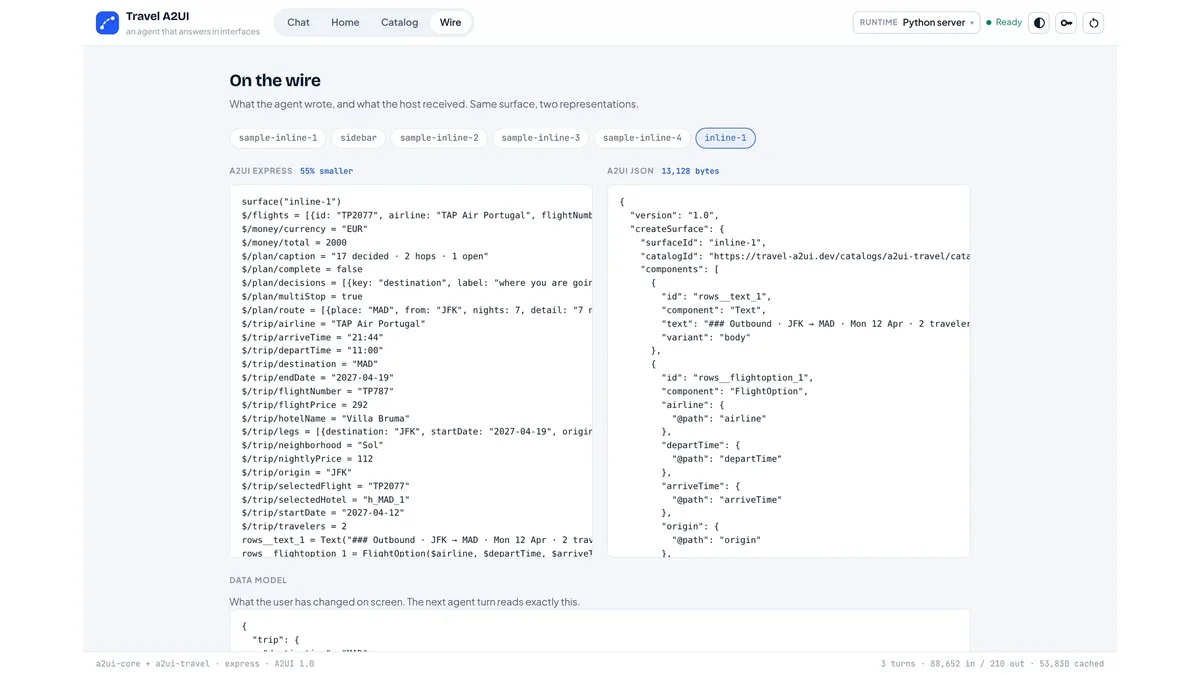
The model does not write the JSON wire messages directly. It writes A2UI Express, a compact notation the Agent SDK compiles into messages — in the sample app’s Wire tab, the Express form runs 55% smaller than the JSON it becomes. The SDK also generates the skill that teaches the model the notation, straight from the catalog, so the instructions never drift from what the client can actually draw.
What you’ll need#
- Python 3.11 or newer, Node.js 20 or newer, and git. No GPU, no paid account, no API key for the first four steps.
- A free Gemini API key from Google AI Studio, only if you want the live agent chat in step 5. The recorded trip, the Catalog tab, and the Wire tab all work without one.
- Flutter 3.47 or newer, only if you want the mobile client. This tutorial runs the React client.
Step 1: Run Travel A2UI#
The official quickstart is Travel A2UI, a small trip planner in the A2UI Labs repository: one Python server, a React web client, and an optional Flutter client. Get the code and start the React client:
git clone https://github.com/a2ui-project/labs
cd labs/samples/travel-a2ui
./scripts/quickstart.sh react
The script creates a virtual environment, installs the server from its lockfile, builds the React client, and starts the server on port 8080. Its closing lines, from this run, are:
  installed into .venv
  React:   http://127.0.0.1:8080
  No GEMINI_API_KEY set: paste a key into the app when it asks.
  Stop with Ctrl+C.
Open http://127.0.0.1:8080. You land on a recorded sample trip — a real conversation with the agent, recorded on November 7, 2026, and replayed on a first visit. No key is needed. The trip it shows: JFK to Madrid, April 12–19, 2027, two travellers. Outbound TAP Air Portugal TP787, 11:00 to 21:44, €292. Return Air France AF242, 14:46 to 01:00, €316. Hotel Villa Nueve, €216 a night. The flight cards in the conversation are A2UI surfaces; the trip panel beside them is another surface, kept in sync from the same data model. Tap a flight and the panel updates — the press travels back to the agent as an action.
Confirm the server is healthy before going further:
curl -s http://127.0.0.1:8080/api/healthz
curl -s http://127.0.0.1:8080/api/meta | python3 -m json.tool | head -20
The health check answers {"ok":true,"sessions":0}. The metadata endpoint reports the protocol version (1.0), the default model (Gemini 3.8 Flash), the active skill set (express-modular, 38,508 characters), and the three surfaces (inline, sidebar, home).
Step 2: Read the pipeline in the Catalog and Wire tabs#
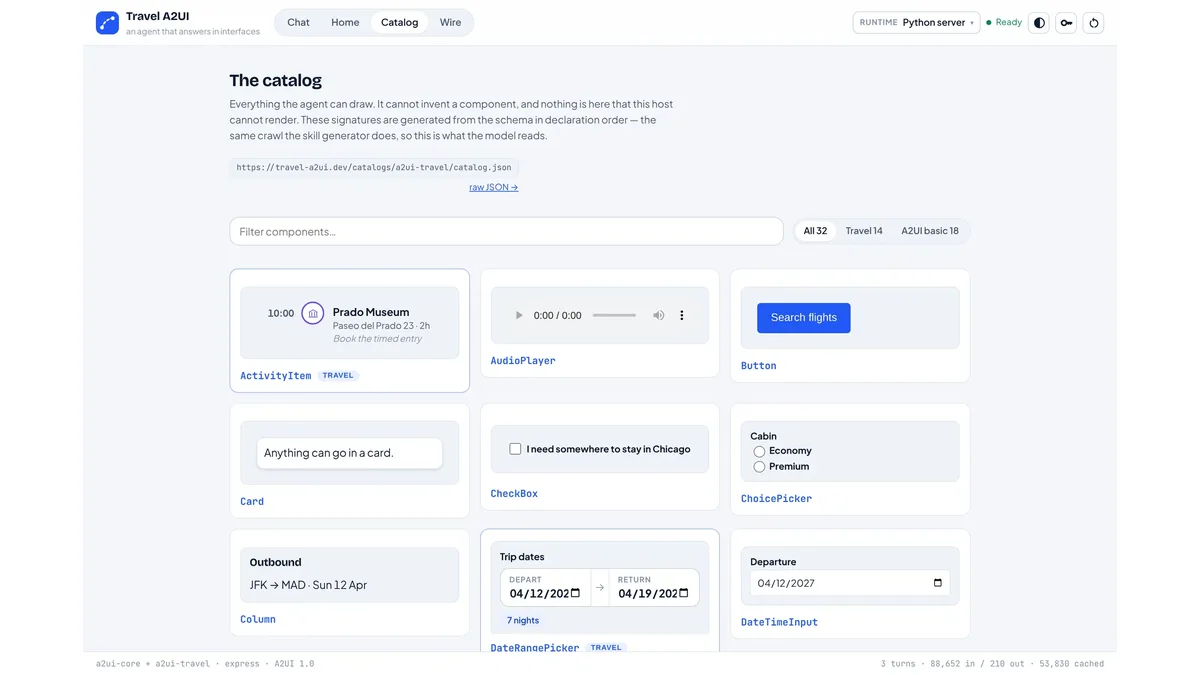
Click Catalog at the top of the app. It draws every component the agent may use, rendered by the real renderer, with the signatures the model is taught. The catalog file behind it — fetch it yourself at /api/catalog — defines 33 components, from the basic Text, Button and Column to travel-specific ones such as FlightOption, HotelCard and DateRangePicker, plus 16 functions including calcNights, formatCurrency and formatDate. The tab states the rule plainly: everything the agent can draw is here, and it cannot invent a component.
Now click Wire. It shows both forms of one surface side by side: the Express the model wrote, and the JSON the client received. For the sample surface the JSON is 13,128 bytes and the Express is 55% smaller. Below them sits the data model — what the user has changed on screen, which the next agent turn reads exactly. This tab is the fastest way to understand the protocol: one surface, two representations, no abstraction in between.
The server also exposes the translation directly. Send it a wire message and it decompiles it to Express:
curl -s -X POST http://127.0.0.1:8080/api/express \
  -H 'Content-Type: application/json' \
  -d '{"messages":[{"createSurface":{"surfaceId":"s1","components":[
    {"id":"root","component":"Column","children":["head","btn"]},
    {"id":"head","component":"Text","text":"Hello from A2UI"},
    {"id":"label","component":"Text","text":"Book it"},
    {"id":"btn","component":"Button","child":"label",
     "action":{"event":{"name":"book"}}}]}}]}'
{"express":"surface(\"s1\")\nroot = Column([head, btn])\nhead = Text(\"Hello from A2UI\")\nlabel = Text(\"Book it\")\nbtn = Button(label, _, Event(\"book\"))"}Note the underscore in Button(label, _, Event("book")): Express positional arguments follow the component’s properties in order — child, variant, action — and _ means “use the default” for the variant. That one character is the difference between a button that compiles and one the guardrail rejects, as the next step shows.
Step 3: Compile Express yourself with the Python SDK#
The quickstart’s server already installed the SDK, but the loop is clearer standalone. Install the published packages — version 0.10.0 of the agent SDK and 0.5.0 of the core — and run the whole pipeline: load the basic catalog, build the prompt the model would receive, compile a hand-written Express block, and watch the guardrail refuse two broken variants.
pip install a2ui-agent-sdk==0.10.0import json
from a2ui.core.basic_catalog import BasicCatalog
from a2ui.core.schema import ProtocolVersion
from a2ui.processor import A2uiGenerator, CatalogConfig
from a2ui.inference_formats import ExpressFormatFactory
from a2ui.parser.messages import to_message_dicts
basic = BasicCatalog(ProtocolVersion.V1_0)
gen = A2uiGenerator(
[CatalogConfig(basic)],
inference_format_factory=ExpressFormatFactory(),
)
proc = gen.create_processor(
{"1.0": {"supportedCatalogIds": [basic.catalog_id]}}
)
express = """<a2ui>
root = Column([head, btn])
head = Text("Hello from A2UI")
label = Text("Book it")
btn = Button(label, _, Event("book"))
</a2ui>"""
for part in proc.parse_response(express):
for message in part.a2ui:
print(json.dumps(to_message_dicts([message]), indent=1))The output is the wire message the client would receive — a createSurface for protocol version 1.0, with the four components and the button’s action spelled out:
[
 {
  "version": "1.0",
  "createSurface": {
   "surfaceId": "main",
   "catalogId": "https://a2ui.org/specification/v1_0/catalogs/basic/catalog.json",
   "components": [
    {"id": "root", "component": "Column", "children": ["head", "btn"]},
    {"id": "head", "component": "Text", "text": "Hello from A2UI"},
    {"id": "label", "component": "Text", "text": "Book it"},
    {"id": "btn", "component": "Button", "child": "label",
     "action": {"event": {"name": "book"}}}
   ]
  }
 }
]
Two details matter here. First, prompt_snippet — the A2UI portion of the system prompt this processor generates — is 21,836 characters for the basic catalog alone: the model is told the notation, the catalog, and the rules, and that text is generated from the same catalog the compiler enforces. Second, the compiler validates as it goes. Feed it a component the catalog does not define:
A2uiCompilationValidationError: Unknown function 'BogusWidget' not defined
in catalog 'https://a2ui.org/specification/v1_0/catalogs/basic/catalog.json'.
Or a button with no action, the exact mistake from the decompiler note above:
A2uiCompilationValidationError: Component 'Button' missing required
property 'action'.
Both are raised before anything is sent to a client. In a real agent loop you would feed the error back to the model for self-correction; the failure mode is a rejected draft, not a broken screen.
Step 4: Teach your coding agent the protocol#
The skill files are generated, not hand-written. The SDK’s SkillGenerator takes the same processor format the server parses with and writes two skills: a core skill for the Express notation and one per catalog. Generate them from the script in the previous step:
from a2ui.skill import SkillGenerator

sg = SkillGenerator(proc.format)
core = sg.generate_core_skill()
catalog = sg.generate_catalog_skill()
print(core.name, len(core.content))       # a2ui-core 3931
print(catalog.name, len(catalog.content)) # a2ui-basic 17880
The catalog skill lists the exact positional signature of every component — for example, AudioPlayer(url, description?, weight?) — so the model never has to guess a property name. The same generator powers the sample app: its scripts/build_skills.py writes the skills from the server’s own processor, and npm run generate refreshes them whenever the catalog changes.
To hand the protocol to a coding agent in your own project, the documented path is the skills CLI:
npx skills add a2ui-project/a2uiIt finds two skills in the repository and asks which to install. For scripts, pass --agent '*' -y to install non-interactively. The installed files are the same skill content the generator above produces.
Step 5: Talk to the live agent#
Everything so far needed no model at all. For the live loop, get a free Gemini key from Google AI Studio and paste it into the app when it asks; the key stays in your browser. Then try the prompt from the docs:
Six days in Madrid in April, two of us, around $2,500 all in
The agent plans the trip turn by turn: flights first, then the hotel, then the days — each answer arriving as surfaces, not paragraphs, with the trip panel updating as you commit to choices. Without a key, the chat endpoint refuses plainly. This run’s curl against /api/chat with no key returned HTTP 401:
{"detail":"A Gemini API key is required. Send it as the x-goog-api-key header."}The metadata endpoint lists the available models: Gemini 3.8 Flash is the default (“follows the whole journey; a few seconds slower”), 3.5 Flash-Lite is fastest to the first surface but misses the return leg, and 3.7 Flash is the previous version. The recorded trip was made with 3.5 Flash-Lite.
Step 6: Make it yours#
Nothing in the sample is coupled to travel except the names. The README’s own table is the porting guide:
| To change… | Edit | And then |
|---|---|---|
| What the agent can draw | scripts/build_catalog.py (it writes catalogs/a2ui-travel/catalog.json) | Write the React and Flutter views, register them |
| What it can look up | data/tools.json | One switch in brain/tools/run.py |
| How it decides what is next | prompts/flow.md | Nothing — it is markdown |
| What the model is told about components | Nothing | npm run generate writes it from the catalog |
The last row is the one to remember. The skill is a build artifact of the catalog, not a document you maintain. Change a component, regenerate, and the model’s instructions, the compiler’s checks, and the renderer’s widgets all move together. That is also why the sample keeps a --check mode on its skill builder: it fails if what is on disk is stale.
When to use A2UI — and when not to#
Use it when the agent’s answer is an interface. Booking flows, dashboards that reshape themselves around a question, support tools where the user picks from options rather than reading a list. The payoff grows with every platform you ship: one agent, one catalog, and React, Flutter, SwiftUI and Jetpack Compose each draw it natively, with no change to the agent.
Use it across a trust boundary. The catalog is a security control as much as a UI contract. An agent that can only emit validated data cannot inject markup, exfiltrate through a crafted link, or render a fake login form — the renderer only draws components it implements, and the server validates before sending. If your agent talks to users you do not control, that boundary is the feature.
Do not confuse it with AG-UI. AG-UI is the event channel between an agent and a frontend — the protocol that streams agent activity into an app, covered on this blog in November. A2UI is what the agent draws once it is connected. They compose: the A2UI Composer, the browser workspace for trying prompts and catalogs, itself runs on AG-UI. If you need the channel, start with AG-UI; if you need the pictures, start here.
Do not use it for static content. A page that looks the same on every turn should be hand-built app code — the quickstart’s own rule of thumb. A2UI earns its keep where the UI depends on what the user just asked. And do not use it as a shortcut for pixel-perfect marketing pages: the agent composes from your catalog, it does not art-direct.
The takeaway#
The catalog is the whole idea. Every other generative-UI approach hands the model a blank canvas and hopes the output is safe, consistent, and renderable. A2UI hands it a menu — and enforces the menu on the server, in the skill the model reads, and in the renderer that draws the result. Run the quickstart, open the Wire tab once, and the rest of the protocol falls into place: Express in, validated JSON out, native widgets on screen. The agent stops narrating the trip and starts building it.
Frequently asked questions
Do I need a model key to try A2UI?
No. The recorded trip, the Catalog tab and the Wire tab work with no key at all. The live agent chat needs a free Gemini key from AI Studio, pasted into the app; it stays in your browser.
Which frameworks can render A2UI?
React, Lit, Angular, Flutter, SwiftUI, Jetpack Compose and Markdown officially, plus community renderers for UIKit, React Native, Vue, Lynx and the terminal. The server never knows which client it is talking to.
Can the agent run code in my app?
No. The agent sends UI descriptions as data, the server validates every message against the catalog, and the renderer only draws components it implements. A component the catalog does not define is rejected with an A2uiCompilationValidationError before anything reaches the screen.