Put your agent in a real UI: hands-on with AG-UI, the protocol that connects agents to frontends
AG-UI is the open protocol that turns any agent into a streaming, tool-calling, state-sharing UI — the missing third leg next to MCP and A2A. Build a working server in Python, drive it from TypeScript, and add a real tool call. Every command verified, no API key needed for the core loop.
- Verified versions:
ag-ui-protocol1.0.0 (Python, PyPI),@ag-ui/client1.0.4 (npm, published November 5, 2026),create-ag-ui-app0.0.59, FastAPI + uvicorn, Python 3.12.3, Node 24.22.1. - The core loop ran end to end with zero API keys: a Python echo server on localhost, a curl transcript of the exact SSE wire format, and a TypeScript
HttpAgentrun that returned the echo and the tool result. - Gotcha 1 — the package name: the Python SDK is
ag-ui-protocol, notag-ui. There is noag-uidistribution on PyPI. - Gotcha 2 — message ownership:
runAgentdoes not take messages. The conversation lives on the agent instance (agent.messages); passing messages torunAgentsilently runs with empty history. - Why now: protocol 1.0 froze the event set in early November 2026; the repo sits at 17,179 stars with 1,577 forks, MIT-licensed, and trended on GitHub the day this was written.
Your agent works. It answers in the terminal, calls tools, finishes the job — and nobody but you ever sees it do any of that. The moment you want a user to talk to it, you hit the part no framework documents well: the frontend. You need streaming text, tool calls the UI can render, shared state both sides can read, and a way for the user to interrupt mid-run. Every team wires this up by hand, differently, and breaks it differently.
AG-UI is the open protocol that standardizes the wiring. It is the third leg of the agent protocol stack: MCP gives agents tools, A2A lets agents talk to each other, and AG-UI brings agents into user-facing applications. This tutorial builds a working AG-UI server in Python with the official SDK, proves it with curl, drives it from TypeScript with the official client, and adds a real tool call — then covers the full-stack starter, including the sign-in it asks for. Every command in the verified core was run for this article, and that core needs no API key at all.
Why AG-UI is blowing up now#
AG-UI is not new — the repo dates to May 2025 — but the last few weeks turned it from a CopilotKit-side project into a protocol with a stable 1.0. The TypeScript client hit 1.0.4 on November 5, 2026, the Python SDK is at 1.0.0, and the docs were refreshed on November 12. It sits at 17,179 stars with 1,577 forks and 5,456 commits, MIT-licensed, and it trended on GitHub the day this tutorial was written. The 1.0 line matters because it freezes the event set: the SDKs are now generated from a single spec (spec/1.0/schema.json in the repo), so the Python and TypeScript sides can no longer drift apart, and the old THINKING_* events are gone, replaced by REASONING_*.
The timing also reflects where agents are going. The first wave of agent work was about the model and its tools — MCP solved that side. The second wave is about putting agents in front of users, and until AG-UI there was no shared answer for what crosses that boundary. LangChain, CrewAI, Microsoft Agent Framework, Google ADK, Mastra, Pydantic AI, Agno, LlamaIndex, AG2, AWS Strands, and the Claude Agent SDK all ship AG-UI support now, which is why one protocol suddenly covers most of the frameworks you might already use.
What you'll need#
- Python 3.12 or newer (this walkthrough used 3.12.3) and Node.js 20 or newer (used 24.22.1 with npm 10.9.4).
- About 50 MB of free disk for the demo virtualenv and packages. No model weights, no GPU.
- No accounts, no API keys, no credit card for the core loop in steps 2–5. A model key only enters the picture in step 7, when the echo agent is swapped for a real LLM.
- A terminal and curl. Everything runs on localhost.
Step 1: The event model in 60 seconds#
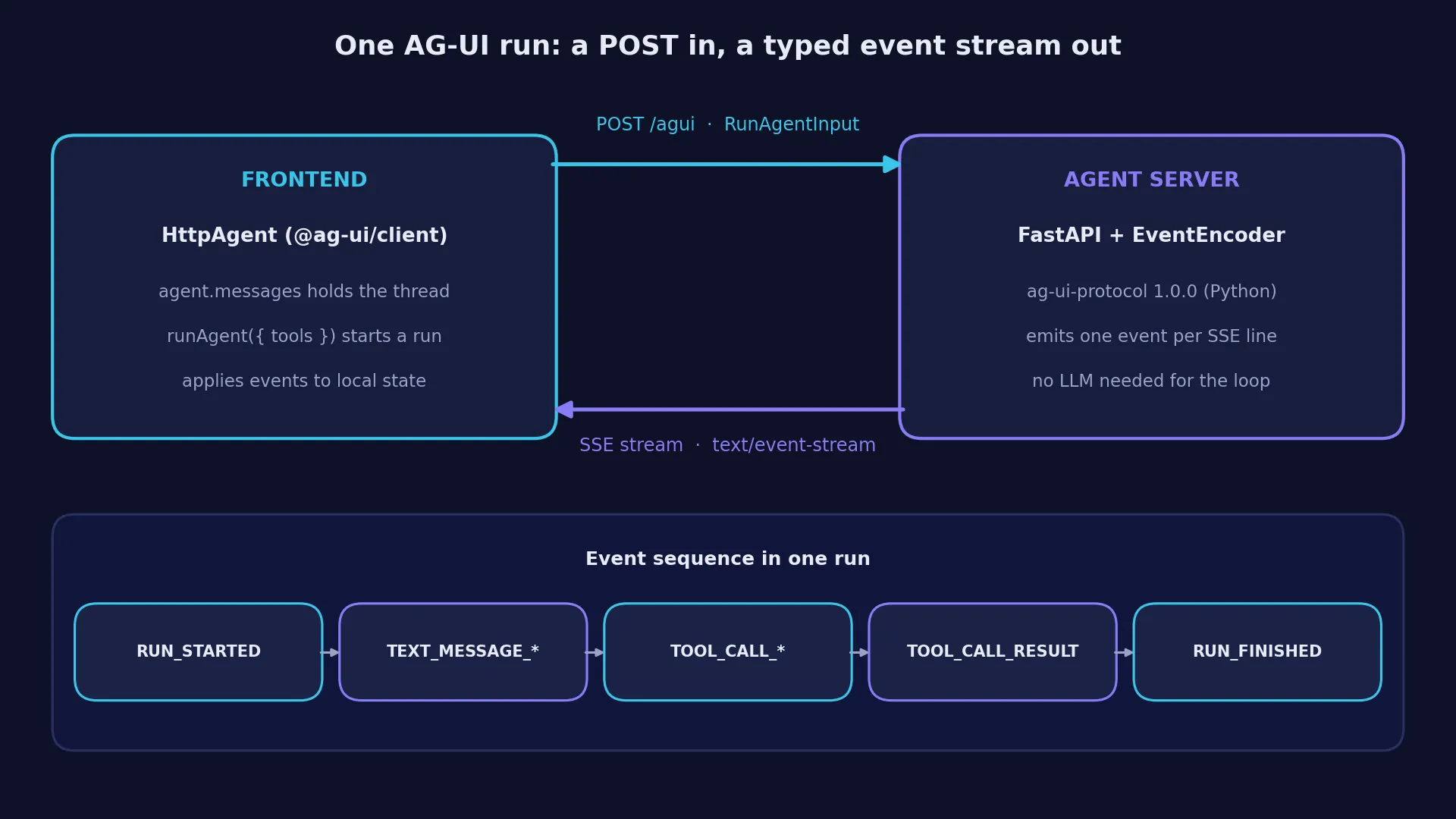
AG-UI is not a library you import and forget. It is a wire protocol: a client POSTs a RunAgentInput JSON document to an agent endpoint, and the server answers with a stream of typed events over Server-Sent Events (text/event-stream, one data: {...} line per event). The client applies each event to its local state — messages, tool calls, shared state — so the UI is always a projection of the event stream, never a second source of truth.
A run has a fixed lifecycle. These are the events you will actually see:
| Event | Meaning |
|---|---|
RUN_STARTED | The run begins; carries threadId and runId. |
TEXT_MESSAGE_START / TEXT_MESSAGE_CONTENT / TEXT_MESSAGE_END | One assistant message, streamed in deltas, keyed by messageId. |
TOOL_CALL_START / TOOL_CALL_ARGS / TOOL_CALL_END | One tool invocation, with its arguments streamed as JSON deltas. |
TOOL_CALL_RESULT | The tool's return value, as a message in the thread. |
RUN_FINISHED | The run ends; carries an outcome such as {"type": "success"}. |
RUN_ERROR | The run failed; the error event, not an HTTP error code. |
STATE_SNAPSHOT / STATE_DELTA | Shared state the frontend and agent both read and write. |
STEP_STARTED / STEP_FINISHED, REASONING_*, SUBAGENT_* | Progress, reasoning blocks, and sub-agent runs for richer agents. |
Three identifiers hold the whole thing together: threadId (the conversation), runId (one agent execution), and messageId (one message inside the run). The client declares the tools the agent may call in the request itself — the server never has to guess what the UI can render. Keep that in mind; it is the detail that makes step 5 work.
Step 2: Build the agent server#
The server is a small FastAPI app. Its only AG-UI-specific piece is the official SDK's EventEncoder, which turns event objects into SSE lines. The agent itself is deterministic — it echoes the user's last message and, when the client declares a get_time tool, calls it. No model, no key, and every event in the stream is one your code emitted on purpose, which is exactly what you want while learning the protocol.
First, the install. One gotcha: the Python package is called ag-ui-protocol, not ag-ui — there is no ag-ui distribution on PyPI, and pip install ag-ui fails outright.
python3 -m venv agui-venv
agui-venv/bin/pip install ag-ui-protocol==1.0.0 fastapi uvicorn
Now the server. Save this as server.py:
"""Minimal AG-UI server: deterministic echo agent + a fake get_time tool.

No LLM, no API key. Emits protocol 1.0 events via the official SDK encoder.
"""
import uuid
from datetime import datetime, timezone

from ag_ui.core.events import (
    RunFinishedEvent,
    RunFinishedSuccessOutcome,
    RunStartedEvent,
    TextMessageContentEvent,
    TextMessageEndEvent,
    TextMessageStartEvent,
    ToolCallArgsEvent,
    ToolCallEndEvent,
    ToolCallResultEvent,
    ToolCallStartEvent,
)
from ag_ui.core.types import RunAgentInput
from ag_ui.encoder import EventEncoder
from fastapi import FastAPI
from fastapi.responses import StreamingResponse

app = FastAPI()
encoder = EventEncoder()


def now_iso() -> str:
    return datetime.now(timezone.utc).isoformat()


@app.post("/agui")
async def run_agent(payload: RunAgentInput):
    thread_id = payload.thread_id or str(uuid.uuid4())
    run_id = payload.run_id or str(uuid.uuid4())
    last_text = ""
    for m in reversed(payload.messages or []):
        if m.role == "user":
            last_text = m.content if isinstance(m.content, str) else ""
            break
    tool_requested = any(
        (t.name if hasattr(t, "name") else t.get("name")) == "get_time"
        for t in (payload.tools or [])
    )

    async def stream():
        yield encoder.encode(
            RunStartedEvent(thread_id=thread_id, run_id=run_id)
        )
        msg_id = str(uuid.uuid4())
        yield encoder.encode(
            TextMessageStartEvent(message_id=msg_id, role="assistant")
        )
        reply = f"You said: {last_text}" if last_text else "Hello from AG-UI!"
        yield encoder.encode(
            TextMessageContentEvent(message_id=msg_id, delta=reply)
        )
        yield encoder.encode(TextMessageEndEvent(message_id=msg_id))
        if tool_requested:
            tc_id = str(uuid.uuid4())
            yield encoder.encode(
                ToolCallStartEvent(
                    tool_call_id=tc_id,
                    tool_call_name="get_time",
                    parent_message_id=msg_id,
                )
            )
            yield encoder.encode(
                ToolCallArgsEvent(tool_call_id=tc_id, delta="{}")
            )
            yield encoder.encode(ToolCallEndEvent(tool_call_id=tc_id))
            yield encoder.encode(
                ToolCallResultEvent(
                    message_id=str(uuid.uuid4()),
                    tool_call_id=tc_id,
                    content=f"The server time is {now_iso()}",
                )
            )
        yield encoder.encode(
            RunFinishedEvent(
                thread_id=thread_id,
                run_id=run_id,
                outcome=RunFinishedSuccessOutcome(),
            )
        )

    return StreamingResponse(stream(), media_type="text/event-stream")
Start it:
agui-venv/bin/uvicorn server:app --port 8123Uvicorn reports Uvicorn running on http://127.0.0.1:8123. The endpoint is POST /agui, and it speaks nothing but AG-UI events.
Step 3: Prove it with curl#
Before any client library touches the server, look at the raw protocol. This request declares the get_time tool and sends one user message:
curl -s -N -X POST http://127.0.0.1:8123/agui \
  -H 'Content-Type: application/json' \
  -d '{"threadId":"t1","runId":"r1",
       "messages":[{"id":"m1","role":"user","content":"hello ag-ui"}],
       "tools":[{"name":"get_time","description":"current server time","parameters":{}}]}'
The response is the whole protocol in nine lines:
data: {"type":"RUN_STARTED","threadId":"t1","runId":"r1"}

data: {"type":"TEXT_MESSAGE_START","messageId":"2072e6a1-...","role":"assistant"}

data: {"type":"TEXT_MESSAGE_CONTENT","messageId":"2072e6a1-...","delta":"You said: hello ag-ui"}

data: {"type":"TEXT_MESSAGE_END","messageId":"2072e6a1-..."}

data: {"type":"TOOL_CALL_START","toolCallId":"ad231120-...","toolCallName":"get_time","parentMessageId":"2072e6a1-..."}

data: {"type":"TOOL_CALL_ARGS","toolCallId":"ad231120-...","delta":"{}"}

data: {"type":"TOOL_CALL_END","toolCallId":"ad231120-..."}

data: {"type":"TOOL_CALL_RESULT","messageId":"c4e82aad-...","toolCallId":"ad231120-...","content":"The server time is 2026-11-14T13:36:54.682135+00:00"}

data: {"type":"RUN_FINISHED","threadId":"t1","runId":"r1","outcome":{"type":"success"}}
Two things worth noticing. First, the JSON keys are camelCase (threadId, toolCallId) even though the Python code uses snake_case — the SDK's models serialize with aliases, so you write Pythonic code and the wire stays spec-compliant. Second, drop the tools array from the request and the run emits exactly five events — the tool call only happens because the client declared the tool. That is the protocol's core deal: the frontend advertises capabilities, the agent uses them.
Step 4: Drive it from TypeScript#
Raw SSE proves the server; the client library is what you would actually ship. Install the two packages — core holds the types and event definitions, client holds the HttpAgent:
mkdir agui-client && cd agui-client
npm init -y
npm install @ag-ui/core @ag-ui/client   # @ag-ui/client 1.0.4
Save this as run.mjs:
import { HttpAgent } from "@ag-ui/client";

const agent = new HttpAgent({ url: "http://127.0.0.1:8123/agui" });
agent.messages = [
  { id: "m1", role: "user", content: "hello from the TS client" },
];

const result = await agent.runAgent({
  tools: [
    {
      name: "get_time",
      description: "current server time",
      parameters: {},
    },
  ],
});

console.log("new messages:");
for (const m of result.newMessages ?? []) {
  console.log("-", m.role, JSON.stringify(m.content ?? m));
}
node run.mjsnew messages:
- assistant "You said: hello from the TS client"
- tool "The server time is 2026-11-14T13:36:55.040119+00:00"The client did more than fetch a stream: it applied every event to its local state, so result.newMessages already holds the assistant reply and the tool result as ordinary messages. That state application is the part you do not want to hand-roll — ordering, deduplication, and partial-message assembly are all handled inside the client.
One gotcha cost a debugging round while writing this tutorial: runAgent does not take messages. The conversation lives on the agent instance (agent.messages), and runAgent takes the per-run options — tools, context, forwarded props. Pass messages into runAgent and it silently runs with an empty history: no error, no warning, just an agent that never saw your message. Set agent.messages first, every time.
Step 5: What the tool call really teaches#
The get_time tool in this demo is fake — it returns the server clock — but the shape is the whole point. In a real agent the flow is identical, only the decision-maker changes: the model reads the declared tools, picks one, and the server emits TOOL_CALL_START, streams the arguments as TOOL_CALL_ARGS deltas, closes with TOOL_CALL_END, executes, and returns the value as TOOL_CALL_RESULT. The frontend never executes anything itself; it renders the call and the result, which is why a UI can show a live tool call — a spinner, a card, a rendered component — without ever trusting the model with the DOM.
That is also where generative UI enters. The protocol's STATE_SNAPSHOT / STATE_DELTA events let the agent push structured state the frontend renders as components — a chart, a form, a confirmation dialog — instead of text. The Dojo at dojo.ag-ui.com demonstrates each building block in 50–200 lines of code; the state-sync and human-in-the-loop examples are the ones to read after this tutorial.
A note on honesty: this demo server calls get_time whenever the client declares it. A real agent decides from the model's output. The event sequence is the same either way, which is why the demo is a faithful stand-in for the wire — but do not mistake the echo for an agent. The decision logic is step 7.
Step 6: Scaffold the full-stack starter#
Read this step as documented, not run end to end: the scaffold stops at a CopilotKit browser sign-in, which needs your own account, so it could not be completed in this session's sandbox. Everything before and after it in this tutorial was run and verified; this step records exactly what the scaffold asks for, so you hit no surprises.
The starter is create-ag-ui-app (version 0.0.59). It scaffolds a chat UI wired to an AG-UI backend for one framework of your choice:
npx create-ag-ui-app my-agent-appRun it in a real terminal — it is interactive and will not work piped. It asks for a project name, then a framework. The framework flags (all verified from the CLI's own help) are --langgraph-py, --langgraph-js, --crewai-flows, --mastra, --pydantic-ai, --llamaindex, --agno, --ag2, and --adk — for example npx create-ag-ui-app --pydantic-ai for the Pydantic AI backend. The CLI's own tip also names Strands, Microsoft Agent Framework, and A2A as starter options.
After the framework choice, the CLI asks where to run the agent — the highlighted option is Self-hosted: try it on your machine (Docker) — then prints a summary and waits for you to press Enter to continue. Then comes the part that stops an unattended run: it opens a browser sign-in at the CopilotKit dashboard and waits for you to sign in and paste the short code it shows. That is a CopilotKit account step, not an AG-UI step — the protocol itself needs no account, but the scaffolding tool does.
Once signed in, the CLI creates the project and installs its dependencies. Start it with the documented npm run dev command from the generated project, then point the frontend's agent connection at your backend's AG-UI endpoint — for the echo server from step 2, that is http://127.0.0.1:8123/agui. The chat UI talks to the endpoint the same way the TypeScript client in step 4 did: one POST per run, one typed event stream back.
If you would rather skip the account step entirely, you do not need the starter at all. The server from step 2 plus any AG-UI client — the official TypeScript client, CopilotKit's React components, or the terminal client — is already a complete AG-UI application. The starter is a shortcut, not a requirement.
Step 7: Swap the echo for a real framework agent#
This step is documented, not run in this session: it needs a model API key, and the core loop above is deliberately key-free. The important fact is how little changes. The starter from step 6 already wires one of nine frameworks — LangGraph, CrewAI, Mastra, Pydantic AI, LlamaIndex, Agno, AG2, ADK, or LangGraph JS — to an AG-UI endpoint. Give it the framework's credentials (for example, an OpenAI key for the LangGraph template), and the same /agui endpoint starts emitting the same events, now driven by a real model: the same RUN_STARTED, the same text deltas, the same tool-call sequence. The frontend code does not change at all, because the frontend never talked to the model — it talked to the protocol.
That is the practical payoff of the whole exercise. If you build your UI against AG-UI instead of against one framework's SDK, the agent behind the endpoint is replaceable: a LangGraph agent today, a Pydantic AI agent next quarter, a hand-rolled Python server like the one in step 2 for the parts that should stay deterministic. The UI keeps working because the contract is the event stream, not the framework.
If you go this route, two things from the docs are worth knowing up front. First, each framework integration has its own quickstart in the AG-UI docs — the integration, not the protocol, owns the credential and model setup, so follow the framework's page rather than guessing. Second, the protocol's RUN_ERROR event is where model failures surface; a production client should handle it as a first-class state (retry, show the error, offer to resume) rather than treating a failed stream as a network error.
When to use AG-UI vs the alternatives#
AG-UI is one protocol in a stack, not a replacement for the others. Place it correctly and it stays out of your way; reach for it where another tool fits and you will fight it.
| Approach | What it is for | Use it when |
|---|---|---|
| AG-UI | Agent ↔ user-facing app | You need streaming, tool rendering, shared state, and interrupts in a UI — and the agent may live in any stack. |
| MCP | Agent ↔ tools and data | Your agent needs to call tools and read data sources. Complementary to AG-UI: an agent can speak both at once. |
| A2A | Agent ↔ agent | Agents coordinate with each other across services. It answers a different question from AG-UI. |
| Vercel AI SDK | TypeScript toolkit for AI chat UIs | You are all-in on TypeScript/React and want the fastest path to a chat UI. Less useful when the agent lives in Python or another stack. |
| Raw SSE / REST | Hand-rolled streaming | One app, one agent, no interop needs. Cheapest to start; you re-implement event typing, state application, and tool rendering yourself. |
The deciding question is who consumes the agent. If the answer is a person looking at a screen, AG-UI is the right layer. If the answer is another agent, that is A2A. If the answer is a tool or a database, that is MCP. Most real products end up using all three, each on its own boundary.
The takeaway#
AG-UI earns its place in the stack by being small: one POST in, one typed event stream out, with the client libraries doing the tedious state work. You verified every piece of that in this tutorial without spending anything — a Python server emitting protocol 1.0 events, a curl transcript of the exact wire format, and a TypeScript client that turns the stream into messages. The two gotchas to carry forward are the PyPI name (ag-ui-protocol, not ag-ui) and the client's message ownership (agent.messages, not runAgent parameters). Everything else is the protocol doing what it says: the same events, whether the agent behind them is a twenty-line echo or a production framework agent with a model key.